MP3: complete analysis of the audio format


Free Download Mp4Gain
picture

MP3: complete analysis of the audio format
Mp3 Audio Format
Mp3 Audio Format

WMA: WMA is the file format encoded by Windows Media Audio, developed by Microsoft.

Mp3 Audio Format
Mp3 Audio Format

WMA is not aimed at the independent market, but at the network! The competitor is the well-known Real Networks in the online media market. Microsoft claims that at a bit rate of just 64 kbps, WMA can achieve sound quality close to CD. Unlike the previous encoding, WMA supports the anti-copy function. Supports adding protection via Windows Media Rights Manager, which can limit playback time, number of playback times, and even playback machine, etc. WMA supports streaming technology, that is, play while reading, so WMA can easily realize online streaming. Because it is a Microsoft masterpiece, Microsoft has added support for WMA in Windows. WMA has excellent technical characteristics. With vigorous promotion, this format has been accepted by more and more people.

WAV: This is an old audio file format developed by Microsoft. WAV is a file format that complies with the PIFF Resource Interchange File Format specification. All WAVs have a file header, the encoding parameters of this file header audio stream. WAV does not have a strict regulation on the encoding of audio streams. In addition to PCM, almost all encodings that support the ACM specification can encode WAV audio streams. Many friends do not have this concept. Let’s take AVI as an example, because AVI and WAV are very similar in file structure, but AVI has one more video stream. There are many types of AVIs we have come into contact with, so we often need to install some decoders to watch some AVIs. DivX, which we have come into contact with a lot, is a type of video encoding. AVI can use DivX encoding to compress video streams, and of course we can also use other code compression. Similarly, WAV can also use a variety of audio codecs to compress its audio stream, but we commonly use WAV whose audio stream is processed by PCM encoding, but this does not mean that WAV can only use PCM codec, it is also you can use MP3 codec. in WAV Just like AVI, as long as the corresponding Decode is installed, you can enjoy these WAVs. On the Windows platform, WAV based on PCM encoding is the best supported audio format. All audio software can support it perfectly. Because it can meet higher sound quality requirements, WAV is also the preferred format for music creation and editing. Suitable for storing musical material. Therefore, WAV based on PCM encoding is used as an intermediate format and is often used in the conversion of other encodings, such as MP3 to WMA.

Ogg Vorbis: The so-called MP3 killer! What is the origin of Ogg Vorbis? OGG is the project name of a large multimedia development program, which will involve coding development in aspects such as video and audio. The whole purpose of the OGG project plan is to provide a completely free media encoding solution for anyone! OGG’s belief is: OPEN! FREE! The word Vorbis is the name of a “playboy” character in the fantasy novel “Small Gods” by Terry Platjat. This term became the official name for audio encoding in the OGG project. At present, Vorbis has been successfully developed and an encoder has been developed. Ogg Vorbis is a high quality audio coding scheme. Official data shows that Ogg Vorbis can achieve better sound quality than MP3 at relatively low data rates. This Ogg Vorbis encoding is also much more advanced than MP3, which was successfully developed in the 1990s. It can support multiple channels. What does this mean? This means that Ogg Vorbis can encode all channels with the support of SACD, DTSCD, DVD AUDIO ripping software (currently there is no such software), instead of MP3 it can only encode 2 channels. The rise of multi-channel music has brought revolutionary changes in music appreciation, especially when appreciating the symphony, it will bring more sense of presence. This revolutionary change cannot be adapted to MP3. Like MP3, Ogg Vorbis is a flexible and open audio codec that allows for significant sound quality adjustments and further algorithm improvements once the codec has been fixed. Therefore, its sound quality will be better and better. Just like MP3.


Free Download Mp4Gain
picture


Mp4Gain Main Window
picture


Mp4Gain Features
picture


Free Download Mp4Gain
picture

Audio compression, how it works Part 4

Audio compression, how it works Part 4

Audio compression
Audio compression

Other divisions of compression methods.

Audio compression
Audio compression

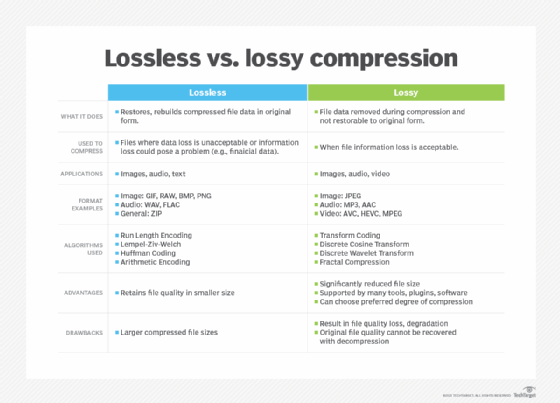
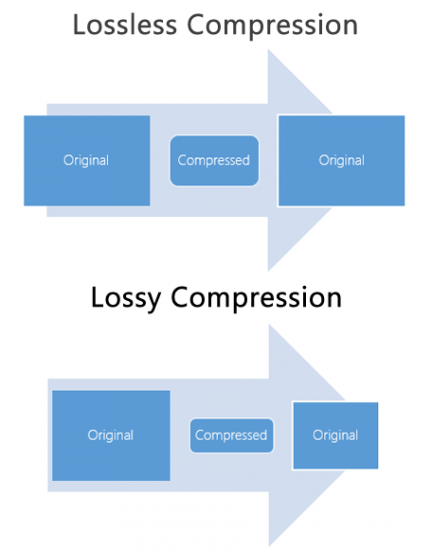
In the field of audio compression, there are two compression methods, lossy compression and lossless compression. Commonly seen MP3, WMA, OGG are called lossy compression As the name suggests, lossy compression reduces the audio sample rate and bit rate, and the output audio file will be smaller than the original file. . Another audio compression is called lossless compression, which is what we’re talking about. Lossless compression can compress the volume of the audio file to a smaller size on the premise of saving 100% of all the data in the original file, and after restoring the compressed audio file, it can achieve the same size and same bitrate as the source file. Lossless compression formats include APE, FLAC, WavPack, LPAC, WMALossless, AppleLossless, La, OptimFROG, Shorten, while common and conventional lossless compression formats are just APE and FLAC. [1]
Main classifications and typical representatives of audio compression algorithms.edit streaming
Generally speaking, audio compression techniques can be divided into two categories: lossless compression and lossy compression, and according to different compression schemes, they can be divided into time-domain compression, transform compression, and time-domain compression. subband, as well as hybrid compression in which multiple technologies are combined with each other. Various compression techniques have large differences in algorithm complexity (including time complexity and space complexity), audio quality, algorithm efficiency (ie compression ratio), and codec delay. The applications of various compression techniques are also different.
Time domain compression technology (or waveform coding)
It directly processes the sample values ​​of the audio PCM code stream and compresses the code stream through silence detection, nonlinear quantization, and difference. Common features of this type of compression technology are low algorithm complexity, average sound quality, small compression ratio (CD quality > 400kbps), and shortest codec delay (relative to other technologies) . This type of compression technology is generally used for voice compression, low bit rate (small source signal bandwidth) applications. Time domain compression technology mainly includes G.711, ADPCM, LPC, CELP, and block compression technology developed on these technologies, such as NICAM, Subband ADPCM (SB-ADPCM) technology.
Subband compression technology
Subband coding theory was first proposed by Crochiere et al. in 1976. The basic idea is to decompose the signal into the sum of components into several subbands and then adopt different compression strategies for each subband component according to its different layout features to reduce code rate. The usual subband compression technology and transform compression technology described below are based on the human perception model (psychoacoustic model) of the sound signal, and the quantization order of the subband samples or the samples The frequency domain is determined by analyzing the spectrum of the signal. other parameters are selected, so it can also be called perceptual compression encoding (Perceptual). Compared with time domain compression technology, these two compression methods are much more complicated. At the same time, the coding efficiency and sound quality are also greatly improved, and the coding delay is correspondingly increased. Generally speaking, the complexity of subband coding is slightly less than that of transform coding and the coding delay is relatively short.
Standardization of Audio Compression Technology and MPEG-1 broadcast
Because digital audio compression technology has a wide application scope and good market prospects, some research institutes and companies spare no effort to develop their own proprietary technologies and products. The standardization of these audio compression techniques is very important. A great success in standardizing audio compression is MPEG-1 Audio (ISO/IEC11172-3). In MPEG-1, three modes are specified for audio compression, namely Layer I, Layer II (ie MUSICAM, also known as MP2), and Layer III (also known as MP3). the three modes

Mp4Gain – Audio Normalizer for videos and audio files

The only audio normalizer for videos. (Mp43Gain)

There is no other software that normalize audio volume and less on the videos tantyos formats. ince Mp4, Flv, 3gp, Avi, Mpeg, etc..

Mp4Gain is unique and revolutionary for its enormous capacity to normalize the audio volume of a huge number of video formats and audio formats also. It o say, can normalize by example9, mp3, flac, ogg, m4a, etc.

Never before was a software capable of so much and so cheaply.

You can get all the same volume tehngan cvideos audio and can do the same with their digital tracks.

Mp4Gain has another number of tools and options, such as changing the pitch, cmbiar tempo, equalize, add Replay-Gain, trim, etc.. making it undoubtedly the most advanced and powerful program of its kind worldwide.

As if that were not enough, it is very easy to use, usually enough to upload a file or a batch of files (batch normalize Mp4Gain do) and press a button and with these was sufficient.

You download the trial version and test it on your own computer, you will surely be more convinced of the power of Mp4Gain.


Mp3 Normalizer with Mp4Gain

Mp3 Normalizer with Mp4Gain


Many people believe, wrongly, that the only Mp4Gain normalizes audio from videos and it is not. Also normalizes the audio of many audio formats.

Let Mp4Gain which normalizes formats:

Video Formats:
mp4, flv, avi, mpeg, mpg, 3gp, wmv

Audio Formats:
mp3, mp2, flac, ogg, m4a, aac, wav, ac3

All these formats can be standardized using Mp4Gain, which is great and is the only software that can do both.

Besides being able to do things like change the pitch without affecting the tempo (which are the beats per minute) or the reverse: change the speed of an audio track or a video, without affecting the pitch.

Mp4Gain is completely new wave, the new fashion. Fits Itunes, Ipad, Ipod, any music player software, any player, whether a laptop or not any of these audio and video formats. For something has caught the attention of the way he has managed, for his tremendous ability.

And talk about the quality of their normalization, we talk about the top of the normalizing, there is nothing better to normalize audio files or audio from videos. Just try it and you will see that not only is one of a kind, very low cost to its capacity and quality, but it s the best on the market normalizing.
Someone has said that is the normalizer of 2013, said that perhaps another 2020. Totalemte is a concept according to the times and what the user needs today. Just try it, descarghandoi the trial version and it absolutely love the Mp4Gain and understand why it is the latest and is gaining such popularity.


Mp3 Normalizer – Mp4 Normalizer – Flv Normalizer

Mp3 Normalizer – Mp4 Normalizer – Flv Normalizer

As it has been a boom in the normalization mp3 audio during the last decade and as it has evolved into a more sophisticated, to achieve true high fidelaidad results, so necsidad has emerged to normalize the audio file video formats like flv, mp4, wmv, avi, etc..

True, it is possible to normalize Mp4Gain audio and video.

Video Formats:
mp4, flv, avi
mpeg, mpg
3gp, wmv

Audio Formats:
mp3, mp2, flac
ogg, m4a, aac
wav, ac3

All these formats can now be normalized to the highest quality. From the classic mp3 to mp4 or flv very common, but also formats used by Apple with MP4 or M4A.

Nomalizar, technically speaking, is the ability to make every millisecond of audio has his best, is perfectly audible and not distorted in any sense.

Mp4Gain get all that and more.


Normalizing audio for the videos

Normalizing audio for the videos

After many years, finally there is the possibility of normalizing the audio of the video, as it is could normalize the audio of mp3s.

But … what is the meaning of normalize audio volume or loudness of the audio?

It means we can match the loudness of our audio archvios or our videos. Why Mp4Gain also nomaliza mp3s and many other audio formats like FLAC, Oog, M4a, etc.. Besides vcideo current formats like flv, mp4, avi, etc.

For that, very often, when you have a rather large collection of videos or audio files, you find that there is disparity in the loudness of some files and must correct manipulating the volume control each time you start a song or video.

Well, this is over.

On the other hand, there are parts that are just perfectly audible and will be redeemed by the Mp4Gain.

Our advice is to “download our trial version and test on your own computer”, will be delighted with the results.

Mp4Gain a normalizer audio and also audio from the videos.

Mp4Gain a normalizer audio and also audio from the videos.

Mp4Gain is ultimately the only audio normalizer that normalizes (principalesm in all formats like mp3, wma, m4a, flac. Ogg, etc.) and also the major audio video formats like avi, mp4, flv, mpeg, etc.

But not only normalizes audio formats and so many possibilities, but does so in a unique way and get totally satisfactory results.

Mp4Gain normalizes each of the thousands of frames that make up a song or video, making every sound, every voice and every instrument sound its best, thus giving better clarity and sound quality, plus get all their audio or video have a uniform sound, avoiding having to this up and down manually to the volume control in each new song or each new video.

So we invite you to download the trial verion of the program and try it out on your own computer.