Quantization Noise in MP3 Compression


Free Download Mp4Gain
picture

Quantization Noise in MP3 Compression

Quantization Noise in MP3 Compression

Let’s talk about Quantization Noise in MP3 Compression

When I first delved into MP3 compression, the term “quantization noise” fascinated me. Imagine packing a suitcase for a long trip but only being allowed to take half your belongings. Quantization noise is the audio equivalent of the compromises you make. In MP3 compression, it’s the unintended artifact introduced when we reduce the precision of sound data to achieve smaller file sizes. This process happens during audio quantization, which determines how audio signals are represented as digital values.

Quantization noise results from rounding or truncating these values, effectively discarding some audio information. The key is ensuring that the noise introduced is less noticeable to human ears. Over my years of studying audio technology, I’ve seen how clever psychoacoustic models in MP3 compression manage this. By focusing on what we *don’t* hear, compression algorithms minimize perceived noise.

Understanding How Quantization Works

Quantization in MP3 compression is a simplification process. Think of it like converting a high-definition photograph into a pixelated image. Each color pixel represents a range of original tones, just as audio quantization maps a range of sound amplitudes into discrete levels. But instead of affecting our eyes, it affects our ears.

To make this efficient, MP3 uses variable quantization levels across frequency bands. Higher precision is reserved for frequencies more noticeable to humans, while less critical bands are treated with coarser quantization. It’s like putting more effort into cooking a main course than a side dish—you focus resources where they matter most.

The Role of Psychoacoustics in Minimizing Quantization Noise

MP3 compression relies heavily on psychoacoustics to hide quantization noise. Our brains are surprisingly forgiving with sound, especially when louder frequencies mask quieter ones. This phenomenon, called “auditory masking,” allows MP3 encoders to allocate fewer bits to frequencies hidden under dominant sounds.

For example, if you’re at a concert with loud drums, you might not hear someone snapping their fingers nearby. Encoders exploit this by prioritizing the drums and reducing data for the snaps. I’ve tested files where masking thresholds were pushed to the limit, and it’s astonishing how well our ears adapt, even though technical imperfections are present.

How Bitrate Affects Quantization Noise

Bitrate is a critical factor in MP3 compression. Higher bitrates mean more data for each second of audio, resulting in finer quantization and less noise. At lower bitrates, sacrifices are necessary, leading to more noticeable quantization artifacts.

I recall comparing a 320 kbps MP3 to a 128 kbps version of the same song. The higher bitrate felt richer, with clearer details, especially in complex sections like orchestras. Lower bitrates often introduced a “swishy” sound, particularly in cymbals or high-pitched vocals, where quantization noise became more apparent.

Quantization Noise and Complex Audio Tracks

Complex tracks, like symphonies or live recordings, highlight the limitations of MP3 compression. These tracks have a broad dynamic range and intricate harmonics, making it harder to mask quantization noise. I’ve worked with live concert recordings where even small quantization errors stood out, especially in quiet passages.

To address this, advanced encoders use adaptive quantization. This technique analyzes the audio in real time, allocating resources dynamically. Think of it as adjusting a camera’s focus based on the subject’s distance, ensuring clarity where it’s needed most.

Real-Life Examples of Quantization Noise

Quantization noise becomes evident in low-quality MP3s or poorly encoded files. One memorable example for me was an audiobook. The narrator’s voice sounded slightly robotic, especially on the “S” sounds. This artifact occurred because the compression algorithm couldn’t adequately represent the subtle frequencies in human speech.

Another example is in old pop songs with prominent cymbals. On lower-bitrate MP3s, the cymbals often sound like static instead of a crisp shimmer. It’s a stark reminder of how sensitive our ears are to high frequencies and how challenging it is to maintain their integrity during compression.

Reducing Quantization Noise in MP3 Files

To reduce quantization noise, higher bitrates or lossless formats like FLAC are the best solutions. But within MP3, some tricks can help:

  • Using a higher-quality encoder ensures better psychoacoustic modeling.
  • Encoding with variable bitrate (VBR) adjusts the bitrate dynamically, reducing noise in complex sections.
  • Applying noise shaping techniques during encoding can push noise into less noticeable frequency ranges.

These strategies significantly improve perceived audio quality, even at lower file sizes.

Advanced Techniques for Handling Quantization Noise

Modern MP3 encoders employ sophisticated methods to mitigate quantization noise. Temporal noise shaping, for instance, redistributes noise across time to make it less perceptible. Picture spreading a tablespoon of salt evenly over a meal instead of dumping it all in one bite. The overall effect is much less jarring.

Another approach is perceptual noise substitution, where the encoder replaces certain noise patterns with psychoacoustically similar ones. This trick works surprisingly well and often makes the noise seem intentional or musical.

When Quantization Noise Becomes a Problem

Quantization noise becomes problematic when it interferes with the listening experience. If you’ve ever heard a garbled podcast or a distorted song, you’ve experienced this firsthand. It’s especially noticeable in quiet sections of a track, where masking effects are minimal.

In my experience, quantization noise is most distracting in solo instrument recordings or acapella tracks. These genres lack the masking benefits of complex, layered sounds, making artifacts painfully obvious.

Latest Words on Quantization Noise in MP3 Compression

Quantization noise in MP3 compression is an inevitable trade-off for smaller file sizes, but it doesn’t have to ruin your audio experience. By understanding how it works and choosing the right encoding settings, you can minimize its impact. For anyone dealing with MP3 files, Mp4Gain offers an excellent way to optimize and enhance audio quality effortlessly.

What is quantization noise in MP3 compression?

Quantization noise is the unintended distortion introduced during MP3 compression when audio data is rounded or truncated to reduce file size. It’s most noticeable in low-quality MP3s.

How does psychoacoustics reduce quantization noise?

Psychoacoustics minimizes quantization noise by exploiting auditory masking, focusing encoding precision on frequencies that are most noticeable to human ears.

What are the best settings to reduce quantization noise?

Use higher bitrates, variable bitrate encoding, and high-quality encoders. These settings prioritize audio fidelity and reduce noticeable artifacts.

Why is quantization noise more noticeable in low-bitrate MP3s?

Low-bitrate MP3s allocate fewer data bits to represent audio, resulting in coarser quantization and more audible noise, especially in complex or high-frequency sounds.

Comments:

Wow, this really breaks down the technical side of MP3 compression. I never knew how much work went into reducing quantization noise. Thanks for explaining it so clearly!

Very interesting article! I’ve always wondered why some MP3s sound worse than others, and now I get it. The explanation about bitrates was super helpful.

I still don’t fully understand how psychoacoustics works. Could you maybe go deeper into that? It’s fascinating but still confusing to me.

This is great info. I’ve noticed the “swishy” sound in cymbals you mentioned in my older MP3s. I’ll definitely look into encoding with higher bitrates now.

Honestly, I think MP3 compression is outdated with all the lossless options available now. But this article made me appreciate how clever the process actually is.


Free Download Mp4Gain
picture


Mp4Gain Main Window
picture


Mp4Gain Features
picture


Free Download Mp4Gain
picture

Stereo Coding Efficiency in MP3

Stereo Coding Efficiency in MP3

Stereo Coding Efficiency in MP3

Let’s talk about Stereo Coding Efficiency in MP3

Stereo coding efficiency in MP3 files is one of the most critical elements in achieving high audio quality with reduced file sizes. Essentially, stereo coding helps manage how each channel of sound—the left and right—is processed, which can directly impact both clarity and compression. MP3 files utilize various stereo coding techniques to ensure a balance between sound quality and file size. As someone who’s spent years in audio processing, I can tell you, understanding stereo coding efficiency isn’t just about technical details but about practical decisions that affect every listener’s experience.

Understanding the Basics of Stereo Sound in MP3

Stereo sound relies on two channels, typically the left and right, to create a spatial audio experience. This separation can enhance the perception of depth, direction, and clarity in sound, especially in music where instrument placement adds to the listener’s experience. In MP3 files, stereo coding is employed to make the best use of this dual-channel setup without making the file unnecessarily large. Think of stereo coding like a camera that can either capture the entire scene in fine detail or just the essential elements, depending on your needs.

Key Techniques in Stereo Coding

Mid/Side (M/S) Stereo Coding

Mid/Side (M/S) coding is a fundamental technique in MP3 encoding. It separates the “mid” (center) sound, where most of the audio information is concentrated, from the “side” (stereo) information. This allows the MP3 encoder to compress the file by focusing on the areas where the listener’s ear is most sensitive to detail. This approach is like focusing on the main character in a story rather than every background element, which means that while the core experience is preserved, file size can be reduced.

Intensity Stereo Coding

Intensity stereo coding is another technique where higher frequencies are compressed by combining them in the two channels. The idea is that at higher frequencies, the human ear is less sensitive to precise directionality, so combining them won’t greatly impact the perceived stereo effect. This method prioritizes the musical “essence” of high-pitched sounds without keeping every small detail separate, like simplifying a photo by focusing on its contrast rather than every small color difference.

Joint Stereo Coding

Joint stereo coding is essentially a combination of M/S and intensity stereo techniques. This method dynamically adjusts the encoding strategy based on the content of each frame, meaning that it adapts to what best suits each part of the audio track. Joint stereo achieves an impressive balance between audio quality and file size, making it the most popular option for most MP3 encodings. Imagine watching a movie where some scenes are in high definition, while others use only basic details; joint stereo ensures that each part of the song gets what it needs.

The Role of Psychoacoustic Models in MP3 Stereo Coding

Psychoacoustic models play a vital role in MP3 encoding, determining which sounds are most perceptible to the human ear and which can be safely ignored. For stereo coding, psychoacoustic models are like editors who decide which parts of a story are essential. In MP3, these models allow the encoder to strip away less noticeable elements while preserving audio quality, especially when balancing the two stereo channels. This is crucial because these models help manage file size without compromising the immersive stereo effect.

Advantages of Efficient Stereo Coding

Improved Audio Quality

Efficient stereo coding ensures that the two channels work harmoniously, preserving the intended depth and spatial effects in the music. Quality stereo coding means listeners can enjoy richer and more defined soundscapes. With efficient coding, it feels as though each sound element occupies its rightful place, much like each instrument in a live concert.

Smaller File Sizes

One of the primary reasons stereo coding efficiency matters is to maintain audio quality while reducing file size. Efficiently encoded MP3 files use less storage, making it easier to save music on devices with limited space. Think of it like packing a suitcase: stereo coding ensures that everything you need fits neatly without excess baggage.

Optimized Streaming Experience

When MP3 files are encoded efficiently, they require less bandwidth to stream. This means listeners get a smoother experience without interruptions. Stereo coding efficiency is especially beneficial for streaming services, where even a few kilobytes of difference per file can add up to significant data savings across millions of streams.

How Stereo Coding Efficiency Impacts Bitrate

Bitrate determines the amount of data encoded per second in an MP3 file, impacting both quality and file size. Higher bitrates often mean better sound quality, but efficient stereo coding can achieve quality sound at lower bitrates. It’s like balancing a recipe—using the right techniques means you can use fewer ingredients without sacrificing flavor. Efficient coding allows for the preservation of sound quality without inflating the file’s bitrate.

Challenges in Achieving Optimal Stereo Coding Efficiency

Balancing Quality and File Size

Finding the right balance between quality and file size in MP3 encoding is always a challenge. Too much compression can make the stereo sound muddy, while too little means larger files. Achieving efficiency is about knowing when and where to make sacrifices in the sound data. Like editing a photo, the key is removing noise without erasing essential details.

Compatibility with Different Devices

Not all devices decode stereo-coded MP3s the same way, which can lead to variations in audio quality across different systems. This variation in playback can affect the perceived efficiency of stereo coding, as it may sound pristine on one device and lacking on another. It’s a bit like watching a film on a high-definition TV versus a standard one—the details may vary based on the device.

Best Practices for Optimizing Stereo Coding in MP3 Files

Choose the Right Bitrate

Selecting an optimal bitrate is essential for stereo coding efficiency. Lower bitrates may save space but can reduce stereo quality. For most music tracks, 128 kbps is the baseline, but higher bitrates like 192 or 256 kbps offer better stereo depth.

Use a High-Quality Encoder

Not all MP3 encoders handle stereo coding the same way. Some encoders apply more advanced stereo techniques than others, leading to higher quality audio even at lower bitrates. A reliable encoder is essential for maximizing stereo coding efficiency.

Test with Different Devices

Play your MP3 file on various devices to ensure the stereo effect remains consistent. Testing across platforms allows you to identify if the stereo coding is optimized, helping you avoid surprises when your audience listens on different setups.

Latest Words on Stereo Coding Efficiency in MP3

Stereo coding efficiency plays a crucial role in maintaining both sound quality and compact file sizes for MP3s. From joint stereo to M/S coding, each technique offers a way to manage stereo sound in a space-saving, quality-preserving way. Through efficient stereo coding, we can enjoy music with rich, immersive audio even at reduced file sizes, making it perfect for personal collections and streaming. For those seeking the best balance, MP4Gain is a tool that allows users to refine their MP3s for optimal playback across all devices.4


Stereo Coding Efficiency in MP3 – Frequently Asked Questions (FAQ)

What is stereo coding efficiency in MP3?

Stereo coding efficiency in MP3 refers to how effectively stereo audio data is compressed without losing sound quality. By optimizing stereo coding, MP3 files can reduce file size while maintaining high sound fidelity, making them ideal for digital storage and streaming.

How does joint stereo improve MP3 efficiency?

Joint stereo coding enhances MP3 efficiency by merging similar audio data from both channels, reducing redundant information. This allows for a smaller file size while maintaining a stereo effect, optimizing both storage and playback quality.

What is the difference between joint stereo and mid/side stereo in MP3?

Joint stereo combines left and right channels by only encoding their differences, while mid/side stereo separates a “mid” (center) and “side” signal. Both methods improve compression efficiency but are applied differently depending on the audio characteristics and desired fidelity.

Does stereo coding affect MP3 audio quality?

Yes, stereo coding impacts audio quality by balancing file size and fidelity. Effective stereo coding techniques like joint or mid/side stereo allow MP3s to remain compact while preserving the stereo field and minimizing sound artifacts for a quality listening experience.

Why is stereo coding efficiency important for MP3 files?

Stereo coding efficiency is crucial because it optimizes audio data storage, making MP3s smaller without significantly reducing quality. This efficiency benefits streaming, downloading, and storage by minimizing bandwidth use while keeping audio clarity intact.

How does psychoacoustic modeling relate to stereo coding in MP3?

Psychoacoustic modeling helps stereo coding by identifying audio elements that are less perceptible to human hearing. By encoding only essential sounds, it minimizes file size and maximizes coding efficiency while maintaining the listener’s perception of quality.

Which stereo coding technique is best for high-quality MP3 files?

For high-quality MP3s, joint stereo is generally preferred as it balances efficiency with sound fidelity, especially at lower bitrates. Mid/side stereo can also work well depending on the complexity of the stereo field and audio content.

Can I adjust stereo coding settings when creating MP3 files?

Yes, many MP3 encoders offer adjustable stereo coding settings. Users can select between joint stereo, mid/side stereo, or simple stereo to find the best balance between file size and sound quality according to their needs.

How does stereo coding affect MP3 file size?

Efficient stereo coding reduces MP3 file size by eliminating redundant or imperceptible audio data. Techniques like joint stereo and mid/side stereo help achieve a compact file while keeping stereo sound, making storage and streaming more efficient.

Is stereo coding efficiency relevant for other audio formats?

Yes, stereo coding efficiency applies to various compressed audio formats beyond MP3. Formats like AAC and OGG also use stereo coding techniques to enhance audio quality and reduce file sizes for an efficient balance in digital audio.

Comments:

Been looking for an article that explains stereo coding this clearly. This really helped me understand how MP3 files work, thanks!

I had no idea about the different types of stereo coding until now. Really makes me appreciate how much work goes into making MP3s sound good!

Great article! But I’d love to know more about joint stereo and how it compares to newer technologies.

Awesome breakdown! I always wondered why some MP3s sound better than others even at the same bitrate.

This article was super informative. Just wish it had more info on what software to use for encoding MP3s properly.

Finally, an article that explains MP3 stereo coding in simple terms. I actually understand it now!

Very helpful, but it would be great to have a comparison between stereo coding in MP3 and other audio formats.

As a music producer, I found this really insightful. Stereo coding isn’t talked about enough when it comes to audio quality.

Thanks for the breakdown on M/S and joint stereo. This has made me rethink my encoding settings for sure.

Great article, but I think a few more examples of how stereo coding affects playback on devices would be useful.

Just

wanted to say thank you for making this so clear. Wish I had found this sooner!

Not totally sure I understand everything here, but this definitely cleared up a lot for me about MP3 quality.

Good info here. Would like to see more on how stereo coding impacts things like headphone vs. speaker playback.

This is by far the best explanation of stereo coding I’ve seen. Makes me think about audio quality in a whole new way.

Low-pass Filtering in MP3 Compression

Low-pass Filtering in MP3 Compression

Low-pass Filtering in MP3 Compression

Let’s talk about low-pass filtering in MP3 compression

Low-pass filtering in MP3 compression is crucial for reducing audio file sizes without a noticeable drop in sound quality. As an expert in audio processing, I’ve come to rely on low-pass filtering to shape audio in a way that cuts down unneeded data, especially higher frequencies that most people can’t hear clearly. It’s like if we’re creating a custom sound experience, leaving in the essentials and trimming away what won’t be missed. Imagine it as curating the highlights of a song, where only the most impactful sounds remain clear. This not only saves space but also keeps the audio enjoyable.

What is Low-pass Filtering?

Low-pass filtering allows only frequencies below a certain threshold to pass through while filtering out higher frequencies. It’s like listening through a wall, where only the deeper, less tinny sounds come through. In audio terms, it removes the high-frequency data that’s often imperceptible to human ears. By applying this in MP3 compression, we can keep the parts of audio that are actually heard by listeners and remove what isn’t, making it easier to achieve smaller file sizes without significantly affecting the sound.

Why Low-pass Filtering is Key in MP3 Compression

In MP3 compression, size reduction is paramount, but keeping the core of the audio quality is essential. Low-pass filtering helps achieve both by shaving off data that contributes little to the overall listening experience. I’ve worked with plenty of audio files where cutting high frequencies—those above 16 kHz or so—doesn’t change how the file sounds to most listeners. Think of it as packing a suitcase: we focus on essentials and skip the extras. With low-pass filtering, MP3s can be compressed to smaller sizes without drastically reducing sound quality.

How Low-pass Filters Work in Digital Audio Processing

Digital audio processing uses algorithms to apply low-pass filters that analyze and remove high-frequency sounds in real time. These algorithms are designed to recognize frequencies that are less likely to be heard by human ears, especially above 20 kHz. In my work, I often compare it to tuning a radio, focusing on just the strongest signals. The low-pass filter in MP3 compression operates similarly, ensuring that the “important” parts of the sound are preserved while filtering out unnecessary frequencies.

Comparing Low-pass Filtering to Other Frequency Filtering Methods

Low-pass filtering isn’t the only option in frequency filtering; there are high-pass, band-pass, and notch filters, each serving different purposes. High-pass filters, for instance, do the reverse, filtering out low frequencies while allowing high ones. Band-pass filters allow a certain range of frequencies to pass, cutting both high and low ends. However, for MP3 compression, low-pass filtering is particularly useful since it targets and reduces high frequencies that humans are less sensitive to. I’ve found that, for audio meant to be played on everyday devices, the low-pass filter is the most efficient choice for retaining sound quality while reducing size.

Benefits of Low-pass Filtering in MP3 Compression

Low-pass filtering in MP3 compression saves space, enhances playback performance, and maintains a quality listening experience. Since MP3s are typically played on portable devices, retaining only essential audio elements is beneficial. By filtering out high frequencies, MP3s become less complex and easier for devices to decode, making playback smoother. It’s like streamlining a car for better fuel efficiency—fewer parts to handle mean it can run smoother and faster.

  • Reduces file size by eliminating inaudible frequencies
  • Ensures smoother playback on various devices
  • Retains core audio quality for a better listening experience

Challenges with Low-pass Filtering in MP3 Compression

While low-pass filtering helps compress MP3 files, it’s not without challenges. Removing too many high frequencies can lead to a dull sound, especially if listeners are using high-quality audio equipment. I’ve had clients who noticed a difference when using studio headphones—while they could barely hear the change on regular devices, the filtering was more noticeable in high-end setups. There’s always a balance to strike, ensuring that the final product sounds good across all devices without losing too much detail.

How Low-pass Filtering Affects Audio Quality

Low-pass filtering has a subtle effect on sound, focusing on reducing the “brightness” or clarity of the audio in exchange for file size reduction. For most listeners, especially on standard headphones or speakers, this difference is negligible. However, in professional settings or high-resolution listening, the absence of those high frequencies can be noticeable. It’s a bit like watching a video in HD versus standard definition: both are clear, but one has that extra level of detail.

Optimizing Low-pass Filter Settings for the Best MP3 Compression

Setting the right frequency threshold for low-pass filtering is key to balancing audio quality and file size. Most MP3s are filtered between 16 and 20 kHz, as this range captures the critical frequencies heard by most people. In my experience, adjusting the filter to the lower end of this range saves more space but can impact clarity. Fine-tuning these settings allows us to control the “sharpness” of the sound and the file size precisely.

Common Misconceptions About Low-pass Filtering in MP3s

One common misconception about low-pass filtering in MP3s is that it always reduces quality. In truth, the effect on quality depends largely on the listening environment and the audio equipment used. On standard devices, the difference is hardly noticeable. Another myth is that low-pass filtering is necessary for all MP3s; however, in some cases, higher fidelity MP3s might not require as aggressive filtering. I’ve seen plenty of instances where higher bitrates made filtering less necessary, showing that it’s not a one-size-fits-all approach.

Real-life Examples of Low-pass Filtering in MP3s

Low-pass filtering in MP3s is everywhere, from streaming services to music apps. Whenever we download a compressed song or stream on platforms like Spotify or Apple Music, we’re experiencing low-pass filtering at work. Even my personal library, filled with MP3s for various purposes, relies on filtering to keep the files compact and compatible across devices. It’s fascinating to think how this single technique has shaped our digital audio landscape.

Practical Applications and How to Use Low-pass Filtering in Audio Projects

For anyone looking to compress audio files, low-pass filtering is a practical first step. When I work with audio files for projects, I usually start by setting a low-pass filter around 16-18 kHz, which ensures quality while keeping the file size down. It’s a method that can be applied across different audio types, from voice recordings to music, making it versatile. It’s as if we’re packing only the essentials, a smart approach that saves space without sacrificing too much quality.

Implementing Low-pass Filtering: Tips for Beginners

If you’re new to audio editing, implementing low-pass filtering can seem intimidating, but it’s actually straightforward. Start by experimenting with different cutoff frequencies; a range between 16-20 kHz works well for most projects. Try listening to your audio at different settings to hear how each cutoff point affects the sound. It’s like adjusting a camera focus—finding the right clarity level is key.

  • Set a frequency range between 16-20 kHz for MP3s
  • Experiment with different cutoff points
  • Listen to the audio on different devices to test quality

Latest Words on Low-pass Filtering in MP3 Compression

Low-pass filtering in MP3 compression is an invaluable tool for balancing quality and file size. By understanding how to manage and set cutoff frequencies, we can create MP3s that retain essential audio characteristics while being compact and playable across devices. It’s a powerful technique that has shaped how we consume music, whether streaming on a phone or playing through high-end headphones. MP4Gain offers effective solutions for optimizing MP3 files, ensuring that low-pass filtering is just right for any audio project.

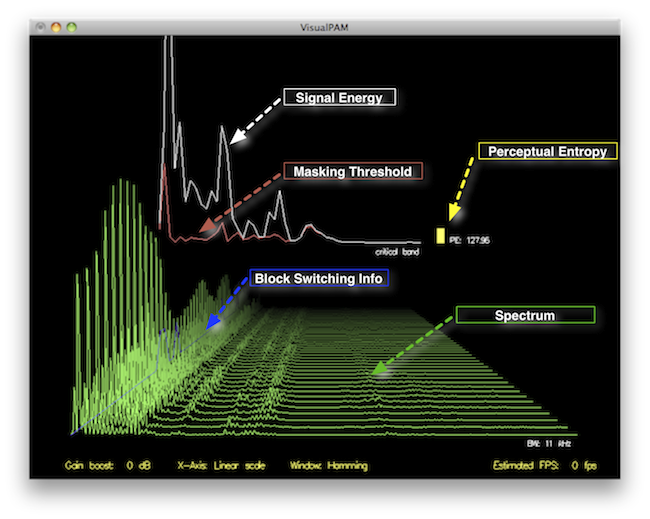
Perceptual Entropy in an MP3 File

How to Measure the Perceptual Entropy in an MP3 File?

Perceptual Entropy
Perceptual Entropy

Introduction to Perceptual Entropy in an Mp3

In the realm of audio compression, the concept of perceptual entropy may seem like an esoteric term. As a specialist in this field with years of experience, I am here to demystify it. Perceptual entropy plays a vital role in the MP3 files we listen to daily, affecting everything from audio quality to file size. In this comprehensive article, I aim to provide you with a deep understanding of how to measure perceptual entropy in an MP3 file and why it matters.

Understanding Perceptual Entropy

Definition of Perceptual Entropy

Perceptual entropy is like the invisible puppeteer behind the scenes of audio compression. Imagine you have a favorite storybook with many repetitive sentences. The storyteller, in this case, the MP3 codec, doesn’t need to narrate every single word. It omits the repeated parts, but cleverly keeps enough information so you don’t miss the essence of the story.

Importance in Audio Compression

The significance of perceptual entropy in audio compression is akin to sorting out your wardrobe. You don’t need to keep every single pair of socks. You retain a representative selection while saving space. Similarly, perceptual entropy ensures audio data is reduced efficiently while preserving the essence of the sound. It’s all about maintaining quality while optimizing storage.

Measuring Perceptual Entropy</h2

Methods for Measurement

The tools used to measure perceptual entropy are like detectives scrutinizing every page of your storybook. They include psychoacoustic models that analyze how our ears perceive sound. These tools decode audio files, identifying what can be safely omitted to keep the story intact.

Tools and Software

Consider these tools like a set of magic glasses that allow you to see the hidden patterns in your storybook. Some widely used software includes LAME MP3 encoder, which employs perceptual entropy measurement techniques to optimize compression. Others, like FFmpeg, offer valuable insights into perceptual entropy.

The Role of Bit Rate

Think of bit rate as the quality slider for your audio file. A higher bit rate keeps more detail, akin to reading every word in your storybook. A lower bit rate, on the other hand, is like reading the story summary; it omits some details but keeps the essence. Perceptual entropy measurement adapts to these bit rate choices, ensuring the right balance.

Significance of Perceptual Entropy in Audio Compression</h2

Effect on Compression Efficiency

Imagine you have a suitcase, and you want to pack it efficiently. The clothes are like the audio data, and the suitcase size is your available storage. Perceptual entropy is your packing strategy, ensuring you fold clothes effectively to use the suitcase space wisely.

Impact on Audio Quality

When you send a letter, you want it to be both light and readable. Perceptual entropy ensures that the message is concise (light) but still understandable (readable). It strikes a balance, making sure that the audio remains clear while saving space.

Real-world Examples

To illustrate perceptual entropy, think of a colorful painting. Perceptual entropy is like an artist who uses fewer brush strokes but still captures the essence and detail of the scene. It’s artistry in audio compression, making sure you experience the music as intended.

Evaluating Audio Quality</h2

Criteria for Audio Quality

Audio quality assessment is similar to a taste test. You sample various dishes and rate them based on factors like taste, presentation, and texture. Similarly, audio quality assessment has criteria, including clarity, absence of distortion, and fidelity, which help evaluate the perceptual entropy’s impact on the final audio.

Striking a Balance

It’s like baking a cake; you need the right ingredients in the right proportions. Perceptual entropy is one of those ingredients. Too much can be like adding too much salt to your cake, and too little can make it tasteless. Striking the right balance is the key to maintaining audio quality.

Tools for Evaluation

To assess audio quality, experts employ tools like spectrograms, waveform comparisons, and listening tests. These tools are like taste testers who evaluate the final dish and provide feedback on its quality, ensuring that perceptual entropy doesn’t compromise the listening experience.

Practical Applications</h2

Music Production

In the world of music production, perceptual entropy is like a sound engineer’s palette of colors. It allows them to maintain high-quality audio while conserving space. For artists and listeners alike, this translates to more music in your collection and quicker downloads.

Streaming Services

Streaming services optimize audio files for efficient delivery. Perceptual entropy ensures that you can enjoy your favorite songs without buffering issues, even on slower internet connections. It’s like having a magic carpet that takes you to your musical destination swiftly.

Industry Insights

To provide insight from industry professionals, it’s as if we’re sitting with renowned chefs to discuss their culinary secrets. In the audio industry, experts understand the art of balancing perceptual entropy for optimal audio quality and efficient distribution. It’s the heart of what makes your listening experience exceptional.

Last Words about Perceptual Entropy Measurement in MP3 Files

In concluding our exploration of perceptual entropy in MP3 files, it’s essential to remember that this invisible force has a profound impact on the way we experience audio. As a specialist in the field, I’ve seen the magic it works behind the scenes. By understanding and measuring perceptual entropy, we can strike the perfect balance between audio quality and efficiency, ensuring that the music you love remains as vibrant and accessible as ever.

MP3 Louder

MP3 Louder

MP3 Louder
MP3 Louder
MP3 Louder
MP3 Louder

How to increase the volume of MP3 files?

An MP3 file’s volume can sometimes be inadequate, especially if the original recording was done at a low level. Fortunately, there are ways to amplify its volume without relying on external tools. One common method is through normalization, which adjusts the volume by analyzing the track’s loudest point and setting it to a standard level. Another approach is to use equalization, which can increase certain frequencies making the audio sound louder.

However, it’s crucial to be cautious. Over-amplifying can lead to audio clipping, where the loudest parts are cut off, leading to distortion. It’s always a good idea to make a backup of your original file before making any modifications.

“Turn the volume up, but not too loud, lest you break the speakers.” – Unknown

Why is my MP3 file so quiet?

MP3 files can be quiet for a variety of reasons. The initial recording might have been set at a low volume, or the conversion process into the MP3 format might have affected its loudness. It’s also possible that dynamic range compression wasn’t applied during the creation, leading to quieter audio.

Understanding these factors can be essential to prevent such issues in future recordings or conversions. Listening to the file on multiple devices can also give insight into whether the problem lies with the file or with a particular playback device.

“In the quiet, we hear the most noise.” – Unknown

Can I make my MP3 songs louder without distorting them?

Yes, MP3 songs can be made louder without causing distortion, but caution is necessary. It’s essential to increase the volume gradually and listen for any signs of audio clipping or distortion. If the track starts sounding harsh, it’s a sign that the volume is too high.

Using the normalization process is a safer way to achieve a louder sound without distorting the audio. This technique adjusts the track’s overall volume based on its loudest point, ensuring a more consistent and clearer sound.

“The loudest noise comes from the silent adjustment.” – Unknown

Methods to boost MP3 audio quality?

Improving the quality of an MP3 isn’t just about volume. Factors like bit rate, sample rate, and the codec used can all impact audio quality. A higher bit rate typically results in better audio quality but at the cost of a larger file size.

It’s also worth noting that once an MP3 has been compressed at a low bit rate, boosting its quality can be challenging. The best approach would be to obtain or create a new file with a higher bit rate or in a lossless format.

“Quality is not an act, it’s a habit.” – Aristotle

How do volume levels in MP3s work?

Volume levels in MP3s are determined by the amplitude of sound waves in the audio data. This amplitude represents the height of sound waves, and the greater the amplitude, the louder the sound. MP3s utilize a compression algorithm that can sometimes alter these amplitudes, affecting the volume.

To get a consistent volume across multiple MP3s, it’s a good idea to use normalization. This ensures that all songs play back at the same volume level.

“Consistency is the last refuge of the unimaginative.” – Oscar Wilde

Can amplifying an MP3 degrade its quality?

Indeed, over-amplifying an MP3 can degrade its quality. If the audio is amplified too much, it can result in clipping, where the peaks of the sound waves are cut off. This leads to a distorted and unpleasant listening experience.

To avoid this, always amplify in moderation and continuously check the audio for signs of distortion.

“Moderation is the key to lasting enjoyment.” – Hosea Ballou

Why do some MP3s play louder than others?

The perceived loudness of an MP3 can vary due to several factors. The recording environment, the original audio source, and the compression methods used can all play a role. Additionally, the use of dynamic range compression in the creation process can make some MP3s sound louder than others.

To achieve a uniform listening experience, consider using normalization or volume leveling software.

“Variety may be the spice of life, but consistency pays the bills.” – Doug Cooper

Best practices for adjusting MP3 volume?

When adjusting MP3 volume, it’s crucial to:

Always make a backup of the original file.
Use normalization rather than manual amplification for consistent results.
Avoid over-amplifying to prevent distortion.
Test the adjusted audio on different devices to ensure quality.
“Best results are achieved through diligence and practice.” – Unknown

What causes variability in MP3 volume levels?

Variability in MP3 volume levels can be attributed to differences in recording equipment, environments, compression techniques, and mastering processes. The way an MP3 is encoded can also introduce variability, especially if different bit rates and codecs are used.

“Inconsistency is the only thing in which men are consistent.” – Horace Smith

How does normalization affect MP3 loudness?

Normalization adjusts the volume of an MP3 based on its loudest point. Instead of amplifying the entire track uniformly, normalization ensures that the peak volume remains consistent across the file. This results in a balanced audio output that’s loud enough without causing distortion.

“Balance is the key to everything.” – Koi Fresco

Final words

MP3s have become a popular audio format due to their versatility and compatibility. Adjusting their volume for an optimal listening experience requires a careful approach to maintain audio quality. By understanding the intricacies of MP3 audio and following best practices, listeners can enjoy their music and recordings at the perfect volume.

Improving MP3 Sound

How to Enhance the Sound Quality of an MP3 File

Improving MP3 Sound
Improving MP3 Sound
Improving MP3 Sound
Improving MP3 Sound

Tips for Improving MP3 Sound

Improving the sound quality of an MP3 file can be a tricky task, but it is definitely possible with the right tools and techniques. As a music enthusiast, I have spent countless hours trying to find the best practices for enhancing the sound quality of my mp3 files. In this article, I will share with you some of the tips and techniques that I have found to be the most effective.

MP3 Sound Improvement

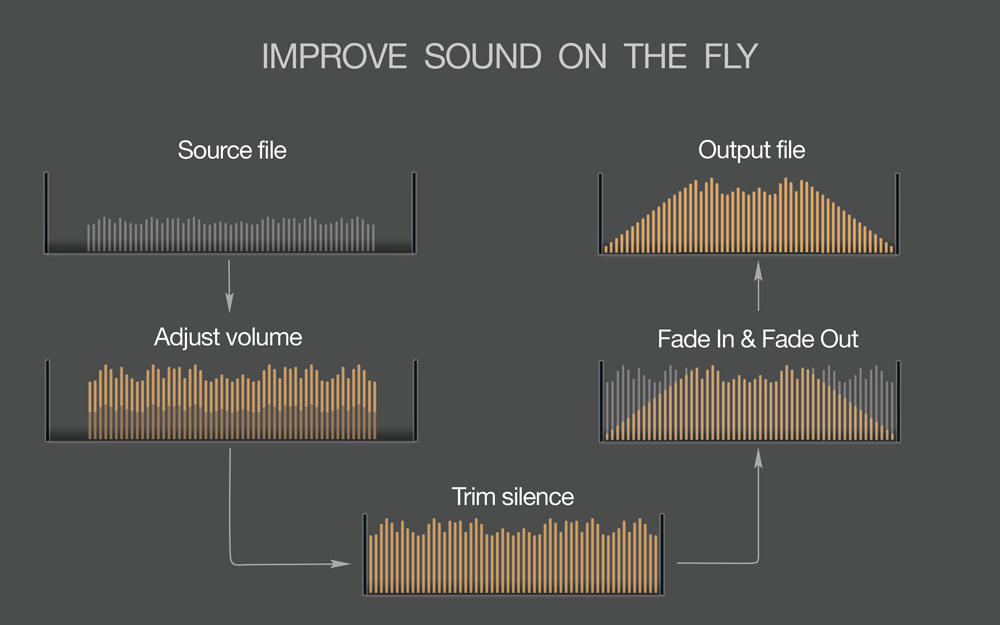
One of the most effective ways to improve the sound quality of an mp3 file is to use a high-quality audio editor like mp4gain. This software allows you to adjust the levels of your mp3 file and normalize the volume to ensure that it sounds great on any device. Additionally, mp4gain can convert your mp3 file to other popular audio formats like WAV, FLAC, and OGG, which can further improve the sound quality.

Another way to improve the sound quality of your mp3 files is to use a high-quality audio player. A good audio player will allow you to adjust the sound settings to your liking, including bass and treble levels, as well as any other sound enhancements that you prefer.

Mp3 Sound Editing

If you want to take your mp3 sound editing to the next level, consider using an equalizer. An equalizer allows you to adjust the levels of specific frequencies in your mp3 file, which can have a dramatic impact on the overall sound quality. With an equalizer, you can boost the bass or treble, or make any other adjustments that you feel are necessary.

Another important aspect of mp3 sound editing is to remove any unwanted noise or distortion from the file. This can be done using various noise reduction tools that are available in most audio editing software. By removing any unwanted noise or distortion, you can greatly improve the overall sound quality of your mp3 file.

Best Practices for Improving MP3 Sound

In addition to the tips and techniques outlined above, there are some best practices that you should keep in mind when trying to improve the sound quality of your mp3 files. Firstly, make sure that you are using high-quality source files. If your original source file is of poor quality, no amount of editing or processing will be able to fix it.

Secondly, always listen to your mp3 file on multiple devices to ensure that it sounds good across different platforms. What sounds great on your computer may not sound as good on your phone or portable music player.

Lastly, don’t be afraid to experiment with different settings and techniques to find what works best for you. Improving the sound quality of your mp3 files is an ongoing process, but with the right tools and techniques, you can achieve great results.

Final Words

Improving the sound quality of your mp3 files may seem like a daunting task, but it is definitely worth the effort. With the tips and techniques outlined in this article, you can take your mp3 sound editing to the next level and enjoy your music to the fullest.

Keywords: mp3 file sound improvement, enhance mp3 sound quality, best mp3 sound editing tools, mp3 sound optimization, how to improve sound quality of mp3 files, mp3 sound correction, mp3 file sound enhancement, mp3 sound equalization, mp3 sound mastering, mp3 sound normalization, mp3 sound effects,