Bit depth: definition


Free Download Mp4Gain
picture

Bit depth: definition

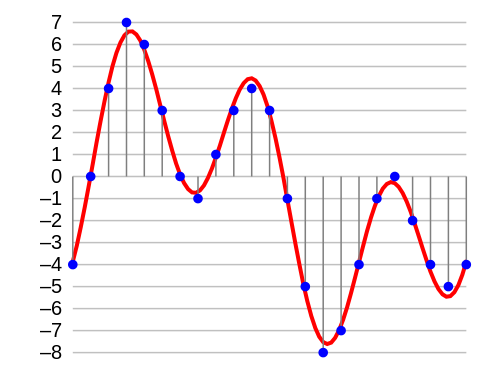
In digital audio, the bit depth is the number of bits of information in each sample and is closely linked to the resolution of the audio. Unlike an analog signal, which is periodic and is made up of infinite points, digital audio is a discrete signal since it is made up of a finite number of points. Use binary numbers (bits) to determine the number of states available to represent the strength of each audio sample and thus represent the signal. “The quality of the representation generally increases as this number of states increases. For example, […] recording of high-fidelity music is obtained on a CD with 65,536 levels of amplitude. The number of possible states of an n-digit (n-bit) binary system is E = 2 ^ n. ” 1. In summary, it is the resolution, in terms of amplitude, that a digitized signal will have. Determine the dynamic range that said signal has. In the following image we can see how a signal is represented in 4-bit depth. 4 bits generate 16 possible values ​​on the vertical axis.

Requirements

A very important aspect to keep in mind is that at a greater bit depth we are going to need more resources to process the audio and more memory to save it. This is because we will have more information. The size of our audio file will be given by the following account:

Number of bits * Sample rate * number of seconds in duration [* 2 (if it is a stereo signal)]

So, for example, the size of a second of audio on a CD, which works with a depth of 16 bits and a sampling rate of 44,100Hz / second is going to be given by the following account:

1 second = 16 * 44100 * 2 (since it is stereo)

1 second = 1411200 bits (0.1764 Mb)

Comparing different bit depths

In the following table we can compare the dynamic range (in decibels) and the number of possible amplitude values ​​of a digitized signal with different bit depths.
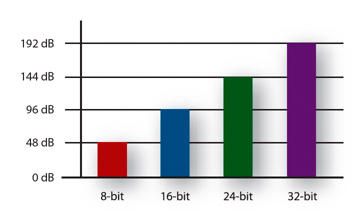

Obviously, the higher the number of bits, the higher the states are possible. The following example compares two pieces of music, leading them to a 16-bit to 4-bit transition. The first piece works in more depth, and the transition is much more noticeable, the result in 4-bits is perceived as the effect of “aliasing”. In the second piece, less dynamic range is used, so the transition it undergoes is almost imperceptible to the ear.


Free Download Mp4Gain
picture


Mp4Gain Main Window
picture


Mp4Gain Features
picture


Free Download Mp4Gain
picture

Bit Depth explanation

Definition

In digital audio, the bit depth is the number of information bits of each sample and is closely linked to the resolution of the audio. Unlike an analog signal, which is periodic and is composed of infinite points, digital audio is a discrete signal since it is composed of a finite number of points. Use binary numbers (bits) to determine the number of available states to represent the strength of each audio sample and thus represent the signal. “The quality of the representation increases, in general, when this number of states is increased. For example, […] high-fidelity music recording is obtained on a CD with 65,536 amplitude levels. The number of possible states of a binary system of n digits (n bits) is E = 2 ^ n. ” 1. In summary, it is the resolution, in terms of amplitude, that will have a digitized signal. Determine the dynamic range of that signal. In the following image we can see how a signal is represented in 4 bits of depth. 4 bits generate 16 possible values ​​on the vertical axis.

Aspects to consider

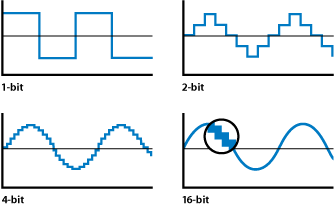
The accuracy of each sample is determined by its bit depth. Then, the higher the bit depth, the higher the resolution in the digitized signal. In addition, the greater the bit depth, the greater the dynamic range for the signal because it will have more points to represent the amplitude of each audio sample. It follows that low levels of bit depth can affect the shape of the wave and thus not achieve a good representation of the original wave because there are fewer possible points to represent it. For example, in the following graph we can see a sinusoid represented with different bit depths. A depth of 1 bit will generate a wave more similar to the square wave (depending on the quantification) because we only have two possible points on the vertical axis.

Requirements

A very important aspect to keep in mind is that at greater bit depth we will need more resources to process the audio and more memory to save it. This is because we will have more information. The size of our audio file will be given by the following account:

Bit number * Sample rate * number of seconds duration [* 2 (if stereo signal)]

Then, for example, the size of a second of audio on a CD, which works with a depth of 16 bits and a sampling frequency of 44,100Hz / second will be given by the following account:

1 second = 16 * 44100 * 2 (since it is stereo)

1 second = 1411200 bits (0.1764 Mb)

Sample Rate and Bit Depth

In sound and audio software and hardware specifications we are often told about processing capacities of up to 96kHz and 64bit operation, but what do these issues really mean? And how do they affect the quality of our sound?

Sample Rate and Frequency Range

The sampling rate is the frequency with which the A / D converter (analog to digital) measures the levels of a signal, the samples are broadly analogous to a series of snapshots. If the converter takes ten samples of the signal every second, it would have a sampling rate of 10 Hz.
The frequency range that an A / D converter (present on a sound card for example) can capture is determined by the sampling frequency, or sampling rate. However, in this there is a strict law that may seem unintuitive: the maximum frequency that can be captured is only half of the sampling frequency. A sampling rate of 10 Hz can capture a maximum frequency of 5 Hz, not 10 Hz. The reason is that, without double the samples of a sound source, some of the oscillations of the signal are lost.
But what happens if there are frequencies higher than the capacity of our sampling frequency in the captured analog audio signal? Aliasing then occurs, phenomena that occur when the highest sampling frequency that has been sampled is higher than the frequencies that can be accurately captured by the A / D converter. Aliasing adds distortion to the audio signal artificially, adding lower frequencies to higher partials. Aliasing can occur in a digital audio system as a result of a poorly designed A / D converter, but you are much more likely to hear it when you play high notes from a software-based synthesizer. If the synthesizer does not use an antialiasing technology, the high notes have the possibility of becoming random groups of tones that have no relation to the key note you are playing.

The researchers at Bell Laboratory are familiar with this problem since 1920 and conceptualized the principle as the Nyquist-Shannon sampling theorem. The theorem is simple: to sample the frequency value of x correctly, you need a sampling frequency of at least twice x. (The maximum frequency at which it can be sampled without aliasing at a certain sampling rate is thus the so-called Nyquist frequency.) So why do we need the sampling rate to be twice as fast as the most frequency? high to be recorded? Because each ordinary period of a waveform includes an upward and a downward oscillation. If the A / D converter takes less than two samples per period, it cannot capture the entire oscillation. In order to capture each “up” and “down” state, you need to take at least two samples from each period. Thus, the sampling rate has to be twice the highest frequency that must be recorded.

According to the Nyquist-Shannon theorem, to sample frequencies that are in the upper limit of the human ear (around 22000 Hz), you need a sampling frequency of around 44000 Hz, which is, not by chance, the rate Normal sampling for commercial audio CDs, 44100 Hz.

This obviously allows you to sample the frequencies from the top of the range of our ear, but what happens when the frequencies of the signal that reach the A / D converter exceed the maximum frequency limit of 22 kHz? They fold into the audible spectrum as distortion, so the A / D converters incorporate an anti-aliasing filter that eliminates these high partials, before the audio is converted to digital format.

AUDIO WHY SEND MY WAV FILES TO 16 BITS, 44,100HZ?

Many will ask, what do we mean by the technical term of 44,100Hz at 16 bits? That term refers to the coding standard with which the compact disc was marketed in the 80’s.

The quality of a compact disc has a depth (bit depth) of 16 bits and a sampling rate of 44.1 kHz, which means that it is the standard quality with which your music will be played from the physical format. But what is the depth and frequency of sampling? Why not handle a higher quality coding such as 24-bit at 96kHz?

Bit depth:

In digital audio using pulse code modulation (MIC or PCM by Pulse Code Modulation), it is the number of bits of information for each sampling and corresponds directly to the resolution of each sampling. Examples of this: The compact disc which uses 16 bits per sampling, DVD Audio and Blu Ray which support 24 bits per sampling. Bit depth is only applicable to lossless (loseless) files and not to compressed (lossy) files such as mp3, wma, etc. With 16-bit audio, there are 65,536 possible levels. With all the higher resolution bits, the number of levels is doubled. By the time we reach 24 bits, we actually have 16777216 levels. Remember that we are talking about a frozen audio segment in an instant of time.

Sample depth:

Pulse code modulation (MIC or PCM by Pulse Code Modulation) is a modulation procedure used to transform an analog signal into a bit sequence. The unit of measure commonly used is Hertz (Hz).

When it is necessary to capture the entire range of human ear capacity (20-20,000 Hz) such as recording studio music, or various types of acoustic events, audio waves are usually recorded at 44,100 Hz, 48,000 Hz, 88,200 Hz or 96,000 Hz. Sampling frequencies of more than 50,000 Hz or 60,000 Hz do not provide useful information to human ears, although the difference is small, in 96,000 Hz sampling it is effective eliminating distortion.

Why send my WAV files at 16 bits, 44,100Hz?

To hear the difference between your music in 16 bits at 44,100Hz and 24bits 96,000Hz you must have a decent professional audio system or professional headphones, have a well-trained ear and this without counting the noise or noise that exists around you, However, if you want to compare both formats, the difference is imperceptible in low-end headphones, speakers of a stereo coppel or the speakers of your macintosh.

It also greatly influences the mixing and production made during the recordings by the audio engineer when capturing the instruments in their raw state. This greatly influences your WAV files to be heard well in their final mix at 44.1KhZ 16 bits or 96kHz at 24 bits.

The society of audio engineers recommend 48,000 Hz for most applications however they give recognition to 44,1000 Hz for the compact disc and its various applications. In any case, it is recommended for its average consumption in digital media a coding at 44,100 Hz at 16 bits to make up your music in a compact disc format and also for digital distributions … although spotify, itunes, etc … compress your music in mp3 format to 128kbps, a minimum and lousy quality.

WAV is a lossless digital audio format (loseless) and are raw audio files which you can request from your audio engineer at no cost when you finish mixing your tracks.