Detailed Music Format Part 2


Free Download Mp4Gain
picture

Detailed Music Format Part 2
Music Format
Music Format

Music CD

Music Format
Music Format


That is, CD records. A CD can play sound files of approximately 74 minutes. The Windows system comes with a CD player. Also, the software that comes with most sound cards provides CD playback functionality, and even some CD-ROM drives are offline. from computer Can be used as a stand-alone CD player when powered on.

WMA with unlimited potential

In developing its own network media service platform, Microsoft primarily promotes ASF (Audio Streaming Format), which is an open standard that supports data transmission over various networks and protocols. It supports audio, video, and a variety of other types of multimedia. And WMA is short for Windows Media Audio, which is equivalent to an ASF file that contains only audio.
The compression ratio of WMA files can be as high as 1:18 in 80kbps 44kHz mode, which is basically the same as VQF. And the compression speed is doubled compared to MP3. So it should be more competitive than VQF.

Vorbis free music format

To avoid rising royalties charged by MP3 music companies, programmers at GMGI’s iCast company developed a new free music format, Vorbis, that rivals or even exceeds MP3 in sound quality. And it will be released over the internet and can be downloaded for free without worrying about infringement issues. But MP3 has become very popular on the Internet, and Microsoft’s Windows Media technology has also started to spread, and Vorbis’s outlook is still not optimistic.

Other audio formats

AIF/AIFF: A sound file format developed by Apple, supported by the MAC platform, and supports 16-bit stereo at 44.1 kHz.
AU: SUN’s AU Compressed Sound File Format, which only supports 8-bit sound, is a commonly used sound file format on the Internet, mainly created by SUN workstations.
CDA: CD audio track file.
CMF: A MIDI-like sound file developed by CREATIVE.
DSP: Abbreviation for digital signal processing. By improving the signal processing method, sound quality will be greatly improved and songs will be more pleasing to the ear.
S3U: MP3 playback file list
RMI: MIDI Instrument Sequence

Lossy compression:

AAC – Sound quality is second only to MPC at high bit rates and looks good at both high and low bit rates. The encoding speed is too slow!
MPC: Performance is average at low bitrate, not as good as MP3 and OGG encoded by Mp3Pro, sound quality is best at high bitrate, and encoding speed is
fast.OGG: The sound quality is better at a low bitrate, and the same is true at a high bitrate. Encoding is slightly slower.
MP3 (MP3Pro): Sound quality is lower than OGG at low bit rate and other aspects are the same as MP3
WMA: High and low bit rates are average, VBR is not supported and the highest is 192Kbit/s

lossless compression:

FLAC – Worst compression ratio of the four, decent encoding speed, good platform support.
PAC: Slightly slower encoding speed, third in compression ratio, good platform support.
APE: The fastest encoding speed, the best compression rate, and the platform is generally supported.
WV: The encoding speed is very fast, the compression rate is second among the four types, and it is only supported by the Windows platform.



Free Download Mp4Gain
picture


Mp4Gain Main Window
picture


Mp4Gain Features
picture


Free Download Mp4Gain
picture

Detailed music format

Detailed music format

Audio File Formats
Audio File Formats

classic wave

Audio File Formats
Audio File Formats

As the most classic Windows media audio format, the WAVE file is widely used, which uses three parameters to represent sound: the number of sampled bits, the sample rate, and the number of channels.
The channels are divided into mono and stereo, and the sample rates are generally 11025 Hz (11 kHz), 22050 Hz (22 kHz), and 44100 Hz (44 kHz). The capacity occupied by the WAVE file = (sampling frequency × sampling bits × channel) × time/8 (1 byte = 8 bits).

traditional mod

MOD is a wavetable-like music format, but its structure is similar to MIDI, it uses real samples, and the volume is small. In the earlier DOS era, MOD was often used as background music for games. Modern mods can contain many audio tracks in many formats, such as S3M, NST, 669, MTM, XM, IT, XT, and RT.

midi music computer

MIDI is short for Musical Instrument Data Interface. Records the sound played by the instrument digitally (each note is recorded as a number), and then synthesizes these records via FM or wavetable during playback: FM synthesis is the sound of the instrument is simulated by mixing the multi-frequency sounds; wavetable synthesis consists of storing the sound samples of the instrument in the wavetable of the sound card and extracting the sound from the wavetable as you play.

Boss Boss MP3

It can be said that MP3 is famous, it uses MPEG Audio Layer 3 technology to compress the sound with a compression ratio of 1:10 or even 1:12, with a sampling rate of 44kHz and a bit rate of 112kbit/s. .
MP3 music is music stored in digital form. If you want to play it, you must have a corresponding digital playback and decoding system. Generally, MP3 digital music is decoded by special software and then restored to a waveform sound signal for playback output. This type of software is called For MP3 players, such as Winamp, etc.

Overlord RA series online

RA, RAM, and RM are Real’s mature network audio formats, using “streaming audio” technology, making them well suited for network streaming. Information such as copyright, singer, producer, mail and song title can be added during production.
RA can be called the supreme lord of multimedia communication on the Internet. It is suitable for streaming on the Internet and is currently the best format for listening to online music online.

VQF with high compression ratio

VQF or TwinVQ is an audio compression technology developed by Nippon Telegraph and Telephone and Yamaha Corporation.
The audio compression rate of VQF is almost twice that of standard MPEG audio and can reach approximately 1:18 or even higher. And popular compression formats like MP3 and RA are usually only around 1:12. But it still won’t affect the sound quality, when VQF compress music at 44kHz-80kbit/s audio sampling rate, its sound quality will be better than 44kHz-128kbit/s MP3, when compress at 44kHz-96kbit/s , the music is close to 44kHz-256kbit/s MP3.

MD minidisc

MD (ie MiniDisc) is a comprehensive portable music format released by SONY in 1992. The compression algorithm it uses is ATRAC technology (the compression ratio is 1:5). MD is divided into Recordable MD (Recordable, with two heads of magnetic head and laser head) and Single Play MD (Prerecorded, only laser head).
The powerful editing function is the strong point of MD. You can quickly select tracks, move tracks, merge, split, delete and edit track titles. It is more personalized than CD and you can have your own MD album at any time. MD products include MD Walkman, MD bedside audio, MD car audio, MD recording deck, MD camera gun and MD driver, etc.

The difference between lossy and lossless Part 2

The difference between lossy and lossless Part 2

lossy and lossless
lossy and lossless

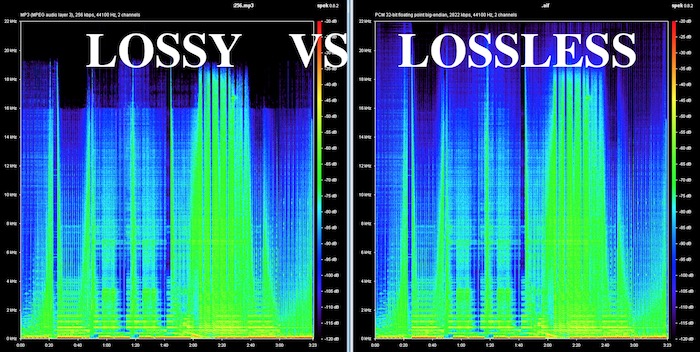
What is the difference between lossless and lossy music? Spectral comparison of lossy and lossless compression

Lossless and Lossy
Lossless and Lossy

Let’s not talk about the difference between the two music formats, let’s talk about the intuitive feel. For example, when you are in KTV, you always click various kinds of music to sing. What is the difference between lossless music and lossy music? Lossy Compression and Lossy Music Spectral Comparison of Lossless Compression

Is WAV a lossy or lossless format? – to understand

Is WAV a lossy or lossless format? 159***1368 WAV is a lossless format, with a maximum bitrate of 1.4M at 44100Hz. I hope to take likes and comments to report that Chocopa is good and WAV love is bad.

What is the difference between lossless and lossy compressed music?

At present, what online home music can really achieve lossless? What is the difference between lossless and lossless listening to online music platforms? Can ordinary people perceive that there is no loss…

What is the difference between lossy compression and lossless compression?

Differences: 1. Lossless compression can be fully restored, lossy compression cannot be the same as the original file after restoration, and there is a certain loss. 2. The compression ratio of lossless compression is generally from “2:1” to “5:1”, while the compression ratio of lossy compression

Know: Lossless and Lossy

It is said that the difference between lossy limit and lossless is obvious when listening to a classic or big weave… But unfortunately… I listen to less classic, don’t be intimidated… Then mention the tears of the times in my mind wma format …now

According to the difference between the images before and after compression, they can be divided into: lossless encoding and lossy encoding.

According to the difference between the images before and after compression, they can be divided into: lossless encoding and lossy encoding. A. Huffman coding B. Run-length coding C. Arithmetic coding D. Predictive coding Popular test College entrance exam First-tier constructor

Does anyone have a rigorous comparison between lossy and lossless image quality? -α|Sony/KM/M SLR/DSLM

Most of the difference between lossy and lossless is not seen in the static images, but in the latitude of the post adjustment. The difference between RAW and jpeg is like the difference between a book and a piece of paper. Lossy compression is sometimes just

The main difference between lossless predictive coding system and lossy predictive coding system is ( ). – Go to school

The main difference between lossless predictive coding system and lossy predictive coding system is ( ). A. The lossless predictive coding system has more quantizer parts than the lossy predictive coding system B. The lossy predictive coding system has more quantizer parts than the lossless predictive coding system

Difference Between Lossless and Lossy Music

1. Lossless music WMP can only play WAVE, if it is APE, please convert it to WAVE first. Qianqianjing can listen to any music format, recommended~~~ 2. The difference between lossless music and lossy music is hard to tell. Because there is also loss

[Double Blind Test] Can you hear the difference between lossy and lossless?

As an academic HiFier, I want to know how big is the difference between lossy and lossless. Feel free to follow the vote. Now I don’t know if the loss is A or B. I named it after a friend of mine to pass the double blind test.

Comparison of lossless and lossy image compression

Lossy Compression vs. Lossless Compression A Closer Look at Various Image Formats In general, there are two different types of image formats: lossy compression and lossless compression. 1. Lossy Compression Lossy compression can reduce images in memory and on disk

What is the difference between lossy and lossless music in game music?

Many friends will ask, some lossy and lossless music sounds no different to me. This is because human hearing is limited, generally 20 Hz to 20 kHz, and the sampling rate of game music production will use 44.1 KHz or 48 KHz.


The difference between lossy and lossless

The difference between lossy and lossless

LOSSY VS LOSSLESS
LOSSY VS LOSSLESS

What is the difference between lossy and lossless?

LOSSY VS LOSSLESS
LOSSY VS LOSSLESS

What is the difference between lossy and lossless?:1 Contents Introduction Lossy and lossless sampling frequency and rate PCM encoding MP3 encoding MPC encoding WMA format APE format 4 Characteristics of MP3MPCmp3PRO APE5 sound format?

Briefly describe the difference between lossy compression and lossless compression. _Examination information network

Briefly describe the difference between lossy compression and lossless compression. Click to see the answers and enter the question bank to practice questions that may interest you. Questions that may interest you. 1 Briefly describe the reasons for image compression. Click to see the answer to enter the question bank Exercise 2 illustrates the bitmap and

Sound is also divided into unique recognition of the advantages and disadvantages of various lossy and lossless audio formats.

Features: The sound quality is average, the compression rate is relatively high, it is compatible with a large number of software and hardware, and it is widely used. It is definitely the current mainstream. OGG encoding Ogg is an advanced lossy audio compression technology, the official name is OggVorbis, it is

What is the difference between lossy and lossless headlight modification?_Ant Car Accessories

The so-called non-destructive installation is to install the lens directly on the original car headlight bulb interface without destroying the original lamp container, and tighten the lens to fix the lens with screws. The so-called lossy installation consists of drilling holes in the original lamp pot and comparing the four screw holes in the lens.

Difference between lossless compression and lossy compression?

Lossless compression is the first step without the above. Therefore, lossless compression can restore data equivalent to what it was before compression, while lossy compression cannot. The scale of “loss” in lossy compression is controllable and algorithms are used to extract information before removing it.

Can you hear the difference between lossy and lossless audio at different sample rates?

Although it is said that the human ear can only hear the sound up to 20 kHz, the 48 kHz sampling rate and the 44.1 kHz sampling rate are actually different. . . It is recommended to use the highest quality to view this video to ensure the bitrate is high enough to reduce suppression.

What is the difference between lossy compression and lossless compression?

Differences: 1. Lossless compression can be fully restored, lossy compression cannot be the same as the original file after restoration, and there is a certain loss. 2. The compression ratio of lossless compression is generally from “2:1” to “5:1”, while the compression ratio of lossy compression


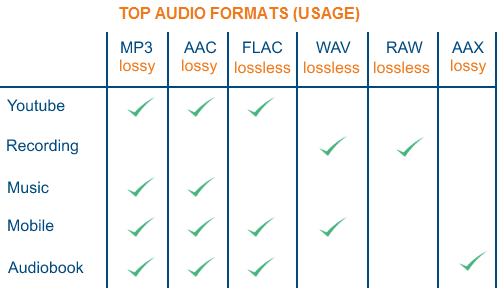
The best popular audio formats

The best popular audio formats

Audio Formats

I looked around the forest of audio formats for normal use and chose the 5 most important ones. It is true that, in part, a bit simplified, a bit rough in presentation. I refrain from differentiating the exact settings of the respective codecs, that would be too complex.

I also don’t want to get into the nasty topic of DRM. The most important one I dropped is probably Vorbis. . Of course, I assume that the correct settings are used when encoding and that a high quality level is selected.

Audio formats

1st place:
MP3 (MPEG-1 Audio Layer 3)

The most widespread digital format, with good encoding (for example, with LAME) in high bit rates, a format of the highest quality and transparency.

Quality (4.5 / 5 points)
Popularity (5/5 points)
Compression (4/5 points)
Total: 13.5

2nd place:
AAC (advanced audio coding)

It became famous especially for its use in the Apple iPod, a codec that has small advantages over MP3 at low bit rates due to technical developments.

Quality (4/5 points)
Popularity (4.5 / 5 points)
Compression (4.5 / 5 points)
Total: 13

3rd place:
WMA (Windows Media Audio)

Windows proprietary format. Of course, Microsoft has the reins here, so variable format doesn’t run on all playback devices. Otherwise, no major strengths and weaknesses and, for example, the standard format with Napster.

Quality (4/5 points)
Popularity (4/5 points)
Compression (4/5 points)

Total: 12

4th place:
FLAC (Free Lossless Audio Codec) !!

As the only lossless codec on this list. FLAC works in something like a ZIP program: the original can be restored from the compressed file by approximately 50% without restrictions. In times of low hard disk space, a real alternative, especially since many playback devices can play this format. My winner of hearts, the popularity will certainly increase in the future.

Quality (5/5 points)
Popularity (3.5 / 5 points)
Compression (3/5 points)

Total: 11.5

5th place:
Wav

The original format of the normal audio CD data. Impeccable quality and still widespread thanks to the well-known compact disc. It actually started out of the competition because it’s completely unzipped.

Quality (5/5 points)
Popularity (5/5 points)
Compression (0/5 points)
Total: 10

What are lossless file formats

Whether it is image, music or video files, it is important to understand the difference between different types of formats and when to use them. Using the wrong format can ruin the quality of a file or make the file size unnecessarily large.

file audio differenze

Some types of media file formats are “lossy” and some types “lossless”. We will explain what these terms mean for the benefits of each type of file format and why you should never convert lossy to lossless formats.

Compression explained.

We use compression to make files smaller so they can retrieve faster and take up less storage space. For example, when you take a photo, your camera captures all the light you can get and collects an image. If you save the image in RAW format, which retains all the clear data that the camera sensor receives, the image can reach 25 MB. (Depending on image resolution: A multi-megapixel camera provides a larger image.)

comprimere i-grandi-audio

If we upload these files to a social network or put them on a website, we don’t want these image files to take up so much space. A photo gallery with RAW images could take hundreds of megabytes of space. RAW formats can be used by professional photographers to maintain high image quality during the editing process, but they are not intended for the average person.

Instead, our camera or smartphone converts the image into a JPEG file. JPEG files are much, much smaller than RAW images. When you convert RAW to JPEG, some of the image data is “discarded”, which produces a much smaller file. The conversion process uses a compression algorithm that works well for photos, so they can look pretty good despite compression. You can still see compression elements, depending on the quality settings.

Note that lost formats generally have a setting that controls their loss. For example, JPEG has a variable quality setting. Low quality produces a smaller JPEG image file, but the image quality is significantly poorer. Below is a close-up example of a lost JPEG: various “compression artifacts” can be seen.

We call RAW a “lossless” format because it retains all the original data in the file, while we call JPEG a “lost” format because some data is lost when we convert an image to JPEG. However, these are not the only design and loss-free formats.

Images: RAW, BMP and PNG are all image formats without data loss. JPEG and WebP are lost image formats.
Audio: WAV is a container file that is often used to contain lossless audio, although it is also capable of containing lost sound. FLAC is a lossless audio format, while MP3 is a lossless audio format.
Video: Consumers use few lossless video formats as they involve video files taking up a large amount of space. Common formats like H.264 and H.265 are all lost. H.264 and H.265 can deliver smaller files with higher quality than previous generations of video codecs because it has a “smarter” algorithm that is better at choosing which data to discard.
Some of these lossless formats also provide compression. For example, a WAV file generally contains uncompressed audio and takes up little space. A FLAC file may contain the same lossless sound as a WAV file, but it uses compression to continue creating a smaller file. Formats like FLAC provide no data: they store all data and compress them intelligently, just like ZIP archives. However, they are still much larger in size than MP3s that throw a lot of data.

A conversion can be a loss, even between formats without data loss. For a conversion to be effectively lossless, the data in the original file must fit within the destination file. For example, loss without FLAC files only supports 24-bit audio. If you converted a WAV file containing 32-bit PCM audio to FLAC, the conversion process must generate some data. The conversion process between a WAV file containing 24-bit PCM audio in FLAC would be lossless.

Encoding digital audio with a loseless format?

Compressing a digital audio with loss is to reduce the size of an audio file.

Codecs are used to reduce the size of the files. Some of the operations that codecs can perform to reduce file sizes are as follows:

Reduce the bit rate of the original sound so that the audio takes up less space.
Remove sounds at frequencies that are not noticeable by the human ear.
Elimination of redundancies of the audio signal.
They can reduce the number of existing channels by transforming a surround sound to Stereo.
Reduce the number of bits per sample.
Etc.
Note: The compression process of an audio is extremely complex. In addition, each codec applies different methodologies to compress the size of an audio.

Obviously during the compression process there will be a loss in audio quality. The higher the weight reduction of the compressed file, the higher the loss of quality.

UTILITIES THAT YOU HAVE TO COMPRESS AN AUDIO

Obviously compressing an audio has certain utilities. Some of them are as detailed below:

The space needed to store the songs on our hard drive will be much smaller. Although hard drives are cheap and their storage capacity is large, it is not feasible and / or practical to store all of our songs without loss.
We can pass the audio files to third parties in a much more convenient and fast way. After compressing a music song we can pass it by email or other means without any problem.
It seems that the trend in the very near future will be to consume video and audio via streaming. Therefore the compression of video and audio is very important. If we offer a web service in which we provide streaming audio, it is essential to compress the audio to save bandwidth and so that customers can play it at home without problems.

Select the compressed audio file format

There are numerous types of compressed file format with loss. Some of the most popular are the following:

.mp3
.ogg
.wma
.m4a
.aac
Depending on the needs, it may be useful to select one format or another.

However in my case I recommend using the mp3 or ogg file format. The reasons are as follows:

The .mp3 files do not stand out for providing the best audio quality. However, the .mp3 format is the most universally extended.
Any music player is capable of playing the .mp3 file format. You cannot say the same of the other file formats.
Everyone is able to play audio in .mp3 format. Even people with little knowledge technologically speaking.
If someone does not want to use the .mp3 format because they think the quality is not enough, or because it is a proprietary format, I recommend using .ogg. In the following link you can find the advantages and disadvantages of the .ogg files with respect to the .mp3 files.
Select the audio compression codec (encoder)

Once the file format is selected we must be aware of the codec that we will use to perform the audio compression.

In the case that we want to compress in the .mp3 file format there are the following codecs:

FHC: It’s the first codec that existed. At present this codec has become obsolete. Its compression time is very high and does not support variable bit rate.

Xing: It is the fastest encoder and allows you to obtain files with a variable bit rate (VBR). However, the quality level offered by this type of encoder is lower than Blade and Lame.

Blade: Until Lame’s appearance was the best option. It is slightly slower than Xing, but the quality levels obtained are much better. Currently this host has a problem and it does not support variable bit rates.

Lame: It is available under the GNU license and is also the best host available today. It supports variable bit rates, is fast and the quality obtained is better than in the rest of the encoders.