What are the advantages of the lossless audio format?


Free Download Mp4Gain
picture

What are the advantages of the lossless audio format?
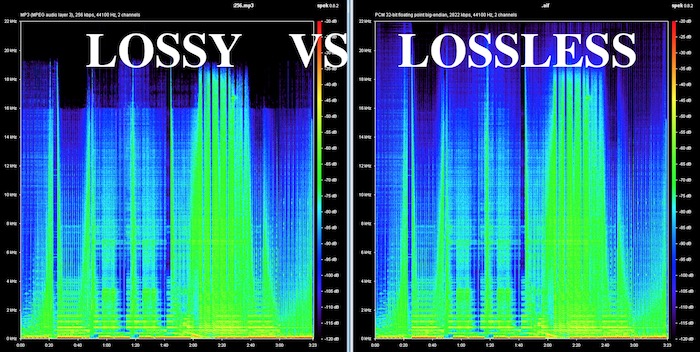
Lossless and Lossy Audio Files

The advantage of lossless for storing an audio collection is that the quality of the recordings is much higher than that of lossy codecs and they take up less space than uncompressed audio. It is true that lossy files are smaller than lossless music files. Most modern playback programs understand the lossless format. Programs that cannot play it can easily learn it using the lossless plugin. What are lossless audio formats?
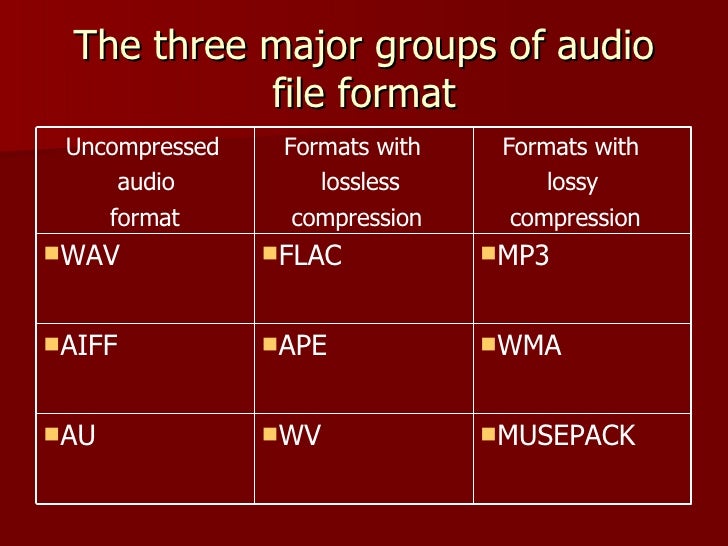
Lossless audio

Lossless audio formats
A true music lover is unlikely to be satisfied with the sound of music recorded in Ogg Vorbis or MP3 compression formats. Of course, if you listen to audio recordings on home audio equipment, sound defects cannot be heard with your ear, but if you try to play a compressed file on high-quality Hi-Fi equipment, you will immediately find the sound defects. . Of course, creating a collection of quality music on CD or vinyl is not easy. There is a reasonable alternative to this path for lovers of high-quality sound – lossless music. It can be stored on a PC in a way that allows you to keep your music’s original settings unchanged, even if compression is applied. In this way it simultaneously solves the problems of high-quality music and its compact storage, since audio equipment for listening (headphones, speakers, amplifiers) is quite affordable.

Uncompressed lossless audio formats:

CDDA is an audio CD standard;
WAV: Microsoft Wave;
IFF-8SVX;
IFF-16SV;
AIFF;
Compressed formats:

FLAC;
APE – Monkey’s Audio;
M4A – Apple Lossless – Apple’s high-quality music format;
WV – WavPack;
WMA: Windows Media Audio 9;
TTA – True Audio.

FLAC format
The most common format is the. It differs from lossy audio codecs in that no data is removed from the audio stream when it is used. This makes it possible to use it successfully to play music on Hi-Fi and Hi-End equipment, as well as to create an archive from a collection of audio recordings.

The great advantage of the format is its free distribution. This is important for musicians who record music on their own. The format has gained a lot of popularity recently, thanks to which its support is included in the vast majority of multimedia players.

APE format
Unlike FLAC, for the APE format there are only codecs and plugins for the Windows platform. For other platforms, there are expensive third-party software solutions. The algorithm is capable of achieving lossless compression of audio information between 1.5 and 2 times. It includes three main stages of encoding, of which only one is based on the use of inherent properties of sound for compression. The rest are similar to conventional filing cabinets. Even though the compression algorithm is distributed free of charge, the licensing restrictions are such that it is practically inaccessible to amateur musicians.

Apple Lossless Format
You can listen to high-quality lossless music using the audio compression codec without sacrificing Apple quality. This format was developed by Apple for use on its own devices. The format is compatible with iPods with special dock connectors and the latest firmware. The format does not use specific rights management (DRM) tools, but the container format contains such capabilities. It also supports QuickTime and is included as a feature in iTunes.

The format is part of the free access libraries, which allows you to organize listening to files in Windows applications. In 2011, Apple released the source codes for the format, opening up broad prospects for the codec. In the future, it can seriously compete with other formats. The tests yielded good results. Compressed files vary in size between 40-60% of the originals. The decoding speed is also impressive, which justifies its use for mobile devices, whose performance is not high.

One of the disadvantages of the codec is that the extension of the audio files matches the audio codec, leading to confusion because AAC is not a high-quality music format. Therefore, it was decided to store the data in an MP4 container with the extension .m4a.


Free Download Mp4Gain
picture


Mp4Gain Main Window
picture


Mp4Gain Features
picture


Free Download Mp4Gain
picture

What are lossless file formats

Whether it is image, music or video files, it is important to understand the difference between different types of formats and when to use them. Using the wrong format can ruin the quality of a file or make the file size unnecessarily large.

file audio differenze

Some types of media file formats are “lossy” and some types “lossless”. We will explain what these terms mean for the benefits of each type of file format and why you should never convert lossy to lossless formats.

Compression explained.

We use compression to make files smaller so they can retrieve faster and take up less storage space. For example, when you take a photo, your camera captures all the light you can get and collects an image. If you save the image in RAW format, which retains all the clear data that the camera sensor receives, the image can reach 25 MB. (Depending on image resolution: A multi-megapixel camera provides a larger image.)

comprimere i-grandi-audio

If we upload these files to a social network or put them on a website, we don’t want these image files to take up so much space. A photo gallery with RAW images could take hundreds of megabytes of space. RAW formats can be used by professional photographers to maintain high image quality during the editing process, but they are not intended for the average person.

Instead, our camera or smartphone converts the image into a JPEG file. JPEG files are much, much smaller than RAW images. When you convert RAW to JPEG, some of the image data is “discarded”, which produces a much smaller file. The conversion process uses a compression algorithm that works well for photos, so they can look pretty good despite compression. You can still see compression elements, depending on the quality settings.

Note that lost formats generally have a setting that controls their loss. For example, JPEG has a variable quality setting. Low quality produces a smaller JPEG image file, but the image quality is significantly poorer. Below is a close-up example of a lost JPEG: various “compression artifacts” can be seen.

We call RAW a “lossless” format because it retains all the original data in the file, while we call JPEG a “lost” format because some data is lost when we convert an image to JPEG. However, these are not the only design and loss-free formats.

Images: RAW, BMP and PNG are all image formats without data loss. JPEG and WebP are lost image formats.
Audio: WAV is a container file that is often used to contain lossless audio, although it is also capable of containing lost sound. FLAC is a lossless audio format, while MP3 is a lossless audio format.
Video: Consumers use few lossless video formats as they involve video files taking up a large amount of space. Common formats like H.264 and H.265 are all lost. H.264 and H.265 can deliver smaller files with higher quality than previous generations of video codecs because it has a “smarter” algorithm that is better at choosing which data to discard.
Some of these lossless formats also provide compression. For example, a WAV file generally contains uncompressed audio and takes up little space. A FLAC file may contain the same lossless sound as a WAV file, but it uses compression to continue creating a smaller file. Formats like FLAC provide no data: they store all data and compress them intelligently, just like ZIP archives. However, they are still much larger in size than MP3s that throw a lot of data.

A conversion can be a loss, even between formats without data loss. For a conversion to be effectively lossless, the data in the original file must fit within the destination file. For example, loss without FLAC files only supports 24-bit audio. If you converted a WAV file containing 32-bit PCM audio to FLAC, the conversion process must generate some data. The conversion process between a WAV file containing 24-bit PCM audio in FLAC would be lossless.