Are your ears worthy of your headphones?


Free Download Mp4Gain
picture

Are your ears worthy of your headphones?…

Audio Quality
Audio Quality

The process of human hearing sound is very complicated.

Audio Quality
Audio Quality

But compared to the metaphysics of headphones and audio, the complexity of the human ear is basically not worth mentioning. But before we get into whether Beats is shallow, whether Sony is good, and whether headphone noise reduction is good for your ears, let’s take a look at what we’re talking about when it comes to sound quality. It may be that when you feel that the sound quality of a certain headset is not good, the problem is in your ears or in the sound file itself.

01 What is sound quality?

The essence of music and sound is the vibration of air, and sound quality is generally attributed to three aspects: volume, pitch, and timbre.

Everyone knows the volume and the tone is Do Re Mi Fa Sol La Ti. And what is the tone?

The American National Standards Institute defines timbre as “…a sensory attribute by which a listener can judge that two tones of the same volume and pitch are not the same.” We can tell the difference between a guitar playing a 440Hz tone and a piano playing a 440Hz tone.

The sound reproduced by different headphones is different, and the timbre is also different. However, in terms of volume, different headphones will also have a certain volume difference due to different internal circuitry; as for the tone, there is no obvious change without accident.

02Digital recording and analog recording

There is no doubt that pre-CD audio carriers: magnetic tapes, vinyl records, etc., are all analog recording products. The word “analog” is also translated as “analog”, in short, it restores and reproduces the vibration in the air at that moment in a physical way. Whether it’s vinyl or tape, physical features such as bumps, depressions, or magnetic dust splits on tape or disc are used to restore the vibrance detail of the audio.

But in the age of CDs and computers, all audio vibrations are converted to 0 or 1 on the surface of the disc and go into the so-called binary algorithm. After decoding, it is restored to physical vibration.

In popular music recordings, there are probably three most common formats:

44.1 kHz, 16-bit waveform

320kb mp3

128kb mp3


Free Download Mp4Gain
picture


Mp4Gain Main Window
picture


Mp4Gain Features
picture


Free Download Mp4Gain
picture

Boost sound

Boost sound

Boost Sound

Mp4Gain is the perfect app if you are looking for boost sound.

Boost Sound

It is very likely that if you have a large collection of audio and video files, you will find yourself in the situation where one or more of these files play at a lower volume than the rest, forcing you to manually correct those songs or videos that you they have a low, quiet volume.

Most likely, you have been building your collection of audio or video files little by little, taking an audio or video from here and another from there. But I do not take into account that they were encoded with different settings, for example, with a different amount of bit rate, among other things, which caused a different power or loudness.

In the time of vinyl records there were also some differences in volume, perhaps less significant because common people did not touch the settings, but also, as it took time to change each record, your ear forgot the volume reference of the previous one. Today, it happens that we play one video after another or one song after another, with 1 second of difference and our ear still maintains the reference of the volume or loudness level and if it changes, we notice it immediately.

In the radio broadcasting stations F.M. They avoid this phenomenon by using audio compressors, which are expensive pieces of hardware that perform this function.

Mp4Gain provides the same quality as an expensive sound compressor from a TV company or an F.M. radio. but Mp4Gainb is really cheap comparatively.

Definitely download Mp4Gain and you will experience the difference.

High resolution CD and sound sound. PART 2

High resolution CD and sound sound. PART 2

Hi-Res

If the song occurs with some enthusiasm and budget, the content of the mastering will change according to the characteristics of the sales means, even if the original master is used, and the points of view will be different depending on the engineer, and strategy will be optimized of sales. Function of the
Therefore, it is natural that the mixing adjustment contents are different for each support sold. That is the difference in the media (format) seen from the side of the production.

Hi-Res Audio

This is because even for the same song, the recorded sound may differ slightly according to the medium (format). This means that. (Of course, it can be the same.)

So, if you compare the CD version and the high resolution version and feel a difference as “high resolution is incredible” or “high resolution is delicate but the CD version is good”, it is not the difference due to specifications Format, but the difference in sound is due to mastering. That is the possibility.

It is easy to understand if you use the fact that it actively changed the sound by mastering as a project, such as “the high-resolution version is remastered by the XX Mastering Engineer”, but in most cases there is no such description because it is Dedicated to the work behind the scenes to approach the original sound (or convert it into a sale sound) with the performance of the destination format. In addition, even if it is shown as a remastered version, the content of what was changed with the remasterization is not announced, and even if it is said that it is mastering simply by changing the level, it is up to that point, and the performance of each format And since the characteristics are different, it is not easy to compare to measure and there is a large part that appeals to the senses, so it is very difficult to understand the real difference of sound due to mastering.

Then, if you have the same song that makes the difference between the CD version and the high resolution version, convert the file from the high resolution version to make a CD and compare it.
I think you can get pretty interesting results testing some things to see if the CD you did sounds similar to the version on CD or the high resolution version.
(It is important to convert the top format file in terms of specifications to the format to compare and compare).

What is a frame rate?

What is a frame rate?

Frame Rate

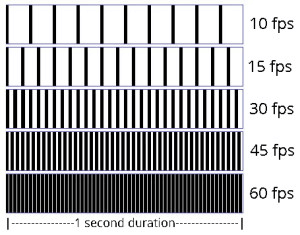
The frame rate is an index that indicates how many times the screen can be rewritten per second during video playback.

Frame Rate

It is expressed as a numerical value per second and the unit is fps (frames per second). For example, if the frame rate is 30 fps, the drawing will be done 30 times per second. The higher this number, the smoother the subject’s movement will be recorded. On the other hand, if this value is low, the subject’s movement will be choppy.

The human eye is said to think of it as a video when it exceeds 22fps, and it can be recognized that the frames drop at about 15fps, so it is said that it does not look like a smooth video.

This frame rate is very important when you want to stream and record smooth, beautiful images, but the higher this value, the larger the file size.

Generally, the standard is 24 fps for movies and 30 fps for TV and video.

In video encoding, the bit rate per second is fixed, so if you increase the frame rate, the number of images will increase and the movement will be smoother, but the amount of data allocated per frame will decrease, so image quality will deteriorate. …

On the other hand, if you reduce the number of frames, the number of images will decrease and the smoothness of the movement will slow down slightly, but you will be able to improve the image quality because a large amount of data will be allocated to each frame.

Frame rate

It supports up to 30 frames, and you can set and adjust the number of frames from the Preferences / Video tab for each client.

The number of frames that can be set is 7 patterns of “1, 5, 10, 15, 20, 25, 30 frames / sec.” The default value is set to “15 frames / sec”.

In a normal meeting, the video is often almost motionless, so even with a 15 frames / sec setting, you can use the video without any hassle.

The higher the number of frames, the smoother the video that can be used for web conferencing, but we recommend that you change it flexibly according to the number of docking stations, the specifications of your PC terminal and the status. of the Internet connection.

What is bit rate (bps)?

What is bit rate (bps)?

bit rate

Bit rate (bps) is an expression that indicates how many bits of data are processed or transmitted / received per unit of time.

Sample Rate

It is common to use “bits per second” (bps) as the unit, and the bit is the smallest unit represented by 0 and 1 in digital (binary).

Defined as the number of bits passed (that is, transferred) to a virtual or physical point on a data transfer path per second, commonly used in digital communication devices such as modems, routers, Serial ATA cables, and LANs.

It is also used to indicate how much information the compressed video and audio data is represented per second, and how much data the communication line can send and receive per second.

In general, increasing the bit rate improves picture and sound quality, but increases file size, and decreasing the bit rate decreases file size but reduces image and sound quality. Also, if you are using a CPU with a slow processing speed or a hard disk with a slow rotational speed, if you play a video created at a high bit rate, the processing may not be in time and the frames will be lose.

Bit rate type (bps)
There are two types of bit rates: constant bit rate (CBR) and variable bit rate (VBR).

All constant bit rates assign the same bit rate everywhere. Set a high bit rate when you want all image files to be high quality, and set a low bit rate when you want to reduce the file size.

It always assigns the same bitrate, so you can easily predict the size of the resulting file. Therefore, it is recommended to use it when there is an upper limit for the file size after encoding or when you want to keep the data transfer rate constant.

Variable bitrate, on the other hand, automatically assigns a high bitrate to fast-moving scenes and a low bitrate to scenes that move little. Since the bit rate is assigned according to the scene, the file size can be reduced while the image quality is relatively high, but the final file size is difficult to predict.

Constant bit rate and variable bit rate

VBR can be divided into two types: s encoding (fixed quality) and 2-step encoding (average bit rate).

1-pass MPEG-2 encoding can shorten processing time for export by analyzing video and encoding while maintaining specified constant quality. However, it is difficult to predict the size of the finished file.

In 2-pass encoding, after analyzing the information from all video data in the 1st pass, the bit rate is assigned and encoded in the 2nd pass based on that information. Although the processing time is long because the processing is performed twice, it is possible to efficiently assign the bit rate, making it possible to create high-quality video. By specifying the average bitrate, you can roughly predict the size of the file.