What is a frame rate?


Free Download Mp4Gain
picture

What is a frame rate?

Frame Rate

The frame rate is an index that indicates how many times the screen can be rewritten per second during video playback.
Frame Rate

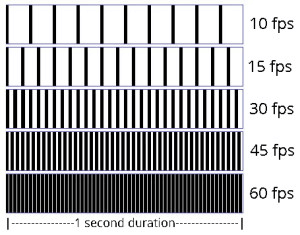
It is expressed as a numerical value per second and the unit is fps (frames per second). For example, if the frame rate is 30 fps, the drawing will be done 30 times per second. The higher this number, the smoother the subject’s movement will be recorded. On the other hand, if this value is low, the subject’s movement will be choppy.

The human eye is said to think of it as a video when it exceeds 22fps, and it can be recognized that the frames drop at about 15fps, so it is said that it does not look like a smooth video.

This frame rate is very important when you want to stream and record smooth, beautiful images, but the higher this value, the larger the file size.

Generally, the standard is 24 fps for movies and 30 fps for TV and video.

In video encoding, the bit rate per second is fixed, so if you increase the frame rate, the number of images will increase and the movement will be smoother, but the amount of data allocated per frame will decrease, so image quality will deteriorate. …

On the other hand, if you reduce the number of frames, the number of images will decrease and the smoothness of the movement will slow down slightly, but you will be able to improve the image quality because a large amount of data will be allocated to each frame.

Frame rate

It supports up to 30 frames, and you can set and adjust the number of frames from the Preferences / Video tab for each client.

The number of frames that can be set is 7 patterns of “1, 5, 10, 15, 20, 25, 30 frames / sec.” The default value is set to “15 frames / sec”.

In a normal meeting, the video is often almost motionless, so even with a 15 frames / sec setting, you can use the video without any hassle.

The higher the number of frames, the smoother the video that can be used for web conferencing, but we recommend that you change it flexibly according to the number of docking stations, the specifications of your PC terminal and the status. of the Internet connection.


Free Download Mp4Gain
picture


Mp4Gain Main Window
picture


Mp4Gain Features
picture


Free Download Mp4Gain
picture

What is bit rate (bps)?

What is bit rate (bps)?

bit rate

Bit rate (bps) is an expression that indicates how many bits of data are processed or transmitted / received per unit of time.

Sample Rate

It is common to use “bits per second” (bps) as the unit, and the bit is the smallest unit represented by 0 and 1 in digital (binary).

Defined as the number of bits passed (that is, transferred) to a virtual or physical point on a data transfer path per second, commonly used in digital communication devices such as modems, routers, Serial ATA cables, and LANs.

It is also used to indicate how much information the compressed video and audio data is represented per second, and how much data the communication line can send and receive per second.

In general, increasing the bit rate improves picture and sound quality, but increases file size, and decreasing the bit rate decreases file size but reduces image and sound quality. Also, if you are using a CPU with a slow processing speed or a hard disk with a slow rotational speed, if you play a video created at a high bit rate, the processing may not be in time and the frames will be lose.

Bit rate type (bps)
There are two types of bit rates: constant bit rate (CBR) and variable bit rate (VBR).

All constant bit rates assign the same bit rate everywhere. Set a high bit rate when you want all image files to be high quality, and set a low bit rate when you want to reduce the file size.

It always assigns the same bitrate, so you can easily predict the size of the resulting file. Therefore, it is recommended to use it when there is an upper limit for the file size after encoding or when you want to keep the data transfer rate constant.

Variable bitrate, on the other hand, automatically assigns a high bitrate to fast-moving scenes and a low bitrate to scenes that move little. Since the bit rate is assigned according to the scene, the file size can be reduced while the image quality is relatively high, but the final file size is difficult to predict.

Constant bit rate and variable bit rate

VBR can be divided into two types: s encoding (fixed quality) and 2-step encoding (average bit rate).

1-pass MPEG-2 encoding can shorten processing time for export by analyzing video and encoding while maintaining specified constant quality. However, it is difficult to predict the size of the finished file.

In 2-pass encoding, after analyzing the information from all video data in the 1st pass, the bit rate is assigned and encoded in the 2nd pass based on that information. Although the processing time is long because the processing is performed twice, it is possible to efficiently assign the bit rate, making it possible to create high-quality video. By specifying the average bitrate, you can roughly predict the size of the file.

What is the sample rate / sample rate?

What is the sample rate / sample rate?

Sampling rate

Sampling rate

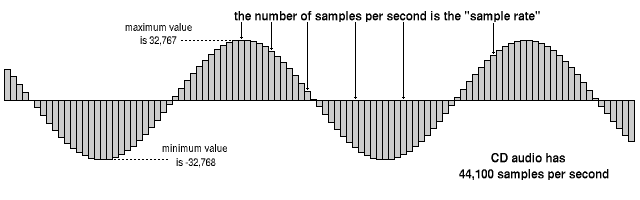
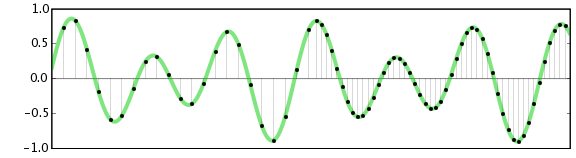
The sampling frequency is the number of sampling processes performed per second in an AD converter that converts an analog signal into a digital signal.

Sampling Rate

The unit is “Hz”, and the higher the value, the faster the analog input signal can be converted to a digital value, resulting in higher sound quality. However, the amount of data increases proportionally, so you must choose the correct frequency for media and devices with limited storage capacity.

It is said that to accurately record and reproduce a certain sound, it is necessary to sample at a frequency that is approximately twice the frequency of that sound. The sampling frequency used for music CDs is 44.1 kHz. In this case, the voice waveform is shredded 44,100 times per second and the voice information at each moment is converted into digital information.

Humans typically have 20Hz to individual differences, but they can perceive sounds between 15kHz and 20kHz as sound, and this frequency band is called the audible range.

Difference between sample rate and bit rate
Sample rate and bit rate are used to describe the sound quality before and after compression of the audio data.

The sampling rate is a value that represents “the number of sampling processes performed per second”.
For example, at the standard sample rate of 44.1 kHz, it means to sample 44100 times per second.
The higher this number, the softer the sound and the better the sound quality. In other words, the numerical value of the sample rate represents the quality of the sound.

On the other hand, the bit rate is a value that indicates “how many levels the volume is represented”.
For example, in the case of 16 bits, which is the standard bit rate, the amount of information is divided by 2 to the 16th power (= 65536 steps). If the number of bits is low, the sound quality will be grainy and, as with the sample rate, the higher the value of the bit rate, the more information that can be reproduced and the better the sound quality.

Sample rate bit rate
Divide the time axis to
44.1 kHz, divide 44100 per second Divide the amount of information vertically Into
In the 16-bit case, divide the amount of information by 2 to the 16th power

From the fundamentals of digital audio to its application

From the fundamentals of digital audio to its application

DIGITAL AUDIO

Introduction: There are specifications, characteristics and unique properties of digital technology.

digital audio

The name digital audio has quickly penetrated the market since the launch of CD players and audio CDs (hereinafter referred to as “CDDA” in this series) in 1982. Before that, audio sources (media recording) were LP records and magnetic tapes, and turntables and tape recorders were the core of audio playback equipment. After the advent of CDDA, MD (Mini Disc) and DAT (Digital Audio Tape) were developed as digital audio applications. In addition, SACD (Super Audio CD), DVD and Blu-ray have appeared, and recently, audio playback in file formats such as MP3, PC / USB audio, and Internet audio has become widespread.

The core technologies of digital audio are AD (analog to digital) conversion and DA (digital to analog) conversion. As long as it is audio, there is no doubt that the quality of the analog signal is important. However, digital audio has specifications, characteristics, and properties of digital audio that are different from conventional analog audio, and most of them are concentrated in the DA conversion system in the playback system.

Digital audio is a technology that has already been put into practice and is widely used in various devices. For this reason, some may point to “what happens now”. However, there are few cases where it is precisely and essentially explained. In this series titled “From the Basics to Digital Audio Applications,” we plan to explain the theory, core technology, applied technology, and unique mounting technology of digital audio in detail from this perspective. First, in Part 1 and Part 2, we will introduce the differences between analog audio and digital audio, and the points to keep in mind when understanding digital audio signals.

What is digital audio in the first place?
Similar to a general electrical signal, the characteristics of a conventional analog audio signal are defined by “signal level” and “signal frequency”. In the reproduction of an analog source, the signals that are handled with the exception of the control system are completely analog signals, and the main characteristics of the analog signals are applied as is. Figure 1 shows the general image of the analog audio reproduction system. Representatives of music sources are LP records and magnetic tapes (open reels, cassettes), and record players (including cartridges) and decks are used as electrical signal conversion and reproduction devices. The noise at each stage of signal processing determines the dynamic range as the ratio of signal to noise.

On the other hand, in digital audio, the source of the signal is a digital signal. The digital signal has digital information according to the signal level and the frequency of the original analog signal. At the same time, it has “digital signal characteristics”. The properties of a digital signal are the “quantization bit number” (quantization resolution, also expressed as “M bit”) that defines the information of the amplitude axis and the “sample rate” (sample rate, fs) which defines the frequency axis information. ) It is also expressed).

Relationship between audio and crystal clear sound quality and clock phase noise

Relationship between audio and crystal clear sound quality and clock phase noise

Hi-Res Audio

Analog → high resolution

High Res Audio

Sound is essentially an analog signal. When processing analog signals, there are “fading, noise, and degradation” drawbacks. Digitization solves that deficiency. The original analog signal is digitized by an analog-to-digital converter (ADC) and distributed as a digital sound source via CD or a network. This digital sound source is processed by the digital-to-analog converter (DAC) of the user’s digital audio equipment and is finally output in analog.

To digitize an analog signal, sampling (* 1) is performed at a constant frequency. To reproduce the sound as closely as possible to the original sound, it is necessary to increase the sampling frequency (* 2) and the bit rate (* 3). Compared to CD sound sources, today’s high-resolution sound sources have an improved sample rate / bit rate, allowing sounds closer to the original sound to be digitized.

[Sampling frequency and bit rate of digital sound source]
Digital sound source Sampling frequency bit rate
CD sound source 44.1 kHz 16 bit
High resolution 96 kHz 24 bit sound source
192 kHz 24 bits
384 kHz 24 bits
Noise components and fluctuations that cause sound deterioration
To accurately reproduce a high-resolution sound source, it is necessary to suppress the deterioration of the sound source in the digital audio device and accurately convert (DAC) from digital to analog and output it. The conversion accuracy of this DAC depends on the noise characteristics (extra frequency components other than the required frequency) of the clock frequency of the audio equipment.

If there is no noise in the circuit, the clock frequency will be a single line ((1) in the right figure), but actually, it is modulated by noise as shown in (2) in the right figure , and the spectrum has an extra frequency component in the vicinity, it will be a characteristic that you will have. This additional frequency component is called “phase noise”.

The phase noise of this clock frequency affects the conversion accuracy of the DAC, resulting in irregular time intervals.
This is called “jitter”. (See figure below)

Noise-free and accurate clock source requirements
In digital audio, clock frequency phase noise affects the DAC function as jitter and contributes to deterioration of the sound source, making it difficult to reproduce faithful sound. Therefore, to improve sound reproducibility, a master clock crystal oscillator with excellent phase noise (small jitter) characteristics is required.

Phase noise is expressed as the level of the frequency component measured at a distance from the original frequency of the crystal oscillator. The distance from the reference frequency is called the offset frequency and is mainly measured in the range of 1 Hz to 1 MHz.

Also, frequency stability is generally considered important for crystal oscillators, but frequency stability is a measure that does not fluctuate in frequency over a long period of time. Audio equipment is required to have less short-term fluctuation than long-term stability. Therefore, SPXO (* 4), which has a frequency stability of ± 30 ppm to ± 100 ppm, is often used as the master clock. Also, in high-end digital audio, OCXO (* 5), etc. can be used in search of higher quality sound.

Supersampling

Supersampling

Supersampling

Calculate the value of the final color

Antialiasing

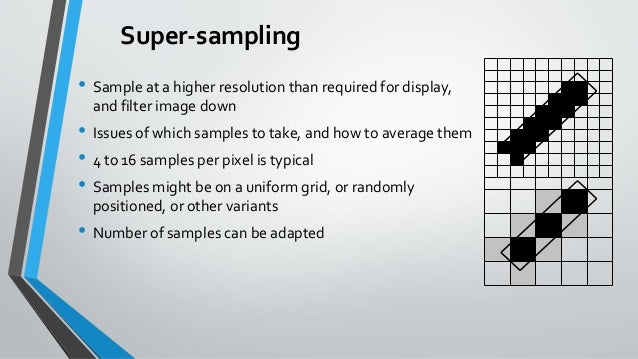
Comparison of render scenes with and without supersampling antialiasing (left side) and with supersampling antialiasing applied (right side). (Do not apply AA means nearest neighbor interpolation).
Supersampling or SSAA (supersampling antialiasing) is a method of spatial antialiasing, that is, the method is used to eliminate aliasing (pixelated with jagged edges, colloquially “jaggies”) from the representation of images in computer games or other software. computer generating images. Aliasing occurs because you see a lot of small squares on your computer screen, unlike real objects that have continuous smooth lines and curves. All of these pixels are the same size and each is a single color. Lines can only be displayed as a collection of pixels, so they look jagged unless they are perfectly horizontal or vertical. The purpose of supersampling is to reduce this effect. Color samples are taken in various cases within one pixel (not just in the center as usual) and the average color value is calculated. This is achieved by rendering the image in a much higher position. The solution is to use additional pixels in the calculation to reduce it to the desired size than the one shown. The result is an image with a smoother transition from one pixel line to another along the edges of the downsampling object.

The number of samples determines the quality of the output.

Motivation
In the case of aliasing 2D images, it appears as follows: Moire pattern a pixelated edge the jagged effect known colloquially as “General”. Signal processing and image processing knowledge suggests achieving complete masu removal. Aliasing, appropriate spatial sampling at the Nyquist rate (or more) after applying the 2D antialiasing filter, because it requires direct and inverse direction in this approach, the Fourier transform, such as supersampling. Computational approaches were developed to avoid the change of domain remaining in the spatial domain (“image domain”).

Method
Computational cost and adaptive supersampling
Supersampling is much more time consuming and computationally expensive. Given the amount of graphics card storage and memory bandwidth, the buffers are several times larger. [1] The solution to this problem is adaptive supersampling, in which only pixels at the edges of the object are supersampled.

Initially, only a few samples are taken within each pixel. If these values ​​are very similar, only these samples will be used to determine the color. Otherwise, more will be used. The result of this method is better performance because more samples are calculated only when necessary.

Oversampling

Oversampling

oversampling

This article is about signal processing oversampling.

OVERSAMPLING

For more information on analyzing oversampling data, see. Oversampling and subsampling in data analysis.
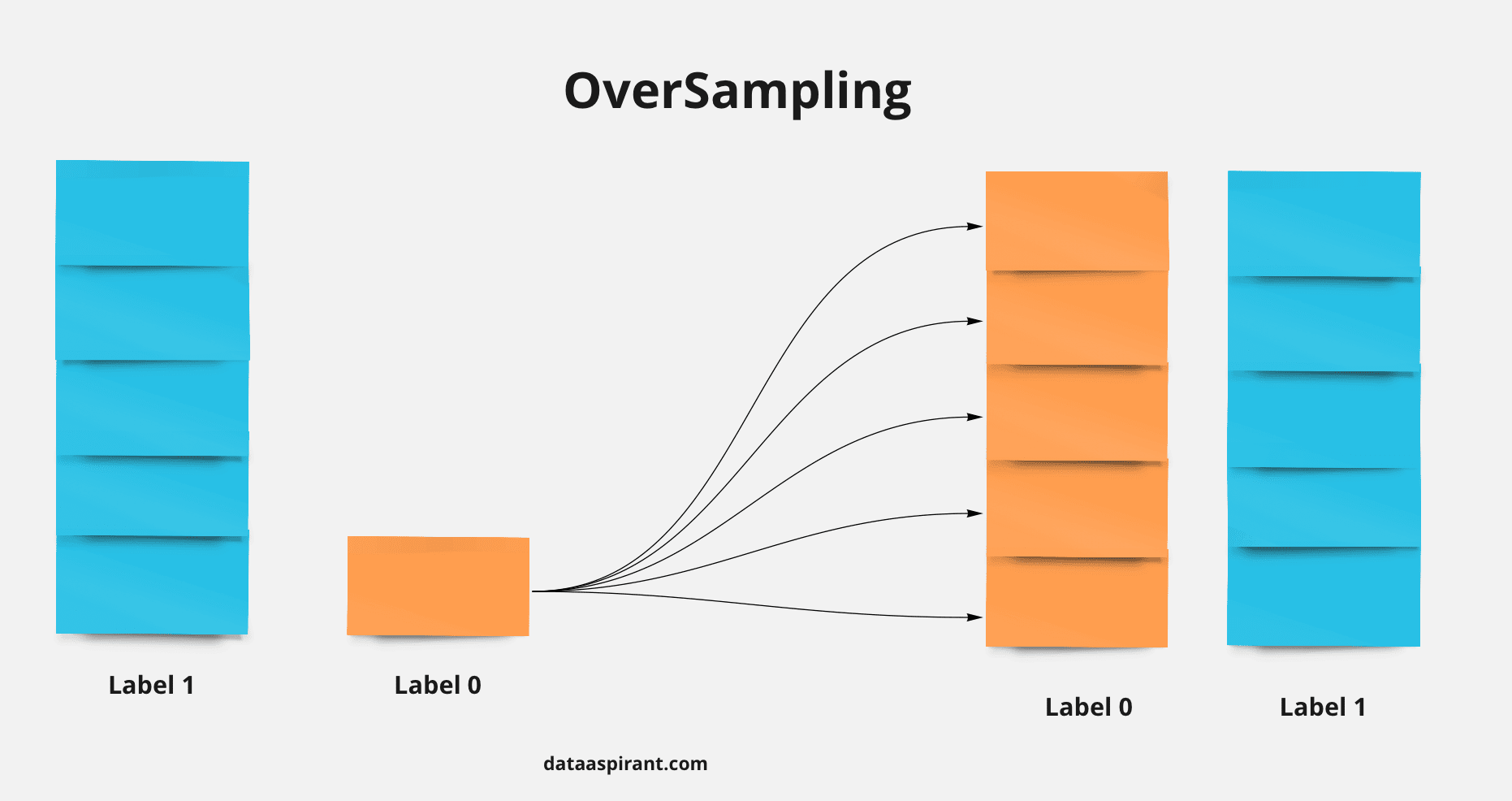
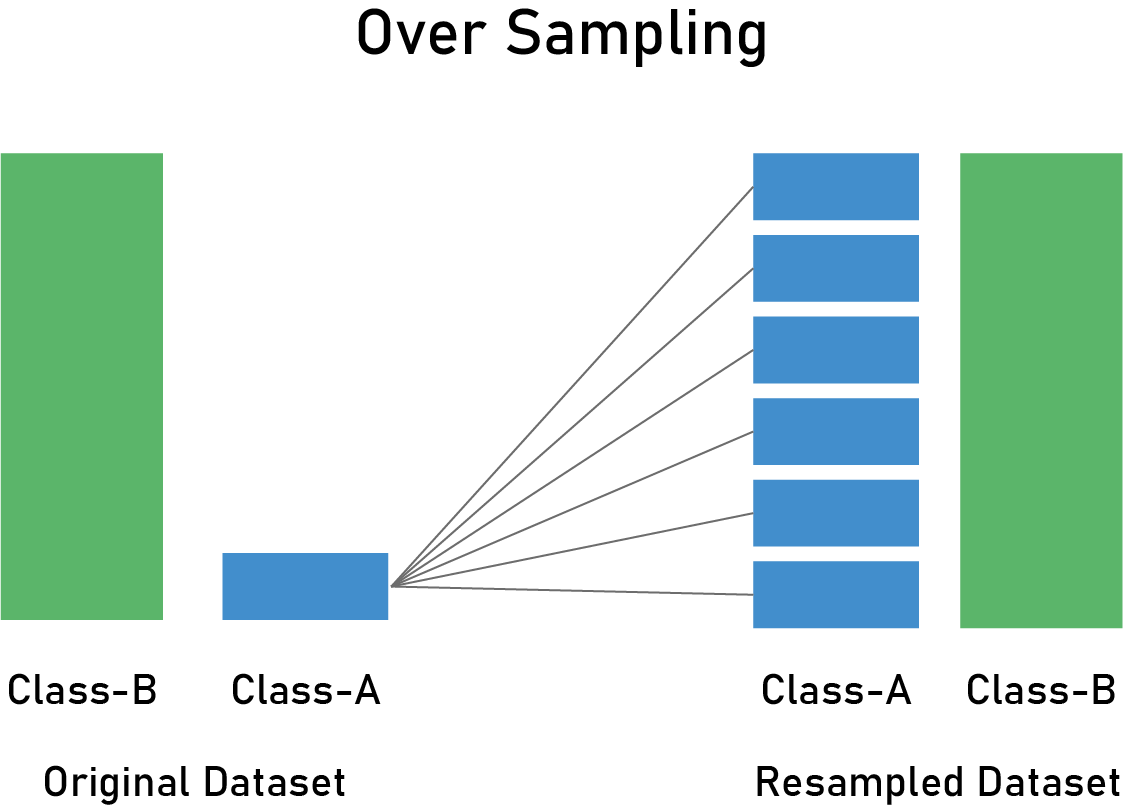
Signal processing, the oversampling process is a signal with a sample rate significantly higher than the straight Nyquist sample rate. In theory, a signal with limited bandwidth can be completely reconstructed when sampled above the Nike line. Nike Straight is defined as twice the bandwidth signal. Oversampling can improve resolution and signal-to-noise ratio, and can help prevent aliasing and phase distortion and relax the performance requirements of the antialiasing filter.

The signal is said to be oversampled with the following coefficients: N times the Nyquist line when sampled at N.

Motivation
There are three main reasons for oversampling.

Anti-aliasing
Oversampling makes analog realization easier. Anti-aliasing filters. [1] Without oversampling, implementing filters with the precise cuts necessary to maximize available bandwidth is very difficult. Nyquist limit. You can relax the design limitations of antialiasing filters by increasing the bandwidth of your sampling system. [2] When sampled, the signal looks like this: Digital filtering and downsampling to the desired sample rate. In modern integrated circuit technology, the digital filters associated with this subsampling are easier to implement than their counterparts. Analog filter Required for systems that are not oversampled.

Solution
In fact, oversampling is implemented to reduce costs and improve performance. Analog-to-digital converter (ADC) or digital-to-analog converter (DAC). [1] Oversampling with a factor of N increases the coefficient N because the dynamic range is also N times the total possible value. However, the signal-to-noise ratio (SNR) increases in amplitude when the uncorrelated noise is added as follows: As the coherent signals are summed, the average increases by N. As a result, the SNR increases as follows: .. sqrt {N} sqrt {N} sqrt {N}

For example, to implement a 24-bit converter, it is sufficient to use a 20-bit converter that can run at 256 times the target sample rate. Combining 256 consecutive 20-bit samples increases SNR by a factor of 16 and effectively adds 4 bits to the resolution to produce a single sample with 24-bit resolution. [3] [a]

The number of samples required to obtain the additional data precision bits.

{mbox {number of samples}} = (2 <n>) <2> = 2 <2n>.
To scale the average sample to a whole number, add bits, the total sample is divided by: n2 2n 2 n

{displaystyle {mbox {scaled mean}} = {frac {sum limits _ {i = 0} ^ {2 ^ {2n} -1} 2 ^ {n} {text {data}} _ {i}} {2 2n} = {frac {sum limits i = 0} 2 2n -1} {text {data}} i} {2 n}}. }
This average is recorded by an uncorrelated noise ADC that contains sufficient signal. [3] Otherwise, for stationary input signals, the sample values ​​are all the same and the average result is the same. Therefore, oversampling did not improve in this case. In similar cases where the ADC does not register noise and the input signal changes over time, oversampling improves the results, but is inconsistent and unpredictable.2 n

Add a bit of dithering to improve dither noise using the resolution oversampling function, noise in the input signal is likely to improve the final result. In many real-world applications, a slight increase in noise deserves a significant improvement in measurement resolution. In practice, raster noise is often placed outside the frequency range of interest, so this noise is filtered in the digital domain to make the final measurement in the frequency range of interest. Resolution and low noise level. [Four]

noise
If multiple samples of the same quantity are obtained with uncorrelated noise, [b] will be added to each sample. This is because, as mentioned above, the uncorrelated signals are loosely coupled and averaged more than the correlated signals. N noise power samples times a factor of N. For example, 4x oversampling improves the signal-to-noise ratio for power by 4x. This equates to a two-fold improvement in voltage.

Audio Processing – Floating Point

Audio Processing – Floating Point

Audio Processing

Floating-point samples are not evenly spaced, so the resolution of floating-point samples is not as simple as that of whole samples.

AUDIO PROCESSING

In floating point representation, the space between two adjacent values ​​is proportional to the value. This results in a significant improvement in SNR compared to entire systems, as the precision of high-level signals is the same as the precision of identical low-level signals. [twenty]

The trade-off between floating point and integer is that the space between large floating point values ​​is greater than the space between large integer values ​​of the same bit depth. Rounding a large floating point number gives you a greater error than rounding a small floating point number, but rounding a whole number always gives you the same level of error. In other words, integers always have a uniform rounding of the LSB to 0 or 1, floating-point numbers have a uniform SNR, and the quantization noise level is always a constant relationship with the signal level. [21] The floating point noise floor increases as the signal increases and decreases as the signal decreases, resulting in audible dispersion if the bit depth is low enough.

Audio processing

Most digital audio processing operations involve re-enticing the sample, resulting in additional rounding errors similar to the original quantization errors that occurred during analog-to-digital conversion. In-process calculations must be performed with greater precision than the input sample to avoid rounding errors that are greater than the implicit error in the ADC. [twenty three]

Digital Signal Processing (DSP) operations can be performed with either fixed-point or floating-point precision. In any case, the precision of each operation is not determined by the resolution of the input data, but by the precision of the hardware operation used to perform each step of the process. For example, on x86 processors, floating-point arithmetic is performed in 16-bit, 32-bit, or 64-bit single- or double-precision fixed-point arithmetic. Therefore, all processing performed on Intel-based hardware is done with these restrictions, regardless of the source format.

Fixed-point digital signal processors Often support specific word lengths to support specific signal resolutions. For example, the Motorola 56000 DSP chip runs with a 24-bit multiplier and 56 accumulator. Accumulate and Multiply Operation Two 24-bit samples with no overflow or truncation. [24] Fixed point results may be truncated and less accurate on devices that do not support large accumulators. The error is compounded through multiple stages of the DSP at a rate that depends on the operation being performed. For uncorrelated steps of audio data without DC offset, the error is considered random with a mean of zero. Under this assumption, the standard deviation of the distribution represents the error signal and the quantization error is proportional to the square root of the number of operations. [25] Algorithms with iterative processing such as the following require a high level of precision. Convolution. [23] Recursive algorithms like the following also require a high level of precision. Infinite Impulse Response (IIR) filter. [26] In certain cases of IIR filters, rounding errors can reduce the frequency response and cause instability. [twenty three]

Hesitate

Headroom and noise floor during the audio processing stage to compare with interpolation levels
Noise caused by quantization errors, such as rounding errors and reduced precision during audio processing, can be reduced by adding a small amount of random noise called. For dither and pre-quantization signals. Dithering eliminates the behavior of non-linear quantization errors, resulting in very low distortion but slight gain. Noise floor. The recommended ITU-R 468 noise weighting for 16-bit digital audio measured with ITU-R 468 is approximately 66 dB below the alignment level, or full scale 84 dB lower than digital, as it is comparable to the microphone and room noise levels. little effect on 16-bit audio.

Audio bit depth Audio

Audio bit depth Audio

Bit Depth

In digital audio using pulse code modulation (PCM), the bit depth is the number of bits in each sample of information and corresponds to the direct resolution of each sample.

bit depth

Some examples of bit depths include Compact Disc Digital Audio, which uses 16 bits per sample and can support up to 24 bits per sample of DVD-Audio and Blu-ray Disc.

In a basic implementation, bit depth fluctuations mainly affect the following noise levels: Quantization error: thus signal-to-noise ratio (SNR) and dynamic range. However, it mitigates these effects without changing the dithering, noise shape, and oversampling bit depth. Bit depth also affects bit rate and file size.

Bit depth is a digital signal that only makes sense for PCM. The non-PCM format, like the lossy compression format, does not have an associated bit depth. [to]

Binary representation

A PCM signal is a set of digital audio samples that contain data that provides the information you need. Reconstructed original analog signal. Each sample is a signal of the signal at a particular amplitude point, and the samples are evenly spaced in time. Amplitude is the only information explicitly stored in the sample and is usually stored as one of the following: Binary number encoded as integer or floating point Fixed number of digits – The bit depth of the sample, also known as word length or size word of mouth.

Resolution indicates the number of discrete values ​​that can be represented in the analog value range. The resolution of the binary integers increases as the length of the word increases exponentially. Adding 1 bit doubles the resolution and adding 2 bits doubles the resolution. The number of possible values ​​that can be represented by an integer bit depth can be calculated using. 2 n, where n bit depth. [1] Therefore, the resolution of a 16-bit system is 65,536 (2 16) possible values.

The entire PCM audio data is normally stored as follows: Two’s complement format for signature numbers. [2]

Many audio file formats and Digital Audio Workstations (DAWs) now support the PCM format with samples represented by floating point numbers. [3] [4] [5] [6] Both WAV and AIFF file formats support floating point rendering. [7] [8] Unlike integers, where the bit pattern is a unique set of bits, floating-point numbers consist of separate fields whose mathematical relationships form a number. The most common standard is IEEE 754, which consists of three fields. Sign bit This is whether the number is positive or negative, exponent, and mantissa. This is raised by the exponent. The mantissa is represented as a binary fraction based on two IEEE-based floating point formats. [9]

Quantization

Bit depth is the quantization error of the reconstructed signal at the maximum level determined by the signal-to-noise ratio (SNR). Bit depth is limited by frequency response, which does not affect sample rate.

Quantization error introduced in analog-to-digital conversion (ADC) as modeled quantization noise. This is the rounding error between the analog input voltage to the ADC and the digitized value of the output. The noise depends on the non-linear signal.

8-bit binary ann (149-inch decimal), highlighted LSB
If the quantization error is the least significant bit (LSB) and the signal has a uniform distribution that covers all quantization levels, the signal-to-quantization noise ratio (SQNR) can be calculated. Scriptstyle {pm frac {1} { 2}}

mathrm {SQNR} = 20log_ {10} (2 ^ {Q}) 約 6.02cdot Q mathrm {dB} 、!
Where Q is the number of quantization bits and the result is measured as follows: Decibel (dB). [10] [11]

Therefore, 16-bit digital audio has a theoretical maximum CD SNR of 96 dB, and professional 24-bit digital audio has a maximum SNR of 144 dB. As of 2011, digital audio conversion technology is limited to an SNR of approximately 123 dB [12] [13] [14] (effectively 21-bit) IC design due to the actual limit. [b] Still, this closely resembles the human performance of the auditory system.

What is bit?

What is bit?

BIT

bit is an abbreviation for binary digits.

Binary Code System BIT

16 bits and 24 bits in catalogs, etc. represent the number of binary digits * handled by computers, etc.

In digital audio, analog sound is converted to a digital signal,
but the number of bits determines how precisely the amplitude value is converted when it is converted to a binary number (quantization) after sampling.
In the case of 1 bit, only 1 or 0 can be judged, but in 8 bit (10001001), 2 raised to the eighth power, that is, 256 steps can be judged in detail.

Currently, the 16-bit mainstream has 65,536 steps and the 24-bit mainstream has 16,777,216 steps.
Now,
there is a part that does not match the actual waveform (analog waveform) and the quantized and sampled digital waveform. This is called quantization noise.
This noise is especially noticeable when the number of bits is small.

So simply increasing the F’s and the number of bits will improve the sound (closer to the original sound)
, but it will consume a lot of memory. Also, in the case of digital recording, it is
very important to manage the input level to bring out the high quality of the sound.
If the recording level is too low, you won’t be able to bring out its goodness.

It is important to configure it so that it is not clipping at the maximum level of the music to be recorded,
but try to increase the overall average level as much as possible to have a wider dynamic range
(recordable high and low level difference) than analog. Make the most of it and record with a good signal-to-noise (SN) ratio.

* The decimal numbers that we usually use are represented by a combination of 10 types of numbers from 0 to 9, but in
binary numbers, are represented by a combination of 0 and 1.

For example, in a 4-digit binary number,

Decimal number 0 1 2 3 Four ・ ・ ・ ・ 14 15
Binary number 0 1 Ten 11 100 ・ ・ ・ 1110 1111
You can express a number from 0 to 15 as.

(5) What is timing?

It is a state in which each device moves in harmony with each other at the same time in the system.

Digital devices use a reference signal called a word clock, and
Each device can be synchronized with a high precision that cannot be compared with analog devices.

For the configuration of each device, the device that supplies the reference word clock is set as the word clock master, and
all other devices are configured as
word clock slaves so that they can operate synchronously in response to the instruction of a unit set by this master increases.

The role of the word clock is similar to that of the conveyor belt used on factory assembly lines.

The digitized audio data is divided into small times, it is
transmitted to each device, processed and finally returned to an analog audio signal by the DA converter.
What happens if the speed of the conveyor belt changes along the way?
The data will be lost or the time will not match.

If there are devices in the system that are not synced
, problems such as loss of sound and noise mixing will occur due to the same cause.

Regarding synchronization, if each device is precisely configured and word clock transmission between each device is guaranteed,
can achieve high-performance and comfortable operation unique to digital technology.

(6) Digital recording medium

CD compact disc. Introduced in 1982.
Bonus CD A CD that can also play back photos and pictures.
CD-R A CD that can only be burned once.
CD-RW A CD that can be recorded many times.
DAT Digital audio tape. Record and play back on magnetic tape.
Maryland Mini disco. Introduced in 1991.
MP3 Achieve CD-quality sound quality on the Internet, personal computers, etc.
SACD Super Audio CD. Higher sound quality than current CD.
DVD Audio You can play videos and music.