
Most important audio formats

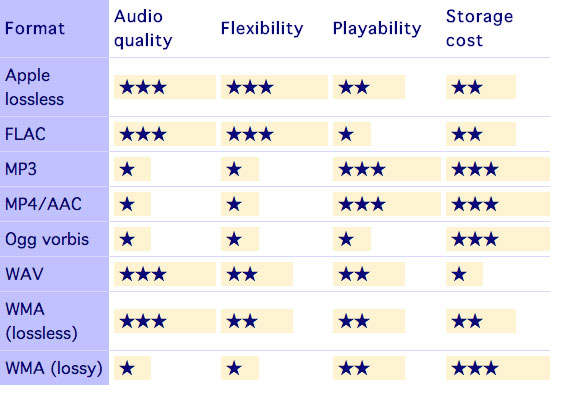
MP3
MPEG Audio Layer III
-Compressed digital format with loss.
-Its compression size: 11 to 1
-Compresses the audio using a lossy algorithm to obtain a smaller size, decoding the signal, allowing less bits to be consumed, which translates into less weight and less quality.
-Extension: .MP3
-Good compatibility. Can be played on almost all audio players
-Easily distributable online
-Better quality-space ratio
-Loss of the original sound, implies a decrease in quality throughout the format
-Supports two channels
-Distortion in frequency bands where the brightness and sparkle (5000hz-20000hz) are located.
-Increase in the bass and subwoofer frequencies (250hz – 40hz) due to the dynamic compression of the sound that causes a different equalization from the original recording.
-present patterns between tracks
AAC
Advanced Audio Coding
– Lossy compressed digital format
-It is an audio compression system developed by the Fraunhoffer Institute, AT&T, Sony and Dolby Laboratories.
– It is an audio broadband coding algorithm with higher performance than MP3.
-Extension: .m4a, .m4b, .m4p, .m4v, .m4r, .3gp, .mp4, .aac
-Play files from the hard disk of a computer with a quality that can be similar to the CD using significantly less space than an mp3.
-This system increases the quality of the mp3.
-Loss of original sound
-Subject to patent
WAV
Waveform audio format
-Uncompressed digital format.
– Windows own format
– Used to store sounds on PC, supports mono and stereo files at various resolutions and sampling rates
– Extension is .wav
-High sound quality
-Provides faithful listening to the audio
-It works in Windows applications and in common equipment with a CD player.
– Includes support for almost all current audio codecs
– Compatible to convert into various formats by means of the appropriate software.Example switching from Wav to Mp3
-It takes up a lot of disk space
-Poor quality-space ratio
-Difficult to distribute online due to the weight of the file
-Allows to capture in the same file up to 6 hours
FLAC
Free Lossless Audio Codec
– Lossless compressed format
-Extension: .flac
-Higher quality in high fidelity equipment
-Information is continuous between separate tracks
-It does not delete information from the original content
-It is an open source format.
-Code and decode quickly
-It takes up a lot of disk space
-It is not supported by all portable players
AIFF
Audio Interchange File Format
-Uncompressed format without loss.
– Format typical of native applications of Mac OS X for example iTunes
-Extension: .aiff or .aif.
-High sound quality
-Requires large storage space
OGG VORBIS
-Compressed format loss
– Stream-oriented container, which means that
can be written and read in one step, making it suitable
for streaming on the internet.
– Free software version to MP3 and AAC.
– Intended to allow maximum encoder flexibility
Extension: .ogg
-It is free, open and not patented
-Similar to MP3
-Good value for space
-Improved same-size MP3 quality.
-It is not supported by all players
-Loss of original sound
WMA
Windows Media Audio
– Lossy audio compression format, although there is a more recent lossless development
-Windows version to compress audio
-Extension: .wma
-Ideal for real-time streaming
-Reduce size of large files
– Inclusion of support in Windows Media Player
-Lower quality
-It takes space
Real Audio
-Media player with various functions and Internet connection tools
Example: listening to music and watching videos hosted on the Internet (streaming), and creating and playing extensive playlists.
–
– Ideal for live streaming over the network due to its streming ability
– the coding allows adapting it to the user’s reception capacity depending on their internet connection speed.
-Can be used in different operating systems (Windows, Linux, Mac OS)
– Ability to transfer files to other multimedia devices
-Reduction in file sizes
-Incompatibility with some browsers
-High RAM consumption
APE
– Lossless compressed format
-Extension: .ape
-Save space
-High quality
-Better file compression rate
-It is not compatible with most players.
-Slow to compress and decompress files


