Understanding the Differences between FLAC, MP3, M4A, OGG, and WAV Audio Formats


Free Download Mp4Gain
picture

Understanding the Differences between FLAC, MP3, M4A, OGG, and WAV Audio Formats

Understanding the Differences between FLAC, MP3, M4A, OGG, and WAV Audio Formats


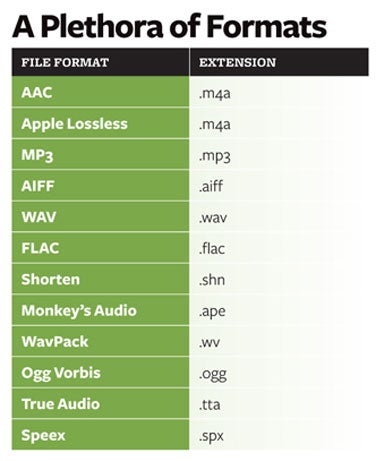
When it comes to digital audio, there are a plethora of different file formats to choose from. Each format has its own set of advantages and disadvantages, making it important to understand the differences between them in order to choose the best option for your needs. In this article, we will take a closer look at five popular audio formats: FLAC, MP3, M4A, OGG, and WAV.

Understanding the Differences between FLAC, MP3, M4A, OGG, and WAV Audio Formats

FLAC

FLAC, or Free Lossless Audio Codec, is a popular open-source format that is known for its lossless compression. This means that, unlike some other formats, FLAC does not lose any audio quality during the compression process. This makes FLAC a great option for audiophiles who want the highest quality audio possible. However, FLAC files are typically larger than other formats, which can be an issue for those with limited storage space.

MP3

MP3, or MPEG Audio Layer III, is one of the most widely used audio formats. It uses a lossy compression method, which means that some audio quality is lost during the compression process. However, MP3 files are significantly smaller than FLAC files, making them a great option for those who want to store a large amount of music on their device. Additionally, the MP3 format is supported by a wide range of devices and software, making it a very convenient option.

M4A

M4A, or MPEG-4 Audio, is a file format that is commonly used for music and other audio files. It is similar to MP3 in that it uses a lossy compression method, but M4A files are typically smaller than MP3 files. Additionally, M4A files can contain advanced features such as chapters and artwork, making them a great option for audiobooks and other spoken-word content. However, it is important to note that not all devices and software support M4A files.

OGG

OGG, or Ogg Vorbis, is a free and open-source format that is similar to MP3 and M4A. It uses a lossy compression method and is known for providing a good balance of audio quality and file size. OGG files are typically smaller than FLAC files but larger than MP3 and M4A files. Additionally, OGG files can contain advanced features such as tags and chapters, making them a great option for audiobooks and other spoken-word content. However, it is important to note that not all devices and software support OGG files.

WAV

WAV, or Waveform Audio File Format, is a popular format that is known for its high audio quality. It is a lossless format, which means that no audio quality is lost during the compression process. However, WAV files are typically larger than other formats, making them an option for those who want the highest quality audio possible but have limited storage space. Additionally, WAV files are supported by a wide range of devices and software, making them a convenient option.


Free Download Mp4Gain
picture


Mp4Gain Main Window
picture


Mp4Gain Features
picture


Free Download Mp4Gain
picture

Why are there so many video and audio formats, and is there a difference?

Why are there so many video and audio formats, and is there a difference?

audio formats

7. VQF format

audio formats

The compression ratio of VQF format can reach 1:18, so under the same circumstances, the volume of compressed VQF file is 30-50% smaller than MP3, which is more convenient for Online streaming and sound quality is excellent with close to CD sound quality (16-bit 44.1kHz stereo). However, VQF has not disclosed technical standards and has not yet become popular.
Supplement: rare

8. Format
FLAC FLAC is lossless audio compression encoding. FLAC is a set of well-known free audio compression codes, which is characterized by lossless compression. Unlike other lossy compression codes, such as MP3 and AAC, it won’t destroy any original audio information, so you can restore the sound quality of music CDs. It is now compatible with many software and hardware audio products. In short, FLAC is similar to MP3, but it is lossless compression, which means that the audio will not lose any information when compressed in FLAC mode. This compression is similar to Zip, but FLAC will give you a higher compression ratio, because FLAC is a compression method specially designed for audio characteristics, and you can use the player to play FLAC compressed files, just like you normally do with your MP3. the files are the same.
Supplement: Lossless format, compared to ape , is larger in size, but has good compatibility, fast encoding speed, and broader player support

9. Format
APE APE is one of the most popular digital music file formats. Unlike lossy compression methods such as MP3, APE is a lossless audio compression technology, which means that after compressing audio data files read from an APE-format audio CD, it can also compress audio data files. APE Restore format files and the restored audio. the files are exactly the same as before the compression without any loss. The file size of APE is about half of that of a CD, but with the popularization of broadband, many music lovers love the APE format, especially for friends who want to stream audio CDs over the network. APE can help them save a lot of resources.
Supplement – lossless compression format, compared to FLAC, the volume is smaller. Encoding is slow.

10. Format
MID MID is the abbreviation of midi, which is its extension, “interface of digital musical instruments”, that is, its real meaning is the name of an interface for different devices to transmit signals. All of our current MIDI music production depends on this interface, and the information transmitted between this interface is also called MIDI information. MIDI was first applied to electronic synthesizers (electronic musical instruments played on keyboards. Due to the inconsistent technical specifications of early electronic synthesizers, it was difficult to link different synthesizers. In August 1983, YAMAHA, ROLAND, KAWAI, and others Well-known electronic musical instruments Instrument manufacturers jointly specified a unified digital musical instrument interface specification, which is the MIDI 1.0 Technical Specification.Since then, a number of electronic synthesizers and electronic musical instruments, such as electronic pianos, have adopted this unified specification. , so that various electronic musical instruments can be linked together to transmit MIDI information and form a true synthetic music performance system.

Why are there so many video and audio formats, and is there a difference?

Why are there so many video and audio formats, and is there a difference?

audio formats
audio formats

3.WAV format

audio formats
audio formats

The WAV format is the oldest digital audio format and is widely supported by the Windows platform and its applications. WAV supports many compression algorithms, supports a variety of audio bits, sampling rates and channels, adopts 44.1 kHz sampling rate and 16 quantization bits, so the sound quality of WAV is almost the same than CD, but WAV format requires too much storage space Not easy to communicate and broadcast.
Supplement: Lossless volume is large

4. Format
ASF ASF is a multimedia playback format formulated by Microsoft, suitable for playback on the Internet.
Supplement: rare format

5. Format
AAC AAC is actually short for Advanced Audio Coding. AAC is part of the MPEG-2 specification. The algorithm used by AAC is different from that of MP3. AAC improves encoding efficiency by combining other features. AAC’s audio algorithm far exceeds some older compression algorithms (like MP3, etc.) in terms of compressibility. It also supports up to 48 audio tracks, 15 low-frequency audio tracks, higher sample rates and bit rates, multi-language support, and higher decoding efficiency. In short, AAC can provide better sound quality on the assumption that MP3 files are 30% smaller.
Added: One of the best lossy formats out there. There are many encodings, faac and nero are common, and the bit rate is up to 448kbps. In terms of hardware support, advanced mp3 and mobile phones are generally supported.

6. Format
Mp3Pro Mp3Pro is an improved version of the Mp3 encoding format. MP3Pro is developed by the Swedish Coding Technology Company, which can also compress the volume of sound files to half the size of the original MP3 format while maintaining the same sound quality. Also, the sound quality of the original MP3 music can be improved basically without changing the file size. You can compress audio files to a lower bit rate and keep the sound quality before compression to the greatest extent possible. MP3pro can achieve full compatibility. The extension of the files compressed by mp3Pro remains .mp3. It can be played on old mp3 players. Old mp3 files can be played on the new mp3pro players.

Why are there so many video and audio formats, and is there a difference?

Why are there so many video and audio formats, and is there a difference?

Audio File Formats
Audio File Formats

I found that there are many video and audio formats, what is the difference between them? Is there a player that supports most audio and video playback formats?

Audio File Formats
Audio File Formats

The difference lies in the encoding method. Original video and audio require a lot of storage space. In the era when the storage device was still in MB as a large drive, various lossy compression encoding formats began to appear. The difference between various encoding formats is the compression ratio. The pros and cons of height and reduction ratio.

Basically, there are more advanced encodings that can provide high-quality audio and video effects with higher compression ratio.

1. Format
MP3 MP3 uses MPEG Audio Layer 3 technology to compress music into a file with a smaller capacity at a compression ratio of 1:10 or even 1:12. Files are compressed to a smaller size. But also very good at keeping the original sound quality. It is precisely because of the small size and high sound quality of MP3 that the MP3 format has become almost synonymous with online music. The music per minute MP3 format is only 1 MB in size, so the size of each song is only 3-4 megabytes.

Supplement: the highest bit rate is 320K, and there is no high frequency part is its default. The sound quality is not high!

2. Format
WMA WMA achieves a higher compression ratio by reducing data traffic while maintaining sound quality. The compression rate can generally reach 1:18, and the generated file size is only half of the corresponding MP3 file. This is very important for models that only assemble 32M. It supports both WMA and RA formats, which means that the 32M space is virtually expanded by 2 times. In addition, WMA can also add copy prevention through the DRM scheme, or add restrictions on playback time and number of playbacks, or even restrictions on playback machines, which can effectively prevent piracy.
Supplement: 128 kbps is the optimal compression ratio of wma, 128 kbps wma = 192 kbps mp3

Description of the main audio formats. Audio file formats

Description of the main audio formats. Audio file formats

Audio File Formats

Surely, many users prefer to use their home computer not only as a workhorse, but also as a multimedia center where they can watch movies or family photos, as well as listen to their favorite music. Although compact digital players or mobile phones are certainly more suitable for listening to musical compositions, but unlike them, a computer can not only play music.

Audio File Formats

No matter how big the built-in memory of your music player is, it will most likely be difficult to store your entire music library on it. Plus, you can create, edit, organize, and search for music with your PC. Also, don’t forget that there are around three dozen common digital audio formats today, and most players are far from omnivorous and can only play a few of them.

So why do you need to create so many music formats to store one type of content? The fact is that, in the vast majority of cases, the sound is stored in “compressed” form, since one minute of uncompressed composition occupies about 10 MB on the hard disk. On the one hand, this seems not to be much, but on the other, if you are a music lover and your collection consists of several hundred or even thousands of songs, then it is clear that the sound must be compressed to reduce the space it occupies in electronic media.

Various special algorithms are used to compress music files, which subsequently determine the structure and presentation of the audio data, or so-called digital audio file formats. All audio formats can be divided into three groups: uncompressed audio formats, lossless compression, and lossy compression.

No compression
One of the most widespread formats related to this type is the well-known WAV. The sound of files with this extension is stored without compression or changes. It is true that much more space is required to store uncompressed files and therefore WAV is more widely used only in professional audio and video applications, where the sound should not have a loss of quality before processing. Keeping ordinary musical compositions in this form is unwarranted waste.

To play WAV files, you do not need any special software, as all media players understand this format, including the standard Windows Media audio player built into the Windows system.

Another format used to store uncompressed audio that is worth mentioning is Apple’s development called AIFF (Audio Interchange File Format). As you may have guessed, it is most commonly used on Macintosh computers running Mac OS X.

Lossless compression (lossless)
Lossless compression algorithms for audio files work on the principle of conventional file cabinets. They do not provide the highest level of compression (40 to 60%), while they have virtually no effect on sound quality. It is also worth noting that in this case, the encrypted data can be fully restored to its original form. Therefore, the use of lossless compression is most often used in cases where it is important to preserve the identity of the compressed data with respect to the original.

The most popular audio formats in this group are FLAC (Free Lossless Audio Codec), APE (Monkey’s Audio), WMA (Windows Media Lossless), and ALAC (Apple Lossless Audio Codec). Each has its own pros and cons. For example, the APE codec offers slightly better compression gains, while FLAC is more common. In general, all true music lovers store their music collections in lossless formats, since they do not remove any data from the audio stream and files created with these codecs can be listened to even on high-quality stereos.

Frequently asked questions about audio formats

Frequently asked questions about audio formats

Audio File Formats

The rapid development of computer technology and the Internet has led to the need to create digital formats that could be stored and reproduced on computers without the use of any physical medium. As a result, various types of digital audio formats have been developed.

audio file formats

Types of digital audio formats
All digital audio formats can be divided into 3 groups according to the principle (codec) used to compress audio data, namely:

Lossy formats
These are audio formats that use a lossy compression method for audio data. That is, when encoding a digital audio recording with any of the lossy codecs, certain changes are made to the audio data. This can significantly reduce the size of the resulting file, but at the same time leads to a deterioration in sound quality. The most popular lossy formats include MP3, WMA, Ogg Vorbis, AAC, and others.

Advantages and disadvantages of lossy audio formats
The main advantage of lossy formats is the small file size, while maintaining acceptable quality for listening. Furthermore, these audio formats are compatible with the vast majority of electronic devices and music players, including home audio systems, radio recorders, and MP3 players.

The main drawback is the loss of sound quality compared to the original. If you convert an audio recording from an original licensed audio CD to a lossy format, when you play the resulting file, the sound will be worse than that of the source.

Lossy formats sound bad?
No way. First, when lossy encoding, there is a choice of compression ratio and sound quality. For example, if we are talking about the MP3 format, then to record a voice (audiobooks, audio tracks for a textbook in a foreign language), the CBR 128 kbps quality will be enough, but for music, the ideal option is CBR 320 kbps. It is worth noting that CBR is short for ConstantBit Rate, which stands for Constant Bitrate.

Second, the compression process uses the principle of removing from the recording those frequencies and sounds that a person cannot hear by nature. There is an opinion, confirmed by many experiments, that music compositions in high quality MP3 format (CBR 320 kbps) cannot be distinguished by ear from the original recording or from a licensed audio CD purchased from a store.

Lossless audio format
This is a type of digital audio format in which the audio data is encoded without loss of quality. The sound will not differ from the source in any way, be it a licensed music CD (CDA format) or a digitized vinyl head, saved in uncompressed WAV format (for Windows) or its analog AIFF (for iOS). The most popular lossless formats are FLAC, Monkey’s Audio, ALAC, WavPack, MWA Lossless.

This makes lossless audio formats ideal for listening to music on good audio equipment. For example, in high-end home speakers or Hi-Fi systems and high-end headphones.

Advantages and disadvantages of lossless formats
The main advantage of lossless audio formats is that during encoding and decoding, the program does not remove any data from the audio stream. Because of this, when playing such files, the listener receives the original sound without disturbance.
But lossless audio formats also have a major drawback. The fact is that many devices for playing sound files do not yet support these formats. You can solve the problem by purchasing the right type of equipment, for example a portable Hi-Fi player or a media player, as well as a home audio system that supports lossless audio formats.

Main digital audio formats

Main digital audio formats

Audio Formats

–MP3: was created by Moving Pictures Experts Group (MPEG), which created and continues to create standards for storing and transmitting audio and video in digital format. In its entirety, the format is called: MPEG-1 / MPEG-2 Layer 3 (MP3). It is the most popular music storage format in the world today.

Audio File Formats
MP3 simultaneously compresses data and processes audio to obtain the smallest possible file size. The bit rate can vary from 8 Kb / s to 320 Kb / s, the sampling rate from 16 kHz to 48 kHz. The goal of processing the original recording with the MP3 compression algorithm is to compress the information as little as possible. So if in its original form a song occupies around 70 MB of memory, then in MP3 format with acceptable quality it will only take around 7-8 MB, as you can see, the gain is significant, although it is achieved by degrading the sound quality .

–AAC: The format has become popular because Apple has adopted it as a standard for storing, selling and distributing music in its ecosystem and iTunes. AAC is very similar to MP3 in terms of audio processing during encoding, although it gives a slightly better result.
Furthermore, AAC not only compresses the data, but also performs sound processing, removing a certain type of data, thus achieving significant savings in memory for storing music. The bit rate can range from 8 kbps to 320 kbps, the sample rate ranges from 8 kHz to 96 kHz. With more sophisticated and sophisticated encoding and compression algorithms, AAC music can sound better than MP3 and take up less memory. Another advantage of the AAC format is that it supports up to 48 channels, while MP3 only supports 2.

–WMA: format developed by Microsoft to compete with MP3. During encoding, data is compressed, music is processed, and parts of it are removed, saving memory. However, there is a variation of the format called WMA Lossless that preserves the quality of the original sound. The vast majority of modern phones, players and computers support this format and there should be no problems with its playback. However, some computers may have a hard time playing them, so if you want maximum compatibility, MP3 may be worth choosing.

–FLAC: Developed by the Xiph.Org organization, this format is free for any type of use, so it is quite widespread these days.
FLAC uses data compression, however it preserves the original sound quality of the recording. music is not processed. The recording quality can be 32-bit / 96 kHz (this is significantly higher than the recording quality of CDs, which is 16-bit / 44.1 kHz). The data compression algorithm can save up to 30% memory compared to the original recording, while maintaining perfect sound quality. It is for this reason that the FLAC format has become very common.

–ALAC: this format is analogous to FLAC, but made by Apple, whose full name is Apple Lossless Audio Codec. Its properties are the same as those of FLAC, but its advantage was that all Apple devices could work with it without the need to install third-party applications. Since iOS 11, the FLAC format has also become fully compatible with Apple devices, so the urgent need for ALAC has decreased significantly for the sake of freedom and the greater compatibility with other devices that FLAC offers.

–WAV: A format developed by Microsoft, this format stores the sound in its original form, so the files take up a lot of memory, although they preserve the perfect quality of the music.
WAV does not compress or process sound, we can say that it is an ideal format for storing master copies and for subsequent sound processing. Although there are certain encoding settings that allow you to compress data, they are generally not used. WAV files are similar in storage method to PCM and AIFF formats.

–AIFF: a format also developed by Apple, the full name is Audio Interchange File Format. The main goal is to store music on Apple computers in its original form.
AIFF doesn’t compress data or perform any sound processing, so like WAV it takes up a lot of memory. The best sound storage format if you want to keep processing it in an editor or convert it to other formats on Mac computers.

–PCM: This format is used for digital recording of analog signals, which is sound. It is a standard for recording audio to CDs, but can also be used to store music digitally in computer memory. PCM does not compress audio, ideal for storing master copies of music or for professional audio work.

Audio formats

Audio formats

Audio Formats
The audio format is a type of computer file that contains music. There are lossless uncompressed, lossless compressed and lossy music audio formats.

Audio Formats

Bit rates
Bit rate is a unit of measurement for data that indicates the number of bits transmitted in a given time. When it comes to music formats, the bit rate is expressed in kilobits per second (kbps) transmitted. If you compare the same song encoded at different bit rates, the file with the highest bit rate will be of higher quality. For example, a 320 kbps (CBR) MP3 file transmits 320 kilobits for every second of the audio stream.

Audio formats containing uncompressed lossless data (Uncompressed Lossless)
Lossless uncompressed data formats retain all original recorded information. Since silence is encoded at the same number of bits per second as sound, files containing uncompressed lossless data are often large. Formats containing lossless and uncompressed data are encoded using pulse code modulation (PCM). Examples:

WAV (PCM) (used in Windows)
AIFF (PCM) (used in Mac OS).
Audio formats containing lossless compressed data (Compressed Lossless)
Lossless compressed formats store all original recorded information in a smaller volume than uncompressed lossless data when compressing data. Silence is encoded at the lowest bit rate and audio is compressed, so files that contain lossless compressed data are usually half the size (file size) of the same song in a format that contains non-data. uncompressed loss.

Since formats that contain compressed data without loss of quality and formats that contain uncompressed data without loss of quality both retain all the information from the original recording, they can be transcoded to each other without loss of quality. Examples:

Free Lossless Audio Codec (FLAC)
Apple Lossless Audio Codec (ALAC)
Mono Audio (APE).
Lossy audio formats
Lossy formats always compress data. Lossy audio formats are smaller than those that contain lossless compressed data and formats that contain uncompressed lossless data by removing some of the original information. These are usually high frequencies that most people cannot hear, however in some cases the difference in lossy and lossless audio formats can be very large.

Since lossy formats lose data during compression (and therefore sound quality), they CANNOT be transcoded to lossless or other lossy audio formats without further loss of sound quality. Examples:

MPEG Layer 3 Audio (MP3)
Advanced Audio Coding (AAC)
Windows Media Audio (WMA)
Dolby Digital 3 (AC3) audio codec
DTS Coherent Acoustics Codec (DTS).
File sizes
Here we can see how the file size of the same song depends on the format in which it is presented: uncompressed data without loss of quality, compressed data without loss of quality or loss of quality. Take Avril Lavigne’s classic pop song Sk8er Boi for example. The song is 3 minutes and 24 seconds long.

Lossless uncompressed format – WAV (PCM): 34.3 MB
Lossless compressed format – FLAC: 25.75 MB (25% compression)
Lossy format – MP3 320 (CBR): 7.78 MB (78% compression)
Sound transparency
Sound transparency is a term used to describe the sound characteristic of a lossy file. The sound of a lossy file is considered transparent if the average person cannot hear the difference between it and a lossless file with the same song, having listened to both files and not knowing in what sequence they were heard. For most people, MP3 192kbps (CBR) is considered transparent.

Allowed audio formats
While there are many types of lossy and lossless audio formats, only a few are allowed on RED.

Since some lossless audio formats can be transcoded to other lossless audio formats without loss of audio quality, the only lossless audio format allowed on RED is FLAC. You can always download FLAC and transcode it to ALAC (for iTunes) or any other lossless or lossy audio format you want.

Allowed lossy audio formats:

MP3 (the minimum bit rate for MP3 is 192 kbps (CBR))
AAC (can be replaced by any MP3 torrent except downloads purchased from the iTunes store and containing exclusive tracks from iTunes)
AC3 (usually found on DVD)
DTS (usually found on DVD)
MP3 is the most popular audio format on RED. We allow you to upload albums to AAC purchased from iTunes because they often contain bonus tracks from iTunes, and since AAC is a lossy format, it cannot be transcoded to other audio formats without losing sound quality. Also, AC3 and DTS are often found on DVD and are lossy audio formats, so they cannot be transcoded to other audio formats without losing sound quality.