Audio Basics


Free Download Mp4Gain
picture

Audio Basics

Audio Basics
Audio Basics

Common audio formats
Audio Basics
Audio Basics

Common WAV files use uncompressed PCM encoding, which makes the quality of WAV files extremely high and the volume surprisingly high. For PCM WAV, I’m afraid only lossless compressed audio can have the same quality. What we usually see mp3, the quality of wma (excluding wmalossless) and wav is much worse! You can see this on the spectrum, even if you compare 320kbps mp3 to wav, it will be inferior!

MP3 audio format
Introduction to the MP3 audio format
The full name of MP3 is Moving Picture Experts Group Audio Layer III. One of the most popular lossy compression and digital audio coding formats today, it is designed to greatly reduce the amount of audio data, while for most users the playback quality is not significantly different from the original. original uncompressed audio. It was invented and standardized in 1991 by a group of engineers from the Fraunhofer-Gesellschaft research organization in Erlangen, Germany.

The so-called MP3 also refers to the audio part in the MPEG standard, ie the MPEG audio layer. It is divided into 3 layers according to the difference of compression quality and encoding processing, corresponding to *.mp1/ *.mp2/ *.mp3 these 3 types of sound files respectively. It should be remembered that compression of MPEG audio files is lossy compression. MPEG3 audio encoding has a high compression ratio of 10:1~12:1, while basically keeping the lower part of the audio undistorted, but at the expense of sound files. the quality of high-frequency audio from 12 KHz to 16 KHz is changed by file size. Music files of the same length are stored in the *.mp3 format, usually only *.wav1/10 of the file, and the sound quality is lower than the . files in CD format or WAV format. Due to its small file size and good sound quality, no other audio format can match it at the beginning of its existence, which provides good conditions for the development of the *.mp3 format.

Characteristics of the MP3 audio format
MP3 is a data compression format.
It discards pulse code modulation (PCM) audio data that is not important to the human ear (similar to how JPEG is lossy image compression), resulting in a much smaller file size.
MP3 audio can be compressed at different bit rates, providing a variety of trade-offs between data size and sound quality. The MP3 format uses a hybrid conversion mechanism to convert time domain signals to frequency domain signals.
32-band polyphase integrator filter (PQF).
Modified discrete cosine filter of 36 or 12 taps (MDCT); each subband size can be independently selected between 0…1 and 2…31.
MP3 not only has extensive client software support, but also has a lot of hardware support, such as portable media players (referring to MP3 players), DVD and CD players.


Free Download Mp4Gain
picture


Mp4Gain Main Window
picture


Mp4Gain Features
picture


Free Download Mp4Gain
picture

Audio Basics

Audio Basics

Audio Basics
Audio Basics

Common audio formats

Audio Basics
Audio Basics

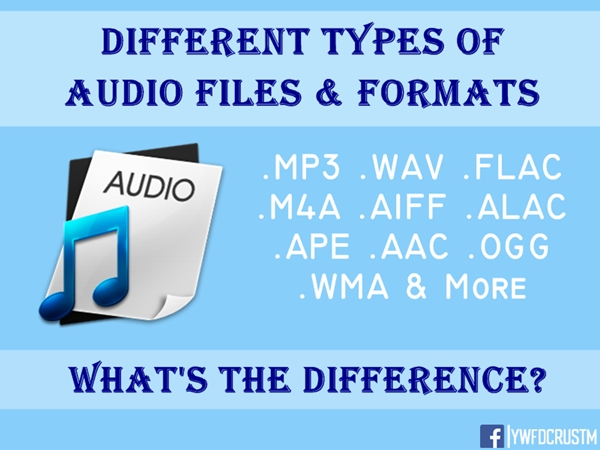
Audio file format specifically refers to the file format in which the audio data is stored. There are many different formats.

The general way to get audio data is to sample (quantize) the audio voltage at a fixed time interval and store the result at a certain resolution (eg CDDA is 16 bits or 2 bytes per sample). The sampling time interval can have different standards, such as CDDA adopts 44100 times per second, DVD adopts 48000 or 96000 times per second. Therefore, sample rate, resolution, and number of channels (for example, 2 for stereo) are key parameters for audio file formats.

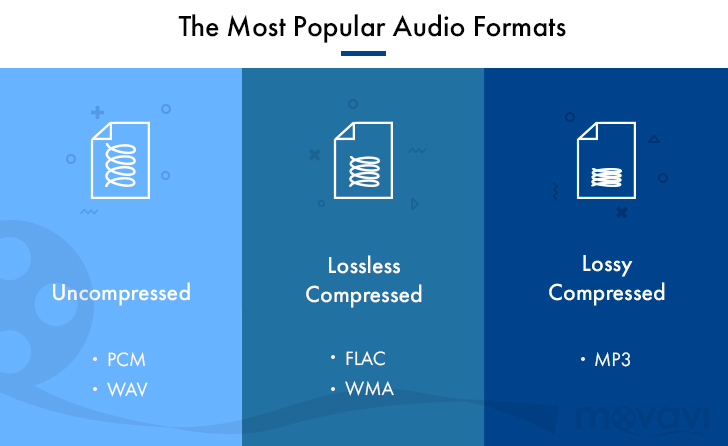
There are two main types of audio file formats:

Lossless formats like WAV, PCM, ALS, ALAC, TAK, FLAC, APE, WavPack (WV)
Lossy formats like MP3, AAC, WMA, Ogg Vorbis
The lossy file format is based on a model of acoustic psychology that removes sounds that are difficult or impossible for humans to hear, such as a very loud sound followed by a very low sound. MP3s fall into this category of files.

Lossless audio formats (such as FLAC) have a compression ratio of around 2:1, no data/quality loss when decompressed, and the data produced by decompression is exactly the same as the uncompressed data. If you need to keep the original quality of your music, you should choose a lossless audio codec. For example, with the free FLAC lossless audio codec, you can store the equivalent of 20 music CDs on a DVD-R disc.

The development history and technical characteristics of the audio format are briefly presented below. Specifically they include: WAV, MP3, WMA, RA, APE, AAC, etc.

WAV audio format
Introduction to the WAV audio format
WAV is a sound file format developed by Microsoft, it is used to save the audio information resources of the WINDOWS platform and is supported by the WINDOWS platform and its applications. The “*.WAV” format supports various compression algorithms, such as MSADPCM, CCITT A LAW, and supports a variety of audio bits, sample rates, and channels. The standard format for WAV files is the same as the CD format, with a sample rate of 44.1K and a rate of 88K/sec, 16-bit quantization.

On the Windows platform, WAV based on PCM encoding is the best supported audio format. All audio software can support it perfectly. Because it can meet higher sound quality requirements, WAV is also the preferred format for music creation and editing. Suitable for storing musical material. Therefore, WAV based on PCM encoding is used as an intermediate format and is often used in the conversion of other encodings, such as MP3 to WMA.

Characteristics of the WAV audio format
Advantages of the WAV audio format include: simple encoding/decoding (almost direct storage of the signal from an analog-to-digital converter (ADC)), universal acceptance/support, and lossless storage.

The main disadvantage of the WAV format is the required audio storage space. This can be a significant issue for small storage limitations or low bandwidth applications.

THE MOST COMMON FORMATS FOR MUSIC AND OTHER AUDIO FILES, AND HOW THEY ARE RELATED TO EACH OTHER

THE MOST COMMON FORMATS FOR MUSIC AND OTHER AUDIO FILES, AND HOW THEY ARE RELATED TO EACH OTHER

Music Formats


And for the direct competitors of the universal MP3 format, they can count on a lot today.

Music Formats

Due to continuing inconsistencies in home storage of the WAV format, it was eventually discontinued. But for professional studios, he says, the basics of the job. Especially when recording live vocals or instruments. Just convert the recorded material from WAV to MP3 at the final stage.

music format

However, music can be represented in some other popular formats nowadays. For example, many times (especially the Internet) they use these data types like OGG, AIFF, AMR, etc. But the real competitor of MP3 has become the newest and best audio FLAC etc. Of course, for MP3 you can convert all parameters to the maximum, but the playback quality of FLAC represents much higher. Also, it is a single file and the separation occurs directly on the track due to the player or startup software. In other words, listeners see each track individually, but can switch between playback tracks. For the MP3 format, this also seems possible to merge multiple tracks through it, thus creating a single file. But here it is in this version fast switching between tracks will not be possible (normal fast forward should be used, that’s all).

However, not everything is bad. The fact that music or audiobooks are all popular formats today allows them to be easily converted, even keeping the original parameters of the audio material. Based on this, and for sound processing and conversion and audio editors, almost all programs call converters. Any program of this type (MP3 editor or converter) detects the original and final type of audio files, is unambiguous and can produce direct and reverse transformations. Let’s explain this specific example.

WAVE THEORY AUDIO EDITOR FOR MP3 FILES
Many types of software are used in audio processing today. First, look at the narrow application of so-called audio editors. The most prominent representatives of these can be called giants Sony Audio Forge, Sintrillium Cool Editing Pro, which was later acquired by Adobe and renamed Audition, Acoustica Mixcraft, ACID Pro and many others.

mp3 editor

The principle on which they operate is that, for convenience, all MP3 audio programs have a typical waveform, as originally used for WAV files. This method determines the appearance and opportunity enough to edit any type of conventional audio material in WAV format. Other than that, the fact that you can do basic copy, cut, paste, etc. E., it’s just a matter of getting the frequency characteristics and bitrate changes, not to mention using a lot of extra effects that plug into VSTs via DirectX or a generic host bridge studio thing.

In its simplest form, the conversion can be done using the standard file menu, which contains the line “Save As…” (Save As…) or the export function present in MP3 format. Thus, all the process is reduced to just the final selection of the format (MP3 here as an example) and activation of the recording mode. In this case the conversion will be done automatically saving the current configuration parameters and the frequency characteristics. I don’t like the original version? ?Nothing is easier than changing the format to MP3, pre-specified with higher settings. However, one thing needs to be considered here: if the raw material is of such poor quality that special remediation or even professional tools will not work for audio it is necessary to use Repairs here, the intervention of various filters, etc. D. For the layman, it will cause great difficulties.

As is clear, there is absolutely no difference between the audiobooks we are dealing with: MP3, music or just recorded voice or noise. By the way, audiobooks are supposed to have a much lower sound quality by default. This is understandable, since the file has to take up minimal space and, in general, the perceived sound characteristics of speech are not that important. Finally, is this a professional recording of a particular set of albums?

However, if you use some standard operations, even without specific knowledge, it’s fine to achieve good results, especially since there are such built-in templates, based on any application for specific operations. Of course, it will be very difficult for the first time to achieve a perfect sound, but if you study the plan and understand how it works, it will work like clockwork, and as a result, it will take a lot of time.