Variety of digital formats.


Free Download Mp4Gain
picture

Variety of digital formats.

audio formats

Surely many users prefer to use their home computer not only as a workhorse, but also as a multimedia center, where they can watch movies or family photos, as well as listen to their favorite music. Although compact digital players or mobile phones are certainly more suitable for listening to musical compositions, but unlike them, a computer can not only play music.
Audio Formats

No matter how big the built-in memory of your music player is, it will most likely be difficult to store your entire music library on it. Plus, you can create, edit, organize, and search for music with your PC. Also, don’t forget that there are around three dozen common digital audio formats today, and most players are far from omnivorous and can only play a few of them.

So why do you need to create so many music formats to store one type of content? The fact is that, in the vast majority of cases, the sound is stored in “compressed” form, since one minute of uncompressed composition occupies about 10 MB on the hard disk. On the one hand, this seems not to be much, but on the other, if you are a music lover and your collection consists of several hundred or even thousands of songs, then it is clear that the sound must be compressed to reduce the space it occupies in electronic media.

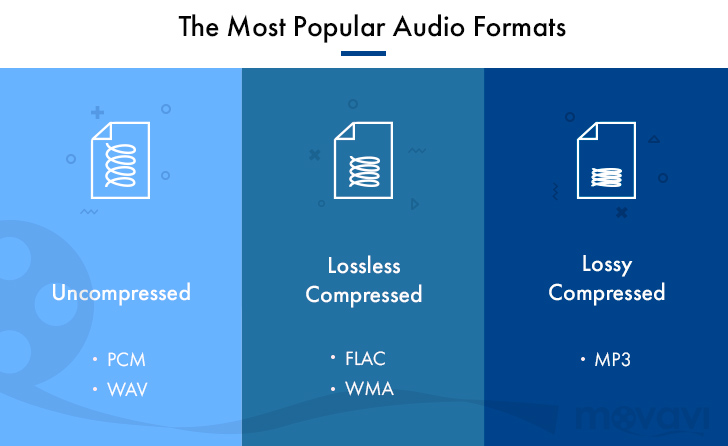
Various special algorithms are used to compress music files, which subsequently determine the structure and presentation of the audio data, or so-called digital audio file formats. All audio formats can be divided into three groups: uncompressed audio formats, lossless compression, and lossy compression.

No compression
One of the most widespread formats related to this type is the well-known WAV. The sound of files with this extension is stored without compression or changes. It is true that much more space is required to store uncompressed files and therefore WAV is more widely used only in professional audio and video applications, where the sound should not have a loss of quality before processing. Keeping ordinary musical compositions in this form is unwarranted waste.

To play WAV files, you do not need any special software, as all media players understand this format, including the standard Windows Media audio player built into the Windows system.

Another format used to store uncompressed audio that is worth mentioning is Apple’s development called AIFF (Audio Interchange File Format). As you may have guessed, it is most commonly used on Macintosh computers running Mac OS X.

Lossless compression (lossless)
Lossless compression algorithms for audio files work on the principle of conventional file cabinets. They do not provide the highest level of compression (40 to 60%), while they have virtually no effect on sound quality. It is also worth noting that in this case, the encrypted data can be fully restored to its original form. Therefore, the use of lossless compression is most often used in cases where it is important to preserve the identity of the compressed data with respect to the original.

The most popular audio formats in this group are FLAC (Free Lossless Audio Codec), APE (Monkey’s Audio), WMA (Windows Media Lossless), and ALAC (Apple Lossless Audio Codec). Each has its own pros and cons. For example, the APE codec offers slightly better compression gains, while FLAC is more common. In general, all true music lovers store their music collections in lossless formats, since they do not remove any data from the audio stream and files created with these codecs can be listened to even on high-quality stereos.

To play lossless compressed formats, as a rule, third-party players (except WMA) are used, such as MPlayer, foobar, AIMP, Winamp, VLC and others, since all the necessary codecs are already built into them. Another option is to separately install an additional codec pack (for example, K-Lite), after which you can listen to files in lossless format from almost any audio player.

Lossy compression
This is the most popular group of algorithms that provides the maximum audio compression ratio (up to 10 times or more). However, unlike previous formats, the audio file loses quality here, and how much depends directly on the degree of compression.

To determine the quality of digitized sound, the most commonly used indicator is the bit rate, the speed of the audio stream obtained after compression and measured in kilobits per second (kbps).


Free Download Mp4Gain
picture


Mp4Gain Main Window
picture


Mp4Gain Features
picture


Free Download Mp4Gain
picture

Audio formats

Before you know the audio formats, know that they are divided into two main groups: the compressed and the uncompressed.

audio formats

Uncompressed formats are those in which the audio quality is assessed and without loss of information, which guarantees that the audios are practically identical to the real ones. Tablets reduce the original file size, taking up less space on your computer or cell phone memory. However, the quality and information may be compromised.

audio format

It is worth mentioning that it is not just a good format that guarantees that the end result will be of excellent sound quality. You need to do your part, too, using good audio software to make the necessary changes and “cleanup,” as well as using quality equipment to record your voice.

1. Advanced Audio Coding (AAC)

It is considered the main competitor to the most famous format on the Internet, MP3, and is commonly used on Apple devices, based on the MPEG-4 standard.

Compared to MP3, AAC has more flexibility, which means you will experience less data loss and quality when compressed. Also, it has a better level at lower bit rates, such as 128 kbps.

2. OGG Vorbis

This is a non-proprietary format, that is, they have no restrictions for audio players to play it. Also, it has a better compression rate than MP3, however it is not as well known or advertised.

It is widely used in game audio, because among other qualities, it brings open source, which provides greater customization, but is difficult to standardize. Its audio quality is quite satisfactory.

3. MP3

Considered the most popular audio format in the world, MP3 offers high compatibility, allowing music and audio to be played in virtually any program or media player.

It was created in Germany and uses the so-called perceptual encoding, which encodes only the sounds that humans can hear. Of all, it manages to be the most balanced in terms of quality versus size.

It may get to lower bit rates, but there may be a final quality loss.

4. WMA

This is Microsoft’s standard format and also quite popular. Unlike MP3, WMA allows the creation of content-protected copies, thus preventing your music or other audio productions from being pirated.

Microsoft’s proposal is that the format achieve a sound property equivalent to that of MP3, but in a much smaller size. In practice, this does not happen, but at low bit rates the result is very similar.

It offers four codecs:

Standard WMA: acts as an MP3 repeater;
WMA Pro: guarantees higher definition audio;
WMA Lossless: allows file compression without loss of quality;
WMA Voice – Aimed at low bit rate voice recordings.

5. MP2

Although it already has a successor, MP2 is still widely used, being the standard format for transmitting radio and television audio. It is a file extension for MPEG -1 layer II playback (MP3 plays in MPEG -1/2 layer III).

One of the attributes of the MP2 is that it still has great compatibility, as well as fewer errors than its successor. In addition to having better performance in audios with higher bit rates.

6. Real Audio

RealNetworks proprietary format. They have multiple audio codecs and great performance for those with low bit rates. It was constantly used in dial-up modems, hi-fi formats for music and streaming, as is the case with web radio.

RealNetworks is an internet provider that works with streaming services. It was founded by a former Microsoft executive and also offers entertainment services through subscriptions.

7. Audio Coding 3 (AC3)

Created in 1983 by Dolby Laboratories, AC3 is primarily used in DVDs, Blu-ray players, home theaters, and HDTV playback. It can reproduce frequencies between 20 and 20,000 Hz, which is equivalent to the human audible sound.

Therefore, the AC3 can reproduce unique and detailed sounds, with very good quality. Its bit rate goes up to 640kpbs and its display speed goes up to 48kHz.

8. WAV

One of the best characteristics of this format is that it has a high sound fidelity rate, that is, it faithfully reproduces what was recorded without compression or loss of data.

It is widely used by those who work with audio editing, since it will be able to manipulate the real sound and without any interference. It is also considered for those who need more definition and sound fidelity as possible for their productions.