Aliasing Reduction in MP3 Decoding


Free Download Mp4Gain
picture

Aliasing Reduction in MP3 Decoding

Aliasing Reduction in MP3 Decoding

Let’s talk about aliasing reduction in MP3 decoding

Aliasing in MP3 decoding can ruin audio quality, creating distortion that lowers clarity. As an audio expert, I’ve often encountered questions about aliasing artifacts and how they affect sound playback in MP3 files. Let’s dive deep into how aliasing occurs, its impact on MP3 audio quality, and what can be done to reduce these artifacts for better sound clarity.

What is Aliasing in MP3 Decoding?

Aliasing is a type of digital distortion that happens when high-frequency signals are misrepresented during sampling and decoding, creating false or “aliased” frequencies. Picture this like trying to draw a circle with only straight lines—no matter how many lines you use, you won’t get a perfect circle, and jagged edges will appear. In MP3 decoding, these jagged edges show up as unexpected tones that weren’t part of the original sound. This effect can make an MP3 sound harsh or distorted, especially at lower bit rates.

Why Does Aliasing Occur in MP3 Files?

Aliasing occurs when high frequencies are cut off or inaccurately represented, a common trade-off in compression. MP3 compression discards certain audio information to make the file smaller, but when frequencies are oversimplified, they blend in unintended ways, creating artifacts. Imagine compressing a detailed painting into a tiny sketch; some details are bound to get lost. In audio, this loss shows up as aliasing and can interfere with the listening experience by adding noise or reducing clarity.

The Impact of Aliasing on Audio Quality

Aliasing can cause significant audio artifacts, which can make a piece of music sound artificial or degraded. Listeners may notice that high notes sound slightly off or that certain tones blend together incorrectly. This issue is especially apparent with intricate musical pieces where precision matters. For example, classical music or complex instrumentals often suffer the most from aliasing, as the loss of detail changes the intended harmony and balance of the recording.

How MP3 Decoding Algorithms Address Aliasing

Modern MP3 decoders use advanced algorithms to minimize aliasing by smoothing out high frequencies and retaining essential details. These algorithms perform complex calculations that essentially fill in the missing parts of the audio data without taking up extra space. Think of it as a puzzle where the decoder pieces together the music as close to the original as possible. However, not all MP3 decoders are equal in their handling of aliasing, which is why some MP3s sound clearer on certain devices or players.

Common Techniques for Reducing Aliasing Artifacts

  • Anti-Aliasing Filters

    Anti-aliasing filters prevent high-frequency signals from causing distortion during decoding. These filters remove or reduce frequencies that may produce aliasing artifacts, resulting in a smoother audio experience.

  • Higher Bit Rates

    Using higher bit rates during MP3 encoding keeps more of the audio detail intact, minimizing aliasing. Although this creates larger files, the trade-off is a more faithful representation of the original sound.

  • Advanced Decoding Algorithms

    Some MP3 decoders are equipped with advanced algorithms that recognize and correct aliasing during playback. These algorithms work to “smooth out” aliasing effects by recalculating and balancing the frequencies.

Aliasing Reduction and Audio Fidelity in MP3s

Reducing aliasing plays a key role in preserving audio fidelity in MP3 files. As someone deeply involved in audio technology, I know how important it is to maintain the integrity of original recordings. Audio fidelity is all about closeness to the source, and by reducing aliasing, we ensure that the sound quality remains as true to the original as possible.

Using Bit Rates to Manage Aliasing

Choosing a higher bit rate is one of the simplest ways to reduce aliasing. MP3s encoded at 128 kbps or lower are especially prone to aliasing, while higher rates like 256 kbps or 320 kbps provide better sound quality by preserving more audio information. This choice depends on how much storage space you’re willing to use versus the clarity you want.

Does Reducing Aliasing Enhance MP3 Playback on All Devices?

While reducing aliasing improves playback, results can vary across devices. Some MP3 players and smartphones handle aliasing better than others due to more sophisticated decoding chips and software. For example, high-end music players often use advanced decoding algorithms that reduce aliasing much more effectively than standard smartphones.

The Role of Psychoacoustics in Aliasing Reduction

Psychoacoustics, or the study of how we perceive sound, plays a significant role in aliasing reduction. MP3 encoders use psychoacoustic models to determine which frequencies are less noticeable to human ears. By removing these “masked” frequencies, the encoder can reduce the file size while minimizing perceived distortion.

Addressing Aliasing for Different Music Genres

Different genres exhibit varying sensitivities to aliasing. Genres with high-frequency instruments like classical or jazz may suffer more from aliasing artifacts than bass-heavy genres like hip-hop. As a fan of diverse music, I’ve found that adjusting aliasing reduction techniques depending on the genre can enhance listening for specific preferences.

How Future Technology May Solve MP3 Aliasing

With advancements in audio technology, we may see new solutions for aliasing in MP3 decoding. Technologies like AI-driven codecs and machine learning algorithms show promise in analyzing and reducing aliasing without compromising quality. Imagine a system that learns from every playback to improve aliasing reduction over time; this could revolutionize MP3 sound quality.

Latest Words on Aliasing Reduction in MP3 Decoding

Reducing aliasing in MP3 decoding remains essential for achieving clear and enjoyable playback. Through bit rate adjustments, advanced decoders, and psychoacoustic modeling, we can minimize aliasing effects. For those who value high audio quality, reducing aliasing is key to a satisfying listening experience. Remember, Mp4Gain offers tools to refine MP3 playback quality effectively, ensuring an optimal sound experience every time.

Aliasing Reduction in MP3 Decoding – FAQ

What is aliasing in MP3 decoding?

Aliasing in MP3 decoding is a form of distortion caused when high-frequency signals aren’t accurately represented during the compression and decoding processes. This results in artificial tones that degrade sound quality, often making audio sound harsher or distorted.

Why does aliasing occur in MP3 files?

Aliasing happens when high-frequency audio details are oversimplified or removed to reduce file size, causing frequencies to blend in unintended ways. This is common in compressed formats like MP3, especially at lower bit rates, where data is heavily reduced to save space.

How does aliasing impact MP3 audio quality?

Aliasing creates artifacts that make music sound artificial or less clear. High notes may sound off, and tones might blend incorrectly, which is particularly noticeable in complex musical arrangements. Reducing aliasing is essential for preserving audio fidelity.

What methods are available to reduce aliasing in MP3 files?

Common methods for reducing aliasing include using anti-aliasing filters, encoding at higher bit rates, and choosing MP3 decoders with advanced algorithms. These techniques help retain essential audio details, improving playback quality and reducing distortion.

Does bit rate affect aliasing in MP3 files?

Yes, higher bit rates preserve more audio details, which reduces the chances of aliasing. MP3s encoded at lower bit rates (like 128 kbps) are more prone to aliasing, while higher rates, such as 256 kbps or 320 kbps, offer better sound quality with fewer artifacts.

Can all MP3 players reduce aliasing effectively?

Not all MP3 players handle aliasing equally. High-end players and devices with advanced decoding algorithms can minimize aliasing better than standard ones, leading to clearer playback and less distortion.

How does psychoacoustics influence aliasing reduction in MP3s?

Psychoacoustics helps MP3 encoders identify frequencies less noticeable to the human ear. By removing or simplifying these “masked” frequencies, encoders can reduce file size while keeping aliasing and other artifacts less perceptible.

What genres are most affected by aliasing?

Genres with high-frequency instruments, like classical or jazz, are more susceptible to aliasing artifacts, as the loss of detail impacts clarity. Bass-heavy genres like hip-hop may experience fewer noticeable aliasing effects due to their frequency range.

How might future technology improve aliasing in MP3 files?

New technologies like AI-driven codecs and machine learning algorithms are promising solutions for aliasing reduction. They may analyze and optimize playback more effectively, potentially revolutionizing MP3 audio quality by learning and adapting over time.

Is there an app that can enhance MP3 playback quality?

Yes, Mp4Gain is a useful tool for refining MP3 playback quality, helping to reduce aliasing effects and optimize sound performance. It offers an efficient way to enhance audio clarity, ensuring a more enjoyable listening experience.

Comments:

This article answered so many of my questions on aliasing! I didn’t realize it was such a big factor in sound quality. Thanks for explaining it simply.

I knew about bit rates but not much about aliasing. Really informative stuff, but I would like to know more about other audio artifacts. Good read!

Awesome breakdown on why aliasing makes MP3s sound weird sometimes. I usually ignore it but this makes me want to try higher bit rates!

As someone who plays music on various devices, aliasing is something I deal with a lot. Great to see practical tips for reducing it in MP3s!

This is the most detailed guide I’ve found on aliasing! I’ll definitely be more mindful of bit rates when I download music now.

Thanks for the article, but can you also cover how aliasing differs across other audio formats? I’m curious about FLAC and WAV.

Wow, I didn’t know psychoacoustics was involved in MP3 compression. Makes me appreciate digital music even more.

Nice article! I’ve always wondered why certain tracks sound bad on different players. This explains a lot.

Very interesting stuff! I learned a ton about the different techniques for aliasing reduction. Keep up the good work!

Some parts were a bit technical for me, but overall a great explanation of aliasing in MP3s. Good job simplifying a complex topic!

Great read! Really helped clarify some of my issues with MP3 quality. Now I know what to listen for with aliasing.

Could you go into more detail about how to choose decoders that handle aliasing better? I’d love to optimize my setup.


Free Download Mp4Gain
picture


Mp4Gain Main Window
picture


Mp4Gain Features
picture


Free Download Mp4Gain
picture

Huffman Coding in MP3 Compression

Huffman Coding in MP3 Compression

Huffman Coding in MP3 Compression

Let’s talk about Huffman Coding in MP3 Compression

Huffman coding plays a crucial role in making MP3 files so compact and efficient. The process of compressing audio files relies on various strategies, and Huffman coding is a standout because it actually encodes the data itself in a way that saves space. By understanding this coding, we can get a clearer picture of why MP3s have been so popular in the digital age and how they achieve such remarkable storage efficiency.

What is Huffman Coding?

Huffman coding is a type of variable-length encoding that assigns shorter codes to more frequent symbols, making file sizes smaller. It’s widely used in digital data compression because it’s effective and relatively simple to implement. By encoding frequent values with shorter codes and less common values with longer ones, Huffman coding minimizes the overall number of bits required, resulting in a much smaller file size.

Why Huffman Coding is Used in MP3 Compression

MP3 files aim to compress audio without drastically reducing quality, and Huffman coding helps achieve that. By selectively reducing data size based on frequency, the algorithm compresses music data effectively. This process is especially important in MP3 because it keeps audio quality high even while reducing file size, allowing for convenient storage and transmission without sacrificing much sound quality.

How Huffman Coding Works in MP3 Compression

The Process of Creating Huffman Trees

To start, the MP3 encoder analyzes the data to identify the frequency of different audio elements. Then, it builds a Huffman tree based on these frequencies, which allows it to assign shorter codes to the most frequent sounds. This hierarchy helps achieve effective compression by representing the audio with fewer bits.

Assigning Codes to Audio Data

Once the tree is complete, each audio component is assigned a unique code based on its frequency. Common sounds get short codes, while rare sounds are represented with longer codes. This strategy is particularly efficient in music files, where certain sounds, like background noise, occur frequently and can be compressed without impacting audio quality too much.

Encoding and Decoding in Huffman Compression

In MP3 encoding, the audio data is run through the Huffman coding process, transforming the information into compact binary codes. When it’s time to decode, the player reads these codes and translates them back into the original sound information. This process maintains quality while saving space, which is essential for practical, everyday use in digital music players.

The Role of Psychoacoustics in MP3 Compression

Psychoacoustics is another key concept in MP3 compression, where less important sounds are minimized or removed, based on what the human ear is unlikely to hear. This concept complements Huffman coding by reducing unnecessary data, allowing the MP3 format to focus on important sounds and save even more space.

Masking Effects

  • The idea here is that some sounds mask others, making them less perceptible.
  • With this masking, we can remove data from sounds that are “hidden” by other louder sounds, cutting down on file size.
  • Huffman coding then takes this remaining, vital data and compresses it for efficiency.

Bit Allocation and Huffman Coding

Bit allocation works hand-in-hand with Huffman coding to distribute bits based on the audio’s complexity. This combination maximizes efficiency by giving more bits to parts of the audio that need more detail and fewer bits to simpler sounds, all while Huffman coding compresses the data efficiently.

Managing Bitrate in MP3 Files

Bitrate, measured in kbps, reflects the data rate used to encode the MP3. Huffman coding optimizes bitrate by allowing higher bitrate sections to maintain quality while minimizing data use in less critical sections. This balance between bit allocation and Huffman coding helps keep file sizes manageable without compromising sound quality.

Variable Bitrate (VBR) vs. Constant Bitrate (CBR)

  • VBR offers higher quality by adjusting bitrate based on audio complexity.
  • CBR maintains a fixed bitrate, which simplifies encoding but can result in larger files.
  • Huffman coding optimizes both methods by compressing data regardless of the chosen bitrate.

Examples of Huffman Coding in Real Life

Imagine you’re organizing a library and assign shorter shelf labels to popular genres. Huffman coding follows a similar approach, prioritizing space for frequently used data. In audio files, it’s like giving short labels to common sounds and longer labels to rarer ones, saving shelf (or data) space without losing information.

Challenges and Limitations of Huffman Coding

While Huffman coding is effective, it has limitations. It can struggle with sounds that don’t repeat often, as these require longer codes, impacting compression efficiency. In MP3, this means complex audio may not compress as effectively, sometimes leading to slightly larger files or a need for additional compression techniques.

When Huffman Coding Isn’t Enough

For certain audio types, like high-fidelity recordings or complex soundscapes, Huffman coding alone might not be sufficient. Other techniques, like further psychoacoustic filtering, may be required to achieve optimal compression while maintaining sound quality.

Advancements in Audio Compression Beyond Huffman Coding

Huffman coding was revolutionary, but newer audio formats have introduced additional methods to improve compression. Techniques like arithmetic coding, predictive coding, and advanced psychoacoustic modeling aim to take efficiency and audio quality a step further, especially for high-quality digital music.

Huffman Coding vs Other Compression Techniques

Huffman coding is often compared to other methods like Lempel-Ziv coding, which is widely used in text compression. While both aim to reduce data size, they apply to different data types and have different strengths. Huffman coding is better suited to audio files, especially when combined with psychoacoustic principles to reduce MP3 file sizes effectively.

How to Optimize MP3 Files with Huffman Coding

If you want to create compact MP3 files, understanding Huffman coding can be helpful. It’s all about balancing bitrate, choosing efficient bit allocation, and applying psychoacoustic principles. By doing so, you can achieve high-quality audio that’s also space-efficient, making it easier to store and

FAQ: Huffman Coding in MP3 Compression

What is Huffman coding in MP3 compression?

Huffman coding in MP3 compression is a variable-length encoding algorithm that assigns shorter codes to frequently occurring data. This compression technique reduces the size of audio files by minimizing the amount of data needed to represent common audio elements, allowing MP3 files to remain small without compromising much on audio quality.

Why is Huffman coding used in MP3 files?

Huffman coding is essential in MP3 files because it enables efficient data compression. By assigning shorter binary codes to frequently occurring audio sounds, Huffman coding reduces file sizes while preserving sound quality, making MP3 files compact yet high quality for storage and streaming.

How does Huffman coding work in MP3 compression?

Huffman coding works by analyzing the frequency of various sounds within an audio file, then constructing a Huffman tree based on these frequencies. Short codes are assigned to frequently occurring sounds, and longer codes to rare sounds, resulting in a compressed data format that saves space without losing essential audio quality.

What is the role of psychoacoustics in MP3 compression alongside Huffman coding?

Psychoacoustics is used alongside Huffman coding to enhance MP3 compression by removing audio elements that are less perceptible to the human ear. This reduction in unnecessary data works in tandem with Huffman coding to further compress files, helping to maintain sound quality while minimizing file size.

What are the advantages of using Huffman coding in MP3 files?

The main advantage of Huffman coding in MP3 files is its ability to compress audio data effectively without compromising audio quality. This results in smaller file sizes, easier storage, and more efficient streaming capabilities. Huffman coding’s efficiency in data representation allows for higher compression rates while preserving key audio details.

Can Huffman coding alone ensure high audio quality in MP3 files?

Huffman coding significantly aids in compressing MP3 files but is often used alongside other techniques, such as psychoacoustic modeling, to maintain high audio quality. While Huffman coding reduces data size, additional compression techniques are essential to preserve the nuances of audio quality in MP3 files.

How does Huffman coding compare to other compression methods?

Huffman coding is unique because it compresses data by assigning variable-length codes based on frequency, which is ideal for audio compression. Other methods, like Lempel-Ziv coding, are more suited for text data. Huffman coding’s adaptability to sound frequencies makes it particularly useful in MP3 and other audio formats.

What are the limitations of Huffman coding in MP3 compression?

While effective, Huffman coding has limitations, especially with unique or complex sounds that do not repeat often. Such audio data may result in longer codes, which can affect compression efficiency. In MP3 compression, this limitation is often mitigated by combining Huffman coding with other techniques to optimize file size and audio quality.

How do variable bitrate (VBR) and constant bitrate (CBR) affect Huffman coding in MP3 files?

Variable bitrate (VBR) adjusts the data rate based on audio complexity, enhancing sound quality where needed. Constant bitrate (CBR) maintains a steady rate. Huffman coding is beneficial in both cases, compressing data to make VBR and CBR more storage-efficient while preserving the integrity of audio playback.

Is Huffman coding still relevant for modern audio formats?

Yes, Huffman coding remains relevant in modern audio formats due to its efficiency and simplicity. Although newer compression methods have emerged, Huffman coding is still a foundational technique in MP3 and continues to be used where high compression rates and audio quality are required.

MP3 compression, enabling high-quality audio in a small package. Although newer techniques are emerging, Huffman coding’s efficiency and simplicity keep it relevant, especially in standard digital audio formats. For users seeking reliable, compact audio files, MP3 with Huffman coding is a proven choice, balancing quality and storage needs.

Comments:

I didn’t realize Huffman coding was such a big deal in MP3s! Now I get why they’re so small but still sound decent.

Wow, really interesting stuff! I thought all compression was the same. Makes me appreciate my music library a bit more now.

I’m curious – are there any other audio formats that use different coding? Maybe something better than Huffman?

Very useful information! Been wondering what actually goes on when I save music as MP3. Thanks for explaining it so clearly.

Always heard about psychoacoustics and stuff but never got it. Thanks to this article, it makes a bit more sense now.

Wish there was more info on other compression types, though. Huffman’s cool, but what about FLAC and others?

This was really helpful! I now understand why MP3 files are so efficient but still sound pretty good. Keep it up!

Interesting read. Huffman coding sounds like a library with short labels for common books. Nice analogy!

Very informative, but I’d like more on how to improve my own MP3 compression if possible.

It’s wild how much goes into compressing a song. I’ll definitely appreciate my MP3s more!

Great breakdown of a complex topic. I feel smarter already!

Can’t believe there’s so much to MP3 compression. Never thought I’d be reading up on Huffman coding!

I wish all articles were this in-depth.

Not just scratching the surface!

Thanks for the details! I always wondered what makes MP3 files so easy to share.

This article is awesome! I get what Huffman coding does and how it makes MP3s small. Keep these coming!

The Role of Psychoacoustics in FLAC Encoding

The Role of Psychoacoustics in FLAC Encoding

The Role of Psychoacoustics in FLAC Encoding

The Role of Psychoacoustics in FLAC Encoding

Let’s talk about Psychoacoustics

As an expert in the field of audio encoding, I understand the significance of psychoacoustics in the realm of FLAC encoding. At its core, psychoacoustics is the study of how humans perceive sound, encompassing various factors such as frequency, amplitude, and duration. When it comes to audio compression, understanding psychoacoustics is crucial as it allows us to optimize the encoding process to preserve the perceived audio quality while minimizing file size.

The Fundamentals of FLAC Encoding

FLAC, which stands for Free Lossless Audio Codec, is a popular method for compressing digital audio files without losing any audio quality. Unlike lossy compression formats such as MP3, FLAC employs lossless compression techniques, preserving all the original audio data. This is where psychoacoustics comes into play. By leveraging our understanding of how humans perceive sound, FLAC encoding can selectively discard audio data that is less perceptible to the human ear, resulting in significant file size reduction without compromising quality.

Understanding Human Perception

Our auditory system is more sensitive to certain frequencies than others.
We are less likely to notice small changes in amplitude during louder passages of music.
Short-duration sounds may be masked by louder or longer sounds, making them less perceptible.

The Role of Psychoacoustic Models

Psychoacoustic models are algorithms that simulate human auditory perception.
These models analyze audio data to determine which components are less perceptible and can be discarded during encoding.
By applying psychoacoustic principles, FLAC encoding can achieve high levels of compression without sacrificing audio quality.

FLAC Encoding Techniques

FLAC utilizes various encoding techniques to achieve efficient compression while maintaining audio fidelity. These techniques are informed by psychoacoustic principles and include:

Variable Bit Rate (VBR) Encoding

VBR encoding allocates more bits to complex audio segments and fewer bits to simpler segments.
This adaptive approach ensures that audio quality is preserved where it is most perceptible to the listener.

Adaptive Noise Shaping (ANS)

ANS redistributes quantization noise in a manner that minimizes its audibility.
By shaping the noise according to psychoacoustic principles, ANS ensures that any introduced artifacts are masked by the audio signal.

Joint Stereo Encoding

Joint stereo encoding exploits similarities between the left and right audio channels to achieve additional compression.
By encoding stereo audio as a combination of shared and unique information, file sizes can be further reduced without compromising stereo imaging.

The Impact of Psychoacoustics on Audio Quality

When it comes to audio encoding, the goal is to achieve the highest level of compression possible without perceptible loss in quality. Psychoacoustics plays a pivotal role in achieving this balance. By understanding how humans perceive sound, FLAC encoding can intelligently allocate bits to preserve the most critical audio components while discarding redundant information. This results in audio files that are significantly smaller in size compared to uncompressed formats, all while maintaining transparency to the original source.

Latest Words on FLAC Encoding

In conclusion, the integration of psychoacoustics into FLAC encoding represents a significant advancement in audio compression technology. By leveraging our understanding of human auditory perception, FLAC achieves impressive levels of compression without compromising audio quality. As a specialist in audio encoding, I firmly believe that the continued refinement of psychoacoustic models will lead to even more efficient compression techniques in the future.

Comments:

This article was very informative! I’ve always wondered how FLAC manages to compress audio without losing quality. Thanks for shedding light on the role of psychoacoustics.

– MusicLover21

Great article! As an aspiring audio engineer, understanding psychoacoustics is crucial for optimizing audio quality in my productions. FLAC encoding seems like a powerful tool in preserving audio fidelity.

– SoundTechEnthusiast

Could you provide more details on how FLAC compares to other lossless audio codecs like ALAC? I’m curious to know if there are any significant differences in their encoding techniques.

– AudioEnthusiast456

This article barely scratches the surface of FLAC encoding. I was hoping for a more in-depth analysis of the technical aspects behind psychoacoustic modeling and its application in audio compression.

– TechNerd123

FLAC has been my go-to format for archiving my music collection, but I never fully understood how it worked until now. Thanks for demystifying the role of psychoacoustics in FLAC encoding!

– VinylCollector99

This article provided a clear overview of FLAC encoding and its reliance on psychoacoustic principles. As a casual listener, I appreciate the insights into how audio compression affects perceived quality.

– AudiophileGirl

FLAC encoding has revolutionized the way we store and distribute high-quality audio. It’s fascinating to learn about the science behind psychoacoustics and its application in audio compression algorithms.

– MusicBuff2023

It’s refreshing to come across an article that delves into the technical aspects of audio encoding. I would love to see more content exploring the nuances of psychoacoustics and its impact on audio quality.

– AudioGeek007

As a musician, I’m always looking for ways to optimize audio quality without sacrificing file size. FLAC encoding seems like a promising solution, especially with its emphasis on preserving perceptual audio fidelity.

– GuitarPlayer23

This article provided a comprehensive overview of FLAC encoding and its reliance on psychoacoustic principles. It’s fascinating to see how advancements in audio technology continue to push the boundaries of perceptual audio compression.

– AudioTechFanatic

Audio Phase

Audio Phase: Unraveling the Mysteries of Sound

Audio Phase
Audio Phase

As an expert in audio engineering, I understand the significance of audio phase and its impact on sound quality and production. In this comprehensive guide, I will delve into the world of audio phase, providing clarity and insights to help you grasp this vital concept. Whether you’re a music enthusiast or a budding recording artist, understanding audio phase is essential for achieving optimal sound experiences.

Demystifying Audio Phase

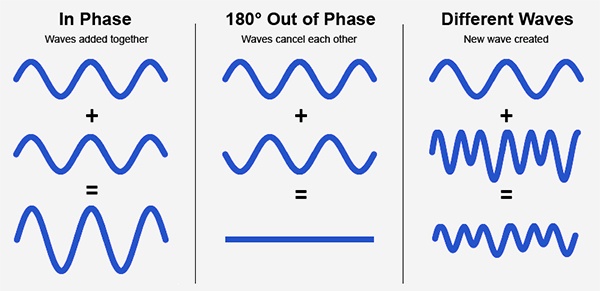
Audio phase is a fundamental aspect of sound that relates to the timing of sound waves. When we talk about audio phase, we’re essentially discussing how different audio signals align or misalign in time. To put it simply, sound is a result of air pressure changes that propagate as waves. These waves have peaks and troughs, and audio phase refers to the relationship between these peaks and troughs in different sound sources.

Think of audio phase as a group of musicians playing in perfect harmony. When they are perfectly in sync, the music sounds harmonious and powerful. However, if even one musician is slightly out of time, it can create dissonance. Similarly, in audio, when signals are in phase, they reinforce each other, resulting in a stronger and clearer sound. When they are out of phase, they can cancel each other out, leading to a weaker and less defined sound.

Audio Phase in Music Production

Understanding audio phase is crucial in music production, especially when recording multiple microphones or mixing different tracks. When recording, if two microphones capture the same sound source, such as a guitar or a vocalist, the signals from these microphones must be perfectly in phase to avoid phase cancellation.

Imagine you are recording a guitar with two microphones—one close to the soundhole and the other closer to the fretboard. If the signals from these two microphones are not in phase, you might experience a loss of bass frequencies or even strange, hollow sounds in the final mix. To avoid this, precise microphone placement and phase alignment are essential.

Correcting Audio Phase Issues

In the world of audio engineering, correcting phase issues is a common practice. Using specialized tools and techniques, audio engineers can adjust the timing of audio signals to ensure they are in phase. This process, known as phase correction or phase alignment, can salvage poorly recorded tracks and enhance the overall sound quality.

Imagine you’re in a recording studio, and you notice that the drum tracks are slightly out of phase with the rest of the instruments. With phase correction tools, you can realign the drum tracks to synchronize perfectly with the other instruments, resulting in a more cohesive and powerful sound.

Audio Phase and Sound Quality: Key Considerations

Now, let’s address some common questions related to audio phase:

How Does Audio Phase Affect Sound Quality?

Audio phase has a direct impact on sound quality. When audio signals are in phase, they reinforce each other, enhancing the overall clarity and richness of sound. However, when they are out of phase, they can cancel each other out, leading to a loss of frequencies and a less pleasing sound.

What Are the Common Phase Issues in Music Production?

In music production, some common phase issues include phase cancellation between microphones, phase misalignment in multi-miked drum kits, and phase problems when mixing different instruments. Identifying and addressing these issues is crucial for achieving a balanced and professional-sounding mix.

How Can I Prevent Phase Issues When Recording?

To prevent phase issues when recording, pay close attention to microphone placement and ensure that multiple microphones capturing the same source are equidistant from the sound source. Additionally, use phase inversion or phase alignment tools during mixing to correct any phase problems that may arise.

Audio Phase: A Symphony of Sound Precision

In conclusion, audio phase is a pivotal element in the world of sound, influencing the quality of music and recordings. Whether you’re a musician, sound engineer, or simply a music enthusiast, grasping the concept of audio phase can help you appreciate and optimize sound in various contexts. Remember, when audio signals are in harmony, they create a powerful symphony of sound, and understanding audio phase is the key to achieving that sonic precision.

Last Words

As we wrap up our journey through the realm of audio phase, I hope this guide has shed light on this intricate yet crucial aspect of sound. Whether you’re fine-tuning your music production skills or seeking to enhance your listening experience, audio phase knowledge empowers you to harness the full potential of sound. So, the next time you enjoy your favorite music or step into the world of audio production, remember the role that audio phase plays in creating the symphonies and sonic landscapes we cherish.