Video Compression Algorithms Used in MP4


Free Download Mp4Gain
picture

Video Compression Algorithms Used in MP4

Video Compression Algorithms Used in MP4

Let’s talk about video compression algorithms used in MP4

Video compression algorithms in MP4 are the backbone of modern multimedia. These algorithms make it possible to watch high-definition videos without needing enormous storage space. Over the years, I’ve explored how these algorithms work and how they transform raw video into compressed formats that save storage and bandwidth without sacrificing too much quality. Imagine shrinking a giant balloon to fit inside a shoebox without popping it—that’s essentially what these algorithms do.

MP4, as a container format, supports multiple compression techniques, with H.264 and H.265 being the most popular. Each algorithm balances file size and quality differently. For example, H.264 prioritizes compatibility, while H.265, or HEVC, excels in reducing file sizes for 4K and HDR content. Understanding these nuances is key to appreciating how MP4 compression impacts everyday video experiences, from streaming services to personal devices.

Why video compression is crucial for MP4

Video compression is essential because raw video files are incredibly large. Imagine recording a 10-minute video on your phone without compression; the file could easily exceed several gigabytes, making storage and sharing impractical. Compression algorithms shrink these files while preserving as much quality as possible.

This efficiency is vital for streaming services like Netflix or YouTube. Without compression, streaming high-quality video would require massive internet bandwidth, which most users don’t have. MP4, with its advanced compression methods, ensures smooth playback, even on slower connections. Compression isn’t just about convenience; it’s a necessity for the modern digital world.

Key algorithms powering MP4 compression

The MP4 format relies on a mix of innovative algorithms that optimize video storage and playback. Let’s dive into the most prominent ones:

  • H.264 (AVC): Widely used for its balance of quality and compatibility, it’s the standard for most MP4 files.
  • H.265 (HEVC): A step ahead of H.264, offering smaller file sizes for high-resolution content like 4K and HDR.
  • VP9: An open-source alternative to H.265, popular with platforms like YouTube.
  • AV1: The newest player, promising even better compression rates without sacrificing quality.

Each of these algorithms uses techniques like motion compensation, quantization, and entropy coding to achieve compression. For instance, motion compensation tracks object movement across frames to avoid storing redundant data. This approach saves space without losing detail.

How motion compensation works in video compression

Motion compensation is like a magician reusing the same trick to save time. Instead of storing every single frame, compression algorithms analyze the motion of objects between frames. They store only the differences, drastically reducing the amount of data.

For example, consider a video of a bouncing ball. Instead of recording the ball’s position in every frame, the algorithm notes the ball’s initial position and its movement pattern. This process not only saves space but also maintains video fluidity.

The role of quantization in MP4 algorithms

Quantization is the art of approximation. Compression algorithms simplify video data by reducing the precision of certain details, focusing on elements that are less noticeable to the human eye. It’s like painting with broader strokes where fine details won’t be missed.

In MP4 compression, quantization removes subtle color variations and textures that viewers won’t perceive. For instance, in a scene with a blue sky, tiny shifts in shade are smoothed out. This method saves significant data without compromising visual quality for most viewers.

Entropy coding: The secret to efficient compression

Entropy coding is where MP4 algorithms truly shine. This process compresses data by focusing on patterns and probabilities. It’s like packing a suitcase more efficiently by rolling clothes instead of folding them.

MP4 uses techniques like Huffman coding and arithmetic coding for entropy. These methods assign shorter codes to frequent data patterns, like a recurring color or shape. The result is a file that stores information compactly without losing critical details.

H.264: The workhorse of MP4 compression

H.264, also known as Advanced Video Coding (AVC), is the gold standard for MP4 compression. It’s used everywhere, from Blu-ray discs to streaming platforms. What makes H.264 remarkable is its adaptability. It balances quality and file size, making it ideal for both HD and standard-definition content.

In my experience, H.264 is perfect for projects where compatibility is crucial. For example, when creating videos for social media, I always choose H.264 because it plays smoothly across devices. Its widespread support ensures hassle-free sharing and playback.

H.265: The evolution of video compression

H.265, or High-Efficiency Video Coding (HEVC), is the next step in compression technology. It achieves up to 50% better compression than H.264, making it essential for 4K and HDR content. If you’ve ever streamed ultra-high-definition videos without buffering, you can thank H.265.

This algorithm uses advanced techniques like larger macroblocks and improved motion prediction. I once compressed a 4K video using H.265, and the file size was nearly half of the H.264 version. The quality? Practically identical to the untrained eye.

VP9 and AV1: Open-source alternatives

VP9 and AV1 are open-source algorithms gaining traction as competitors to H.265. VP9 is widely used on YouTube, offering excellent compression without royalties. AV1, developed by the Alliance for Open Media, takes things further, promising even smaller file sizes.

I’ve tested AV1 for personal projects, and the results are impressive. It’s especially useful for web streaming, where bandwidth is a concern. While not as widely supported as H.264 or H.265, these algorithms represent the future of compression.

Real-life applications of MP4 compression

The impact of MP4 compression is everywhere. From streaming movies to recording videos on your phone, these algorithms make digital media accessible. Without compression, platforms like Netflix or TikTok wouldn’t function as seamlessly as they do.

I once recorded a family event on my smartphone, and the video looked stunning despite being heavily compressed. The MP4 format allowed me to share it online without worrying about quality or file size. This convenience is a direct result of advanced compression algorithms.

Challenges in video compression

While MP4 compression is impressive, it comes with challenges. Balancing file size and quality is a constant struggle. Over-compression can lead to artifacts, where the video looks pixelated or distorted.

One time, I compressed a video too much, and the details in darker scenes were lost. It was a reminder that compression isn’t perfect. Finding the right settings requires understanding the content and its intended use.

Latest words on video compression algorithms used in MP4

Video compression algorithms in MP4 are a marvel of modern technology. They make it possible to store and share high-quality videos efficiently. Understanding these algorithms, from H.264 to AV1, reveals their role in shaping our digital world.

For anyone looking to optimize their video experience, tools like Mp4Gain offer excellent solutions for refining compression settings and enhancing playback quality.

FAQ: Video Compression Algorithms Used in MP4

What are the main video compression algorithms used in MP4?

The most commonly used video compression algorithms in MP4 are H.264 (AVC), H.265 (HEVC), VP9, and AV1. Each has unique features, with H.264 focusing on compatibility, H.265 offering better compression for 4K content, VP9 being a royalty-free option, and AV1 providing superior compression for streaming.

Why is video compression important in MP4?

Video compression is crucial because raw video files are extremely large and impractical for storage or sharing. Compression algorithms reduce file sizes while maintaining quality, making it possible to stream videos and save storage space without noticeable quality loss.

How does motion compensation work in MP4 compression?

Motion compensation identifies and tracks object movement between frames, storing only the differences. For example, in a video of a moving car, the algorithm records the background once and focuses on the car’s movement, reducing redundant data and saving storage space.

What is the difference between H.264 and H.265?

H.264, or AVC, is known for its broad compatibility and efficiency in compressing HD content. H.265, or HEVC, improves compression efficiency by up to 50%, making it ideal for 4K and HDR videos, but it may require more processing power and newer devices for playback.

What is entropy coding in video compression?

Entropy coding reduces file size by assigning shorter codes to frequently occurring data patterns. Techniques like Huffman coding and arithmetic coding are used to pack video information efficiently without sacrificing critical details.

Which video compression algorithm is best for streaming?

For streaming, H.265 and VP9 are excellent choices. H.265 offers superior compression for high-quality content like 4K, while VP9 is a royalty-free alternative widely supported by platforms like YouTube. AV1 is an emerging option with even better efficiency for web streaming.

How does quantization affect video compression?

Quantization simplifies video data by reducing precision in less noticeable areas, such as subtle color variations. This process removes unnecessary detail while keeping the video visually appealing, significantly reducing file size without noticeable quality loss.

Is AV1 better than H.265 for MP4 compression?

AV1 offers better compression efficiency than H.265, making it ideal for reducing bandwidth usage in streaming. However, H.265 has broader hardware and software support, so the choice depends on the platform and the device’s compatibility.

What challenges do video compression algorithms face?

Challenges include balancing file size and quality, avoiding compression artifacts, and maintaining efficiency for high-resolution content. Advanced techniques like motion prediction and entropy coding help, but over-compression can still lead to noticeable issues like pixelation.

Can MP4 compression be adjusted for specific needs?

Yes, MP4 compression settings can be adjusted based on the desired balance between quality and file size. For example, higher bitrates improve quality but increase file size, while lower bitrates save space but may sacrifice detail.

Comments:

Wow, I finally understand how video compression works. It’s crazy how much thought goes into these algorithms. Thanks for breaking it down so clearly!

This was super helpful, but I wish you had gone deeper into AV1. I’m curious how it compares to VP9 in real-world use. Can you add more examples?

I always wondered why my 4K videos look great but take up so little space. Now I know it’s all thanks to H.265. Great read!

Why didn’t you mention older codecs like MPEG-2? Some of us still use older systems, and it would’ve been nice to see a comparison.

Love this article! I’m starting to edit videos, and this gave me a better idea of which formats to use. H.265 sounds like a game-changer.

Compression artifacts have ruined so many of my videos. Wish there was a foolproof way to avoid them completely. Any tips?

I’ve always used H.264 but didn’t know much about VP9 or AV1. Will definitely look into them. Thanks for the heads-up!

This was great, but the section on entropy coding confused me a little. Can you explain it with another example?

Great breakdown of MP4 compression! Would love to see a follow-up on how these algorithms handle audio compression.

I think you nailed the explanation. Never thought of video compression as packing a suitcase, but it makes so much sense now!

I’m just getting into video production, and this article was super helpful. Thanks for keeping it simple and relatable!

Good stuff, but it’d be awesome if you included a chart comparing file sizes for the different algorithms. Visuals help a lot!

Finally, someone explains this in a way I can understand. The balloon analogy was spot on. Kudos for making it relatable!

I’ve been trying to decide between H.265 and AV1 for my next project. This article gave me the clarity I needed. Thanks a ton!


Free Download Mp4Gain
picture


Mp4Gain Main Window
picture


Mp4Gain Features
picture


Free Download Mp4Gain
picture

Video Codecs: H.264, H.265, and VP9

The Importance of Choosing the Right Video Codec


H.264, H.265, and VP9

Video Codecs: H.264, H.265, and VP9

As the world becomes increasingly digitized, the importance of video codecs in our lives cannot be overstated. Video codecs are essential in video compression, encoding, streaming, and playback. Choosing the right codec can make the difference between smooth playback and frustrating buffering, between crisp and clear images and pixelated messes. In this article, we will explore the differences between three of the most popular video codecs in use today: H.264, H.265, and VP9.

H.264 vs H.265: What’s the Difference?

H.264, also known as AVC (Advanced Video Coding), has been the dominant codec in use for the past decade. It is widely supported by devices and software and offers good compression while maintaining high video quality. However, H.265 (HEVC) is slowly taking over. It is a newer and more advanced codec that offers better compression ratios, which means smaller file sizes with the same quality as H.264. H.265 is also better at handling high-resolution videos, making it a good choice for 4K and 8K videos. However, it requires more processing power to decode, which may be an issue on older devices.

Personally, I have found that H.265 delivers noticeably better quality than H.264 for the same file size. It is especially noticeable in high-motion scenes like action movies or sports. However, it does require more processing power, so make sure your device can handle it before choosing it as your preferred codec.

VP9: The New Kid on the Block

VP9 is a newer codec developed by Google and is designed to be a royalty-free alternative to H.265. It offers better compression than H.264 while maintaining the same video quality. It is also highly efficient at handling high-resolution videos, making it a good choice for 4K and 8K videos. However, its adoption has been slow due to its lack of support in many devices and software. It also requires more processing power to decode than H.264.

One of my personal experiences with VP9 was when I was trying to stream a 4K video on my laptop. I noticed that the video was buffering a lot and the quality was not as good as I expected. After some research, I found out that the video was encoded with VP9, which my laptop did not support. I had to switch to H.264 to get smooth playback.

Conclusion: Choosing the Right Video Codec

Choosing the right video codec is crucial for ensuring smooth video playback and high video quality. H.264 is still a solid choice for most situations, but H.265 and VP9 offer better compression and handling of high-resolution videos. However, they require more processing power and may not be supported by all devices and software. Make sure to choose the codec that best suits your needs and device capabilities.

In conclusion, video codecs are an essential part of our digital lives, and choosing the right one can make all the difference in our video-watching experience. Always keep in mind the pros and cons of each codec and make an informed decision based on your needs.

What is H.265 and why is it better than H.264?

What is H.265 and why is it better than H.264?

H265/HEVC

Known as High Efficiency Video Coding (HVEC) and MPEG-H Part 2, H.265 is a video compression standard designed for the latest generations of high definition video. It is the successor to the widely used H.264 codec (also called AVC or MPEG-4 Part 10) and offers some significant improvements over the current compression scheme. H.265 was developed by the Joint Video Coding Collective Group (JCT-VC), a group of video encoding experts that began work on the compression standard in 2010.

H.265

The H.265 codec offers some significant improvements over the H.264 codec, which was first developed in the cloudy days of 2003. There are so many improvements to consider, but here are the highlights for consumers.

Better compression

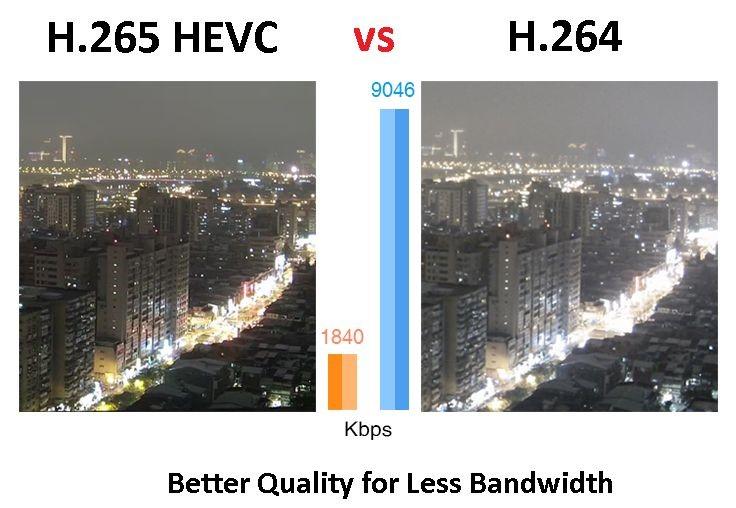
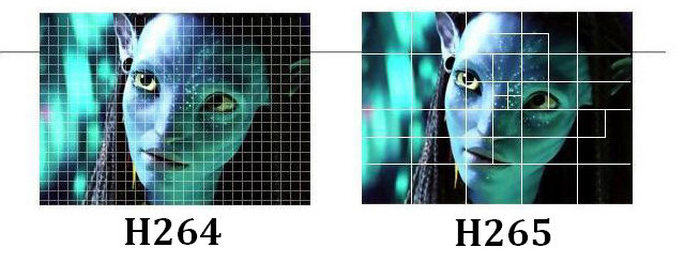
H.265 offers significantly improved compression over H.264. The new codec can do almost twice the compression of its predecessor. With H.265, video with the same visual quality would only take up half the memory. Alternatively, videos with the same file size and bitrate can be significantly better. Part of this improvement comes from increasing the size of the macroblock. H.264 only allows 16 x 16 pixel macroblocks, which are too small to be really effective in higher resolution video. H.265 provides 64 x 64 pixel macroblocks (now called Coding Tree Units, or CTUs) to improve encoding efficiency at all resolutions.

Improved intraframe motion prediction

Video compression is based on predicting movement between frames. When there are no changes to a pixel, a video codec can save space by referencing it instead of playing it. Therefore, improved motion prediction means improved file size and compression quality. Along with the improved compression standards in H.265, we also found significant improvements in motion prediction and compensation.

Improved intra-frame prediction

Video compression also benefits from individual frame “motion” analysis, allowing you to compress individual video frames more efficiently. This can be achieved by describing the pixels with a mathematical function instead of the actual values ​​of the pixels. The function takes up less space than pixel data, which reduces file size. However, the codec must support a sufficiently advanced mathematical function for this method to be really useful. The H.265 intra-prediction function is much more detailed than H.264, it allows 33 directions of movement in nine directions of H.264.

Parallel processing

H.265 uses tiles and fragments that can be decoded independently of the rest of the frame. This means that the decoding process can be divided into multiple parallel streaming processes using more efficient decoding capabilities in modern multi-core processors. At higher video resolutions, this improved efficiency is necessary for decoding tempo-controlled video on lower hardware.

Larger maximum frame size
The world is getting higher resolution and H.265 supports it. With H.265, video can be encoded up to 8K UHD or 8192 pixels × 4320 pixels. Currently, only a few cameras can produce 8K video and very few monitors can display this resolution. But just as HD is the current standard, we can expect 4K and ultimately 8K to get the same level of attention.

Hardware support

The H.265 codec is specifically supported by the current generation of Intel processors. The Kaby Lake line of processors contains dedicated instruction sets for encoding and decoding H.265 video, as for future generations. This gives the codec many speed and consistency benefits over other high definition video codecs. Given the popularity and technical superiority of the H.264 codec, it’s not surprising that Intel prefers to ditch its hardware. Of course, this doesn’t limit the use of H.265 to Kaby Lake processors, but it does mean that computers using Kaby Lake chips will be more flexible for playing H.265 video. And considering that the computational overhead required to encode and decode high-definition H.265 video is quite significant,

Conclusion: where to find H.265?

H.265 is still less common than H.264, but it is rapidly gaining ground in the market. Apple’s new iPhone and iPad operating system, iOS 11, saves all video files in H.265. The next-generation MacBook Pro includes hardware support for Kaby Lake for codec decoding.

Everything you need to know about HEVC / H.265

Everything you need to know about HEVC / H.265

H.265

You may have heard a lot about HEVC / H.265 lately. With the rise in popularity of 4K video, Apple has embraced this new industry standard on Mac Hight Sierra and iOS 11. Compared to H.264, H.265 / HEVC has great advantages, but what are they? And can you really take advantage of that H.265 / HEVC? I will go into HEVC / H.265 in detail below and hope it is helpful.

H.265

What is HEVC / H.265?

HEVC stands for High Efficiency Video Coding, also known as H.265 and MPEG-H Part 2, it is the latest and most advanced video compression standard jointly developed by MPEG and VCEG, which offers higher encoding efficiency and better improved video quality. HEVC is capable of compressing video with twice the data compression rate, but only requires half the bit rate to maintain the same video quality and halve the storage space compared to H.264.

Why does HEVC / H.265 come?

As you may know, more and more 4K and 8K videos are appearing in the world, while these HD videos require a lot of space, making it impossible to download and stream them in the best quality. To reduce storage space while maintaining the same H.264-based quality, it uses HEVC encoding technology.

HEVC can easily deliver video content to your Apple TV, computer, even iPhone or other portable devices with high quality and less space. If you like to play HEVC / H.265 videos, you can decode the files first and play them through the media player. However, you can also convert DVD to H.265 codec to get half the size but the same video quality. Therefore, many consumer devices and operating systems gradually support HEVC / H.265.

H.265 performance, advantages and disadvantages

H.265 is designed to deliver higher quality video with limited bandwidth that is cut in half. This means that we can enjoy 1080p high definition video with our smartphone and tablets online. The H.265 standard keeps pace with the high resolution display.

The main advantage of H.265 is that H.265 has better compression performance and lower bandwidth utilization, which can further reduce the design bit rate to reduce transmission and storage costs. And now, many high-definition 4K devices, such as 4K Blu-ray player or other streaming media players, support H.265. By the way, you can also convert H.265 to other supported formats with a free H.265 converter to play on your devices.

It is worth noting that the investment in H.265 is huge, especially after H.264; many industrial companies will hesitate to choose H.265. On the other hand, H.265 has 3 groups of patents with different price structures and terms. Lack of clarity on royalties stopped the adoption of H.265.

Development and current status of H.265

H.265 is now increasingly supported by many platforms and operating systems, but it is not widely supported. The successful popularization of a video standard depends on several aspects, including the decision of the standards organization, the emergence of competitors, applications, and royalties. Unlike H.264, H.265 requires high license fees, which are charged by HEVC Advance, an independent license manager.

Like the development of a high-resolution display, H.265 will also evolve. Despite its industrial rival VP9 and other limiting factors, H.265 will find a way out and gain massive popularity.

The battle of the codecs: H.265 vs VP9 vs AV1

The battle of the codecs: H.265 vs VP9 vs AV1

VP9 vs HEVC (h265)

In this post, we are going to try to shed some clarity on a fundamental question: which codec is better?

AV1 vs VP9 vs H.265

There are numerous studies that focus on analyzing in detail the performance of video coding systems and, in Digital-Content.es, we are going to try to summarize some of their results to clarify the battle between the H.265, VP9 and AV1.

At the beginning of this decade, work on high-efficiency video coding with standards such as H.265 (MPEG-H Part 2 or HEVC, High Efficiency Video Coding) or VP9 saw the light. In recent years, the Alliance for Open Media has focused on the development of AV1. As we already commented from this blog, “AV1 aspires to become the industry standard, displacing VP9 and competing directly with HEVC / H.265, being more efficient than this and, also, open source” (Why should you start to use the AV1 codec?).

The questions that arise are: is it true that AV1 is much better than the rest of the standards? … And, between H.265 and VP9, ​​which one is better?

Regarding the bit rate, according to a study entitled “Comparison of Compression Efficiency between HEVC / H. 265, VP9 and AV1 based on Subjective Quality Assessments”, it is shown that the AV1 and H.265 codecs account for 28% and a 27% bitrate savings respectively compared to VP9. However, the same analysis specifies that, although it is true that H.265 assumes a bitrate gain in relation to VP9, ​​the differences are not very significant when working with very high bit rates. For its part, the fight in this regard between AV1 and H.265 is served, with very similar performances, although slightly favorable to H.265, largely conditioned to the audiovisual content used for encoding.

In terms of encoding time, another study titled “Future Video Coding Technologies: A Performance Evaluation of AV1, JEM, VP9, ​​and HM” reveals that AV1 requires more time to achieve greater efficiency in video compression. In this sense, the analysis specifies that AV1 requires approximately 58 times more execution time than VP9. For its part, the research entitled “Study on H.265 / HEVC against VP9 and H.264: On Space and Time Complexity for Codecs” concludes that VP9 consumes approximately 35-45 times more encoding time than its competitor H.265 .

Following the data of these two parameters in the studies presented, the H.265 codec clearly outperforms its competitors. If we analyze the visual distortion generated by these encoders, according to parameters analyzed in “Comparison of Compression Efficiency between HEVC / H. 265, VP9 and AV1 based on Subjective Quality Assessments”, we can determine, based on objective and subjective metrics, that AV1 contains lower distortions than H.265 and VP9. This same analysis clarifies that at very high bit rates, the differences between all of them are not significant. AV1 and H.265 are subjectively perceived as very similar, so they compete strongly.

Therefore, taking into account the three factors that we have determined in this analysis and following the studies presented, we can consider H.265 as the winning codec in this battle. We trust in the evolutionary power of AV1, especially considering that it is an open and royalty-free solution.

The H.265 War vs. AV1 is still open!

H.264, H.265 and H.265 + video codecs. Pros and cons

H.264, H.265 and H.265 + video codecs. Pros and cons

H.265

The first versions of H.264 video compression codecs appeared in 2013. Today, the Н.265 format has confidently entered the video surveillance market and dictates its own terms. Many manufacturers produce equipment that supports this video compression format.

H.265 / HEVC

The H.264 compression format, unlike previous MJPEG and MPEG-4 codecs, enables you to efficiently solve the problem of streaming a large number of high-definition video streams.

Using H.264 in IP video surveillance systems provides high image quality with less data, requires less network bandwidth, and fewer hard drives to store video files. However, there is also a downside of fat. Using H.264 places heavy loads on IT equipment.

To increase the efficiency of the use of computing resources, developers apply various methods. For example, transfer part of the operations to the video card. Thanks to this, the video card can take care of part of the decoding calculations. The use of this feature provided a reduction in processor load up to two times, and the possibility of using processors of lower power, and therefore the cost.

Transferring decoding operations to a video card also allows you to save not only on the server, but also on the client side of the video surveillance system. To use this function, in the configuration of the client part of the software, you must specify where to perform the processing: on the central processor or on the video card.

To reduce the load on IT equipment, video analysis technology of compressed video streams from IP cameras without their complete decoding is also used. The use of this technology leads to an increase in data processing speed, thereby reducing the load on the central processor. In addition, the decrease can reach an average of 4 times.

Thanks to this, it is possible to connect 4 times more cameras to one server. Another option to save is the use of less powerful processors and, therefore, more budgetary, and a decrease in the cost of the server equipment.

Another disadvantage of the H.264 codec is that most web and mobile clients for video surveillance systems do not support this format and, to receive a video image, a procedure is required to transcode the video stream into MJPEG. Such an operation is resource intensive and places additional loads on computing resources.

H.264 processing is possible with sufficiently powerful computing resources of a mobile device. If resources are insufficient, the video stream is automatically switched to the MJPEG format. And the user himself can independently choose the format of the video transmission.

As you can see, the H.264 codec used for video surveillance has many pros and cons. However, a heavy load on computing resources often nullifies all benefits.

The new H.265 format supports even more uploads. It uses stronger and more advanced video compression algorithms in its work. With the same visual quality, the new H.265 codec represents an approximately double reduction in file size compared to its H.264 predecessor. This saves a lot of space on the disk space of video recorders and servers. And half the bit rate reduces traffic on video transmission networks.

Thanks to more powerful compression mechanisms, the H.265 codec does an excellent job of encoding high and high definition video over 8K UHD (8192 × 4320). In addition, for high-quality video playback at 4K codec resolution, a transmission speed of only 50MB / s is required.

It is important that H.265 compress the video almost without loss, the quality of the compressed video is kept at a high level. Special compression algorithms eliminate artifacts inherent in H.264, such as graininess or blurry edges of moving objects.

But the main advantage of the H.265 codec is that the volume of video processed according to the new standard turned out to be almost 85% lower than when using H.264. However, the H.265 codec requires more powerful elements and processors in the hardware.

Moving towards increasing video compression, the H.265 + codec recently appeared on the market that allows you to reduce the bit rate of video cameras, which in turn reduces the cost of implementation and uses fewer matrices of disk for storing video files.

H.265 + improves the compression ratio through three key technologies: predictive encoding technology, background noise suppression technology.

What is the future of the video compression standard? Differences between H.264 and H.265

Recordings available on the Internet and real-time broadcasts have become two of the main sources of communication today. H.264 is one of the video compression formats that enables this visual and digital revolution. Just analyze the amount of time you spend in front of broadcast channels or portals. In 2017, the average number of hours observed daily worldwide is one billion. In 2016, 500 million hours were counted. In just one year, the results doubled.

H.265 vs H.264

If the H.264 video compression format is capable of supporting and offering quality to so many people every day of the year, the same is true for surveillance and monitoring technologies. Video compression is as important for YouTube as it is for an IP CCTV system. Basically, video compression is done using technologies that allow captured data to be intelligently transmitted. To do this, they reduce the amount of information that is similar and that would be just an additional burden on the files.

H265 vs H264

The Importance of Standards in Video Compression

Video compression uses techniques that will make files less burdensome, without interfering with the quality and, above all, the accuracy of the information. Precisely because it prioritizes the maintenance of visual characteristics, it is so essential to know what technologies are used. Choosing one format or another can directly affect the sharpness and loading of images. Since you don’t need to keep all the data, the suggestion is to use an industry standard. Until then, H.264, also called advanced video encoding (AVC), is the predominant one.

H.264 is considered one of the most adaptable and high-level formats. However, there is already what would be its evolution, H.265 or High Efficiency Video Coding (HEVC). Both are standardized and approved by the responsible institutions. That is, they are two official standards. Before talking about the benefits that H.265 adds to video compression, it’s important to note that both are standards that will make partners and vendors maintain identical prerequisites. What guarantees compatibility and more options for the clients.

H.264: what are the advantages of video compression?

Video compression is based on a technology that analyzes images captured within frames. It is like looking at a photo and identifying what data is relevant and what is not. For example, if there are an equal number of frames that are not noticeable, they are discarded. For that to happen, there is a forecast that uses a “comparison basis”. The deleted image is opposed to what serves as a parameter and, with that, one perceives what is altered. Only changes in relation to the base frame remain. Those with the same values ​​are not considered in the encoding, which reduces the size and number of pixels.

When using macroblock comparison, where each frame is decomposed and compared until it finds compatibility or modifications. Therefore, the similar ones are eliminated, or rather, the frame of reference is maintained. In H.264, macroblocks are used, with the division of images and, consequently, their segmentation into more blocks. Replays are considered redundancies and pixels do not count within video compression. What has changed with H.265?

H.265: what is the main change?

H.265 has a potential for video compression that significantly outperforms H.264, using less bandwidth and maintaining quality delivery. For this reason, you can stream higher-level content with the same amount of bandwidth that the other uses to do the same with more compact data.

There has been an evolution in compression, streaming and support capabilities, although H.265 uses the same video compression technique explained above. Macroblocks that make comparisons between divided frames of the same frame with a standard reference. So why is such a relevant technological advance?

The key issue for H.265 is the strategic use of macroblocks. There is also compatibility between similar pixels between frames, but with greater flexibility. There is no fixed area, it all depends on the type of image and your need. Greater attention to detail is paid only when necessary, making video compression even higher and more effective by reducing pixels and bytes.

In H.264, macroblocks do not exceed a 16-pixel standard, which are not best suited for certain situations and images. In H.265, there is an increase in the size of the blocks up to 64 pixels.

COMPRESSION AND VIDEO FORMATS

COMPRESSION AND VIDEO FORMATS

In the world of digital video production and distribution, few topics are as complicated and confusing as the choice of format to use.

There are many reasons.

First of all, it must be said that not all video formats are compatible with all digital platforms.

This can lead to major problems with the input, output, upload and download of the required files.

Therefore, one cannot generally speak of the “best video format”.

video formats

A lot depends on what you need and which platform you should use.

Second, video formats can cause big problems because there are so many of them.

And to make things even more complicated, a large number of these formats are now largely out of date.

In this article I will reveal everything I know about this topic.

I have to be honest: for me, like most filmmakers, this has always been a difficult topic.

I still remember the hours I spent with my editor trying to figure out which video format could best be sent to the manufacturer.

video formats

I will never forget the call in the middle of the night from one of the most famous Mediaset producers who yelled at me: “Hello Francesco, you cannot see the file you just sent me.”

I hung up and after banging my head against the wall, I called the editor to tell him what had happened.

Finally, you need to realize that a video format is more than its file extension.

The term “video format” per se confuses people because it contains two different components: the codec and the container.

With that premise, we can get to the heart of this article, which, believe me, was really hard to write.

1) Let’s start with the vocabulary

First, here is a list of the most commonly used words:

A) FRAME / RATE SPF

The number of frames per second.

I recently wrote an article on this topic, which you can find here.

B) VIDEO SIZE

This data is used to measure the width and height of the video.

The most common measurements are (in pixels):

426 x 240 (240p)
640 x 360 (360p)
854 x 480 (480p)
1280 x 720 (720p)
1920 x 1080 (1080p)
2560 x 1440 (1440p)
3840 x 2160 (2160p)

C) PROPORTIONS

The aspect ratio of an image describes the proportional relationship between width and height.

D) CODEC

Codecs are programs that digitally encode and decode data, making it easy to store and reproduce.

When it comes to codecs, it basically means that our video file has been compressed.

After compression, this file must be stored in a container, which we will discuss later.

There are different types of codecs, e.g. B. the recording codec.

This is the software that your camcorder uses to compress your movie files.

Then there is the export codec, which is instead the format we assigned to our output video.

Finally we have the codec for the master in which we will save our final project.

The most common codecs are:

MJPEG
MPEG-4
H264
H265
WMV
PRO RES
DNxHD

Let’s see them together:

MPEG-4

The ‘MPEG-4 is one of the most popular codecs in the world.

It was introduced in late 1998 and is mainly used for applications such as video telephony or digital television, for streaming films over the Internet and for storing CD-ROMs.

The advantage of MPEG-4 is, in fact, the ability to compress a two-hour video on a CD for a high quality result.

Thanks to this, MPEG-4 has become very popular with users around the world.

Today, MPEG-4 is compatible with a wide range of devices, from satellite television to cell phones.

H264

The H264 is part of the latest generation of codecs and offers high quality videos with relatively low bit rates.

The standard offers up to double MPEG-4 compression.

In addition to improving the quality of perception, the H.264 standard can deliver high quality DVD-Videos with less than 1 Mbit / s.

Personally, I use H264 for the videos that I upload to YouTube.

H265

L ‘H265, also known as High Efficiency Video Coding or HEVC, is the latest in a long line of video codecs.

Like its predecessor, the H264, the H265 was developed by the ITU-T Video Coding Expert Group for the broadcasting industry.

Compression is great for H264, but is used for resolutions of SD, HD and 4K films.