Role of predictive coding in H.265 and AAC compression


Free Download Mp4Gain
picture

Role of predictive coding in H.265 and AAC compression
Role of predictive coding in H.265 and AAC compression

Let’s talk about the role of predictive coding in H.265 and AAC compression

Predictive coding is fundamental to modern compression technologies like H.265 and AAC, enabling efficient encoding without compromising quality. At its core, predictive coding reduces redundant data by predicting the values of future data based on previous patterns. For instance, in a video, if one frame is nearly identical to the next, predictive coding eliminates the need to encode the entire frame again. It’s like predicting what the next puzzle piece looks like when assembling a jigsaw puzzle. This technique allows for smaller file sizes while preserving visual and audio quality.

In my work, I’ve seen predictive coding excel in handling complex audio and video sequences. With H.265, this process identifies similarities between frames and encodes only the differences, dramatically cutting down data requirements. Similarly, AAC uses predictive coding to analyze and predict audio waveforms, ensuring that only the necessary changes are encoded. Picture a friend trying to describe a simple drawing over the phone—they only need to tell you what changes to make to complete the image, saving time and effort.

How predictive coding optimizes H.265 compression

H.265, or HEVC, relies heavily on predictive coding to enhance video compression efficiency. By using intra-frame and inter-frame prediction, it minimizes redundant information. Intra-frame prediction looks within a single frame for patterns, while inter-frame prediction focuses on similarities between consecutive frames. For example, a static background in a video scene doesn’t need to be encoded repeatedly if predictive coding captures its unchanged nature.

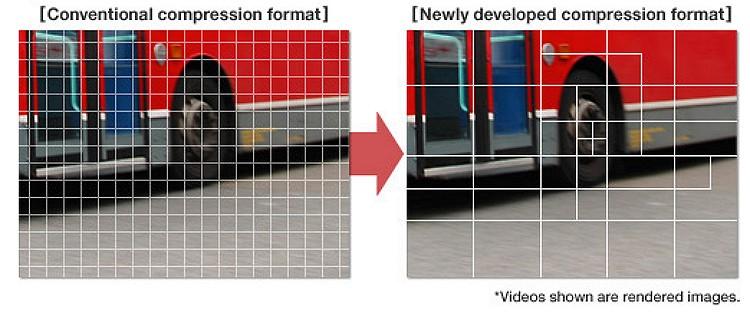
The efficiency of H.265 comes from its ability to divide frames into smaller blocks and predict their content more accurately. I’ve often explained this using a mosaic analogy: instead of recreating each tile individually, H.265 identifies repeating patterns and predicts their placement, reducing the data load. This approach not only saves bandwidth but also improves streaming quality for high-definition content, even on limited internet connections.

How predictive coding works in AAC compression

In AAC, predictive coding ensures efficient audio compression by analyzing and predicting sound waveforms. It removes redundant frequencies and encodes only the essential changes. Think of it like adjusting the temperature in a room: once you set the thermostat, only small tweaks are needed to maintain comfort. Predictive coding in AAC eliminates unnecessary adjustments, focusing solely on what’s required to preserve audio fidelity.

This technique is particularly valuable for music and speech. By predicting and encoding only the differences between successive sound samples, AAC achieves high-quality audio with lower file sizes. I’ve personally worked with AAC files that maintain studio-level sound quality while being small enough to fit on older devices with limited storage. Predictive coding is the unsung hero behind this balance of quality and efficiency.

Latest words on the role of predictive coding in H.265 and AAC compression

Predictive coding is the cornerstone of H.265 and AAC compression, ensuring smaller file sizes without sacrificing quality. By predicting and encoding only the essential changes in video frames and audio waveforms, this technology maximizes efficiency. It’s like packing smarter for a trip—bringing only what you truly need while leaving unnecessary items behind.

If you’re looking to optimize your media files further, Mp4Gain offers tools that can help improve audio and video quality while leveraging these advanced compression techniques. It’s the ideal choice for those who want to enhance their media without compromising efficiency.

FAQs about the role of predictive coding in H.265 and AAC compression

What is predictive coding in H.265?

Predictive coding in H.265 reduces redundant data by predicting similarities within and between video frames, optimizing compression efficiency.

How does predictive coding work in AAC?

Predictive coding in AAC analyzes sound waveforms, encodes only changes between samples, and removes redundant frequencies to ensure high audio quality.

Why is predictive coding important in compression?

Predictive coding reduces file sizes while maintaining quality, making it essential for efficient video and audio streaming and storage.

What is inter-frame prediction in H.265?

Inter-frame prediction in H.265 analyzes similarities between consecutive frames to encode only the changes, reducing redundancy.

How does predictive coding affect video quality?

Predictive coding ensures that video compression retains high quality by focusing on encoding essential details and eliminating redundancies.

What is the role of intra-frame prediction in H.265?

Intra-frame prediction in H.265 analyzes patterns within a single frame to encode data more efficiently.

Does predictive coding improve streaming performance?

Yes, predictive coding reduces file sizes, enabling smoother streaming even on limited bandwidth connections.

Is predictive coding exclusive to H.265 and AAC?

No, predictive coding is used in other codecs as well, but it plays a critical role in H.265 and AAC for advanced compression.

How does predictive coding balance quality and compression?

By predicting and encoding only changes, predictive coding reduces data usage without compromising perceived quality.

What devices benefit from predictive coding?

Devices like smartphones, streaming platforms, and storage-constrained gadgets benefit from predictive coding’s efficiency.

Comments:

I didn’t know predictive coding worked this way! It’s amazing how it keeps file sizes so small without losing quality.

Good read, but I would have liked more examples of real-life applications of predictive coding. Still, solid info!

Wow, this article answered a lot of my questions about H.265. I’m going to bookmark this for future reference!

What a great explanation! I always wondered how AAC could be so efficient. This really cleared it up for me.

Pretty detailed article, but maybe a bit too technical in some spots. Would be nice to have even simpler analogies.

Can predictive coding be applied to older codecs too? Curious about how far back this technology goes.

I’ve been searching for an easy way to explain H.265 to a client, and this article nailed it. Thanks a ton!

Didn’t know predictive coding was the reason why my streaming is so smooth. Learned a lot from this post!

The way this was broken down into examples made it so easy to follow. Great job simplifying complex ideas!


Free Download Mp4Gain
picture


Mp4Gain Main Window
picture


Mp4Gain Features
picture


Free Download Mp4Gain
picture

Compression efficiency in MP4 video streams

Compression efficiency in MP4 video streams

Compression efficiency in MP4 video streams

Let’s talk about compression efficiency in MP4 video streams

Compression efficiency in MP4 video streams determines how effectively data is stored without compromising the viewing experience. This topic is critical as it directly impacts file sizes, streaming quality, and the balance between performance and visual fidelity. With my experience in multimedia optimization, I’ve seen how small tweaks in compression algorithms can result in massive improvements. Think of it like packing a suitcase—how efficiently you organize everything determines whether it fits while still being accessible.

The MP4 format is popular for its versatility and high-quality compression methods, which make it suitable for everything from smartphone videos to streaming platforms. Its efficiency lies in how it uses codecs like H.264 or H.265, which rely on perceptual coding to reduce redundant or less noticeable details. This approach ensures smaller files with impressive quality, something critical in today’s streaming-driven world.

How codecs influence compression efficiency

Codecs play a pivotal role in how MP4 files are compressed. If you’ve ever wondered why two MP4 files of similar duration can have vastly different sizes, the answer lies in their codec.

Modern codecs like H.264 and H.265 use techniques like motion compensation and predictive coding. These identify repeated patterns or predictable movements in video frames, reducing redundant data. For example, a static background in a scene doesn’t need to be re-encoded for every frame; instead, it’s referenced from the first frame where it appears.

The trade-off between compression and quality

Achieving the right balance between file size and quality is a challenge. I often compare this to adjusting a water hose; too much pressure, and you waste water (or data in this case); too little, and you don’t get the result you want. Compression at low bitrates can lead to visible artifacts like blockiness or banding, especially in areas of high motion or gradients.

Efficient MP4 compression ensures that critical visual details remain sharp, even at reduced file sizes. For instance, H.265 is about 50% more efficient than H.264, meaning you can achieve the same quality at half the file size. However, the trade-off comes in encoding and decoding complexity, which requires more processing power.

Factors affecting MP4 compression efficiency

Several factors impact how efficiently an MP4 video stream compresses:

  • Resolution: Higher resolutions, like 4K, demand more data, but smart compression can preserve quality.
  • Bitrate: A higher bitrate delivers better quality but results in larger files.
  • Frame rate: Higher frame rates like 60fps add more data to each second of video.
  • Codec choice: Using H.265 instead of H.264 can drastically improve compression efficiency.

From my experience, I’ve seen how adjusting these parameters can make a significant difference. For example, reducing the frame rate for a slow-moving video can cut file sizes in half without noticeable quality loss.

Real-world examples of MP4 compression efficiency

Think about streaming platforms like Netflix or YouTube. These platforms use advanced MP4 compression to deliver high-quality videos while minimizing bandwidth use. They employ adaptive bitrate streaming, which adjusts video quality in real time based on your internet speed.

Another example is video surveillance systems. Efficient MP4 compression ensures hours of high-definition footage can be stored on limited storage devices without frequent overwrites. In my experience, tweaking settings like resolution and codec can extend storage capacity significantly.

Emerging technologies enhancing compression

New technologies are continually pushing the boundaries of compression efficiency. AI-based video compression is one exciting development. These systems learn to recognize patterns and optimize encoding better than traditional algorithms. AI compression can reduce file sizes by up to 30% compared to standard methods.

Additionally, the emergence of codecs like AV1 promises even better efficiency. AV1 can outperform H.265, providing higher-quality streams at lower bitrates, making it ideal for ultra-high-definition content.

How compression impacts streaming experiences

Streaming services depend heavily on efficient MP4 compression. A poorly compressed video can result in buffering, pixelation, or quality drops, frustrating viewers. Compression ensures smooth playback, even on slower connections. For instance, efficient MP4 streams can adapt to 480p when bandwidth is limited and switch to 4K when speeds improve.

In my work, I’ve seen how optimizing compression settings can create seamless streaming experiences. By balancing bitrate and resolution, we can maintain quality even during fluctuating network conditions.

Optimizing MP4 compression for different use cases

Every application demands a unique approach to MP4 compression. For professional videographers, preserving every detail is crucial, so higher bitrates and advanced codecs are preferred. In contrast, mobile users prioritize smaller file sizes for quicker sharing.

I once optimized a video marketing campaign where we reduced the file size by 70% without compromising quality. This was achieved by carefully selecting resolution, bitrate, and codec settings tailored to the target audience.

Latest words on compression efficiency in MP4 video streams

Compression efficiency in MP4 video streams is a cornerstone of modern multimedia. It balances the need for quality, accessibility, and performance. As a specialist, I’ve seen how advancements like AI and new codecs are reshaping the landscape. Tools like Mp4Gain are invaluable for achieving optimal compression settings, ensuring videos are high-quality yet efficient.

What is compression efficiency in MP4 video streams?

Compression efficiency refers to the ability to reduce file sizes while maintaining high video quality. It uses advanced codecs to achieve this balance.

Why is MP4 compression important?

MP4 compression ensures smaller file sizes, faster streaming, and optimal storage without losing video quality.

How does H.265 improve compression efficiency?

H.265 uses advanced algorithms like motion compensation and prediction, reducing data redundancy and improving efficiency.

What is adaptive bitrate streaming?

Adaptive bitrate streaming adjusts video quality in real time based on internet speed, ensuring smooth playback.

Can AI enhance video compression?

Yes, AI-based systems optimize encoding by recognizing patterns, reducing file sizes more efficiently than traditional methods.

What is AV1 codec?

AV1 is a next-generation codec that offers better compression efficiency than H.265, ideal for high-definition content.

What are compression artifacts?

Compression artifacts are visual distortions like blockiness or banding that occur due to aggressive data reduction.

How does resolution affect compression efficiency?

Higher resolutions demand more data, but efficient compression methods can preserve quality without increasing file sizes excessively.

What is perceptual coding in video compression?

Perceptual coding prioritizes details visible to human eyes, removing less noticeable elements to save space.

How does Mp4Gain optimize MP4 compression?

Mp4Gain helps adjust compression settings for optimal quality and efficiency, tailored to individual needs.

Comments:

I’ve been struggling with compression artifacts on my videos. This article gave me so much insight! Great job explaining codecs.

I still don’t fully get how adaptive bitrate works. Can you elaborate more on how it adjusts in real time?

This was super helpful. I tried reducing the frame rate for my videos, and it worked wonders for file size!

I didn’t know AV1 was better than H.265. Are there any downsides to using it?

Why do some streaming services still use older codecs like H.264 if better options exist? Please explain more!

Wow, I learned so much about perceptual coding. Makes sense why some details are sacrificed for size!

I wish you went deeper into AI compression. That seems like the future. Do you have more resources on that?

Great article, but I think more real-world examples would make it even better. Like specific use cases of AV1.

Didn’t realize how much resolution affects compression efficiency. Time to recheck my encoding settings!

Impact of Quantization Matrices on MP4 Quality

Impact of Quantization Matrices on MP4 Quality

Impact of Quantization Matrices on MP4 Quality

Let’s talk about the impact of quantization matrices on MP4 quality

When it comes to MP4 quality, quantization matrices play a pivotal role in determining how much detail is retained or lost during compression. As someone deeply involved in video encoding and optimization, I’ve seen how these matrices can make or break the visual appeal of a video. They essentially dictate how compression algorithms prioritize certain frequencies over others, affecting the clarity, sharpness, and overall fidelity of the video.

Imagine this: You’re editing a photo and need to reduce its file size. If you reduce every part of the image equally, the overall quality diminishes evenly. However, if you could selectively reduce detail in the background while keeping the main subject sharp, the result would look much better. That’s what quantization matrices do for video. They allow certain details to remain intact while compressing less noticeable parts. This nuanced control has a direct impact on MP4 quality, making it an indispensable aspect of video compression.

Understanding what quantization matrices are

Quantization matrices are essentially blueprints that guide compression algorithms in deciding which parts of the video data to keep and which to discard. They work by assigning weights to different frequency components in the video, influencing how much compression is applied to each.

In simpler terms, think of a quantization matrix as a map that shows where to save space and where to preserve details. For instance, if a scene in a video has a bright sky and detailed buildings, the matrix might allow for more compression in the sky (which is uniform) and less in the buildings (which are intricate). This balancing act is crucial for achieving efficient compression without compromising perceived quality.

Why quantization matrices matter for MP4 quality

The choice of quantization matrices significantly affects MP4 quality because they control how visible artifacts—like blockiness or blurring—appear after compression. When the wrong matrix is used, you might end up with a file that’s small but riddled with visual flaws. On the other hand, a well-optimized matrix ensures the video looks crisp and professional, even at reduced file sizes.

I’ve worked with projects where fine-tuning the quantization matrices led to significant improvements in quality without ballooning the file size. For instance, a sports video with fast-moving players and a static audience can benefit from a custom matrix that allocates more detail to motion-heavy areas. The result? A sharper, more engaging viewing experience.

How quantization matrices work in video encoding

Quantization matrices operate by breaking video data into smaller chunks and analyzing their frequency components. Higher frequencies correspond to fine details, while lower frequencies relate to broader, uniform areas. The matrix assigns a priority to each frequency, determining how much of it to preserve.

For example, during the encoding of an MP4, the algorithm uses the quantization matrix to decide how much detail to keep in textures, edges, and transitions. By compressing low-priority areas more aggressively, it reduces file size while keeping the viewer’s focus on the critical parts of the scene. This approach mimics how the human eye perceives detail, prioritizing the elements that are most noticeable.

Real-world examples of quantization matrix optimization

In one project, I helped optimize training videos for a corporate client. These videos needed to look great on large screens but still fit within strict storage limits. By customizing the quantization matrices, I was able to maintain sharp text and clear diagrams while compressing the less critical background elements. This approach saved gigabytes of space without sacrificing quality.

Another instance involved a nature documentary where the focus was on preserving intricate details in animal fur and leaves. A generic matrix would have smoothed out these details, but by tailoring the matrix to prioritize high frequencies in these areas, we achieved stunning visual results. The final MP4 files were not only compact but also visually immersive.

The balance between compression and quality

Striking the right balance between compression and quality is an art, and quantization matrices are the brush. Using overly aggressive matrices might save space, but it can lead to artifacts that ruin the viewing experience. On the flip side, overly lenient matrices preserve every detail but result in massive file sizes.

I always recommend experimenting with different matrices to find the sweet spot. For instance, action movies and gaming videos require matrices that prioritize motion clarity, while documentaries might focus on preserving texture and color depth. Each type of content benefits from a tailored approach, ensuring the MP4 delivers an excellent viewing experience.

Advanced techniques for customizing quantization matrices

For those deeply invested in video quality, customizing quantization matrices offers unparalleled control. Most encoding software allows you to tweak these matrices or even upload custom ones. By analyzing the content of your video, you can adjust the matrix to prioritize the most visually important elements.

For example, when encoding a video for e-learning, I prioritize text and diagrams, ensuring they remain sharp even after compression. Similarly, for music videos, I focus on preserving color gradients and dynamic lighting, which are crucial for aesthetic appeal. These adjustments often involve trial and error, but the payoff is worth the effort.

MP4 encoding standards and quantization matrices

MP4 encoding standards like H.264 and H.265 incorporate predefined quantization matrices, but these can be adjusted for specific needs. The default settings are designed to provide a good balance, but they might not suit all scenarios.

In my experience, using custom matrices tailored to the content type can yield significantly better results. For instance, H.265’s flexibility allows for more granular adjustments, making it ideal for high-definition content. By experimenting with these settings, you can achieve compression ratios that were previously unattainable.

Latest words on the impact of quantization matrices on MP4 quality

Quantization matrices are a critical component of MP4 compression, directly influencing the balance between quality and file size. By understanding how they work and applying them strategically, you can achieve remarkable results. Whether you’re encoding videos for streaming, storage, or playback, fine-tuning these matrices can make a noticeable difference.

If you’re looking for a tool to manage your video quality with precision, Mp4Gain offers advanced options to normalize and optimize your MP4 files. It’s an excellent solution for ensuring your videos look their best while staying within size constraints.

FAQs about the impact of quantization matrices on MP4 quality

What are quantization matrices in MP4 encoding?

Quantization matrices are tools used in video encoding to prioritize certain details during compression. They assign weights to different frequency components, determining what to preserve and what to compress more aggressively.

How do quantization matrices affect video quality?

They influence the balance between detail retention and file size. Properly optimized matrices minimize visible artifacts while maintaining clarity in important areas.

Can I customize quantization matrices?

Yes, many encoding tools allow customization of quantization matrices to suit specific video content, offering greater control over quality and compression.

Are there default quantization matrices in MP4 standards?

Yes, encoding standards like H.264 and H.265 include default matrices designed to provide a balance between quality and compression. However, these can be adjusted.

What content benefits most from custom quantization matrices?

Content with specific visual priorities, like action scenes or text-heavy educational videos, benefits from custom matrices tailored to preserve essential details.

Do quantization matrices impact file size?

Yes, by selectively compressing less noticeable details, quantization matrices can reduce file size while maintaining perceived quality.

What role do quantization matrices play in H.265 encoding?

In H.265, matrices allow for more precise adjustments, making it ideal for high-definition content and achieving better compression ratios.

Are quantization matrices necessary for all MP4 files?

While not mandatory, they are essential for optimizing quality and file size, especially in professional applications or high-compression scenarios.

Can poor quantization matrices ruin MP4 quality?

Yes, poorly designed matrices can introduce visible artifacts like blockiness and blurring, degrading the viewing experience.

What tools are best for managing quantization matrices?

Professional encoding software often provides options for customizing quantization matrices. Tools like Mp4Gain help normalize and optimize MP4 files efficiently.

Comments:

Wow, I didn’t know quantization matrices could make such a difference! I’ve always wondered why some videos look great even when compressed. Great info here.

Really helpful article, but I wish there were more examples of specific software settings for beginners like me. Maybe a guide could help?

I’ve been trying to compress gaming videos, and this makes sense now! Custom matrices are definitely the way to go for motion-heavy content.

This is one of the best explanations I’ve found online. It’s clear and detailed without being overly technical. Thanks for sharing!

Can you add more about how matrices affect audio tracks in MP4 files? I feel like there’s a gap there.

The nature documentary example was spot on. I’ve had issues with textures being lost in wildlife videos. Great tip on custom matrices!

Didn’t know H.265 allowed for such precise adjustments. Makes me want to revisit some older projects to see what I can improve.

The H.266 codec arrives to save the Internet: halves the size of streaming video

The H.266 codec arrives to save the Internet: halves the size of streaming video

H.266/VVC Codec

After three years of development, today the H.266 codec was introduced, which promises to halve the size of streaming videos without losing quality.

Codec H.266

The German Fraunhofer HHI institute has just introduced the long-awaited H.266 codec, which promises to lighten Internet traffic by halving the size of videos compared to the HEVC (H.265) codec. It is an important achievement considering that 80% of Internet traffic is streaming video.

The German Fraunhofer HHI institute, which is also behind the H.264 and H.265 formats, is part of the network of German institutions that also created the MP3 audio format. It has been working on the H.266 codec for three years together with Apple, Intel, Huawei, Microsoft, Qualcomm, Sony and Ericsson.

The main improvements of H.266 with respect to H.265 are two: the spectacular compression of the video, and its greater versatility. It is not only designed to encode streaming video or in local mode.

Register
Fraunhofer HHI claims that a 90 minute 4K video encoded with the H.265 codec occupies about 10 GB, but if it is encoded with H.266 it is reduced to 5 GB without losing image quality.

It is a format that accepts all resolutions, from low-resolution video to 8K, although it has been developed with 4K resolution in mind, so the main improvements are noticeable from this resolution.

As we have mentioned, it stands out for its versatility. It not only works well with conventional video or streaming. Also with 360-degree video, virtual reality, streaming video games like Google Stadia, screen sharing, etc. It also supports 10-bit color and HDR in all situations.

If you cut the video size in half without losing quality, the H.266 codec could be a major relief for Internet traffic, should platforms like Neftlix, Amazon Prime Video, YouTube or Disney + adapt it.

The main problem is that it is a licensed codec, only certain versions can be used for free and for non-commercial use. Netflix for example used H.264 and H.265 (HEVC), but for streaming on Android it opted for AV1, which is a free codec.

We’ll see what level of acceptance it has, but the fact that companies like Apple, Microsoft or Sony support it is important.

Software to encode and decode the H.266 codec will arrive in the fall. It will also be implemented in chips that will be used in mobiles, and devices such as Chromecast or Fire TV Stick.

Which video codec to choose? H264 or H265?

When we finish editing our issues in our editing software, the first hurdle we face (due to lack of hard disk space …) is often the format in which we decided to export our video. Digital or physical. We are faced with a list of video codec names that are sometimes difficult to enter. And which many amateur cameramen are also afraid of.

h.264 h.265

Which internet user has never searched for a codec or codec package to play a video. And if not, at best you only heard the sound … As I wrote in another article, the video codec mainly depends on the medium in which your video is broadcast. In fact, it is not as simple as the photo, which is often enough to export in jpeg or other format so it can be seen everywhere. Video has this major drawback, which is choosing the right codec based on the streaming platform.

H.264 VS H.265

The concept of containers and codecs.

To illustrate what a container and a codec are, imagine a jar (the container) that contains letters (the codec). The video player that will “decode” this file can be compared to a person who has the key to the pot. And who will put the letters together to make words and then make meaningful sentences? In fact, the container is the file that can be related to a box or jar where the video codec, audio codec and sometimes even the subtitle file are found. If you have a video in .avi or .mp4 or .mov or even .mkv, the container will end after the period. What videographers also call ‘video format’.

For example, for .mp4, the container is MP4. So far so good. And so in this container there can be Mpeg4, H264 or x264 which are video codecs.

Accompanied by the audio track which can be in mp3, AC3 or AAC, but we’ll return to the audio codecs in another article. And since we don’t like doing things in the video, these video codecs can also be found in other containers …

Yes, otherwise it would be too easy.

So the biggest concern in the video is this famous lack of compatibility that ALL multimedia platforms have. Play a video file if no codec package is installed yet. In fact, every codec has affinity with this or that manufacturer (Windows, Apple, etc.).

About H265 (HEVC)

Let’s be clear, this is tomorrow’s codec, which will replace the H264 very soon. Why ? One is made for UHD (4K) but also for 8K (Super Ultra HD?). It also supports HDR, which the H264 does not. And two because it offers a more optimized encryption algorithm than H264. This allows you to deliver as beautiful, if not more beautiful and more detailed, H264 image quality to a file with almost the same bit rate … but with two obvious advantages: size and quality!

Example: for a 2 hour movie in Full HD encoded with 6 Mbs in H264, you get a file of about 8-9 GB, while with the H265 codec you are at a lower bit rate (for example 5 Mbs) a file of 5 GB with the same image quality or even better! A bit rate of 10 Mbs in H265 is enough to get high quality 4K video. You will understand that the algorithm is completely different from H264. It allows streaming services to deliver 4K content without needing too much bandwidth.

But all this comes at a price …

The disadvantage of H.265 is that it consumes a lot of resources when encoding. You need a very good computer configuration to edit or export with this codec. The algorithm requires a lot of processor resources.

Another detail, it is compatible with YouTube. That was not the case before.