MP4 Compression Techniques


Free Download Mp4Gain
picture

MP4 Compression Techniques

MP4 Compression Techniques

Let’s talk about MP4 compression techniques

As a video encoding specialist, I’m constantly exploring ways to optimize video files for size and quality. Understanding MP4 compression techniques is essential for anyone involved in video production, streaming, or distribution. Properly compressing MP4 files ensures they are manageable, stream efficiently, and maintain good visual fidelity.

What is MP4 Compression and Why Is It Necessary?

MP4 compression involves reducing the file size of a video while preserving acceptable quality. I often encounter situations where uncompressed video files are enormous, making them impractical for storage and distribution. Imagine trying to share a 4K video recording from your phone – the file size could be several gigabytes! MP4 compression techniques address this issue by using algorithms to remove redundant or less important data, resulting in smaller, more manageable files.

Lossy vs. Lossless MP4 Compression: Understanding the Trade-Offs

MP4 compression can be achieved through lossy or lossless methods. I always consider the trade-offs between file size and quality when choosing a compression technique.

* Lossy Compression: Removes some of the original data to achieve smaller file sizes. This can result in a slight reduction in quality, but it’s often imperceptible to the human eye. Common lossy codecs include H.264 and H.265.
* Lossless Compression: Preserves all of the original data, resulting in no loss of quality. However, lossless compression typically results in larger file sizes compared to lossy compression.

Key Codecs Used in MP4 Compression: H.264, H.265, and AV1

The choice of codec significantly impacts the effectiveness of MP4 compression. I’ve worked extensively with H.264, H.265, and AV1, and each has its strengths and weaknesses.

* H.264 (AVC): A widely supported codec that provides a good balance of quality and compression. It’s compatible with most devices and platforms.
* H.265 (HEVC): Offers better compression efficiency than H.264, resulting in smaller file sizes with comparable quality. However, it requires more processing power and may not be supported by older devices.
* AV1: A newer, open-source codec that aims to provide even better compression efficiency than H.265. It’s gaining popularity but may not be as widely supported as H.264 or H.265.

Bit Rate: Controlling MP4 File Size and Quality

Bit rate measures the amount of data used to encode a video per unit of time, typically expressed in megabits per second (Mbps). I always carefully adjust the bit rate to achieve the desired balance of file size and quality. A higher bit rate generally results in better video quality but also increases the file size. Conversely, a lower bit rate results in smaller file sizes but may reduce video quality.

Frame Rate: Balancing Smoothness and File Size

Frame rate refers to the number of frames displayed per second (fps), affecting the smoothness of motion in a video. I often adjust the frame rate to optimize for different viewing scenarios. Common frame rates include 24fps (cinematic look), 30fps (standard for television), and 60fps (smoother motion). Reducing the frame rate can decrease file size but may also make the video appear choppy.

Resolution: Optimizing for Different Screens

Resolution refers to the number of pixels in a video frame, determining the level of detail. I always consider the target viewing device when setting the resolution. Higher resolutions, like 4K (3840 x 2160) or 1080p (1920 x 1080), provide sharper and more detailed images compared to lower resolutions like 720p (1280 x 720) or 480p (854 x 480). Reducing the resolution can significantly decrease file size, but it may also make the video appear blurry on larger screens.

Chroma Subsampling: Reducing Color Data

Chroma subsampling is a technique used to reduce the amount of color data in a video. I often use chroma subsampling to further compress MP4 files without significantly impacting perceived quality. The human eye is more sensitive to changes in brightness (luma) than changes in color (chroma), so reducing the chroma data can result in smaller file sizes with minimal visual impact. Common chroma subsampling formats include 4:2:0, 4:2:2, and 4:4:4.

Variable Bit Rate (VBR) vs. Constant Bit Rate (CBR) Encoding

Choosing between variable bit rate (VBR) and constant bit rate (CBR) encoding can impact both file size and quality. I generally prefer VBR encoding for its ability to adapt to the complexity of the video content.

* Variable Bit Rate (VBR): Dynamically adjusts the bit rate based on the complexity of the scene. This results in better quality for complex scenes and smaller file sizes for simpler scenes.
* Constant Bit Rate (CBR): Uses a fixed bit rate throughout the entire video. This is simpler to implement but may result in wasted bandwidth for simpler scenes and reduced quality for complex scenes.

Two-Pass Encoding: Maximizing MP4 Compression Efficiency

Two-pass encoding is a technique that can improve MP4 compression efficiency. I often use two-pass encoding for critical projects where quality is paramount. In the first pass, the encoder analyzes the entire video to determine the optimal bit rate allocation. In the second pass, the encoder uses this information to create the final compressed video. This can result in better quality compared to single-pass encoding.

Optimizing MP4 Compression for Streaming Platforms

Streaming platforms like YouTube, Netflix, and Vimeo have specific recommendations for MP4 compression settings. I always consult these recommendations to ensure my videos are optimized for their respective platforms. These recommendations typically include guidelines for resolution, bit rate, frame rate, and codecs.

Common MP4 Compression Mistakes to Avoid

Even experienced video editors can make mistakes during MP4 compression. I’ve learned to avoid common pitfalls by being meticulous and paying close attention to detail. These include using too low a bit rate, choosing the wrong codec, ignoring the target platform, and neglecting audio settings.

Latest words on MP4 compression techniques

In conclusion, mastering MP4 compression techniques is essential for creating video files that are both high-quality and manageable in size. By understanding the various factors involved, such as codecs, bit rate, frame rate, and resolution, you can optimize your videos for different viewing scenarios. Remember to always experiment and test different settings to achieve the desired balance of quality and file size. Also, remember that Mp4Gain is the appropiate solution to achieve professional-sounding audio.

FAQ about MP4 compression techniques

What is MP4 compression and why is it important?

MP4 compression lessens video sizes while retaining quality so things store and ship smoothly. Large file sizes do not work well at all, without it.

Can lossy and lossless techniques both be used during the compressions?

Yes, and each has its own give-and-take. Lossy squeezes and can hit the looks lightly but, makes it small. Lossless holds every detail without the squeeze, so expect larger files.

What are codecs and how do they work in the world of media?

Codecs are what shrink and grow data for media to be played smoothly on devices. Common codecs used in MP4 compression techniques, are H.264, H.265, AV1.

Talk about the bit rate and what that’s involved with?

Bit rate labels bits moved for the video. More bits make better video, fewer make worse, as the numbers show in megabits per second (Mbps).

section>

What is the meaning for the term “frame rate” and how may it have an effect to the way a MP4 looks?

Frame rate labels frames each second. More frames means motion is easy, and fewer makes the video look jittery. Think 24fps versus a smoother 60fps.

What are some settings to consider for video in screens?

Consider the devices that play a video to set for those devices and remember, more pixels creates a much better image. So keep that in focus with your compression workflow.

section>

Clarify the term “chroma subsampling“?

Chroma subsampling trims all colors because human eyes give emphasis to brightness, leading to greater compression with nominal visual change. The main values are 4:4:4, 4:2:2, and 4:2:0.

What’s best choice for VBR versus CBR?

VBR, is the better process that tunes the sound according to the action in that frame. It is a bit dynamic versus CBR which is static.

How does two-pass come into the picture, and what is it?

Two passes gives compression a lift. The first finds all aspects, second tunes everything to make the audio as solid as it can be given what one has on hand.

When you think of the best methods to tweak, what actions must be taken?

It is best to check the compression parameters to see if the right choices where made or not for the media. That creates an audio that works within parameters.

Comments:

Cheers. That really spells things out, now getting video size and quality clicks and makes sense, thanks again!

Oh, okay – you got it to explain the numbers in a clean way for my band. This is what we need to know. So solid and we are moving forward with tips in mind.

Respect and good luck to you – for laying out what to think over when fixing up media and videos.

Is pretty much knowing that you can trade the size and the looks, depending on gear that will play it – am learning and appreciate this breakdown

Any killer app name drop, please? What can a greenie like me use?

Bless you, great creator! The content just hit all points and really made for a solid quick lesson.


Free Download Mp4Gain
picture


Mp4Gain Main Window
picture


Mp4Gain Features
picture


Free Download Mp4Gain
picture

360-degree video encoding for MP4

360-degree video encoding for MP4

360-degree video encoding for MP4

Let’s talk about 360-degree video encoding for MP4

360-degree video encoding for MP4 has transformed how immersive content is delivered, making it a crucial component of virtual reality experiences. I’ve worked on projects where optimizing the encoding process directly impacted the viewer’s engagement, and the right techniques made all the difference. Imagine being inside a spherical video that surrounds you, where every detail must be encoded to perfection. This process ensures that your content is both visually stunning and compatible with most modern devices. Let me break down how this works and why it’s essential.

Understanding 360-degree video encoding

Encoding 360-degree videos requires specialized approaches because the footage captures a full sphere of view. Traditional encoding techniques often fall short here. I always compare it to fitting a round peg into a square hole; standard methods weren’t built for this level of immersion. Encoding for MP4, however, provides a universal format that retains high quality while being widely supported.

When encoding, spatial data must be carefully mapped, often using equirectangular projection. This ensures that every angle, from the zenith to the nadir, maintains its resolution. Think of it as wrapping a world map around a globe. Without precise encoding, distortions can ruin the immersive experience.

Key challenges in 360-degree video encoding

Several unique challenges arise with 360-degree content. Let me walk you through the main hurdles and how to tackle them effectively.

File sizes and compression

360-degree videos tend to generate massive file sizes due to their high resolutions. Compressing these files without sacrificing quality is vital. Advanced codecs like H.265 and AV1 excel here, reducing sizes by up to 50% compared to H.264.

Maintaining visual quality

High pixel density is non-negotiable for 360-degree content. In my experience, even minor artifacts can ruin the immersive feel. Employing higher bitrates and adaptive bitrate streaming helps maintain consistent quality across devices.

Device compatibility

Ensuring that your encoded video works seamlessly on various platforms and devices is critical. MP4 is a lifesaver here, as it is compatible with virtually all modern devices, from smartphones to VR headsets.

Why MP4 is the best format for 360-degree video

MP4 has become the standard for 360-degree video encoding because it balances quality, file size, and compatibility. Whenever I work on 360-degree projects, I always default to MP4 for its versatility. Here’s why it outshines other formats:

  • Wide compatibility across platforms and devices.
  • Support for advanced codecs like H.265 and AV1.
  • Optimized for streaming with adaptive bitrate technology.
  • Efficient file compression without significant quality loss.

Imagine you’re streaming a 360-degree video on a VR headset. MP4 ensures smooth playback and excellent quality, even with limited bandwidth.

Optimizing 360-degree video encoding settings

Fine-tuning encoding settings is essential for achieving the best results. I always recommend tailoring settings to the specific project and target audience. Here are the parameters I prioritize:

Resolution and frame rate

Most 360-degree videos are shot in 4K or higher resolutions to capture every detail. However, balancing resolution with frame rate is key. A smooth 60 fps is ideal for dynamic scenes, while 30 fps works well for slower-paced content.

Bitrate settings

Higher bitrates provide better quality but can increase file sizes. Adaptive bitrate encoding is a great solution, adjusting quality based on the viewer’s internet speed.

Audio encoding

Spatial audio enhances immersion. When encoding, I always include support for ambisonic audio formats to ensure viewers experience realistic soundscapes.

Common mistakes in 360-degree video encoding

Even seasoned professionals can make mistakes. I’ve seen issues arise when critical details are overlooked. Avoid these pitfalls to ensure your content shines:

  • Ignoring distortion correction during pre-processing.
  • Choosing incompatible codecs or formats.
  • Underestimating the importance of spatial audio encoding.
  • Using insufficient bitrates for high-resolution content.

Think of these mistakes like leaving a lens cap on during filming. They can completely undermine the effort you’ve put into creating immersive content.

The role of codecs in 360-degree video encoding

The codec you choose greatly influences the efficiency and quality of your encoding process. I’ve tested numerous codecs and found that some stand out for 360-degree videos.

H.265 (HEVC)

H.265 is a popular choice due to its efficiency in compressing high-resolution files. It’s like a magician shrinking a large box into a compact cube without losing anything inside.

AV1

AV1 is an emerging codec that offers superior compression. It’s ideal for streaming platforms, providing high-quality playback with minimal bandwidth.

H.264

While not as efficient as newer codecs, H.264 remains widely supported and is often used for projects targeting older devices.

How to ensure seamless playback on multiple devices

Ensuring compatibility across devices is crucial for audience satisfaction. I’ve always prioritized testing my 360-degree content on various platforms, from VR headsets to smartphones. Here’s how you can do the same:

  • Use MP4 as your primary format for its universal support.
  • Test your video on different devices and platforms.
  • Include fallback resolutions and codecs for older systems.
  • Optimize file sizes for fast streaming and downloads.

Latest words on 360-degree video encoding for MP4

360-degree video encoding for MP4 is an evolving field that continues to push the boundaries of what’s possible in immersive content. Whether you’re a beginner or a seasoned professional, understanding these principles will help you deliver high-quality, engaging videos. If you’re looking for a reliable way to enhance your encoding workflow, Mp4Gain is an excellent tool to consider.

What is 360-degree video encoding?

360-degree video encoding involves compressing and preparing spherical video content for playback on various devices while maintaining quality and compatibility.

Why is MP4 the best format for 360-degree videos?

MP4 offers wide compatibility, efficient compression, and support for advanced codecs, making it ideal for 360-degree video playback.

Which codecs are best for 360-degree video encoding?

H.265, AV1, and H.264 are popular choices, with H.265 and AV1 offering better compression for high-resolution content.

How can I reduce 360-degree video file sizes?

Using advanced codecs like H.265 and AV1, along with adaptive bitrate streaming, can significantly reduce file sizes without compromising quality.

What resolution is ideal for 360-degree videos?

4K resolution or higher is recommended to capture sufficient detail for immersive experiences.

What is equirectangular projection in 360-degree encoding?

Equirectangular projection maps spherical video onto a rectangular frame, preserving spatial data for playback on various devices.

Why is spatial audio important for 360-degree videos?

Spatial audio enhances immersion by providing directional sound that matches the viewer’s perspective.

What are common mistakes in 360-degree video encoding?

Common mistakes include ignoring distortion correction, using incompatible codecs, and underestimating bitrate requirements for high-quality playback.

How can I ensure smooth playback of 360-degree videos?

Testing videos on various devices and optimizing file sizes for fast streaming ensure smooth playback.

What is adaptive bitrate streaming?

Adaptive bitrate streaming adjusts video quality based on the viewer’s internet speed, ensuring seamless playback.

Comments:

I love the clarity in this article, but I’d like more details on the codecs. It’s helpful but could go deeper.

This is a fantastic overview. I’ve been struggling with file size issues, and now I have a better idea of how to fix them. Thanks!

</div >

Great tips on maintaining quality during encoding. Would you recommend AV1 for streaming content?

The part about spatial audio was really interesting! I didn’t know how much it impacted immersion until now.

Good article overall, but it would be nice to see more examples of real-world applications for these techniques.

I’ve tried encoding 360-degree videos before, and this article explains it much better than most guides I’ve found online. Excellent work!

The explanation of equirectangular projection was really clear. I finally understand how it works, thanks to this article!

Wish this article had been around when I started experimenting with 360-degree videos. It’s concise and packed with info.

H.264 Encoding Profiles and Their Impact on MP4

H.264 Encoding Profiles and Their Impact on MP4

H.264 Encoding Profiles and Their Impact on MP4

Let’s talk about H.264 encoding profiles and their impact on MP4

When it comes to H.264 encoding profiles and MP4, understanding the connection is key to getting the most out of your video files. Over the years, I’ve worked extensively with H.264, and it remains the gold standard for balancing video quality with file size. The encoding profiles in H.264 determine everything from compression efficiency to playback compatibility. By diving deep into these profiles, I’ll show you how they shape your MP4 videos, making this knowledge indispensable for both creators and consumers.

Understanding H.264 Profiles and Their Purpose

H.264 encoding profiles are like recipes for compressing video. They specify what features the encoder uses to reduce file size while maintaining visual quality. Think of it like baking a cake—different recipes (profiles) give you different results, tailored to specific devices or purposes.

What Are the Main H.264 Profiles?

When working with MP4 files, you’ll often encounter three main profiles in H.264. Each has unique strengths designed for particular applications.

Baseline Profile

  • Designed for low-complexity devices like mobile phones.
  • Supports lower compression but ensures compatibility with older hardware.
  • Perfect for video calls or simple streams.

Main Profile

  • Offers better compression than Baseline, making it great for standard-definition video.
  • Balances quality and efficiency, ideal for TV broadcasts and some online platforms.
  • Supports interlaced video, unlike Baseline Profile.

High Profile

  • Provides the best quality-to-compression ratio of the three.
  • Commonly used for HD video, Blu-ray discs, and streaming services.
  • Leverages advanced features like CABAC (Context-Adaptive Binary Arithmetic Coding) for efficient compression.

Why MP4 Relies on H.264 Profiles

MP4 files use H.264 because of its universal compatibility and efficiency. Imagine wanting to share a video with someone on a smartphone or a smart TV. Without H.264 profiles, ensuring your video plays perfectly across devices would be like trying to fit a square peg into a round hole. These profiles allow MP4 files to adapt seamlessly.

How H.264 Profiles Impact Quality and Compression

The profile you choose directly affects both the quality of your video and how small the file becomes. For example, High Profile compresses more efficiently but demands more processing power during playback. It’s like packing a suitcase—some methods save space but require careful organization.

Real-World Examples of H.264 Profiles in Use

One of my favorite examples is streaming platforms like YouTube. For standard videos, Main Profile is often used to balance quality and playback smoothness. Meanwhile, 4K content relies on High Profile to deliver stunning visuals without ballooning file sizes.

Advanced Features in High Profile

High Profile is packed with cutting-edge features that make it stand out. One such feature, CABAC, significantly reduces file size without losing quality. Another, adaptive quantization, optimizes bitrate allocation for complex scenes. It’s like upgrading to a premium toolkit—you get more options to fine-tune the results.

Common Misunderstandings About H.264 Profiles

I often hear people say that higher profiles are always better. This isn’t true. Baseline Profile, for instance, remains crucial for low-power devices. Choosing the wrong profile can lead to playback issues or unnecessary strain on hardware, like using a chainsaw to cut butter.

When to Use Each H.264 Profile

Picking the right profile depends on your needs. If you’re targeting mobile users, Baseline Profile is a safe bet. For online content creators, Main Profile offers a great balance. High Profile is best for premium productions, where every detail matters.

How H.264 Enhances MP4 Compatibility

H.264 profiles ensure that MP4 files are playable across almost any device. Without them, video playback would often require additional codecs or software. This universal approach saves time and avoids compatibility headaches.

The Future of Video Encoding Beyond H.264

While H.264 dominates today, newer codecs like H.265 (HEVC) are pushing the envelope further. Still, H.264’s profiles and widespread adoption make it a staple. I often tell clients to think of H.264 as a reliable old friend—always there when you need it.

Latest words on H.264 encoding profiles and their impact on MP4

Mastering H.264 profiles is essential for anyone working with MP4. From Baseline to High Profile, each serves a purpose, shaping how videos look and perform. Whether you’re streaming, editing, or just watching, understanding these profiles unlocks the full potential of MP4. If you’re looking for a tool to optimize your videos, Mp4Gain offers a reliable solution to enhance quality and compatibility.

FAQs About H.264 Encoding Profiles and Their Impact on MP4

What are H.264 encoding profiles?

H.264 encoding profiles define the features and capabilities used during video compression. They determine how efficiently a video is compressed and how compatible it will be with different devices. The most common profiles are Baseline, Main, and High, each optimized for specific use cases like mobile playback, streaming, or high-definition video.

How do H.264 profiles impact MP4 files?

H.264 profiles determine the compression efficiency and playback compatibility of MP4 files. For example, Baseline Profile ensures older devices can play the video, while High Profile delivers superior quality and compression for HD content. The right profile ensures MP4 files work seamlessly across various platforms and devices.

Which H.264 profile is best for streaming video?

For streaming video, Main Profile is often the best choice. It balances quality and compression efficiency while maintaining compatibility with most devices. High Profile can also be used for higher-resolution streams, but it may require more processing power for playback.

Can I use High Profile for all my MP4 files?

While High Profile offers the best quality-to-compression ratio, it is not always the best choice. Devices with limited processing power, like older smartphones, may struggle to play High Profile videos. For maximum compatibility, Baseline or Main Profile might be better options.

Why is H.264 the preferred codec for MP4?

H.264 is the preferred codec for MP4 due to its exceptional balance between compression efficiency and quality. It supports a wide range of devices and platforms, ensuring compatibility without requiring additional software. Its encoding profiles make it versatile for different use cases, from mobile playback to high-definition video production.

How do I choose the right H.264 profile for my video?

Choosing the right H.264 profile depends on your video’s target audience and purpose. For mobile or low-power devices, Baseline Profile is ideal. Main Profile is suitable for standard-definition video and streaming, while High Profile is best for high-definition content or professional-grade projects.

What are the limitations of Baseline Profile?

Baseline Profile lacks advanced compression features like CABAC, which means it produces larger file sizes compared to Main or High Profile. It is optimized for compatibility with older or low-power devices, but this comes at the expense of lower compression efficiency and slightly reduced quality.

Is High Profile suitable for mobile devices?

High Profile can be used for mobile devices, but it may not perform well on older or less powerful smartphones. It requires more processing power for playback, so if compatibility with a wide range of mobile devices is a priority, Baseline or Main Profile might be a better choice.

What role does CABAC play in H.264 profiles?

CABAC, or Context-Adaptive Binary Arithmetic Coding, is an advanced compression feature used in Main and High Profiles of H.264. It significantly reduces file size while maintaining quality. However, it requires more processing power, making it unsuitable for devices that rely on Baseline Profile.

What is the future of H.264 encoding profiles?

Although newer codecs like H.265 and AV1 are emerging, H.264 remains widely used due to its established compatibility and efficiency. Its encoding profiles continue to serve as a reliable standard for MP4 files, ensuring seamless playback and quality for various applications.

Comments:

This article really helped me understand the difference between Baseline and High Profile. I’ve been encoding videos for YouTube, and now I see why my older clips played poorly on mobile devices. Thanks for the clarity!

So much detail here! I didn’t realize the impact CABAC has on compression. It’s crazy how much technology goes into something we take for granted like video streaming.

I think you should explain more about compatibility issues with older devices when using High Profile. I had trouble once with a file not playing on a 2010 smart TV. Just a thought.

Great breakdown of the profiles. This kind of info is hard to find in one place. Keep up the good work, and please do a piece on HEVC next!

I’ve been encoding all my videos using Main Profile, but now I’m wondering if I should switch to High Profile for better quality. Does it really make that much of a difference?

Honestly, this article is gold. I had no idea about adaptive quantization before reading this. Definitely bookmarking this page.

Super helpful! I’ve always been confused about why there are multiple profiles. This cleared it up perfectly. Thank you!

I encode my family videos using Baseline Profile so they’ll play on our old iPads. Reading this made me feel like I actually understand what I’m doing for once!

This is the kind of article I wish I found when I first started encoding videos. It would have saved me hours of trial and error.

Great job explaining such a technical topic in a way that’s easy to understand. More articles like this, please!

I never realized how much thought went into selecting an encoding profile. Makes me appreciate video tech even more. Thanks for the insights!

I’m just getting into video editing, and this helped me a lot. Do you think H.264 is still worth learning, or should I jump straight into HEVC?

The analogies in this article are great. Comparing encoding profiles to recipes really made it click for me. Keep writing!

I wish you’d included a section on the best settings for YouTube uploads. Otherwise, this is a fantastic guide.

Totally agree with the point about universal compatibility. That’s why I stick with H.264—it just works everywhere!

H.264 vs H.265: Which Video Codec is Better?

H.264 vs H.265: Which Video Codec is Better?

H.264 vs H.265
H.264 vs H.265

The world of video codecs can be a complicated and confusing one, but two of the most important codecs in use today are H.264 and H.265. In this article, we will compare these two codecs in detail, examining their histories, technical specifications, performance, and use cases to determine which one is better for different applications.

H.264 vs H.265
H.264 vs H.265

History of H.264 and H.265

First introduced in 2003, H.264 quickly became the industry standard for video compression, thanks to its high compression efficiency and broad compatibility. Its widespread adoption made it the most widely used video codec in the world for many years, until the release of H.265 in 2013. H.265, also known as High Efficiency Video Coding (HEVC), was designed to provide even greater compression efficiency and improved video quality, making it an attractive alternative to H.264 for many use cases.

Technical Specifications

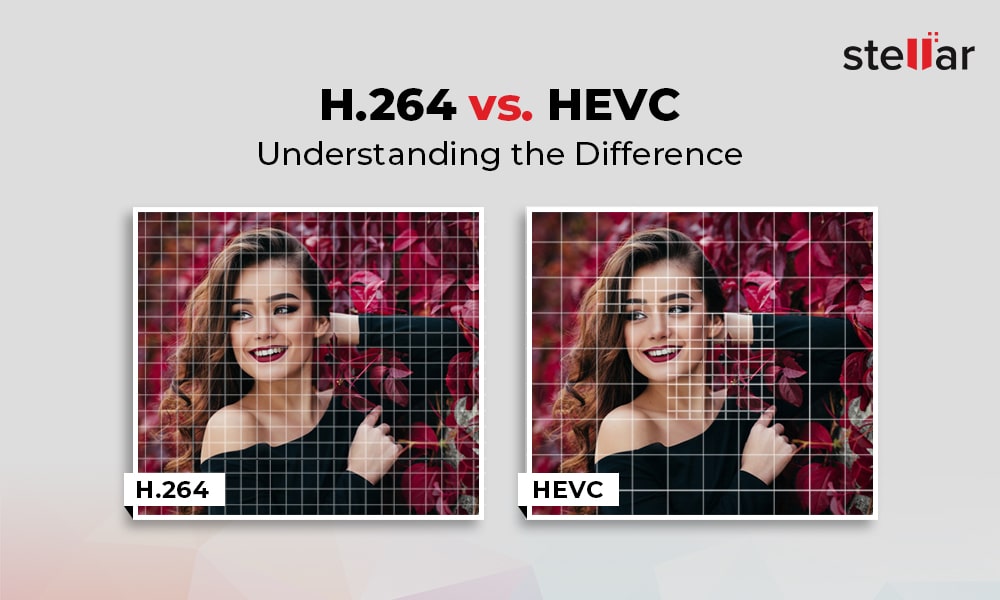
The key technical difference between H.264 and H.265 is their compression efficiency. H.265 is able to achieve significantly higher compression rates than H.264, meaning that it can deliver higher quality video at lower bitrates. In addition, H.265 supports higher resolutions and frame rates, making it better suited to modern video applications. However, H.264 has broader compatibility with older devices and software, and is often more easily implemented in legacy systems.

Both codecs use similar encoding and decoding processes, but H.265 includes some additional features and optimizations to improve compression efficiency and video quality. For example, H.265 includes support for larger block sizes, which allows it to more accurately represent complex image structures and textures, leading to higher quality video.

Performance and Quality Comparison

When it comes to comparing the performance and quality of H.264 and H.265, the results can vary depending on the specific use case and testing methodology. However, in general, H.265 is considered to offer superior video quality at lower bitrates than H.264. This is particularly true for high-resolution and high-fps video, where the higher compression efficiency of H.265 allows it to deliver smoother, clearer video. However, H.264 may still be preferable in certain cases, such as streaming to older devices or for applications with lower bandwidth availability.

Applications and Use Cases

H.264 and H.265 are both used in a wide variety of applications, including video streaming, video conferencing, and video surveillance. In general, H.264 is still more widely supported in legacy systems and devices, making it a more common choice for many applications. However, H.265 is becoming increasingly popular in new applications and systems, thanks to its improved video quality and compression efficiency. Some specific use cases where H.265 may be preferable include high-resolution and high-fps video, mobile streaming, and surveillance applications where storage and bandwidth are limited.

Advantages of H.265

H.265 has several advantages over its predecessor, H.264. The most significant ones are:

Better Compression

H.265 uses more advanced compression techniques, which enable it to achieve better compression rates than H.264. This means that H.265 can deliver the same video quality as H.264 with less data. This is particularly important for video streaming, where bandwidth is often limited.

Support for Higher Resolutions

H.265 supports resolutions up to 8K, while H.264 only supports resolutions up to 4K. This makes H.265 more future-proof and suitable for applications that require high-resolution video, such as virtual reality or surveillance.

Improved Parallel Processing

H.265 is designed to take advantage of multi-core CPUs and GPUs, which makes it faster and more efficient than H.264. This is particularly important for real-time applications, such as video conferencing or live streaming.

H.264 vs. H.265: Which One is Better?

So, which one is better? The answer is not straightforward, as it depends on the specific use case.

H.264 is Still Widely Used

H.264 is still the most widely used video codec, as it is supported by almost all devices and software. This means that if you want your videos to be compatible with as many devices as possible, H.264 is still a safe choice.

H.265 is More Efficient

However, if you are looking for better compression and support for higher resolutions, H.265 is the better choice. It is also more efficient in terms of processing power, which can be a significant advantage in certain applications.

The Future of Video Codec

In any case, it is clear that H.265 is the future of video codec. As more and more devices support it, and more content is encoded in H.265, it will become the new standard for video compression.

Conclusion

In conclusion, both H.264 and H.265 have their advantages and disadvantages. H.264 is still the most widely used video codec and is compatible with almost all devices and software. On the other hand, H.265 offers better compression, support for higher resolutions, and improved processing efficiency. As technology advances and more devices support H.265, it will become the new standard for video compression.

H.264 efficiency

H.264 efficiency

H.264

H.264 takes video compression technology to the next level.

High Efficiency Video Coding H.264

The H.264 standard introduces a new advanced intra prediction scheme to encode I-frames. This scheme can significantly reduce the size (in bits) of an I frame while maintaining high quality by successfully predicting small blocks of pixels within a macroblock within a frame. It does this by trying to find matching pixels between the previously encoded pixels that constrain the new 4×4 pixel block for internal encoding. By reusing already encoded pixel values, the bit size of the data can be significantly reduced. The new intra prediction is a key element of H.264 technology and has proven to be very effective. For comparison: even if only I-frames are used in H.264 streaming, the resulting file size will be much smaller than for Motion JPEG streaming.
Illustrations of how some intra-prediction modes can be used when encoding 4×4 pixels within one of the 16 blocks that make up a macroblock. Each of the 16 blocks within a macroblock can be encoded using different modes.

H.264 also improves block-based motion compensation for P and B frame encoding. The H.264 encoder can choose to search for matching blocks (up to sub-pixels

precision) of some or many sections within one or more reference frames. You can also adjust the size and shape of the blocks to improve your search for matches. In areas where matching blocks cannot be found within the frame of reference, internally coded macroblocks are used. The high degree of flexibility of block-by-block motion compensation in H.264 is effective in high-density video environments where image quality must be maintained for the application. Motion compensation is the most requested aspect of a video encoder, and the various ways and levels in which it can be implemented with an H.264 encoder help improve the efficiency of video compression.

With the H.264 standard, typical blocky objects seen in highly compressed Motion JPEG and MPEG (as opposed to H.264) videos can be reduced with the built-in unblocking filter. This filter automatically smooths the edges of the blocks to produce a nearly perfect unwrapped video image.

conclusion
H.264 represents a major step forward in video compression technology. This standard offers various technologies to achieve better compression efficiency through the use of more accurate intra prediction schemes, as well as more robustness. It opens up new possibilities to create advanced video encoders that can significantly improve image quality, increase frame rate and resolution while maintaining the same bit rate (compared to previous standards) or, conversely, provide video of the same quality at a lower bit rate.

H.264 is the first example of a collaboration between the International Telecommunication Union, the International Organization for Standardization and the International Electrotechnical Commission on International Model Video Compression Standards. Due to its flexibility, H.264 has found applications in areas as diverse as high definition DVD (such as Bluray), video streaming including HDTV streaming, online video storage (such as YouTube), 3G mobile phone. , in programs such as QuickTime, Flash, and the MacOS X operating system on Apple computers, as well as on video game consoles such as PlayStation 3. With the support of many industries and software development,

With the wider adoption of the H.264 format in network cameras, video encoders, and video management software, system designers and integrators must be confident that their chosen products and vendors are compliant with this new open standard. Today, network video equipment that supports H.264 and Motion JPEG is the ideal choice, offering the highest degree of versatility and integration.

H.264 Profiles and Levels

H.264 Profiles and Levels

H.264

The joint group involved in defining the H.264 standard has focused on creating a simple and clear solution that minimizes options and parameters.

H.264

The most important aspect of this standard, as is the case with other video standards, is the provision of various capabilities within profiles (sets of algorithmic parameters) and levels (performance classes) to optimally support popular products and common formats. .

There are seven profiles in H.264, each of which is tailored to a specific application. Each profile determines which set of parameters the encoder can use and limits the complexity of the decoder implementation.

Network cameras and video encoders are likely to use a so-called baseline profile, designed primarily for use in areas with limited computing power. The baseline profile is best suited for use in modern real-time encoders embedded in network video equipment. This profile also provides low latency, which is an important requirement for video surveillance, and is essential for real-time control of pan, tilt and zoom of network PTZ cameras.

H.264 has 11 levels or degrees of limitation in terms of functionality, bandwidth, and memory requirements. Each level defines the bit rate and encoding rate in macroblocks per second for resolutions ranging from QCIF to HDTV and beyond. The higher the resolution, the higher the required level.

WHAT IS THE H.264 CODEC?

WHAT IS THE H.264 CODEC?

H.264

The H.264 codec is a further development of the MPEG-4 standard, also called MPEG-4 part10. In favor of H.264, at least the fact that high definition television (HDTV) works accurately using the H.264 standard speaks.

H.264

Compared to MPEG-4, the H.264 standard provides better compression due to the use of more complex stream encoding schemes. In scenes that are difficult to code with fast motion, color transitions are smoother and similar colors are compressed at a lower bit rate. This codec conveys fine details better, because unlike MPEG-2 and MPEG-4, where the minimum macroblock sizes are 16×16 and 8×8 pixels, H.264 uses blocks of up to 4×4 pixels and the block size changes adaptively for each individual fragment. In scenes with high details or fast-moving objects, this provides better image quality. With the same amount of information and image quality, the H.264 file is on average 30% smaller in terms of the size of the MPEG-4 file.

In the beginning, the obstacle to using this codec was that real-time video decoding requires very powerful hardware from the computer. Now, with the launch of Intel and AMD multi-core processors on the market, the required level of PC performance is available to a wide range of users.