Role of predictive coding in H.265 and AAC compression


Free Download Mp4Gain
picture

Role of predictive coding in H.265 and AAC compression

Role of predictive coding in H.265 and AAC compression

Let’s talk about the role of predictive coding in H.265 and AAC compression

Predictive coding is fundamental to modern compression technologies like H.265 and AAC, enabling efficient encoding without compromising quality. At its core, predictive coding reduces redundant data by predicting the values of future data based on previous patterns. For instance, in a video, if one frame is nearly identical to the next, predictive coding eliminates the need to encode the entire frame again. It’s like predicting what the next puzzle piece looks like when assembling a jigsaw puzzle. This technique allows for smaller file sizes while preserving visual and audio quality.

In my work, I’ve seen predictive coding excel in handling complex audio and video sequences. With H.265, this process identifies similarities between frames and encodes only the differences, dramatically cutting down data requirements. Similarly, AAC uses predictive coding to analyze and predict audio waveforms, ensuring that only the necessary changes are encoded. Picture a friend trying to describe a simple drawing over the phone—they only need to tell you what changes to make to complete the image, saving time and effort.

How predictive coding optimizes H.265 compression

H.265, or HEVC, relies heavily on predictive coding to enhance video compression efficiency. By using intra-frame and inter-frame prediction, it minimizes redundant information. Intra-frame prediction looks within a single frame for patterns, while inter-frame prediction focuses on similarities between consecutive frames. For example, a static background in a video scene doesn’t need to be encoded repeatedly if predictive coding captures its unchanged nature.

The efficiency of H.265 comes from its ability to divide frames into smaller blocks and predict their content more accurately. I’ve often explained this using a mosaic analogy: instead of recreating each tile individually, H.265 identifies repeating patterns and predicts their placement, reducing the data load. This approach not only saves bandwidth but also improves streaming quality for high-definition content, even on limited internet connections.

How predictive coding works in AAC compression

In AAC, predictive coding ensures efficient audio compression by analyzing and predicting sound waveforms. It removes redundant frequencies and encodes only the essential changes. Think of it like adjusting the temperature in a room: once you set the thermostat, only small tweaks are needed to maintain comfort. Predictive coding in AAC eliminates unnecessary adjustments, focusing solely on what’s required to preserve audio fidelity.

This technique is particularly valuable for music and speech. By predicting and encoding only the differences between successive sound samples, AAC achieves high-quality audio with lower file sizes. I’ve personally worked with AAC files that maintain studio-level sound quality while being small enough to fit on older devices with limited storage. Predictive coding is the unsung hero behind this balance of quality and efficiency.

Latest words on the role of predictive coding in H.265 and AAC compression

Predictive coding is the cornerstone of H.265 and AAC compression, ensuring smaller file sizes without sacrificing quality. By predicting and encoding only the essential changes in video frames and audio waveforms, this technology maximizes efficiency. It’s like packing smarter for a trip—bringing only what you truly need while leaving unnecessary items behind.

If you’re looking to optimize your media files further, Mp4Gain offers tools that can help improve audio and video quality while leveraging these advanced compression techniques. It’s the ideal choice for those who want to enhance their media without compromising efficiency.

FAQs about the role of predictive coding in H.265 and AAC compression

What is predictive coding in H.265?

Predictive coding in H.265 reduces redundant data by predicting similarities within and between video frames, optimizing compression efficiency.

How does predictive coding work in AAC?

Predictive coding in AAC analyzes sound waveforms, encodes only changes between samples, and removes redundant frequencies to ensure high audio quality.

Why is predictive coding important in compression?

Predictive coding reduces file sizes while maintaining quality, making it essential for efficient video and audio streaming and storage.

What is inter-frame prediction in H.265?

Inter-frame prediction in H.265 analyzes similarities between consecutive frames to encode only the changes, reducing redundancy.

How does predictive coding affect video quality?

Predictive coding ensures that video compression retains high quality by focusing on encoding essential details and eliminating redundancies.

What is the role of intra-frame prediction in H.265?

Intra-frame prediction in H.265 analyzes patterns within a single frame to encode data more efficiently.

Does predictive coding improve streaming performance?

Yes, predictive coding reduces file sizes, enabling smoother streaming even on limited bandwidth connections.

Is predictive coding exclusive to H.265 and AAC?

No, predictive coding is used in other codecs as well, but it plays a critical role in H.265 and AAC for advanced compression.

How does predictive coding balance quality and compression?

By predicting and encoding only changes, predictive coding reduces data usage without compromising perceived quality.

What devices benefit from predictive coding?

Devices like smartphones, streaming platforms, and storage-constrained gadgets benefit from predictive coding’s efficiency.

Comments:

I didn’t know predictive coding worked this way! It’s amazing how it keeps file sizes so small without losing quality.

Good read, but I would have liked more examples of real-life applications of predictive coding. Still, solid info!

Wow, this article answered a lot of my questions about H.265. I’m going to bookmark this for future reference!

What a great explanation! I always wondered how AAC could be so efficient. This really cleared it up for me.

Pretty detailed article, but maybe a bit too technical in some spots. Would be nice to have even simpler analogies.

Can predictive coding be applied to older codecs too? Curious about how far back this technology goes.

I’ve been searching for an easy way to explain H.265 to a client, and this article nailed it. Thanks a ton!

Didn’t know predictive coding was the reason why my streaming is so smooth. Learned a lot from this post!

The way this was broken down into examples made it so easy to follow. Great job simplifying complex ideas!


Free Download Mp4Gain
picture


Mp4Gain Main Window
picture


Mp4Gain Features
picture


Free Download Mp4Gain
picture

H.264 vs H.265: Which Video Codec is Better?

H.264 vs H.265: Which Video Codec is Better?

H.264 vs H.265
H.264 vs H.265

The world of video codecs can be a complicated and confusing one, but two of the most important codecs in use today are H.264 and H.265. In this article, we will compare these two codecs in detail, examining their histories, technical specifications, performance, and use cases to determine which one is better for different applications.

H.264 vs H.265
H.264 vs H.265

History of H.264 and H.265

First introduced in 2003, H.264 quickly became the industry standard for video compression, thanks to its high compression efficiency and broad compatibility. Its widespread adoption made it the most widely used video codec in the world for many years, until the release of H.265 in 2013. H.265, also known as High Efficiency Video Coding (HEVC), was designed to provide even greater compression efficiency and improved video quality, making it an attractive alternative to H.264 for many use cases.

Technical Specifications

The key technical difference between H.264 and H.265 is their compression efficiency. H.265 is able to achieve significantly higher compression rates than H.264, meaning that it can deliver higher quality video at lower bitrates. In addition, H.265 supports higher resolutions and frame rates, making it better suited to modern video applications. However, H.264 has broader compatibility with older devices and software, and is often more easily implemented in legacy systems.

Both codecs use similar encoding and decoding processes, but H.265 includes some additional features and optimizations to improve compression efficiency and video quality. For example, H.265 includes support for larger block sizes, which allows it to more accurately represent complex image structures and textures, leading to higher quality video.

Performance and Quality Comparison

When it comes to comparing the performance and quality of H.264 and H.265, the results can vary depending on the specific use case and testing methodology. However, in general, H.265 is considered to offer superior video quality at lower bitrates than H.264. This is particularly true for high-resolution and high-fps video, where the higher compression efficiency of H.265 allows it to deliver smoother, clearer video. However, H.264 may still be preferable in certain cases, such as streaming to older devices or for applications with lower bandwidth availability.

Applications and Use Cases

H.264 and H.265 are both used in a wide variety of applications, including video streaming, video conferencing, and video surveillance. In general, H.264 is still more widely supported in legacy systems and devices, making it a more common choice for many applications. However, H.265 is becoming increasingly popular in new applications and systems, thanks to its improved video quality and compression efficiency. Some specific use cases where H.265 may be preferable include high-resolution and high-fps video, mobile streaming, and surveillance applications where storage and bandwidth are limited.

Advantages of H.265

H.265 has several advantages over its predecessor, H.264. The most significant ones are:

Better Compression

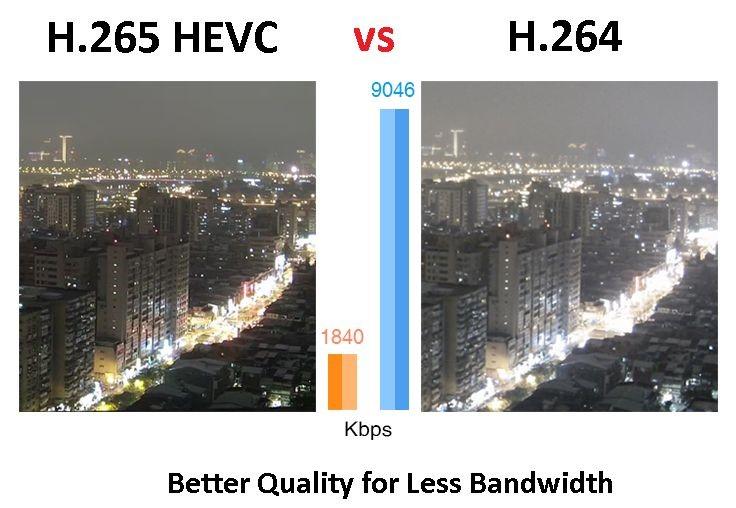
H.265 uses more advanced compression techniques, which enable it to achieve better compression rates than H.264. This means that H.265 can deliver the same video quality as H.264 with less data. This is particularly important for video streaming, where bandwidth is often limited.

Support for Higher Resolutions

H.265 supports resolutions up to 8K, while H.264 only supports resolutions up to 4K. This makes H.265 more future-proof and suitable for applications that require high-resolution video, such as virtual reality or surveillance.

Improved Parallel Processing

H.265 is designed to take advantage of multi-core CPUs and GPUs, which makes it faster and more efficient than H.264. This is particularly important for real-time applications, such as video conferencing or live streaming.

H.264 vs. H.265: Which One is Better?

So, which one is better? The answer is not straightforward, as it depends on the specific use case.

H.264 is Still Widely Used

H.264 is still the most widely used video codec, as it is supported by almost all devices and software. This means that if you want your videos to be compatible with as many devices as possible, H.264 is still a safe choice.

H.265 is More Efficient

However, if you are looking for better compression and support for higher resolutions, H.265 is the better choice. It is also more efficient in terms of processing power, which can be a significant advantage in certain applications.

The Future of Video Codec

In any case, it is clear that H.265 is the future of video codec. As more and more devices support it, and more content is encoded in H.265, it will become the new standard for video compression.

Conclusion

In conclusion, both H.264 and H.265 have their advantages and disadvantages. H.264 is still the most widely used video codec and is compatible with almost all devices and software. On the other hand, H.265 offers better compression, support for higher resolutions, and improved processing efficiency. As technology advances and more devices support H.265, it will become the new standard for video compression.

What is H.265 and why is it better than H.264?

What is H.265 and why is it better than H.264?

H265/HEVC

Known as High Efficiency Video Coding (HVEC) and MPEG-H Part 2, H.265 is a video compression standard designed for the latest generations of high definition video. It is the successor to the widely used H.264 codec (also called AVC or MPEG-4 Part 10) and offers some significant improvements over the current compression scheme. H.265 was developed by the Joint Video Coding Collective Group (JCT-VC), a group of video encoding experts that began work on the compression standard in 2010.

H.265

The H.265 codec offers some significant improvements over the H.264 codec, which was first developed in the cloudy days of 2003. There are so many improvements to consider, but here are the highlights for consumers.

Better compression

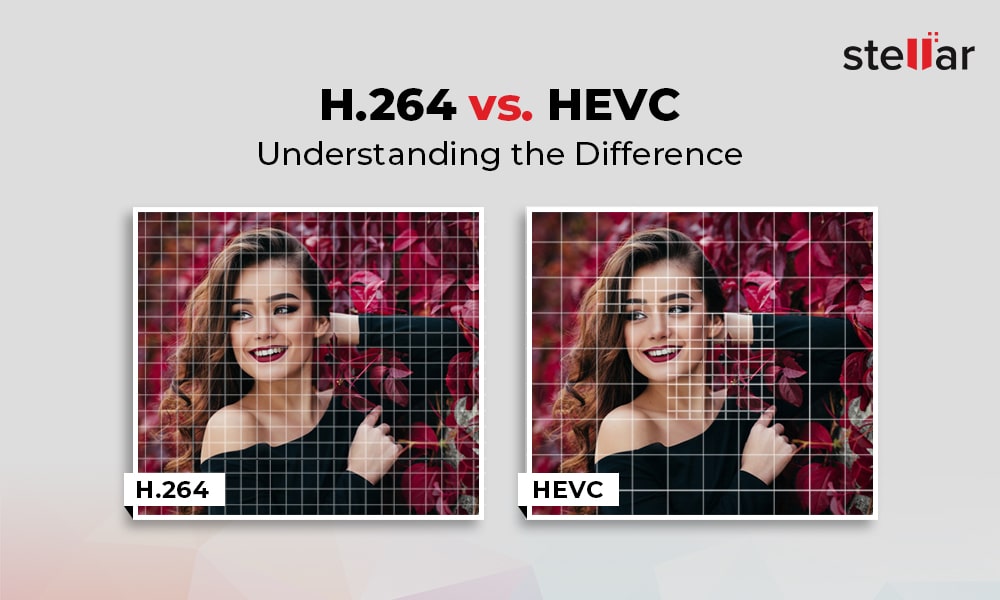
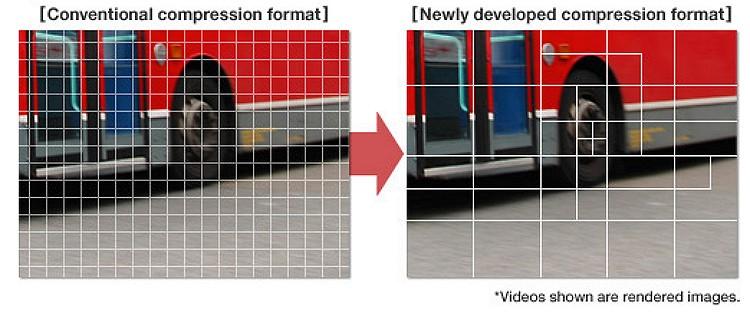
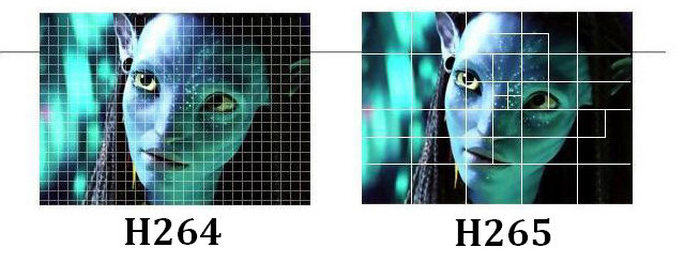
H.265 offers significantly improved compression over H.264. The new codec can do almost twice the compression of its predecessor. With H.265, video with the same visual quality would only take up half the memory. Alternatively, videos with the same file size and bitrate can be significantly better. Part of this improvement comes from increasing the size of the macroblock. H.264 only allows 16 x 16 pixel macroblocks, which are too small to be really effective in higher resolution video. H.265 provides 64 x 64 pixel macroblocks (now called Coding Tree Units, or CTUs) to improve encoding efficiency at all resolutions.

Improved intraframe motion prediction

Video compression is based on predicting movement between frames. When there are no changes to a pixel, a video codec can save space by referencing it instead of playing it. Therefore, improved motion prediction means improved file size and compression quality. Along with the improved compression standards in H.265, we also found significant improvements in motion prediction and compensation.

Improved intra-frame prediction

Video compression also benefits from individual frame “motion” analysis, allowing you to compress individual video frames more efficiently. This can be achieved by describing the pixels with a mathematical function instead of the actual values ​​of the pixels. The function takes up less space than pixel data, which reduces file size. However, the codec must support a sufficiently advanced mathematical function for this method to be really useful. The H.265 intra-prediction function is much more detailed than H.264, it allows 33 directions of movement in nine directions of H.264.

Parallel processing

H.265 uses tiles and fragments that can be decoded independently of the rest of the frame. This means that the decoding process can be divided into multiple parallel streaming processes using more efficient decoding capabilities in modern multi-core processors. At higher video resolutions, this improved efficiency is necessary for decoding tempo-controlled video on lower hardware.

Larger maximum frame size
The world is getting higher resolution and H.265 supports it. With H.265, video can be encoded up to 8K UHD or 8192 pixels × 4320 pixels. Currently, only a few cameras can produce 8K video and very few monitors can display this resolution. But just as HD is the current standard, we can expect 4K and ultimately 8K to get the same level of attention.

Hardware support

The H.265 codec is specifically supported by the current generation of Intel processors. The Kaby Lake line of processors contains dedicated instruction sets for encoding and decoding H.265 video, as for future generations. This gives the codec many speed and consistency benefits over other high definition video codecs. Given the popularity and technical superiority of the H.264 codec, it’s not surprising that Intel prefers to ditch its hardware. Of course, this doesn’t limit the use of H.265 to Kaby Lake processors, but it does mean that computers using Kaby Lake chips will be more flexible for playing H.265 video. And considering that the computational overhead required to encode and decode high-definition H.265 video is quite significant,

Conclusion: where to find H.265?

H.265 is still less common than H.264, but it is rapidly gaining ground in the market. Apple’s new iPhone and iPad operating system, iOS 11, saves all video files in H.265. The next-generation MacBook Pro includes hardware support for Kaby Lake for codec decoding.

Everything you need to know about HEVC / H.265

Everything you need to know about HEVC / H.265

H.265

You may have heard a lot about HEVC / H.265 lately. With the rise in popularity of 4K video, Apple has embraced this new industry standard on Mac Hight Sierra and iOS 11. Compared to H.264, H.265 / HEVC has great advantages, but what are they? And can you really take advantage of that H.265 / HEVC? I will go into HEVC / H.265 in detail below and hope it is helpful.

H.265

What is HEVC / H.265?

HEVC stands for High Efficiency Video Coding, also known as H.265 and MPEG-H Part 2, it is the latest and most advanced video compression standard jointly developed by MPEG and VCEG, which offers higher encoding efficiency and better improved video quality. HEVC is capable of compressing video with twice the data compression rate, but only requires half the bit rate to maintain the same video quality and halve the storage space compared to H.264.

Why does HEVC / H.265 come?

As you may know, more and more 4K and 8K videos are appearing in the world, while these HD videos require a lot of space, making it impossible to download and stream them in the best quality. To reduce storage space while maintaining the same H.264-based quality, it uses HEVC encoding technology.

HEVC can easily deliver video content to your Apple TV, computer, even iPhone or other portable devices with high quality and less space. If you like to play HEVC / H.265 videos, you can decode the files first and play them through the media player. However, you can also convert DVD to H.265 codec to get half the size but the same video quality. Therefore, many consumer devices and operating systems gradually support HEVC / H.265.

H.265 performance, advantages and disadvantages

H.265 is designed to deliver higher quality video with limited bandwidth that is cut in half. This means that we can enjoy 1080p high definition video with our smartphone and tablets online. The H.265 standard keeps pace with the high resolution display.

The main advantage of H.265 is that H.265 has better compression performance and lower bandwidth utilization, which can further reduce the design bit rate to reduce transmission and storage costs. And now, many high-definition 4K devices, such as 4K Blu-ray player or other streaming media players, support H.265. By the way, you can also convert H.265 to other supported formats with a free H.265 converter to play on your devices.

It is worth noting that the investment in H.265 is huge, especially after H.264; many industrial companies will hesitate to choose H.265. On the other hand, H.265 has 3 groups of patents with different price structures and terms. Lack of clarity on royalties stopped the adoption of H.265.

Development and current status of H.265

H.265 is now increasingly supported by many platforms and operating systems, but it is not widely supported. The successful popularization of a video standard depends on several aspects, including the decision of the standards organization, the emergence of competitors, applications, and royalties. Unlike H.264, H.265 requires high license fees, which are charged by HEVC Advance, an independent license manager.

Like the development of a high-resolution display, H.265 will also evolve. Despite its industrial rival VP9 and other limiting factors, H.265 will find a way out and gain massive popularity.

H.264, H.265 and H.265 + video codecs. Pros and cons

H.264, H.265 and H.265 + video codecs. Pros and cons

H.265

The first versions of H.264 video compression codecs appeared in 2013. Today, the Н.265 format has confidently entered the video surveillance market and dictates its own terms. Many manufacturers produce equipment that supports this video compression format.

H.265 / HEVC

The H.264 compression format, unlike previous MJPEG and MPEG-4 codecs, enables you to efficiently solve the problem of streaming a large number of high-definition video streams.

Using H.264 in IP video surveillance systems provides high image quality with less data, requires less network bandwidth, and fewer hard drives to store video files. However, there is also a downside of fat. Using H.264 places heavy loads on IT equipment.

To increase the efficiency of the use of computing resources, developers apply various methods. For example, transfer part of the operations to the video card. Thanks to this, the video card can take care of part of the decoding calculations. The use of this feature provided a reduction in processor load up to two times, and the possibility of using processors of lower power, and therefore the cost.

Transferring decoding operations to a video card also allows you to save not only on the server, but also on the client side of the video surveillance system. To use this function, in the configuration of the client part of the software, you must specify where to perform the processing: on the central processor or on the video card.

To reduce the load on IT equipment, video analysis technology of compressed video streams from IP cameras without their complete decoding is also used. The use of this technology leads to an increase in data processing speed, thereby reducing the load on the central processor. In addition, the decrease can reach an average of 4 times.

Thanks to this, it is possible to connect 4 times more cameras to one server. Another option to save is the use of less powerful processors and, therefore, more budgetary, and a decrease in the cost of the server equipment.

Another disadvantage of the H.264 codec is that most web and mobile clients for video surveillance systems do not support this format and, to receive a video image, a procedure is required to transcode the video stream into MJPEG. Such an operation is resource intensive and places additional loads on computing resources.

H.264 processing is possible with sufficiently powerful computing resources of a mobile device. If resources are insufficient, the video stream is automatically switched to the MJPEG format. And the user himself can independently choose the format of the video transmission.

As you can see, the H.264 codec used for video surveillance has many pros and cons. However, a heavy load on computing resources often nullifies all benefits.

The new H.265 format supports even more uploads. It uses stronger and more advanced video compression algorithms in its work. With the same visual quality, the new H.265 codec represents an approximately double reduction in file size compared to its H.264 predecessor. This saves a lot of space on the disk space of video recorders and servers. And half the bit rate reduces traffic on video transmission networks.

Thanks to more powerful compression mechanisms, the H.265 codec does an excellent job of encoding high and high definition video over 8K UHD (8192 × 4320). In addition, for high-quality video playback at 4K codec resolution, a transmission speed of only 50MB / s is required.

It is important that H.265 compress the video almost without loss, the quality of the compressed video is kept at a high level. Special compression algorithms eliminate artifacts inherent in H.264, such as graininess or blurry edges of moving objects.

But the main advantage of the H.265 codec is that the volume of video processed according to the new standard turned out to be almost 85% lower than when using H.264. However, the H.265 codec requires more powerful elements and processors in the hardware.

Moving towards increasing video compression, the H.265 + codec recently appeared on the market that allows you to reduce the bit rate of video cameras, which in turn reduces the cost of implementation and uses fewer matrices of disk for storing video files.

H.265 + improves the compression ratio through three key technologies: predictive encoding technology, background noise suppression technology.

The H.266 codec arrives to save the Internet: halves the size of streaming video

The H.266 codec arrives to save the Internet: halves the size of streaming video

H.266/VVC Codec

After three years of development, today the H.266 codec was introduced, which promises to halve the size of streaming videos without losing quality.

Codec H.266

The German Fraunhofer HHI institute has just introduced the long-awaited H.266 codec, which promises to lighten Internet traffic by halving the size of videos compared to the HEVC (H.265) codec. It is an important achievement considering that 80% of Internet traffic is streaming video.

The German Fraunhofer HHI institute, which is also behind the H.264 and H.265 formats, is part of the network of German institutions that also created the MP3 audio format. It has been working on the H.266 codec for three years together with Apple, Intel, Huawei, Microsoft, Qualcomm, Sony and Ericsson.

The main improvements of H.266 with respect to H.265 are two: the spectacular compression of the video, and its greater versatility. It is not only designed to encode streaming video or in local mode.

Register
Fraunhofer HHI claims that a 90 minute 4K video encoded with the H.265 codec occupies about 10 GB, but if it is encoded with H.266 it is reduced to 5 GB without losing image quality.

It is a format that accepts all resolutions, from low-resolution video to 8K, although it has been developed with 4K resolution in mind, so the main improvements are noticeable from this resolution.

As we have mentioned, it stands out for its versatility. It not only works well with conventional video or streaming. Also with 360-degree video, virtual reality, streaming video games like Google Stadia, screen sharing, etc. It also supports 10-bit color and HDR in all situations.

If you cut the video size in half without losing quality, the H.266 codec could be a major relief for Internet traffic, should platforms like Neftlix, Amazon Prime Video, YouTube or Disney + adapt it.

The main problem is that it is a licensed codec, only certain versions can be used for free and for non-commercial use. Netflix for example used H.264 and H.265 (HEVC), but for streaming on Android it opted for AV1, which is a free codec.

We’ll see what level of acceptance it has, but the fact that companies like Apple, Microsoft or Sony support it is important.

Software to encode and decode the H.266 codec will arrive in the fall. It will also be implemented in chips that will be used in mobiles, and devices such as Chromecast or Fire TV Stick.

H.265 vs H.264 video format comparison. What is HEVC and AVC?

H.265 vs H.264 video format comparison. What is HEVC and AVC?

H.264 vs H.264

H.265 (HEVC), unlike H.264 (AVC), is becoming the most widely used format for compressing video and recording 4K / 8K UHD content, not to mention HD / SD video. Upgrading 4K and 8K video challenges the current H.264 compression standard, as it can no longer encode Ultra HD video at a satisfactory bit rate than HD content.

h.264 vs h.265

As a result, the next-generation HEVC video compression standard gains an advantage over AVC due to better compression efficiency. This allows for a 50% reduction in bit rate, but provides the same video quality.

This post shows the differences between the two standards based on file size, bandwidth usage, bitrate, quality, and compatibility.

What is H.265 (HEVC)?
H.265 is also known as High Efficiency Video Coding (HEVC). This format is twice as efficient as H.264 when encoding. It halves the transmission speed at the same quality level as its predecessor. Designed for next-generation HDTV displays and content capture systems that have progressive frame rates and resolutions, as well as improved image quality in terms of noise levels, color spaces, and dynamic range.

What is H.264 (AVC)?
H.264 or MPEG-4 AVC is a video encoding format that is currently one of the most widely used to compress and deliver video content. AVC saves the bit rate by 50% or more compared to its predecessor MPEG-2. It has a wider range of applications covering all compressed videos, from low bit rate streaming applications (YouTube, iTunes, Vimeo, Facebook, Instagram) to various HDTV broadcasts via terrestrial, cable and satellite TV. It is also widely used for Blu-ray discs, DVDs, IP networks, and digital cinema applications with virtually lossless encoding.

Comparison of video compression formats
Compression efficiency
H.265 differs from H.264 in compression efficiency. HEVC doubles the encoding efficiency of its predecessor. This means that the H.265 codec saves about 50% bit rate for the same encoding quality. Specifically, the average bit reduction for H.265 is 64% at 4K UHD, 62% at 1080p, 56% at 720p, and 52% at 480p. So if you download a movie in H.265 and play it on an Android iPhone, 50% of the mobile device memory will be saved. And the quality of the film will not suffer!

H.265 vs H.264 format comparison – compression efficiency

Broadband
H.265 also beats H.264 in terms of bandwidth usage. Because the HEVC algorithm uses efficient encoding, it promises a reduction of around 40-50% in the transmission bandwidth required to compress video (eg 720p) with the same quality. Typically, 4K H264 (AVC) streaming requires 32 Mbps of bandwidth, while 4K HEVC video is only 15 Mbps. Thus, it is possible to enjoy 4k videos smoothly even with a congested network connection.

To sum it up, let’s say avi is a heavyweight file with high quality image and audio, best suited for DVDs and home PCs.

Mp4 is a lightweight file that doesn’t require a lot of processing power to play, suitable for watching videos in a browser and on smartphones.

What is the future of the video compression standard? Differences between H.264 and H.265

Recordings available on the Internet and real-time broadcasts have become two of the main sources of communication today. H.264 is one of the video compression formats that enables this visual and digital revolution. Just analyze the amount of time you spend in front of broadcast channels or portals. In 2017, the average number of hours observed daily worldwide is one billion. In 2016, 500 million hours were counted. In just one year, the results doubled.

H.265 vs H.264

If the H.264 video compression format is capable of supporting and offering quality to so many people every day of the year, the same is true for surveillance and monitoring technologies. Video compression is as important for YouTube as it is for an IP CCTV system. Basically, video compression is done using technologies that allow captured data to be intelligently transmitted. To do this, they reduce the amount of information that is similar and that would be just an additional burden on the files.

H265 vs H264

The Importance of Standards in Video Compression

Video compression uses techniques that will make files less burdensome, without interfering with the quality and, above all, the accuracy of the information. Precisely because it prioritizes the maintenance of visual characteristics, it is so essential to know what technologies are used. Choosing one format or another can directly affect the sharpness and loading of images. Since you don’t need to keep all the data, the suggestion is to use an industry standard. Until then, H.264, also called advanced video encoding (AVC), is the predominant one.

H.264 is considered one of the most adaptable and high-level formats. However, there is already what would be its evolution, H.265 or High Efficiency Video Coding (HEVC). Both are standardized and approved by the responsible institutions. That is, they are two official standards. Before talking about the benefits that H.265 adds to video compression, it’s important to note that both are standards that will make partners and vendors maintain identical prerequisites. What guarantees compatibility and more options for the clients.

H.264: what are the advantages of video compression?

Video compression is based on a technology that analyzes images captured within frames. It is like looking at a photo and identifying what data is relevant and what is not. For example, if there are an equal number of frames that are not noticeable, they are discarded. For that to happen, there is a forecast that uses a “comparison basis”. The deleted image is opposed to what serves as a parameter and, with that, one perceives what is altered. Only changes in relation to the base frame remain. Those with the same values ​​are not considered in the encoding, which reduces the size and number of pixels.

When using macroblock comparison, where each frame is decomposed and compared until it finds compatibility or modifications. Therefore, the similar ones are eliminated, or rather, the frame of reference is maintained. In H.264, macroblocks are used, with the division of images and, consequently, their segmentation into more blocks. Replays are considered redundancies and pixels do not count within video compression. What has changed with H.265?

H.265: what is the main change?

H.265 has a potential for video compression that significantly outperforms H.264, using less bandwidth and maintaining quality delivery. For this reason, you can stream higher-level content with the same amount of bandwidth that the other uses to do the same with more compact data.

There has been an evolution in compression, streaming and support capabilities, although H.265 uses the same video compression technique explained above. Macroblocks that make comparisons between divided frames of the same frame with a standard reference. So why is such a relevant technological advance?

The key issue for H.265 is the strategic use of macroblocks. There is also compatibility between similar pixels between frames, but with greater flexibility. There is no fixed area, it all depends on the type of image and your need. Greater attention to detail is paid only when necessary, making video compression even higher and more effective by reducing pixels and bytes.

In H.264, macroblocks do not exceed a 16-pixel standard, which are not best suited for certain situations and images. In H.265, there is an increase in the size of the blocks up to 64 pixels.