What is H.265 and why is it better than H.264?

What is H.265 and why is it better than H.264?

H265/HEVC

Known as High Efficiency Video Coding (HVEC) and MPEG-H Part 2, H.265 is a video compression standard designed for the latest generations of high definition video. It is the successor to the widely used H.264 codec (also called AVC or MPEG-4 Part 10) and offers some significant improvements over the current compression scheme. H.265 was developed by the Joint Video Coding Collective Group (JCT-VC), a group of video encoding experts that began work on the compression standard in 2010.

H.265

The H.265 codec offers some significant improvements over the H.264 codec, which was first developed in the cloudy days of 2003. There are so many improvements to consider, but here are the highlights for consumers.

Better compression

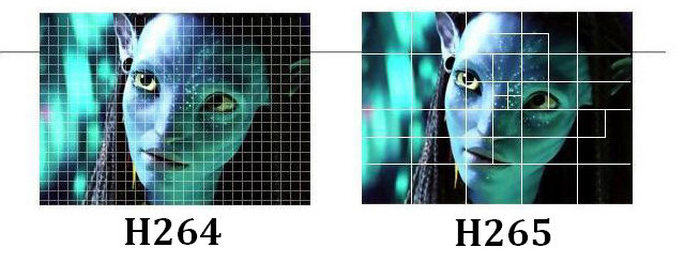
H.265 offers significantly improved compression over H.264. The new codec can do almost twice the compression of its predecessor. With H.265, video with the same visual quality would only take up half the memory. Alternatively, videos with the same file size and bitrate can be significantly better. Part of this improvement comes from increasing the size of the macroblock. H.264 only allows 16 x 16 pixel macroblocks, which are too small to be really effective in higher resolution video. H.265 provides 64 x 64 pixel macroblocks (now called Coding Tree Units, or CTUs) to improve encoding efficiency at all resolutions.

Improved intraframe motion prediction

Video compression is based on predicting movement between frames. When there are no changes to a pixel, a video codec can save space by referencing it instead of playing it. Therefore, improved motion prediction means improved file size and compression quality. Along with the improved compression standards in H.265, we also found significant improvements in motion prediction and compensation.

Improved intra-frame prediction

Video compression also benefits from individual frame “motion” analysis, allowing you to compress individual video frames more efficiently. This can be achieved by describing the pixels with a mathematical function instead of the actual values ​​of the pixels. The function takes up less space than pixel data, which reduces file size. However, the codec must support a sufficiently advanced mathematical function for this method to be really useful. The H.265 intra-prediction function is much more detailed than H.264, it allows 33 directions of movement in nine directions of H.264.

Parallel processing

H.265 uses tiles and fragments that can be decoded independently of the rest of the frame. This means that the decoding process can be divided into multiple parallel streaming processes using more efficient decoding capabilities in modern multi-core processors. At higher video resolutions, this improved efficiency is necessary for decoding tempo-controlled video on lower hardware.

Larger maximum frame size
The world is getting higher resolution and H.265 supports it. With H.265, video can be encoded up to 8K UHD or 8192 pixels × 4320 pixels. Currently, only a few cameras can produce 8K video and very few monitors can display this resolution. But just as HD is the current standard, we can expect 4K and ultimately 8K to get the same level of attention.

Hardware support

The H.265 codec is specifically supported by the current generation of Intel processors. The Kaby Lake line of processors contains dedicated instruction sets for encoding and decoding H.265 video, as for future generations. This gives the codec many speed and consistency benefits over other high definition video codecs. Given the popularity and technical superiority of the H.264 codec, it’s not surprising that Intel prefers to ditch its hardware. Of course, this doesn’t limit the use of H.265 to Kaby Lake processors, but it does mean that computers using Kaby Lake chips will be more flexible for playing H.265 video. And considering that the computational overhead required to encode and decode high-definition H.265 video is quite significant,

Conclusion: where to find H.265?

H.265 is still less common than H.264, but it is rapidly gaining ground in the market. Apple’s new iPhone and iPad operating system, iOS 11, saves all video files in H.265. The next-generation MacBook Pro includes hardware support for Kaby Lake for codec decoding.

Everything you need to know about HEVC / H.265

Everything you need to know about HEVC / H.265

H.265

You may have heard a lot about HEVC / H.265 lately. With the rise in popularity of 4K video, Apple has embraced this new industry standard on Mac Hight Sierra and iOS 11. Compared to H.264, H.265 / HEVC has great advantages, but what are they? And can you really take advantage of that H.265 / HEVC? I will go into HEVC / H.265 in detail below and hope it is helpful.

H.265

What is HEVC / H.265?

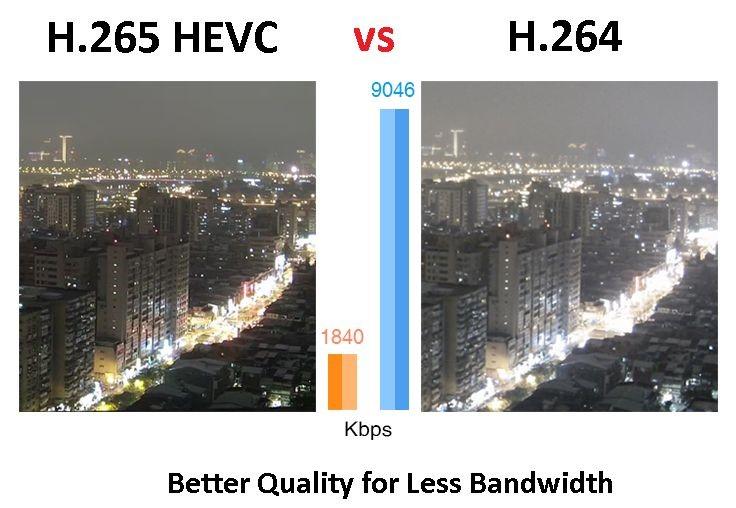
HEVC stands for High Efficiency Video Coding, also known as H.265 and MPEG-H Part 2, it is the latest and most advanced video compression standard jointly developed by MPEG and VCEG, which offers higher encoding efficiency and better improved video quality. HEVC is capable of compressing video with twice the data compression rate, but only requires half the bit rate to maintain the same video quality and halve the storage space compared to H.264.

Why does HEVC / H.265 come?

As you may know, more and more 4K and 8K videos are appearing in the world, while these HD videos require a lot of space, making it impossible to download and stream them in the best quality. To reduce storage space while maintaining the same H.264-based quality, it uses HEVC encoding technology.

HEVC can easily deliver video content to your Apple TV, computer, even iPhone or other portable devices with high quality and less space. If you like to play HEVC / H.265 videos, you can decode the files first and play them through the media player. However, you can also convert DVD to H.265 codec to get half the size but the same video quality. Therefore, many consumer devices and operating systems gradually support HEVC / H.265.

H.265 performance, advantages and disadvantages

H.265 is designed to deliver higher quality video with limited bandwidth that is cut in half. This means that we can enjoy 1080p high definition video with our smartphone and tablets online. The H.265 standard keeps pace with the high resolution display.

The main advantage of H.265 is that H.265 has better compression performance and lower bandwidth utilization, which can further reduce the design bit rate to reduce transmission and storage costs. And now, many high-definition 4K devices, such as 4K Blu-ray player or other streaming media players, support H.265. By the way, you can also convert H.265 to other supported formats with a free H.265 converter to play on your devices.

It is worth noting that the investment in H.265 is huge, especially after H.264; many industrial companies will hesitate to choose H.265. On the other hand, H.265 has 3 groups of patents with different price structures and terms. Lack of clarity on royalties stopped the adoption of H.265.

Development and current status of H.265

H.265 is now increasingly supported by many platforms and operating systems, but it is not widely supported. The successful popularization of a video standard depends on several aspects, including the decision of the standards organization, the emergence of competitors, applications, and royalties. Unlike H.264, H.265 requires high license fees, which are charged by HEVC Advance, an independent license manager.

Like the development of a high-resolution display, H.265 will also evolve. Despite its industrial rival VP9 and other limiting factors, H.265 will find a way out and gain massive popularity.

H.264, H.265 and H.265 + video codecs. Pros and cons

H.264, H.265 and H.265 + video codecs. Pros and cons

H.265

The first versions of H.264 video compression codecs appeared in 2013. Today, the Н.265 format has confidently entered the video surveillance market and dictates its own terms. Many manufacturers produce equipment that supports this video compression format.

H.265 / HEVC

The H.264 compression format, unlike previous MJPEG and MPEG-4 codecs, enables you to efficiently solve the problem of streaming a large number of high-definition video streams.

Using H.264 in IP video surveillance systems provides high image quality with less data, requires less network bandwidth, and fewer hard drives to store video files. However, there is also a downside of fat. Using H.264 places heavy loads on IT equipment.

To increase the efficiency of the use of computing resources, developers apply various methods. For example, transfer part of the operations to the video card. Thanks to this, the video card can take care of part of the decoding calculations. The use of this feature provided a reduction in processor load up to two times, and the possibility of using processors of lower power, and therefore the cost.

Transferring decoding operations to a video card also allows you to save not only on the server, but also on the client side of the video surveillance system. To use this function, in the configuration of the client part of the software, you must specify where to perform the processing: on the central processor or on the video card.

To reduce the load on IT equipment, video analysis technology of compressed video streams from IP cameras without their complete decoding is also used. The use of this technology leads to an increase in data processing speed, thereby reducing the load on the central processor. In addition, the decrease can reach an average of 4 times.

Thanks to this, it is possible to connect 4 times more cameras to one server. Another option to save is the use of less powerful processors and, therefore, more budgetary, and a decrease in the cost of the server equipment.

Another disadvantage of the H.264 codec is that most web and mobile clients for video surveillance systems do not support this format and, to receive a video image, a procedure is required to transcode the video stream into MJPEG. Such an operation is resource intensive and places additional loads on computing resources.

H.264 processing is possible with sufficiently powerful computing resources of a mobile device. If resources are insufficient, the video stream is automatically switched to the MJPEG format. And the user himself can independently choose the format of the video transmission.

As you can see, the H.264 codec used for video surveillance has many pros and cons. However, a heavy load on computing resources often nullifies all benefits.

The new H.265 format supports even more uploads. It uses stronger and more advanced video compression algorithms in its work. With the same visual quality, the new H.265 codec represents an approximately double reduction in file size compared to its H.264 predecessor. This saves a lot of space on the disk space of video recorders and servers. And half the bit rate reduces traffic on video transmission networks.

Thanks to more powerful compression mechanisms, the H.265 codec does an excellent job of encoding high and high definition video over 8K UHD (8192 × 4320). In addition, for high-quality video playback at 4K codec resolution, a transmission speed of only 50MB / s is required.

It is important that H.265 compress the video almost without loss, the quality of the compressed video is kept at a high level. Special compression algorithms eliminate artifacts inherent in H.264, such as graininess or blurry edges of moving objects.

But the main advantage of the H.265 codec is that the volume of video processed according to the new standard turned out to be almost 85% lower than when using H.264. However, the H.265 codec requires more powerful elements and processors in the hardware.

Moving towards increasing video compression, the H.265 + codec recently appeared on the market that allows you to reduce the bit rate of video cameras, which in turn reduces the cost of implementation and uses fewer matrices of disk for storing video files.

H.265 + improves the compression ratio through three key technologies: predictive encoding technology, background noise suppression technology.

What is the future of the video compression standard? Differences between H.264 and H.265

Recordings available on the Internet and real-time broadcasts have become two of the main sources of communication today. H.264 is one of the video compression formats that enables this visual and digital revolution. Just analyze the amount of time you spend in front of broadcast channels or portals. In 2017, the average number of hours observed daily worldwide is one billion. In 2016, 500 million hours were counted. In just one year, the results doubled.

H.265 vs H.264

If the H.264 video compression format is capable of supporting and offering quality to so many people every day of the year, the same is true for surveillance and monitoring technologies. Video compression is as important for YouTube as it is for an IP CCTV system. Basically, video compression is done using technologies that allow captured data to be intelligently transmitted. To do this, they reduce the amount of information that is similar and that would be just an additional burden on the files.

H265 vs H264

The Importance of Standards in Video Compression

Video compression uses techniques that will make files less burdensome, without interfering with the quality and, above all, the accuracy of the information. Precisely because it prioritizes the maintenance of visual characteristics, it is so essential to know what technologies are used. Choosing one format or another can directly affect the sharpness and loading of images. Since you don’t need to keep all the data, the suggestion is to use an industry standard. Until then, H.264, also called advanced video encoding (AVC), is the predominant one.

H.264 is considered one of the most adaptable and high-level formats. However, there is already what would be its evolution, H.265 or High Efficiency Video Coding (HEVC). Both are standardized and approved by the responsible institutions. That is, they are two official standards. Before talking about the benefits that H.265 adds to video compression, it’s important to note that both are standards that will make partners and vendors maintain identical prerequisites. What guarantees compatibility and more options for the clients.

H.264: what are the advantages of video compression?

Video compression is based on a technology that analyzes images captured within frames. It is like looking at a photo and identifying what data is relevant and what is not. For example, if there are an equal number of frames that are not noticeable, they are discarded. For that to happen, there is a forecast that uses a “comparison basis”. The deleted image is opposed to what serves as a parameter and, with that, one perceives what is altered. Only changes in relation to the base frame remain. Those with the same values ​​are not considered in the encoding, which reduces the size and number of pixels.

When using macroblock comparison, where each frame is decomposed and compared until it finds compatibility or modifications. Therefore, the similar ones are eliminated, or rather, the frame of reference is maintained. In H.264, macroblocks are used, with the division of images and, consequently, their segmentation into more blocks. Replays are considered redundancies and pixels do not count within video compression. What has changed with H.265?

H.265: what is the main change?

H.265 has a potential for video compression that significantly outperforms H.264, using less bandwidth and maintaining quality delivery. For this reason, you can stream higher-level content with the same amount of bandwidth that the other uses to do the same with more compact data.

There has been an evolution in compression, streaming and support capabilities, although H.265 uses the same video compression technique explained above. Macroblocks that make comparisons between divided frames of the same frame with a standard reference. So why is such a relevant technological advance?

The key issue for H.265 is the strategic use of macroblocks. There is also compatibility between similar pixels between frames, but with greater flexibility. There is no fixed area, it all depends on the type of image and your need. Greater attention to detail is paid only when necessary, making video compression even higher and more effective by reducing pixels and bytes.

In H.264, macroblocks do not exceed a 16-pixel standard, which are not best suited for certain situations and images. In H.265, there is an increase in the size of the blocks up to 64 pixels.

COMPRESSION AND VIDEO FORMATS

COMPRESSION AND VIDEO FORMATS

In the world of digital video production and distribution, few topics are as complicated and confusing as the choice of format to use.

There are many reasons.

First of all, it must be said that not all video formats are compatible with all digital platforms.

This can lead to major problems with the input, output, upload and download of the required files.

Therefore, one cannot generally speak of the “best video format”.

video formats

A lot depends on what you need and which platform you should use.

Second, video formats can cause big problems because there are so many of them.

And to make things even more complicated, a large number of these formats are now largely out of date.

In this article I will reveal everything I know about this topic.

I have to be honest: for me, like most filmmakers, this has always been a difficult topic.

I still remember the hours I spent with my editor trying to figure out which video format could best be sent to the manufacturer.

video formats

I will never forget the call in the middle of the night from one of the most famous Mediaset producers who yelled at me: “Hello Francesco, you cannot see the file you just sent me.”

I hung up and after banging my head against the wall, I called the editor to tell him what had happened.

Finally, you need to realize that a video format is more than its file extension.

The term “video format” per se confuses people because it contains two different components: the codec and the container.

With that premise, we can get to the heart of this article, which, believe me, was really hard to write.

1) Let’s start with the vocabulary

First, here is a list of the most commonly used words:

A) FRAME / RATE SPF

The number of frames per second.

I recently wrote an article on this topic, which you can find here.

B) VIDEO SIZE

This data is used to measure the width and height of the video.

The most common measurements are (in pixels):

426 x 240 (240p)
640 x 360 (360p)
854 x 480 (480p)
1280 x 720 (720p)
1920 x 1080 (1080p)
2560 x 1440 (1440p)
3840 x 2160 (2160p)

C) PROPORTIONS

The aspect ratio of an image describes the proportional relationship between width and height.

D) CODEC

Codecs are programs that digitally encode and decode data, making it easy to store and reproduce.

When it comes to codecs, it basically means that our video file has been compressed.

After compression, this file must be stored in a container, which we will discuss later.

There are different types of codecs, e.g. B. the recording codec.

This is the software that your camcorder uses to compress your movie files.

Then there is the export codec, which is instead the format we assigned to our output video.

Finally we have the codec for the master in which we will save our final project.

The most common codecs are:

MJPEG
MPEG-4
H264
H265
WMV
PRO RES
DNxHD

Let’s see them together:

MPEG-4

The ‘MPEG-4 is one of the most popular codecs in the world.

It was introduced in late 1998 and is mainly used for applications such as video telephony or digital television, for streaming films over the Internet and for storing CD-ROMs.

The advantage of MPEG-4 is, in fact, the ability to compress a two-hour video on a CD for a high quality result.

Thanks to this, MPEG-4 has become very popular with users around the world.

Today, MPEG-4 is compatible with a wide range of devices, from satellite television to cell phones.

H264

The H264 is part of the latest generation of codecs and offers high quality videos with relatively low bit rates.

The standard offers up to double MPEG-4 compression.

In addition to improving the quality of perception, the H.264 standard can deliver high quality DVD-Videos with less than 1 Mbit / s.

Personally, I use H264 for the videos that I upload to YouTube.

H265

L ‘H265, also known as High Efficiency Video Coding or HEVC, is the latest in a long line of video codecs.

Like its predecessor, the H264, the H265 was developed by the ITU-T Video Coding Expert Group for the broadcasting industry.

Compression is great for H264, but is used for resolutions of SD, HD and 4K films.