The H.266 codec arrives to save the Internet: halves the size of streaming video

The H.266 codec arrives to save the Internet: halves the size of streaming video

H.266/VVC Codec

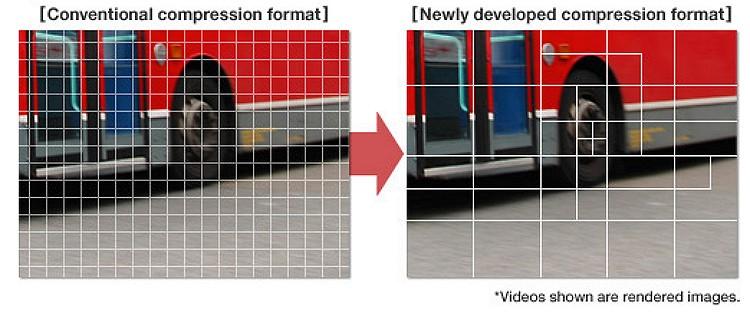
After three years of development, today the H.266 codec was introduced, which promises to halve the size of streaming videos without losing quality.

Codec H.266

The German Fraunhofer HHI institute has just introduced the long-awaited H.266 codec, which promises to lighten Internet traffic by halving the size of videos compared to the HEVC (H.265) codec. It is an important achievement considering that 80% of Internet traffic is streaming video.

The German Fraunhofer HHI institute, which is also behind the H.264 and H.265 formats, is part of the network of German institutions that also created the MP3 audio format. It has been working on the H.266 codec for three years together with Apple, Intel, Huawei, Microsoft, Qualcomm, Sony and Ericsson.

The main improvements of H.266 with respect to H.265 are two: the spectacular compression of the video, and its greater versatility. It is not only designed to encode streaming video or in local mode.

Register
Fraunhofer HHI claims that a 90 minute 4K video encoded with the H.265 codec occupies about 10 GB, but if it is encoded with H.266 it is reduced to 5 GB without losing image quality.

It is a format that accepts all resolutions, from low-resolution video to 8K, although it has been developed with 4K resolution in mind, so the main improvements are noticeable from this resolution.

As we have mentioned, it stands out for its versatility. It not only works well with conventional video or streaming. Also with 360-degree video, virtual reality, streaming video games like Google Stadia, screen sharing, etc. It also supports 10-bit color and HDR in all situations.

If you cut the video size in half without losing quality, the H.266 codec could be a major relief for Internet traffic, should platforms like Neftlix, Amazon Prime Video, YouTube or Disney + adapt it.

The main problem is that it is a licensed codec, only certain versions can be used for free and for non-commercial use. Netflix for example used H.264 and H.265 (HEVC), but for streaming on Android it opted for AV1, which is a free codec.

We’ll see what level of acceptance it has, but the fact that companies like Apple, Microsoft or Sony support it is important.

Software to encode and decode the H.266 codec will arrive in the fall. It will also be implemented in chips that will be used in mobiles, and devices such as Chromecast or Fire TV Stick.

Which video codec to choose? H264 or H265?

When we finish editing our issues in our editing software, the first hurdle we face (due to lack of hard disk space …) is often the format in which we decided to export our video. Digital or physical. We are faced with a list of video codec names that are sometimes difficult to enter. And which many amateur cameramen are also afraid of.

h.264 h.265

Which internet user has never searched for a codec or codec package to play a video. And if not, at best you only heard the sound … As I wrote in another article, the video codec mainly depends on the medium in which your video is broadcast. In fact, it is not as simple as the photo, which is often enough to export in jpeg or other format so it can be seen everywhere. Video has this major drawback, which is choosing the right codec based on the streaming platform.

H.264 VS H.265

The concept of containers and codecs.

To illustrate what a container and a codec are, imagine a jar (the container) that contains letters (the codec). The video player that will “decode” this file can be compared to a person who has the key to the pot. And who will put the letters together to make words and then make meaningful sentences? In fact, the container is the file that can be related to a box or jar where the video codec, audio codec and sometimes even the subtitle file are found. If you have a video in .avi or .mp4 or .mov or even .mkv, the container will end after the period. What videographers also call ‘video format’.

For example, for .mp4, the container is MP4. So far so good. And so in this container there can be Mpeg4, H264 or x264 which are video codecs.

Accompanied by the audio track which can be in mp3, AC3 or AAC, but we’ll return to the audio codecs in another article. And since we don’t like doing things in the video, these video codecs can also be found in other containers …

Yes, otherwise it would be too easy.

So the biggest concern in the video is this famous lack of compatibility that ALL multimedia platforms have. Play a video file if no codec package is installed yet. In fact, every codec has affinity with this or that manufacturer (Windows, Apple, etc.).

About H265 (HEVC)

Let’s be clear, this is tomorrow’s codec, which will replace the H264 very soon. Why ? One is made for UHD (4K) but also for 8K (Super Ultra HD?). It also supports HDR, which the H264 does not. And two because it offers a more optimized encryption algorithm than H264. This allows you to deliver as beautiful, if not more beautiful and more detailed, H264 image quality to a file with almost the same bit rate … but with two obvious advantages: size and quality!

Example: for a 2 hour movie in Full HD encoded with 6 Mbs in H264, you get a file of about 8-9 GB, while with the H265 codec you are at a lower bit rate (for example 5 Mbs) a file of 5 GB with the same image quality or even better! A bit rate of 10 Mbs in H265 is enough to get high quality 4K video. You will understand that the algorithm is completely different from H264. It allows streaming services to deliver 4K content without needing too much bandwidth.

But all this comes at a price …

The disadvantage of H.265 is that it consumes a lot of resources when encoding. You need a very good computer configuration to edit or export with this codec. The algorithm requires a lot of processor resources.

Another detail, it is compatible with YouTube. That was not the case before.