X264 codec

X264 codec

H.264

Frequent questions

H.264

Question: What is the difference between the new H.264 standard and the old MPEG-4 standard?
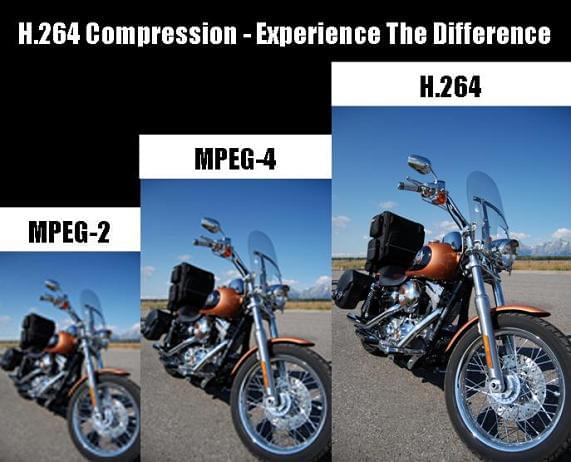
Answer: The H.264 video compression standard (the full name is MPEG-4 Part 10 AVC / H.264) is a logical continuation of the MPEG-4 Part 2 ASP standard (which is often simply referred to as MPEG-4). . The standard itself was adopted in mid-2003, but the truly effective codecs of this standard started to appear recently.

For users, the transition to the new standard means an improvement in the encoding efficiency of their video streams. That is, with the same quality of the compressed sequence, the new standard’s movie will take up less disk space or a smaller channel width (the standard’s developers set a goal of reducing the size by 50%).

More information on the standard can be obtained from the following sources:

Question: Where can I get the x264 codec?

Answer: The x264 codec is an open source H.264 codec. Several independent comparisons (see for example the comparison on the Doom9 website or our lab comparison) show that the x264 codec is one of the best codecs in the new H.264 standard.

The official page for codec developers is http://developers.videolan.org/x264.html. In it, you can subscribe to the codec developers mailing list, download the latest sources or various versions of the codec assembly (executable programs already compiled and ready to use).

Interestingly, the developers do not make official finished versions (releases), that is, the codec changes all the time. New versions of the source code appear almost every day, so it is sometimes difficult to keep track of the changes that take place.

You can find more information and discussions about the codec on the Doom9 forums.

Question: How can I use the console version of the codec?

Answer: The command line is generally used to compress video with the x264 codec. The codec can also be assembled as a Video for Windows filter, but in this case, the user has a limited set of encoding parameters.

In addition, for the convenience of work, various versions of the graphical interface can be used.

Modes of
Bit rate control algorithm The codec has three different bit rate control algorithms:

CRF (constant rate factor): constant quantizer for each type of frame, set by the user. Initialized on the command line as –crf <integer>
ABR (Average Bit Rate): Variation of the quality in different frames to achieve the best quality of the stream at a given bit rate. – Bitrate <integer> se
initializes.There may be additional parameters that control the algorithm:
–ratetol <float> Bit rate tolerance (in percent)
–vbv-maxrate <integer> Maximum frame bit rate
–vbv-bufsize <integer> Buffer size
–vbv-init <float> Initial buffer fill (percent)
Additional parameters can also be configured to control the change in the quantization factor, such as –qpmin <integer>, –qpmax <integer>, –qpstep <integer>, which specify the minimum, maximum quantization factors, and the change maximum. in the quantization factor between frames, respectively. …
Multi-pass mode. Similar to ABR, but allows you to achieve better quality by making multiple passes through the film. The first pass fills the statistics file. To do this, the codec is launched with the –pass 1 parameter. Last Pass encodes the movie using the statistics file generated in the first pass. The codec starts with the –pass 2 parameter. Multiple additional passes can be added between the first and last passes, each of which refines the statistics. In such cases, the codec starts with the –pass 3 parameter.

Recording standards H.265 and H.264 (MPEG4)

Recording standards H.265 and H.264 (MPEG4)

H.264 H.265

Compression standards for video have been around since the advent of the IP Internet Protocol and are used in a variety of areas, from Internet video conferencing and broadband communications networks to digital TV, video surveillance, and mobile IP networks.

H265/HEVC - what you need to know - Createinmotion

At the moment, the most widespread and popular digital video encoding format is H.264, but manufacturers and consumers are paying more and more attention to the H.265 or HEVC (High Efficiency Video Coding) compression standard. Let’s take a look at its advantages and disadvantages.

H.264 and H.265 compression standards

What is the advantage of H.265?

The H.265 compression format uses only half the bit rate of the H.264 format, which means that you can transfer more information over the same bandwidth and reduce the cost of hardware “hardware”.

But despite this clear advantage, the H.265 format is still far from mainstream adoption. Can you do anything with the H.264 format so far? In fact, taking into account the growth of modern technologies and the popularity of video content, the bandwidth requirements of the channel and the amount of data stored are also growing.

The popular H.264 codec now doesn’t stand still, and its bitrate is optimized in three ways: predictive encoding, noise suppression, and “long-term” bitrate control. As a result, we managed to reduce the occupied video memory by up to 75%, which means that the H.264 codec will compete with the new H.265 codec for a long time.

H.265 Complexities

Since the H.264 codec is being finalized and has been used for a long time, manufacturers are in no rush to invest in equipment modernization. And according to the results of tests of the Н.265 codec by various teams, the conclusions turned out to be ambiguous. In a real comparison, the codecs did not differ much in the size of the video stream. But many gamers had trouble playing the new codec. The difference in video quality was noticeable only at the minimum setting (200 kbps). The H.265 image turned out to be more detailed, which can be useful in video surveillance to recognize license plates at the entrance.

An additional difficulty in the implementation of the H.265 codec is the higher cost of the patent, which means that the cost of the final product will also increase for the consumer, not everyone is ready for this. Modern video equipment is constantly evolving, the quality of the video signal is improving, and the cost of components is increasing.

Enhanced H.264 codec

Another reason for postponing H.265 was the introduction of optimized H.264 encoding technologies by popular manufacturers, using various modern technologies.

Optimized H.264 Technologies

Optimized H.264 technologies use predictive coding to reduce the bit rate spent on an unchanging background image.

Predictive coding

In a simplified version, this encoding is explained in the image. The static background is separated from moving objects and simplified, the bit rate is significantly reduced, the optimized encoding reduces the volume of video transmission.

H.264 + technology

Hikvision has developed a next-generation H.264 + compression standard. The video camera detects the moving parts of the frame and encodes them with higher bit rate content; less bit rate is assigned to static parts. In addition, the standard H.264 / AVC codec is used, with which you can view and store videos on compatible devices. The only thing is, H.264 + can’t add or subtract keyframes automatically.

Noise reduction

H.264 encoding can effectively suppress various noises that occur during signal recording and transmission. This could be unwanted electrical signals, blurry pixels caused by fluctuations in light, temperature, or other external interference. By intelligently coding foreground objects, the image becomes sharper and more accurate in color.

So is H.264 encoding better than H.265?

With the above in mind, let’s draw conclusions: H.264 encoding offers nothing less than the offerings of the H.265 standard. Also, H.264 is compatible with all existing systems, is more common, and costs less.

As a result, the H.265 standard offers up to a 50% advantage in video streaming compression: you will save on hard drive size or increase drive life.

H.265 vs H.264 video format comparison. What is HEVC and AVC?

H.265 vs H.264 video format comparison. What is HEVC and AVC?

H.264 vs H.264

H.265 (HEVC), unlike H.264 (AVC), is becoming the most widely used format for compressing video and recording 4K / 8K UHD content, not to mention HD / SD video. Upgrading 4K and 8K video challenges the current H.264 compression standard, as it can no longer encode Ultra HD video at a satisfactory bit rate than HD content.

h.264 vs h.265

As a result, the next-generation HEVC video compression standard gains an advantage over AVC due to better compression efficiency. This allows for a 50% reduction in bit rate, but provides the same video quality.

This post shows the differences between the two standards based on file size, bandwidth usage, bitrate, quality, and compatibility.

What is H.265 (HEVC)?
H.265 is also known as High Efficiency Video Coding (HEVC). This format is twice as efficient as H.264 when encoding. It halves the transmission speed at the same quality level as its predecessor. Designed for next-generation HDTV displays and content capture systems that have progressive frame rates and resolutions, as well as improved image quality in terms of noise levels, color spaces, and dynamic range.

What is H.264 (AVC)?
H.264 or MPEG-4 AVC is a video encoding format that is currently one of the most widely used to compress and deliver video content. AVC saves the bit rate by 50% or more compared to its predecessor MPEG-2. It has a wider range of applications covering all compressed videos, from low bit rate streaming applications (YouTube, iTunes, Vimeo, Facebook, Instagram) to various HDTV broadcasts via terrestrial, cable and satellite TV. It is also widely used for Blu-ray discs, DVDs, IP networks, and digital cinema applications with virtually lossless encoding.

Comparison of video compression formats
Compression efficiency
H.265 differs from H.264 in compression efficiency. HEVC doubles the encoding efficiency of its predecessor. This means that the H.265 codec saves about 50% bit rate for the same encoding quality. Specifically, the average bit reduction for H.265 is 64% at 4K UHD, 62% at 1080p, 56% at 720p, and 52% at 480p. So if you download a movie in H.265 and play it on an Android iPhone, 50% of the mobile device memory will be saved. And the quality of the film will not suffer!

H.265 vs H.264 format comparison – compression efficiency

Broadband
H.265 also beats H.264 in terms of bandwidth usage. Because the HEVC algorithm uses efficient encoding, it promises a reduction of around 40-50% in the transmission bandwidth required to compress video (eg 720p) with the same quality. Typically, 4K H264 (AVC) streaming requires 32 Mbps of bandwidth, while 4K HEVC video is only 15 Mbps. Thus, it is possible to enjoy 4k videos smoothly even with a congested network connection.

To sum it up, let’s say avi is a heavyweight file with high quality image and audio, best suited for DVDs and home PCs.

Mp4 is a lightweight file that doesn’t require a lot of processing power to play, suitable for watching videos in a browser and on smartphones.

Why the H.264 Video Format Continues to Gain Importance for Videos and Streaming

H.264 is a video compression method. Currently, it is considered the industry standard and is one of the most widely used video formats. Full HD video and audio recording is as unthinkable without this encoding and decoding process as modern video playback.

H.264

What does H.264 mean?

The H.264 video format is now in the standard video signal encoding and decoding. It enables the transmission of high-quality video signals without imposing excessive demands on the bandwidth. At the same time, H.264 has a significantly lower bit rate than other formats.

H.264 comparission

You have to know that about H.264

The term the term denotes a method for video compression.
H.264 is now considered the standard for storing and playing video formats.
The decisive factor for the success of the format is its usability up to a resolution of 4K (4092 x 2160 pixels)
The bandwidth of using H.264 ranges from YouTube to televisions and professional video productions.
The video format is an open standard, but it cannot be used without a license fee. This will be paid to the MPEG-LA consortium.

Usually we come in contact with the H.264 standard for video compression in relation to the MP4 file format. However, the two must be distinguished. One is the algorithm for compressing or decompressing. The other of the “containers” in which this process is used.

It should be noted that H.264 is not limited to the MP4 container format. When this standard was developed 15 (!) Years ago, it was deliberately designed for a wide range of applications. If you want to add audio to the image, a container format is required. As an algorithm, H.264 only compresses images.

Today, H.264 is the standard for Blu-Ray video discs. It is used uniformly by different manufacturers. The same applies to high definition television broadcasts. In general, the format is considered suitable for professional high-quality and post-processing. Rather, compression is naturally still data reduction. This is always accompanied by a certain loss compared to the original format!

Video cameras (digital cameras) also use this method to compress their recordings.

Manufacturers such as Apple use H.264 as a codec for QuickTime (version 7 or higher). The same goes for Microsoft Windows Media.

A video file that uses this method is called an H.264 file. These include, for example, MP4, HDTV, Blu-ray, and previously HD DVD.

The compression format supports a wide variety of applications. These are only limited by variables defined in the data flow. These are the maximum resolution or frame rate. The higher the video bitrate, the higher the levels.

What is AVC / Advanced Video Coding?

Advanced Video Coding (AVC) is nothing more than a video file that has been encoded with H.264.

Sometimes the term is also used as a synonym for MP4. This term can be found, for example, in the description of the recording process of digital cameras (so-called AVC camcorders), as well as in relation to Blu-ray and HDTV.

What are the limits of H.264?

The H.264 / AVC standard, contrary to what many believe, is not limited to 4K. It also allows DCI 4K (this corresponds to 4092 x 2160 pixels) at a frame rate of 60 fps (frames per second). SONY uses a system called XAVC, which is nothing more than 4K AVC.

The limits of H.264 today are not on the hardware or software side. But in the bandwidths necessary for transmission. This is where the levels come into play. They define, and limit, the maximum data rate and resolution that are available during playback.

Playback on computer

Basically, H.264 can be used independently of a specific container format. In addition to the more common MP4 video format, the standard can also be used for AVI files, Ogg formats, or Matryoshka containers (. Mkv).

For playing a video on YouTube, MP4 with H.264 is considered the most suitable format. Because these files are the best possible technical compromise between file size and data quality today.

As always, when playing videos encoded using software (a player), the computer’s processor (CPU for short) plays a decisive role. Hardware and graphics card are important.