Role of predictive coding in H.265 and AAC compression


Free Download Mp4Gain
picture

Role of predictive coding in H.265 and AAC compression

Role of predictive coding in H.265 and AAC compression

Let’s talk about the role of predictive coding in H.265 and AAC compression

Predictive coding is fundamental to modern compression technologies like H.265 and AAC, enabling efficient encoding without compromising quality. At its core, predictive coding reduces redundant data by predicting the values of future data based on previous patterns. For instance, in a video, if one frame is nearly identical to the next, predictive coding eliminates the need to encode the entire frame again. It’s like predicting what the next puzzle piece looks like when assembling a jigsaw puzzle. This technique allows for smaller file sizes while preserving visual and audio quality.

In my work, I’ve seen predictive coding excel in handling complex audio and video sequences. With H.265, this process identifies similarities between frames and encodes only the differences, dramatically cutting down data requirements. Similarly, AAC uses predictive coding to analyze and predict audio waveforms, ensuring that only the necessary changes are encoded. Picture a friend trying to describe a simple drawing over the phone—they only need to tell you what changes to make to complete the image, saving time and effort.

How predictive coding optimizes H.265 compression

H.265, or HEVC, relies heavily on predictive coding to enhance video compression efficiency. By using intra-frame and inter-frame prediction, it minimizes redundant information. Intra-frame prediction looks within a single frame for patterns, while inter-frame prediction focuses on similarities between consecutive frames. For example, a static background in a video scene doesn’t need to be encoded repeatedly if predictive coding captures its unchanged nature.

The efficiency of H.265 comes from its ability to divide frames into smaller blocks and predict their content more accurately. I’ve often explained this using a mosaic analogy: instead of recreating each tile individually, H.265 identifies repeating patterns and predicts their placement, reducing the data load. This approach not only saves bandwidth but also improves streaming quality for high-definition content, even on limited internet connections.

How predictive coding works in AAC compression

In AAC, predictive coding ensures efficient audio compression by analyzing and predicting sound waveforms. It removes redundant frequencies and encodes only the essential changes. Think of it like adjusting the temperature in a room: once you set the thermostat, only small tweaks are needed to maintain comfort. Predictive coding in AAC eliminates unnecessary adjustments, focusing solely on what’s required to preserve audio fidelity.

This technique is particularly valuable for music and speech. By predicting and encoding only the differences between successive sound samples, AAC achieves high-quality audio with lower file sizes. I’ve personally worked with AAC files that maintain studio-level sound quality while being small enough to fit on older devices with limited storage. Predictive coding is the unsung hero behind this balance of quality and efficiency.

Latest words on the role of predictive coding in H.265 and AAC compression

Predictive coding is the cornerstone of H.265 and AAC compression, ensuring smaller file sizes without sacrificing quality. By predicting and encoding only the essential changes in video frames and audio waveforms, this technology maximizes efficiency. It’s like packing smarter for a trip—bringing only what you truly need while leaving unnecessary items behind.

If you’re looking to optimize your media files further, Mp4Gain offers tools that can help improve audio and video quality while leveraging these advanced compression techniques. It’s the ideal choice for those who want to enhance their media without compromising efficiency.

FAQs about the role of predictive coding in H.265 and AAC compression

What is predictive coding in H.265?

Predictive coding in H.265 reduces redundant data by predicting similarities within and between video frames, optimizing compression efficiency.

How does predictive coding work in AAC?

Predictive coding in AAC analyzes sound waveforms, encodes only changes between samples, and removes redundant frequencies to ensure high audio quality.

Why is predictive coding important in compression?

Predictive coding reduces file sizes while maintaining quality, making it essential for efficient video and audio streaming and storage.

What is inter-frame prediction in H.265?

Inter-frame prediction in H.265 analyzes similarities between consecutive frames to encode only the changes, reducing redundancy.

How does predictive coding affect video quality?

Predictive coding ensures that video compression retains high quality by focusing on encoding essential details and eliminating redundancies.

What is the role of intra-frame prediction in H.265?

Intra-frame prediction in H.265 analyzes patterns within a single frame to encode data more efficiently.

Does predictive coding improve streaming performance?

Yes, predictive coding reduces file sizes, enabling smoother streaming even on limited bandwidth connections.

Is predictive coding exclusive to H.265 and AAC?

No, predictive coding is used in other codecs as well, but it plays a critical role in H.265 and AAC for advanced compression.

How does predictive coding balance quality and compression?

By predicting and encoding only changes, predictive coding reduces data usage without compromising perceived quality.

What devices benefit from predictive coding?

Devices like smartphones, streaming platforms, and storage-constrained gadgets benefit from predictive coding’s efficiency.

Comments:

I didn’t know predictive coding worked this way! It’s amazing how it keeps file sizes so small without losing quality.

Good read, but I would have liked more examples of real-life applications of predictive coding. Still, solid info!

Wow, this article answered a lot of my questions about H.265. I’m going to bookmark this for future reference!

What a great explanation! I always wondered how AAC could be so efficient. This really cleared it up for me.

Pretty detailed article, but maybe a bit too technical in some spots. Would be nice to have even simpler analogies.

Can predictive coding be applied to older codecs too? Curious about how far back this technology goes.

I’ve been searching for an easy way to explain H.265 to a client, and this article nailed it. Thanks a ton!

Didn’t know predictive coding was the reason why my streaming is so smooth. Learned a lot from this post!

The way this was broken down into examples made it so easy to follow. Great job simplifying complex ideas!


Free Download Mp4Gain
picture


Mp4Gain Main Window
picture


Mp4Gain Features
picture


Free Download Mp4Gain
picture

Motion vector estimation in MP4 encoding

Motion vector estimation in MP4 encoding

Motion vector estimation in MP4 encoding

Let’s talk about motion vector estimation in MP4 encoding

Motion vector estimation in MP4 encoding is a cornerstone of video compression technology. Without it, storing or streaming high-quality video would be impractical. I’ve worked with encoding systems for years, and understanding motion vectors is like finding a shortcut in a maze. Imagine tracking a ball as it moves across a field — rather than storing every position frame by frame, motion vector estimation calculates the path and only updates the changes. This approach dramatically reduces the file size, and that’s what makes MP4 encoding so efficient.

When you dive into the details, the concept becomes even more fascinating. Motion vector estimation is the process of predicting movement between frames, which helps encode video data more effectively. Instead of recording redundant data for every frame, the encoder predicts how blocks of pixels move, reducing data storage requirements. This is why videos today maintain high quality while remaining compact.

How motion vectors reduce redundancy in video encoding

The beauty of motion vectors lies in their ability to eliminate redundancy. Think about a static background in a video scene — encoding every single frame of that background would be wasteful. Instead, motion vectors allow the encoder to “reuse” parts of the image. For example, if only a car moves in a scene, motion vector estimation focuses on the car, not the stationary background.

By reducing redundancy, motion vectors lower the amount of data needed for encoding. This is critical for streaming platforms where bandwidth is limited. It’s like packing a suitcase efficiently by folding clothes rather than stuffing them in randomly.

The role of macroblocks in motion vector estimation

Motion vector estimation depends heavily on macroblocks, which are small, rectangular sections of a video frame. Imagine dividing a jigsaw puzzle into smaller pieces to study their movement. Each macroblock is analyzed to determine how it moves between frames. For instance, in a scene with a moving train, the macroblocks around the train will show displacement, while stationary macroblocks remain unchanged.

Macroblocks provide the foundation for encoding because they allow precise calculations. Encoders use algorithms to determine how these blocks move and store only the necessary data to describe the motion. This efficiency is what enables smooth playback even on limited internet connections.

Techniques for motion estimation in MP4 encoding

Several techniques are used for motion estimation, each with unique advantages. Here are some methods:

  • Full search: This method evaluates all possible movements for maximum accuracy but is computationally intensive.
  • Hierarchical search: It starts with a broad search and narrows down, balancing accuracy and speed.
  • Diamond search: This technique uses a diamond-shaped pattern to find motion vectors quickly.

Personally, I’ve seen hierarchical search perform best in scenarios where speed is critical, like live streaming. However, full search is invaluable when high precision is necessary, such as in professional video editing. The choice of method depends on the trade-offs between processing power and quality.

Challenges in motion vector estimation

Motion estimation isn’t without its challenges. Complex scenes with rapid movement or changing lighting conditions can confuse the encoder. I’ve encountered situations where motion vectors produced artifacts, like blurry or pixelated regions. These issues arise because the encoder struggles to predict motion accurately.

To address these challenges, advanced algorithms incorporate adaptive techniques. For example, they adjust for camera shake or zoom by analyzing patterns over time. This adaptability ensures better encoding quality, even in challenging scenarios.

The impact of motion vectors on file size

Motion vector estimation has a direct impact on file size. By predicting motion, the encoder avoids storing redundant data, which significantly reduces file sizes. I’ve encoded videos where motion estimation cut the size by over 50%, making them ideal for sharing or streaming.

This efficiency also benefits mobile users. Streaming services rely on motion vectors to deliver high-quality video without consuming excessive data. It’s like compressing a sponge to save space while retaining its essential features.

Applications of motion vector estimation in video streaming

Motion vector estimation is crucial for modern video streaming platforms. When watching a live sports event, for instance, motion estimation ensures smooth transitions and minimal buffering. Without it, the video would stutter or consume enormous amounts of bandwidth.

Streaming platforms like YouTube and Netflix optimize motion estimation to deliver high-definition content efficiently. By reducing the data required for each frame, they make seamless playback possible even on slower internet connections.

Optimizing motion vector estimation for better results

Optimizing motion vector estimation involves balancing accuracy, speed, and computational power. Advanced encoders use machine learning to improve predictions. I’ve seen systems that learn from previous frames to refine motion vector accuracy, reducing errors and enhancing quality.

Using higher bitrates can also improve results, but it comes at the cost of larger file sizes. Finding the right balance is key to achieving both quality and efficiency.

Why motion vector estimation improves playback quality

Motion vector estimation enhances playback quality by maintaining smooth transitions between frames. Without it, videos might appear jerky or out of sync. I’ve often compared this to a flipbook animation — the smoother the transitions, the better the illusion of motion.

By accurately predicting movement, motion vectors ensure that encoded videos look natural and fluid, even on high-resolution screens. This technology is what makes MP4 encoding ideal for both professional and casual use.

Latest words on motion vector estimation in MP4 encoding

Motion vector estimation is a cornerstone of video compression, enabling efficient and high-quality encoding. By focusing on how pixels move between frames, it minimizes redundancy and optimizes file sizes. From streaming to professional video editing, this technology plays a vital role in today’s digital world.

For anyone working with video files, understanding motion vector estimation is essential. And for practical encoding needs, tools like Mp4Gain provide solutions that align with these advanced concepts, ensuring optimal quality and efficiency.

FAQ about motion vector estimation in MP4 encoding

What is motion vector estimation in MP4 encoding?

Motion vector estimation predicts the movement of pixels between frames to reduce redundancy and optimize video compression.

How do motion vectors reduce file size?

Motion vectors reduce file size by eliminating the need to store redundant data for unchanged parts of video frames.

What are macroblocks in motion estimation?

Macroblocks are small sections of video frames used to analyze and calculate motion vectors for encoding.

Why is motion vector estimation important for streaming?

It ensures smooth transitions and reduces data usage, enabling high-quality streaming on limited bandwidth.

What challenges exist in motion vector estimation?

Challenges include handling complex scenes, rapid motion, and changing lighting conditions without introducing artifacts.

What is the role of machine learning in motion estimation?

Machine learning enhances motion estimation by improving predictions based on patterns from previous frames.

How does motion estimation affect video quality?

It improves quality by ensuring smooth motion transitions and reducing artifacts in encoded videos.

What are common techniques for motion estimation?

Common techniques include full search, hierarchical search, and diamond search, each offering unique trade-offs between speed and accuracy.

Can motion vector estimation adapt to camera movement?

Yes, advanced

algorithms adjust for camera shake or zoom, ensuring accurate motion vector predictions.

What is the benefit of hierarchical search in motion estimation?

Hierarchical search balances speed and accuracy, making it ideal for real-time encoding applications.

Comments:

I really enjoyed this article. Finally, someone explains motion vectors in a way that’s easy to understand. The example with the moving car was spot on!

Can you dive deeper into how machine learning impacts motion estimation? I’m curious about specific algorithms used in modern encoders.

I’ve always wondered how streaming platforms keep their videos so smooth. This article gave me a lot of clarity. Thanks!

The section on macroblocks was really helpful. Could you elaborate more on how they interact with different video resolutions?

As someone who works in video editing, I appreciate the technical depth here. It’s rare to find such comprehensive explanations.

Honestly, I wish this article included more diagrams. Understanding motion vectors is tough without visual aids!

Great write-up! I’m still struggling to understand how motion estimation handles overlapping objects in a scene. Any insights?

Handling Anamorphic Video in MP4 Containers

Handling Anamorphic Video in MP4 Containers

Handling Anamorphic Video in MP4 Containers

Let’s Talk About Handling Anamorphic Video in MP4 Containers

Handling anamorphic video correctly within MP4 containers is essential to maintain playback quality across devices. Anamorphic video, which transforms a wide-screen image to fit standard-sized media, brings unique challenges when stored in MP4 format. MP4, a highly compatible video container, doesn’t automatically account for anamorphic adjustments, potentially leading to squished or stretched visuals. In this article, I’ll share my extensive experience with anamorphic video, explaining how it works, the nuances of MP4 handling, and giving practical examples so you can confidently manage anamorphic files in MP4.

Understanding Anamorphic Video: Key Concepts and Real-World Examples

Aspect Ratio vs. Resolution

Aspect ratio and resolution are fundamental to understanding anamorphic video. The aspect ratio describes the video’s width to height ratio, like 16:9 for widescreen TVs. Resolution, however, refers to the pixel count, like 1920×1080. When dealing with anamorphic video, the image stretches, often altering the aspect ratio without changing the resolution. Imagine stretching a balloon: its shape changes without gaining any new material.

The Origins of Anamorphic Video

Originally developed for widescreen cinema, anamorphic video helped theaters showcase large-scale movies without needing super-wide film. Early cinemas relied on anamorphic lenses to capture a wide field onto standard film, which then expanded on screen. In digital video, anamorphic formatting compresses data to save space without losing the cinematic look.

The MP4 Container: How It Works with Anamorphic Video

What is an MP4 Container?

MP4 containers bundle video, audio, and subtitles in a format compatible with nearly every device. This flexibility makes MP4 ideal for video storage and playback, though its compatibility can become complicated with anamorphic video. An MP4 file doesn’t automatically recognize an anamorphic setting, so configuring the correct playback settings is crucial.

Why Anamorphic Video Poses a Challenge for MP4

Anamorphic videos in MP4 containers require special configurations. Without them, you’ll often see “squished” or stretched visuals. Imagine trying to view a widescreen movie on an older, square TV – without adjustments, the image won’t look right. These challenges make it necessary to understand aspect ratios and pixel configurations thoroughly.

Preparing Anamorphic Video for MP4 Containers: Step-by-Step Guide

Choosing the Right Aspect Ratio for MP4 Playback

Selecting the right aspect ratio is key to ensuring videos display correctly. Before encoding, it’s helpful to “flag” anamorphic video files so players recognize the correct dimensions. Flags tell media players to adjust aspect ratios, avoiding issues with distortion during playback.

Encoding Anamorphic Video for MP4 Containers

To encode anamorphic video correctly, I usually start by configuring the pixel aspect ratio (PAR) and display aspect ratio (DAR) settings. This ensures that the video appears in its intended shape. It’s wise to test on a short video segment before committing to the entire file, ensuring your settings deliver the best results.

Using Correct Pixel Aspect Ratio (PAR) Settings

Using the correct PAR helps preserve the original video proportions. If you don’t, the video may appear distorted or compressed. Testing with various settings can help you find the most compatible solution for your display.

Playback Optimization and Device Compatibility

Ensuring Cross-Device Compatibility

To guarantee that anamorphic MP4 files play correctly on various devices, test playback across phones, computers, and TVs. The difference between devices is comparable to viewing the same image on different-sized screens – each will display the video differently.

Resolving Common Playback Issues

If your anamorphic video appears stretched or letterboxed, you can often fix this by adjusting the aspect ratio or scaling settings on your playback device. Many devices offer controls to help with these adjustments, allowing you to avoid letterboxing or pillarboxing effects.

Advanced Techniques for Professional Quality Anamorphic Video

Fine-Tuning Video Bitrate and Quality

Bitrate adjustments can prevent distortions, especially if you’re compressing video for smaller file sizes. Choosing the right balance between bitrate and quality settings can result in professional-looking video, even at lower resolutions.

Maintaining High Resolution and Quality

When scaling anamorphic video, be sure to preserve as much quality as possible. Reducing resolution too much can introduce visible artifacts, while optimal scaling settings maintain clarity, even in widescreen formats.

Latest Words on Handling Anamorphic Video in MP4 Containers

Configuring anamorphic video correctly in MP4 containers enables optimal viewing across devices without distortion or loss of quality. Remember to fine-tune settings like aspect ratio, pixel configuration, and bitrate for the best results. For anyone needing an easy solution to adjust or convert anamorphic videos, Mp4Gain offers comprehensive support for various formats, making it simple to achieve professional-quality playback.

Comments:

Man, I’ve been struggling with this issue forever! It finally makes sense now. Thanks for breaking it down. – VideoGuy123

Good article, but it would help to see more examples. Can you go into what’s best for mobile vs. TV screens? – TechLady007

This really helped me fix my video stretch problem. Following these steps was a lifesaver. – HappyEditor

Any advice for handling these files on older devices? My video still doesn’t look right on an older TV. – RetroFanatic

Thank you for the tips! Never knew aspect ratio was so complex. – MovieBuff93

It would be great to have a visual guide along with these steps. Anyone else agree? – FilmMakerPro

Thanks for this! I had no idea MP4 was so picky with aspect ratios. – CuriousCoder

Man, this article saved my day. Anamorphic videos were driving me crazy! – VideoFan90

Awesome write-up. Super helpful for beginners in video editing. – NewbieNerd

Great info! Mp4Gain sounds like what I need for my projects. – DigitalCreator

I was lost on this topic until I found this article. Thanks! – StudioGuy

Had no idea I could fix my stretched videos with just a few changes. Thanks! – MovieLover2020

This article was super helpful! Finally, my video looks normal. – EditMaster

Great article, though I wish it was a bit longer with more examples. – Sarah_Tech

I used to avoid anamorphic videos because of this issue. Glad to know there’s a fix. – FilmBuff101

https://x.com/ricardo_mx_news/status/1850186947144122729https://x.com/ricardo_mx_news/status/1850186947144122729

https://x.com/ricardo_mx_news/status/1850181030184898600https://x.com/ricardo_mx_news/status/18501810301848986004

https://www.tumblr.com/mp3-mp4/765410514408996864/keyframe-interval-selection-in-mp4-encoding

Data compression

Data compression

Data compression
Data compression

The process of encoding information using fewer bits than the original representation

Data compression
Data compression

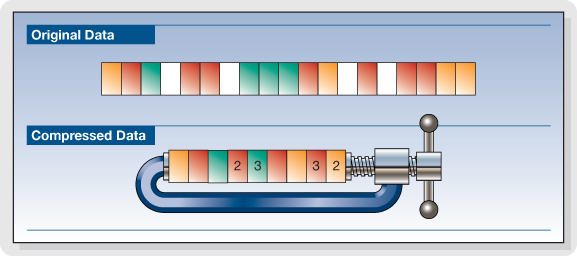
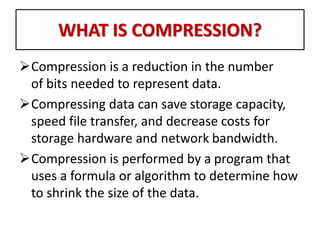
In computer science and information theory, data compression or source coding is the process of representing information with fewer data bits (or other information-related units) than if it were not encoded, according to an encoding mechanism specific . For example, if we encode “compression” as “comp”, the item can be represented with fewer data bits. A common example is the ZIP archive format, which not only provides compression but also acts as an archiver, capable of storing many files in the same archive.

We can use data consistency (represented by information entropy, entropy), regularity, and predictability to achieve data compression. The compression technology first developed by humans is actually natural language. Generally speaking, if a thing can be described in a relatively simplified natural language, then it will be better able to compress such things. The more consistent the data, the more concentrated its statistical features. Take image compression as an example, which centrally accounts for the time domain and frequency domain of the Fourier transform, the histogram, and the eigenvalues.


Data compression is possible because most real-world data has statistical redundancy. For example, the letter “e” is more commonly used in English than the letter “z”, and it is very unlikely that the letter “q” will be followed by a “z”. Non-destructive data compression generally exploits statistical redundancy so that the sender’s data can be represented more succinctly, but fully.

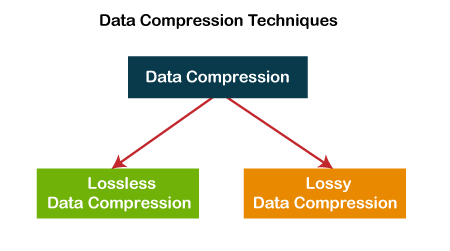
The compression ratio of non-destructive data compression is not sufficient to handle the large volume of audio and video data, but if some loss of fidelity is allowed, higher compression can be achieved. For example, when people look at photographs or television images, they may not realize that some details are not perfect. Similarly, two audio recording sample streams may sound the same, but they are not actually exactly the same. Destructive data compression uses fewer bits to represent images, video, or audio with acceptable or imperceptible numbers.

However, there are often files that cannot be compressed using destructive data compression, and in fact cannot be compressed using any compression algorithm for data that does not contain discernible patterns. Also, trying to compress already compressed data often results in data bloat.

In fact, destructive data compression will eventually get to the point where it won’t work. For example, an extreme example: the compression algorithm deletes the last byte of the file every time, and after this algorithm continues to compress until the file is empty, the compression algorithm will not continue to work.

Compression is important because it helps reduce the consumption of expensive resources such as hard drive space and connection bandwidth, however, compression requires information processing resources, which can also be expensive. Therefore, the design of the data compression mechanism requires a compromise between the compression capacity, the degree of distortion, the computing resources required, and various other factors that must be taken into account.

As with any form of communication, compressed data communication only works if both the sender and receiver of the information understand the encryption mechanism. For example, the article only makes sense if the recipient knows that the article is to be interpreted in Chinese characters. Also, the compressed data can only be understood by the receiver if he knows the encoding method.

Audio and video data compression

Audio and video data compression

Audio and video data compression

In computer science and information theory, data compression or source coding is the process of representing information with fewer data bits (or other information-related units) than if it were not encoded, according to an encoding mechanism specific .

Audio and video data compression

For example, if we encode “compression” as “comp”, the item can be represented with fewer data bits. A common example is the ZIP archive format, which not only provides compression but also acts as an archiver, capable of storing many files in the same archive.

We can use data consistency (represented by information entropy, entropy), regularity, and predictability to achieve data compression. The compression technology first developed by humans is actually natural language. Generally speaking, if a thing can be described in a relatively simplified natural language, then it will be better able to compress such things.

The more consistent the data, the more concentrated its statistical features. Taking image compression as an example, it centrally represents the time domain and frequency domain of the Fourier transform, the histogram, and the eigenvalues.

Data compression is possible because most real-world data has statistical redundancy. For example, the letter “e” is more commonly used in English than the letter “z”, and it is very unlikely that the letter “q” will be followed by a “z”. Non-destructive data compression generally exploits statistical redundancy so that the sender’s data can be represented more succinctly, but fully.

The compression ratio of non-destructive data compression is not sufficient to handle large volumes of audio and video data, but higher compression can be achieved if some loss of fidelity is tolerated. For example, when people look at photographs or television images, they may not realize that some details are not perfect. Similarly, two audio recording sample streams may sound the same, but they are not actually exactly the same. Destructive data compression uses fewer bits to represent images, video, or audio with acceptable or imperceptible numbers.

However, there are often files that cannot be compressed using destructive data compression, and in fact cannot be compressed using any compression algorithm for data that does not contain discernible patterns. Also, trying to compress already compressed data often results in data bloat.