Frame interpolation in MP4 video encoding


Free Download Mp4Gain
picture

Frame interpolation in MP4 video encoding
Frame interpolation in MP4 video encoding

Let’s talk about frame interpolation in MP4 video encoding

Frame interpolation in MP4 video encoding is a game-changer when it comes to improving video playback quality. As a video encoding specialist, I’ve worked extensively with techniques that make videos smoother and more visually appealing. Frame interpolation is the process of generating additional frames between existing ones to achieve a higher frame rate. This technique is particularly useful for creating seamless transitions, reducing motion blur, and enhancing the viewing experience for sports, gaming, and high-action videos.

Imagine watching a sports event where fast movements look choppy due to low frame rates. By applying frame interpolation, these movements become smoother and more fluid. This technology is often compared to filling in gaps in a flipbook so that animations appear continuous rather than jittery.

How frame interpolation works in MP4 encoding

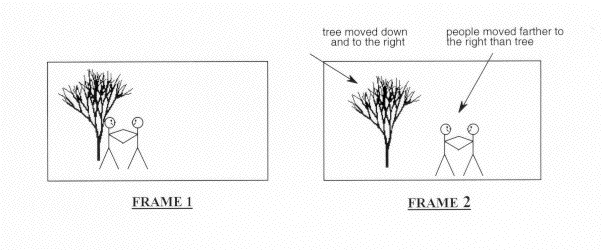
At its core, frame interpolation uses advanced algorithms to predict the motion between existing frames and generate new frames accordingly. I like to think of it as solving a puzzle where the computer guesses the “missing pieces” based on patterns it detects.

For instance, if a car moves across the screen, frame interpolation analyzes the trajectory of the car and creates intermediate frames to show its movement more smoothly. This is done using motion vectors, which track the object’s movement across frames.

  • Motion estimation: Detects how objects move between frames.
  • Motion compensation: Creates new frames based on estimated motion paths.
  • Smoothing algorithms: Ensures the transitions between frames are natural and visually consistent.

This process requires significant computational power, which is why it’s typically performed during encoding rather than playback.

Benefits of frame interpolation in MP4 video encoding

Frame interpolation provides numerous advantages that elevate the video viewing experience.

  • Smoother playback: It eliminates choppiness and makes movements appear more natural.
  • Enhanced visual quality: Details become clearer, especially in fast-paced scenes.
  • Improved user experience: Whether it’s gaming or streaming, smoother videos are more enjoyable to watch.

From my experience, using frame interpolation in high-action scenes like car chases or sports highlights transforms the viewing experience, making it feel more immersive.

Challenges of implementing frame interpolation

Despite its benefits, frame interpolation has challenges that need to be addressed for optimal performance.

One major issue is “artifacts,” which are visual distortions that occur when the algorithm predicts motion incorrectly. For example, if two people cross paths in a frame, the system might blend their movements, resulting in a blurry or distorted image.

Additionally, the process demands a lot of computational resources. Devices with limited processing power may struggle to handle frame interpolation efficiently, leading to lag or overheating.

Applications of frame interpolation in MP4 video encoding

Frame interpolation is used in various industries to enhance video quality and performance.

  • Streaming services: Platforms like Netflix and YouTube use frame interpolation to improve playback on devices with varying frame rate capabilities.
  • Gaming: High-frame-rate gaming relies on interpolation to ensure smooth visuals, especially in competitive eSports.
  • Film restoration: Old movies can be upscaled to modern frame rates, preserving their quality for new audiences.

I’ve seen how even vintage footage can come to life with interpolation, making it accessible to younger generations who expect modern video standards.

How to optimize frame interpolation in MP4 encoding

To achieve the best results with frame interpolation, it’s important to fine-tune the settings during the encoding process.

  • Adjust frame rates: Match the target frame rate to the content type, such as 60 FPS for sports or 24 FPS for films.
  • Use high-quality algorithms: Advanced interpolation methods reduce artifacts and maintain visual fidelity.
  • Test on multiple devices: Ensure compatibility across a range of playback platforms.

In my work, I’ve learned that balancing quality and performance is key. Over-processing can lead to diminishing returns, so it’s crucial to find the sweet spot.

Latest words on frame interpolation in MP4 video encoding

Frame interpolation is a powerful tool for enhancing video quality, but it’s not without its challenges. By understanding how it works and applying best practices, you can transform ordinary videos into exceptional viewing experiences. Whether you’re working on a blockbuster film or a personal project, interpolation can make your content stand out.

For those looking to optimize their videos further, consider tools like Mp4Gain to normalize audio and video settings, ensuring a consistent and professional finish.

FAQ about frame interpolation in MP4 video encoding

What is frame interpolation?

Frame interpolation is the process of creating additional frames between existing ones to achieve smoother video playback.

Why is frame interpolation important in MP4 encoding?

It enhances video quality by eliminating choppiness, reducing motion blur, and providing a seamless viewing experience.

How does frame interpolation work?

It uses motion estimation and compensation algorithms to predict and generate new frames based on the movement in existing ones.

What are the challenges of frame interpolation?

Common challenges include visual artifacts, high computational demands, and potential device compatibility issues.

Can frame interpolation improve old videos?

Yes, it can upscale older footage to modern frame rates, making it look smoother and more appealing.

Is frame interpolation suitable for all video types?

It works best for high-motion content like sports and action scenes but may not be ideal for all genres.

What devices support frame interpolation?

Many modern TVs, smartphones, and media players support interpolation, but results may vary depending on the hardware.

What are the alternatives to frame interpolation?

Other techniques include motion blur reduction and frame rate matching, though they may not be as effective.

How can I minimize artifacts in frame interpolation?

Using high-quality algorithms and fine-tuning settings during encoding can significantly reduce artifacts.

Does frame interpolation increase file size?

Yes, additional frames can increase file size, but modern compression techniques can help manage this.

Comments:

Wow, this was super detailed! I didn’t know frame interpolation was so complex. Great job explaining it step by step. It’s so helpful for my gaming videos.

– VideoLover22

Hey, could you dive deeper into how frame interpolation handles overlapping objects? That part felt a little rushed.

– CuriousCoder

I tried using frame interpolation, and my old videos look amazing now. Thanks for the breakdown!

– OldSchoolFilms

This makes me think about upgrading my TV. Smooth playback is really something I’ve taken for granted. Thanks for sharing.

– HomeTheaterGuy

Honestly, I wish there was more info about real-time applications for frame interpolation. Still a great read, though!

– TechBuff87

The example with the car really made this easy to understand. Never thought I’d enjoy a technical article so much!

– SimpleReader


Free Download Mp4Gain
picture


Mp4Gain Main Window
picture


Mp4Gain Features
picture


Free Download Mp4Gain
picture

Motion vector estimation in MP4 encoding

Motion vector estimation in MP4 encoding

Motion vector estimation in MP4 encoding

Let’s talk about motion vector estimation in MP4 encoding

Motion vector estimation in MP4 encoding is a cornerstone of video compression technology. Without it, storing or streaming high-quality video would be impractical. I’ve worked with encoding systems for years, and understanding motion vectors is like finding a shortcut in a maze. Imagine tracking a ball as it moves across a field — rather than storing every position frame by frame, motion vector estimation calculates the path and only updates the changes. This approach dramatically reduces the file size, and that’s what makes MP4 encoding so efficient.

When you dive into the details, the concept becomes even more fascinating. Motion vector estimation is the process of predicting movement between frames, which helps encode video data more effectively. Instead of recording redundant data for every frame, the encoder predicts how blocks of pixels move, reducing data storage requirements. This is why videos today maintain high quality while remaining compact.

How motion vectors reduce redundancy in video encoding

The beauty of motion vectors lies in their ability to eliminate redundancy. Think about a static background in a video scene — encoding every single frame of that background would be wasteful. Instead, motion vectors allow the encoder to “reuse” parts of the image. For example, if only a car moves in a scene, motion vector estimation focuses on the car, not the stationary background.

By reducing redundancy, motion vectors lower the amount of data needed for encoding. This is critical for streaming platforms where bandwidth is limited. It’s like packing a suitcase efficiently by folding clothes rather than stuffing them in randomly.

The role of macroblocks in motion vector estimation

Motion vector estimation depends heavily on macroblocks, which are small, rectangular sections of a video frame. Imagine dividing a jigsaw puzzle into smaller pieces to study their movement. Each macroblock is analyzed to determine how it moves between frames. For instance, in a scene with a moving train, the macroblocks around the train will show displacement, while stationary macroblocks remain unchanged.

Macroblocks provide the foundation for encoding because they allow precise calculations. Encoders use algorithms to determine how these blocks move and store only the necessary data to describe the motion. This efficiency is what enables smooth playback even on limited internet connections.

Techniques for motion estimation in MP4 encoding

Several techniques are used for motion estimation, each with unique advantages. Here are some methods:

  • Full search: This method evaluates all possible movements for maximum accuracy but is computationally intensive.
  • Hierarchical search: It starts with a broad search and narrows down, balancing accuracy and speed.
  • Diamond search: This technique uses a diamond-shaped pattern to find motion vectors quickly.

Personally, I’ve seen hierarchical search perform best in scenarios where speed is critical, like live streaming. However, full search is invaluable when high precision is necessary, such as in professional video editing. The choice of method depends on the trade-offs between processing power and quality.

Challenges in motion vector estimation

Motion estimation isn’t without its challenges. Complex scenes with rapid movement or changing lighting conditions can confuse the encoder. I’ve encountered situations where motion vectors produced artifacts, like blurry or pixelated regions. These issues arise because the encoder struggles to predict motion accurately.

To address these challenges, advanced algorithms incorporate adaptive techniques. For example, they adjust for camera shake or zoom by analyzing patterns over time. This adaptability ensures better encoding quality, even in challenging scenarios.

The impact of motion vectors on file size

Motion vector estimation has a direct impact on file size. By predicting motion, the encoder avoids storing redundant data, which significantly reduces file sizes. I’ve encoded videos where motion estimation cut the size by over 50%, making them ideal for sharing or streaming.

This efficiency also benefits mobile users. Streaming services rely on motion vectors to deliver high-quality video without consuming excessive data. It’s like compressing a sponge to save space while retaining its essential features.

Applications of motion vector estimation in video streaming

Motion vector estimation is crucial for modern video streaming platforms. When watching a live sports event, for instance, motion estimation ensures smooth transitions and minimal buffering. Without it, the video would stutter or consume enormous amounts of bandwidth.

Streaming platforms like YouTube and Netflix optimize motion estimation to deliver high-definition content efficiently. By reducing the data required for each frame, they make seamless playback possible even on slower internet connections.

Optimizing motion vector estimation for better results

Optimizing motion vector estimation involves balancing accuracy, speed, and computational power. Advanced encoders use machine learning to improve predictions. I’ve seen systems that learn from previous frames to refine motion vector accuracy, reducing errors and enhancing quality.

Using higher bitrates can also improve results, but it comes at the cost of larger file sizes. Finding the right balance is key to achieving both quality and efficiency.

Why motion vector estimation improves playback quality

Motion vector estimation enhances playback quality by maintaining smooth transitions between frames. Without it, videos might appear jerky or out of sync. I’ve often compared this to a flipbook animation — the smoother the transitions, the better the illusion of motion.

By accurately predicting movement, motion vectors ensure that encoded videos look natural and fluid, even on high-resolution screens. This technology is what makes MP4 encoding ideal for both professional and casual use.

Latest words on motion vector estimation in MP4 encoding

Motion vector estimation is a cornerstone of video compression, enabling efficient and high-quality encoding. By focusing on how pixels move between frames, it minimizes redundancy and optimizes file sizes. From streaming to professional video editing, this technology plays a vital role in today’s digital world.

For anyone working with video files, understanding motion vector estimation is essential. And for practical encoding needs, tools like Mp4Gain provide solutions that align with these advanced concepts, ensuring optimal quality and efficiency.

FAQ about motion vector estimation in MP4 encoding

What is motion vector estimation in MP4 encoding?

Motion vector estimation predicts the movement of pixels between frames to reduce redundancy and optimize video compression.

How do motion vectors reduce file size?

Motion vectors reduce file size by eliminating the need to store redundant data for unchanged parts of video frames.

What are macroblocks in motion estimation?

Macroblocks are small sections of video frames used to analyze and calculate motion vectors for encoding.

Why is motion vector estimation important for streaming?

It ensures smooth transitions and reduces data usage, enabling high-quality streaming on limited bandwidth.

What challenges exist in motion vector estimation?

Challenges include handling complex scenes, rapid motion, and changing lighting conditions without introducing artifacts.

What is the role of machine learning in motion estimation?

Machine learning enhances motion estimation by improving predictions based on patterns from previous frames.

How does motion estimation affect video quality?

It improves quality by ensuring smooth motion transitions and reducing artifacts in encoded videos.

What are common techniques for motion estimation?

Common techniques include full search, hierarchical search, and diamond search, each offering unique trade-offs between speed and accuracy.

Can motion vector estimation adapt to camera movement?

Yes, advanced

algorithms adjust for camera shake or zoom, ensuring accurate motion vector predictions.

What is the benefit of hierarchical search in motion estimation?

Hierarchical search balances speed and accuracy, making it ideal for real-time encoding applications.

Comments:

I really enjoyed this article. Finally, someone explains motion vectors in a way that’s easy to understand. The example with the moving car was spot on!

Can you dive deeper into how machine learning impacts motion estimation? I’m curious about specific algorithms used in modern encoders.

I’ve always wondered how streaming platforms keep their videos so smooth. This article gave me a lot of clarity. Thanks!

The section on macroblocks was really helpful. Could you elaborate more on how they interact with different video resolutions?

As someone who works in video editing, I appreciate the technical depth here. It’s rare to find such comprehensive explanations.

Honestly, I wish this article included more diagrams. Understanding motion vectors is tough without visual aids!

Great write-up! I’m still struggling to understand how motion estimation handles overlapping objects in a scene. Any insights?

Interframe prediction in MP4 videos

Interframe prediction in MP4 videos

Interframe prediction in MP4 videos

Let’s talk about interframe prediction in MP4 videos

Interframe prediction is the backbone of efficient MP4 video compression. This method predicts frames by analyzing differences between consecutive images, drastically reducing the data needed. When I explain it, I like to compare it to flipping through a photo album. Imagine that each page only changes slightly from the last—why reprint the whole picture when you can just update the changes? That’s essentially what interframe prediction does.

In MP4 videos, this technique leverages patterns and redundancies between frames, cutting down file sizes while maintaining quality. It’s a game-changer for streaming, especially on platforms where bandwidth efficiency is critical. Without it, watching your favorite series online would require massive data usage.

How interframe prediction works

At its core, interframe prediction relies on creating reference frames, often called keyframes, and deriving subsequent frames from them. Picture it like painting a mural: the keyframe is your blank canvas with the main outline, and each predicted frame is like adding details to the painting without starting from scratch.

This process involves two main types of frames:

  • Intra-coded frames (I-frames): These contain complete image data and serve as reference points.
  • Predicted frames (P-frames) and bi-predicted frames (B-frames): These only store changes relative to other frames.

What’s fascinating is how these frames interact. B-frames, for example, can predict changes both backward and forward in time, enabling smoother transitions. This creates highly efficient compression but requires complex calculations.

The role of motion vectors in interframe prediction

Motion vectors play a crucial role in interframe prediction by tracking object movement between frames. Think of it like following the path of a ball in a sports game. Instead of capturing the ball’s position in every frame, motion vectors only record its trajectory.

Motion vectors allow video encoders to estimate where pixels should move from one frame to the next. This reduces the need for redundant pixel storage and improves compression. It’s a brilliant way to balance quality and efficiency.

Challenges in interframe prediction

While interframe prediction is powerful, it comes with challenges. One common issue is the “prediction drift” caused by errors accumulating over time. Imagine building a tower with slightly misaligned blocks; the higher you go, the worse the misalignment.

This drift can degrade video quality, especially in low-bandwidth scenarios. To counter this, periodic keyframes (I-frames) are introduced to reset predictions and maintain consistency. However, more I-frames mean larger file sizes, so it’s a delicate balancing act.

Applications of interframe prediction

Interframe prediction isn’t just theoretical; it’s widely used in real-world applications. For instance:

  • Streaming platforms rely on it to deliver high-quality videos without overloading networks.
  • Video conferencing benefits from reduced bandwidth usage, ensuring smooth communication.
  • Surveillance systems use it to store long durations of footage efficiently.

These examples highlight its versatility and importance. From YouTube to Zoom, interframe prediction is behind the scenes making it all work.

Improving interframe prediction techniques

With advancements in technology, researchers are constantly improving interframe prediction algorithms. New approaches, like machine learning-based prediction, are being developed. These methods analyze vast datasets to predict motion patterns more accurately.

For example, AI algorithms can detect complex motions, such as swirling smoke or water ripples, which traditional methods struggle with. This improves video quality in dynamic scenes while maintaining compression efficiency.

Why interframe prediction matters for MP4 videos

Interframe prediction is crucial for MP4 videos because it strikes a balance between quality and file size. Whether you’re streaming a movie or uploading a video, this technology ensures fast loading times without compromising visual fidelity. For me, the most impressive aspect is how seamless it feels. You don’t notice the compression—it just works.

Without interframe prediction, we’d face larger files, slower downloads, and reduced accessibility. It’s a cornerstone of modern digital media, making high-quality content available to everyone.

Latest words on interframe prediction in MP4 videos

Interframe prediction is a fascinating blend of science and art. It captures the essence of motion while keeping file sizes manageable. From the intricate calculations of motion vectors to the clever use of reference frames, it’s a marvel of modern engineering.

If you’re working with MP4 files or just curious about video compression, understanding interframe prediction is essential. It’s a technique that impacts our daily lives more than we realize. Tools like Mp4Gain can further optimize videos, ensuring the best possible quality and performance.

What is interframe prediction in MP4 videos?

Interframe prediction is a technique that compresses MP4 videos by predicting changes between frames, reducing redundancy and file sizes.

How do motion vectors work in interframe prediction?

Motion vectors track pixel movements between frames, enabling encoders to predict changes efficiently without storing redundant data.

Why are I-frames important in MP4 videos?

I-frames provide complete image data, serving as reference points for interframe prediction to maintain video quality and consistency.

What challenges exist in interframe prediction?

Challenges include prediction drift and balancing file size with quality, requiring careful optimization of I-frames and prediction algorithms.

How does interframe prediction benefit streaming platforms?

It reduces bandwidth usage while maintaining quality, enabling smooth playback even on low-speed connections.

Can interframe prediction handle complex motions?

Traditional methods struggle with complex motions, but newer AI-driven algorithms are improving accuracy in such scenarios.

What are the types of frames in interframe prediction?

Frames include I-frames (complete data), P-frames (predicted from a prior frame), and B-frames (predicted both forward and backward).

How does interframe prediction optimize MP4 video storage?

It reduces redundant information by predicting changes between frames, allowing for smaller file sizes without losing quality.

Is interframe prediction used outside of MP4 videos?

Yes, it’s widely used in other video formats and applications, such as surveillance systems and real-time streaming services.

How does Mp4Gain enhance MP4 videos?

Mp4Gain optimizes MP4 videos, improving quality and performance by applying advanced techniques like interframe prediction adjustments.

Comments:

I’ve always wondered how streaming services compress videos so well. This article gave me so much insight. Great stuff!

Interesting read, but I wish there was a deeper dive into how

AI is changing interframe prediction. Could you add more about that?

Thanks for explaining it in such simple terms. The analogy with a photo album really made it clear for me.

I didn’t know motion vectors were such a big deal. This is fascinating!

Wow, this explains why my old videos take up so much space compared to newer ones. Technology really has advanced!

Good article, but you skipped over how prediction errors are fixed in real-time applications like video conferencing.

This was super informative. I’ve been curious about video compression ever since I started editing my own MP4 files. Thanks!

Can’t believe how much I learned here! I had no idea B-frames were so crucial to compression.

I think this explained it better than some video tutorials I’ve seen. Nice job breaking it down!

This is gold! The section about challenges was spot-on and helped me understand why some videos lag.

What is Motion Estimation in Video Compression?

What is Motion Estimation in Video Compression?

Motion Estimation in Video


Motion Estimation and Compensation

Motion estimation and compensation are fundamental techniques used in video compression. Motion estimation refers to the process of analyzing consecutive video frames to identify the motion vectors between them. Motion compensation, on the other hand, involves using these motion vectors to predict the pixel values of the current frame based on the previous frame. By utilizing motion estimation and compensation, video compression algorithms can efficiently remove temporal redundancies, resulting in smaller file sizes without significant quality loss.
I first encountered the concept of motion estimation during my undergraduate studies in computer science. We were tasked with implementing a simple video compression algorithm, and I quickly learned that motion estimation was a crucial component. As I delved deeper into the topic, I came across the book “Video Coding for Mobile Communications: Efficiency, Complexity, and Resilience” by K.R. Rao et al., which provided a comprehensive overview of motion estimation algorithms and their applications.

Motion Estimation Algorithms

There are several motion estimation algorithms used in video compression, each with its strengths and weaknesses. One of the most popular methods is block matching, which divides the frame into small blocks and compares them with corresponding blocks in the previous frame to find the best match. Another commonly used technique is optical flow, which estimates the motion vectors by analyzing the brightness patterns between frames.
In my experience with video compression software, I have found that the choice of motion estimation algorithm can significantly impact the compression efficiency and visual quality of the output. For example, block matching algorithms tend to perform well on videos with simple, uniform motion, while optical flow methods excel in more complex scenes with dynamic motion.

Video Coding Standards

Video compression standards are crucial for ensuring interoperability and compatibility between different devices and software. Some of the most widely used standards include H.264/AVC, HEVC, and MPEG-4. These standards define the encoding process, including the motion estimation and compensation techniques used, and specify the parameters required for decoding.
As someone who has worked extensively with video coding standards, I can attest to the importance of following these guidelines to ensure compatibility and optimal performance. However, it is worth noting that some proprietary codecs, such as Apple’s ProRes and Google’s VP9, may offer superior performance in certain scenarios.

In conclusion, motion estimation is a critical component of video compression, allowing for efficient removal of temporal redundancies. By utilizing motion estimation and compensation techniques, video compression algorithms can significantly reduce file sizes without compromising quality. As I have learned through my experiences with video compression, the choice of motion estimation algorithm and adherence to video coding standards are crucial factors in achieving optimal compression efficiency and visual quality.

video compression, motion estimation, motion compensation, block matching, optical flow, video coding standards, H.264/AVC, HEVC, MPEG-4, video coding research, video compression techniques, video compression software, video quality, compression efficiency, temporal redundancies, compatibility, proprietary codecs, ProRes, VP9, K.R. Rao, video coding for mobile communications, file size reduction, video frames, motion vectors, pixel values, previous frame, brightness patterns.