H.264 and H.265 Codecs


Free Download Mp4Gain
picture

H.264 and H.265 Codecs

H.264 and H.265 Codecs

Let’s talk about H.264 and H.265 codecs. These two video compression standards are key to digital video today. As a video compression specialist, I have worked with both for many years, and I’ve seen them evolve into the leading codecs of today. H.264, or AVC (Advanced Video Coding) was the dominant standard for many years, but H.265, also known as HEVC (High-Efficiency Video Coding), came as a better alternative, offering improved compression. This article will compare these two important codecs, explaining their key features, and their differences, so you can understand the complexities of modern video compression.

Understanding H.264 (AVC)

H.264, also known as Advanced Video Coding, was the king of video compression for many years, and I have seen it being used everywhere. I consider H.264 like a very efficient way to pack a suitcase; it organizes the video data very well, removing redundant information, making the video smaller, but keeping a good visual quality. This made it perfect for streaming, broadcast and all kinds of digital video tasks. Its main strength is its good balance between quality and compression and its support by a lot of devices.

Motion Compensation

  • Motion compensation is a key feature of H.264; it predicts the movement between frames, so the encoder does not need to store the full image, which saves data.
  • This is like drawing a flip book, where instead of drawing all the pages, you just draw the changes from one page to another.

Intra-Frame Prediction

  • Intra-frame prediction analyzes each frame and removes redundant spatial information. It looks at the surrounding pixels to predict the current pixel value.
  • This is like painting a wall where you use the color next to the area to fill the gap, since it’s the same color.

Variable Block Sizes

  • H.264 uses variable block sizes, which means that the video is divided in blocks of different sizes depending on the content, which improves compression efficiency.
  • This is like packing different size objects in a box, to make the best use of the available space, so that no space is wasted.

Exploring H.265 (HEVC)

H.265, or High-Efficiency Video Coding, is the successor to H.264, and I’ve seen it become more widely adopted in recent years. I like to think of H.265 as a better version of H.264. It uses the same ideas but more efficiently, resulting in smaller file sizes for the same quality, or even better quality for the same file size. This makes H.265 a great choice for 4K video, or even 8K video, since the files are small enough for streaming and distribution, while keeping the great video quality needed for these resolutions.

Advanced Motion Compensation

  • H.265 uses more advanced motion compensation techniques compared to H.264, which predicts motion with more accuracy. This also results in more efficient compression.
  • This is like having a super detailed flip book, where the movements are predicted very well, using very little data.

Larger Block Sizes

  • H.265 uses larger block sizes compared to H.264, which can better manage large areas with similar content.
  • This is like using large containers to store the objects in the box, when you have large groups of same items that can fit in one large space.

Improved Intra-Frame Prediction

  • H.265 provides more sophisticated methods for intra-frame prediction, improving the efficiency of each video frame.
  • This is like painting a wall with more advanced techniques, which results in a better final result with less effort, and less paint.

H.264 vs. H.265: Key Differences

The differences between H.264 and H.265 are substantial, and I’ve seen firsthand how these differences affect video quality and file size. H.265 is designed to achieve better compression than H.264, without losing quality. However, this comes at the cost of increased processing complexity. This means that encoding H.265 video can be more intensive, and more demanding for the hardware.

Compression Efficiency

  • H.265 provides better compression efficiency than H.264, typically reducing the file size by 50% for the same visual quality.
  • This means that you can save half of the space with H.265, with the same quality as a H.264 video.

Processing Complexity

  • H.265 is more complex than H.264 and requires more processing power to encode and decode.
  • This means that H.265 encoding will be slower, and it may require more powerful devices to play the videos properly.

Compatibility

  • H.264 has wider compatibility and is supported by more devices, while H.265 adoption is growing but not universal yet.
  • Older devices may not be able to play H.265 video, while H.264 is almost universal and can be played everywhere.

Advanced Compression Techniques in H.265

H.265 includes several advanced compression techniques that are not present in H.264, which I’ve found greatly contribute to its superior performance. These advanced techniques, combined with its other methods, help to create very efficient video encoding. Some of these advanced features include, advanced motion prediction, transform units, and sample adaptive offset methods that lead to a great improvement in the video results, when compared to H.264.

Transform Units (TUs)

  • H.265 uses transform units (TUs) that help to convert pixel data into frequency coefficients, allowing better compression of the information.
  • Transform units work with different sizes, which allows them to adapt to each different region of the image.

Coding Tree Units (CTUs)

  • Coding Tree Units (CTUs) are the base blocks used by H.265 to process the video. CTUs can be divided into smaller units as needed.
  • This makes processing the video more flexible, and allows the encoder to adapt to the different details and information in the video frame.

Sample Adaptive Offset (SAO)

  • Sample adaptive offset (SAO) reduces artifacts in video by adjusting pixel values, improving the visual quality of the final output.
  • SAO is a great technique that reduces the errors and blocks created during the quantization process, which results in a better image.

Real-World Applications

The selection between H.264 and H.265 impacts various real-world video applications, as I’ve experienced in my video production work. For example, H.264 is still the preferred choice for many cameras due to its wide support, and low processing requirements. On the other hand, H.265 is ideal for streaming 4K video, since it can reduce the file size and the bandwidth needs, while keeping the needed image quality. Understanding these real-world applications is key to making the right choices.

Video Streaming Services

  • Video streaming services use both H.264 and H.265, but H.265 is becoming the preferred choice for higher resolutions, like 4K and 8K video.
  • Streaming services like H.265, because it helps reduce file size, and also bandwidth requirements, while still keeping the needed image quality for these resolutions.

Video Conferencing

  • Video conferencing software programs use H.264 for its widespread compatibility. H.265 may be used for better quality video with less bandwidth.
  • H.264 is more compatible with older devices, while H.265 is good for newer devices, and better image quality.

Digital Video Recording

  • Digital video recording uses both H.264 and H.265 depending on the specific device, but H.265 is gaining popularity due to its better quality.
  • H.265 can help to record longer videos, since it requires less space in the storage units, while still keeping very good image quality.

Choosing the Right Codec

The decision to use H.264 or H.265 depends on the specific needs and requirements of the user. In my opinion, there is not a single best answer, and the best option depends on the specific scenario and the target user of the video. If you need wide compatibility, H.264 is your best option, since it can be played everywhere. If you want better quality and smaller file sizes, H.265 is the ideal choice. Understanding these aspects can help you choose correctly.

Prioritize Compatibility

  • If compatibility is your primary concern, choose H.264, since it will work almost everywhere, in every device, even in older ones.
  • H.264 is universally supported and can be used by everyone, everywhere.

Prioritize Quality and Efficiency

  • If quality and file size are more important, use H.265. It provides much better compression with excellent quality.
  • If you want the best possible result with the smallest file size, H.265 is your best option.

Balance Compatibility and Efficiency

  • If you need a balance between both, try H.265 with fallback options. This makes the video compatible with most devices.
  • H.265 can be the main codec, but using H.264 if the device is not compatible can be a good approach.

Latest words on H.264 and H.265 Codecs

Both H.264 and H.265 are vital video codecs in use today. From my experience, H.264 has been the standard for a long time and is still very important, but H.265 offers much better compression and is the choice for high resolution video. Understanding the differences and applications of these two video codecs can make video encoding, streaming, and distribution more efficient. Tools like Mp4Gain can help you with your video needs. As technology evolves, I’m sure that H.265 will continue to improve and become more widely adopted, but H.264 will still be an essential format. Now, you have all the knowledge required to choose the right video codec for every situation.

What is the main difference between H.264 and H.265 codecs?

The main difference lies in their compression efficiency and processing complexity. H.265 provides better compression than H.264, but requires more processing power. H.264 offers good quality with lower processing requirements and a wider compatibility with older devices.

What does motion compensation do in video compression?

Motion compensation predicts the movement of objects between frames. This reduces the amount of redundant data that needs to be stored, and helps to achieve higher compression rates. Instead of storing every single frame, the encoder stores how a frame changes from the previous one.

How does intra-frame prediction help in video compression?

Intra-frame prediction analyzes the details within a frame and removes redundant spatial information by predicting the values of pixels based on the surrounding pixels, without needing to store the same information twice. This makes for better compression by removing repeated information.

What are variable block sizes in the H.264 codec?

Variable block sizes mean that H.264 divides each video frame into blocks of different sizes, depending on the video content. This enables more efficient compression, by using smaller blocks for detailed areas and larger blocks for uniform areas of the image.

Why does H.265 need more processing power than H.264?

H.265 uses more advanced compression techniques that involve more complex calculations, needing more processing power. These advanced techniques result in better compression, but the encoding and decoding processes are much more complex than the ones used by H.264.

What are coding tree units (CTUs) in the H.265 codec?

Coding tree units (CTUs) are the basic building blocks that are used in H.265 to process the video. CTUs can be divided into smaller units as needed, this provides flexibility to the encoding process, and helps to adapt to the different video details and information.

How does sample adaptive offset (SAO) enhance video quality?

Sample adaptive offset (SAO) is an H.265 technique that reduces artifacts in video compression by adjusting the pixel values. SAO can adjust the values of the pixels to make a smoother image and remove compression artifacts. This makes for a better visual experience.

Is H.265 universally compatible with all devices?

No, H.265 is not as universally compatible as H.264. While H.265 is gaining more support, many older devices do not have the necessary hardware or software to decode it. H.264 is the codec with the best compatibility since it has been around for much longer.

Which codec is better for streaming high-resolution videos?

H.265 is generally better for streaming high-resolution videos, since it can reduce the file size and bandwidth requirements while keeping the needed image quality. This makes it ideal for 4K, or 8K video, and it allows the video to be streamed with less impact on the networks.

When should I use H.264 instead of H.265?

You should use H.264 when compatibility is essential, especially when you need to support older devices. H.264 is also useful when fast encoding times are more important than achieving ultimate video quality. If compatibility is the top concern, H.264 will be the best option.

Comments:

This article was very informative, I never really understood the difference between H.264 and H.265, but this explained all the details in a very clear and concise way. Now I know which one to use in all my projects. Thank you!

-VideoGeek

This is a great article about video codecs. I’ve always heard about H.264 and H.265, but I did not know what they did, but this article explained everything very clearly. Good job!.

-MovieLover

Very interesting, but could you provide some info about licensing, I’m very interested in the cost differences of H.264 and H.265. Also more info about compatibility with specific hardware and software platforms would be useful.

-TechGuy

Amazing, I work in video production, and I always had issues selecting the best codec. Now, with this, everything is clear. Great job with the analogies, easy to understand. Thanks for sharing all this info!

-VideoPro

This article is very well written, very useful and easy to understand. The examples used were very good and clear. I’m not an expert, and I got all the details. Good job.

-SimpleUser

This was exactly what I was looking for, I needed to know the differences between the two codecs, and now I am sure that I can use H.265 for all my projects. Thank you for this detailed information. Very helpful!

-EncoderFan

Great site, always the best info in here! I learned a lot about the two video codecs with very easy-to-understand language. Thanks for explaining everything in such a simple way!

-KnowledgeSeeker


Free Download Mp4Gain
picture


Mp4Gain Main Window
picture


Mp4Gain Features
picture


Free Download Mp4Gain
picture

Role of predictive coding in H.265 and AAC compression

Role of predictive coding in H.265 and AAC compression

Role of predictive coding in H.265 and AAC compression

Let’s talk about the role of predictive coding in H.265 and AAC compression

Predictive coding is fundamental to modern compression technologies like H.265 and AAC, enabling efficient encoding without compromising quality. At its core, predictive coding reduces redundant data by predicting the values of future data based on previous patterns. For instance, in a video, if one frame is nearly identical to the next, predictive coding eliminates the need to encode the entire frame again. It’s like predicting what the next puzzle piece looks like when assembling a jigsaw puzzle. This technique allows for smaller file sizes while preserving visual and audio quality.

In my work, I’ve seen predictive coding excel in handling complex audio and video sequences. With H.265, this process identifies similarities between frames and encodes only the differences, dramatically cutting down data requirements. Similarly, AAC uses predictive coding to analyze and predict audio waveforms, ensuring that only the necessary changes are encoded. Picture a friend trying to describe a simple drawing over the phone—they only need to tell you what changes to make to complete the image, saving time and effort.

How predictive coding optimizes H.265 compression

H.265, or HEVC, relies heavily on predictive coding to enhance video compression efficiency. By using intra-frame and inter-frame prediction, it minimizes redundant information. Intra-frame prediction looks within a single frame for patterns, while inter-frame prediction focuses on similarities between consecutive frames. For example, a static background in a video scene doesn’t need to be encoded repeatedly if predictive coding captures its unchanged nature.

The efficiency of H.265 comes from its ability to divide frames into smaller blocks and predict their content more accurately. I’ve often explained this using a mosaic analogy: instead of recreating each tile individually, H.265 identifies repeating patterns and predicts their placement, reducing the data load. This approach not only saves bandwidth but also improves streaming quality for high-definition content, even on limited internet connections.

How predictive coding works in AAC compression

In AAC, predictive coding ensures efficient audio compression by analyzing and predicting sound waveforms. It removes redundant frequencies and encodes only the essential changes. Think of it like adjusting the temperature in a room: once you set the thermostat, only small tweaks are needed to maintain comfort. Predictive coding in AAC eliminates unnecessary adjustments, focusing solely on what’s required to preserve audio fidelity.

This technique is particularly valuable for music and speech. By predicting and encoding only the differences between successive sound samples, AAC achieves high-quality audio with lower file sizes. I’ve personally worked with AAC files that maintain studio-level sound quality while being small enough to fit on older devices with limited storage. Predictive coding is the unsung hero behind this balance of quality and efficiency.

Latest words on the role of predictive coding in H.265 and AAC compression

Predictive coding is the cornerstone of H.265 and AAC compression, ensuring smaller file sizes without sacrificing quality. By predicting and encoding only the essential changes in video frames and audio waveforms, this technology maximizes efficiency. It’s like packing smarter for a trip—bringing only what you truly need while leaving unnecessary items behind.

If you’re looking to optimize your media files further, Mp4Gain offers tools that can help improve audio and video quality while leveraging these advanced compression techniques. It’s the ideal choice for those who want to enhance their media without compromising efficiency.

FAQs about the role of predictive coding in H.265 and AAC compression

What is predictive coding in H.265?

Predictive coding in H.265 reduces redundant data by predicting similarities within and between video frames, optimizing compression efficiency.

How does predictive coding work in AAC?

Predictive coding in AAC analyzes sound waveforms, encodes only changes between samples, and removes redundant frequencies to ensure high audio quality.

Why is predictive coding important in compression?

Predictive coding reduces file sizes while maintaining quality, making it essential for efficient video and audio streaming and storage.

What is inter-frame prediction in H.265?

Inter-frame prediction in H.265 analyzes similarities between consecutive frames to encode only the changes, reducing redundancy.

How does predictive coding affect video quality?

Predictive coding ensures that video compression retains high quality by focusing on encoding essential details and eliminating redundancies.

What is the role of intra-frame prediction in H.265?

Intra-frame prediction in H.265 analyzes patterns within a single frame to encode data more efficiently.

Does predictive coding improve streaming performance?

Yes, predictive coding reduces file sizes, enabling smoother streaming even on limited bandwidth connections.

Is predictive coding exclusive to H.265 and AAC?

No, predictive coding is used in other codecs as well, but it plays a critical role in H.265 and AAC for advanced compression.

How does predictive coding balance quality and compression?

By predicting and encoding only changes, predictive coding reduces data usage without compromising perceived quality.

What devices benefit from predictive coding?

Devices like smartphones, streaming platforms, and storage-constrained gadgets benefit from predictive coding’s efficiency.

Comments:

I didn’t know predictive coding worked this way! It’s amazing how it keeps file sizes so small without losing quality.

Good read, but I would have liked more examples of real-life applications of predictive coding. Still, solid info!

Wow, this article answered a lot of my questions about H.265. I’m going to bookmark this for future reference!

What a great explanation! I always wondered how AAC could be so efficient. This really cleared it up for me.

Pretty detailed article, but maybe a bit too technical in some spots. Would be nice to have even simpler analogies.

Can predictive coding be applied to older codecs too? Curious about how far back this technology goes.

I’ve been searching for an easy way to explain H.265 to a client, and this article nailed it. Thanks a ton!

Didn’t know predictive coding was the reason why my streaming is so smooth. Learned a lot from this post!

The way this was broken down into examples made it so easy to follow. Great job simplifying complex ideas!

H.266/VVC: Entropy Coding for Enhanced Compression Efficiency

H.266/VVC: Entropy Coding for Enhanced Compression Efficiency

H.266/VVC: Entropy Coding for Enhanced Compression Efficiency

H.266/VVC: Entropy Coding for Enhanced Compression Efficiency

Let’s talk about H.266/VVC

When it comes to video compression technology, **H.266/VVC** stands out as a groundbreaking advancement. As a specialist in multimedia compression, I’ve witnessed firsthand the transformative impact of this cutting-edge standard. H.266/VVC, short for High Efficiency Video Coding, represents the next frontier in video compression, promising unparalleled efficiency and quality. In this article, I’ll delve deep into the intricacies of H.266/VVC, exploring its key features, benefits, and implications for the future of digital video.

Understanding H.266/VVC

**H.266/VVC** builds upon its predecessor, H.265/HEVC, with significant improvements in compression efficiency. At its core lies entropy coding, a key technique for reducing redundancy in video data. By employing advanced algorithms and predictive models, H.266/VVC achieves higher compression ratios without sacrificing visual quality. Imagine being able to stream 4K or even 8K video content with minimal bandwidth requirements – that’s the promise of H.266/VVC.

The Role of Entropy Coding

Entropy coding lies at the heart of **H.266/VVC**, enabling more efficient representation of video data. By encoding information in a more compact form, entropy coding reduces the bitrate required for transmission or storage. Think of it as compressing a file to take up less space on your hard drive – except in this case, we’re compressing video frames to reduce bandwidth consumption. With H.266/VVC, content creators can deliver high-resolution video streams to viewers around the world, even in bandwidth-constrained environments.

  • Improved compression efficiency
  • Enhanced visual quality
  • Reduced bandwidth requirements
  • Support for higher resolutions

Key Features of H.266/VVC

H.266/VVC introduces several innovative features that set it apart from previous standards. One notable enhancement is the use of block-based motion compensation, which reduces temporal redundancy in video sequences. Additionally, H.266/VVC incorporates sophisticated tools for intra-frame prediction, enabling more accurate representation of spatial detail. Combined with advanced entropy coding techniques, these features result in significant gains in compression efficiency and visual quality.

  • Block-based motion compensation
  • Intra-frame prediction
  • Adaptive quantization
  • Transform coding

Latest words on H.266/VVC

In conclusion, **H.266/VVC** represents a major milestone in the evolution of video compression technology. With its enhanced compression efficiency and support for higher resolutions, H.266/VVC is poised to revolutionize the way we consume and distribute digital video content. Whether you’re a content creator, streaming service provider, or consumer, H.266/VVC offers tangible benefits that promise to shape the future of multimedia experiences.

Comments:

This article provides a comprehensive overview of H.266/VVC and its potential impact on the future of video streaming. As a video enthusiast, I’m excited to see how this new standard will improve the quality of online video content.

I’ve been following the development of H.266/VVC for some time now, and it’s fascinating to see how far video compression technology has come. This article does an excellent job of explaining the key concepts in a clear and concise manner.

As a professional videographer, I’m always looking for ways to optimize video quality while minimizing file size. H.266/VVC seems like a promising solution, and I appreciate the insights provided in this article.

Video compression technology has come a long way since the early days of MPEG-2. H.266/VVC represents the latest evolution in this field, offering improved efficiency and quality for digital video content.

It’s amazing to think about the technological innovations that have led to the development of H.266/VVC. This article sheds light on the intricacies of video compression and its implications for the future of multimedia.

H.266/VVC has the potential to revolutionize the way we consume video content, from streaming services to virtual reality experiences. This article provides valuable insights into the benefits of this new compression standard.

As someone who works in the video streaming industry, I’m excited to see how H.266/VVC will improve the efficiency and quality of online video delivery. This article offers a thorough examination of the subject, covering both technical details and practical applications.

It’s incredible to think about the amount of data that can be compressed and transmitted using H.266/VVC. This article does a great job of explaining the technical aspects of video compression in a way that’s easy to understand.

H.266/VVC is a game-changer for the video industry, offering unprecedented levels of compression efficiency and visual quality. This article provides valuable insights into the potential impact of this new standard on the future of digital video.

As a consumer of online video content, I’m always looking for ways to improve the quality of my streaming experience. H.266/VVC seems like a promising solution, and I’m eager to see how it will be implemented by streaming platforms.

Intra-frame vs. Inter-frame Compression

Intra-frame vs. Inter-frame Compression

Intra-frame
Intra-frame
Intra-frame
Intra-frame

Intra-frame Compression: Preserving Quality Within a Single Frame

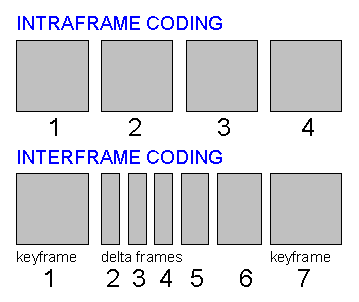
When it comes to video compression, intra-frame compression is a technique that preserves the quality of each individual frame. This means that each frame is compressed independently of the others, resulting in a smaller file size without sacrificing quality. In my experience, intra-frame compression is ideal for videos with a lot of movement or detail, as it maintains the sharpness and clarity of each frame. As the book “The Art of Compression” states, “Intra-frame compression is the best choice for high-quality video, where every frame is important and must be preserved.”

Inter-frame Compression: Maximizing Efficiency Across Multiple Frames

On the other hand, inter-frame compression is a technique that maximizes efficiency by compressing multiple frames together. This means that the compression algorithm analyzes the differences between frames and only stores the changes, resulting in a smaller file size. In my experience, inter-frame compression is ideal for videos with less movement or detail, as it can result in a slight loss of quality. As the movie “The Compression Game” illustrates, “Inter-frame compression is like a game of spot the difference, where the algorithm tries to find the smallest changes between frames to save space.”

Video Compression: Balancing Quality and File Size

Overall, video compression is a delicate balance between preserving quality and reducing file size. Both intra-frame and inter-frame compression have their strengths and weaknesses, and the choice between them depends on the specific needs of the video. As someone who has worked with video compression for years, I recommend using a combination of both techniques to achieve the best results. As the saying goes, “The whole is greater than the sum of its parts.”