H.264 Encoding Profiles and Their Impact on MP4


Free Download Mp4Gain
picture

H.264 Encoding Profiles and Their Impact on MP4

H.264 Encoding Profiles and Their Impact on MP4

Let’s talk about H.264 encoding profiles and their impact on MP4

When it comes to H.264 encoding profiles and MP4, understanding the connection is key to getting the most out of your video files. Over the years, I’ve worked extensively with H.264, and it remains the gold standard for balancing video quality with file size. The encoding profiles in H.264 determine everything from compression efficiency to playback compatibility. By diving deep into these profiles, I’ll show you how they shape your MP4 videos, making this knowledge indispensable for both creators and consumers.

Understanding H.264 Profiles and Their Purpose

H.264 encoding profiles are like recipes for compressing video. They specify what features the encoder uses to reduce file size while maintaining visual quality. Think of it like baking a cake—different recipes (profiles) give you different results, tailored to specific devices or purposes.

What Are the Main H.264 Profiles?

When working with MP4 files, you’ll often encounter three main profiles in H.264. Each has unique strengths designed for particular applications.

Baseline Profile

  • Designed for low-complexity devices like mobile phones.
  • Supports lower compression but ensures compatibility with older hardware.
  • Perfect for video calls or simple streams.

Main Profile

  • Offers better compression than Baseline, making it great for standard-definition video.
  • Balances quality and efficiency, ideal for TV broadcasts and some online platforms.
  • Supports interlaced video, unlike Baseline Profile.

High Profile

  • Provides the best quality-to-compression ratio of the three.
  • Commonly used for HD video, Blu-ray discs, and streaming services.
  • Leverages advanced features like CABAC (Context-Adaptive Binary Arithmetic Coding) for efficient compression.

Why MP4 Relies on H.264 Profiles

MP4 files use H.264 because of its universal compatibility and efficiency. Imagine wanting to share a video with someone on a smartphone or a smart TV. Without H.264 profiles, ensuring your video plays perfectly across devices would be like trying to fit a square peg into a round hole. These profiles allow MP4 files to adapt seamlessly.

How H.264 Profiles Impact Quality and Compression

The profile you choose directly affects both the quality of your video and how small the file becomes. For example, High Profile compresses more efficiently but demands more processing power during playback. It’s like packing a suitcase—some methods save space but require careful organization.

Real-World Examples of H.264 Profiles in Use

One of my favorite examples is streaming platforms like YouTube. For standard videos, Main Profile is often used to balance quality and playback smoothness. Meanwhile, 4K content relies on High Profile to deliver stunning visuals without ballooning file sizes.

Advanced Features in High Profile

High Profile is packed with cutting-edge features that make it stand out. One such feature, CABAC, significantly reduces file size without losing quality. Another, adaptive quantization, optimizes bitrate allocation for complex scenes. It’s like upgrading to a premium toolkit—you get more options to fine-tune the results.

Common Misunderstandings About H.264 Profiles

I often hear people say that higher profiles are always better. This isn’t true. Baseline Profile, for instance, remains crucial for low-power devices. Choosing the wrong profile can lead to playback issues or unnecessary strain on hardware, like using a chainsaw to cut butter.

When to Use Each H.264 Profile

Picking the right profile depends on your needs. If you’re targeting mobile users, Baseline Profile is a safe bet. For online content creators, Main Profile offers a great balance. High Profile is best for premium productions, where every detail matters.

How H.264 Enhances MP4 Compatibility

H.264 profiles ensure that MP4 files are playable across almost any device. Without them, video playback would often require additional codecs or software. This universal approach saves time and avoids compatibility headaches.

The Future of Video Encoding Beyond H.264

While H.264 dominates today, newer codecs like H.265 (HEVC) are pushing the envelope further. Still, H.264’s profiles and widespread adoption make it a staple. I often tell clients to think of H.264 as a reliable old friend—always there when you need it.

Latest words on H.264 encoding profiles and their impact on MP4

Mastering H.264 profiles is essential for anyone working with MP4. From Baseline to High Profile, each serves a purpose, shaping how videos look and perform. Whether you’re streaming, editing, or just watching, understanding these profiles unlocks the full potential of MP4. If you’re looking for a tool to optimize your videos, Mp4Gain offers a reliable solution to enhance quality and compatibility.

FAQs About H.264 Encoding Profiles and Their Impact on MP4

What are H.264 encoding profiles?

H.264 encoding profiles define the features and capabilities used during video compression. They determine how efficiently a video is compressed and how compatible it will be with different devices. The most common profiles are Baseline, Main, and High, each optimized for specific use cases like mobile playback, streaming, or high-definition video.

How do H.264 profiles impact MP4 files?

H.264 profiles determine the compression efficiency and playback compatibility of MP4 files. For example, Baseline Profile ensures older devices can play the video, while High Profile delivers superior quality and compression for HD content. The right profile ensures MP4 files work seamlessly across various platforms and devices.

Which H.264 profile is best for streaming video?

For streaming video, Main Profile is often the best choice. It balances quality and compression efficiency while maintaining compatibility with most devices. High Profile can also be used for higher-resolution streams, but it may require more processing power for playback.

Can I use High Profile for all my MP4 files?

While High Profile offers the best quality-to-compression ratio, it is not always the best choice. Devices with limited processing power, like older smartphones, may struggle to play High Profile videos. For maximum compatibility, Baseline or Main Profile might be better options.

Why is H.264 the preferred codec for MP4?

H.264 is the preferred codec for MP4 due to its exceptional balance between compression efficiency and quality. It supports a wide range of devices and platforms, ensuring compatibility without requiring additional software. Its encoding profiles make it versatile for different use cases, from mobile playback to high-definition video production.

How do I choose the right H.264 profile for my video?

Choosing the right H.264 profile depends on your video’s target audience and purpose. For mobile or low-power devices, Baseline Profile is ideal. Main Profile is suitable for standard-definition video and streaming, while High Profile is best for high-definition content or professional-grade projects.

What are the limitations of Baseline Profile?

Baseline Profile lacks advanced compression features like CABAC, which means it produces larger file sizes compared to Main or High Profile. It is optimized for compatibility with older or low-power devices, but this comes at the expense of lower compression efficiency and slightly reduced quality.

Is High Profile suitable for mobile devices?

High Profile can be used for mobile devices, but it may not perform well on older or less powerful smartphones. It requires more processing power for playback, so if compatibility with a wide range of mobile devices is a priority, Baseline or Main Profile might be a better choice.

What role does CABAC play in H.264 profiles?

CABAC, or Context-Adaptive Binary Arithmetic Coding, is an advanced compression feature used in Main and High Profiles of H.264. It significantly reduces file size while maintaining quality. However, it requires more processing power, making it unsuitable for devices that rely on Baseline Profile.

What is the future of H.264 encoding profiles?

Although newer codecs like H.265 and AV1 are emerging, H.264 remains widely used due to its established compatibility and efficiency. Its encoding profiles continue to serve as a reliable standard for MP4 files, ensuring seamless playback and quality for various applications.

Comments:

This article really helped me understand the difference between Baseline and High Profile. I’ve been encoding videos for YouTube, and now I see why my older clips played poorly on mobile devices. Thanks for the clarity!

So much detail here! I didn’t realize the impact CABAC has on compression. It’s crazy how much technology goes into something we take for granted like video streaming.

I think you should explain more about compatibility issues with older devices when using High Profile. I had trouble once with a file not playing on a 2010 smart TV. Just a thought.

Great breakdown of the profiles. This kind of info is hard to find in one place. Keep up the good work, and please do a piece on HEVC next!

I’ve been encoding all my videos using Main Profile, but now I’m wondering if I should switch to High Profile for better quality. Does it really make that much of a difference?

Honestly, this article is gold. I had no idea about adaptive quantization before reading this. Definitely bookmarking this page.

Super helpful! I’ve always been confused about why there are multiple profiles. This cleared it up perfectly. Thank you!

I encode my family videos using Baseline Profile so they’ll play on our old iPads. Reading this made me feel like I actually understand what I’m doing for once!

This is the kind of article I wish I found when I first started encoding videos. It would have saved me hours of trial and error.

Great job explaining such a technical topic in a way that’s easy to understand. More articles like this, please!

I never realized how much thought went into selecting an encoding profile. Makes me appreciate video tech even more. Thanks for the insights!

I’m just getting into video editing, and this helped me a lot. Do you think H.264 is still worth learning, or should I jump straight into HEVC?

The analogies in this article are great. Comparing encoding profiles to recipes really made it click for me. Keep writing!

I wish you’d included a section on the best settings for YouTube uploads. Otherwise, this is a fantastic guide.

Totally agree with the point about universal compatibility. That’s why I stick with H.264—it just works everywhere!


Free Download Mp4Gain
picture


Mp4Gain Main Window
picture


Mp4Gain Features
picture


Free Download Mp4Gain
picture

Video Compression Algorithms Used in MP4

Video Compression Algorithms Used in MP4

Video Compression Algorithms Used in MP4

Let’s talk about video compression algorithms used in MP4

Video compression algorithms in MP4 are the backbone of modern multimedia. These algorithms make it possible to watch high-definition videos without needing enormous storage space. Over the years, I’ve explored how these algorithms work and how they transform raw video into compressed formats that save storage and bandwidth without sacrificing too much quality. Imagine shrinking a giant balloon to fit inside a shoebox without popping it—that’s essentially what these algorithms do.

MP4, as a container format, supports multiple compression techniques, with H.264 and H.265 being the most popular. Each algorithm balances file size and quality differently. For example, H.264 prioritizes compatibility, while H.265, or HEVC, excels in reducing file sizes for 4K and HDR content. Understanding these nuances is key to appreciating how MP4 compression impacts everyday video experiences, from streaming services to personal devices.

Why video compression is crucial for MP4

Video compression is essential because raw video files are incredibly large. Imagine recording a 10-minute video on your phone without compression; the file could easily exceed several gigabytes, making storage and sharing impractical. Compression algorithms shrink these files while preserving as much quality as possible.

This efficiency is vital for streaming services like Netflix or YouTube. Without compression, streaming high-quality video would require massive internet bandwidth, which most users don’t have. MP4, with its advanced compression methods, ensures smooth playback, even on slower connections. Compression isn’t just about convenience; it’s a necessity for the modern digital world.

Key algorithms powering MP4 compression

The MP4 format relies on a mix of innovative algorithms that optimize video storage and playback. Let’s dive into the most prominent ones:

  • H.264 (AVC): Widely used for its balance of quality and compatibility, it’s the standard for most MP4 files.
  • H.265 (HEVC): A step ahead of H.264, offering smaller file sizes for high-resolution content like 4K and HDR.
  • VP9: An open-source alternative to H.265, popular with platforms like YouTube.
  • AV1: The newest player, promising even better compression rates without sacrificing quality.

Each of these algorithms uses techniques like motion compensation, quantization, and entropy coding to achieve compression. For instance, motion compensation tracks object movement across frames to avoid storing redundant data. This approach saves space without losing detail.

How motion compensation works in video compression

Motion compensation is like a magician reusing the same trick to save time. Instead of storing every single frame, compression algorithms analyze the motion of objects between frames. They store only the differences, drastically reducing the amount of data.

For example, consider a video of a bouncing ball. Instead of recording the ball’s position in every frame, the algorithm notes the ball’s initial position and its movement pattern. This process not only saves space but also maintains video fluidity.

The role of quantization in MP4 algorithms

Quantization is the art of approximation. Compression algorithms simplify video data by reducing the precision of certain details, focusing on elements that are less noticeable to the human eye. It’s like painting with broader strokes where fine details won’t be missed.

In MP4 compression, quantization removes subtle color variations and textures that viewers won’t perceive. For instance, in a scene with a blue sky, tiny shifts in shade are smoothed out. This method saves significant data without compromising visual quality for most viewers.

Entropy coding: The secret to efficient compression

Entropy coding is where MP4 algorithms truly shine. This process compresses data by focusing on patterns and probabilities. It’s like packing a suitcase more efficiently by rolling clothes instead of folding them.

MP4 uses techniques like Huffman coding and arithmetic coding for entropy. These methods assign shorter codes to frequent data patterns, like a recurring color or shape. The result is a file that stores information compactly without losing critical details.

H.264: The workhorse of MP4 compression

H.264, also known as Advanced Video Coding (AVC), is the gold standard for MP4 compression. It’s used everywhere, from Blu-ray discs to streaming platforms. What makes H.264 remarkable is its adaptability. It balances quality and file size, making it ideal for both HD and standard-definition content.

In my experience, H.264 is perfect for projects where compatibility is crucial. For example, when creating videos for social media, I always choose H.264 because it plays smoothly across devices. Its widespread support ensures hassle-free sharing and playback.

H.265: The evolution of video compression

H.265, or High-Efficiency Video Coding (HEVC), is the next step in compression technology. It achieves up to 50% better compression than H.264, making it essential for 4K and HDR content. If you’ve ever streamed ultra-high-definition videos without buffering, you can thank H.265.

This algorithm uses advanced techniques like larger macroblocks and improved motion prediction. I once compressed a 4K video using H.265, and the file size was nearly half of the H.264 version. The quality? Practically identical to the untrained eye.

VP9 and AV1: Open-source alternatives

VP9 and AV1 are open-source algorithms gaining traction as competitors to H.265. VP9 is widely used on YouTube, offering excellent compression without royalties. AV1, developed by the Alliance for Open Media, takes things further, promising even smaller file sizes.

I’ve tested AV1 for personal projects, and the results are impressive. It’s especially useful for web streaming, where bandwidth is a concern. While not as widely supported as H.264 or H.265, these algorithms represent the future of compression.

Real-life applications of MP4 compression

The impact of MP4 compression is everywhere. From streaming movies to recording videos on your phone, these algorithms make digital media accessible. Without compression, platforms like Netflix or TikTok wouldn’t function as seamlessly as they do.

I once recorded a family event on my smartphone, and the video looked stunning despite being heavily compressed. The MP4 format allowed me to share it online without worrying about quality or file size. This convenience is a direct result of advanced compression algorithms.

Challenges in video compression

While MP4 compression is impressive, it comes with challenges. Balancing file size and quality is a constant struggle. Over-compression can lead to artifacts, where the video looks pixelated or distorted.

One time, I compressed a video too much, and the details in darker scenes were lost. It was a reminder that compression isn’t perfect. Finding the right settings requires understanding the content and its intended use.

Latest words on video compression algorithms used in MP4

Video compression algorithms in MP4 are a marvel of modern technology. They make it possible to store and share high-quality videos efficiently. Understanding these algorithms, from H.264 to AV1, reveals their role in shaping our digital world.

For anyone looking to optimize their video experience, tools like Mp4Gain offer excellent solutions for refining compression settings and enhancing playback quality.

FAQ: Video Compression Algorithms Used in MP4

What are the main video compression algorithms used in MP4?

The most commonly used video compression algorithms in MP4 are H.264 (AVC), H.265 (HEVC), VP9, and AV1. Each has unique features, with H.264 focusing on compatibility, H.265 offering better compression for 4K content, VP9 being a royalty-free option, and AV1 providing superior compression for streaming.

Why is video compression important in MP4?

Video compression is crucial because raw video files are extremely large and impractical for storage or sharing. Compression algorithms reduce file sizes while maintaining quality, making it possible to stream videos and save storage space without noticeable quality loss.

How does motion compensation work in MP4 compression?

Motion compensation identifies and tracks object movement between frames, storing only the differences. For example, in a video of a moving car, the algorithm records the background once and focuses on the car’s movement, reducing redundant data and saving storage space.

What is the difference between H.264 and H.265?

H.264, or AVC, is known for its broad compatibility and efficiency in compressing HD content. H.265, or HEVC, improves compression efficiency by up to 50%, making it ideal for 4K and HDR videos, but it may require more processing power and newer devices for playback.

What is entropy coding in video compression?

Entropy coding reduces file size by assigning shorter codes to frequently occurring data patterns. Techniques like Huffman coding and arithmetic coding are used to pack video information efficiently without sacrificing critical details.

Which video compression algorithm is best for streaming?

For streaming, H.265 and VP9 are excellent choices. H.265 offers superior compression for high-quality content like 4K, while VP9 is a royalty-free alternative widely supported by platforms like YouTube. AV1 is an emerging option with even better efficiency for web streaming.

How does quantization affect video compression?

Quantization simplifies video data by reducing precision in less noticeable areas, such as subtle color variations. This process removes unnecessary detail while keeping the video visually appealing, significantly reducing file size without noticeable quality loss.

Is AV1 better than H.265 for MP4 compression?

AV1 offers better compression efficiency than H.265, making it ideal for reducing bandwidth usage in streaming. However, H.265 has broader hardware and software support, so the choice depends on the platform and the device’s compatibility.

What challenges do video compression algorithms face?

Challenges include balancing file size and quality, avoiding compression artifacts, and maintaining efficiency for high-resolution content. Advanced techniques like motion prediction and entropy coding help, but over-compression can still lead to noticeable issues like pixelation.

Can MP4 compression be adjusted for specific needs?

Yes, MP4 compression settings can be adjusted based on the desired balance between quality and file size. For example, higher bitrates improve quality but increase file size, while lower bitrates save space but may sacrifice detail.

Comments:

Wow, I finally understand how video compression works. It’s crazy how much thought goes into these algorithms. Thanks for breaking it down so clearly!

This was super helpful, but I wish you had gone deeper into AV1. I’m curious how it compares to VP9 in real-world use. Can you add more examples?

I always wondered why my 4K videos look great but take up so little space. Now I know it’s all thanks to H.265. Great read!

Why didn’t you mention older codecs like MPEG-2? Some of us still use older systems, and it would’ve been nice to see a comparison.

Love this article! I’m starting to edit videos, and this gave me a better idea of which formats to use. H.265 sounds like a game-changer.

Compression artifacts have ruined so many of my videos. Wish there was a foolproof way to avoid them completely. Any tips?

I’ve always used H.264 but didn’t know much about VP9 or AV1. Will definitely look into them. Thanks for the heads-up!

This was great, but the section on entropy coding confused me a little. Can you explain it with another example?

Great breakdown of MP4 compression! Would love to see a follow-up on how these algorithms handle audio compression.

I think you nailed the explanation. Never thought of video compression as packing a suitcase, but it makes so much sense now!

I’m just getting into video production, and this article was super helpful. Thanks for keeping it simple and relatable!

Good stuff, but it’d be awesome if you included a chart comparing file sizes for the different algorithms. Visuals help a lot!

Finally, someone explains this in a way I can understand. The balloon analogy was spot on. Kudos for making it relatable!

I’ve been trying to decide between H.265 and AV1 for my next project. This article gave me the clarity I needed. Thanks a ton!

How to Choose the Right Video Format to Get the Best Quality

How to Choose the Right Video Format to Get the Best Quality

How to Choose the Right Video Format to Get the Best Quality

In the world of digital media, video content has become a powerful means of communication. Whether you’re creating content for your website, social media, or professional projects, one critical decision you’ll face is choosing the right video format to ensure the best quality. Let’s delve into this topic and explore the factors that can help you make an informed choice.

Understanding Video Format Basics

Video format refers to the specific way in which your video file is encoded and stored. It determines the quality, file size, and compatibility of your video across various devices and platforms. The choice of video format can significantly impact the viewing experience. As film director Christopher Nolan once said, “Every film should have its own world, a logic, and feel to it that expands beyond the exact image that the audience is seeing.” In a similar vein, the video format you choose should align with the world you want to create for your audience.

When considering video formats, you’ll often come across terms like MP4, AVI, MKV, MOV, and more. Each format has its strengths and weaknesses. For instance, MP4 is widely used for its compatibility with various devices and excellent compression, making it suitable for online streaming. On the other hand, MOV, developed by Apple, is known for its high-quality playback and is preferred by professionals.

Selecting the Right Resolution

Resolution is a crucial factor in video quality. It determines the number of pixels that make up each frame of your video. A higher resolution generally leads to crisper and more detailed visuals. However, the choice of resolution should align with your target audience and distribution platform. As filmmaker Stanley Kubrick once noted, “If it can be written or thought, it can be filmed.” In the context of video format selection, this means you should have a clear vision of your content’s purpose and how you want it to be perceived.

Common video resolutions include Full HD (1920×1080), Ultra HD (4K, 3840×2160), and even higher resolutions for specialized purposes. If your content is primarily intended for YouTube or social media, Full HD is a practical choice, as it balances quality and file size. However, for cinematic experiences or professional presentations, Ultra HD or even higher resolutions might be preferred to capture every detail.

Choosing the Right Codec

The codec, short for compressor-decompressor, plays a crucial role in video format selection. It determines how the video data is compressed and decompressed during playback. A well-chosen codec can optimize both quality and file size. As director Quentin Tarantino once said, “I didn’t go to film school; I went to films.” Similarly, understanding codecs and their impact can be more valuable than formal education when it comes to video production.

Common video codecs include H.264, H.265 (HEVC), VP9, and AV1. H.264 is widely supported and offers excellent compression, making it a go-to choice for online video. H.265 provides better quality at lower bitrates but may require more processing power. VP9 and AV1 are open-source codecs gaining popularity for their efficiency and quality. The choice of codec should align with your intended distribution platform and audience’s devices.

Final Words

Choosing the right video format is a critical decision in video production. It determines the quality of your content and its compatibility with various devices and platforms. To quote renowned filmmaker George Lucas, “Special effects are just a tool, a means of telling a story.” Similarly, the video format is a tool for conveying your story to the audience. By understanding the basics of video format, resolution, and codec, you can make informed choices that enhance your content’s quality and impact.

In summary, remember that your choice of video format should align with your content’s purpose, target audience, and distribution platform. It’s a powerful tool to create your unique storytelling world and make your videos stand out.

What are the factors that affect video quality?

What are the factors that affect video quality?

video quality
video quality

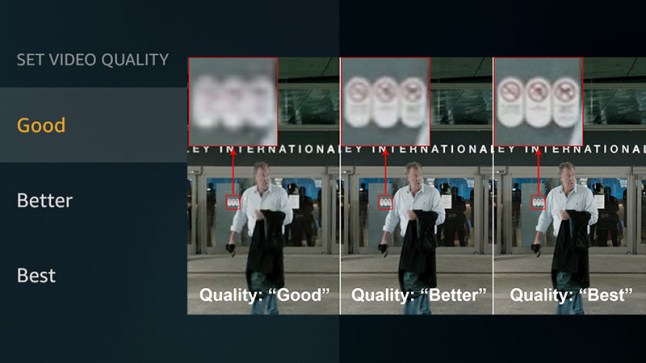
The “image quality” of a video is actually a very complicated topic.

video quality
video quality


Whether it is the fluidity of the image, the size of the image or the clarity of the image, it can be counted in the criteria of “image quality”.

Here we must first clarify some more important parameters

1. Bitrate

The bitrate affects the volume of the video, which is proportional to the final size of the video file. That is, the higher the bitrate, the larger the video file size. The lower the bitrate, the smaller the video file size. What role does the code rate play? In simple terms, bitrate size is the amount of data contained in one second of video. That is the sample rate. In this way, the higher the bitrate, the richer the content of the video file, the richer the image details, and the closer the overall image quality to the original material.

2. Frame rate

The frame rate affects the smoothness of the image. Under normal circumstances, if the video exceeds 24 frames per second, the human eye may assume that it is smooth by default. In most cases, the frame rate does not affect “image quality”, because the frame rate standards that can be selected are “scientific” and “effective”. Whether it is film (23.976), PAL (25), or NTSC (29.97), in these common formats, the frame rates shown in parentheses are the frame rates that can give people a good viewing experience. .

3. Resolution

The definition of resolution should be very familiar to everyone. N*M resolution essentially refers to the number of pixels. The resolution determines how fine the video is. If the original material can be guaranteed. The higher the resolution, the better the video content.

With that said, we can start to infer the image and video quality factors.

first priority

quality of original materials

The quality of good footage trumps everything, and the quality of footage can be hidden. That is, I have a 1920 x 1280 video in hand and downscale it to a 1280 x 720 video. If other parameters are reasonable, the image quality of this video can be guaranteed. For example, I only have a PAL material (720*576), I want to convert it to a 1920*1080 video, if the resolution of this material in this new video exceeds 720*576 (i.e. its original resolution), the quality of the video starts to drop off sharply and there is no way to compensate for this process.

Second, the code rate should be selected within a reasonable range. Under normal circumstances, the original 25M/s video material can still be viewed if it is compressed to 8M/s, but only if your display device is a common home device or general projector. Specific discussions are also required in the high definition environment.

The last and most problematic is the video format.

What are the factors that affect video quality?

What are the factors that affect video quality?

Video Quality
Video Quality

Bit rate

Video Quality
Video Quality

Resolution

encoding type

frames per second

The “image quality” of a video is actually a very complicated topic. Whether it is the fluidity of the image, the size of the image or the clarity of the image, it can be counted in the criteria of “image quality”.

Here we must first clarify some more important parameters

1. Bit rate (also called bitrate)

The bitrate affects the volume of the video, which is proportional to the final size of the video file. That is, the higher the bitrate, the larger the video file size. The lower the bitrate, the smaller the video file size. What role does the code rate play? In simple terms, bitrate size is the amount of data contained in one second of video. That is the sample rate. In this way, the higher the bitrate, the richer the content of the video file, the richer the image details, and the closer the overall image quality to the original material.

2. Frame rate

The frame rate affects the smoothness of the image. Under normal circumstances, if the video exceeds 24 frames per second, the human eye may assume that it is smooth by default. In most cases, the frame rate does not affect “image quality”, because the frame rate standards that can be selected are “scientific” and “effective”. Whether it is film (23.976), PAL (25), or NTSC (29.97), in these common formats, the frame rates shown in parentheses are the frame rates that can give people a good viewing experience. .

3. Resolution

The definition of resolution should be very familiar to everyone. N*M resolution essentially refers to the number of pixels. The resolution determines how fine the video is. If the original material can be guaranteed. The higher the resolution, the better the video content.

With that said, we can start to infer the image and video quality factors.

first priority

quality of original materials

The quality of good footage trumps everything, and the quality of footage can be hidden. That is, I have a 1920 x 1280 video in hand and downscale it to a 1280 x 720 video. If other parameters are reasonable, the image quality of this video can be guaranteed. For example, I only have a PAL material (720*576), I want to convert it to a 1920*1080 video, if the resolution of this material in this new video exceeds 720*576 (i.e. its original resolution), the quality of the video starts to drop off sharply and there is no way to compensate for this process.

Second, the code rate should be selected within a reasonable range. Under normal circumstances, the original 25M/s video material can still be viewed if it is compressed to 8M/s, but only if your display device is a common home device or general projector. Specific discussions are also required in the high definition environment.

The last and most problematic is the video format.

There are endless video formats, and we are also dazzled in the process of practical application.