Video Quality: Understanding the Factors that Determine it


Free Download Mp4Gain
picture

Video Quality: Understanding the Factors that Determine it

Video Quality
Video Quality
Video Quality
Video Quality

Video quality is the most crucial aspect of any video, whether it’s a movie, TV show, or a YouTube clip. In today’s world, where video streaming is the norm, video quality is even more critical. However, not everyone understands the factors that determine video quality and how to optimize it.

What is Video Quality?

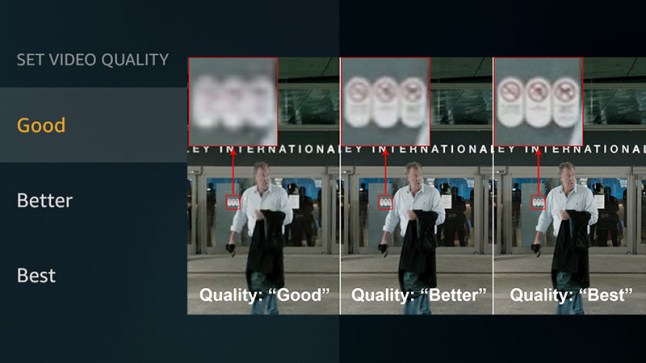
Video quality refers to the level of visual and audio fidelity of a video. A high-quality video has a clear, sharp picture, vibrant colors, and excellent audio quality. On the other hand, a low-quality video may have pixelated images, distorted colors, and muffled audio.

Video quality is determined by several factors, including resolution, bitrate, codec, and frame rate. Understanding these factors is crucial to optimizing video quality.

Resolution

Resolution refers to the number of pixels that make up a video image. The higher the resolution, the more pixels, and the sharper the image. The most common video resolutions are 720p, 1080p, and 4K.

When choosing a resolution, it’s important to consider the display device’s capabilities. For example, if you’re watching a video on a smartphone screen, a 720p resolution is sufficient. However, if you’re watching the same video on a large TV screen, a 4K resolution would provide a better viewing experience.

Bitrate

Bitrate refers to the amount of data that is used to encode a video. It affects both the video’s quality and file size. A higher bitrate results in a higher-quality video but also a larger file size.

When choosing a bitrate, it’s important to consider the available bandwidth. A higher bitrate requires more bandwidth, which may result in buffering or slow streaming. Therefore, it’s important to balance quality and file size with available bandwidth.

Codec

A codec is a software that compresses and decompresses video data. It affects the video’s quality, file size, and compatibility with different devices and players. The most common codecs are H.264 and H.265.

When choosing a codec, it’s important to consider compatibility with the playback device and the available processing power. For example, H.265 provides better compression than H.264, resulting in smaller file sizes, but requires more processing power to decode.

Frame Rate

Frame rate refers to the number of frames per second (fps) in a video. A higher frame rate results in smoother and more fluid motion. The standard frame rate for video is 24 fps, but higher frame rates, such as 60 fps, are becoming more common.

When choosing a frame rate, it’s important to consider the content and the intended viewing experience. For example, a higher frame rate is more suitable for action scenes, while a lower frame rate may be sufficient for a dialogue-driven drama.

Conclusion

Optimizing video quality requires a balance of resolution, bitrate, codec, and frame rate. Understanding these factors and choosing the right combination can result in high-quality videos that provide a better viewing experience. One tool that can help optimize video quality is MP4Gain, which can normalize the audio volume of a video and improve overall quality.

FAQ

  • What is the best video resolution?

    The best video resolution depends on the purpose of the video and the device on which it will be played. For example, a video intended for social media or online streaming may have a lower resolution than a video intended for a cinema screen or high-end TV. However, there are some video resolutions that are widely considered to be the best for certain purposes.

    1080p (Full HD)

    1080p (1920 x 1080 pixels) is a video resolution commonly used for Blu-ray discs, HDTV broadcasts, and online streaming platforms such as YouTube and Netflix. This resolution provides a clear and detailed image that is suitable for most purposes, including watching movies, playing games, and general computer use. However, it may not be sufficient for larger screens or high-end devices that require higher resolutions.

    4K Ultra HD

    4K Ultra HD (3840 x 2160 pixels) is a video resolution that provides four times the number of pixels as 1080p. This resolution is becoming increasingly popular for high-end devices, such as gaming consoles, high-end TVs, and high-end smartphones. It provides a significantly more detailed and immersive image, particularly on larger screens or when viewed up close. However, it requires a powerful device and may not be necessary for all purposes.

    8K Ultra HD

    8K Ultra HD (7680 x 4320 pixels) is the highest video resolution currently available. It provides sixteen times the number of pixels as 1080p and is primarily used for professional applications, such as video production and digital signage. It requires a very powerful device and is not necessary for most consumer purposes.

    Factors that affect video quality

    Video quality is affected by a variety of factors, including resolution, frame rate, bitrate, and codecs. Understanding these factors can help you choose the right settings for your video and ensure the best possible quality.

    Resolution

    As discussed above, resolution refers to the number of pixels in a video image. Higher resolutions generally result in better image quality, but also require more storage space and processing power. However, the benefits of higher resolutions may not be noticeable on smaller screens or at normal viewing distances.

    Frame rate

    Frame rate refers to the number of individual frames that make up a video per second. The most common frame rates are 24, 25, and 30 frames per second (fps). Higher frame rates can result in smoother motion and reduce motion blur, but also require more storage space and processing power. However, higher frame rates may not be noticeable for certain types of video, such as still images or talking heads.

    Bitrate

    Bitrate refers to the amount of data used to represent a video image per second. Higher bitrates generally result in better image quality, but also require more storage space and may cause playback issues on slower devices or internet connections. However, lower bitrates may result in compression artifacts or pixelation.

    Codecs

    Codecs are software programs that compress and decompress video data for playback. Different codecs use different algorithms to compress video data, resulting in different levels of compression and image quality. Some codecs are better suited for certain types of video or devices, while others may be more versatile but less efficient.

    Conclusion

    Video quality is a complex and multifaceted topic that is influenced by a variety of factors. Choosing the right video resolution, frame rate, bitrate, and codec can help you achieve the best possible results for your specific needs. However, it is important to keep in mind that there is no one-size-fits-all solution, and the best settings will vary depending on the intended use of the video.

    How can I improve video quality?

    There are several ways to improve video quality, depending on the specific issue you are facing. Here are some tips:

    • Use a higher video resolution and bitrate.
    • Ensure proper lighting and exposure when shooting the video.
    • Stabilize the camera to avoid shaky footage.
    • Use a high-quality codec for encoding the video.
    • Reduce noise and grain in post-processing.
    • Use color correction to enhance the colors and contrast.
    • Use a high-quality audio recording device and ensure proper sound levels.

    Conclusion

    Video quality is an important aspect of video production that can greatly impact the viewer’s experience. By understanding the key factors that influence video quality and choosing the appropriate settings for your specific needs, you can achieve the best possible results. Remember to consider the intended use of the video, as well as the device and platform on which it will be viewed, when selecting video settings. With the right tools and techniques, you can create high-quality videos that will captivate and engage your audience.

    FAQ

    What is video resolution?

    Video resolution refers to the number of pixels that make up a video image. A higher resolution means a larger number of pixels, resulting in a clearer and more detailed image.

    What is video bitrate?

    Video bitrate refers to the amount of data used to encode a video stream. A higher bitrate means more data is used, resulting in a higher-quality video with fewer compression artifacts.

    What is a video codec?

    A video codec is a software algorithm used to compress and decompress video data. Different codecs offer varying levels of compression and quality, and the choice of codec will depend on the specific needs and requirements of the video project.



Free Download Mp4Gain
picture


Mp4Gain Main Window
picture


Mp4Gain Features
picture


Free Download Mp4Gain
picture

What are the factors that affect video quality?

What are the factors that affect video quality?

video quality
video quality

The “image quality” of a video is actually a very complicated topic.

video quality
video quality


Whether it is the fluidity of the image, the size of the image or the clarity of the image, it can be counted in the criteria of “image quality”.

Here we must first clarify some more important parameters

1. Bitrate

The bitrate affects the volume of the video, which is proportional to the final size of the video file. That is, the higher the bitrate, the larger the video file size. The lower the bitrate, the smaller the video file size. What role does the code rate play? In simple terms, bitrate size is the amount of data contained in one second of video. That is the sample rate. In this way, the higher the bitrate, the richer the content of the video file, the richer the image details, and the closer the overall image quality to the original material.

2. Frame rate

The frame rate affects the smoothness of the image. Under normal circumstances, if the video exceeds 24 frames per second, the human eye may assume that it is smooth by default. In most cases, the frame rate does not affect “image quality”, because the frame rate standards that can be selected are “scientific” and “effective”. Whether it is film (23.976), PAL (25), or NTSC (29.97), in these common formats, the frame rates shown in parentheses are the frame rates that can give people a good viewing experience. .

3. Resolution

The definition of resolution should be very familiar to everyone. N*M resolution essentially refers to the number of pixels. The resolution determines how fine the video is. If the original material can be guaranteed. The higher the resolution, the better the video content.

With that said, we can start to infer the image and video quality factors.

first priority

quality of original materials

The quality of good footage trumps everything, and the quality of footage can be hidden. That is, I have a 1920 x 1280 video in hand and downscale it to a 1280 x 720 video. If other parameters are reasonable, the image quality of this video can be guaranteed. For example, I only have a PAL material (720*576), I want to convert it to a 1920*1080 video, if the resolution of this material in this new video exceeds 720*576 (i.e. its original resolution), the quality of the video starts to drop off sharply and there is no way to compensate for this process.

Second, the code rate should be selected within a reasonable range. Under normal circumstances, the original 25M/s video material can still be viewed if it is compressed to 8M/s, but only if your display device is a common home device or general projector. Specific discussions are also required in the high definition environment.

The last and most problematic is the video format.

What are the factors that affect video quality?

What are the factors that affect video quality?

Video Quality
Video Quality

Bit rate

Video Quality
Video Quality

Resolution

encoding type

frames per second

The “image quality” of a video is actually a very complicated topic. Whether it is the fluidity of the image, the size of the image or the clarity of the image, it can be counted in the criteria of “image quality”.

Here we must first clarify some more important parameters

1. Bit rate (also called bitrate)

The bitrate affects the volume of the video, which is proportional to the final size of the video file. That is, the higher the bitrate, the larger the video file size. The lower the bitrate, the smaller the video file size. What role does the code rate play? In simple terms, bitrate size is the amount of data contained in one second of video. That is the sample rate. In this way, the higher the bitrate, the richer the content of the video file, the richer the image details, and the closer the overall image quality to the original material.

2. Frame rate

The frame rate affects the smoothness of the image. Under normal circumstances, if the video exceeds 24 frames per second, the human eye may assume that it is smooth by default. In most cases, the frame rate does not affect “image quality”, because the frame rate standards that can be selected are “scientific” and “effective”. Whether it is film (23.976), PAL (25), or NTSC (29.97), in these common formats, the frame rates shown in parentheses are the frame rates that can give people a good viewing experience. .

3. Resolution

The definition of resolution should be very familiar to everyone. N*M resolution essentially refers to the number of pixels. The resolution determines how fine the video is. If the original material can be guaranteed. The higher the resolution, the better the video content.

With that said, we can start to infer the image and video quality factors.

first priority

quality of original materials

The quality of good footage trumps everything, and the quality of footage can be hidden. That is, I have a 1920 x 1280 video in hand and downscale it to a 1280 x 720 video. If other parameters are reasonable, the image quality of this video can be guaranteed. For example, I only have a PAL material (720*576), I want to convert it to a 1920*1080 video, if the resolution of this material in this new video exceeds 720*576 (i.e. its original resolution), the quality of the video starts to drop off sharply and there is no way to compensate for this process.

Second, the code rate should be selected within a reasonable range. Under normal circumstances, the original 25M/s video material can still be viewed if it is compressed to 8M/s, but only if your display device is a common home device or general projector. Specific discussions are also required in the high definition environment.

The last and most problematic is the video format.

There are endless video formats, and we are also dazzled in the process of practical application.

3D, HD, 1080p, 1080i, Blue-Ray, DVD … Everything you need to know about video

3D, HD, 1080p, 1080i, Blue-Ray, DVD … Everything you need to know about video

video quality

Part 1. Video quality

video quality

How do we celebrate the new year? That’s it, on the table! However, television is usually the most integral part of this table. New Years greetings, favorite shows, movies, shows, concerts, without this, the New Year would not be the holiday we are used to.

But the vacation itself lasts only one night, and there are many more vacations and weekends. And how else to decorate the cold days of the week in January that we spend at home, if not watching good movies in high quality? No way! What do we do when we want to see a movie? We turn on the TV … But there they impose a program on us, what if nothing relevant and interesting comes at the moment?

So a video player of any kind or a computer, in combination with the Internet or various discs, comes to our rescue. But, we already said that downloading from the internet is illegal. And time goes by, for example, you can’t download a 3D movie in such a modern format from the Internet. You’ll need a special monitor, special glasses, and for the sake of a movie, you really don’t want to pump out 30 gigabytes. What to do? And how do we understand what and how we see ourselves? How to get the most out of your film?

Or how not to spoil the impression of a canvas that has just been published, which has already been seen, but which you did not like at all due to the quality of the image? And it is not surprising, because this copy was filmed in an underground cinema, on a cheap video camera with shaking hands …

Everything can be solved! For the last time this year, I will open your eyes to the accessible, simple, but often hidden from the eyes of a normal man on the street!

Let go of ignorance. What is video quality?

Today, in 2012, already a year, let’s not mention the subject of videotapes. They have already outlived their own. Let’s see what video quality it is in general. What does it consist of? As measured? Various parameters:

Source. It is the most important. Without a high quality source you can do whatever you want with the video, record it wherever and however you want, it can’t be of better quality anymore. Worse please, but in the opposite direction, never. A simple example: take a movie from a DVD with 10 of them and burn it in Blue-Ray. Will the quality of this change? No…

Under the good quality source, or rather the one from which the countdown comes, we take the film edited in the film studio in the way it was assembled on the editing table in the final version. This is the source of all kinds of licenses and the video quality standard. Everything else can only be WORSE.

Resolution. No, not to see a movie! Video resolution measured in horizontal and vertical pixels. Have you often noticed that licensed DVD movies still look awfully “blurry” on modern “flat” TVs? And the television itself doesn’t look as “sharp” and “bright” as it used to? Many even complain that they bought expensive equipment, but everything has gotten even worse … And few people think that this process is roughly comparable to driving a Zaporozhets, buying a Mercedes, pumping gas from the first tank to the second tank and Undisguised surprise that this “gasoline” is enough for Mercedes for a very short time. Of course, Mercedes needs to fill its own full tank, not a full tank of Zaporozhets!

Do you remember the source? Therefore, it is already insufficient for comfortable viewing. Because standard television has a slightly worse transmission format than DVD. But even this is not enough for a clear display! So what kind of permissions are there?

480p: TV broadcast format. The letter p is responsible for the parameter of displaying the entire image at once, that is, at 24 frames per second, all the pixels in each frame are displayed. The resolution is 640×480 pixels (width x height ratio).

576p: widescreen DVD format, resolution 720X576.

720p – the youngest of the HD formats (high definition, high quality), most often used in games on modern XBOX360 and SONY PLAY STATION 3 consoles. Some modern TV channels also broadcast on it, so the picture looks a lot best. It has a resolution of 1024X768.

1080i: The format designated in technology as HD-Ready (not to be confused with Full-HD!). The letter i is responsible for the interlaced display method. That is, out of 24 (this is just an example, modern video has 60 frames per second), half of the frames will show all pixels across a line, in odd order, and the other half in even order. With this clever method, we have a high resolution, but in fact, although it is not noticeable with the naked eye, we get 12 frames per second, instead of 24. The resolution here is 1920X1080 pixels.