Video Compression Algorithms Used in MP4


Free Download Mp4Gain
picture

Video Compression Algorithms Used in MP4

Video Compression Algorithms Used in MP4

Let’s talk about video compression algorithms used in MP4

Video compression algorithms in MP4 are the backbone of modern multimedia. These algorithms make it possible to watch high-definition videos without needing enormous storage space. Over the years, I’ve explored how these algorithms work and how they transform raw video into compressed formats that save storage and bandwidth without sacrificing too much quality. Imagine shrinking a giant balloon to fit inside a shoebox without popping it—that’s essentially what these algorithms do.

MP4, as a container format, supports multiple compression techniques, with H.264 and H.265 being the most popular. Each algorithm balances file size and quality differently. For example, H.264 prioritizes compatibility, while H.265, or HEVC, excels in reducing file sizes for 4K and HDR content. Understanding these nuances is key to appreciating how MP4 compression impacts everyday video experiences, from streaming services to personal devices.

Why video compression is crucial for MP4

Video compression is essential because raw video files are incredibly large. Imagine recording a 10-minute video on your phone without compression; the file could easily exceed several gigabytes, making storage and sharing impractical. Compression algorithms shrink these files while preserving as much quality as possible.

This efficiency is vital for streaming services like Netflix or YouTube. Without compression, streaming high-quality video would require massive internet bandwidth, which most users don’t have. MP4, with its advanced compression methods, ensures smooth playback, even on slower connections. Compression isn’t just about convenience; it’s a necessity for the modern digital world.

Key algorithms powering MP4 compression

The MP4 format relies on a mix of innovative algorithms that optimize video storage and playback. Let’s dive into the most prominent ones:

  • H.264 (AVC): Widely used for its balance of quality and compatibility, it’s the standard for most MP4 files.
  • H.265 (HEVC): A step ahead of H.264, offering smaller file sizes for high-resolution content like 4K and HDR.
  • VP9: An open-source alternative to H.265, popular with platforms like YouTube.
  • AV1: The newest player, promising even better compression rates without sacrificing quality.

Each of these algorithms uses techniques like motion compensation, quantization, and entropy coding to achieve compression. For instance, motion compensation tracks object movement across frames to avoid storing redundant data. This approach saves space without losing detail.

How motion compensation works in video compression

Motion compensation is like a magician reusing the same trick to save time. Instead of storing every single frame, compression algorithms analyze the motion of objects between frames. They store only the differences, drastically reducing the amount of data.

For example, consider a video of a bouncing ball. Instead of recording the ball’s position in every frame, the algorithm notes the ball’s initial position and its movement pattern. This process not only saves space but also maintains video fluidity.

The role of quantization in MP4 algorithms

Quantization is the art of approximation. Compression algorithms simplify video data by reducing the precision of certain details, focusing on elements that are less noticeable to the human eye. It’s like painting with broader strokes where fine details won’t be missed.

In MP4 compression, quantization removes subtle color variations and textures that viewers won’t perceive. For instance, in a scene with a blue sky, tiny shifts in shade are smoothed out. This method saves significant data without compromising visual quality for most viewers.

Entropy coding: The secret to efficient compression

Entropy coding is where MP4 algorithms truly shine. This process compresses data by focusing on patterns and probabilities. It’s like packing a suitcase more efficiently by rolling clothes instead of folding them.

MP4 uses techniques like Huffman coding and arithmetic coding for entropy. These methods assign shorter codes to frequent data patterns, like a recurring color or shape. The result is a file that stores information compactly without losing critical details.

H.264: The workhorse of MP4 compression

H.264, also known as Advanced Video Coding (AVC), is the gold standard for MP4 compression. It’s used everywhere, from Blu-ray discs to streaming platforms. What makes H.264 remarkable is its adaptability. It balances quality and file size, making it ideal for both HD and standard-definition content.

In my experience, H.264 is perfect for projects where compatibility is crucial. For example, when creating videos for social media, I always choose H.264 because it plays smoothly across devices. Its widespread support ensures hassle-free sharing and playback.

H.265: The evolution of video compression

H.265, or High-Efficiency Video Coding (HEVC), is the next step in compression technology. It achieves up to 50% better compression than H.264, making it essential for 4K and HDR content. If you’ve ever streamed ultra-high-definition videos without buffering, you can thank H.265.

This algorithm uses advanced techniques like larger macroblocks and improved motion prediction. I once compressed a 4K video using H.265, and the file size was nearly half of the H.264 version. The quality? Practically identical to the untrained eye.

VP9 and AV1: Open-source alternatives

VP9 and AV1 are open-source algorithms gaining traction as competitors to H.265. VP9 is widely used on YouTube, offering excellent compression without royalties. AV1, developed by the Alliance for Open Media, takes things further, promising even smaller file sizes.

I’ve tested AV1 for personal projects, and the results are impressive. It’s especially useful for web streaming, where bandwidth is a concern. While not as widely supported as H.264 or H.265, these algorithms represent the future of compression.

Real-life applications of MP4 compression

The impact of MP4 compression is everywhere. From streaming movies to recording videos on your phone, these algorithms make digital media accessible. Without compression, platforms like Netflix or TikTok wouldn’t function as seamlessly as they do.

I once recorded a family event on my smartphone, and the video looked stunning despite being heavily compressed. The MP4 format allowed me to share it online without worrying about quality or file size. This convenience is a direct result of advanced compression algorithms.

Challenges in video compression

While MP4 compression is impressive, it comes with challenges. Balancing file size and quality is a constant struggle. Over-compression can lead to artifacts, where the video looks pixelated or distorted.

One time, I compressed a video too much, and the details in darker scenes were lost. It was a reminder that compression isn’t perfect. Finding the right settings requires understanding the content and its intended use.

Latest words on video compression algorithms used in MP4

Video compression algorithms in MP4 are a marvel of modern technology. They make it possible to store and share high-quality videos efficiently. Understanding these algorithms, from H.264 to AV1, reveals their role in shaping our digital world.

For anyone looking to optimize their video experience, tools like Mp4Gain offer excellent solutions for refining compression settings and enhancing playback quality.

FAQ: Video Compression Algorithms Used in MP4

What are the main video compression algorithms used in MP4?

The most commonly used video compression algorithms in MP4 are H.264 (AVC), H.265 (HEVC), VP9, and AV1. Each has unique features, with H.264 focusing on compatibility, H.265 offering better compression for 4K content, VP9 being a royalty-free option, and AV1 providing superior compression for streaming.

Why is video compression important in MP4?

Video compression is crucial because raw video files are extremely large and impractical for storage or sharing. Compression algorithms reduce file sizes while maintaining quality, making it possible to stream videos and save storage space without noticeable quality loss.

How does motion compensation work in MP4 compression?

Motion compensation identifies and tracks object movement between frames, storing only the differences. For example, in a video of a moving car, the algorithm records the background once and focuses on the car’s movement, reducing redundant data and saving storage space.

What is the difference between H.264 and H.265?

H.264, or AVC, is known for its broad compatibility and efficiency in compressing HD content. H.265, or HEVC, improves compression efficiency by up to 50%, making it ideal for 4K and HDR videos, but it may require more processing power and newer devices for playback.

What is entropy coding in video compression?

Entropy coding reduces file size by assigning shorter codes to frequently occurring data patterns. Techniques like Huffman coding and arithmetic coding are used to pack video information efficiently without sacrificing critical details.

Which video compression algorithm is best for streaming?

For streaming, H.265 and VP9 are excellent choices. H.265 offers superior compression for high-quality content like 4K, while VP9 is a royalty-free alternative widely supported by platforms like YouTube. AV1 is an emerging option with even better efficiency for web streaming.

How does quantization affect video compression?

Quantization simplifies video data by reducing precision in less noticeable areas, such as subtle color variations. This process removes unnecessary detail while keeping the video visually appealing, significantly reducing file size without noticeable quality loss.

Is AV1 better than H.265 for MP4 compression?

AV1 offers better compression efficiency than H.265, making it ideal for reducing bandwidth usage in streaming. However, H.265 has broader hardware and software support, so the choice depends on the platform and the device’s compatibility.

What challenges do video compression algorithms face?

Challenges include balancing file size and quality, avoiding compression artifacts, and maintaining efficiency for high-resolution content. Advanced techniques like motion prediction and entropy coding help, but over-compression can still lead to noticeable issues like pixelation.

Can MP4 compression be adjusted for specific needs?

Yes, MP4 compression settings can be adjusted based on the desired balance between quality and file size. For example, higher bitrates improve quality but increase file size, while lower bitrates save space but may sacrifice detail.

Comments:

Wow, I finally understand how video compression works. It’s crazy how much thought goes into these algorithms. Thanks for breaking it down so clearly!

This was super helpful, but I wish you had gone deeper into AV1. I’m curious how it compares to VP9 in real-world use. Can you add more examples?

I always wondered why my 4K videos look great but take up so little space. Now I know it’s all thanks to H.265. Great read!

Why didn’t you mention older codecs like MPEG-2? Some of us still use older systems, and it would’ve been nice to see a comparison.

Love this article! I’m starting to edit videos, and this gave me a better idea of which formats to use. H.265 sounds like a game-changer.

Compression artifacts have ruined so many of my videos. Wish there was a foolproof way to avoid them completely. Any tips?

I’ve always used H.264 but didn’t know much about VP9 or AV1. Will definitely look into them. Thanks for the heads-up!

This was great, but the section on entropy coding confused me a little. Can you explain it with another example?

Great breakdown of MP4 compression! Would love to see a follow-up on how these algorithms handle audio compression.

I think you nailed the explanation. Never thought of video compression as packing a suitcase, but it makes so much sense now!

I’m just getting into video production, and this article was super helpful. Thanks for keeping it simple and relatable!

Good stuff, but it’d be awesome if you included a chart comparing file sizes for the different algorithms. Visuals help a lot!

Finally, someone explains this in a way I can understand. The balloon analogy was spot on. Kudos for making it relatable!

I’ve been trying to decide between H.265 and AV1 for my next project. This article gave me the clarity I needed. Thanks a ton!


Free Download Mp4Gain
picture


Mp4Gain Main Window
picture


Mp4Gain Features
picture


Free Download Mp4Gain
picture

Video Compression Methods

Video Compression Methods

Video Compression
Video Compression
Video Compression
Video Compression


Introduction to Video Compression

Video compression is the process of reducing the size of digital video files without sacrificing quality. Compression is necessary for efficient storage and transmission of video over networks or on physical media. The compression process involves removing redundant and non-essential information from the video stream, while retaining as much perceptual quality as possible. There are several video compression methods available, each with its own strengths and weaknesses.

Lossy Compression

Lossy compression is the most common method of video compression. It works by discarding information that is deemed less important, based on visual perception. The discarded information cannot be recovered, which is why this method is called “lossy”. The amount of compression can be adjusted by varying the amount of information that is discarded. Popular lossy video compression codecs include H.264, MPEG-4, and VP9.

Lossless Compression

Lossless compression, on the other hand, retains all of the original information, but compresses it in a way that can be reconstructed exactly. This method is typically used for archival or master copies, where quality cannot be sacrificed. However, lossless compression does not achieve the same degree of compression as lossy methods. Examples of lossless video compression codecs include Apple ProRes and Avid DNxHD.

Hybrid Compression

Hybrid compression methods combine elements of both lossy and lossless compression. These methods use lossy compression on parts of the video that are less important, and lossless compression on parts that are more important. The result is a balance between quality and compression efficiency. One example of a hybrid compression codec is the JPEG2000 format.

Variable Bit Rate (VBR) vs. Constant Bit Rate (CBR)

Video compression can be further classified as either variable bit rate (VBR) or constant bit rate (CBR). In VBR, the bit rate varies depending on the complexity of the video content. This allows for higher quality in complex scenes, while still maintaining a reasonable file size. CBR, on the other hand, maintains a constant bit rate throughout the entire video stream. This results in predictable file sizes, but can lead to lower quality in complex scenes.

Compression Settings

The effectiveness of video compression is highly dependent on the settings used during compression. Key settings include the bitrate, resolution, frame rate, and codec. Higher bitrates and resolutions result in higher quality, but also larger file sizes. The codec used can also have a significant impact on the quality and compression efficiency. Experimenting with different settings can help achieve the desired balance between quality and file size.

Conclusion

Video compression is a necessary part of modern video production and distribution. There are several compression methods available, each with its own advantages and disadvantages. Choosing the right compression method and settings requires a balance between quality and file size.

FAQ

1. What is the difference between lossy and lossless compression?

Lossy compression discards information that is deemed less important, while lossless compression retains all of the original information. Lossy compression achieves higher compression ratios, but at the expense of quality.

2. What are some common video compression codecs?

Some common video compression codecs include H.264, MPEG-4, VP9, Apple ProRes, and Avid DNxHD.

3. What is hybrid compression?

Hybrid compression methods combine elements of both lossy and lossless compression. These methods use lossy compression on parts of the video that are less important, and lossless

Digital video, video [DV – Digit Video, video]

Digital video, video [DV – Digit Video, video]

Video compress!

1. The term used in relation to the systems and tools to create, store, transform, transmit and / or receive (including reproduction) of moving images using computer technology. Digital video is characterized by the following basic parameters: frame rate [frame rate] (measured by the number of interchangeable image frames on the screen per second), screen resolution [spatial resolution] (measured by the number of pixels in an image frame), color depth or color resolution [color resolution] (measured by the number of transmitted color tones), and image quality [image quality] – a complex indicator, including the above. One type of digital video is computer animation.

Video Compression

2. Video presentation format used for recording and data exchange between digital video cameras, VCR and PC. Also called DV editing [DV-the format]. For DV transmission, the IEEE-1394 standard (FireWire or i.LINK) is used. Provides 5: 1 video signal compression ratio, 3.6MB / s signal transmission rate, video frame resolution for PAL – 720×576 and NTSC – 720×480, support for recording and reproduce sound in 4 channels with a sampling frequency of 32 kHz and a bit depth of 12 (or in 2 channels with a sampling frequency of 48 kHz and a bit depth of 16 bits). See [556] for more details.

DV Type-1 (Digital Video Type-1): A variant of the DV format presentation (see above), incompatible with Video for Windows and compatible only with later versions of DirectShow. A file in this format has video and audio components of the recording, which are interleaved (stereo, 48 kHz, 16-bit). This format is the recommended format for processing DV video on a PC [556].
DV Type-2 (Digital Video Type-2) – The original (legacy) version of the DV format on a PC, backward compatible with Video for Windows – Programs running on Video for Windows can only read one file Type -2. In this case, to save data in it, you need to use a special codec. Compared to Type -1, it is more expensive to decode and mix [556].
S-Video is an image format in which chroma and luminance are separated into two separate signals, resulting in higher image quality (see also “stereo video” above).
Component Video [Component Video]: Color video transmitted using three separate channels using one of the color separation models: RGB, YiQ, or YUV.

Intel DVI (Intel Digital Video Interface), Intel Real-time Video – DVI is a hardware / software suite that includes a DVI chipset, an executable software interface, data compression and decompression schemes, and data file formats. DVI format was created in 1984 in Princeton, New Jersey by employees of the USA company the RCA Corporation. Then it changed ownership and from 1988 became the property of Intel Corp., which supports its development. Currently, DVI is a multimedia format for storing audio and video data. Its main features: Supports 16 million colors; it has a maximum resolution of 256×240 pixels; uses its own compression machine and JPEG (5: 4 motion picture compression ratio); it also provides still image storage and compression (lossy and lossless); has a specification on CD-ROM. Audio compression is done using ADPCM and PCM 8. For more information, see [584].

RIFF (Resource, Interchange, File, Format) – “File Format Resource Sharing” from Microsoft is a complex multimedia format used for Windows * *, Windows NT, and OS / 2 operating systems. Its purpose: to adapt various types of data for multimedia programs. The type of data contained in the RIFF file is indicated by the extension: embedded audiovisual data – * .avi; audio data (“wave”) – * .wav; raster data – * .rdi; MIDI data – * .rmi; lots of other RIFF- * .bnd files … Since there are many different multimedia files under the general name RIFF, each of them is processed taking into account the type of data it contains. For example, a RIFF file that contains audiovisual data is often referred to and treated as an AVI file in general and not as a RIFF file. RIFF files are often mistakenly believed to be similar to TIFF (Tag Image File Format) files. Although these formats use the same storage concept, they are incompatible. For more details, see [584].

QT (QuickTime), QTM (QuickTime Movie Resourse Format)

The perfect video compression

We all like to enjoy great image quality in the videos and movies we watch on the computer, especially if you make your own compressed copies of DVD movies. I have always relied on the popular DivX but, now that there are other types of compression such as Xvid and some as modern as the H.264, it would be worth comparing to discover which one offers the best quality in the smallest size.


For the test I have chosen the movie Transformers, released in November 2007 and directed by Michael Bay, with Shia Labeouf and Megan Fox as protagonists. It is an action movie with a variety of scenes: static in great detail, with movement, explosions, lots of color … ideal for testing. The DVD boasts a very high image quality, as evidenced by the editors of a well-known magazine.

codecs

Choice of codecs, bitrates and encoders

To carry out the test, you have to choose different “compression methods”, each of them to several different “qualities” and using one or several programs that allow to compress in this way.
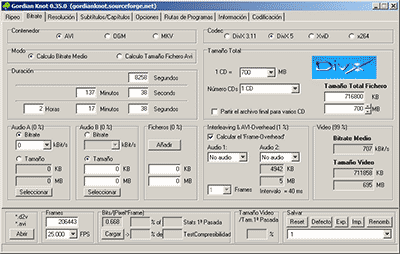
Things have changed a lot since in 2000 I compressed my first movie in DivX 3.11 format. It took me a whole day looking for information on the Internet on how to do it and my computer at that time (an AMD K6 II of 400Mhz) took all night to compress it in only 650 MB. Since then I have been using all versions of DivX, from 3.11 to the current 6. But the Xvid codec sounds more and more and there are excellent comments from the newest H.264, so the question is on the table: what is The best way to compress to achieve sublime image quality? Well, for this you have to discover which is the best codec and use it at the optimal bitrate with the ideal encoder. But what about that “codec”, “bitrate” and “encoder”?

Codec, the type of compression

The “compression method” is what in the video world is called “codec”, which is the acronym for COmpresor-DECompresor, a program capable of compressing and decompressing the image in a certain way. It is something similar to what photography programs incorporate to allow them to read and write files in JPEG format, for example. The type of compression that incorporates the DVD is called MPEG-2 and is already considered somewhat old, being surpassed by the MPEG-4 standard, more modern and efficient.
The problem is that there are many types of MPEG-4 and it is not clear which one is the best.

On the one hand there is DivX (a variant of the MPEG-4 type called ASP; see official page), which is tremendously popular and more and more DVD lounge players admit it. The decompressor (necessary to watch the videos) is free, but the compressor (to generate them) is paid.

There is also Xvid, (which is the same type as DivX; official page) a competitor of DivX (its name is the same, but vice versa) although completely free.

codec

And finally, the very modern H.264, of the MPEG-4 AVC type, a prodigy of compression according to experts. Well, to find out which one is better, I have compared the generic MPEG-4 with these three contenders. There are several codecs to use this type of compression, but the most popular is the x264, mostly because it is free, which is what I used.

The versions that I have used for this comparison are the following: DivX Pro v6.8.2, Xvid v1.2 and x264 revision 808.

Bitrate, the amount of compression

Already with each of them, you can select the “quality” image, similar to how you choose the quality between 0 and 12 when saving a JPEG file from Photoshop. The difference is that in the world of video this is known as bitrate, which is nothing more than the bit stream per second of video, and is measured in bits per second and their multiples. Since video is a succession of frames formed of pixels (ultimately bits), this parameter measures the flow of information per second; at higher flow, higher quality and vice versa. In our case, I will use measures in “kbps” (“Kb / s” would also work), that is, kilobits per second (be careful, don’t confuse it with KB / s, which would be kiloBytes per second, an 8 times larger unit).
In order not to make the mistake of falling short, I have chosen 7 different bitrates, starting from an intermediate one. Taking the original DVD image, with a 720×304 pixel size frame