How to choose the perfect compressor configuration


Free Download Mp4Gain
picture

Compressors and how to use them, explained.

Compression is one of your most powerful mixing tools. It is the essential element behind any good mix.

But for your compressors to work, you must first understand what compression is.

It can seem intimidating to start learning such a broad subject, especially when the controls and how they affect the signal are difficult to understand in relation to the sound.

This article will help you understand what compression does, how to choose the perfect compressor setting, and some common mistakes to avoid.

But before…

What is compression in music?

Compression in music is the process of reducing the dynamic range of a signal. Dynamic range is the difference between the loudest and quietest parts of an audio signal.
audio compression

You must reduce the dynamic range of most audio signals to sound natural to a recording.

For example: imagine a whisper and a scream on the same audio track. If they had the same volume difference as they do in real life, it would be very annoying!

Compressors fix all of this by attenuating the loudest parts of the signal and boosting what is output so that the quieter parts are more noticeable.

Imagine a whisper and a scream on the same audio track. If they had the same volume difference as they do in real life, it would be very annoying!
Using compression
Experienced engineers often talk about how one compressor is more “musical” than another.

It is an important concept. Its dynamics is one of the fundamental aspects for its sound to be unique.

When you use a compressor to change the dynamics, the sound engineer becomes part of the musical performance.

If your compressors work properly, they will positively contribute to performance and improve recordings.

Transients: understanding high energy moments.

To understand compression, you need to know what transients are.

Transients are the first high-energy moments of a certain sound in its waveform. These explosions give our brain a lot of information about the quality of a sound.

Since transients are usually louder than the rest of the waveform, they are greatly influenced by compressors.

For example: think of a nice roaring trap. As soon as the trap enters, there is an initial peak in the waveform that narrows slowly. That initial energy spike is your transient.
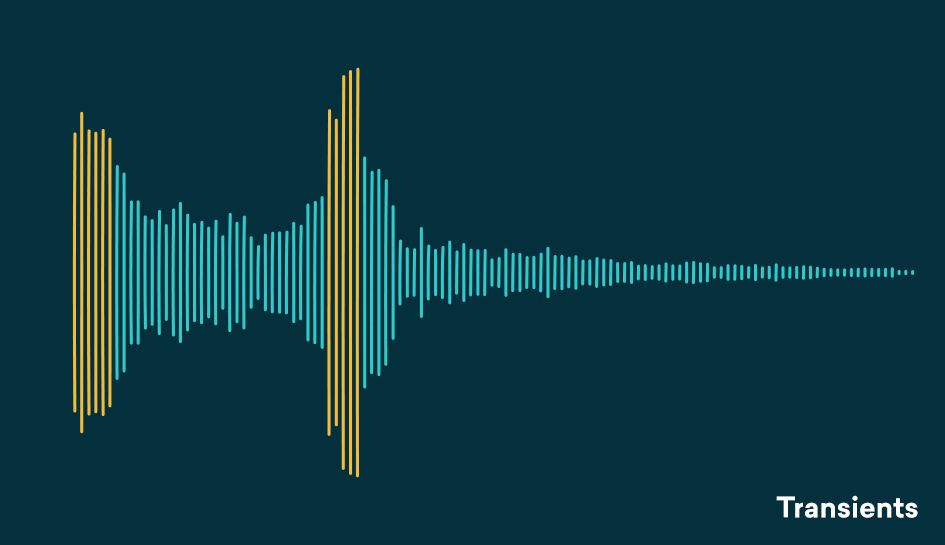
transient compresor

Compression helps you find the perfect balance for a track that has good dynamic range with a beautiful, full body.
A waveform with good dynamics will have a lot of transients when some sounds hit and then decay in the composition. Transients and their final decay are what make a waveform similar to a fish bone.

There is even an overly dynamic trail. If your song is transient without a body, its sound will not be of interest to your ear.

The reverse is also true, no dynamics can lead to lifeless, exhausting sound for the human ear and a waveform that looks like a big brick.

Compression helps you find the perfect balance for a track that has good dynamic range with a beautiful, full body.

Limiter

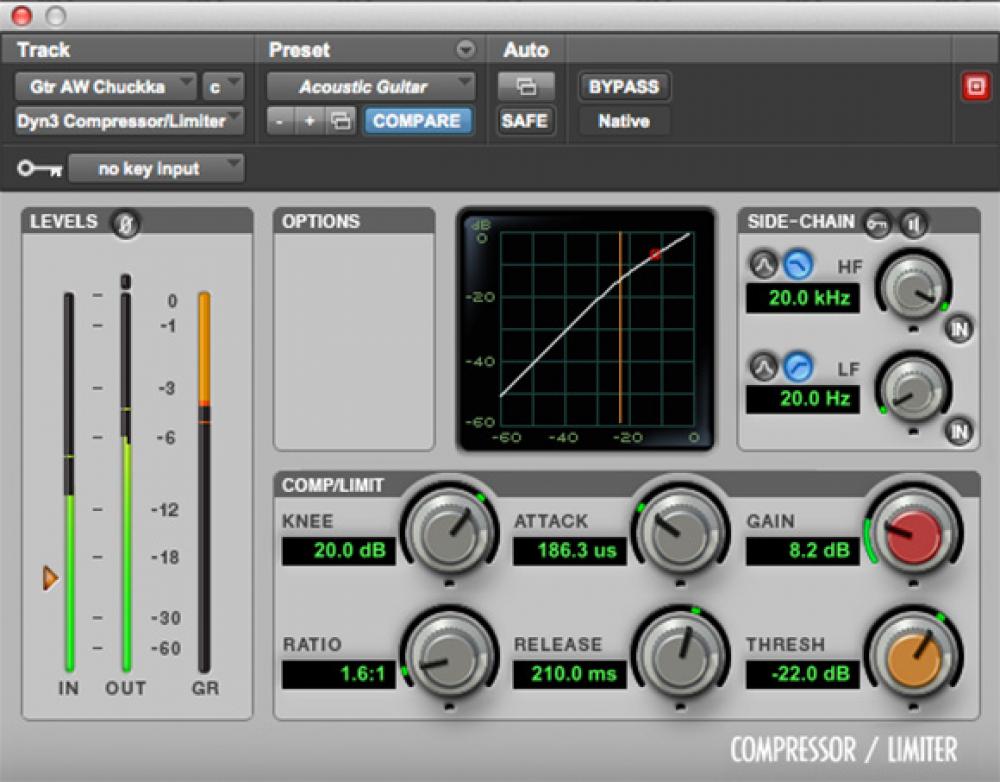
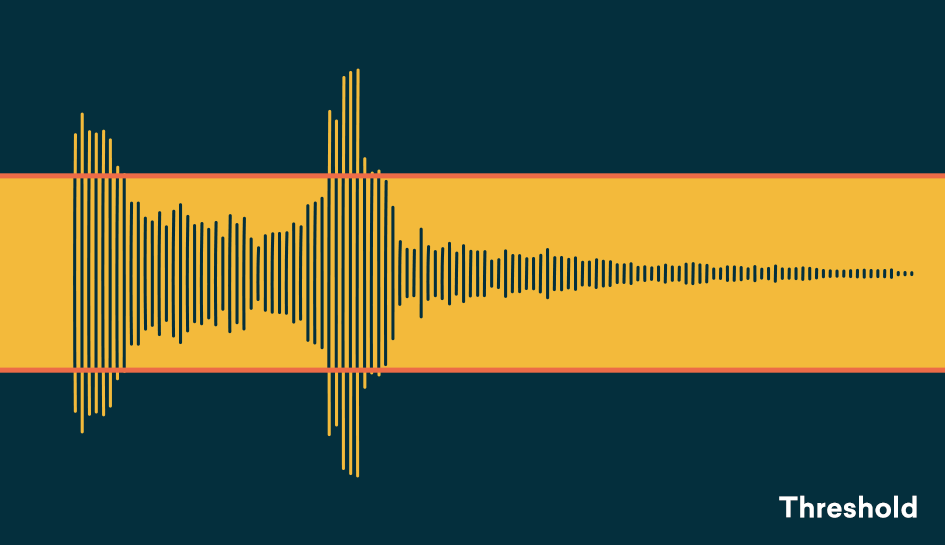
The threshold determines the signal level at which the compressor will start operating. The threshold is measured in dB, therefore any signal above the set threshold will be compressed.

When setting the threshold, decide what part of the signal you want to reduce.
With the threshold low, the compressor gain reduction is applied to a larger portion of the signal. Setting it higher affects only the most aggressive peaks and leaves the rest intact.

To determine what the perfect threshold is, think about what you’re trying to accomplish by compressing the audio and which parts of the signal are the most troublesome.

Are strong signal transients distracting you from the rest of your mix? Or maybe your final decadence is imperceptible in the mix?

A good rule of thumb for compression is “do no harm.”
Set the threshold to hear compressor operation on the part of the signal that needs to be addressed and not lowered.

Setting the perfect threshold will depend on your needs. Play the track and tweak it on the go to find the perfect amount.

Relationship

The ratio determines the amount of gain reduction applied by the compressor when the signal exceeds the threshold. It is called a relationship because it is expressed in comparison with the unaffected signal.

The higher the first number in the report, the greater the gain reduction factor.

For example, we can say that an uncompressed signal would have a 1: 1 ratio


Free Download Mp4Gain
picture


Mp4Gain Main Window
picture


Mp4Gain Features
picture


Free Download Mp4Gain
picture

What is the compressor and how does it work?

The compressor, together with the equalizer, is one of the most important and most used processors in professional audio, but its operation is not always so intuitive and knowing how to master the compression technique sometimes requires years of experience. In this new article we begin to explore this fundamental processor.

What is the compressor for?

First of all, let’s start to see what the compressor’s function is: to reduce the dynamic range of an audio track, that is, to decrease the distance in volume between the weakest signal and the strongest signal. Initially created to optimize recording on magnetic tape and to avoid saturation of the input stages, the compressor is still used today during recording and mixing. Reducing dynamic range also allows us to keep multiple tracks in the mix, such as a voice, for example, always at the same volume throughout the song so that they are not dominated by the other instruments in the most crowded sections, as well as to avoid Output saturation.

Compressor

Back to basics: what is the compressor and how does it work

The controls

Now let’s see in detail what the various compressor controls are and what they are for:
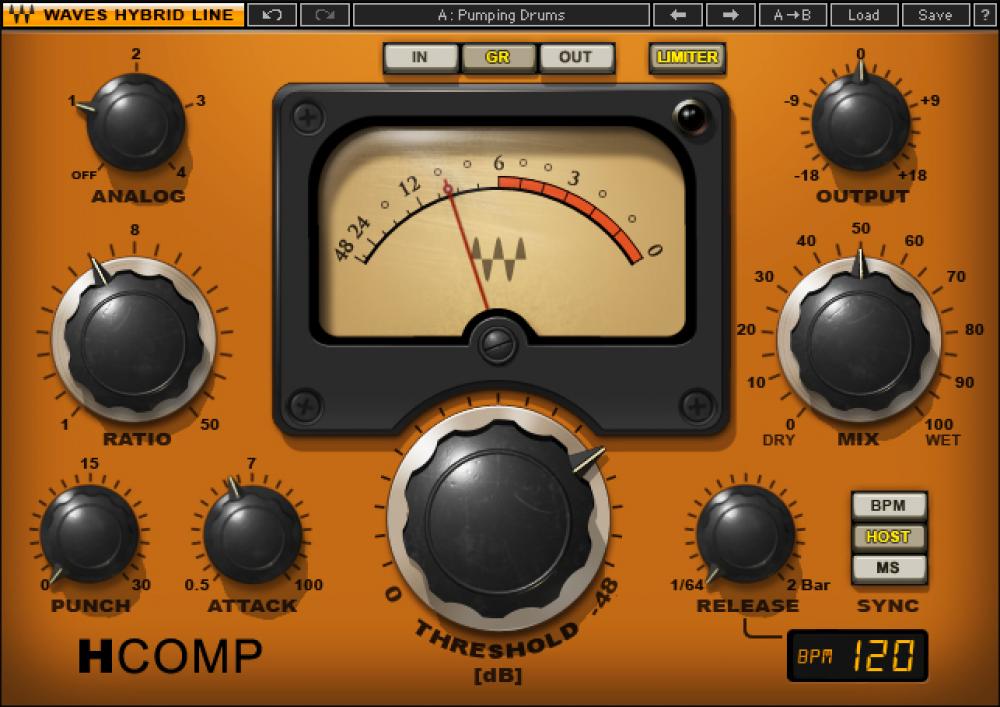
— Threshold: or threshold, expressed in dB, indicates the point beyond which the compressor begins to operate.
— Ratio: is the compression ratio and indicates how much the signal will compress when it exceeds the Threshold. For example, with a 2: 1 ratio, each signal that exceeds the threshold will be halved at the output, that is, every 2 dB at input 1 will be returned at the output.
— Make Up Gain: This is the output of the compressor and is used to recover the volume lost due to compression.
— Attack: expressed in milliseconds is the time it takes for the compressor to start once the signal has passed the threshold.
— Release: always expressed in milliseconds, it indicates the time it takes for the compressor to stop compression once the signal has returned below the threshold.
— Gain reduction meter: it is not a control but a visual indicator, led or pointer, which informs how much the signal is compressed, through a scale in dB.
— Bypass: shuts down the processor, making the signal pass through the machine without alteration.

With the advent of digital and accessories, we can find controls that not all hardware compressors have:
— Knee: indicates the type of curve at the point where the compressor begins to operate, which can be abrupt (Hard Knee), soft (Soft Knee) or various intermediate values.
— Automatic: sets the time control to which it refers (attack, release or both) automatically, depending on the input signal (program dependent).
— Sidechain eq or External Sidechain: Sidechain is the signal that drives the compression circuit, where in most cases it is the signal itself to compress, but sometimes it can be a version of the input signal with different equalization, for example without low frequencies, so that they don’t start the compressor too soon. Or it can be an external signal, such as the one used on the radio where the speaker’s voice signal drives a compressor on the background music signal, so it automatically turns off when it starts to speak (Ducking), or Classic Speaker Use to activate the compressor on various instruments in the mix or the Master Buss.
— Mix: used to mix the compressed signal with the original signal. This way, you can use Parallel Compression directly on the compressor, without having to use two mixer tracks (one for the dry signal and one for the compressed signal).
Back to basics: what is the compressor and how does it work

Compressor

Compressor or limiter?

What is the difference between a compressor and a limiter?

Essentially, the compression ratio: over 10 dB ratio, the processor is considered a limiter. A separate case is the Brickwall Limiter, a compressor with immediate attack and a compression ratio of infinity to 1, so that no signal can exceed the Threshold. It is mainly used on the master buses so as not to exceed 0dBFS on the output and then send the converters to clips.

Usage examples

As we already said, the compressor is used to keep the volume excursion under control. One track in the mix: in this case, using a fairly fast attack, slow release and not too aggressive ratio, allows us to compress the signal constantly and transparently, that is, without making your intervention feel excessively.
The compressor can also serve to emphasize the attack of a percussion instrument: in one case, for example, by setting a medium slow attack.

Audio normalization or compression

The function of a compressor is to reduce the dynamic range of the signal, that is, the level difference between the strongest and weakest signal parts.

Why compression or normalize?

At the time of analog, the limited dynamics of the main musical supports (vinyl, audio and video cassettes) did not allow to reproduce the dynamics of a classical, jazz or even rock orchestra in the case of the audio cassette. Therefore, the signal was compressed to avoid distortion in the transmission medium.

audio compression or normalization

Now that the music is converted to 16-bit or more, recorded in digital format, and then streamed to CD / DVD or downloaded, the dynamics of the media is enough to faithfully reproduce the dynamics of almost any orchestra. The old technical limitations have disappeared, therefore compression is no longer essential.

However, whatever the musical genre, some sources (voices) are compressed almost systematically. The goal of modern compression is therefore to optimize sound recording, either to get closer to reality or, conversely, to create a less faithful but denser, more controlled, more powerful sound, etc., or even a sound. totaly new.

And to do all this, the compressor is satisfied with a simple principle: it reduces dynamics by attenuating the signal level when the latter exceeds a given threshold level.

Level settings

– Threshold (threshold level, in dB)

This parameter determines the threshold level from which the compressor is triggered. As long as the input signal level remains below the threshold, the compressor does not start and no treatment is applied. As soon as the source signal exceeds the threshold level, compression is applied.

– Ratio (compression ratio)

The ratio determines the amount of level reduction applied to the part of the signal that exceeds the threshold level, the rest of the signal is not processed. Depending on the compressor, the ratio can vary from 1: 1 to Inf: 1. Quésaco?

Set up a compressor

With a 1: 1 ratio, no compression is applied, the level of the input signal is equal to that of the output signal. With a ratio of 2: 1, the level of the signal portion that exceeds the threshold is divided by 2 in the output signal. With a 3: 1 ratio, it is divided by 3, etc. When the compression ratio is infinite (Inf: 1 ratio), the compressor behaves like a limiter: the output signal never exceeds the threshold level, regardless of the input level.

Therefore, the compression intensity applied to the signal is a compromise between the threshold and the compression rate setting:

The lower the threshold, the larger the compressed signal portion.
The higher the ratio, the greater the level reduction applied to the signal portion above the threshold.
Depending on the compressors, you may find other parameters, for example, an input level setting instead of the threshold, or a gain setting (also called the offset or output level) that amplifies the signal to compensate for the drop in level resulting from compression.

Time settings

– Attack (attack, in ms)

Attack corresponds to the time the compressor needs to reach the given ratio when the signal level exceeds the threshold level. A quick attack of a few milliseconds triggers strong compression as soon as the signal level exceeds the threshold; With a slower attack, the compressor passes the first transients of the signal peaks, keeping one side alive and well cut.

Set up a compressor

– Launch (launch, in ms and s)

Release corresponds to the time the compressor needs to return to the 1: 1 unit ratio when the source signal falls below the threshold level. A quick launch of a few tens of ms allows the original character to stay alive. Slower relaxation improves instrument resonance and reverberation, but can cause compression of the first peak transients when the latter are close together.

– Knee (literally knee!)

The Knee parameter determines the increase in compression, that is, the transition between the compression ratio of the unit (1: 1, no compression) and the compression ratio set to ratio.

Applications

At the output, the compressor can be used as a limiter to control signal peaks and prevent distortion from occurring in the analog / digital conversion stage.
When taking and mixing, light compression can bring out weak parts of the signal and thus reveal certain details.
In the mix, the compressor allows you to increase the average level of the audio volume output.

Destructive compression vs non-destructive

Destructive compression is compression obtained by losing information. This means that if you extract the compressed signal with this technique, you will not find the start signal.

Destructive Vs Non-Destructive Audio compression

In destructive compression techniques, there are basically methods that take advantage of the properties of the human ear. The latter listens to frequencies between 20 Hz and 20 kHz. If a song contains frequencies outside this range, we can easily delete them without losing the audio quality because the ear does not hear them. In fact, frequencies between 2 kHz and 5 kHz are generally heard correctly. In fact, less than 5 dB is required to hear frequencies in this band, while more than 20 dB is required to hear frequencies below 100 Hz or above 10 kHz. These results can be used to reduce the size of the files. For example, we can conclude that all frequencies above 15 kHz are suppressed.

audio compression

MP3 also uses the principle of masked frequencies. If in a frequency group some have a much higher noise level than others, it is not necessary to keep the frequencies low – we will not hear them. Imagine yourself in your garden listening to the birds sing. The chord goes over your head (even very high). We no longer listen to birds because the sound they make is much quieter than that of the plane. It is as if the birds no longer exist or have stopped singing. Obviously, it is not necessary to code all the frequencies present in a song so that the human ear can always perceive it well. Finally like the two ways

What do we find among non-destructive techniques?

Mainly coding techniques.

Let’s explain. A sound is a frequency. A second of music is therefore a sequence of frequencies. Imagine that in the series of samples that make up a second of music (remember that there are 44,100), we have the same frequency several times in succession, for example 10 times. If instead of storing these 10 points, we only store 1 and the number of times it is repeated, we must encode 2 digits and not 10. If we also apply this method to frequencies which are no longer identical, but very dense together (so close that the average human ear cannot distinguish them), we can still save space. This time, the compression is destructive because we are replacing one frequency with another frequency (almost identical).

MP3 also uses the algorithm of Huffman (1952) as a method of encoding information. This method is used in all compression algorithms (compression of text files, compression of images, compression of sound). It is based on the use of a variable length code and the probability that an event (in this case a frequency) will occur. The more a frequency appears, the shorter the code (low number of bits to display it). The file is read for the first time and a table appears with the frequencies that appear and the number of times they appear. We derive the right code. This encryption was last used. It is the final phase of compression. This is non-destructive coding.

MP3 works on the properties of the ear, first to reduce the size of a part, then processes the stereo sound and possibly applies encodings which end with Huffman encoding.

The use of all the reduction options mentioned depends on the location you want to give within 1 minute of your tablet and therefore on the compression speed to apply.
To encode MP3 audio files, we are talking more in terms of bit rate than compression rate.
Bit rate is the number of bits allowed in 1 second.
Therefore, we have the following relationship: the more we want to compress a song (so that it takes up the least space possible), the lower the bit rate.

Choice of compression ratio (bit rate)

Obviously, the more you compress, the worse the sound quality.
You have to compromise the file size and audio quality.
This commitment can be dictated by your needs, but also by the use you want to make of your MP3 files. It may not even be demanding if your MP3s are intended for your portable music player and are too demanding to be listened to on a stereo system.

Does MP3 affect the sound quality?

The compression of songs affects the quality, but the losses are not necessarily audible.

mp3 audio quality

Is compression of MP3 songs harmful to the sound quality? Whether it is HD music or “normal” definition, the question of compression remains. The advantage is that the weight of the songs is reduced, so they take up less space in the memory of a phone or a portable music player. With standard MP3 compression, a music album ranges from 500 MB to 45 MB.

But by the way, the music is damaged. The sound seems a little less natural, less precise, less dynamic. Some of the audio information is literally destroyed. It doesn’t always sound good, but for some songs the difference is clear until everyone will notice.

mp3 quality

Fortunately, you can improve the quality of an MP3 song by compressing it with less force. The loss of sound quality becomes less clear, but in return the song weighs more. MP3 isn’t the only compressed music format that corrupts music. The most famous competitors are AAC, Ogg Vorbis and WMA. MP3 is not the most efficient compression format, this title applies to the Ogg Vorbis, but it is still a good option. All music players can play MP3 and online record stores prefer this format.

Lossless compression

However, some music lovers are reluctant to MP3. They swear by “nondestructive” compression, which does not remove sound information. The music has been completely preserved: we hear absolutely no difference. The best known non-destructive formats are Flac, APE and Alac. Unfortunately, not all electronic devices can play music recorded in these formats. Few artists offer their music in “non-destructive” compression. And the weight of the parts thus compressed is still very heavy. An album quickly reaches several hundred megabytes. However, the Flac stands out as the reference format for the most demanding music lovers.

Is it reasonable to keep using MP3? This remains a smart choice for most music lovers, as long as they choose an appropriate compression ratio. Which one to choose: 192 kbit / s, 256 kbit / s or 320 kbit / s? The stronger the compression, the lighter the number, but the lower the quality. With 128 kbit / s, the sound has clearly deteriorated, most of us can hear it. At 192 kbit / s, degradation becomes difficult for most of us to observe except for some rare numbers.

With 256 kbit / s, you have to have a musical ear and good sound equipment to make the difference. With 320 kbit / s, you need a well-trained ear and highly accurate audio equipment to make a difference. We only see a difference in quality in certain titles and only in certain passages. Therefore, most of us can settle for 192 kbit / s recording. Music lovers should expect a minimum of 256 kbit / s. And professionals will choose formats of 320 kbit / s or ‘lossless’.

Data compression techniques

It is evident that coding techniques for multimedia information contain large amounts of data that require memory space for recording and high transmission speed for transfer to other digital systems.

These needs can be met by reducing the space occupied by the data with special compression techniques. Compressed data cannot be used directly for processing, viewing, or playback. Compression techniques are used by special programs immediately before data storage or transmission. During the read or receive phase, similar programs perform decompression. Compression can be done on the basis that information encoding techniques dedicate an always equal amount of memory to each information element (be it a character, a pixel or a sound sample), regardless of their statistical frequency and its significance.

The compression techniques developed so far are more than a hundred but grouped into two categories:

Compression without loss of information.

Lossless compression techniques are based on compact coding of the same data streams or coding with a small number of bits of the most statistically frequent data.

Picture
This compression is completely reversible and the decompression program returns the exact bit sequence as it originally was. For this reason, loss-free technique is applicable to any type of data, including executable texts and programs, although the achievable compression factor is not very high: values ​​usually range from 2: 1 to 4: 1. Of course, these results vary depending on the type of input data.

RLE encoding

Data Compression

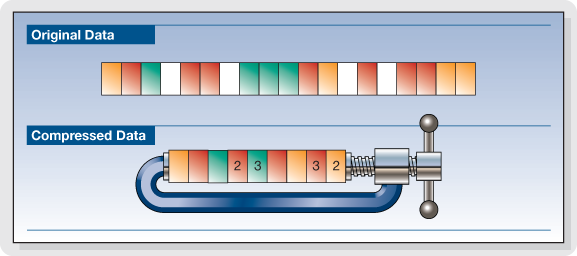
The RLE (Run Length Encoding) compression technique is oriented to equal byte sequences. In the original version, it provides the introduction of a special character that indicates the beginning of a sequence, and instead of encoding the same characters in the sequence one by one, it encodes only the first one, followed by a number indicating where many times drawn and repeated. Specifies with the Sc character at the beginning of the sequence, the statement

these ******** are eight stars… these Sc * 8 are eight stars

where 8 is not encoded as an ASCII character but as a binary number.

The decompression program interprets the next byte as a counter and rebuilds the original sequence.

For image compression, RLE encoding only works well with images that contain large areas of uniform color, but are not very effective with complex images.

Compression with loss of information.

Loss-free compression techniques are not sufficient to solve the problem of the huge amount of data generated by encoding multimedia information, e.g. Video images while allowing better use of memory space on disks or data transmission lines. High resolution. , audio or video.

However, to try to solve this problem, it is necessary to remember that multimedia information, although subject to transformation, can remain understandable; This allows for compression factors that are higher in some orders of magnitude than those observed.

These interventions can be studied based on the behavior (vision and hearing) of our sensory systems to reduce the required memory without obvious changes in information content. Compression techniques that do this are called “lossy” since the least significant piece of information is irreversibly suppressed. Therefore, it appears that the bitstream after decompression is different from the original, and therefore these techniques cannot be used for other types of information, e.g. Text. Furthermore, the information thus compressed is not suitable for further processing as the loss introduced with each subsequent step becomes more and more apparent.

What is video encoding and how does it work?

The technique of compressing videos

What do we mean when we talk about video coding or, as industry experts generally call it, video coding?

YOUTUBE VIDEO FORMAT

Simply put, video encoding is the process of compressing and converting video content. The ultimate goal is to use less storage space, use less bandwidth, and make the user experience smoother. It goes without saying that the compression process causes a significant loss of information. The more data that is applied, the more data is deleted in the video. The result is a different version of the original due to missing data.

mp4 videos

Why is video coding so important?

Video encoding is essential for transmission because it simplifies the transmission of video on the Internet through a compression process. Compression reduces the bandwidth required while providing a high quality experience. Without this, raw video content would not allow many users to view content on the Internet due to insufficient connection speeds. The protagonist of this process is the bit rate or the speed of digital data transmission that can be transmitted in a certain time interval in a communication channel. When streaming, the bit rate determines whether users can easily view the content or are exposed to video buffering.

Another fundamental aspect of video coding is compatibility. Indeed, sometimes the content is already compressed to an appropriate size, but it still needs to be encoded to be compatible with different devices and applications, although this is often referred to as transcoding.

The video encoding process is governed by video codecs, which are compression standards that are created through software or hardware applications. Each codec consists of an encoder for compressing the video and a decoder for restoring an approximation of the video for playback. The name codec is actually derived from the merging of the words “encoder” and “decoder”.

But what is the best codec?

It depends on the type of video. On this occasion we will describe the most commonly used.

To stream high quality video over the Internet, H.264 is arguably the most widely used codec for most multimedia traffic. This codec is considered to be of excellent quality, coding speed and compression efficiency, although it is not as efficient as the later HEVC (High Efficiency Video Coding) compression standard, also known as H.265. H.264 also supports 4K video streaming, a real advance for a codec created in 2003.

Now that we have an overview of codecs, let’s look at some compression techniques.

Compression techniques

The most common compression technique is scaling the resolution. The higher the resolution of a video, the more information is contained in each picture. One way to reduce the amount of data is to reduce the size of the image and then scan it again. As a result, fewer pixels are generated, which reduces the level of detail of the image, which has a positive effect on the amount of information required. This process allows you to set multiple quality levels for a video that correspond to different resolutions created. A practical example is if you are watching a movie in streaming before playing it, you can actually choose the resolution at which you want to watch it, provided your device
Support him

One video compression technique that may not be widely used is the interframe. This process reduces “redundant” information from one frame to another.

Another technique is the P-frame, short for predictive frame, which means that it can look back at an i-frame or another P-frame and understand whether the same images are present. In this case, this part is excluded for reasons of space.

B-Frame, on the other hand, is the bidirectional predictive frame that offers good compression without affecting the viewing experience. However, this technique requires a higher coding profile.

Another technique is that which makes it possible to intervene in the color. This process, called “chroma subsampling”, tries to maintain the brightness of the image, which affects the quality of the color. Finally, another method of compressing videos is to reduce the number of frames per second.