How to choose the perfect compressor configuration


Free Download Mp4Gain
picture

Compressors and how to use them, explained.

Compression is one of your most powerful mixing tools. It is the essential element behind any good mix.

But for your compressors to work, you must first understand what compression is.

It can seem intimidating to start learning such a broad subject, especially when the controls and how they affect the signal are difficult to understand in relation to the sound.

This article will help you understand what compression does, how to choose the perfect compressor setting, and some common mistakes to avoid.

But before…

What is compression in music?

Compression in music is the process of reducing the dynamic range of a signal. Dynamic range is the difference between the loudest and quietest parts of an audio signal.
audio compression

You must reduce the dynamic range of most audio signals to sound natural to a recording.

For example: imagine a whisper and a scream on the same audio track. If they had the same volume difference as they do in real life, it would be very annoying!

Compressors fix all of this by attenuating the loudest parts of the signal and boosting what is output so that the quieter parts are more noticeable.

Imagine a whisper and a scream on the same audio track. If they had the same volume difference as they do in real life, it would be very annoying!
Using compression
Experienced engineers often talk about how one compressor is more “musical” than another.

It is an important concept. Its dynamics is one of the fundamental aspects for its sound to be unique.

When you use a compressor to change the dynamics, the sound engineer becomes part of the musical performance.

If your compressors work properly, they will positively contribute to performance and improve recordings.

Transients: understanding high energy moments.

To understand compression, you need to know what transients are.

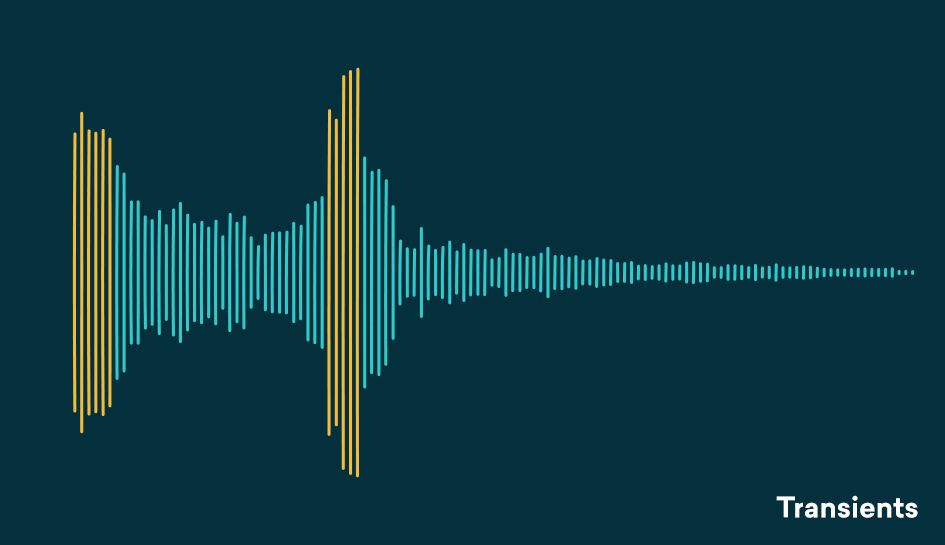
Transients are the first high-energy moments of a certain sound in its waveform. These explosions give our brain a lot of information about the quality of a sound.

Since transients are usually louder than the rest of the waveform, they are greatly influenced by compressors.

For example: think of a nice roaring trap. As soon as the trap enters, there is an initial peak in the waveform that narrows slowly. That initial energy spike is your transient.
transient compresor

Compression helps you find the perfect balance for a track that has good dynamic range with a beautiful, full body.
A waveform with good dynamics will have a lot of transients when some sounds hit and then decay in the composition. Transients and their final decay are what make a waveform similar to a fish bone.

There is even an overly dynamic trail. If your song is transient without a body, its sound will not be of interest to your ear.

The reverse is also true, no dynamics can lead to lifeless, exhausting sound for the human ear and a waveform that looks like a big brick.

Compression helps you find the perfect balance for a track that has good dynamic range with a beautiful, full body.

Limiter

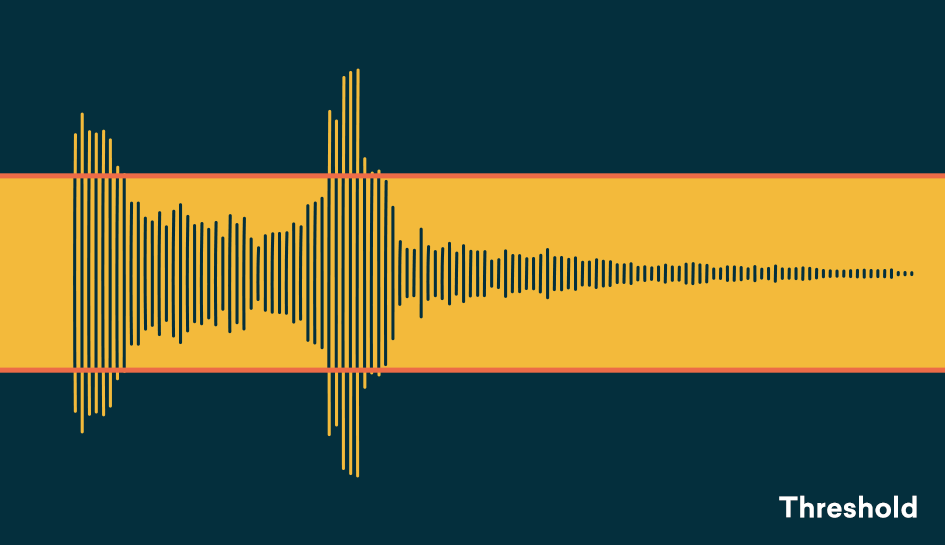
The threshold determines the signal level at which the compressor will start operating. The threshold is measured in dB, therefore any signal above the set threshold will be compressed.

When setting the threshold, decide what part of the signal you want to reduce.
With the threshold low, the compressor gain reduction is applied to a larger portion of the signal. Setting it higher affects only the most aggressive peaks and leaves the rest intact.

To determine what the perfect threshold is, think about what you’re trying to accomplish by compressing the audio and which parts of the signal are the most troublesome.

Are strong signal transients distracting you from the rest of your mix? Or maybe your final decadence is imperceptible in the mix?

A good rule of thumb for compression is “do no harm.”
Set the threshold to hear compressor operation on the part of the signal that needs to be addressed and not lowered.

Setting the perfect threshold will depend on your needs. Play the track and tweak it on the go to find the perfect amount.

Relationship

The ratio determines the amount of gain reduction applied by the compressor when the signal exceeds the threshold. It is called a relationship because it is expressed in comparison with the unaffected signal.

The higher the first number in the report, the greater the gain reduction factor.

For example, we can say that an uncompressed signal would have a 1: 1 ratio


Free Download Mp4Gain
picture


Mp4Gain Main Window
picture


Mp4Gain Features
picture


Free Download Mp4Gain
picture

Does MP3 affect the sound quality?

The compression of songs affects the quality, but the losses are not necessarily audible.

mp3 audio quality

Is compression of MP3 songs harmful to the sound quality? Whether it is HD music or “normal” definition, the question of compression remains. The advantage is that the weight of the songs is reduced, so they take up less space in the memory of a phone or a portable music player. With standard MP3 compression, a music album ranges from 500 MB to 45 MB.

But by the way, the music is damaged. The sound seems a little less natural, less precise, less dynamic. Some of the audio information is literally destroyed. It doesn’t always sound good, but for some songs the difference is clear until everyone will notice.

mp3 quality

Fortunately, you can improve the quality of an MP3 song by compressing it with less force. The loss of sound quality becomes less clear, but in return the song weighs more. MP3 isn’t the only compressed music format that corrupts music. The most famous competitors are AAC, Ogg Vorbis and WMA. MP3 is not the most efficient compression format, this title applies to the Ogg Vorbis, but it is still a good option. All music players can play MP3 and online record stores prefer this format.

Lossless compression

However, some music lovers are reluctant to MP3. They swear by “nondestructive” compression, which does not remove sound information. The music has been completely preserved: we hear absolutely no difference. The best known non-destructive formats are Flac, APE and Alac. Unfortunately, not all electronic devices can play music recorded in these formats. Few artists offer their music in “non-destructive” compression. And the weight of the parts thus compressed is still very heavy. An album quickly reaches several hundred megabytes. However, the Flac stands out as the reference format for the most demanding music lovers.

Is it reasonable to keep using MP3? This remains a smart choice for most music lovers, as long as they choose an appropriate compression ratio. Which one to choose: 192 kbit / s, 256 kbit / s or 320 kbit / s? The stronger the compression, the lighter the number, but the lower the quality. With 128 kbit / s, the sound has clearly deteriorated, most of us can hear it. At 192 kbit / s, degradation becomes difficult for most of us to observe except for some rare numbers.

With 256 kbit / s, you have to have a musical ear and good sound equipment to make the difference. With 320 kbit / s, you need a well-trained ear and highly accurate audio equipment to make a difference. We only see a difference in quality in certain titles and only in certain passages. Therefore, most of us can settle for 192 kbit / s recording. Music lovers should expect a minimum of 256 kbit / s. And professionals will choose formats of 320 kbit / s or ‘lossless’.

Data compression techniques

It is evident that coding techniques for multimedia information contain large amounts of data that require memory space for recording and high transmission speed for transfer to other digital systems.

These needs can be met by reducing the space occupied by the data with special compression techniques. Compressed data cannot be used directly for processing, viewing, or playback. Compression techniques are used by special programs immediately before data storage or transmission. During the read or receive phase, similar programs perform decompression. Compression can be done on the basis that information encoding techniques dedicate an always equal amount of memory to each information element (be it a character, a pixel or a sound sample), regardless of their statistical frequency and its significance.

The compression techniques developed so far are more than a hundred but grouped into two categories:

Compression without loss of information.

Lossless compression techniques are based on compact coding of the same data streams or coding with a small number of bits of the most statistically frequent data.

Picture
This compression is completely reversible and the decompression program returns the exact bit sequence as it originally was. For this reason, loss-free technique is applicable to any type of data, including executable texts and programs, although the achievable compression factor is not very high: values ​​usually range from 2: 1 to 4: 1. Of course, these results vary depending on the type of input data.

RLE encoding

Data Compression

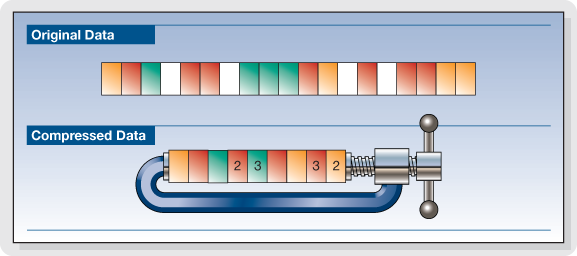
The RLE (Run Length Encoding) compression technique is oriented to equal byte sequences. In the original version, it provides the introduction of a special character that indicates the beginning of a sequence, and instead of encoding the same characters in the sequence one by one, it encodes only the first one, followed by a number indicating where many times drawn and repeated. Specifies with the Sc character at the beginning of the sequence, the statement

these ******** are eight stars… these Sc * 8 are eight stars

where 8 is not encoded as an ASCII character but as a binary number.

The decompression program interprets the next byte as a counter and rebuilds the original sequence.

For image compression, RLE encoding only works well with images that contain large areas of uniform color, but are not very effective with complex images.

Compression with loss of information.

Loss-free compression techniques are not sufficient to solve the problem of the huge amount of data generated by encoding multimedia information, e.g. Video images while allowing better use of memory space on disks or data transmission lines. High resolution. , audio or video.

However, to try to solve this problem, it is necessary to remember that multimedia information, although subject to transformation, can remain understandable; This allows for compression factors that are higher in some orders of magnitude than those observed.

These interventions can be studied based on the behavior (vision and hearing) of our sensory systems to reduce the required memory without obvious changes in information content. Compression techniques that do this are called “lossy” since the least significant piece of information is irreversibly suppressed. Therefore, it appears that the bitstream after decompression is different from the original, and therefore these techniques cannot be used for other types of information, e.g. Text. Furthermore, the information thus compressed is not suitable for further processing as the loss introduced with each subsequent step becomes more and more apparent.