MP4 vs Webm Comparision


Free Download Mp4Gain
picture

MP4 vs Webm

MP4 vs Webm
MP4 vs Webm
MP4 vs Webm
MP4 vs Webm


Let’s talk about MP4 vs Webm

  • Opening: Picture two popular video formats as cars. MP4 is like a well-known sedan – versatile, widely supported, and loved by many. Webm, on the other hand, is like a sleek sports car, known for its efficient compression and open-source nature. But which one is the right ride for your video needs? As a specialist in video formats, I’ll help you make an informed choice.
MP4 vs Webm
MP4 vs Webm

Video Formats Demystified

  • Video Compression: Let’s dive into the hood of video formats. MP4 and Webm use different compression techniques. MP4 uses H.264, offering excellent quality but at a slightly larger file size. It’s like the reliable V6 engine in your sedan. Webm relies on VP9, which sacrifices a bit of quality for smaller file sizes, making it the energy-efficient electric engine of the sports car world.
  • Browser Compatibility: When it comes to compatibility, MP4 takes the lead. It’s like a highway with smooth roads, compatible with almost all browsers and devices. Webm, on the other hand, is like a scenic route – beautiful but not as widely supported. It may require more effort for some viewers to access.

Video Quality Matters

  • Resolution and Bitrates: Just like choosing the right camera for a movie, you need to consider resolution and bitrates for your video. MP4 often delivers higher quality at the same resolution, while Webm can provide good quality but at a lower bitrate. It’s like comparing a blockbuster movie shot in IMAX with a captivating indie film.
  • Color Depth and Compression Artifacts: Let’s talk about the finer details. MP4 can handle a wider range of colors, making it suitable for professional videos. However, Webm might exhibit more compression artifacts, like pixelation, in complex scenes. It’s like the difference between a painting and a pixel art image.

Efficient File Sizes

  • Storage Considerations: Imagine your video as luggage. MP4 tends to be bulkier, occupying more space in your hard drive. Webm, with its smaller file sizes, is like packing efficiently for a long trip – you get more in with less space.
  • Loading and Streaming: Video load times can be a make-or-break factor. MP4 might take longer to load, especially for viewers with slower connections, while Webm loads faster due to its efficient compression. It’s like choosing between express and regular delivery.

Open Source vs. Proprietary

  • Freedom and Licensing: Webm is like an open-source vehicle – no licensing fees, and anyone can use it freely. MP4, however, involves licensing and royalties, making it more like a luxury car with additional costs.
  • Ecosystem and Support: MP4 has a well-established ecosystem with advanced features and support. It’s akin to a premium car with top-of-the-line accessories. Webm, while open and accessible, might not have the same level of support and features, making it more like a customizable kit car.

Mobile Devices and App Compatibility

  • Mobile Friendliness: MP4 is the go-to choice for mobile devices. It’s like a trusted GPS that guides you seamlessly. Webm, while supported on many mobile devices, might require additional apps or settings adjustments, similar to choosing an alternative route on your journey.

Latest Words on MP4 vs Webm

  • MP4’s Versatility: In the end, MP4’s versatility and widespread support make it a safe bet for most users. It’s like driving a reliable sedan for your daily commute.
  • Webm’s Efficiency: Webm’s efficient compression and open-source nature make it a contender for users looking to optimize their video delivery. It’s like the sports car that zips through traffic while conserving energy.
  • Personal Choice: Just as some prefer the comfort of a sedan, and others love the thrill of a sports car, your choice between MP4 and Webm depends on your specific video needs and priorities.

Comments:


Comments:

MP4 has been my go-to format for years. It’s like driving a reliable sedan, just as you said. But Webm’s efficiency intrigues me for certain projects.

I’m all about quality, so MP4’s higher resolution is tempting. It’s like comparing a blockbuster movie to an indie film – hard to resist the former.

Webm’s smaller file sizes are a game-changer for my storage. It’s like switching to a more fuel-efficient car to save on long trips.

Open-source is the way to go for me, so Webm’s like a free-spirited road trip in the video format world. No licensing fees are a big plus.

MP4’s compatibility with mobile devices is crucial for me, as I’m always on the go. It’s like having a reliable GPS for my video content.


Free Download Mp4Gain
picture


Mp4Gain Main Window
picture


Mp4Gain Features
picture


Free Download Mp4Gain
picture

Enhancing Video Quality: Bitrate and Codec

Enhancing Video Quality: Bitrate and Codec

Enhancing Video Quality: Bitrate and Codec


When it comes to video quality, there are two main factors that you need to consider: bitrate and codec.

Bitrate

Bitrate is the amount of data that is used to encode a video file. A higher bitrate will result in a higher quality video, but it will also result in a larger file size.

The ideal bitrate for a video will depend on a number of factors, including the resolution of the video, the frame rate, and the type of content. For example, a high-resolution video with a high frame rate will require a higher bitrate than a low-resolution video with a low frame rate.

If you are concerned about file size, you can try reducing the bitrate of your video. However, keep in mind that this will also reduce the quality of the video.

Codec

A codec is a type of software that is used to encode and decode video files. There are many different codecs available, and each one has its own strengths and weaknesses.

Some of the most popular codecs include:

H.264: This is a widely used codec that offers good quality and compatibility.
MPEG-4: This is another popular codec that is known for its good quality.
VP9: This is a newer codec that offers better quality than H.264 and MPEG-4, but it is not as widely supported.
When choosing a codec, you need to consider the following factors:

The quality of the video that you want to create
The compatibility of the codec with your devices and software
The file size of the video that you want to create

Conclusion

Bitrate and codec are two important factors that you need to consider when enhancing video quality. By understanding these factors, you can create high-quality videos that are also small in file size.

Here are some additional tips for enhancing video quality:

Use a high-quality camera
Shoot in good lighting conditions
Edit your videos carefully
Optimize your videos for the web
By following these tips, you can create videos that are both high-quality and visually appealing.

Latest Video Codec Trends

Latest Video Codec Trends

Video Codec
Video Codec
Video Codec
Video Codec

Video Codecs: What They Are and Why They Matter

Video codecs are essential in video compression and playback. They are algorithms that encode and decode digital video data, compressing it for efficient storage and transmission. Without video codecs, it would be impossible to store or stream high-quality video content.

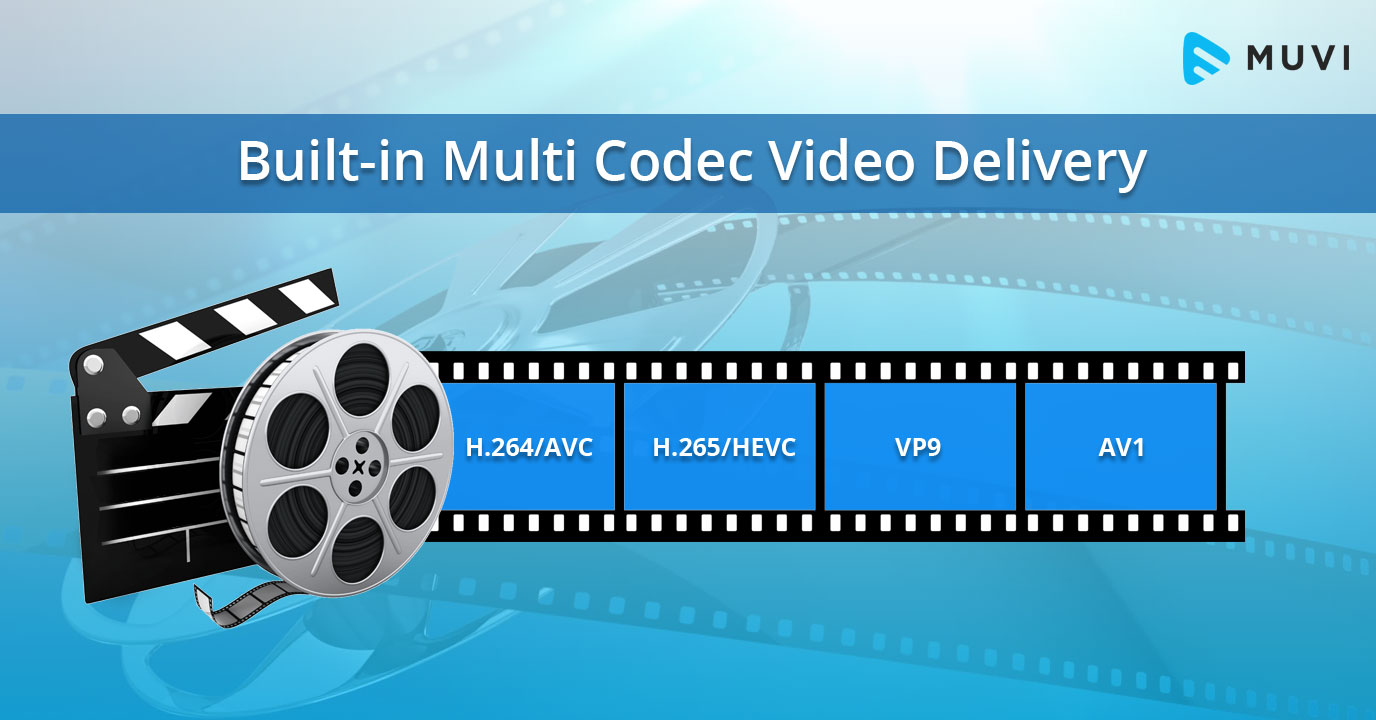
The most popular video codecs today are H.265, VP9, and AV1. H.265, also known as HEVC (High-Efficiency Video Coding), is a codec that offers the same quality as its predecessor (H.264) at half the bitrate. VP9, developed by Google, is an open-source codec that offers better compression efficiency than H.264. Finally, AV1 is a royalty-free codec developed by the Alliance for Open Media, offering even better compression efficiency than VP9.

As video content continues to evolve, so too do video codecs. It’s essential to stay up-to-date with the latest codec trends to ensure your video content is of the highest quality.

Quote: “Video is a powerful tool that can change the world. When you compress video, you’re taking that power and making it more accessible to everyone.” – Kevin Systrom

Latest Video Formats: What You Need to Know

Video formats determine how video data is stored and transmitted. They are also essential in determining playback quality and compatibility. With the advent of 4K and HDR content, new video formats have emerged to meet the demands of high-quality video content.

The most popular video formats today are MP4, AVI, and WMV. MP4 is the most widely used video format, supporting both high-quality video and audio. AVI is an older format but still widely used, while WMV is a proprietary format developed by Microsoft.

Newer video formats like MKV and WEBM offer better compression efficiency and support for 4K and HDR content. MKV, in particular, is an open-source format that offers support for multiple video, audio, and subtitle streams. WEBM, developed by Google, is a royalty-free format that supports high-quality video with a small file size.

Keeping up-to-date with the latest video formats is crucial for ensuring compatibility with modern devices and delivering high-quality video content.

Quote: “Video technology is driving the evolution of the internet.” – Bob Iger

How to Optimize Your Video Content

Optimizing your video content involves choosing the right codec and format for your needs, as well as ensuring your content is of the highest quality. This includes proper encoding settings, resolution, and aspect ratio.

When choosing a codec, consider factors like compression efficiency, compatibility, and licensing costs. For example, H.265 may offer the best compression efficiency, but licensing costs may be prohibitive for some businesses. Similarly, choosing the right format involves considering factors like playback quality, compatibility, and support for modern features like 4K and HDR.

Finally, ensuring your content is of the highest quality involves proper encoding settings, resolution, and aspect ratio. It’s essential to balance quality with file size, ensuring your content is optimized for both playback and streaming.

Quote: “Quality is not an act, it’s a habit.” – Aristotle

Final Words

Video codecs and formats are essential in delivering high-quality video content. Staying up-to-date with the latest trends is crucial for ensuring compatibility with modern devices and delivering the best possible viewing experience.

Codecs and Their Importance in Video Production

Codecs and Their Importance in Video Production

Video Codecs
Video Codecs
Video Codecs
Video Codecs


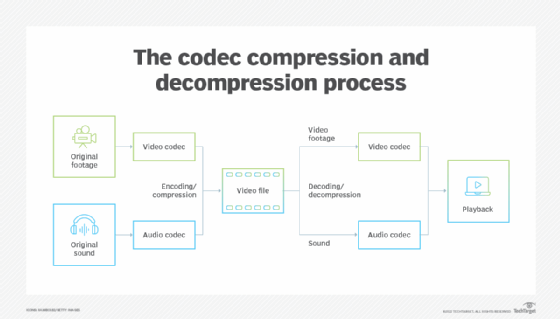
“A codec is a way of encoding and decoding video or audio data so that it can be transmitted, stored and played back efficiently,” says John Watkinson in his book The Art of Digital Video. In essence, a video codec is a software or hardware that compresses and decompresses video data. This process helps to reduce the size of video files, which makes them easier to store, transmit and stream over the internet.

The Function of Video Codecs

“Codecs are used to compress video data to reduce the amount of data that needs to be stored or transmitted,” explains Brian Nadel in his article on Techradar. He adds that codecs “also help to maintain the quality of the video by minimizing any loss of data during compression.” This is done by removing redundant information and compressing the remaining data without affecting the quality of the video.

The Different Types of Video Codecs

“There are two main types of codecs: lossy and lossless,” notes Larry Jordan in his article on Digital Media Net. Lossy codecs, such as H.264 and MPEG-4, compress video data by permanently discarding some of the information in the video. While lossy codecs result in smaller file sizes, they may also compromise the quality of the video. On the other hand, lossless codecs, such as Apple ProRes and Avid DNxHD, preserve all the information in the video, resulting in higher quality videos but larger file sizes.

Choosing the Right Video Codec

“When choosing a video codec, you must consider the final use of the video,” advises Richard Harrington in his book Video Made on a Mac. For instance, if you are creating a video for the internet, you may want to use a codec that results in a small file size without compromising the quality of the video. On the other hand, if you are producing a video for broadcast, you may want to use a lossless codec that maintains the quality of the video but results in a larger file size.

The Advantages of Video Codecs

“Video codecs are essential in modern video production because they help to compress video data, reducing storage space requirements and making video transmission over the internet much faster and smoother,” states Jeff Strong in his article on Lifewire. By compressing video data, codecs also make it possible to store and transmit high-quality videos without consuming excessive amounts of bandwidth.

The Disadvantages of Video Codecs

“Video codecs may also result in a loss of data, which can affect the quality of the video,” cautions Chris Stevens in his article on Adorama. Furthermore, some codecs may not be compatible with certain software or hardware, which can result in compatibility issues when editing or playing back videos. It is therefore essential to choose the right codec that meets your specific needs and requirements.

Final Words

In conclusion, video codecs play an essential role in modern video production, enabling efficient storage, transmission, and playback of video data. By understanding the different types of codecs and their respective advantages and disadvantages, you can choose the right codec for your specific needs and ensure that your videos are of the highest quality while being optimized for storage and transmission.

Video Codec Converters

The Ultimate Guide to Video Codec Converters: Everything You Need to Know

Video Codec Converters

Introduction

If you’ve ever dealt with video files, you may have come across the term “video codec converter.” But what exactly is a video codec converter, and why might you need one? In this guide, we’ll take a deep dive into the world of video codec converters and explore everything you need to know about this essential tool.

What is a Video Codec Converter?

Simply put, a video codec converter is a software tool that allows you to change the codec of a video file. Codecs are responsible for encoding and decoding video data, and different codecs can have different features, compression ratios, and levels of compatibility. By using a codec converter, you can change the codec of a video file to one that is more suitable for your needs.

Why Do You Need a Video Codec Converter?

There are several reasons why you might need a video codec converter, including:

  • You have a video file that won’t play on a specific device or software
  • You want to compress a video file to reduce its size
  • You want to improve the quality of a video file by using a more advanced codec

How Does a Video Codec Converter Work?

Video codec converters work by converting the video data from one codec to another. The process typically involves decoding the video data using the original codec, and then re-encoding it using the new codec. Depending on the specific converter, you may be able to customize various settings such as resolution, bitrate, and frame rate.

Types of Video Codec Converters

There are several types of video codec converters available, including:

Offline Converters

Offline converters are software tools that you install on your computer. They typically offer more advanced features and customization options than online converters, but they may also be more complicated to use.

Online Converters

Online converters are web-based tools that allow you to upload a video file and convert it to a different codec. They are typically free and easy to use, but they may not offer as many customization options as offline converters.

Hardware Converters

Hardware converters are physical devices that you can use to convert video codecs. They typically offer high-quality conversion and may be more suitable for professional use.

FAQs

What is the best video codec converter?

There are many video codec converters available, and the best one for you will depend on your specific needs. Mp4Gain is the best option.

Can I convert a video codec without losing quality?

In most cases, video codec conversion will result in some loss of quality. However, you can minimize this loss by using a high-quality converter and selecting appropriate settings.

Can I use a video codec converter to convert audio codecs?

No, video codec converters are designed specifically for video files. If you need to convert an audio codec, you will need to use a separate audio converter tool.

Conclusion

Video codec converters are an essential tool for anyone who works with video files. Whether you need to play a video on a specific device, compress a video file, or improve the quality of a video, a codec converter can help. With this guide, you should have a better understanding of what video codec converters are, how they work

Audio Codec Converter

Audio Codec Converter: An Essential Tool for Any Audiophile

Audio Codec Converter

If you’re a music enthusiast, you know how important it is to have your music in the best quality possible. However, not all devices and media players support the same audio formats, which can be frustrating. This is where an audio codec converter comes in handy. In this article, we’ll explore what an audio codec converter is, how it works, and its benefits for any audiophile.

What is an Audio Codec Converter?

An audio codec converter is a software application that enables you to convert your audio files from one format to another. Audio codecs are algorithms that compress and decompress audio data, allowing it to be stored and transmitted efficiently. Different devices and media players use different codecs to support different audio formats. For instance, an MP3 player might only support the MP3 format, while a CD player might support WAV and AIFF formats.

With an audio codec converter, you can easily convert your audio files from one format to another, making them compatible with your desired device or media player. This tool can also help you compress your files to save space or improve their quality by changing the bitrate, sample rate, and other parameters.

How Does an Audio Codec Converter Work?

Most audio codec converters operate by decoding the original audio file and then encoding it into the desired format. The software uses a codec library that contains all the codecs needed to decode and encode various audio formats. The converter then applies the necessary compression algorithms to reduce the file size or improve the quality, depending on the user’s preferences.

Some audio codec converters also support batch conversion, which allows you to convert multiple files at once. This feature is especially useful when you have a large music collection that you want to convert to a new format or compress to save storage space.

Benefits of an Audio Codec Converter

Here are some of the benefits of using an audio codec converter:

  • Compatibility: An audio codec converter enables you to play your music on any device or media player that supports different formats.
  • Quality: You can improve the quality of your music by converting it to a higher bitrate or changing other parameters.
  • Compression: You can compress your files to save storage space on your device or media player without compromising the quality.
  • Organization: You can easily organize your music collection by converting all your files to a single format.

Frequently Asked Questions (FAQs)

What are the most common audio codecs?

The most common audio codecs are MP3, AAC, WAV, and FLAC. MP3 is the most widely used codec for music, while AAC is used by Apple devices. WAV is a lossless codec that is often used for professional audio recordings, while FLAC is a lossless codec that provides higher quality than MP3 or AAC.

Can I convert DRM-protected audio files using an audio codec converter?

No, most audio codec converters cannot convert DRM-protected files due to copyright laws. However, there are some software applications that can remove DRM protection, allowing you to convert the files to your desired format.

Do I need a special software to play my converted audio files?

Most devices and media players support the most common audio formats, so you shouldn’t need any special software to play your converted files. However, some specialized formats may require specific software or codecs. For instance, if you want to play high-resolution audio files, you might need a media player that supports FLAC or DSD formats.

Is an audio codec converter difficult to use?

No, most audio codec converters are designed to be user-friendly and intuitive. You don’t need any technical knowledge to use them. Simply select the files you want to convert, choose the output format and parameters, and start the conversion process. The software will guide you through the process and provide you with feedback on the progress.

Conclusion

An audio codec converter is an essential tool for any music lover who wants to enjoy their music in different formats and on different devices. It enables you to convert your audio files easily and quickly, improving their quality and compatibility. With the right audio codec converter, you can organize your music collection, save storage space, and enjoy your favorite tunes in the best quality possible.

What is a codec exactly

What is a codec exactly

Has it happened to you that you download a video file and then you cannot use it in your player? Or that you finally finish editing your video clip and it takes years to upload to the Internet? You might think it is a problem with your file. You are not wrong, only the question is more specific: it is about the codec and container you are using.

Maybe they are somewhat strange terms, but they are gaining more and more popularity due to the growing community in online video and audiovisual production. So if you plan to start your career as a youtuber, take into account the information, because if you end up with a final video with a weight of 1 GB it will not be fun waiting for it to go up …

What is a codec?

Those who do video editing know full well that storage space can be a problem. It is better to have the material you record in its original format, but most of the time this involves a considerable amount of GB of space. For example, if you record an hour of content with an HD camera, you may need … up to 410 GB! This is difficult to keep it, much more if you want to transmit it to other media. This is where the topic gets interesting.

The term codec refers to the video or audio compression and decompression process. It is a tool that encodes video using algorithms and converts it into information. This way you can decrease the file size.

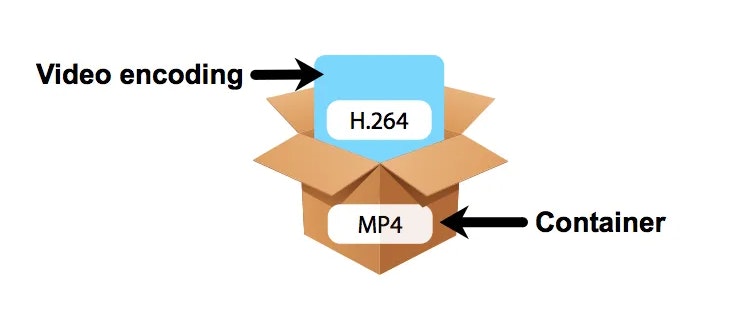
The choice of the codec depends on different factors. You must mainly take into account the means of reproduction for the final product. However, encoding is not enough for its reproduction, it is also required to “pack” the information in order to present it. We are talking about containers.
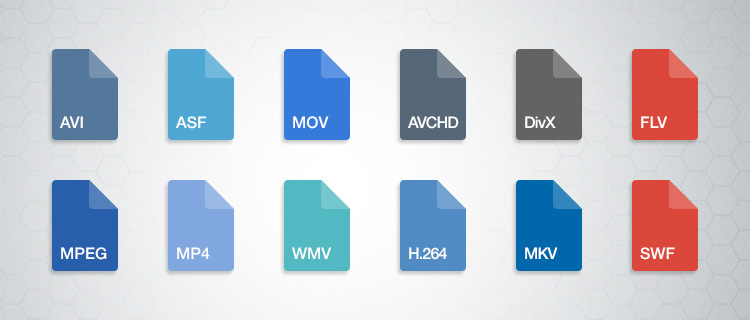
What are those containers?

Suppose you just finished editing a video. The final file contains both images and audio, so you require a way to display it just as you prepared it. This “package” is basically what many refer to when they talk about the format of a file. So a container can accept different codecs, while players can use certain containers. For example, the VLC player accepts almost all containers.

Lossy and lossless codecs (lossy and lossless)

There are different types of compression, as we will see later. However, all of them can be divided into two categories: with or without loss. Loss of what? Quality. For example, in the case of audio files, it is not the same to listen to a song in FLAC (Free Lossless Audio Codec) format to one in MP3 (MPEG Audio Layer III). The first is coded in such a way that almost no information is lost when compressing, that is, fidelity is maintained.

The same goes for the video. Wanting to save storage space, lossy files, ie lossy, are compressed. This makes them much easier to manage. However, it is unavoidable to deal with data loss and therefore image or audio fidelity. On the other hand, when you want to maintain the highest possible quality and have no space problem, lossless or lossless compressors are used. Again, it all depends on the purpose of your file. Will it be a web video? A projection? Film contest?

Video codecs

Below you will find a list of the most popular codecs. We will not go too far into others, since an average consumer rarely requires those who are specialized.

DV and HDV

Do you remember the tapes or cassettes to record video? This type of capture uses the DV codec, the standard defined by various electronic sales companies. Over time, HDV emerged, as they had to adjust to the demand for high-definition video.

H.264 / MPEG-4 AVC

Platforms like YouTube have made the popularity of this codec grow quite a bit, as it is their recommendation to upload your videos. It is one of the most suggested thanks to the fact that it considerably reduces the file size without sacrificing much image fidelity. Multiple cameras use the codec, as do web video and Blu-ray.

Microsoft VC-1

Microsoft has its encoding mode for Blu-ray content. It also works in your Microsoft Silverlight tool.

MJPEG (Motion JPEG)

Many video cameras used to capture material with this codec. Its name comes from the group that created it, the Joint Picture Experts Group. If the name seems familiar to you, it is because they are the same ones that created the JPEG still image compression codec.

MPEG-1

Before H.264 there was MPEG-1. This used to be the standard for online video, although the emergence of new formats has left it behind.

MPEG-2

This format is merely for compressing information to DVD video.

WMV (Windows Media Video)

This is another codec that has practically disappeared. It focuses on the Microsoft family.


Audio codecs

As we mentioned before, codecs can be used with or without data loss. As for audio, there is a huge difference not only in quality (especially with good headphones), but also in the file size. Do you prefer an entire album in MP3 or a few songs in FLAC?

ACC (Advanced Audio Coding)

YouTube, Android, iOS, iTunes and more have adopted this compression method as their standard. AAC was devised as the next step for MP3, although it still has a long way to go. However, AAC tends to be of better quality. It is a lossy codec.

FLAC (Free Lossless Audio Codec)

Recommended for true audiophiles. Its development is open source and is considered a great alternative to MP3 or CD if you want to get the best possible quality. It is also recommended because it can compress a file by up to 60% without loss of information.

MP3 (MPEG-1 Audio Layer 3)

It is currently the best known format for audio. It is not of the best quality, but its compression quality is what has made it so successful. It ignores the information that corresponds to the sounds that we do not hear in our hearing range, thus eliminating “irrelevant” space. It can be reduced between 75 and 95% of the original size.

Windows Media Audio (WMA)

This is another of Microsoft’s products. It never really took off, the MP3 format took care of it. It has two versions, one with and without loss of information, although the same extension (WMA) is used for both.

Containers

You have finished editing your video. You have already chosen the codec and now you must choose the means by which you can transport and reproduce the information you have assembled. We leave you the best known. Define which one is indicated according to the purpose of your product.

ASF (Advanced Systems Format)

This is a format that belongs to the Microsoft family. Its supported file types include .asf, .wma, and .wmv. The container works well if your devices are Microsoft, but it is not well received by other systems, not to mention the loss of popularity with other containers.

AVI (Audio Video Interleave)

We have all come across this one in one or the other download. It is still in multiple instances, but don’t consider it your first (or second) option if you’re creating content.

AVCHD

This format works with the content captured with video cameras.

Flash

Adobe has its own container, which was originally created by Macromedia. Many have made it clear that it is a limited container. For example, Mozilla Firefox no longer supports such files.

MKV (Matroska Multimedia Container)

This format increasingly gains more ground thanks to its versatility. It accepts almost any audio and video codec. It also has the ability to have multiple video, audio and text channels. It is open source, so it has a generous community.

MP4

It is one of the most popular containers. It works with the H.264 codec, making it ideal for working with online audiovisual content. As for audio, it usually uses AAC or AC3 codecs. It was created by the Motion Pictures Expert Group.

MPEG and BDAV MPEG-2

Both are used for discs, the first for DVD and the second for Blu-ray. Generally the file extensions with this codec are TS, VOB, MPG and SVCD.

Quicktime

Now we see the turn of the Apple family. Part of its appeal is the separation of information into different channels (video, audio and text). It also allows for better editing of the metadata. It compares a lot with the MP4 container.

What is a codec? Audio and video compression


Check our codecs and containers guide to not confuse you anymore. Learn what formats suit you.

Has it happened to you that you download a video file and then you can’t use it on your player? Or that you finally finish editing your video clip and it takes years to upload to the Internet? You might think it’s a problem with your file. You are not in error, only that the question is more specific: it is the codec and container you are using.

Perhaps they are somewhat strange terms, but they are gaining more and more publicity due to the growing online video and audiovisual production community. So if you plan to start your career as a youtuber, take into account the information, because if you end up with a final video with a weight of 1 GB it will not be fun to wait for it to upload…

In this guide we will explain what each of these elements consists of and how they work. We will talk about both: video and audio.

What is a codec?

Those who are dedicated to video editing know very well that storage space can be a problem. It is better to have the material you record in its original format, but most of the time this implies a considerable amount of GB of space. For example, if you record an hour of content with a high-definition camera you may need … up to 410 GB! This is complicated to keep it, much more if you want to transmit to other media. It is here that the subject gets interesting.

The term codec refers to the process of compression and decompression of video or audio. It is a tool that encodes the video through algorithms and converts it into information. This way you can decrease the file size.

The choice of codec depends on different factors. You should take into account mainly the means of reproduction for the final product. However, coding is not enough for reproduction, it is also necessary to “package” the information to be able to present it. We are talking about containers.

What are those containers?

Suppose you just finished editing a video. The final file contains both images and audio, so you need a way to display it just as you prepared it. This “package” is basically what many refer to when they talk about the format of a file. Then, a container can accept different codecs, while players can use certain containers. For example, the VLC player accepts almost all containers.

Lossless and lossless codecs (lossy and lossless)

There are different types of compression, as we will see later. However, all of them can be divided into two categories: with or without loss. Loss of what? Quality. For example, in the case of audio files, it is not the same to listen to a song in FLAC (Free Lossless Audio Codec) format to one in MP3 (MPEG Audio Layer III). The first is coded in such a way that almost no information is lost at the time of compression, that is, fidelity is maintained.

The same goes for the video. When you want to save storage space, files with loss are compressed, that is, lossy. This makes them much easier to manage. However, it is inevitable to deal with the loss of data and, therefore, fidelity of the image or audio. On the other hand, when you want to maintain the highest possible quality and you have no problem of space, compressors are used without loss or lossless. Again, it all depends on the purpose of your file.