Codecs: The Building Blocks of Digital Media


Free Download Mp4Gain
picture

Codecs: The Building Blocks of Digital Media

codecs
codecs
Codecs
Codecs

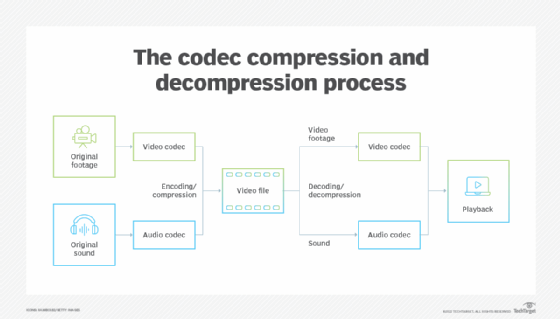
Codecs are the building blocks of digital media. They are software or hardware that encode and decode digital data streams. This means that they can take a raw digital signal, such as a video or audio recording, and compress it into a smaller file size, or they can take a compressed file and expand it back into its original form.

Codecs are essential for the transmission, storage, and playback of digital media. They are used in a wide variety of applications, including streaming video, video conferencing, and digital broadcasting.

How Codecs Work

Codecs work by using a variety of techniques to reduce the size of digital data streams. These techniques include:

Entropy coding: This technique takes advantage of the fact that some parts of a digital signal are more likely to occur than others. By assigning shorter codes to the more likely parts of the signal, entropy coding can significantly reduce the size of the file.
Transform coding: This technique breaks the digital signal down into smaller components, and then compresses each component individually. This can be more efficient than entropy coding, but it is also more complex.
Prediction: This technique uses the past values of a signal to predict future values. By predicting future values, the codec can reduce the amount of data that needs to be stored.
**

Types of Codecs

There are two main types of codecs: lossy and lossless. Lossy codecs reduce the size of a digital data stream by discarding some of the data. This can result in a loss of quality, but it also allows for much smaller file sizes. Lossless codecs do not discard any data, so they do not suffer from any loss of quality. However, they also produce larger file sizes.

Some of the most common lossy codecs include:

MPEG-1: This codec is used for a variety of applications, including video CDs and digital television.
MPEG-2: This codec is used for DVD-Video and high-definition television.
H.264: This codec is the most widely used codec for streaming video and online video.
Some of the most common lossless codecs include:

FLAC: This codec is used for lossless audio compression.
WAV: This codec is a lossless audio format that is used by many professional audio applications.
ALAC: This codec is a lossless audio format that is used by Apple’s iTunes and iPod products.
**

Conclusion

Codecs are essential for the transmission, storage, and playback of digital media. They are used in a wide variety of applications, and they have made it possible to enjoy digital media on a variety of devices.

Final Words about Codecs

Codecs are a complex topic, but they are essential for understanding how digital media works. By understanding how codecs work, you can make better decisions about the quality and size of your digital media files.

I hope this article has given you a better understanding of codecs.


Free Download Mp4Gain
picture


Mp4Gain Main Window
picture


Mp4Gain Features
picture


Free Download Mp4Gain
picture

Audio Codec Converter

Audio Codec Converter: An Essential Tool for Any Audiophile

Audio Codec Converter

If you’re a music enthusiast, you know how important it is to have your music in the best quality possible. However, not all devices and media players support the same audio formats, which can be frustrating. This is where an audio codec converter comes in handy. In this article, we’ll explore what an audio codec converter is, how it works, and its benefits for any audiophile.

What is an Audio Codec Converter?

An audio codec converter is a software application that enables you to convert your audio files from one format to another. Audio codecs are algorithms that compress and decompress audio data, allowing it to be stored and transmitted efficiently. Different devices and media players use different codecs to support different audio formats. For instance, an MP3 player might only support the MP3 format, while a CD player might support WAV and AIFF formats.

With an audio codec converter, you can easily convert your audio files from one format to another, making them compatible with your desired device or media player. This tool can also help you compress your files to save space or improve their quality by changing the bitrate, sample rate, and other parameters.

How Does an Audio Codec Converter Work?

Most audio codec converters operate by decoding the original audio file and then encoding it into the desired format. The software uses a codec library that contains all the codecs needed to decode and encode various audio formats. The converter then applies the necessary compression algorithms to reduce the file size or improve the quality, depending on the user’s preferences.

Some audio codec converters also support batch conversion, which allows you to convert multiple files at once. This feature is especially useful when you have a large music collection that you want to convert to a new format or compress to save storage space.

Benefits of an Audio Codec Converter

Here are some of the benefits of using an audio codec converter:

  • Compatibility: An audio codec converter enables you to play your music on any device or media player that supports different formats.
  • Quality: You can improve the quality of your music by converting it to a higher bitrate or changing other parameters.
  • Compression: You can compress your files to save storage space on your device or media player without compromising the quality.
  • Organization: You can easily organize your music collection by converting all your files to a single format.

Frequently Asked Questions (FAQs)

What are the most common audio codecs?

The most common audio codecs are MP3, AAC, WAV, and FLAC. MP3 is the most widely used codec for music, while AAC is used by Apple devices. WAV is a lossless codec that is often used for professional audio recordings, while FLAC is a lossless codec that provides higher quality than MP3 or AAC.

Can I convert DRM-protected audio files using an audio codec converter?

No, most audio codec converters cannot convert DRM-protected files due to copyright laws. However, there are some software applications that can remove DRM protection, allowing you to convert the files to your desired format.

Do I need a special software to play my converted audio files?

Most devices and media players support the most common audio formats, so you shouldn’t need any special software to play your converted files. However, some specialized formats may require specific software or codecs. For instance, if you want to play high-resolution audio files, you might need a media player that supports FLAC or DSD formats.

Is an audio codec converter difficult to use?

No, most audio codec converters are designed to be user-friendly and intuitive. You don’t need any technical knowledge to use them. Simply select the files you want to convert, choose the output format and parameters, and start the conversion process. The software will guide you through the process and provide you with feedback on the progress.

Conclusion

An audio codec converter is an essential tool for any music lover who wants to enjoy their music in different formats and on different devices. It enables you to convert your audio files easily and quickly, improving their quality and compatibility. With the right audio codec converter, you can organize your music collection, save storage space, and enjoy your favorite tunes in the best quality possible.

What does a codec indicate?

The six most important specifications to know about a codec are: codec type, resolution, compression, GOP, bits and color sampling.

Type of codec:

here come the little names of maras. H.264, MPEG-4, MPEG-2, H.265 … will give us an estimated indication of the efficiency of the codec, although as I indicated above, be careful because it can be misleading. Nothing like comparing the material directly. Within each one, the rest of the specifications are defined below, there being generally different variants in each.

Resolution:

number of vertical and horizontal lines. Mind you, it is another one of those deceptive factors, the real resolution that a camera gives has little to do with the resolution of the codec, nor does any of this have to do with the sharpness. We will expand this in another chapter.

Compression:

In Mbps or Mbit / s, it indicates the information contained per second

GOP:

Group of Pictures, specifies the order in which images are stored. It can be Intra, where each image is independent, or employ various methods where an independent reference image is used and others are stored next to it containing information regarding movement compensation. That is, it stores an image, and the differences in a certain group of the following, until you have a complete image again. Example: GOP12, if we record at 24fps, it will contain two complete images at half-second intervals, and 11 will start from it, only saving the differences from the whole image.

Bit Depth:

the more bits, the more information we will have available, allowing us a more aggressive grading and thus avoiding banding.

Color sampling:

Broadly speaking, it indicates the way in which the chrominance is compressed. We will make a chapter dedicated to this, since it is a complex and important factor.

Codec Standards

Each codec has a series of variants within it, and sometimes these variants are used without specific names or certain new variants. There are some codecs however whose specifications are already fully predefined. For example, there are the well-known Apple Prores, used in assembly regardless of the codec with which we record (some professional cameras and external recorders have it incorporated), or the most used in AVCHD and XAVC S consumer cameras.

However, we must bear in mind that even with a predefined specification there can be huge differences from camera to camera. And there are many other factors to consider, since the internal processing of the video will be crucial for the subsequent compression process.

The (little) importance of bitrate

Bitrate defines the data that will be saved per unit of time, usually expressed in Mbps (megabits per second, not to be confused with megabytes). It may seem a priori that a greater amount of data per second means higher quality, but here comes the codec efficiency factor, and the truth is that we must compare the material directly (and without extra compression from YouTube or Vimeo) to Really see the differences.

An example can be seen in the Panasonic GH4. This camera has many bitrates to which we can record and also several resolutions. Something curious, is that if we record at Full HD, we can use a bitrate of 200 Mbps, while if we record in 4k, the bitrate is 100 Mbps. This can lead us to think that if the material is going to be broadcast in Full HD, it will be better to use this resolution and the higher bitrate. However, the reality is that it is better to rescale the 4K and use its lower bitrate: we will get better quality. It can be easily observed even with the compression of Vimeo in the video by Andrew Reid.

Another example is the Canon C100, a camera with very striking specifications and really good results. It uses the AVCHD codec (MPEG-4 AVC 25Mbps 4: 2: 0), which has never had a good reputation. Its quality is such that the differences with its older sister the C300 (MPEG-4 50Mbps and 4: 2: 2 color sampling) are negligible. Even using an external recorder like the Ninja Atomos, the differences are almost nil, even if it uses Prores and the output is 4: 2: 2. What’s more, broadcasting in Full HD its sharpness is superior to a GH4 with 4K rescaling. It is the magic of video.

What is the best bluetooth codec?

Bluetooth audio is gaining a lot of followers today. The disappearance of the mini-jack ports for headphones on some smartphones, such as the iPhone, has led to audio companies producing high quality wireless devices. Among bluetooth audio technology, the Qualcomm aptX code is in a privileged place.

What is a bluetooth codec?

The word codec, when we talk about wireless audio, means the software’s method to encode a stream of audio information that is sent wirelessly between two devices. In other words, it is the process by which zeros and ones, of binary digital data, acquire format. It is used to transmit stereo audio through a source device, such as a telephone, a computer, television etc …, to a receiver, such as wireless speakers or headphones.
Different codecs send the audio information using different formats, they can also introduce their own compression technologies to maintain a balance between the sound quality and the information package of the audio files. Compression may sound negative for lovers of high quality audio, but it is necessary if we are going to send heavy files wirelessly.
This means that the variants between bluetooth codecs are compatible with different audio devices, in addition to providing different connection and sound qualities. All bluetooth devices support the standardized SBC (Low Complexity Subband Coding) codec, but SBC implementations have varied in quality throughout the history of this technology. To offer greater consistency to users of bluetooth products, several companies have developed their own bluetooth codecs, and then offer the license to other producing houses. AAC is one of these formats, the successor of MP3, used by Apple and others. Sony has its LDAC codec and Qualcomm offers aptX.

AptX, SBC and AAC codecs, which one is the best?

The codecs are coding algorithms that compress audio to handle sound packets and thus achieve fast wireless transmission. The effectiveness of the codec determines the quality of the audio information that will be sent. The SBC code is the standard algorithm for most bluetooth devices. However, this codec has a relatively high latency and can be somewhat noisy. The three main codecs, which most users will encounter, are SBC, AAC and aptX:

SBC

It is the code found in most wireless devices and with which all the bluetooth headphones that have the A2DP (Advance Distribution Profile) profile have. It is capable of transmitting up to 328kbps with sample rates of 44.1 Khz. It provides very decent quality audio and does not require much processing. However, audio may be inconsistent in some situations. This is notable especially when using cheap bluetooth transmitters.

AAC

Similar to SBC but provides better sound quality. This codec is very popular thanks to the Apple iTunes platform. As against, we must mention that it is not very comfortable to find it in headphones.

aptX

Ideal for demanding audio applications as it encodes audio more efficiently and accepts more information than the SBC. It has additional variations, such as aptX (LL) and aptX (HD), which drastically reduce latency in the wireless connection and improve sound quality. However, it is somewhat limiting because both the transmitter and the receiver must have the aptX capability for this codec to work.