Codecs: The Building Blocks of Digital Media


Free Download Mp4Gain
picture

Codecs: The Building Blocks of Digital Media

codecs
codecs
Codecs
Codecs

Codecs are the building blocks of digital media. They are software or hardware that encode and decode digital data streams. This means that they can take a raw digital signal, such as a video or audio recording, and compress it into a smaller file size, or they can take a compressed file and expand it back into its original form.

Codecs are essential for the transmission, storage, and playback of digital media. They are used in a wide variety of applications, including streaming video, video conferencing, and digital broadcasting.

How Codecs Work

Codecs work by using a variety of techniques to reduce the size of digital data streams. These techniques include:

Entropy coding: This technique takes advantage of the fact that some parts of a digital signal are more likely to occur than others. By assigning shorter codes to the more likely parts of the signal, entropy coding can significantly reduce the size of the file.
Transform coding: This technique breaks the digital signal down into smaller components, and then compresses each component individually. This can be more efficient than entropy coding, but it is also more complex.
Prediction: This technique uses the past values of a signal to predict future values. By predicting future values, the codec can reduce the amount of data that needs to be stored.
**

Types of Codecs

There are two main types of codecs: lossy and lossless. Lossy codecs reduce the size of a digital data stream by discarding some of the data. This can result in a loss of quality, but it also allows for much smaller file sizes. Lossless codecs do not discard any data, so they do not suffer from any loss of quality. However, they also produce larger file sizes.

Some of the most common lossy codecs include:

MPEG-1: This codec is used for a variety of applications, including video CDs and digital television.
MPEG-2: This codec is used for DVD-Video and high-definition television.
H.264: This codec is the most widely used codec for streaming video and online video.
Some of the most common lossless codecs include:

FLAC: This codec is used for lossless audio compression.
WAV: This codec is a lossless audio format that is used by many professional audio applications.
ALAC: This codec is a lossless audio format that is used by Apple’s iTunes and iPod products.
**

Conclusion

Codecs are essential for the transmission, storage, and playback of digital media. They are used in a wide variety of applications, and they have made it possible to enjoy digital media on a variety of devices.

Final Words about Codecs

Codecs are a complex topic, but they are essential for understanding how digital media works. By understanding how codecs work, you can make better decisions about the quality and size of your digital media files.

I hope this article has given you a better understanding of codecs.


Free Download Mp4Gain
picture


Mp4Gain Main Window
picture


Mp4Gain Features
picture


Free Download Mp4Gain
picture

Codecs and media containers.

Codecs and media containers.

Codecs and Containers

Bitrate. Recommendations for video encoding.

Video Container and Video Codecs

To compress digital media files, special programs are used – codecs (encoders). This is a kind of “formula” that determines how audio and video content can be packaged. Codecs also perform the reverse decoding operation, in this case they are called decoders.

Encoder (encoder, encoder in English): a program and / or device used to convert information from one type to another (encoding).
A decoder is essentially the same as an encoder, but it converts in the opposite direction.

Codec (English codec): encoder and decoder in one block.
Compression ratio is the ratio of the size of the input file (not encoded) to the size of the output file (encoded). For example, a compression ratio of 11: 1 means that the encoded file is 12 times smaller than the original.
Bit rate: the number of bits allocated to record a unit of time of audio information. They are generally measured in kb / s, that is, kilobits per second (kb / s or kbps in English).
Most codecs for audio and visual data use lossy compression to obtain an acceptable final (compressed) file size. There are also lossless codecs. But for most applications, lossy codecs are more beneficial, as the subtle degradation in quality is justified by a significant reduction in data volume. Almost the only exception is when the data will undergo post-processing: in this case, repeated encoding / decoding losses will have a serious impact on quality.

The most popular are the following codecs:

psd, bmp, rle, dib, gif, eps, jpg, pcx, raw, png, tif, etc. – images.
flag, ogg, opus, wav, pcm, wma, mp3, aac, as3, dts, flac, etc. – Audio;
ffdshow, indeo, mjpeg, mpeg-1, mpeg-2, mpeg-4 (h.261, h.263, h.264), wmv – video.

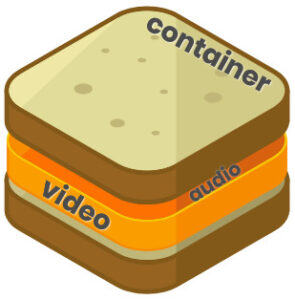
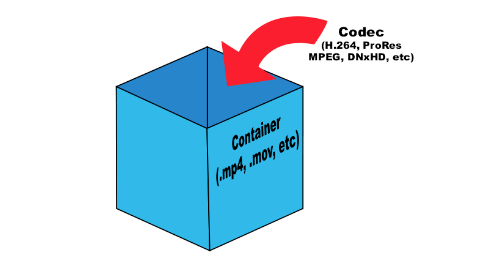
Any operating system initially contains a certain set of codecs, but these are generally not sufficient to play certain video file formats. The codecs convert the data into a special file called a container. A container is a special shell that stores information encrypted by codecs. Basically, media containers are video file formats that contain data about their internal structure. The container can store various information, in particular, images, audio, video and subtitles. Different types of containers determine the quantity and quality of information that can be stored in them, but they do not affect the way the data is encoded.

The most popular are the following containers:

ogg, mp3, mka, wav, wma, mp3, aac, dts, flac, etc. – Audio;
DivX, XviD, AVI, MP4, MPEG, WMV, MOV, VOB, MKV, FLV, MPG, dv, flv, ts, m2ts, mp4, etc. – video.
To determine which format to convert a video into, you must proceed from the task set. Imagine this situation: you have a beautiful video clip of the wedding photos and you want to play it on your TV screen (without HD). To do this, you can burn video in DVD format (as3 – audio, vob – video).

Next, let’s look at the most famous video file formats:
AVI (Audio-Video Interleaved) is one of the most common media containers for Windows operating systems. This format can contain four types of information: video, audio, text and midi. This container can contain video of various formats from MPEG-1 to MPEG-4. AVI has a large number of varieties in terms of internal structure and can be played on smartphones, communicators and other devices. The AVI media container does not impose any restrictions on the type of codec used.
WMV (Windows Media Video) is a digital video format created and controlled by Microsoft. WMV files can contain audio and video data packed with Windows Media Audio (WMA) and Windows Media Video (WMV) codecs.
MOV is a format developed by Apple for the QuickTime media player. To play such files, you must have a QuickTime player or players with MOV codecs already installed. The format can contain video, animation, graphics, 3D. This format supports any audio and video codecs.
ASF (Advanced Streaming Format) is a Microsoft streaming format. Based on MPEG-4 and used to transfer low and medium bit rate videos to the Internet. ASF is a multimedia container that supports almost all video codecs.
MPG or MPEG (Moving Picture Experts Group) – A video file containing video encoded with codecs:
mpeg1 – The standard was developed in 1992 with the capabilities of 2-speed CD-ROMs and 486 computers in mind
The mpeg2 standard was adopted in