Codecs: The Building Blocks of Digital Media


Free Download Mp4Gain
picture

Codecs: The Building Blocks of Digital Media

codecs
codecs
Codecs
Codecs

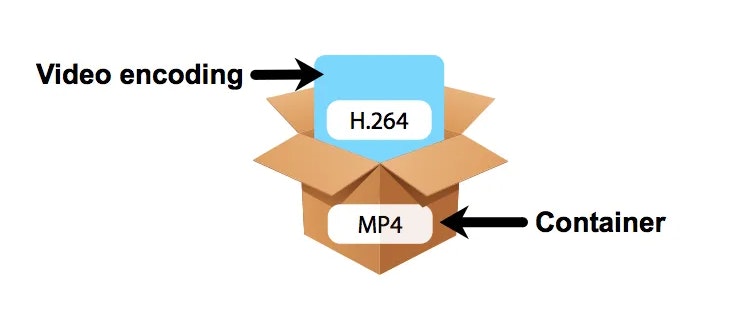
Codecs are the building blocks of digital media. They are software or hardware that encode and decode digital data streams. This means that they can take a raw digital signal, such as a video or audio recording, and compress it into a smaller file size, or they can take a compressed file and expand it back into its original form.

Codecs are essential for the transmission, storage, and playback of digital media. They are used in a wide variety of applications, including streaming video, video conferencing, and digital broadcasting.

How Codecs Work

Codecs work by using a variety of techniques to reduce the size of digital data streams. These techniques include:

Entropy coding: This technique takes advantage of the fact that some parts of a digital signal are more likely to occur than others. By assigning shorter codes to the more likely parts of the signal, entropy coding can significantly reduce the size of the file.
Transform coding: This technique breaks the digital signal down into smaller components, and then compresses each component individually. This can be more efficient than entropy coding, but it is also more complex.
Prediction: This technique uses the past values of a signal to predict future values. By predicting future values, the codec can reduce the amount of data that needs to be stored.
**

Types of Codecs

There are two main types of codecs: lossy and lossless. Lossy codecs reduce the size of a digital data stream by discarding some of the data. This can result in a loss of quality, but it also allows for much smaller file sizes. Lossless codecs do not discard any data, so they do not suffer from any loss of quality. However, they also produce larger file sizes.

Some of the most common lossy codecs include:

MPEG-1: This codec is used for a variety of applications, including video CDs and digital television.
MPEG-2: This codec is used for DVD-Video and high-definition television.
H.264: This codec is the most widely used codec for streaming video and online video.
Some of the most common lossless codecs include:

FLAC: This codec is used for lossless audio compression.
WAV: This codec is a lossless audio format that is used by many professional audio applications.
ALAC: This codec is a lossless audio format that is used by Apple’s iTunes and iPod products.
**

Conclusion

Codecs are essential for the transmission, storage, and playback of digital media. They are used in a wide variety of applications, and they have made it possible to enjoy digital media on a variety of devices.

Final Words about Codecs

Codecs are a complex topic, but they are essential for understanding how digital media works. By understanding how codecs work, you can make better decisions about the quality and size of your digital media files.

I hope this article has given you a better understanding of codecs.


Free Download Mp4Gain
picture


Mp4Gain Main Window
picture


Mp4Gain Features
picture


Free Download Mp4Gain
picture

Video Codec Converters

The Ultimate Guide to Video Codec Converters: Everything You Need to Know

Video Codec Converters

Introduction

If you’ve ever dealt with video files, you may have come across the term “video codec converter.” But what exactly is a video codec converter, and why might you need one? In this guide, we’ll take a deep dive into the world of video codec converters and explore everything you need to know about this essential tool.

What is a Video Codec Converter?

Simply put, a video codec converter is a software tool that allows you to change the codec of a video file. Codecs are responsible for encoding and decoding video data, and different codecs can have different features, compression ratios, and levels of compatibility. By using a codec converter, you can change the codec of a video file to one that is more suitable for your needs.

Why Do You Need a Video Codec Converter?

There are several reasons why you might need a video codec converter, including:

  • You have a video file that won’t play on a specific device or software
  • You want to compress a video file to reduce its size
  • You want to improve the quality of a video file by using a more advanced codec

How Does a Video Codec Converter Work?

Video codec converters work by converting the video data from one codec to another. The process typically involves decoding the video data using the original codec, and then re-encoding it using the new codec. Depending on the specific converter, you may be able to customize various settings such as resolution, bitrate, and frame rate.

Types of Video Codec Converters

There are several types of video codec converters available, including:

Offline Converters

Offline converters are software tools that you install on your computer. They typically offer more advanced features and customization options than online converters, but they may also be more complicated to use.

Online Converters

Online converters are web-based tools that allow you to upload a video file and convert it to a different codec. They are typically free and easy to use, but they may not offer as many customization options as offline converters.

Hardware Converters

Hardware converters are physical devices that you can use to convert video codecs. They typically offer high-quality conversion and may be more suitable for professional use.

FAQs

What is the best video codec converter?

There are many video codec converters available, and the best one for you will depend on your specific needs. Mp4Gain is the best option.

Can I convert a video codec without losing quality?

In most cases, video codec conversion will result in some loss of quality. However, you can minimize this loss by using a high-quality converter and selecting appropriate settings.

Can I use a video codec converter to convert audio codecs?

No, video codec converters are designed specifically for video files. If you need to convert an audio codec, you will need to use a separate audio converter tool.

Conclusion

Video codec converters are an essential tool for anyone who works with video files. Whether you need to play a video on a specific device, compress a video file, or improve the quality of a video, a codec converter can help. With this guide, you should have a better understanding of what video codec converters are, how they work

How do the audio and video codecs work?

For what purposes and how are codecs used?

Let’s start with the analysis of the name that is the result of the union of two words CODer and DECoder. In fact, through the codecs it should be possible both to decode multimedia, audio or video files, as well as to create them.
In reality, codecs do not always allow file creation and the reason is often legal or commercial in nature.

Codec

Its internal functioning is usually very complex, due to
to the nature of the processing they must perform. While the
The purpose is to allow the expansion capacity of the different players, so that they can see or let us listen to the content of the files written in a format that they did not understand at the time of their launch.

Codec

Regardless of the file format, the content is always the same, that is, a movie or audio, intended to be played.
So it was decided to introduce an additional software layer between the file and the player, which filters access to the file itself and that
always makes the player “see” the same type of object even if the file format varies.

In order to use codecs, you first need to know
its existence, which is why in Windows systems there are
parts of the log file, which collect information
on the different multimedia filters installed. Generally, your
Interaction with players is done through COM interfaces.
Simply put, when we tell our favorite player to open a media file, it will do nothing more than retrieve the list of installed codecs and try to open the file with
each. If one of the codecs is successful, the player will use it
to show us or listen to the file.

As we have seen, its use is completely transparent for the user and is completely managed by the player. Some players even manage the installation of the necessary codecs. However, it is also possible to install them manually. On Windows systems, codecs that use COM technology are generally in the form of DLLs that must be registered, a procedure that involves entering all public interfaces of the codec in the registry file.
To do this, you need to run the command
“Regsvr32 <dll name>” while uninstalling it
just add the “/ u” option to the first command.

Other operating systems use some interprocess communication mechanism other than COM, but the structure does not change. That is, it is always a filter to access the file.

The existence of different formats and related CODECs arises for technical and commercial reasons. Different multimedia companies usually prefer to define their own encoding formats, to optimize their use by their applications.
And in addition to this, by defining their own format, they are not obliged to pay user licenses
. This mainly applies to file generation; in fact, many codecs are simply decoders.

In this way, companies can add read support for various formats to their applications at no additional cost, while using their proprietary format for saving.

What is the best bluetooth codec?

Bluetooth audio is gaining a lot of followers today. The disappearance of the mini-jack ports for headphones on some smartphones, such as the iPhone, has led to audio companies producing high quality wireless devices. Among bluetooth audio technology, the Qualcomm aptX code is in a privileged place.

What is a bluetooth codec?

The word codec, when we talk about wireless audio, means the software’s method to encode a stream of audio information that is sent wirelessly between two devices. In other words, it is the process by which zeros and ones, of binary digital data, acquire format. It is used to transmit stereo audio through a source device, such as a telephone, a computer, television etc …, to a receiver, such as wireless speakers or headphones.
Different codecs send the audio information using different formats, they can also introduce their own compression technologies to maintain a balance between the sound quality and the information package of the audio files. Compression may sound negative for lovers of high quality audio, but it is necessary if we are going to send heavy files wirelessly.
This means that the variants between bluetooth codecs are compatible with different audio devices, in addition to providing different connection and sound qualities. All bluetooth devices support the standardized SBC (Low Complexity Subband Coding) codec, but SBC implementations have varied in quality throughout the history of this technology. To offer greater consistency to users of bluetooth products, several companies have developed their own bluetooth codecs, and then offer the license to other producing houses. AAC is one of these formats, the successor of MP3, used by Apple and others. Sony has its LDAC codec and Qualcomm offers aptX.

AptX, SBC and AAC codecs, which one is the best?

The codecs are coding algorithms that compress audio to handle sound packets and thus achieve fast wireless transmission. The effectiveness of the codec determines the quality of the audio information that will be sent. The SBC code is the standard algorithm for most bluetooth devices. However, this codec has a relatively high latency and can be somewhat noisy. The three main codecs, which most users will encounter, are SBC, AAC and aptX:

SBC

It is the code found in most wireless devices and with which all the bluetooth headphones that have the A2DP (Advance Distribution Profile) profile have. It is capable of transmitting up to 328kbps with sample rates of 44.1 Khz. It provides very decent quality audio and does not require much processing. However, audio may be inconsistent in some situations. This is notable especially when using cheap bluetooth transmitters.

AAC

Similar to SBC but provides better sound quality. This codec is very popular thanks to the Apple iTunes platform. As against, we must mention that it is not very comfortable to find it in headphones.

aptX

Ideal for demanding audio applications as it encodes audio more efficiently and accepts more information than the SBC. It has additional variations, such as aptX (LL) and aptX (HD), which drastically reduce latency in the wireless connection and improve sound quality. However, it is somewhat limiting because both the transmitter and the receiver must have the aptX capability for this codec to work.