Video Codec Explanation


Free Download Mp4Gain
picture

Video Codec Explanation

Video Codec Explanation

Video codecs, or compression-decompression algorithms, are the unsung heroes behind the videos we watch daily. They work like digital magicians, making it possible to store and transmit videos efficiently while preserving image quality. To understand them better, think of video codecs as puzzle masters.

Imagine you have a jigsaw puzzle of a beautiful landscape. However, you need to fit it into a smaller box for storage or mailing. A video codec is like an expert puzzle solver; it disassembles the image into smaller pieces, discards unnecessary ones (compression), and records the steps needed to put it all back together (encoding). When you want to enjoy the landscape again, the video codec reassembles it, like completing the puzzle.

Video codecs come in various types, each with its strengths. Some prioritize smaller file sizes for streaming, while others focus on maintaining pristine quality for high-definition content. Understanding these differences helps you select the right codec for your specific needs.

What Are the Best Video Codecs for Streaming?

When it comes to streaming video content over the internet, the choice of video codec plays a significant role in ensuring a smooth and enjoyable viewing experience. Two popular video codecs for streaming are H.264 and H.265 (also known as HEVC).

H.264, also known as AVC (Advanced Video Coding), has been a long-standing favorite for online streaming platforms. It offers a good balance between video quality and compression efficiency, making it suitable for a wide range of devices and network conditions. It’s like the reliable family car that gets you where you need to go comfortably and without fuss.

On the other hand, H.265, or HEVC (High-Efficiency Video Coding), is like the fuel-efficient hybrid car of the video codec world. It provides superior compression, resulting in smaller file sizes without compromising quality. This makes it an excellent choice for streaming 4K and even 8K video content, where bandwidth is a concern.

As someone deeply immersed in the world of video codecs, I’ve witnessed firsthand how the right codec choice can transform the streaming experience. It’s not just about technicalities; it’s about delivering content that captivates the audience while optimizing resources.



Free Download Mp4Gain
picture


Mp4Gain Main Window
picture


Mp4Gain Features
picture


Free Download Mp4Gain
picture

Codecs: The Building Blocks of Digital Media

Codecs: The Building Blocks of Digital Media

codecs
codecs
Codecs
Codecs

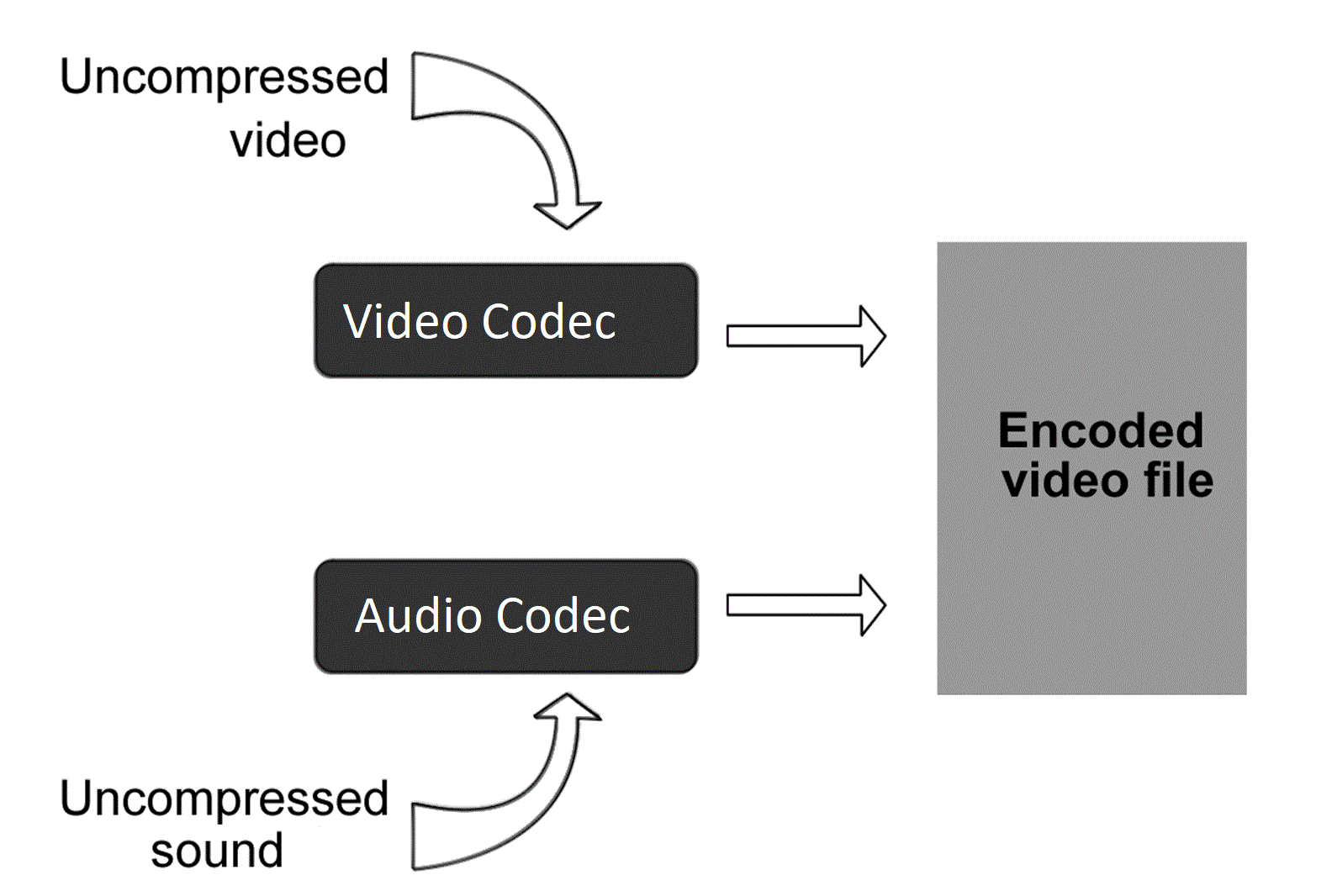
Codecs are the building blocks of digital media. They are software or hardware that encode and decode digital data streams. This means that they can take a raw digital signal, such as a video or audio recording, and compress it into a smaller file size, or they can take a compressed file and expand it back into its original form.

Codecs are essential for the transmission, storage, and playback of digital media. They are used in a wide variety of applications, including streaming video, video conferencing, and digital broadcasting.

How Codecs Work

Codecs work by using a variety of techniques to reduce the size of digital data streams. These techniques include:

Entropy coding: This technique takes advantage of the fact that some parts of a digital signal are more likely to occur than others. By assigning shorter codes to the more likely parts of the signal, entropy coding can significantly reduce the size of the file.
Transform coding: This technique breaks the digital signal down into smaller components, and then compresses each component individually. This can be more efficient than entropy coding, but it is also more complex.
Prediction: This technique uses the past values of a signal to predict future values. By predicting future values, the codec can reduce the amount of data that needs to be stored.
**

Types of Codecs

There are two main types of codecs: lossy and lossless. Lossy codecs reduce the size of a digital data stream by discarding some of the data. This can result in a loss of quality, but it also allows for much smaller file sizes. Lossless codecs do not discard any data, so they do not suffer from any loss of quality. However, they also produce larger file sizes.

Some of the most common lossy codecs include:

MPEG-1: This codec is used for a variety of applications, including video CDs and digital television.
MPEG-2: This codec is used for DVD-Video and high-definition television.
H.264: This codec is the most widely used codec for streaming video and online video.
Some of the most common lossless codecs include:

FLAC: This codec is used for lossless audio compression.
WAV: This codec is a lossless audio format that is used by many professional audio applications.
ALAC: This codec is a lossless audio format that is used by Apple’s iTunes and iPod products.
**

Conclusion

Codecs are essential for the transmission, storage, and playback of digital media. They are used in a wide variety of applications, and they have made it possible to enjoy digital media on a variety of devices.

Final Words about Codecs

Codecs are a complex topic, but they are essential for understanding how digital media works. By understanding how codecs work, you can make better decisions about the quality and size of your digital media files.

I hope this article has given you a better understanding of codecs.

Enhancing Video Quality: Bitrate and Codec

Enhancing Video Quality: Bitrate and Codec

Enhancing Video Quality: Bitrate and Codec


When it comes to video quality, there are two main factors that you need to consider: bitrate and codec.

Bitrate

Bitrate is the amount of data that is used to encode a video file. A higher bitrate will result in a higher quality video, but it will also result in a larger file size.

The ideal bitrate for a video will depend on a number of factors, including the resolution of the video, the frame rate, and the type of content. For example, a high-resolution video with a high frame rate will require a higher bitrate than a low-resolution video with a low frame rate.

If you are concerned about file size, you can try reducing the bitrate of your video. However, keep in mind that this will also reduce the quality of the video.

Codec

A codec is a type of software that is used to encode and decode video files. There are many different codecs available, and each one has its own strengths and weaknesses.

Some of the most popular codecs include:

H.264: This is a widely used codec that offers good quality and compatibility.
MPEG-4: This is another popular codec that is known for its good quality.
VP9: This is a newer codec that offers better quality than H.264 and MPEG-4, but it is not as widely supported.
When choosing a codec, you need to consider the following factors:

The quality of the video that you want to create
The compatibility of the codec with your devices and software
The file size of the video that you want to create

Conclusion

Bitrate and codec are two important factors that you need to consider when enhancing video quality. By understanding these factors, you can create high-quality videos that are also small in file size.

Here are some additional tips for enhancing video quality:

Use a high-quality camera
Shoot in good lighting conditions
Edit your videos carefully
Optimize your videos for the web
By following these tips, you can create videos that are both high-quality and visually appealing.

Latest Video Codec Trends

Latest Video Codec Trends

Video Codec
Video Codec
Video Codec
Video Codec

Video Codecs: What They Are and Why They Matter

Video codecs are essential in video compression and playback. They are algorithms that encode and decode digital video data, compressing it for efficient storage and transmission. Without video codecs, it would be impossible to store or stream high-quality video content.

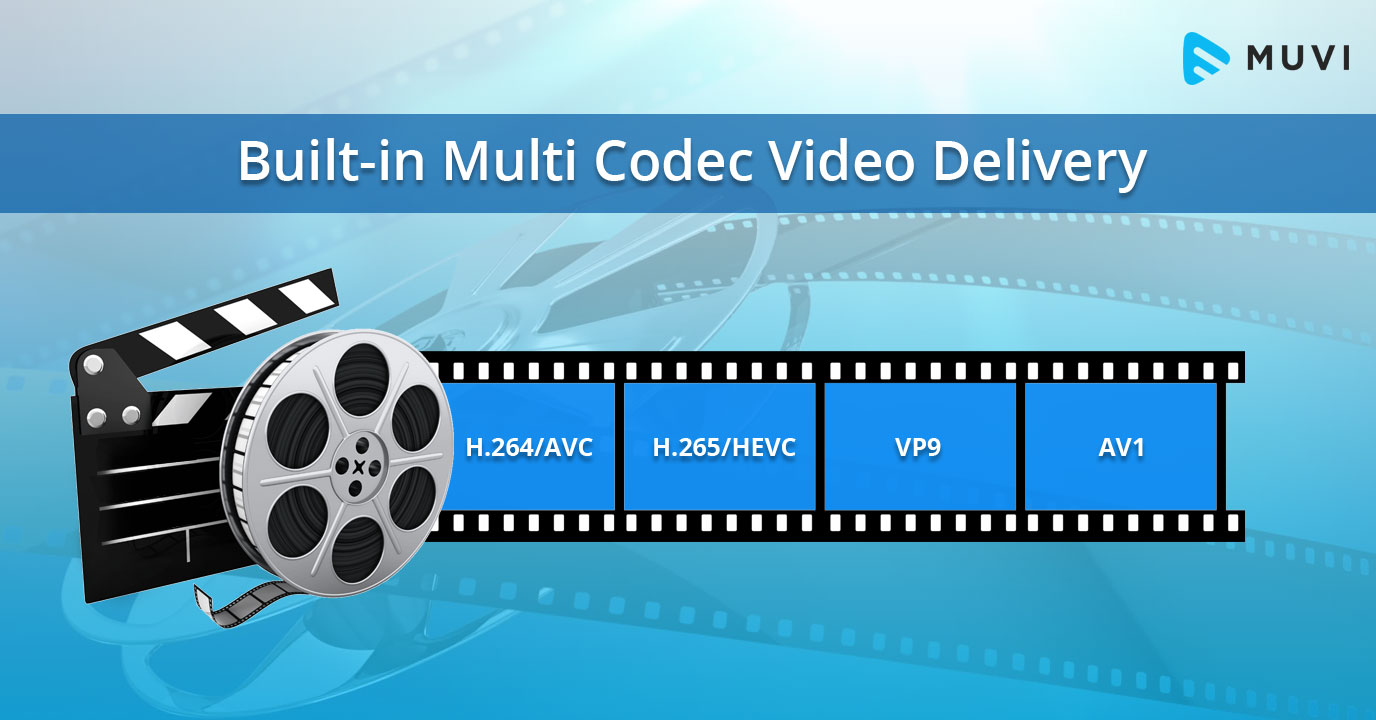
The most popular video codecs today are H.265, VP9, and AV1. H.265, also known as HEVC (High-Efficiency Video Coding), is a codec that offers the same quality as its predecessor (H.264) at half the bitrate. VP9, developed by Google, is an open-source codec that offers better compression efficiency than H.264. Finally, AV1 is a royalty-free codec developed by the Alliance for Open Media, offering even better compression efficiency than VP9.

As video content continues to evolve, so too do video codecs. It’s essential to stay up-to-date with the latest codec trends to ensure your video content is of the highest quality.

Quote: “Video is a powerful tool that can change the world. When you compress video, you’re taking that power and making it more accessible to everyone.” – Kevin Systrom

Latest Video Formats: What You Need to Know

Video formats determine how video data is stored and transmitted. They are also essential in determining playback quality and compatibility. With the advent of 4K and HDR content, new video formats have emerged to meet the demands of high-quality video content.

The most popular video formats today are MP4, AVI, and WMV. MP4 is the most widely used video format, supporting both high-quality video and audio. AVI is an older format but still widely used, while WMV is a proprietary format developed by Microsoft.

Newer video formats like MKV and WEBM offer better compression efficiency and support for 4K and HDR content. MKV, in particular, is an open-source format that offers support for multiple video, audio, and subtitle streams. WEBM, developed by Google, is a royalty-free format that supports high-quality video with a small file size.

Keeping up-to-date with the latest video formats is crucial for ensuring compatibility with modern devices and delivering high-quality video content.

Quote: “Video technology is driving the evolution of the internet.” – Bob Iger

How to Optimize Your Video Content

Optimizing your video content involves choosing the right codec and format for your needs, as well as ensuring your content is of the highest quality. This includes proper encoding settings, resolution, and aspect ratio.

When choosing a codec, consider factors like compression efficiency, compatibility, and licensing costs. For example, H.265 may offer the best compression efficiency, but licensing costs may be prohibitive for some businesses. Similarly, choosing the right format involves considering factors like playback quality, compatibility, and support for modern features like 4K and HDR.

Finally, ensuring your content is of the highest quality involves proper encoding settings, resolution, and aspect ratio. It’s essential to balance quality with file size, ensuring your content is optimized for both playback and streaming.

Quote: “Quality is not an act, it’s a habit.” – Aristotle

Final Words

Video codecs and formats are essential in delivering high-quality video content. Staying up-to-date with the latest trends is crucial for ensuring compatibility with modern devices and delivering the best possible viewing experience.

Codecs and Their Importance in Video Production

Codecs and Their Importance in Video Production

Video Codecs
Video Codecs
Video Codecs
Video Codecs


“A codec is a way of encoding and decoding video or audio data so that it can be transmitted, stored and played back efficiently,” says John Watkinson in his book The Art of Digital Video. In essence, a video codec is a software or hardware that compresses and decompresses video data. This process helps to reduce the size of video files, which makes them easier to store, transmit and stream over the internet.

The Function of Video Codecs

“Codecs are used to compress video data to reduce the amount of data that needs to be stored or transmitted,” explains Brian Nadel in his article on Techradar. He adds that codecs “also help to maintain the quality of the video by minimizing any loss of data during compression.” This is done by removing redundant information and compressing the remaining data without affecting the quality of the video.

The Different Types of Video Codecs

“There are two main types of codecs: lossy and lossless,” notes Larry Jordan in his article on Digital Media Net. Lossy codecs, such as H.264 and MPEG-4, compress video data by permanently discarding some of the information in the video. While lossy codecs result in smaller file sizes, they may also compromise the quality of the video. On the other hand, lossless codecs, such as Apple ProRes and Avid DNxHD, preserve all the information in the video, resulting in higher quality videos but larger file sizes.

Choosing the Right Video Codec

“When choosing a video codec, you must consider the final use of the video,” advises Richard Harrington in his book Video Made on a Mac. For instance, if you are creating a video for the internet, you may want to use a codec that results in a small file size without compromising the quality of the video. On the other hand, if you are producing a video for broadcast, you may want to use a lossless codec that maintains the quality of the video but results in a larger file size.

The Advantages of Video Codecs

“Video codecs are essential in modern video production because they help to compress video data, reducing storage space requirements and making video transmission over the internet much faster and smoother,” states Jeff Strong in his article on Lifewire. By compressing video data, codecs also make it possible to store and transmit high-quality videos without consuming excessive amounts of bandwidth.

The Disadvantages of Video Codecs

“Video codecs may also result in a loss of data, which can affect the quality of the video,” cautions Chris Stevens in his article on Adorama. Furthermore, some codecs may not be compatible with certain software or hardware, which can result in compatibility issues when editing or playing back videos. It is therefore essential to choose the right codec that meets your specific needs and requirements.

Final Words

In conclusion, video codecs play an essential role in modern video production, enabling efficient storage, transmission, and playback of video data. By understanding the different types of codecs and their respective advantages and disadvantages, you can choose the right codec for your specific needs and ensure that your videos are of the highest quality while being optimized for storage and transmission.

WHAT IS THE BIT RATE?

WHAT IS THE BIT RATE?

Video Codec

Bit rate is the amount of video and audio data transferred per second, and the unit bps (bits per second) is used. It is expressed as “video file capacity = bitrate value x time”. The higher the bit rate, the better the picture and sound quality, but the larger the final file size. Adjust the bit rate when you want to reduce the file size when encoding a video file or when you want to improve the image quality.

video codec

The higher the bit rate, the higher the image quality, but if the original video has a low bit rate, no matter how high the bit rate is, no improvement in the quality of the image can be expected. picture. Also, if you are using a CPU with a slow processing speed or a hard disk with a slow rotational speed, if you play a video created at a high bit rate, the processing may not be in time and they will be lost. frames. Also, when posting a video on the home page, it cannot be played properly if the internet line speed is slow.

The DVD-Video standard requires a total video and audio bit rate of 9848 kbps or less, and the Blu-ray standard (BDMV) requires a total video and audio bit rate of 40,000 kbps or less. Therefore, it is necessary to adjust the bit rate according to the purpose and environment. There are two kinds of

encoding methods: constant bit rate (CBR) and variable bit rate (VBR).
Select the encoding method that suits your purpose, such as image quality at encoding time and final size balance.

Constant Bit Rate (CBR)
All constant bit rates assign the same bit rate at all times. Set a high bit rate when you want to improve the image quality of all video files, and set a low bit rate when you want to reduce the file size (a low bit rate can cause noise to be noticeable in a scene with many movement).

It always assigns the same bitrate, so you can easily predict the size of the resulting file. Therefore, it is recommended to use it when there is an upper limit for the file size after encoding or when you want to keep the data transfer rate constant.

Also, WMV (Windows Media Video), etc. You can configure 2-pass CBR. With 2-pass CBR, the amount of data distributed to each video is strictly adjusted and is a mechanism to target higher image quality.

Variable Bit Rate (VBR)
Variable bit rate automatically assigns a high bit rate for fast moving scenes and a low bit rate for slow moving scenes. Since the bit rate is assigned according to the scene, the file size can be reduced while the image quality is relatively high, but the final file size is difficult to predict.

VBR can be divided into two types. 1-step encoding (fixed quality) and 2-step encoding (average bit rate).
1-pass MPEG-2 encoding can shorten processing time for export by analyzing video and encoding while maintaining specified constant quality. However, it is difficult to predict the size of the finished file.

In 2-pass encoding, after analyzing the information from all video data in the 1st pass, the bit rate is assigned and encoded in the 2nd pass based on that information. Although the processing time is long because the processing is performed twice, it is possible to allocate the bit rate efficiently, making it possible to create high-quality video. By specifying the average bitrate, you can roughly predict the size of the file.

Visualization objective | Optimal codec changes depending on the recipient

Visualization objective | Optimal codec changes depending on the recipient

VIDEO CODECS

What should we think about widely used codecs, such as H.265, and internal standards other than international standards?

AVI vs MP4 vs MKV - WMV vs H.264 vs H.265 vs Xvid

When making a selection, you need to think about it depending on your goal and display purpose.

For example, Microsoft codecs include WMV7, WMV8, WMV9, WMA9. These are internal standards, but if you have a Windows machine, Windows Media Player is installed and supports company codecs. The Windows environment is widespread, and if you are targeting offices and users in a Windows environment, you don’t have to think about checking for codecs or installing them, which is a very efficient option.

It is also high resolution, but uses FLAC codec with lossless compression and WAV without compression. Compared to AAC and MP3, which are widely used in portable music players, the amount of FLAC and WAV data is very large and is considered disadvantageous in terms of penetration rate. However, if you are targeting people who want to enjoy higher sound quality, the high resolution is very attractive, and there are many cases where buying compatible equipment or supporting FLAC, WAV, etc. is not a barrier to aiming. .

■ Trends in international standards H.265 / HEVC and H.266 / VVC
H.265 has attracted attention as a next-generation codec, but its spread is limited to some environments. Also, H.266 was announced in 2020 as the latest codec.
H.265 has twice the high compression rate of H.264 / MPEG4 AVC, but on the other hand, it says “the encoding time is longer than H.264 / MPEG-4 AVC” and “the load on the computer during playback is high “. There is one caveat. H.266 has a compression ratio that is twice that of H.265, but it also increases the load.

By the way, some of you may be wondering: “Why is H.265 not so widespread?” This has to do with “standardization”.
The most famous codec is WebM, which is used on YouTube. In this way, “the codec developed by the company and AV1 developed by a non-profit organization are in a competitive state”, and H.265 is “used”. to the fact that a license fee is incurred, it has not been generalized.

One of the reasons H.264 is widely used is the “x264” encoder, which was built around licensing. By avoiding the license relationship, “x264” has been adopted and used in many encoding software, and H.264 has become widespread.

■ Easy to distribute new codecs for specific purposes
For example, Dwango and NTT started the H.265 demo experiment on Nico Nico Live Broadcasting in November 2014. If you are a specific target of niconico users, it is easier to distribute codecs than an indeterminate number of users.

In this way, the codec selection changes according to the display purpose.

In the end
So far, we have explained “compression rate”, “standardization” and “display objective” as “three points of view that must be suppressed to select the optimal video codec”. In actual operation, you may not be able to make decisions due to the rapidly changing display environment and technology. In such a case, I think the best shortcut is to consult a professional. We are not only familiar with the latest codecs and file combination examples, but we also believe that they will offer the best selection according to the purpose and usage scene based on our achievements.

Standardization | It has a great influence on the spread of codecs

Standardization | It has a great influence on the spread of codecs

Video Codec

For video playback, the same codec as the sender-encoded “video data codec” and “audio data codec” must be included in the display environment on the receiver side and decoded.

VIDEO CODECS

Therefore, as a second point of view of codec selection, it is necessary to be aware of the propagation situation.
Codecs are found in many places. In terms of devices, terminals, browsers, personal computer operating systems, etc., “standardization” has a great influence on the support of each codec from each manufacturer.

Standardization can be broadly classified into
1) internal standards (standards independently established by companies)
2) industry standards (independently established by the industry. There are merits in terms of compatibility, etc.)
3) National standards (established by the national government based on the law. JIS, etc.)
4) Regional standards (standards that span multiple countries)
5) International standards (global standards)

There is, and the influence increases in the order of 1) → 5). Since an international standard is recognized as suitable for general use around the world, it will be adopted by many manufacturers and developers and will be widely used. The number of cases where the codec is pre-installed in browsers, players, playback terminals, etc. will increase, and if the codec installation is no longer necessary, the threshold for viewing videos of the recipient will be lowered considerably. Therefore, it is necessary to pay attention to the standardization trend as an important point of view of codec selection.

There are “ISO / IEC JCT1” that started in the storage field and “ITU-T” that started in the communication field as the organizations that established the international standard for compression encoding of video and audio data. ISO / IEC is formulating the MPEG series, ITU-T is formulating the international standard for the H.26X series, and both organizations jointly formulate H.262 / MPEG-2 and H.264 / MPEG-4 AVC (Fig. 1 ).

[Fig. 1] Standardization flow of “MPEG” and “H.26X” series
] Standardization flow chart for each series of “MPEG” and “H.26X”

If you want to widely reach an indeterminate number of people, it is important to select a codec that is popular to some extent, and it is essential to be aware of “standardization” at that time. However, it is not always good to keep up with the latest, and even if it becomes an international standard, it will take some time before it becomes mainstream, so be careful.

Three perspectives to consider to select the best video codec Codec

Three perspectives to consider to select the best video codec
Codec

Video Codec

In this article, as basic knowledge about
codecs: -A codec is a program that encodes (encodes) / decodes (decodes) video data and
Audio.

VIDEO CODEC

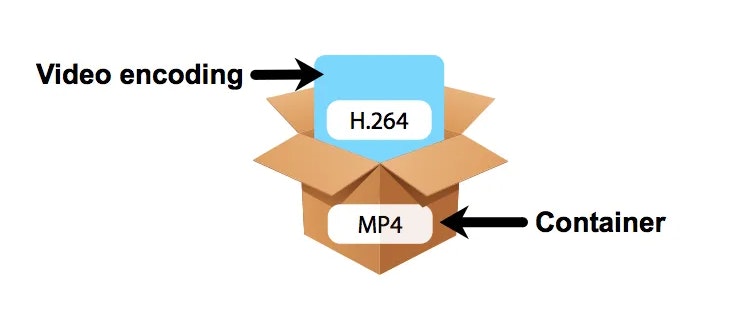
-Even if the file format is the same, different codecs are different.-Al
play a video,
I explained that the codec used at the time of encoding is also required for the recipient’s viewing environment, but in this article, “compression rate” and “compression rate” are described as “three viewpoints that need to be suppressed to be able to select the optimal video codec. ” I will explain about “standardization” and “display goal”.

Viewpoint 1: Compression Rate | Make it easy to distribute and distribute high-quality online videos
A film expresses movement through a collection of continuous images and, if it is not compressed, the amount of data will be enormous. Therefore, compression technology has been developed to efficiently record and save video data. Compression technology is one of the hearts of codec development. By using compression technology, it is possible to record a large amount of information, such as moving images with a large amount of data, to achieve higher image quality even with the same capacity, and reduce the amount of data to facilitate distribution and distribution. Therefore, “compression rate” is an important point of view when selecting a codec.

■ Two compression methods, “lossy compression” and “lossless compression”
There are two types of data compression methods: “lossy compression”, which reduces the weight of the data by thinning it within a range that does not affect the eyes, and “lossless compression”, which returns the original amount of data. when unzipped without thinning the data. Since the amount of data is very large in “uncompressed”, which does not compress the data at all, compressed data is often used when handling moving images. Lossy compression codecs are often used for video distribution, especially MPEG-4 AVC and WebM for Youtube.

■ High compression rate codec
For example, since the birth of MPEG-1 in 1993, there have been “MPEG series” such as MPEG-2 (1995) and MPEG-4 AVC (2003). MPEG-4 AVC is said to have approximately twice the compression ratio of MPEG-2. In other words, the standard for DVD video is set at approximately 8 Mbps for MPEG-2, but in terms of calculation, if compressed with MPEG-4 AVC, the same image quality can be obtained at approximately 4 Mbps. Double of compression rate means that the file capacity will be cut in half when video is delivered with the same image quality, and the communication bandwidth at the time of delivery will also be cut in half.

By improving compression efficiency, even with the same image quality, a small amount of data can be used.
The load on the video distribution server can be reduced and the server risk minimal and display lag can be
reduced.-Avoid close communication lines and provide information to viewers.
the
advantages of easier delivery and higher image quality of videos.
The following [Demo 1] is compressed using the MPEG-2 codec on the left and the MPEG-4 AVC codec on the right at the same bit rate, but the difference in image quality is clear.

Video Formats and Their Features Part 2

Video Formats and Their Features Part 2

video formats

Video file extensions

Video Formats

The video extension (like any other file) is a set of characters that help the Windows operating system to determine the type of information contained in the file, as well as to choose the appropriate program to open it. The video file extension classification is as follows:

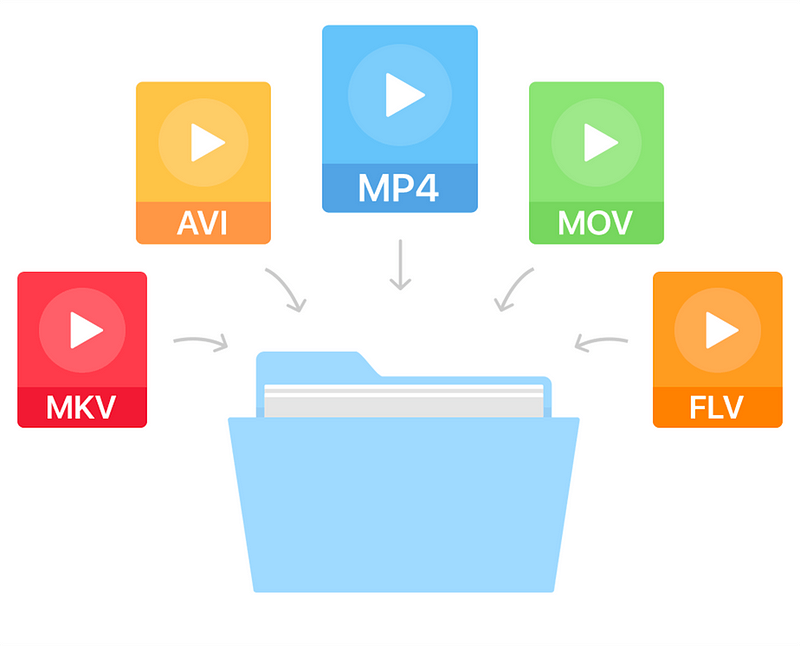
AVI (Audio-Video Interleaved) is a very popular format, more precisely, a container. It was developed by Microsoft. This container can store four types of data: audio, video, text, and midi. It can include video of any format, from MPEG-1 to MPEG-4, sounds of various formats; the codec mix can be anything. The contents of the AVI container can be found using various programs, from a simple VideoToolBox to a powerful Adobe Premiere.
WMV (Windows Media Video) is another Microsoft format. If you create a movie in Movie Maker that comes with Windows, it will be in this format.
MOV. This format was invented by the Apple Macintosh. In addition to video data, it can contain graphics, animations, and 3D. The files of this format are played in QuickTime Player from Apple itself,
MKV (Matroska or “Matryoshka”) is another container that can hold both video and audio, as well as subtitles and the like. MKV is open source and has been used almost everywhere lately. Files in this format are playable on most players, including Windows Media Player, which is included with Windows.
3gp is a third generation video format for mobile phones. Movies recorded in this format have poor image quality. However, the small size eliminates this disadvantage. Also, 3gp video seems more or less visible on small phone screens.
Video formats used on the Internet
Videos created on the Internet usually have one of the following formats:

FLV (Flash Video) is a video format used by various video hosting sites like YouTube, RuTube, Google Video, and others.
An animation or video in Flash format created in Adobe Flash has the extension SWF (Shockwave Flash). To play these files, you need a browser with Flash Player installed. Videos in this format are also ubiquitous on the Internet, where you can watch them directly from the site.
RealVideo is a format created by RealNetworks and used for television broadcasts on the Web. Movies recorded in this format have an RM, RA or RAM extension and are small in size and of poor quality.
File extensions found on DVD
If you look at the contents of the folder with the DVD movie, you will not immediately understand which file you need to run for the movie to start, because there are a lot of them there. But if you know how files of different extensions differ, this variety will be easier to navigate:

VOB (Versioned Object Base) is an extension of the container, which then contains video (or several at the same time) in MPEG-2 format, audio, movie subtitles and menus. These are the main files on the movie DVD.
IFO files contain information about the movie, the order in which the VOB files are played, and the menus. That is, these are service files that are created in the process of burning a DVD movie.
Also on DVD you can view video files with m2v and m2p extensions (MPEG-2 format). It makes no sense to delve into its features and functions, we can only say that they are necessary for creating VOB files and burning DVD movies.
Optical disc formats
While we’re talking about the files found on DVD, it’s worth talking a bit about the formats of optical digital drives:

Perhaps the most popular of them is the DVD. It is he who is the reason why the VHS format has sunk into oblivion. DVD videos are compressed using the MPEG-2 standard, have a bit rate of 2000 to 9800 Kbps and a size of 720×576 (for PAL) or 720×480 (for NTSC).
HDDVD is a large capacity disc that can record high definition video. Video compression standards are the same as for Blu-Ray.
Blu-ray disc. Next-generation optical media with increased storage capacity for video information, including high definition. It became widespread in 2006 and in 2008 it replaced the HDDVD format. All Hollywood studios have switched to this format.