Video codecs are essential in video compression and playback. They are algorithms that encode and decode digital video data, compressing it for efficient storage and transmission. Without video codecs, it would be impossible to store or stream high-quality video content.
The most popular video codecs today are H.265, VP9, and AV1. H.265, also known as HEVC (High-Efficiency Video Coding), is a codec that offers the same quality as its predecessor (H.264) at half the bitrate. VP9, developed by Google, is an open-source codec that offers better compression efficiency than H.264. Finally, AV1 is a royalty-free codec developed by the Alliance for Open Media, offering even better compression efficiency than VP9.
As video content continues to evolve, so too do video codecs. It’s essential to stay up-to-date with the latest codec trends to ensure your video content is of the highest quality.
Quote: “Video is a powerful tool that can change the world. When you compress video, you’re taking that power and making it more accessible to everyone.” – Kevin Systrom
Latest Video Formats: What You Need to Know
Video formats determine how video data is stored and transmitted. They are also essential in determining playback quality and compatibility. With the advent of 4K and HDR content, new video formats have emerged to meet the demands of high-quality video content.
The most popular video formats today are MP4, AVI, and WMV. MP4 is the most widely used video format, supporting both high-quality video and audio. AVI is an older format but still widely used, while WMV is a proprietary format developed by Microsoft.
Newer video formats like MKV and WEBM offer better compression efficiency and support for 4K and HDR content. MKV, in particular, is an open-source format that offers support for multiple video, audio, and subtitle streams. WEBM, developed by Google, is a royalty-free format that supports high-quality video with a small file size.
Keeping up-to-date with the latest video formats is crucial for ensuring compatibility with modern devices and delivering high-quality video content.
Quote: “Video technology is driving the evolution of the internet.” – Bob Iger
How to Optimize Your Video Content
Optimizing your video content involves choosing the right codec and format for your needs, as well as ensuring your content is of the highest quality. This includes proper encoding settings, resolution, and aspect ratio.
When choosing a codec, consider factors like compression efficiency, compatibility, and licensing costs. For example, H.265 may offer the best compression efficiency, but licensing costs may be prohibitive for some businesses. Similarly, choosing the right format involves considering factors like playback quality, compatibility, and support for modern features like 4K and HDR.
Finally, ensuring your content is of the highest quality involves proper encoding settings, resolution, and aspect ratio. It’s essential to balance quality with file size, ensuring your content is optimized for both playback and streaming.
Quote: “Quality is not an act, it’s a habit.” – Aristotle
Final Words
Video codecs and formats are essential in delivering high-quality video content. Staying up-to-date with the latest trends is crucial for ensuring compatibility with modern devices and delivering the best possible viewing experience.
“A codec is a way of encoding and decoding video or audio data so that it can be transmitted, stored and played back efficiently,” says John Watkinson in his book The Art of Digital Video. In essence, a video codec is a software or hardware that compresses and decompresses video data. This process helps to reduce the size of video files, which makes them easier to store, transmit and stream over the internet.
The Function of Video Codecs
“Codecs are used to compress video data to reduce the amount of data that needs to be stored or transmitted,” explains Brian Nadel in his article on Techradar. He adds that codecs “also help to maintain the quality of the video by minimizing any loss of data during compression.” This is done by removing redundant information and compressing the remaining data without affecting the quality of the video.
The Different Types of Video Codecs
“There are two main types of codecs: lossy and lossless,” notes Larry Jordan in his article on Digital Media Net. Lossy codecs, such as H.264 and MPEG-4, compress video data by permanently discarding some of the information in the video. While lossy codecs result in smaller file sizes, they may also compromise the quality of the video. On the other hand, lossless codecs, such as Apple ProRes and Avid DNxHD, preserve all the information in the video, resulting in higher quality videos but larger file sizes.
Choosing the Right Video Codec
“When choosing a video codec, you must consider the final use of the video,” advises Richard Harrington in his book Video Made on a Mac. For instance, if you are creating a video for the internet, you may want to use a codec that results in a small file size without compromising the quality of the video. On the other hand, if you are producing a video for broadcast, you may want to use a lossless codec that maintains the quality of the video but results in a larger file size.
The Advantages of Video Codecs
“Video codecs are essential in modern video production because they help to compress video data, reducing storage space requirements and making video transmission over the internet much faster and smoother,” states Jeff Strong in his article on Lifewire. By compressing video data, codecs also make it possible to store and transmit high-quality videos without consuming excessive amounts of bandwidth.
The Disadvantages of Video Codecs
“Video codecs may also result in a loss of data, which can affect the quality of the video,” cautions Chris Stevens in his article on Adorama. Furthermore, some codecs may not be compatible with certain software or hardware, which can result in compatibility issues when editing or playing back videos. It is therefore essential to choose the right codec that meets your specific needs and requirements.
Final Words
In conclusion, video codecs play an essential role in modern video production, enabling efficient storage, transmission, and playback of video data. By understanding the different types of codecs and their respective advantages and disadvantages, you can choose the right codec for your specific needs and ensure that your videos are of the highest quality while being optimized for storage and transmission.
Understanding Video Containers: MP4, AVI, MKV, and More
Video Containers
Introduction to Video Containers
Video Containers
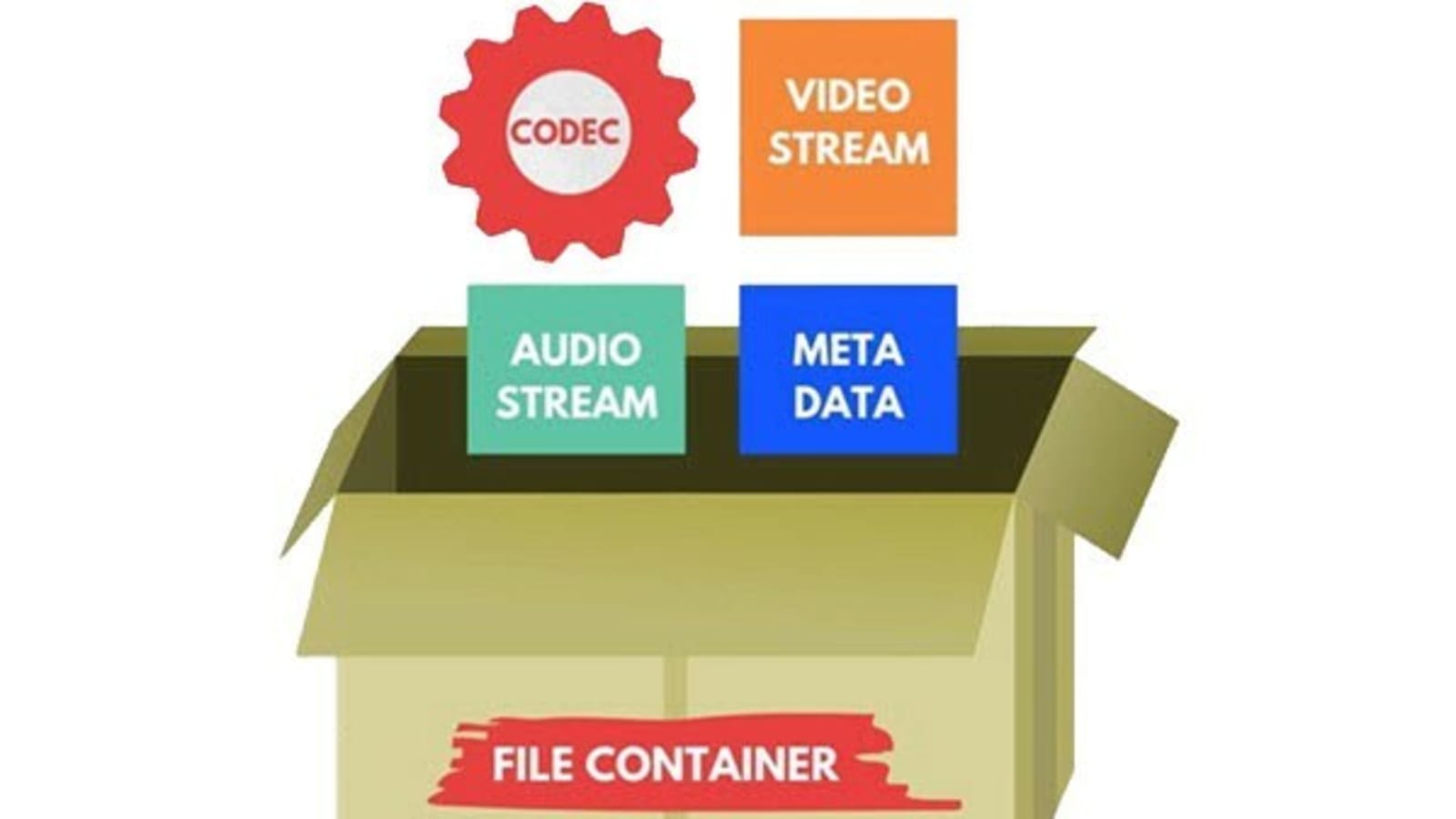
Video containers are an integral part of digital video technology, and they play a crucial role in delivering video content to users. A video container is essentially a file format that combines different types of data, including video, audio, and subtitles, into a single file. Video containers enable users to store and play back video files, and they support a wide range of codecs and other video-related technologies.
In this article, we will explore some of the most popular video containers in use today, including MP4, AVI, and MKV. We will provide an in-depth technical analysis of each container, including their history, features, benefits, and common codecs. We will also cover the purpose and definition of video containers, as well as the importance of choosing the right container for your needs.
The Purpose of Video Containers
The primary purpose of a video container is to store and organize video and audio content in a single file. Video containers are designed to accommodate multiple video and audio codecs, which are used to compress the video and audio data in the file. The container format also includes information about the video and audio streams, such as the frame rate, resolution, and bit rate.
The video container provides a common structure for storing video and audio data, and it enables users to easily share and distribute video files. Video containers are also used to deliver video content over the internet, as they support streaming technologies that enable users to watch video content without having to download the entire file.
History of Video Containers
The history of video containers dates back to the early days of digital video technology, when various video formats were being developed to store and play back digital video content. One of the earliest video container formats was AVI (Audio Video Interleave), which was introduced by Microsoft in 1992. AVI was designed to support multiple video and audio codecs, and it quickly became a popular format for storing and playing back video content.
In the years that followed, a number of other video container formats were developed, each with its own unique features and benefits. One of the most popular video container formats today is MP4 (MPEG-4 Part 14), which was introduced in 2001 as a successor to the older MPEG-2 video format. MP4 is designed to be a highly versatile and efficient container format that can support a wide range of video and audio codecs.
Another popular video container format is MKV (Matroska Video), which was introduced in 2002 as an open-source alternative to other container formats. MKV is designed to support a wide range of video and audio codecs, and it also includes support for advanced features such as subtitles and multiple audio tracks.
Features and Benefits of Video Containers
One of the key features of video containers is their support for multiple video and audio codecs. Video codecs are used to compress video data in order to reduce file size and improve playback performance. Audio codecs are used to compress audio data in a similar manner.
Video containers also include information about the video and audio streams in the file, such as the frame rate, resolution, and bit rate. This information is used by media players to correctly play back the video and audio content, and it ensures that the video is displayed at the correct size and aspect ratio.
Another important feature of video containers is their support for streaming technologies, which enable users to watch video content without having to download the entire file. Streaming technologies work by delivering the video content in small chunks, which are downloaded and played back in real-time.
Common Codecs Used in Video Containers
One of the most important components of video containers is the codec used to compress and decompress the video data. Codecs are responsible for reducing the file size of the video while maintaining its quality. There are many different codecs available, each with its own strengths and weaknesses.
H.264/AVC
H.264/AVC is a widely used codec that provides a high compression ratio with good video quality. It is supported by most modern devices and is often used for streaming video online. However, it can be computationally intensive, requiring a powerful processor to decode.
HEVC/H.265
HEVC/H.265 is a newer codec that provides even better compression than H.264/AVC, resulting in smaller file sizes with higher quality video. It is also more efficient than H.264/AVC, meaning it requires less bandwidth to stream. However, it is not yet widely supported by devices and software, and it can be more computationally intensive to decode than H.264/AVC.
VP9
VP9 is a codec developed by Google that provides high-quality video at lower bitrates. It is commonly used for streaming video on YouTube and other Google services. However, it is not as widely supported as H.264/AVC or HEVC/H.265, and it can be more computationally intensive to decode.
AV1
AV1 is a relatively new codec that provides high-quality video at even lower bitrates than VP9. It is an open-source codec developed by the Alliance for Open Media, which includes major tech companies such as Google, Microsoft, and Amazon. However, it is not yet widely supported by devices and software, and it can be computationally intensive to decode.
Choosing the Right Video Container
When it comes to choosing the right video container, there are several factors to consider, including compatibility with devices and software, quality and file size considerations, and future-proofing.
Compatibility
The first factor to consider is compatibility. Different devices and software support different video containers and codecs, so it is important to choose a container and codec that is widely supported. MP4 is a good choice for maximum compatibility, as it is supported by most devices and software.
Quality and File Size
Another factor to consider is the quality and file size of the video. Different containers and codecs can result in different levels of quality and file size. Generally, newer codecs like HEVC/H.265 and AV1 provide higher quality video at lower file sizes, but they may not be supported by all devices and software.
Future-Proofing
Finally, it is important to consider future-proofing when choosing a video container. Video technology is constantly evolving, so it is important to choose a container and codec that will be supported in the future. MP4 is a good choice for future-proofing, as it is widely supported and likely to remain so in the future.
Conclusion
Video containers play a crucial role in the storage and playback of video content. Understanding the differences between video containers like MP4, AVI, and MKV, as well as the codecs used to compress and decompress the video data, is essential for choosing the right container for your needs. By considering factors like compatibility, quality and file size, and future-proofing, you can ensure that your video content is stored and played back seamlessly on a wide range of devices and software.
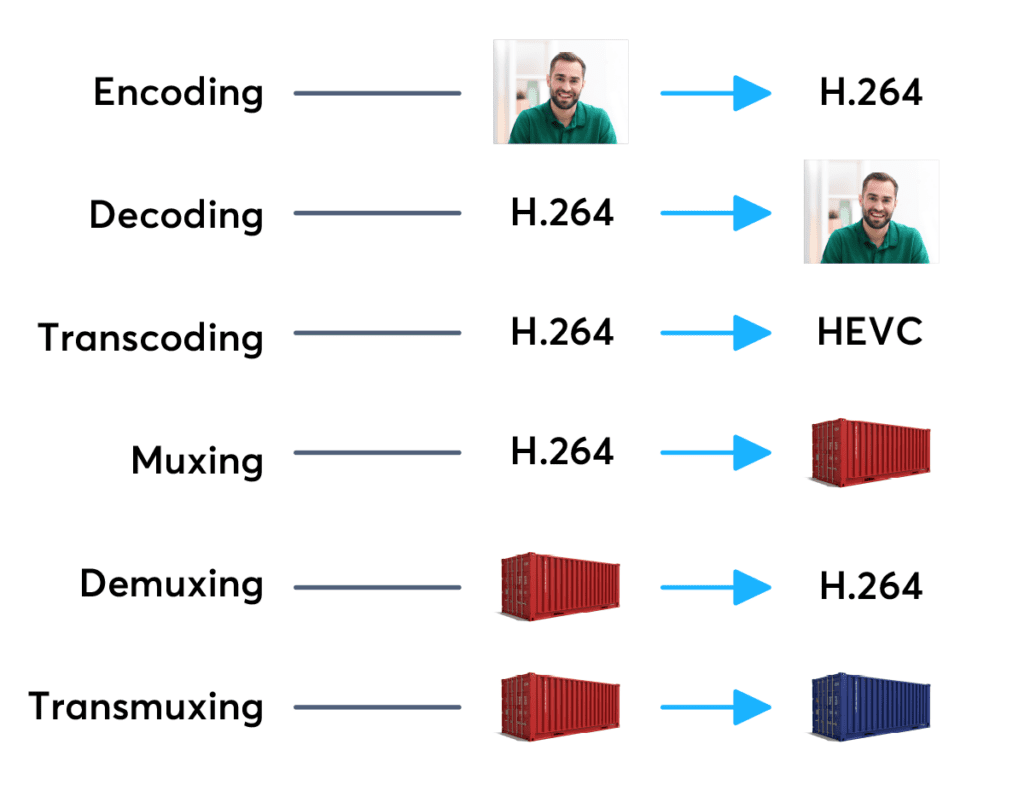
Codecs are components (circuits, modules) or computer programs that create a stream of data to encode and / or can decode. The term “Codec” is a made-up word that consists of parts of the English terms CO der and DEC o. (En) Encoders are used to encode data streams for transmission (eg Reed-Solomon contributes to DVB error protection), Encrypt (eg AACS as content protection for Blu-ray Disc) or to reduce the amount of data (compression method, for example, MP3 for audio). The decoder (decoder) retrieves the encoder’s original input information from the encoded data stream.
2. CODECS FOR COMPRESSING DATA STREAMS
No medium of storage or transmission is infinitely large. Therefore, the available resources must be budgeted. Therefore, it is very important to reduce the amount of data that must be transmitted or stored. There are different compression methods adapted to the information to be compressed.
Each compression method has its advantages and disadvantages. There is a trade-off between compression factor (= ratio of source file size to target file size), compression quality (= lossless / lossy -> type and number of artifacts), speed, usability , decoder distribution and finally also costs. Compression processes and their implementation in the market play an extremely important economic role, since compression algorithms can be patented and their use must be compensated by the payment of licenses by device manufacturers or software users. Some kind of content encryption can also be achieved through proprietary and undisclosed compression algorithms, allowing distribution control.
Operating principle
Compressing a digital signal means that parts of the information must be suppressed without changing the content of the information. These ‘superfluous’ data, the so-called redundancies and irrelevancies are components of information, for example an image, that are present several times (redundant) or cannot be perceived by humans (irrelevant). Furthermore, redundancies can also occur in the digital data describing the image, for example. All compression methods are based on the principle of eliminating redundant information. In most compression processes, several different algorithms are used one after the other to eliminate redundancies in content and data. Algorithms that discover and avoid redundancies on a purely mathematical basis usually work lossless without loss), that is, no information is lost. After compression and subsequent decompression the information then corresponds 1: 1 to the original. Compression algorithms that evaluate information components based on physiological models (for example, MP3) for their importance and then discard unimportant information (irrelevance reduction), function lossy with loss), since information it is lost during compression.
3. FILES WITH COMPRESSED CONTENT
If the data is compressed through a certain process, it must be put into a format in which it can be distributed. These can be streams that are streamed like DVB, for example, or files that are stored on a storage medium. The compressed “raw data” thus creates a structure that allows the data as in a container (transport container). The way this container or container format is made depends on the transmission medium, the operating system and the specific application.
II. CONTAINER FORMATS
Container files are file structures that simplify external (multimedia) data and allow exchange, even across platform boundaries. Container formats describe how this user data is stored (not how it is encoded!). In principle, cabinet files can contain all kinds of data, but they are generally restricted to specific data. Specialized in data types. For example, PDF files are ideal for reproducing documents that are true to the original, consisting of font information and raster or vector graphics, whereas an AVI file generally contains movie and sound information.
Container formats for multimedia applications always use already encoded data streams, i.e. compressed
Confusion between codec and container is very common. And even more if we add file extensions, such as .flv, .mp3, .mp4, etc.
What is a codec?
The codec term comes from the concatenation of the initials of two words: encoder and decoder. Strictly speaking, a codec is a specification on how to code a type of information and then be able to decode it. For example, a codec determines how video and audio information is compressed and decompressed. Remember that compression is a specific case of coding in which space is reduced, eliminating redundant or low perceptual impact information.
Coding means something like compressing. That is, it seeks to reduce the amount of bits that an audio file occupies. The idea is to reduce the amount of bits while maintaining the highest possible audio quality.
Obviously, once the files have been compressed, they need the counterpart, which becomes the decoder that is the one that can interpret and reconvert in sound what was written in the file.
Then, a codec is one that serves to compress and decompress (encode and decode) an audio or video file.
What is a container?
Within the multimedia scope, a container is a specification on how different types of encoded multimedia content are sorted within a file. These different contents are usually, mainly, video, audio and text.
Consider the case of a movie in digital format. This movie is in a file. When we open that file, a player runs and we can enjoy the movie. Notice that a movie has video, has audio, subtitles, information about its author, information about its duration, etc. For the convenience of the user, all these elements are grouped into a single file. The order in which they are saved in that file is the container specification.
Connection
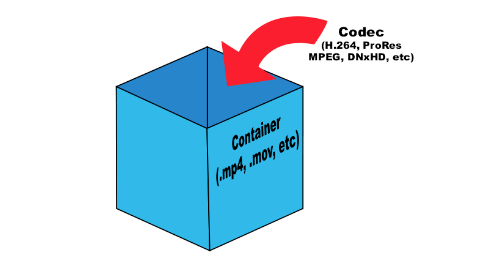
The video information that is inside a container is usually compressed, that is, it usually follows the specification of a specific codec. The same goes for audio information. The confusion appears when there are containers and codecs with very similar or even equal names.
The most popular
The most popular video codecs currently are Theora, VP8, MPEG-2, h.264, Xvid and Divx. Regarding audio codecs: AAC, FLAC, MP3, Vorbis (ogg) and WMA are the most abundant.
The most commonly used containers are AVI, Divx, Matroska, Flash video, MP4, MPEG, Ogg, Quicktime, MXF and WebM. Since the containers are intrinsically linked to the files, each of them also specifies one or several possible file extensions:
The containers are interpreted through a media player application, such as Windows Media Player, Quicktime (application with the same name as a container), VLC, Plex, RealPlayer or Winamp, to name a few .
A good option is the VLC player, as it offers compatibility with all formats under almost any platform and even allows you to play incomplete files (useful feature if you want to start playing an audiovisual content that has not yet finished downloading, provided that this be progressive). In addition, it is freely distributed.