CODECS AND CONTAINERS
I.CODEC
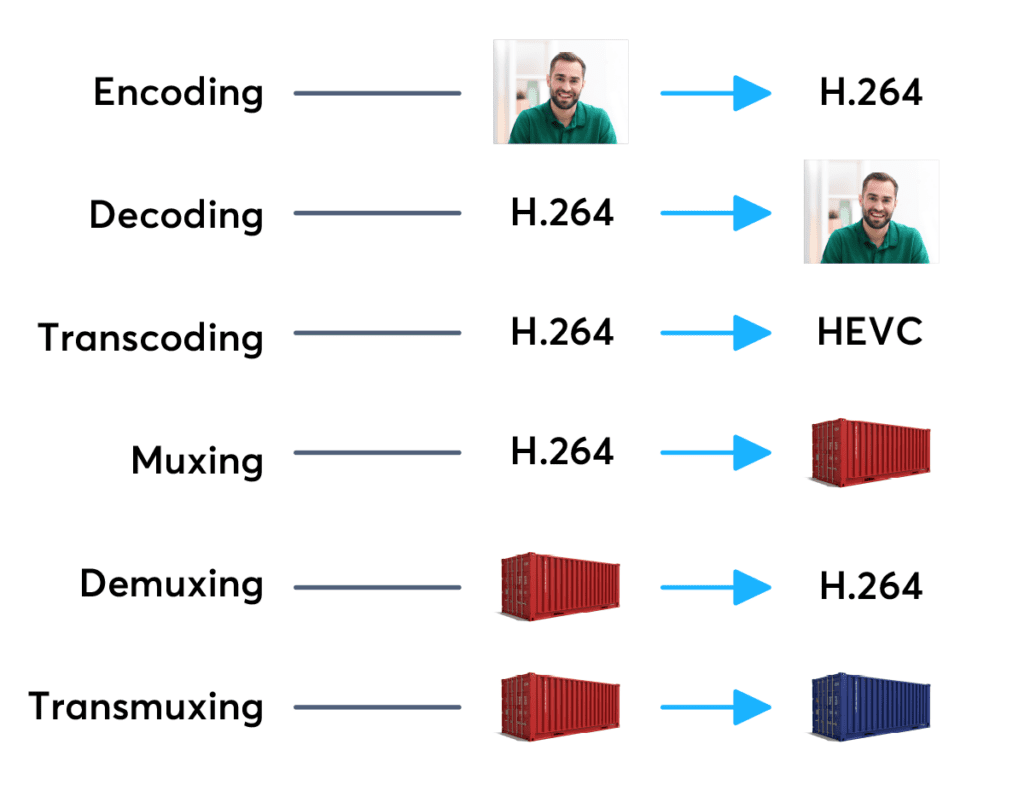
Codecs are components (circuits, modules) or computer programs that create a stream of data to encode and / or can decode. The term “Codec” is a made-up word that consists of parts of the English terms CO der and DEC o. (En) Encoders are used to encode data streams for transmission (eg Reed-Solomon contributes to DVB error protection), Encrypt (eg AACS as content protection for Blu-ray Disc) or to reduce the amount of data (compression method, for example, MP3 for audio). The decoder (decoder) retrieves the encoder’s original input information from the encoded data stream.
2. CODECS FOR COMPRESSING DATA STREAMS
No medium of storage or transmission is infinitely large. Therefore, the available resources must be budgeted. Therefore, it is very important to reduce the amount of data that must be transmitted or stored. There are different compression methods adapted to the information to be compressed.

Each compression method has its advantages and disadvantages. There is a trade-off between compression factor (= ratio of source file size to target file size), compression quality (= lossless / lossy -> type and number of artifacts), speed, usability , decoder distribution and finally also costs. Compression processes and their implementation in the market play an extremely important economic role, since compression algorithms can be patented and their use must be compensated by the payment of licenses by device manufacturers or software users. Some kind of content encryption can also be achieved through proprietary and undisclosed compression algorithms, allowing distribution control.
Operating principle
Compressing a digital signal means that parts of the information must be suppressed without changing the content of the information. These ‘superfluous’ data, the so-called redundancies and irrelevancies are components of information, for example an image, that are present several times (redundant) or cannot be perceived by humans (irrelevant). Furthermore, redundancies can also occur in the digital data describing the image, for example. All compression methods are based on the principle of eliminating redundant information. In most compression processes, several different algorithms are used one after the other to eliminate redundancies in content and data. Algorithms that discover and avoid redundancies on a purely mathematical basis usually work lossless without loss), that is, no information is lost. After compression and subsequent decompression the information then corresponds 1: 1 to the original. Compression algorithms that evaluate information components based on physiological models (for example, MP3) for their importance and then discard unimportant information (irrelevance reduction), function lossy with loss), since information it is lost during compression.
3. FILES WITH COMPRESSED CONTENT
If the data is compressed through a certain process, it must be put into a format in which it can be distributed. These can be streams that are streamed like DVB, for example, or files that are stored on a storage medium. The compressed “raw data” thus creates a structure that allows the data as in a container (transport container). The way this container or container format is made depends on the transmission medium, the operating system and the specific application.
II. CONTAINER FORMATS
Container files are file structures that simplify external (multimedia) data and allow exchange, even across platform boundaries. Container formats describe how this user data is stored (not how it is encoded!). In principle, cabinet files can contain all kinds of data, but they are generally restricted to specific data. Specialized in data types. For example, PDF files are ideal for reproducing documents that are true to the original, consisting of font information and raster or vector graphics, whereas an AVI file generally contains movie and sound information.
Container formats for multimedia applications always use already encoded data streams, i.e. compressed