Enhancing Video Quality: Bitrate and Codec


Free Download Mp4Gain
picture

Enhancing Video Quality: Bitrate and Codec

Enhancing Video Quality: Bitrate and Codec


When it comes to video quality, there are two main factors that you need to consider: bitrate and codec.

Bitrate

Bitrate is the amount of data that is used to encode a video file. A higher bitrate will result in a higher quality video, but it will also result in a larger file size.

The ideal bitrate for a video will depend on a number of factors, including the resolution of the video, the frame rate, and the type of content. For example, a high-resolution video with a high frame rate will require a higher bitrate than a low-resolution video with a low frame rate.

If you are concerned about file size, you can try reducing the bitrate of your video. However, keep in mind that this will also reduce the quality of the video.

Codec

A codec is a type of software that is used to encode and decode video files. There are many different codecs available, and each one has its own strengths and weaknesses.

Some of the most popular codecs include:

H.264: This is a widely used codec that offers good quality and compatibility.
MPEG-4: This is another popular codec that is known for its good quality.
VP9: This is a newer codec that offers better quality than H.264 and MPEG-4, but it is not as widely supported.
When choosing a codec, you need to consider the following factors:

The quality of the video that you want to create
The compatibility of the codec with your devices and software
The file size of the video that you want to create

Conclusion

Bitrate and codec are two important factors that you need to consider when enhancing video quality. By understanding these factors, you can create high-quality videos that are also small in file size.

Here are some additional tips for enhancing video quality:

Use a high-quality camera
Shoot in good lighting conditions
Edit your videos carefully
Optimize your videos for the web
By following these tips, you can create videos that are both high-quality and visually appealing.


Free Download Mp4Gain
picture


Mp4Gain Main Window
picture


Mp4Gain Features
picture


Free Download Mp4Gain
picture

Latest Video Codec Trends

Latest Video Codec Trends

Video Codec
Video Codec
Video Codec
Video Codec

Video Codecs: What They Are and Why They Matter

Video codecs are essential in video compression and playback. They are algorithms that encode and decode digital video data, compressing it for efficient storage and transmission. Without video codecs, it would be impossible to store or stream high-quality video content.

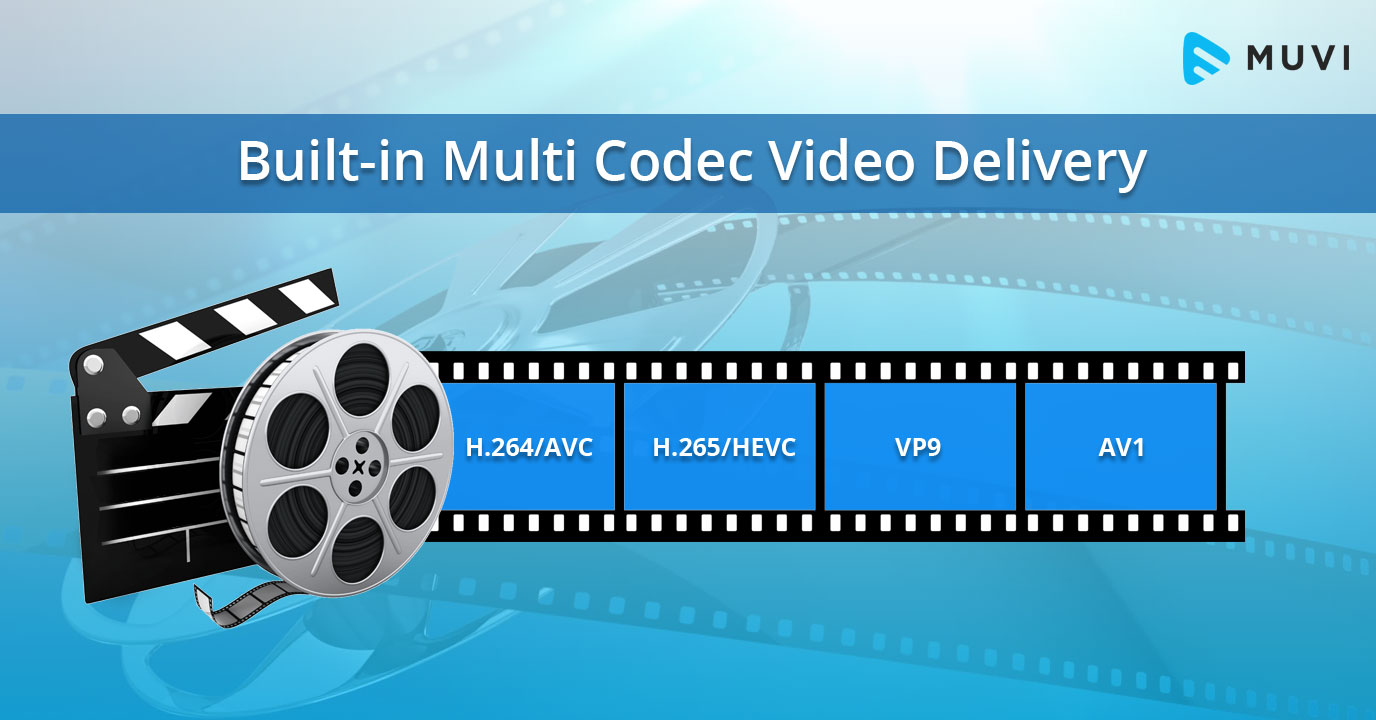
The most popular video codecs today are H.265, VP9, and AV1. H.265, also known as HEVC (High-Efficiency Video Coding), is a codec that offers the same quality as its predecessor (H.264) at half the bitrate. VP9, developed by Google, is an open-source codec that offers better compression efficiency than H.264. Finally, AV1 is a royalty-free codec developed by the Alliance for Open Media, offering even better compression efficiency than VP9.

As video content continues to evolve, so too do video codecs. It’s essential to stay up-to-date with the latest codec trends to ensure your video content is of the highest quality.

Quote: “Video is a powerful tool that can change the world. When you compress video, you’re taking that power and making it more accessible to everyone.” – Kevin Systrom

Latest Video Formats: What You Need to Know

Video formats determine how video data is stored and transmitted. They are also essential in determining playback quality and compatibility. With the advent of 4K and HDR content, new video formats have emerged to meet the demands of high-quality video content.

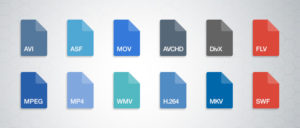
The most popular video formats today are MP4, AVI, and WMV. MP4 is the most widely used video format, supporting both high-quality video and audio. AVI is an older format but still widely used, while WMV is a proprietary format developed by Microsoft.

Newer video formats like MKV and WEBM offer better compression efficiency and support for 4K and HDR content. MKV, in particular, is an open-source format that offers support for multiple video, audio, and subtitle streams. WEBM, developed by Google, is a royalty-free format that supports high-quality video with a small file size.

Keeping up-to-date with the latest video formats is crucial for ensuring compatibility with modern devices and delivering high-quality video content.

Quote: “Video technology is driving the evolution of the internet.” – Bob Iger

How to Optimize Your Video Content

Optimizing your video content involves choosing the right codec and format for your needs, as well as ensuring your content is of the highest quality. This includes proper encoding settings, resolution, and aspect ratio.

When choosing a codec, consider factors like compression efficiency, compatibility, and licensing costs. For example, H.265 may offer the best compression efficiency, but licensing costs may be prohibitive for some businesses. Similarly, choosing the right format involves considering factors like playback quality, compatibility, and support for modern features like 4K and HDR.

Finally, ensuring your content is of the highest quality involves proper encoding settings, resolution, and aspect ratio. It’s essential to balance quality with file size, ensuring your content is optimized for both playback and streaming.

Quote: “Quality is not an act, it’s a habit.” – Aristotle

Final Words

Video codecs and formats are essential in delivering high-quality video content. Staying up-to-date with the latest trends is crucial for ensuring compatibility with modern devices and delivering the best possible viewing experience.

Codecs and Their Importance in Video Production

Codecs and Their Importance in Video Production

Video Codecs
Video Codecs
Video Codecs
Video Codecs


“A codec is a way of encoding and decoding video or audio data so that it can be transmitted, stored and played back efficiently,” says John Watkinson in his book The Art of Digital Video. In essence, a video codec is a software or hardware that compresses and decompresses video data. This process helps to reduce the size of video files, which makes them easier to store, transmit and stream over the internet.

The Function of Video Codecs

“Codecs are used to compress video data to reduce the amount of data that needs to be stored or transmitted,” explains Brian Nadel in his article on Techradar. He adds that codecs “also help to maintain the quality of the video by minimizing any loss of data during compression.” This is done by removing redundant information and compressing the remaining data without affecting the quality of the video.

The Different Types of Video Codecs

“There are two main types of codecs: lossy and lossless,” notes Larry Jordan in his article on Digital Media Net. Lossy codecs, such as H.264 and MPEG-4, compress video data by permanently discarding some of the information in the video. While lossy codecs result in smaller file sizes, they may also compromise the quality of the video. On the other hand, lossless codecs, such as Apple ProRes and Avid DNxHD, preserve all the information in the video, resulting in higher quality videos but larger file sizes.

Choosing the Right Video Codec

“When choosing a video codec, you must consider the final use of the video,” advises Richard Harrington in his book Video Made on a Mac. For instance, if you are creating a video for the internet, you may want to use a codec that results in a small file size without compromising the quality of the video. On the other hand, if you are producing a video for broadcast, you may want to use a lossless codec that maintains the quality of the video but results in a larger file size.

The Advantages of Video Codecs

“Video codecs are essential in modern video production because they help to compress video data, reducing storage space requirements and making video transmission over the internet much faster and smoother,” states Jeff Strong in his article on Lifewire. By compressing video data, codecs also make it possible to store and transmit high-quality videos without consuming excessive amounts of bandwidth.

The Disadvantages of Video Codecs

“Video codecs may also result in a loss of data, which can affect the quality of the video,” cautions Chris Stevens in his article on Adorama. Furthermore, some codecs may not be compatible with certain software or hardware, which can result in compatibility issues when editing or playing back videos. It is therefore essential to choose the right codec that meets your specific needs and requirements.

Final Words

In conclusion, video codecs play an essential role in modern video production, enabling efficient storage, transmission, and playback of video data. By understanding the different types of codecs and their respective advantages and disadvantages, you can choose the right codec for your specific needs and ensure that your videos are of the highest quality while being optimized for storage and transmission.

Understanding Video Containers: MP4, AVI, MKV, and More

Understanding Video Containers: MP4, AVI, MKV, and More

Video Containers
Video Containers

Introduction to Video Containers

Video Containers
Video Containers

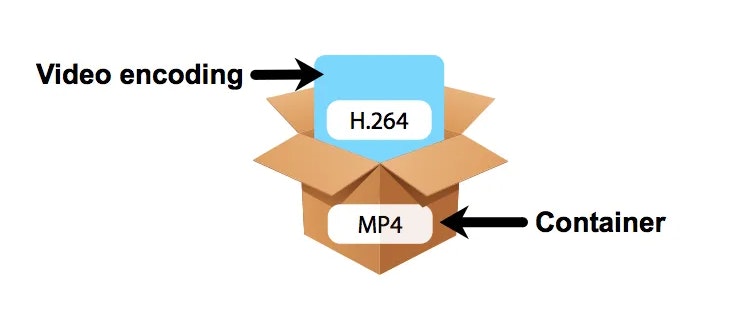
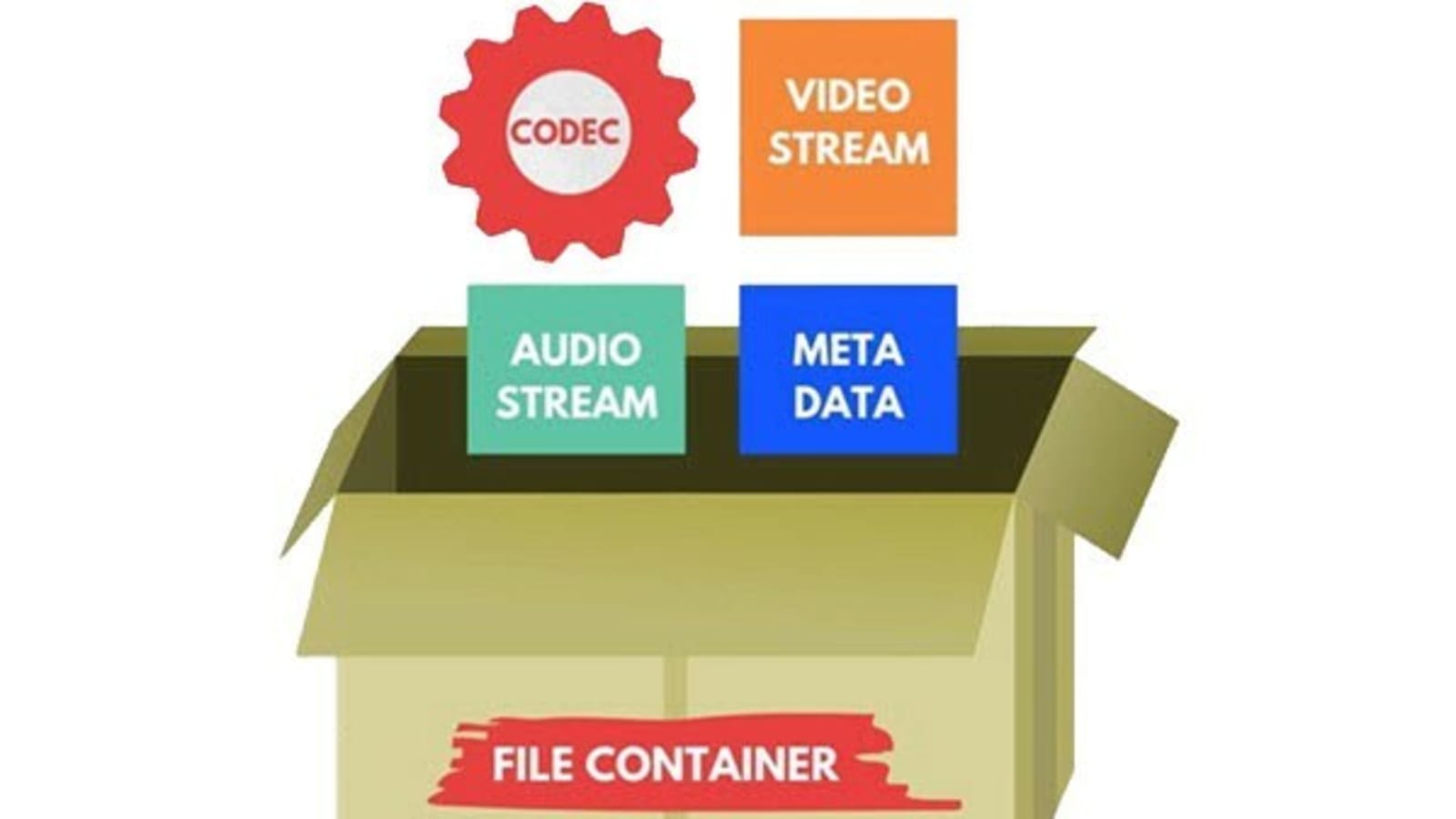
Video containers are an integral part of digital video technology, and they play a crucial role in delivering video content to users. A video container is essentially a file format that combines different types of data, including video, audio, and subtitles, into a single file. Video containers enable users to store and play back video files, and they support a wide range of codecs and other video-related technologies.

In this article, we will explore some of the most popular video containers in use today, including MP4, AVI, and MKV. We will provide an in-depth technical analysis of each container, including their history, features, benefits, and common codecs. We will also cover the purpose and definition of video containers, as well as the importance of choosing the right container for your needs.

The Purpose of Video Containers

The primary purpose of a video container is to store and organize video and audio content in a single file. Video containers are designed to accommodate multiple video and audio codecs, which are used to compress the video and audio data in the file. The container format also includes information about the video and audio streams, such as the frame rate, resolution, and bit rate.

The video container provides a common structure for storing video and audio data, and it enables users to easily share and distribute video files. Video containers are also used to deliver video content over the internet, as they support streaming technologies that enable users to watch video content without having to download the entire file.

History of Video Containers

The history of video containers dates back to the early days of digital video technology, when various video formats were being developed to store and play back digital video content. One of the earliest video container formats was AVI (Audio Video Interleave), which was introduced by Microsoft in 1992. AVI was designed to support multiple video and audio codecs, and it quickly became a popular format for storing and playing back video content.

In the years that followed, a number of other video container formats were developed, each with its own unique features and benefits. One of the most popular video container formats today is MP4 (MPEG-4 Part 14), which was introduced in 2001 as a successor to the older MPEG-2 video format. MP4 is designed to be a highly versatile and efficient container format that can support a wide range of video and audio codecs.

Another popular video container format is MKV (Matroska Video), which was introduced in 2002 as an open-source alternative to other container formats. MKV is designed to support a wide range of video and audio codecs, and it also includes support for advanced features such as subtitles and multiple audio tracks.

Features and Benefits of Video Containers

One of the key features of video containers is their support for multiple video and audio codecs. Video codecs are used to compress video data in order to reduce file size and improve playback performance. Audio codecs are used to compress audio data in a similar manner.

Video containers also include information about the video and audio streams in the file, such as the frame rate, resolution, and bit rate. This information is used by media players to correctly play back the video and audio content, and it ensures that the video is displayed at the correct size and aspect ratio.

Another important feature of video containers is their support for streaming technologies, which enable users to watch video content without having to download the entire file. Streaming technologies work by delivering the video content in small chunks, which are downloaded and played back in real-time.

Common Codecs Used in Video Containers

One of the most important components of video containers is the codec used to compress and decompress the video data. Codecs are responsible for reducing the file size of the video while maintaining its quality. There are many different codecs available, each with its own strengths and weaknesses.

H.264/AVC

H.264/AVC is a widely used codec that provides a high compression ratio with good video quality. It is supported by most modern devices and is often used for streaming video online. However, it can be computationally intensive, requiring a powerful processor to decode.

HEVC/H.265

HEVC/H.265 is a newer codec that provides even better compression than H.264/AVC, resulting in smaller file sizes with higher quality video. It is also more efficient than H.264/AVC, meaning it requires less bandwidth to stream. However, it is not yet widely supported by devices and software, and it can be more computationally intensive to decode than H.264/AVC.

VP9

VP9 is a codec developed by Google that provides high-quality video at lower bitrates. It is commonly used for streaming video on YouTube and other Google services. However, it is not as widely supported as H.264/AVC or HEVC/H.265, and it can be more computationally intensive to decode.

AV1

AV1 is a relatively new codec that provides high-quality video at even lower bitrates than VP9. It is an open-source codec developed by the Alliance for Open Media, which includes major tech companies such as Google, Microsoft, and Amazon. However, it is not yet widely supported by devices and software, and it can be computationally intensive to decode.

Choosing the Right Video Container

When it comes to choosing the right video container, there are several factors to consider, including compatibility with devices and software, quality and file size considerations, and future-proofing.

Compatibility

The first factor to consider is compatibility. Different devices and software support different video containers and codecs, so it is important to choose a container and codec that is widely supported. MP4 is a good choice for maximum compatibility, as it is supported by most devices and software.

Quality and File Size

Another factor to consider is the quality and file size of the video. Different containers and codecs can result in different levels of quality and file size. Generally, newer codecs like HEVC/H.265 and AV1 provide higher quality video at lower file sizes, but they may not be supported by all devices and software.

Future-Proofing

Finally, it is important to consider future-proofing when choosing a video container. Video technology is constantly evolving, so it is important to choose a container and codec that will be supported in the future. MP4 is a good choice for future-proofing, as it is widely supported and likely to remain so in the future.

Conclusion

Video containers play a crucial role in the storage and playback of video content. Understanding the differences between video containers like MP4, AVI, and MKV, as well as the codecs used to compress and decompress the video data, is essential for choosing the right container for your needs. By considering factors like compatibility, quality and file size, and future-proofing, you can ensure that your video content is stored and played back seamlessly on a wide range of devices and software.

CODECS AND CONTAINERS

CODECS AND CONTAINERS

I.CODEC

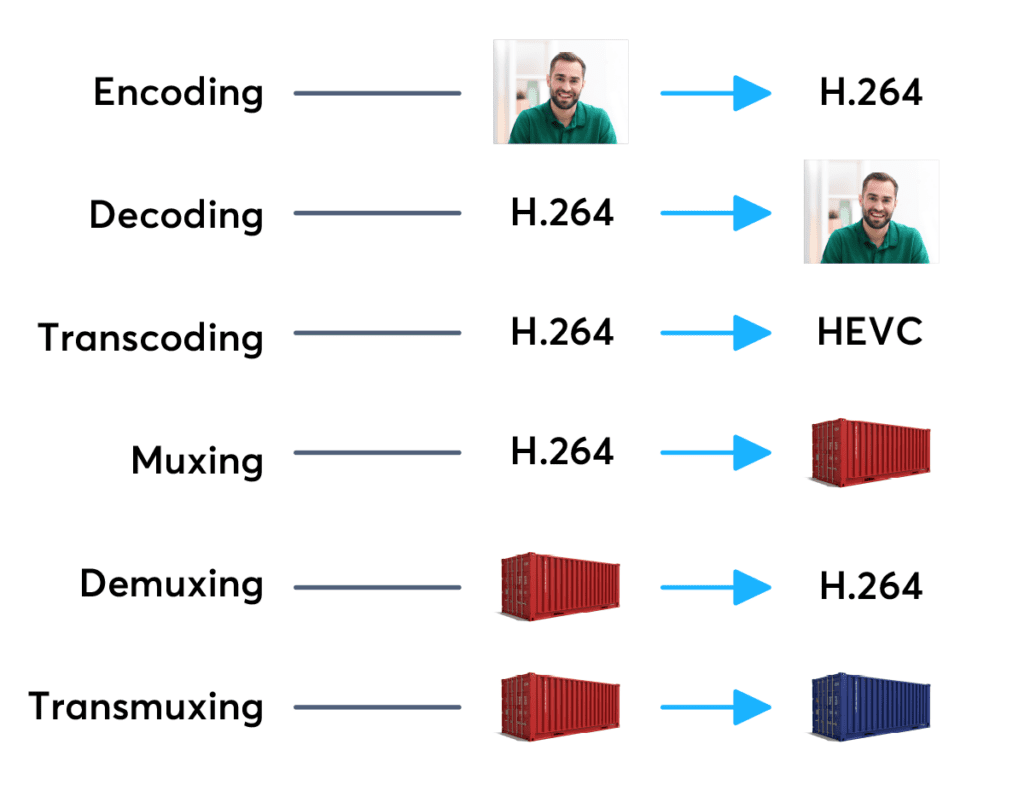
Codecs are components (circuits, modules) or computer programs that create a stream of data to encode and / or can decode. The term “Codec” is a made-up word that consists of parts of the English terms CO der and DEC o. (En) Encoders are used to encode data streams for transmission (eg Reed-Solomon contributes to DVB error protection), Encrypt (eg AACS as content protection for Blu-ray Disc) or to reduce the amount of data (compression method, for example, MP3 for audio). The decoder (decoder) retrieves the encoder’s original input information from the encoded data stream.

codecs and containers

2. CODECS FOR COMPRESSING DATA STREAMS

No medium of storage or transmission is infinitely large. Therefore, the available resources must be budgeted. Therefore, it is very important to reduce the amount of data that must be transmitted or stored. There are different compression methods adapted to the information to be compressed.

Codecs and containers
Each compression method has its advantages and disadvantages. There is a trade-off between compression factor (= ratio of source file size to target file size), compression quality (= lossless / lossy -> type and number of artifacts), speed, usability , decoder distribution and finally also costs. Compression processes and their implementation in the market play an extremely important economic role, since compression algorithms can be patented and their use must be compensated by the payment of licenses by device manufacturers or software users. Some kind of content encryption can also be achieved through proprietary and undisclosed compression algorithms, allowing distribution control.

Operating principle

Compressing a digital signal means that parts of the information must be suppressed without changing the content of the information. These ‘superfluous’ data, the so-called redundancies and irrelevancies are components of information, for example an image, that are present several times (redundant) or cannot be perceived by humans (irrelevant). Furthermore, redundancies can also occur in the digital data describing the image, for example. All compression methods are based on the principle of eliminating redundant information. In most compression processes, several different algorithms are used one after the other to eliminate redundancies in content and data. Algorithms that discover and avoid redundancies on a purely mathematical basis usually work lossless without loss), that is, no information is lost. After compression and subsequent decompression the information then corresponds 1: 1 to the original. Compression algorithms that evaluate information components based on physiological models (for example, MP3) for their importance and then discard unimportant information (irrelevance reduction), function lossy with loss), since information it is lost during compression.

3. FILES WITH COMPRESSED CONTENT

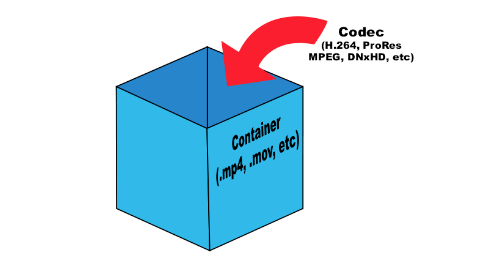
If the data is compressed through a certain process, it must be put into a format in which it can be distributed. These can be streams that are streamed like DVB, for example, or files that are stored on a storage medium. The compressed “raw data” thus creates a structure that allows the data as in a container (transport container). The way this container or container format is made depends on the transmission medium, the operating system and the specific application.

II. CONTAINER FORMATS

Container files are file structures that simplify external (multimedia) data and allow exchange, even across platform boundaries. Container formats describe how this user data is stored (not how it is encoded!). In principle, cabinet files can contain all kinds of data, but they are generally restricted to specific data. Specialized in data types. For example, PDF files are ideal for reproducing documents that are true to the original, consisting of font information and raster or vector graphics, whereas an AVI file generally contains movie and sound information.

Container formats for multimedia applications always use already encoded data streams, i.e. compressed