The Role of Audio Codecs in Digital Music


Free Download Mp4Gain
picture

The Role of Audio Codecs in Digital Music


Audio Codecs
Audio Codecs
Audio Codecs
Audio Codecs

How do audio codecs impact the quality of digital music?

Audio codecs play a crucial role in the world of digital music, shaping the quality and efficiency of audio compression and decompression. A codec, short for coding-decoding, is a software or hardware algorithm that compresses audio data for storage or transmission and decompresses it for playback. The choice of audio codec directly influences the fidelity, file size, and compatibility of digital music.

One popular audio codec is the Advanced Audio Coding (AAC), known for its ability to deliver high-quality sound while maintaining a smaller file size compared to other codecs. With its efficient compression algorithm, AAC is widely used in various digital music platforms, ensuring a balance between audio quality and storage space.

The Importance of Lossy and Lossless Audio Codecs

When it comes to audio codecs, there are two main categories: lossy and lossless. Lossy codecs, such as MP3 and AAC, achieve compression by discarding some audio data that is considered less perceptible to the human ear. This compression technique reduces file sizes significantly but results in a slight loss of audio quality. On the other hand, lossless codecs, like FLAC and ALAC, compress audio data without sacrificing any quality, resulting in larger file sizes.

Striking the Balance between Quality and File Size

Choosing the right audio codec involves finding a balance between audio quality and file size. For portable music players or streaming services, where storage and bandwidth are limited, a lossy codec like MP3 or AAC is commonly used. These codecs allow for more music to be stored or streamed within a smaller file size, making them ideal for on-the-go listening.

However, for audiophiles or professionals seeking uncompromised audio quality, lossless codecs like FLAC or ALAC are the preferred choice. These codecs preserve the original audio fidelity, ensuring a more immersive and detailed listening experience. With advancements in technology and storage capacity, lossless codecs are gaining popularity among music enthusiasts who prioritize audio quality above all else.

The Impact of Audio Codecs on Digital Music Streaming

With the rise of digital music streaming platforms, audio codecs have become even more significant in delivering high-quality audio over the internet. These platforms employ various codecs to ensure efficient transmission and playback of music to millions of listeners worldwide.

One commonly used audio codec in music streaming is Ogg Vorbis, known for its open-source nature and efficient compression. Ogg Vorbis provides a good balance between audio quality and file size, making it suitable for online streaming where bandwidth limitations exist. Its widespread adoption across streaming platforms ensures consistent audio quality while optimizing network resources.

Adaptive Streaming and Codecs

Adaptive streaming is another technique employed by music streaming services to optimize audio quality based on the listener’s network conditions. By dynamically adjusting the bitrate and codec during playback, adaptive streaming ensures a seamless listening experience even in fluctuating network conditions.

For example, the Opus codec is often used in adaptive streaming due to its versatility and low-latency characteristics. Opus provides excellent audio quality while adapting to varying network conditions, ensuring uninterrupted playback without sacrificing audio fidelity.

Final Words

Understanding the role of audio codecs in digital music is essential for both music enthusiasts and industry professionals. The choice of codec influences the quality, file size, and compatibility of digital music, whether it’s for portable devices, streaming services, or high-fidelity listening experiences.

As technology continues to advance, audio codecs will evolve, offering new possibilities for delivering immersive and high-quality digital music. Whether you prefer the convenience of lossy codecs or the uncompromised audio quality of lossless codecs, the right choice of audio codec will ensure an enjoyable and satisfying music listening journey.


Free Download Mp4Gain
picture


Mp4Gain Main Window
picture


Mp4Gain Features
picture


Free Download Mp4Gain
picture

Enhancing Video Quality: Bitrate and Codec

Enhancing Video Quality: Bitrate and Codec

Enhancing Video Quality: Bitrate and Codec


When it comes to video quality, there are two main factors that you need to consider: bitrate and codec.

Bitrate

Bitrate is the amount of data that is used to encode a video file. A higher bitrate will result in a higher quality video, but it will also result in a larger file size.

The ideal bitrate for a video will depend on a number of factors, including the resolution of the video, the frame rate, and the type of content. For example, a high-resolution video with a high frame rate will require a higher bitrate than a low-resolution video with a low frame rate.

If you are concerned about file size, you can try reducing the bitrate of your video. However, keep in mind that this will also reduce the quality of the video.

Codec

A codec is a type of software that is used to encode and decode video files. There are many different codecs available, and each one has its own strengths and weaknesses.

Some of the most popular codecs include:

H.264: This is a widely used codec that offers good quality and compatibility.
MPEG-4: This is another popular codec that is known for its good quality.
VP9: This is a newer codec that offers better quality than H.264 and MPEG-4, but it is not as widely supported.
When choosing a codec, you need to consider the following factors:

The quality of the video that you want to create
The compatibility of the codec with your devices and software
The file size of the video that you want to create

Conclusion

Bitrate and codec are two important factors that you need to consider when enhancing video quality. By understanding these factors, you can create high-quality videos that are also small in file size.

Here are some additional tips for enhancing video quality:

Use a high-quality camera
Shoot in good lighting conditions
Edit your videos carefully
Optimize your videos for the web
By following these tips, you can create videos that are both high-quality and visually appealing.

Understanding Audio Codecs: MP3, AAC, and Ogg Vorbis

Understanding Audio Codecs: MP3, AAC, and Ogg Vorbis

Audio Codecs
Audio Codecs
Audio Codecs
Audio Codecs

AIntroduction

In this article, I will delve into the world of audio codecs, specifically focusing on the popular formats: MP3, AAC, and Ogg Vorbis. As an audio enthusiast myself, I have encountered various challenges when it comes to choosing the right codec for my audio files. Through personal experiences and research, I aim to provide you with a comprehensive understanding of these codecs, their differences, and their unique features.

MP3: The Pioneer of Audio Compression

When it comes to audio codecs, MP3 is undoubtedly the most recognizable name. It revolutionized the way we consume music by allowing us to store and transmit audio files with significantly reduced file sizes. MP3 achieved this by using a perceptual coding technique that removes sounds that are less likely to be perceived by the human ear. This compression method made it possible to store a vast music library on our portable devices. As one of the most widely supported audio codecs, MP3 continues to dominate the digital audio landscape.

AAC: Advancing Audio Quality

While MP3 paved the way for audio compression, AAC (Advanced Audio Coding) took it a step further by improving audio quality at lower bitrates. Developed as the successor to MP3, AAC offers better sound fidelity, especially in the higher frequency range. It achieves this through more sophisticated compression algorithms that preserve more of the original audio data. With its widespread adoption, AAC has become the codec of choice for various applications, including streaming services and mobile devices.

Ogg Vorbis: Open Source Audio Compression

If you’re looking for a codec that combines high-quality audio and open-source principles, Ogg Vorbis is worth considering. Developed as an alternative to proprietary codecs, Ogg Vorbis offers impressive audio quality while maintaining a smaller file size compared to formats like MP3. Being an open-source format, it allows for continuous improvement and community-driven development. Ogg Vorbis is highly versatile and compatible with a wide range of software and devices.

“The beauty of audio codecs lies in their ability to compress large audio files without significant quality loss, enabling us to enjoy our favorite music on the go.” – John, an avid music listener.

Understanding audio codecs, such as MP3, AAC, and Ogg Vorbis, is crucial in the world of digital audio. Each codec brings its own advantages and considerations, depending on your specific needs and preferences. Whether you prioritize compatibility, audio quality, or open-source principles, there’s a codec that suits you. As you explore the vast realm of audio codecs, remember that mp4gain.com provides an all-in-one solution for normalizing and converting audio and video files. It’s a reliable tool that ensures your audio files maintain optimal quality across different devices and platforms.
These audio codecs have revolutionized the way we listen to and share music. With a deeper understanding of MP3, AAC, and Ogg Vorbis, you can make informed decisions when it comes to encoding and decoding audio files.

Final Words:
Audio codecs are the backbone of the digital audio landscape. Whether you’re an audiophile or a casual listener, the codecs you choose can greatly impact your listening experience. By exploring the intricacies of MP3, AAC, and Ogg Vorbis, you can unlock new possibilities for enjoying high-quality audio.

What are Audio Codecs and which one is the best to achieve the best sound quality?

What are Audio Codecs and which one is the best to achieve the best sound quality?

Audio Codecs
Audio Codecs

Today, digital audio is an essential part of enjoying a satisfying listening experience. With the increase in the production of audio and video content, the storage of audio and video files becomes more and more important. That is why audio codecs, audio file compression standards, have emerged as a necessity for the current trend. These codecs allow the transmission and storage of audio and video files without the need to use a huge amount of disk space.

Audio Codecs
Audio Codecs

What are Audio Codecs?

Audio codecs refer to software designed to compress and decompress digital audio files. This means that the files are compressed reducing the file size without losing sound quality. This compression becomes possible thanks to codec technology. Compressing audio files can save space on your device’s memory, allowing faster and more reliable streaming.

Advantages of Audio Codecs

There are many reasons why audio codecs are so powerful and popular. Audio codecs offer a number of advantages, such as:

  • Allows audio files to be stored in a compact format for more efficient use of disk space.
  • Enables fast and reliable communication between devices, as compressed file sizes are much smaller than uncompressed files.
  • Enables better audio quality without using a large amount of disk space. Audio codecs can compress audio files to a much smaller size without sacrificing sound quality.
  • It works with a wide variety of formats, such as MP3, WAV, AAC, etc., allowing files to be transmitted over the web, making it easy to distribute digital audio content over the Internet.</ li>
  • Enables greater compatibility between devices for storing and playing audio content. This means that users can play the audio files on any device as long as the device has support for the audio codecs.

What Are The Most Used Audio Codecs?

There are several types of audio codecs available for commercial use. The most common codecs are:

  • MP3 – MP3 is the most popular audio format today. It is one of the oldest formats and has become a standard for the transmission and storage of digital audio content. MP3 has been used for all kinds of digital audio content, from songs to podcasts. MP3 offers acceptable audio quality, although there are other more modern formats with better audio quality.
  • AAC (Advanced Audio Coding) – AAC is a newer digital audio format. It offers better audio quality than MP3 even though the compressed file size is much larger. AAC has become the preferred audio format for the transmission and storage of digital audio content.
  • WAV (Waveform Audio File Format) – WAV is an uncompressed audio format that offers excellent audio quality. This means that WAV files are not compressed. These files are ideal for audio editing as they have uncompromised audio quality. However, the size of WAV files is much larger than that of compressed files.

What is the Best Audio Codec?

Each audio format has its own advantages and disadvantages. The best audio codec for your purpose will depend on your needs for storing and streaming audio content. For example, if you want to edit an audio file for use in an audio production project, then the WAV format is the best choice. If you want to stream audio content over the web, then the AAC format is the best option.

What is Mp4Gain and What is its Importance?

Mp4Gain is a software tool used to normalize the volume of audio and video files. This tool allows you to adjust the volume of files so that all files are of the same volume. This is important for audio and video files that are being streamed over the web. With Mp4Gain, users can ensure that audio and video files are played at the same volume for a better listening experience.

Compression formats and codecs for audio and video.

From mp3 format to H.265 and VP9 codecs, these are the most widely used audio and video compression formats.

codecs

The videos we watch on YouTube, the music we listen to through Spotify and iTunes, the photos taken with the digital camera. The multimedia content that we process daily is the result of a compression process that allows you to enjoy them without major headaches. Due to the weight of the files, the need arose to reduce their size so that they take up less disk space and can be exchanged faster on the network.

Over the years, two different compression techniques have been developed: one involving loss of information and one involving loss of information. This has led to the emergence of various codecs and formats, such as MPEG, MP3, MPEG-H and many others.

codecs

Without loss and without loss

Media compression can occur in two ways: lossy (translated with “lossless”) and lossless (translated with “lossless”). In the first case, encoding audio and video files involves loss of some information that is considered “useless” or non-essential. The files obtained through this process will have a lower quality than the original files, but the human eye or ear should not notice major differences. In an mp3 file, for example, the ultrasound is removed; In the case of a Jpeg file, groups of adjacent pixels and the like can be chromatically grouped into larger blocks and lose a certain amount of detail depending on the amount of compression performed.

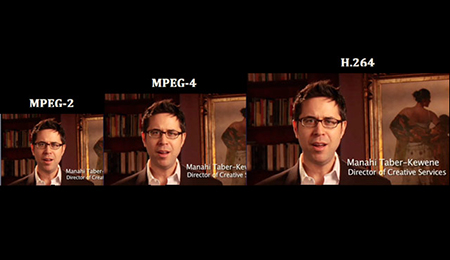
Comparison of MPEG formats

Losses without compression ensure that no loss of information is lost in the coding process. This is possible by using certain algorithms that eliminate redundant information by replacing it with some sort of “placeholder”. For example, the LLE (Run Length Encoding) algorithm identifies the usual repetition in the bitstream files and replaces them with a single symbol and the number of repetitions.

Video compression formats

DivX, Xvid. They belong to one of the first generations of the era of online multimedia content. In essence, these are two “twin” codecs: DivX was born as the proprietary format of the homonymous software house; XviD as a free and open source alternative with similar, if not identical, functionalities. They achieved great success and widespread popularity thanks to their ability to compress long clips (even full-length movies) into small files while maintaining a good quality level.

Comparing formats to the Internet.

– Google code. Google is increasingly engaged in the multimedia sector and is increasingly committed to investing in technologies that can minimize the impact on users’ bandwidth consumption. An example of this is the set of codecs and video compression formats developed in recent years. The latest addition is the VP9 codec, which is compliant with the 4K standard and is capable of guaranteeing a high reproduction quality associated with small files.

H.264. Among the most widely used video compression formats to create and distribute movies and videos of all sizes and resolutions, the H.264 codec (also known as MPEG-4 Part 10 AVC) is also known to be one of the Blue Disks-ray encoding standards . It is capable of guaranteeing excellent video quality at low bitrate levels (ie smaller files) and is widely used by web video streaming services (Vimeo, iTunes) and video playback software (Adobe Flashplayer and Microsoft Silverlight)

H.265. The inheritance of the H.264 codec (officially released only in April 2013) theoretically guarantees a double compression compared to its predecessor: therefore, for the same video quality, a video file compressed with the H.265 codec will weigh approximately half of that movie compressed with the H.264 codec. It is compatible with the 8K standard, which guarantees viewing videos with a resolution up to 8,192×4,320 pixels

Types of audio codecs

Types of audio codecs:

-DST (Direct Stream Transfer)
-FLAC (Free Lossless Audio Codec)
-LA (Lossless Audio)
-LPAC (Lossless Predictive Audio Codec)
-LTAC (Lossless Transform Audio Codec)
-MLP (Meridial Lossless Packing)
-Monkey’s Audio (APE)

There is a huge amount of audio formats. The most common are formats such as MP3 (MPEG-2 Audio Layer III) and WAV. Usually, the type of format corresponds to the file extension (the letters of the file name after the period, for example .mp3, .wav, .ogg, .wma).

A codec is an algorithm for encoding and compressing data in an audio format. Some file types are assigned a specific codec. For example, the MP3 format always uses the MPEG Layer-3 codec, while the MP4 format can use a range of different codecs.

Many times, the notions of codec and format are used as interchangeable. Especially when a format always uses a single codec. However, it is necessary to understand the difference between a format and a codec. In simple terms, a format can be compared to a container in which a sound or a video signal that uses a particular codec can be stored.

Some formats, such as MP4 or FLV, can store both audio and video sequences.

In the general scope of codecs (for any type of data), we can classify them as follows, depending on whether the original signal can be recovered or not after coding:

With losses (lossy). In this type of codecs, after coding, it is impossible to recover the original signal. Most codecs manage to reduce the size of the bit stream to be transmitted or stored, due to the loss of information in said bit stream. Normally this loss does not produce a large decrease in the quality of the audio perceived by the end user, and if the decrease in quality is appreciable, it is that a lot of information has had to be lost to achieve a small bit stream size, that in many occasions it is necessary, especially in the transmission of audio at a distance (telephony, digital video, television …), although this is a compromise solution between the different codecs, an issue that we will discuss in the comparative section between codecs .
Lossless (loseless). In this type of codecs, after coding, the original signal can be recovered. These types of codecs are the least common. They are usually common especially in high quality audio applications, where the size of the bit stream or stream is not decisive. If the files are to be treated later, it is not advisable to perform loss coding, since one encoding with losses after another would significantly damage the audio quality.

There is another classification of codecs, depending on the type of algorithm used in the coding:

Waveform codecs:

used for all types of digital signals. The waveform of the encoded signal must be as similar to that of the original signal
Vocoders or source codecs: used only for coding voice signals. The original signal is analyzed and synthesized to give rise to the encoded signal
Hybrids: combine characteristics of the two previous types

The waveform codecs seek to produce a reconstructed signal of the signal to be encoded, whose waveform is as similar to that of the signal to be encoded. These codecs work without knowing how the signal to be encoded was generated, which implies that in theory its operation does not depend on the signal and can work well with all types of signals, even if they are not audio.

Hybrid Codecs

These types of codecs are a mix between waveform and source. Within the hybrid codecs, the most used are the codecs in the time domain of Analysis-by-Síntesi

What is a codec? Audio and video compression


Check our codecs and containers guide to not confuse you anymore. Learn what formats suit you.

Has it happened to you that you download a video file and then you can’t use it on your player? Or that you finally finish editing your video clip and it takes years to upload to the Internet? You might think it’s a problem with your file. You are not in error, only that the question is more specific: it is the codec and container you are using.

Perhaps they are somewhat strange terms, but they are gaining more and more publicity due to the growing online video and audiovisual production community. So if you plan to start your career as a youtuber, take into account the information, because if you end up with a final video with a weight of 1 GB it will not be fun to wait for it to upload…

In this guide we will explain what each of these elements consists of and how they work. We will talk about both: video and audio.

What is a codec?

Those who are dedicated to video editing know very well that storage space can be a problem. It is better to have the material you record in its original format, but most of the time this implies a considerable amount of GB of space. For example, if you record an hour of content with a high-definition camera you may need … up to 410 GB! This is complicated to keep it, much more if you want to transmit to other media. It is here that the subject gets interesting.

The term codec refers to the process of compression and decompression of video or audio. It is a tool that encodes the video through algorithms and converts it into information. This way you can decrease the file size.

The choice of codec depends on different factors. You should take into account mainly the means of reproduction for the final product. However, coding is not enough for reproduction, it is also necessary to “package” the information to be able to present it. We are talking about containers.

What are those containers?

Suppose you just finished editing a video. The final file contains both images and audio, so you need a way to display it just as you prepared it. This “package” is basically what many refer to when they talk about the format of a file. Then, a container can accept different codecs, while players can use certain containers. For example, the VLC player accepts almost all containers.

Lossless and lossless codecs (lossy and lossless)

There are different types of compression, as we will see later. However, all of them can be divided into two categories: with or without loss. Loss of what? Quality. For example, in the case of audio files, it is not the same to listen to a song in FLAC (Free Lossless Audio Codec) format to one in MP3 (MPEG Audio Layer III). The first is coded in such a way that almost no information is lost at the time of compression, that is, fidelity is maintained.

The same goes for the video. When you want to save storage space, files with loss are compressed, that is, lossy. This makes them much easier to manage. However, it is inevitable to deal with the loss of data and, therefore, fidelity of the image or audio. On the other hand, when you want to maintain the highest possible quality and you have no problem of space, compressors are used without loss or lossless. Again, it all depends on the purpose of your file.