Audio Codec Comparison: A Comprehensive Guide for Audio Geeks
Introduction
Audio codecs play a significant role in digital audio technology, as they are responsible for compressing and decompressing digital audio files. The use of audio codecs is essential to reduce the file size of audio files, making them easier to store, share, and transfer over the internet.
However, with the numerous audio codecs available in the market, it can be challenging to choose the right one for your needs. In this article, we will provide a comprehensive guide on the most popular audio codecs available today, their features, and their pros and cons.
What is an Audio Codec?
An audio codec is a software program or algorithm that compresses and decompresses digital audio data. The term codec stands for coder-decoder, and it is responsible for reducing the file size of digital audio files by removing redundant and irrelevant information from the file while retaining the original sound quality as much as possible.
Without an audio codec, digital audio files would be too large to store or transfer over the internet, which would be impractical. Therefore, audio codecs are essential for digital audio technology to function effectively.
Types of Audio Codecs
-
Lossy Audio Codecs
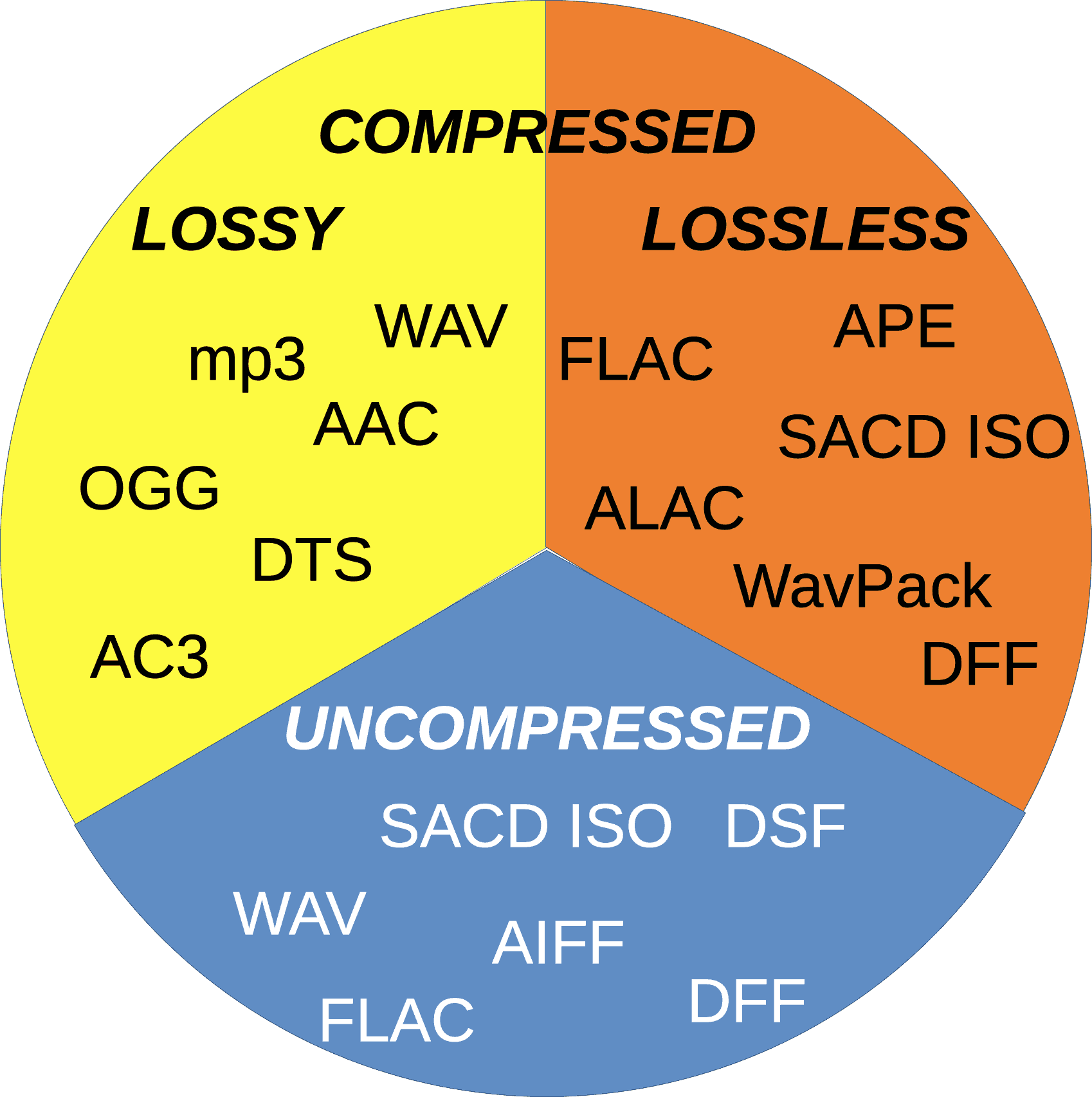
Lossy audio codecs are designed to reduce the file size of digital audio files by discarding information that is considered irrelevant or redundant for human hearing. Lossy codecs achieve compression by applying psychoacoustic models that analyze the human auditory system’s limitations and remove sounds that are inaudible or less audible to the human ear. The most popular lossy audio codecs are:
- MP3
- AAC
- OGG
- WMA
-
Lossless Audio Codecs
Lossless audio codecs compress digital audio files without discarding any information. Lossless codecs achieve compression by using sophisticated algorithms that analyze and encode the original audio data without affecting its quality. Lossless codecs are preferred for archiving or storing audio files that require the highest possible sound quality. The most popular lossless audio codecs are:
- FLAC
- ALAC
- WAV
- AIFF
Popular Audio Codecs
MP3
MP3 is the most popular audio codec in the world, and it has been around since the 1990s. MP3 stands for MPEG Audio Layer III, and it is a lossy audio codec that compresses digital audio files by removing sounds that are less audible to the human ear. MP3 is compatible with almost all audio players and devices and is widely used for music streaming, downloading, and sharing over the internet.
The main advantage of MP3 is its small file size, which makes it easy to store and transfer over the internet. However, MP3’s main drawback is its reduced sound quality, especially for audio files that contain a wide range of frequencies or dynamic range. MP3 files are prone to audio artifacts, such as compression artifacts, and they can sound flat or distorted compared to the original audio file.
AAC
AAC stands for Advanced Audio Coding, and it is a lossy audio codec that is widely used for music streaming and downloading. AAC is the default audio codec for Apple devices and is used by popular streaming services such as Spotify, Tidal, and YouTube. AAC is also used for high-definition digital television and radio broadcasting, as well as in various video formats such as MP4 and M4V.
FLAC
FLAC stands for Free Lossless Audio Codec, and as the name suggests, it is a lossless audio codec. FLAC is designed to compress audio files without losing any data or quality. It is an open-source codec that can be used on any platform and supports metadata, tagging, and album cover art. FLAC is a popular codec for archiving audio files and for audiophiles who want to preserve the original quality of their music. However, because FLAC files are larger than compressed audio files, they are less suitable for streaming and downloading over the internet.
ALAC
ALAC stands for Apple Lossless Audio Codec, and it is a lossless audio codec that is similar to FLAC. ALAC is the default audio codec for Apple devices and is supported by iTunes and other Apple software. Like FLAC, ALAC is designed to compress audio files without losing any data or quality. However, because ALAC is only supported by Apple devices and software, it is less widely used than FLAC.
Opus
Opus is a relatively new audio codec that was standardized by the Internet Engineering Task Force (IETF) in 2012. Opus is a versatile codec that can be used for a wide range of audio applications, including music streaming, voice chat, and video conferencing. It is designed to provide high-quality audio at low bitrates and can adapt to changing network conditions. Opus is an open-source codec that is supported by most modern web browsers and operating systems.
DSD
DSD stands for Direct Stream Digital, and it is a high-resolution audio codec that is used for digital recordings of analog audio sources. DSD uses a 1-bit sampling method that is different from traditional PCM-based codecs. DSD recordings have a high sampling rate and a wide frequency response, which allows them to capture more of the original sound than other codecs. DSD is used primarily by audiophiles and is supported by high-end audio equipment and software.
Conclusion
Choosing the right audio codec depends on your specific needs and preferences. If you want to compress your audio files for streaming or downloading, then lossy codecs such as MP3 or AAC are a good choice. If you want to preserve the original quality of your music, then lossless codecs such as FLAC or ALAC are a better option. Opus is a versatile codec that can be used for a wide range of audio applications, and DSD is a high-resolution codec that is ideal for audiophiles. Ultimately, the choice of codec depends on your personal preferences and the specific requirements of your project or application.
One tool that can be useful for managing and adjusting audio files is MP4Gain. MP4Gain is a software that allows you to normalize and adjust the volume of MP3, MP4, FLAC, and other audio files. It can be used to ensure that all of your audio files have the same volume level, which can be particularly useful for creating playlists or for streaming audio files. MP4Gain is available for Windows and it is a simple and effective tool for managing your audio files.