Comparing WMA to Ogg Vorbis for Open-Source Audio Compression


Free Download Mp4Gain
picture

Comparing WMA to Ogg Vorbis for Open-Source Audio Compression

Comparing WMA to Ogg Vorbis for Open-Source Audio Compression

Let’s talk about comparing WMA to Ogg Vorbis for open-source audio compression. As an expert in audio encoding with years of experience, I’ve seen how important selecting the right audio compression format is for any project, be it for music or speech. WMA (Windows Media Audio) and Ogg Vorbis are two notable audio formats, but they approach compression in different ways, and each has distinct advantages and disadvantages. It’s like choosing the right type of container for your food; some containers keep the food fresher for longer, while others may not be suitable. In the realm of audio, the ‘container’ is the codec, and I’m here to help you understand each one’s strengths when compared to the other.

Understanding WMA and Ogg Vorbis Audio Codecs

Understanding the differences between WMA and Ogg Vorbis is the first step when deciding which one is more suitable for your needs. WMA, developed by Microsoft, is a proprietary codec often used in Windows systems. Think of it as a specific brand of tool, often designed to work best with its own ecosystem. On the other hand, Ogg Vorbis is an open-source codec, that’s free to use and modify, imagine it like a community tool that everyone contributes to, making it very flexible. These different approaches mean they have distinct characteristics regarding compression efficiency, compatibility, and licensing, all of which impact their use in different projects. From my experience, the key to mastering audio encoding is understanding each codec and choosing the right one.

Audio Compression Quality: WMA vs. Ogg Vorbis

When evaluating audio compression, one must look into the quality that WMA and Ogg Vorbis provide at various bitrates. Both codecs are designed to reduce file size, but the methods used affect audio fidelity. WMA, particularly in its more advanced versions, can achieve very good quality at low bitrates. Imagine this as a painter who can create very detailed art with fewer brushstrokes. On the other hand, Ogg Vorbis is known for its excellent quality, which is very close to the source, and it uses an adaptable approach, like a chef who adjusts the recipe depending on the ingredients, to offer an optimal result. From my professional practice, I can assure you that the “best” quality is subjective, because it depends on the source audio and intended use.

Open Source Nature and Licensing of Ogg Vorbis

The open-source nature and licensing of Ogg Vorbis are key benefits that set it apart from WMA. Ogg Vorbis is released under a very liberal license that allows it to be freely used, modified, and distributed, just like a public park, available for everyone to use and enjoy. This open model fosters innovation and adoption across different platforms. WMA, being proprietary, often involves licensing fees and might have usage restrictions, like a private club, that has a strict rules for usage. My experience shows that the open nature of Ogg Vorbis is a major advantage when you need flexibility in your audio projects, particularly if you’re looking for a low-cost solution, allowing for collaboration and contribution.

Compatibility and Platform Support

The compatibility and platform support for WMA and Ogg Vorbis vary significantly, this is very important when you want to use an audio format. WMA has deep integration with Windows and Microsoft products, similar to how a key fits its lock, so it might be the best choice within the Windows ecosystem, but might cause problems outside it. Ogg Vorbis, with its open-source nature, has become widely supported across different operating systems and software, as it is a format that welcomes all systems, becoming a universal choice. My professional experience has shown me that choosing a format that plays seamlessly across many platforms enhances the usability and reach of your projects. And for this aspect Ogg Vorbis is normally the wisest choice.

WMA and Ogg Vorbis File Size Efficiency

File size efficiency is a critical factor when dealing with audio compression, and something I look into very carefully. Both WMA and Ogg Vorbis aim to reduce file sizes, but achieve this goal with different methods. WMA can sometimes achieve slightly smaller file sizes at lower bitrates, it’s like packing more clothes in a smaller suitcase, this comes at a cost in quality. Ogg Vorbis often focuses on maintaining higher quality, and this means its files might be slightly larger, so its like choosing a bigger suitcase to avoid wrinkling the clothes. From my years of experience, I’ve learned that the ‘best’ size is the one that suits your specific needs, whether it’s saving storage space or prioritizing high-fidelity sound.

Use Cases for WMA and Ogg Vorbis

When using WMA and Ogg Vorbis, you have to consider each format’s strength, because they are designed for different use cases. WMA is common in environments where Microsoft products are dominant, like corporate presentations or Windows software. Think of it as a tool designed for a specific environment, offering the best results in that context. On the other hand, Ogg Vorbis is popular in open-source projects, video games and online streaming services because it offers flexibility and compatibility, like a tool that works well everywhere. I often find that the choice of the codec depends heavily on where and how you want to use your audio content.

Encoding and Decoding Speed

The encoding and decoding speed of WMA and Ogg Vorbis can influence performance, especially when working with many files. WMA can sometimes have faster encoding speeds, especially with specific hardware and software support, just as using a specific kitchen appliance can speed up cooking, but it depends on the hardware and software. Ogg Vorbis is often designed to be efficient across a broad range of devices, offering reliable performance even in less powerful machines, like using a manual tool that works on any situation. From my professional experience, the encoding/decoding speed might be a concern for some users, while for others the flexibility is more important, so you need to consider what you need most.

WMA has faster encoding speed, but depends on the system.

Ogg Vorbis offers a very reliable speed across different platforms.

Encoding speed depends on hardware support.

Practical Tips and Tools for Audio Compression

I have learned a lot when it comes to practical tips and tools for audio compression, and they make the process a lot smoother. Choosing a suitable bitrate is key to balance file size and audio quality, like adjusting the volume of a radio to make sure it is clear. Testing different compression settings allows you to find the best settings for your particular audio, similar to fine tuning an instrument, getting the best performance. Tools for audio compression can streamline the process, and you need to know how to use them. From my professional practice, I have seen that a well-optimized compression workflow can save you space, time and improve the audio quality of your projects.

Latest words on comparing WMA to Ogg Vorbis

So, after exploring both WMA and Ogg Vorbis for open-source audio compression, it’s clear that each has its own strengths and weaknesses, and that is why I have compared both formats today. WMA is very efficient in the Windows ecosystem, while Ogg Vorbis, being open source, gives more flexibility. The ‘best’ choice depends largely on your project’s specific requirements, from compatibility to audio quality and file size needs. Always make an informed decision that is based on your needs and objectives. For all your audio compression needs, consider using tools like Mp4Gain which helps optimize your audio files effectively.

What is the main advantage of Ogg Vorbis over WMA for audio compression?

The main advantage of Ogg Vorbis over WMA lies in its open-source nature. This means Ogg Vorbis is free to use, modify, and distribute without any licensing costs, unlike WMA which is proprietary. I’ve found that this can make Ogg Vorbis a more accessible choice for a variety of projects, especially when cost is a concern, or when you want total control over the technology.

Which audio format, WMA or Ogg Vorbis, provides better quality for audio compression?

Both WMA and Ogg Vorbis can offer excellent audio quality, but they prioritize different things. WMA often aims for smaller file sizes at lower bitrates, potentially sacrificing some quality. Ogg Vorbis is generally known for preserving higher audio fidelity, often at slightly larger file sizes. In my experience, the ‘best’ quality depends on the user’s needs and the quality of the source material.

How do the licensing terms differ between WMA and Ogg Vorbis?

The licensing terms are drastically different. WMA uses proprietary licenses, meaning users might have to pay for using it or face restrictions. Ogg Vorbis, being open source, operates under a very permissive license. That allows free use, modification and distribution. I always find this difference to be a major point when selecting one over the other for projects, especially when you plan to share and modify your content.

Is WMA or Ogg Vorbis better for audio streaming online?

Ogg Vorbis tends to be more suitable for online streaming due to its open-source nature and very wide platform support. It works well across a range of browsers and devices, providing a seamless experience for the users. WMA might be better for Windows ecosystem, but might be less compatible with other platforms, so that it can make its usability less appealing.

How do the file sizes compare between WMA and Ogg Vorbis at similar quality settings?

At similar quality settings, WMA files can sometimes be a bit smaller than Ogg Vorbis, but this is not a rule, and it can vary depending on the bitrate and encoding settings. Ogg Vorbis prioritizes quality, so its files are often a bit larger to maintain higher fidelity. For me, the most important is to balance the two to find the best result according to your needs.

In which situations is it preferable to use WMA over Ogg Vorbis?

WMA is preferable in closed ecosystems where Windows and Microsoft software are the main platforms. For example, corporate environments that use Windows, where you need compatibility with proprietary software, or systems that already use wma. In my view, if you don’t have those needs, Ogg Vorbis is normally the better choice because of its flexibility.

Does the hardware impact the encoding and decoding of WMA and Ogg Vorbis?

Yes, hardware plays a significant role. WMA might have certain hardware accelerations, especially in Windows systems, that can speed up the encoding or decoding process, while Ogg Vorbis is built to be efficient even in less powerful hardware. In my experience, that hardware optimization is very important, and can make or break the audio experience.

Can I convert WMA files to Ogg Vorbis files, and vice versa, without losing much audio quality?

Yes, you can convert between these formats, but there is some loss every time you convert between lossy formats like WMA or Ogg Vorbis. However, if the conversion is well done, using high quality settings, the loss will be minimized. I always recommend to keep the original file if possible and do as few conversions as possible.

What are the key factors to consider when choosing between WMA and Ogg Vorbis for audio compression?

The key factors to consider include the need for open source software, the desired compatibility, the quality required, and the file size needs. Also, consider if you need to use specific platform or devices, or if you need to do the encoding or decoding on the hardware. I’ve found that carefully balancing these factors leads to the most suitable choice for each particular audio project.

Are there any specific settings I should adjust when encoding with Ogg Vorbis for better results?

Yes, there are several settings you can adjust. Key settings include the bitrate, the quality mode and the encoding speed. Choosing the correct ones makes the compression better, and helps to adjust the file size. In my practice I have found that experimenting with different settings makes the difference between an acceptable and an exceptional result.

Comments:

Great breakdown! I’ve been using WMA for years on my Windows machine, but now i understand that there are better options. I think I’ll make a test to see if I can hear the difference.

– WindowsUser

This article was super helpful for my audio project. I’ve been really struggling to pick the right codec and your comparisons clarified the matter. Thanks a lot!

– AudioNewbie

Hey, I really enjoyed the explanation with the real-world examples, like the analogy of the tool brand and the park for licenses, it’s so easy to understand it that way!. Thanks for the useful knowledge

– EasyToUnderstand

I have been searching for this information for days. This is the best explanation that I’ve found. I wish i had seen this before. Now I can start working on my videos without any doubt. Thanks!.

– ResearchGuy

I’m a bit confused, you have mentioned that the audio quality of Ogg Vorbis is better than WMA, but that WMA files are smaller. Which one should I use in the end?. Could you be more specific about what to expect of each?

– ConfusedUser

Awesome article. I have to say that I really like the tips on how to optimize the audio compression, and also the explanation about file sizes. Thanks for making it so understandable.

– AudioPro

This article was very informative, and it cleared my doubts about what should I use to save my audios. Also the faq section was amazing, it answered all my questions!. Great Job!

– KnowledgeSeeker

I am impressed, great article! I was in the dark about which codec to choose. I will share it with my friend who is struggling with this topic. It’s good to learn from the pros.

– TechSavvy


Free Download Mp4Gain
picture


Mp4Gain Main Window
picture


Mp4Gain Features
picture


Free Download Mp4Gain
picture

The Role of Audio Codecs in Digital Music

The Role of Audio Codecs in Digital Music

Audio Codecs
Audio Codecs
Audio Codecs
Audio Codecs

How do audio codecs impact the quality of digital music?

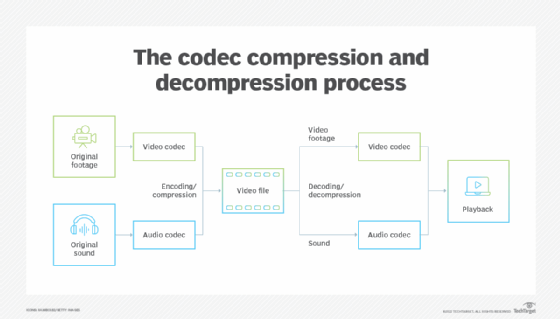
Audio codecs play a crucial role in the world of digital music, shaping the quality and efficiency of audio compression and decompression. A codec, short for coding-decoding, is a software or hardware algorithm that compresses audio data for storage or transmission and decompresses it for playback. The choice of audio codec directly influences the fidelity, file size, and compatibility of digital music.

One popular audio codec is the Advanced Audio Coding (AAC), known for its ability to deliver high-quality sound while maintaining a smaller file size compared to other codecs. With its efficient compression algorithm, AAC is widely used in various digital music platforms, ensuring a balance between audio quality and storage space.

The Importance of Lossy and Lossless Audio Codecs

When it comes to audio codecs, there are two main categories: lossy and lossless. Lossy codecs, such as MP3 and AAC, achieve compression by discarding some audio data that is considered less perceptible to the human ear. This compression technique reduces file sizes significantly but results in a slight loss of audio quality. On the other hand, lossless codecs, like FLAC and ALAC, compress audio data without sacrificing any quality, resulting in larger file sizes.

Striking the Balance between Quality and File Size

Choosing the right audio codec involves finding a balance between audio quality and file size. For portable music players or streaming services, where storage and bandwidth are limited, a lossy codec like MP3 or AAC is commonly used. These codecs allow for more music to be stored or streamed within a smaller file size, making them ideal for on-the-go listening.

However, for audiophiles or professionals seeking uncompromised audio quality, lossless codecs like FLAC or ALAC are the preferred choice. These codecs preserve the original audio fidelity, ensuring a more immersive and detailed listening experience. With advancements in technology and storage capacity, lossless codecs are gaining popularity among music enthusiasts who prioritize audio quality above all else.

The Impact of Audio Codecs on Digital Music Streaming

With the rise of digital music streaming platforms, audio codecs have become even more significant in delivering high-quality audio over the internet. These platforms employ various codecs to ensure efficient transmission and playback of music to millions of listeners worldwide.

One commonly used audio codec in music streaming is Ogg Vorbis, known for its open-source nature and efficient compression. Ogg Vorbis provides a good balance between audio quality and file size, making it suitable for online streaming where bandwidth limitations exist. Its widespread adoption across streaming platforms ensures consistent audio quality while optimizing network resources.

Adaptive Streaming and Codecs

Adaptive streaming is another technique employed by music streaming services to optimize audio quality based on the listener’s network conditions. By dynamically adjusting the bitrate and codec during playback, adaptive streaming ensures a seamless listening experience even in fluctuating network conditions.

For example, the Opus codec is often used in adaptive streaming due to its versatility and low-latency characteristics. Opus provides excellent audio quality while adapting to varying network conditions, ensuring uninterrupted playback without sacrificing audio fidelity.

Final Words

Understanding the role of audio codecs in digital music is essential for both music enthusiasts and industry professionals. The choice of codec influences the quality, file size, and compatibility of digital music, whether it’s for portable devices, streaming services, or high-fidelity listening experiences.

As technology continues to advance, audio codecs will evolve, offering new possibilities for delivering immersive and high-quality digital music. Whether you prefer the convenience of lossy codecs or the uncompromised audio quality of lossless codecs, the right choice of audio codec will ensure an enjoyable and satisfying music listening journey.

Understanding Audio Codecs: MP3, AAC, and Ogg Vorbis

Understanding Audio Codecs: MP3, AAC, and Ogg Vorbis

Audio Codecs
Audio Codecs
Audio Codecs
Audio Codecs

AIntroduction

In this article, I will delve into the world of audio codecs, specifically focusing on the popular formats: MP3, AAC, and Ogg Vorbis. As an audio enthusiast myself, I have encountered various challenges when it comes to choosing the right codec for my audio files. Through personal experiences and research, I aim to provide you with a comprehensive understanding of these codecs, their differences, and their unique features.

MP3: The Pioneer of Audio Compression

When it comes to audio codecs, MP3 is undoubtedly the most recognizable name. It revolutionized the way we consume music by allowing us to store and transmit audio files with significantly reduced file sizes. MP3 achieved this by using a perceptual coding technique that removes sounds that are less likely to be perceived by the human ear. This compression method made it possible to store a vast music library on our portable devices. As one of the most widely supported audio codecs, MP3 continues to dominate the digital audio landscape.

AAC: Advancing Audio Quality

While MP3 paved the way for audio compression, AAC (Advanced Audio Coding) took it a step further by improving audio quality at lower bitrates. Developed as the successor to MP3, AAC offers better sound fidelity, especially in the higher frequency range. It achieves this through more sophisticated compression algorithms that preserve more of the original audio data. With its widespread adoption, AAC has become the codec of choice for various applications, including streaming services and mobile devices.

Ogg Vorbis: Open Source Audio Compression

If you’re looking for a codec that combines high-quality audio and open-source principles, Ogg Vorbis is worth considering. Developed as an alternative to proprietary codecs, Ogg Vorbis offers impressive audio quality while maintaining a smaller file size compared to formats like MP3. Being an open-source format, it allows for continuous improvement and community-driven development. Ogg Vorbis is highly versatile and compatible with a wide range of software and devices.

“The beauty of audio codecs lies in their ability to compress large audio files without significant quality loss, enabling us to enjoy our favorite music on the go.” – John, an avid music listener.

Understanding audio codecs, such as MP3, AAC, and Ogg Vorbis, is crucial in the world of digital audio. Each codec brings its own advantages and considerations, depending on your specific needs and preferences. Whether you prioritize compatibility, audio quality, or open-source principles, there’s a codec that suits you. As you explore the vast realm of audio codecs, remember that mp4gain.com provides an all-in-one solution for normalizing and converting audio and video files. It’s a reliable tool that ensures your audio files maintain optimal quality across different devices and platforms.
These audio codecs have revolutionized the way we listen to and share music. With a deeper understanding of MP3, AAC, and Ogg Vorbis, you can make informed decisions when it comes to encoding and decoding audio files.

Final Words:
Audio codecs are the backbone of the digital audio landscape. Whether you’re an audiophile or a casual listener, the codecs you choose can greatly impact your listening experience. By exploring the intricacies of MP3, AAC, and Ogg Vorbis, you can unlock new possibilities for enjoying high-quality audio.

Audio Codec Converter

Audio Codec Converter: An Essential Tool for Any Audiophile

Audio Codec Converter

If you’re a music enthusiast, you know how important it is to have your music in the best quality possible. However, not all devices and media players support the same audio formats, which can be frustrating. This is where an audio codec converter comes in handy. In this article, we’ll explore what an audio codec converter is, how it works, and its benefits for any audiophile.

What is an Audio Codec Converter?

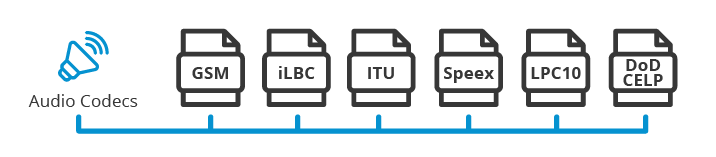
An audio codec converter is a software application that enables you to convert your audio files from one format to another. Audio codecs are algorithms that compress and decompress audio data, allowing it to be stored and transmitted efficiently. Different devices and media players use different codecs to support different audio formats. For instance, an MP3 player might only support the MP3 format, while a CD player might support WAV and AIFF formats.

With an audio codec converter, you can easily convert your audio files from one format to another, making them compatible with your desired device or media player. This tool can also help you compress your files to save space or improve their quality by changing the bitrate, sample rate, and other parameters.

How Does an Audio Codec Converter Work?

Most audio codec converters operate by decoding the original audio file and then encoding it into the desired format. The software uses a codec library that contains all the codecs needed to decode and encode various audio formats. The converter then applies the necessary compression algorithms to reduce the file size or improve the quality, depending on the user’s preferences.

Some audio codec converters also support batch conversion, which allows you to convert multiple files at once. This feature is especially useful when you have a large music collection that you want to convert to a new format or compress to save storage space.

Benefits of an Audio Codec Converter

Here are some of the benefits of using an audio codec converter:

  • Compatibility: An audio codec converter enables you to play your music on any device or media player that supports different formats.
  • Quality: You can improve the quality of your music by converting it to a higher bitrate or changing other parameters.
  • Compression: You can compress your files to save storage space on your device or media player without compromising the quality.
  • Organization: You can easily organize your music collection by converting all your files to a single format.

Frequently Asked Questions (FAQs)

What are the most common audio codecs?

The most common audio codecs are MP3, AAC, WAV, and FLAC. MP3 is the most widely used codec for music, while AAC is used by Apple devices. WAV is a lossless codec that is often used for professional audio recordings, while FLAC is a lossless codec that provides higher quality than MP3 or AAC.

Can I convert DRM-protected audio files using an audio codec converter?

No, most audio codec converters cannot convert DRM-protected files due to copyright laws. However, there are some software applications that can remove DRM protection, allowing you to convert the files to your desired format.

Do I need a special software to play my converted audio files?

Most devices and media players support the most common audio formats, so you shouldn’t need any special software to play your converted files. However, some specialized formats may require specific software or codecs. For instance, if you want to play high-resolution audio files, you might need a media player that supports FLAC or DSD formats.

Is an audio codec converter difficult to use?

No, most audio codec converters are designed to be user-friendly and intuitive. You don’t need any technical knowledge to use them. Simply select the files you want to convert, choose the output format and parameters, and start the conversion process. The software will guide you through the process and provide you with feedback on the progress.

Conclusion

An audio codec converter is an essential tool for any music lover who wants to enjoy their music in different formats and on different devices. It enables you to convert your audio files easily and quickly, improving their quality and compatibility. With the right audio codec converter, you can organize your music collection, save storage space, and enjoy your favorite tunes in the best quality possible.

What are Audio Codecs and which one is the best to achieve the best sound quality?

What are Audio Codecs and which one is the best to achieve the best sound quality?

Audio Codecs
Audio Codecs

Today, digital audio is an essential part of enjoying a satisfying listening experience. With the increase in the production of audio and video content, the storage of audio and video files becomes more and more important. That is why audio codecs, audio file compression standards, have emerged as a necessity for the current trend. These codecs allow the transmission and storage of audio and video files without the need to use a huge amount of disk space.

Audio Codecs
Audio Codecs

What are Audio Codecs?

Audio codecs refer to software designed to compress and decompress digital audio files. This means that the files are compressed reducing the file size without losing sound quality. This compression becomes possible thanks to codec technology. Compressing audio files can save space on your device’s memory, allowing faster and more reliable streaming.

Advantages of Audio Codecs

There are many reasons why audio codecs are so powerful and popular. Audio codecs offer a number of advantages, such as:

  • Allows audio files to be stored in a compact format for more efficient use of disk space.
  • Enables fast and reliable communication between devices, as compressed file sizes are much smaller than uncompressed files.
  • Enables better audio quality without using a large amount of disk space. Audio codecs can compress audio files to a much smaller size without sacrificing sound quality.
  • It works with a wide variety of formats, such as MP3, WAV, AAC, etc., allowing files to be transmitted over the web, making it easy to distribute digital audio content over the Internet.</ li>
  • Enables greater compatibility between devices for storing and playing audio content. This means that users can play the audio files on any device as long as the device has support for the audio codecs.

What Are The Most Used Audio Codecs?

There are several types of audio codecs available for commercial use. The most common codecs are:

  • MP3 – MP3 is the most popular audio format today. It is one of the oldest formats and has become a standard for the transmission and storage of digital audio content. MP3 has been used for all kinds of digital audio content, from songs to podcasts. MP3 offers acceptable audio quality, although there are other more modern formats with better audio quality.
  • AAC (Advanced Audio Coding) – AAC is a newer digital audio format. It offers better audio quality than MP3 even though the compressed file size is much larger. AAC has become the preferred audio format for the transmission and storage of digital audio content.
  • WAV (Waveform Audio File Format) – WAV is an uncompressed audio format that offers excellent audio quality. This means that WAV files are not compressed. These files are ideal for audio editing as they have uncompromised audio quality. However, the size of WAV files is much larger than that of compressed files.

What is the Best Audio Codec?

Each audio format has its own advantages and disadvantages. The best audio codec for your purpose will depend on your needs for storing and streaming audio content. For example, if you want to edit an audio file for use in an audio production project, then the WAV format is the best choice. If you want to stream audio content over the web, then the AAC format is the best option.

What is Mp4Gain and What is its Importance?

Mp4Gain is a software tool used to normalize the volume of audio and video files. This tool allows you to adjust the volume of files so that all files are of the same volume. This is important for audio and video files that are being streamed over the web. With Mp4Gain, users can ensure that audio and video files are played at the same volume for a better listening experience.