Audio Codec Converter


Free Download Mp4Gain
picture

Audio Codec Converter: An Essential Tool for Any Audiophile
Audio Codec Converter

If you’re a music enthusiast, you know how important it is to have your music in the best quality possible. However, not all devices and media players support the same audio formats, which can be frustrating. This is where an audio codec converter comes in handy. In this article, we’ll explore what an audio codec converter is, how it works, and its benefits for any audiophile.

What is an Audio Codec Converter?

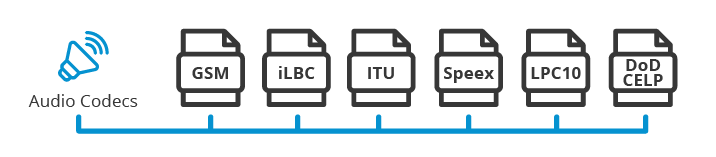
An audio codec converter is a software application that enables you to convert your audio files from one format to another. Audio codecs are algorithms that compress and decompress audio data, allowing it to be stored and transmitted efficiently. Different devices and media players use different codecs to support different audio formats. For instance, an MP3 player might only support the MP3 format, while a CD player might support WAV and AIFF formats.

With an audio codec converter, you can easily convert your audio files from one format to another, making them compatible with your desired device or media player. This tool can also help you compress your files to save space or improve their quality by changing the bitrate, sample rate, and other parameters.

How Does an Audio Codec Converter Work?

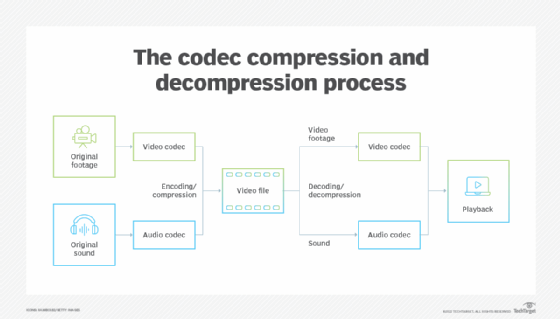
Most audio codec converters operate by decoding the original audio file and then encoding it into the desired format. The software uses a codec library that contains all the codecs needed to decode and encode various audio formats. The converter then applies the necessary compression algorithms to reduce the file size or improve the quality, depending on the user’s preferences.

Some audio codec converters also support batch conversion, which allows you to convert multiple files at once. This feature is especially useful when you have a large music collection that you want to convert to a new format or compress to save storage space.

Benefits of an Audio Codec Converter

Here are some of the benefits of using an audio codec converter:

  • Compatibility: An audio codec converter enables you to play your music on any device or media player that supports different formats.
  • Quality: You can improve the quality of your music by converting it to a higher bitrate or changing other parameters.
  • Compression: You can compress your files to save storage space on your device or media player without compromising the quality.
  • Organization: You can easily organize your music collection by converting all your files to a single format.

Frequently Asked Questions (FAQs)

What are the most common audio codecs?

The most common audio codecs are MP3, AAC, WAV, and FLAC. MP3 is the most widely used codec for music, while AAC is used by Apple devices. WAV is a lossless codec that is often used for professional audio recordings, while FLAC is a lossless codec that provides higher quality than MP3 or AAC.

Can I convert DRM-protected audio files using an audio codec converter?

No, most audio codec converters cannot convert DRM-protected files due to copyright laws. However, there are some software applications that can remove DRM protection, allowing you to convert the files to your desired format.

Do I need a special software to play my converted audio files?

Most devices and media players support the most common audio formats, so you shouldn’t need any special software to play your converted files. However, some specialized formats may require specific software or codecs. For instance, if you want to play high-resolution audio files, you might need a media player that supports FLAC or DSD formats.

Is an audio codec converter difficult to use?

No, most audio codec converters are designed to be user-friendly and intuitive. You don’t need any technical knowledge to use them. Simply select the files you want to convert, choose the output format and parameters, and start the conversion process. The software will guide you through the process and provide you with feedback on the progress.

Conclusion

An audio codec converter is an essential tool for any music lover who wants to enjoy their music in different formats and on different devices. It enables you to convert your audio files easily and quickly, improving their quality and compatibility. With the right audio codec converter, you can organize your music collection, save storage space, and enjoy your favorite tunes in the best quality possible.


Free Download Mp4Gain
picture


Mp4Gain Main Window
picture


Mp4Gain Features
picture


Free Download Mp4Gain
picture

Audio to MP3 Converter

Transforming Your Audio Files into MP3 Format: The Benefits of Using an Audio to MP3 Converter

Audio to MP3 Converter

Are you tired of dealing with incompatible audio files on your devices? Or are you someone who wants to save storage space by compressing your audio files? The solution to your problem is an Audio to MP3 Converter. This software application enables you to convert your audio files to the popular MP3 format with ease.

The Advantages of Using an Audio to MP3 Converter

  • Compatibility: MP3 format is compatible with a wide range of devices, including smartphones, laptops, tablets, and MP3 players. Converting your audio files to MP3 ensures that you can listen to your music on any device without compatibility issues.
  • Compression: MP3 files are compressed, which means that they take up less space than other audio file formats. This makes it easier to store and share your music files.
  • Quality: An Audio to MP3 Converter allows you to adjust the quality of the MP3 files you create. You can choose to keep the original quality, reduce the quality to save space, or increase the quality for better listening experiences.
  • Batch Conversion: An Audio to MP3 Converter lets you convert multiple audio files at once, saving you time and effort.

How to Use an Audio to MP3 Converter like Mp4Gain

Using an Audio to MP3 Converter is a straightforward process. Follow these simple steps:

  1. Download and install Mp4Gain on your device.
  2. Open the software and select the audio files you want to convert.
  3. Select the MP3 format and adjust the quality settings if required.
  4. Click on the “Convert” button to start the conversion process.
  5. Wait for the software to finish converting your files. Once done, you can find your new MP3 files in the destination folder.

FAQs about Audio to MP3 Converter

1. What audio file formats can I convert to MP3 using an Audio to MP3 Converter?

Most Audio to MP3 Converters support a wide range of audio file formats, including WAV, WMA, AAC, FLAC, OGG, and more.

2. Is an Audio to MP3 Converter free?

There are both free and paid Audio to MP3 Converter software options available. Some free software may have limited features, while paid software may offer more advanced features and better quality conversions.

3. Can I adjust the quality of the MP3 files I create?

Yes, an Audio to MP3 Converter allows you to adjust the quality of the MP3 files you create. You can choose to keep the original quality, reduce the quality to save space, or increase the quality for better listening experiences.

Conclusion

An Audio to MP3 Converter is a useful tool for anyone who wants to convert their audio files to the popular MP3 format. It offers a wide range of benefits, including compatibility, compression, quality, and batch conversion. With the easy-to-use software available, anyone can convert their audio files to MP3 in just a few simple steps.

What is Audio Conversion?

What is Audio Conversion?

What is Audio Conversion?

Audio conversion is when you take a sound or music file and change it to a different type of file. It’s like changing a picture from a square shape to a circle shape, but for sounds!


Why Do People Convert Audio Files?

There are a few reasons why people might want to convert audio files. One reason is to make them smaller so they take up less space on your computer or phone. Another reason is to change the file type so it can be played on different devices or programs. For example, if you have a music file that can only be played on iTunes, you might want to convert it to an MP3 so you can play it on other music players.

How Does Audio Conversion Work?

Audio conversion works by taking the original sound file and changing its format. This can be done in a few different ways, but the most common method is called “transcoding”. Transcoding involves taking the original file and using software to convert it to a different format.

For example, let’s say you have a music file that is in WAV format (which is a big file size), but you want to convert it to an MP3 format (which is smaller and more widely compatible). You would use a software program to do this. The program would take the original WAV file and “transcode” it into an MP3 file. This process involves analyzing the original file and re-encoding it into a new format that is smaller and more compatible.

What Are Some Common Audio Formats?

  • WAV
  • MP3
  • FLAC
  • AAC
  • OGG

These are just a few of the most common audio formats. Each format has its own advantages and disadvantages. For example, WAV files are very high quality, but they take up a lot of space. MP3 files are smaller, but they lose some quality in the compression process. FLAC files are high quality and also compress well, but they’re not as widely supported as MP3s. AAC and OGG are also compressed formats that are used for streaming and mobile devices.

Why Do Audio Files Lose Quality When They’re Converted?

When an audio file is converted from one format to another, it has to be compressed in some way to make it smaller or to change its format. Compression involves removing some of the data from the original file, which can result in a loss of quality.

Think of it like taking a big picture and shrinking it down to a smaller size. Some of the details will be lost or blurry because there’s just not enough room to keep all the information. The same thing happens with audio files when they’re compressed.

What is mp4gain?

mp4gain is a software program that can help you adjust the volume of your audio files. Sometimes, when you convert a file from one format to another, the volume level can change. mp4gain can help you fix this problem by analyzing your audio files and adjusting the volume levels so they’re consistent across all your files. This can be really helpful if you have a lot of different music files that were recorded at different volumes.

Conclusion

So, there you have it! Audio conversion is when you change a sound or music file from one format to another. People do this for different reasons, like making files smaller or more compatible with different devices or programs. Audio conversion works by “transcoding” the original file using software, which can result in some loss of quality due to compression. There are many different audio formats to choose from, each with their own advantages and disadvantages. If you need to adjust the volume levels of your audio files after converting them, you can use a program like mp4gain to do so.