Decoding Audio Formats: Technical Aspects Explored


Free Download Mp4Gain
picture

Decoding Audio Formats: Technical Aspects Explored
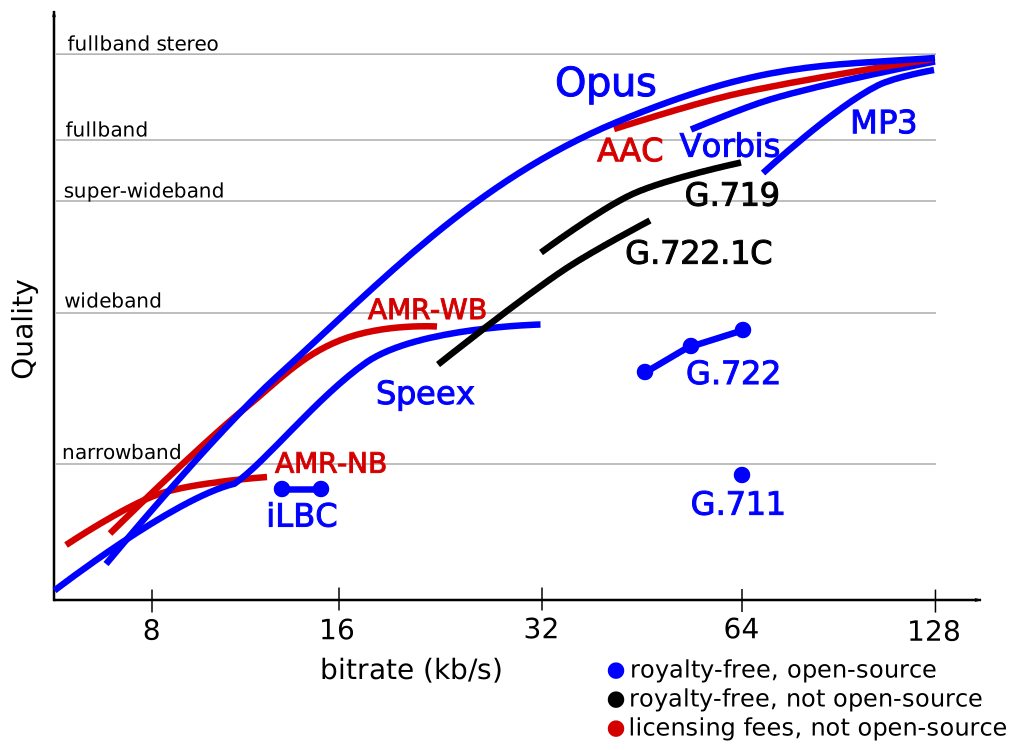
Decoding Audio Formats

In this article, we will explore the technical aspects of decoding audio formats. We will discuss the different types of audio formats, the process of decoding audio, and the factors that affect audio quality.

Types of Audio Formats

There are many different types of audio formats, each with its own advantages and disadvantages. Some of the most common audio formats include:

  • WAV: WAV is a lossless audio format, which means that it does not lose any data when it is converted from one format to another. WAV files are typically larger than other audio formats, but they offer the best possible sound quality.
  • MP3: MP3 is a lossy audio format, which means that some data is lost when it is converted from one format to another. MP3 files are much smaller than WAV files, which makes them ideal for storing and transferring audio files.
  • AAC: AAC is another lossy audio format that offers better sound quality than MP3. AAC files are typically slightly larger than MP3 files, but they offer a noticeable improvement in sound quality.
  • FLAC: FLAC is another lossless audio format that offers similar sound quality to WAV, but with much smaller file sizes. FLAC files are a good choice for people who want the best possible sound quality without sacrificing file size.

The Process of Decoding Audio

When an audio file is played, it must first be decoded. Decoding is the process of converting the digital data in the audio file into sound waves that can be heard by the human ear.

The process of decoding audio typically involves the following steps:

  1. The audio file is read from the storage device.
  2. The digital data in the audio file is converted into an analog signal.
  3. The analog signal is amplified and sent to a speaker.
  4. The speaker converts the analog signal into sound waves that can be heard by the human ear.

Factors That Affect Audio Quality

There are a number of factors that can affect the quality of audio that is decoded from an audio file. Some of the most important factors include:

  • Sample rate: The sample rate is the number of times per second that the audio data is sampled. Higher sample rates result in better sound quality, but they also result in larger file sizes.
  • Bit depth: The bit depth is the number of bits used to represent each sample of audio data. Higher bit depths result in better sound quality, but they also result in larger file sizes.
  • Compression: Audio files can be compressed to reduce their file size. However, compression can also reduce sound quality.

Final Words

Decoding audio is a complex process that involves converting digital data into sound waves that can be heard by the human ear. The quality of the audio that is decoded can be affected by a number of factors, including the sample rate, bit depth, and compression of the audio file.

If you are looking for the best possible sound quality, you should use a lossless audio format such as WAV or FLAC. However, if you need to store or transfer audio files over a network, you should use a lossy audio format such as MP3 or AAC.


Free Download Mp4Gain
picture


Mp4Gain Main Window
picture


Mp4Gain Features
picture


Free Download Mp4Gain
picture

What is Audio Conversion?

What is Audio Conversion?

What is Audio Conversion?

Audio conversion is when you take a sound or music file and change it to a different type of file. It’s like changing a picture from a square shape to a circle shape, but for sounds!


Why Do People Convert Audio Files?

There are a few reasons why people might want to convert audio files. One reason is to make them smaller so they take up less space on your computer or phone. Another reason is to change the file type so it can be played on different devices or programs. For example, if you have a music file that can only be played on iTunes, you might want to convert it to an MP3 so you can play it on other music players.

How Does Audio Conversion Work?

Audio conversion works by taking the original sound file and changing its format. This can be done in a few different ways, but the most common method is called “transcoding”. Transcoding involves taking the original file and using software to convert it to a different format.

For example, let’s say you have a music file that is in WAV format (which is a big file size), but you want to convert it to an MP3 format (which is smaller and more widely compatible). You would use a software program to do this. The program would take the original WAV file and “transcode” it into an MP3 file. This process involves analyzing the original file and re-encoding it into a new format that is smaller and more compatible.

What Are Some Common Audio Formats?

  • WAV
  • MP3
  • FLAC
  • AAC
  • OGG

These are just a few of the most common audio formats. Each format has its own advantages and disadvantages. For example, WAV files are very high quality, but they take up a lot of space. MP3 files are smaller, but they lose some quality in the compression process. FLAC files are high quality and also compress well, but they’re not as widely supported as MP3s. AAC and OGG are also compressed formats that are used for streaming and mobile devices.

Why Do Audio Files Lose Quality When They’re Converted?

When an audio file is converted from one format to another, it has to be compressed in some way to make it smaller or to change its format. Compression involves removing some of the data from the original file, which can result in a loss of quality.

Think of it like taking a big picture and shrinking it down to a smaller size. Some of the details will be lost or blurry because there’s just not enough room to keep all the information. The same thing happens with audio files when they’re compressed.

What is mp4gain?

mp4gain is a software program that can help you adjust the volume of your audio files. Sometimes, when you convert a file from one format to another, the volume level can change. mp4gain can help you fix this problem by analyzing your audio files and adjusting the volume levels so they’re consistent across all your files. This can be really helpful if you have a lot of different music files that were recorded at different volumes.

Conclusion

So, there you have it! Audio conversion is when you change a sound or music file from one format to another. People do this for different reasons, like making files smaller or more compatible with different devices or programs. Audio conversion works by “transcoding” the original file using software, which can result in some loss of quality due to compression. There are many different audio formats to choose from, each with their own advantages and disadvantages. If you need to adjust the volume levels of your audio files after converting them, you can use a program like mp4gain to do so.