Demystifying Audio Encoding: Converting Analog to Digital

What is Audio Encoding?
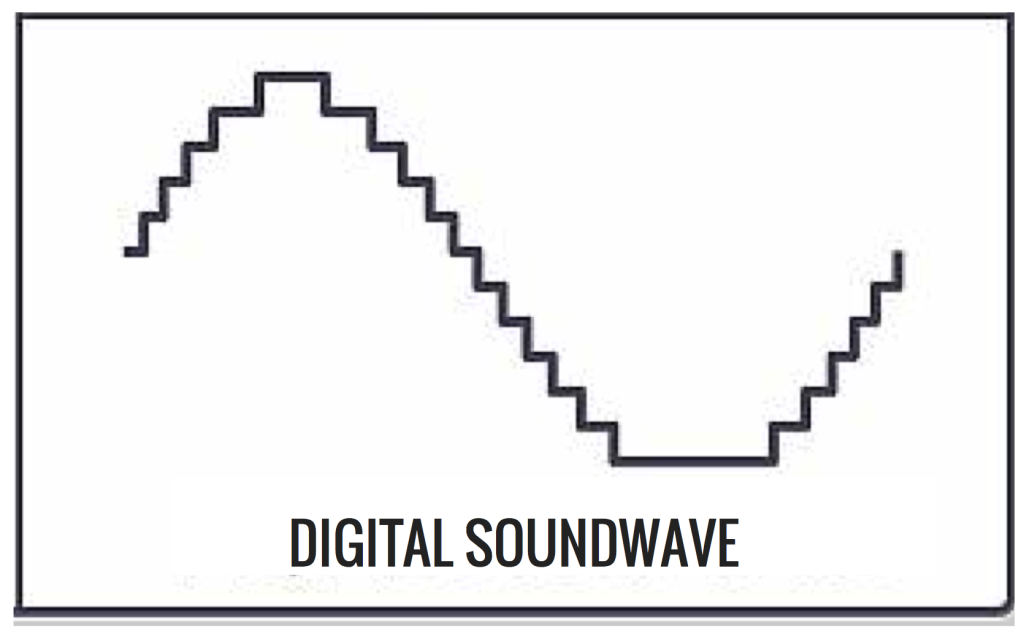
Audio encoding is the process of converting analog audio signals into a digital format that can be stored, transmitted, and manipulated using digital devices and software. It involves the transformation of continuous variations in air pressure (analog signals) into discrete numerical representations (digital signals). This conversion allows for efficient storage, editing, and playback of audio content.
Audio encoding relies on specialized algorithms and techniques to capture and represent the characteristics of an analog audio signal in a digital form. The analog signal is sampled at regular intervals, and each sample is assigned a numerical value that represents its amplitude. These samples are then quantized to a specific bit depth, which determines the dynamic range and resolution of the digital audio.
The conversion from analog to digital audio is essential for various applications, including music production, broadcasting, telecommunications, and multimedia playback. Understanding the process of audio encoding helps unravel the complexities involved in preserving and manipulating audio content in the digital domain.
The Importance of Analog-to-Digital Conversion in Audio Encoding
Analog-to-digital conversion is a crucial step in audio encoding, as it bridges the gap between the physical world of sound and the digital realm. This conversion allows for the manipulation, storage, and transmission of audio signals using digital technologies. By digitizing analog audio, we unlock a multitude of possibilities for editing, processing, and distributing audio content.
One of the key benefits of analog-to-digital conversion is the preservation of audio quality. Digital audio can be stored without degradation and reproduced with high fidelity, ensuring that the original characteristics of the analog signal are faithfully captured. Additionally, digital audio enables non-destructive editing, where changes can be made to the audio without permanently altering the original signal.
The process of analog-to-digital conversion involves several parameters, such as sampling rate and bit depth, which influence the quality and accuracy of the digital representation. Higher sampling rates capture more audio detail, while greater bit depths provide a wider dynamic range and improved resolution. Understanding these parameters allows for informed decisions when encoding analog audio into the digital domain.
Preserving Audio Fidelity: Challenges and Techniques
Preserving audio fidelity during analog-to-digital conversion is a primary concern in audio encoding. Several challenges arise due to the limitations of the digital representation compared to the continuous nature of analog audio. Techniques have been developed to mitigate these challenges and enhance the accuracy of the digital representation.
Dithering is one such technique used to minimize quantization errors introduced during analog-to-digital conversion. It involves the addition of low-level noise to the audio signal before quantization, which helps distribute the quantization error more evenly. This reduces audible artifacts, such as quantization noise, and preserves the subtle details of the original analog audio.
Another technique is oversampling, which involves sampling the analog audio signal at a higher rate than the standard sampling rate. This oversampling allows for better reconstruction of the audio signal during digital-to-analog conversion, reducing aliasing distortion and improving the overall fidelity of the reproduced sound.
By demystifying audio encoding and understanding the intricacies of analog-to-digital conversion, we gain insights into the processes and techniques involved in converting analog audio signals into the digital domain. This knowledge empowers us to make informed decisions when working with digital audio, ensuring the preservation of audio quality and the realization of creative possibilities.
Why is Analog-to-Digital Conversion Important in Audio Encoding?
Analog-to-digital conversion is a crucial step in audio encoding as it enables the transformation of continuous analog audio signals into digital data that can be processed, stored, and transmitted using digital devices and systems. This conversion facilitates the integration of audio content into the digital domain, offering numerous advantages in terms of accessibility, manipulation, and preservation.
One of the primary benefits of analog-to-digital conversion is the ability to store and archive audio content in a digital format. Unlike analog recordings, digital audio files can be replicated without degradation, ensuring that the original quality is preserved over time. This is particularly important for historical or valuable audio recordings that need to be protected and accessed in the future.
Additionally, digital audio allows for easy editing, manipulation, and processing. By converting analog audio to digital, it becomes possible to apply various digital audio effects, adjust levels, remove noise, and perform precise edits. This level of flexibility and control enhances the creative possibilities for musicians, producers, and audio engineers.
The Challenges and Techniques in Analog-to-Digital Conversion
Analog-to-digital conversion presents certain challenges due to the inherent differences between analog and digital representations of sound. One significant challenge is quantization error, which occurs when the continuous analog signal is discretized into digital samples. Techniques have been developed to minimize these errors and improve the accuracy of the digital representation.
Dithering is a common technique used to mitigate quantization errors by introducing low-level noise. This noise helps distribute the quantization error across a wider frequency range, reducing audible artifacts and preserving the subtle nuances of the original analog audio.
Another challenge is aliasing, which can occur when the analog signal is not properly filtered before sampling. Aliasing leads to distortion and undesirable artifacts in the digital audio. Anti-aliasing filters are employed to remove frequencies above the Nyquist limit, ensuring that only the desired audio information is captured during the sampling process.
By understanding the importance of analog-to-digital conversion and the challenges it entails, we can appreciate the complexities involved in audio encoding. Through the use of appropriate techniques and careful consideration of parameters such as sampling rate and bit depth, we can achieve high-quality digital representations of analog audio, opening up a world of possibilities in the digital realm.
Digital audio conversion
Benefits of analog-to-digital conversion
Techniques for preserving audio fidelity
Sampling rate and bit depth in audio encoding
Dithering in analog-to-digital conversion
Anti-aliasing filters in audio sampling
Digital preservation of audio content
Creative possibilities with digital audio
Historical audio archiving
Editing and processing digital audio