Demystifying Audio Encoding: Converting Analog to Digital


Free Download Mp4Gain
picture

Demystifying Audio Encoding: Converting Analog to Digital

Analog Audio
Analog Audio
Analog Audio
Analog Audio

What is Audio Encoding?

Audio encoding is the process of converting analog audio signals into a digital format that can be stored, transmitted, and manipulated using digital devices and software. It involves the transformation of continuous variations in air pressure (analog signals) into discrete numerical representations (digital signals). This conversion allows for efficient storage, editing, and playback of audio content.

Audio encoding relies on specialized algorithms and techniques to capture and represent the characteristics of an analog audio signal in a digital form. The analog signal is sampled at regular intervals, and each sample is assigned a numerical value that represents its amplitude. These samples are then quantized to a specific bit depth, which determines the dynamic range and resolution of the digital audio.

The conversion from analog to digital audio is essential for various applications, including music production, broadcasting, telecommunications, and multimedia playback. Understanding the process of audio encoding helps unravel the complexities involved in preserving and manipulating audio content in the digital domain.

The Importance of Analog-to-Digital Conversion in Audio Encoding

Analog-to-digital conversion is a crucial step in audio encoding, as it bridges the gap between the physical world of sound and the digital realm. This conversion allows for the manipulation, storage, and transmission of audio signals using digital technologies. By digitizing analog audio, we unlock a multitude of possibilities for editing, processing, and distributing audio content.

One of the key benefits of analog-to-digital conversion is the preservation of audio quality. Digital audio can be stored without degradation and reproduced with high fidelity, ensuring that the original characteristics of the analog signal are faithfully captured. Additionally, digital audio enables non-destructive editing, where changes can be made to the audio without permanently altering the original signal.

The process of analog-to-digital conversion involves several parameters, such as sampling rate and bit depth, which influence the quality and accuracy of the digital representation. Higher sampling rates capture more audio detail, while greater bit depths provide a wider dynamic range and improved resolution. Understanding these parameters allows for informed decisions when encoding analog audio into the digital domain.

Preserving Audio Fidelity: Challenges and Techniques

Preserving audio fidelity during analog-to-digital conversion is a primary concern in audio encoding. Several challenges arise due to the limitations of the digital representation compared to the continuous nature of analog audio. Techniques have been developed to mitigate these challenges and enhance the accuracy of the digital representation.

Dithering is one such technique used to minimize quantization errors introduced during analog-to-digital conversion. It involves the addition of low-level noise to the audio signal before quantization, which helps distribute the quantization error more evenly. This reduces audible artifacts, such as quantization noise, and preserves the subtle details of the original analog audio.

Another technique is oversampling, which involves sampling the analog audio signal at a higher rate than the standard sampling rate. This oversampling allows for better reconstruction of the audio signal during digital-to-analog conversion, reducing aliasing distortion and improving the overall fidelity of the reproduced sound.

By demystifying audio encoding and understanding the intricacies of analog-to-digital conversion, we gain insights into the processes and techniques involved in converting analog audio signals into the digital domain. This knowledge empowers us to make informed decisions when working with digital audio, ensuring the preservation of audio quality and the realization of creative possibilities.

Why is Analog-to-Digital Conversion Important in Audio Encoding?

Analog-to-digital conversion is a crucial step in audio encoding as it enables the transformation of continuous analog audio signals into digital data that can be processed, stored, and transmitted using digital devices and systems. This conversion facilitates the integration of audio content into the digital domain, offering numerous advantages in terms of accessibility, manipulation, and preservation.

One of the primary benefits of analog-to-digital conversion is the ability to store and archive audio content in a digital format. Unlike analog recordings, digital audio files can be replicated without degradation, ensuring that the original quality is preserved over time. This is particularly important for historical or valuable audio recordings that need to be protected and accessed in the future.

Additionally, digital audio allows for easy editing, manipulation, and processing. By converting analog audio to digital, it becomes possible to apply various digital audio effects, adjust levels, remove noise, and perform precise edits. This level of flexibility and control enhances the creative possibilities for musicians, producers, and audio engineers.

The Challenges and Techniques in Analog-to-Digital Conversion

Analog-to-digital conversion presents certain challenges due to the inherent differences between analog and digital representations of sound. One significant challenge is quantization error, which occurs when the continuous analog signal is discretized into digital samples. Techniques have been developed to minimize these errors and improve the accuracy of the digital representation.

Dithering is a common technique used to mitigate quantization errors by introducing low-level noise. This noise helps distribute the quantization error across a wider frequency range, reducing audible artifacts and preserving the subtle nuances of the original analog audio.

Another challenge is aliasing, which can occur when the analog signal is not properly filtered before sampling. Aliasing leads to distortion and undesirable artifacts in the digital audio. Anti-aliasing filters are employed to remove frequencies above the Nyquist limit, ensuring that only the desired audio information is captured during the sampling process.

By understanding the importance of analog-to-digital conversion and the challenges it entails, we can appreciate the complexities involved in audio encoding. Through the use of appropriate techniques and careful consideration of parameters such as sampling rate and bit depth, we can achieve high-quality digital representations of analog audio, opening up a world of possibilities in the digital realm.

Digital audio conversion
Benefits of analog-to-digital conversion
Techniques for preserving audio fidelity
Sampling rate and bit depth in audio encoding
Dithering in analog-to-digital conversion
Anti-aliasing filters in audio sampling
Digital preservation of audio content
Creative possibilities with digital audio
Historical audio archiving
Editing and processing digital audio


Free Download Mp4Gain
picture


Mp4Gain Main Window
picture


Mp4Gain Features
picture


Free Download Mp4Gain
picture

MIDI and digital sound: pros and cons

MIDI and digital sound: pros and cons

Digital Audio

The WAVE format is one of many, but it is far from the only format for recording digital audio.

Digital Audio

Unlike MIDI data, digital audio data is actually sound recorded in thousands of units called samples. Digital data represents the amplitude (or volume) of a sound at discrete moments. The sound of digital data is independent of the playback device and therefore always sounds the same. But you have to pay for this with large volumes of sound files.

MIDI data is to digital data what vector graphics are to bitmaps. In other words, MIDI data depends on the audio playback devices and digital data is independent. Just as the appearance of vector graphics depends on the printer or monitor screen, the sound of MIDI files depends on the MIDI device to play these files. Similarly, a melody played on a concert piano will sound different from a normal piano. Digital data, on the other hand, is identical and independent of the reproduction system. The MIDI standard is similar in this respect to the PostScript standard and allows you to control instruments in understandable language.

Compared to digital sound, MIDI has the following advantages:

MIDI files take up less memory and the size of these files does not affect sound quality. On average, MIDI files are 200 to 1000 times smaller than digital files and therefore take up a small amount of RAM, disk space and do not require large CPU resources.

In some cases, MIDI files sound better than digital audio files. In this case, the sound source of the MIDI files must be of high quality.

You can change the length of MIDI files by changing the tempo of the sound, while maintaining the quality and volume of the sound. MIDI data can be easily edited, even at the single note level. You can manipulate small segments of a MIDI song (with millisecond precision), which is not possible with digital audio.

The main disadvantage of a MIDI file comes from its merits. Since MIDI data is not sound itself, playback will be as accurate as the device for playing the MIDI data is identical to the device used to create the original file. Even the sound of a MIDI instrument according to the General MIDI standard depends on the electronic playback device and the method used. MIDI sound is not used for voice playback.

The main advantage of digital audio over MIDI sound is that the reproduction quality of digital sound is always constant, and here MIDI sound is inferior to digital sound. There are two reasons why you should work with digital audio:

A wider selection of programs and systems that support working with digital sound.

The preparation and creation of digital sound elements does not require knowledge of music theory, which cannot be said for MIDI data.

Sound tips
Voice recording from microphone
Any book devoted to multimedia necessarily contains a section on microphone sound recording. In addition, the Sound Recorder (Phonograph) program, which is included in the standard Windows distribution, is usually used for this. Working with it is described in detail in the attached help file. It is easy to use and we will not dwell on it in detail.

The microphones come in condenser and dynamic microphones. Capacitors are more expensive, they give better sound, but your connection must be compatible with a sound card. And the vast majority of sound cards are designed for dynamic microphones.

Another important characteristic of a microphone is its directivity. The microphones are omni-directional (they have the same sensitivity to sound in all directions), unidirectional (they have the highest sensitivity to sound coming from the front), and bi-directional (more sensitive to sound coming from the front and rear). A unidirectional microphone is usually the best option, as it eliminates background noise. But it is more expensive than omni-directional microphones and is more sensitive to choppy breath sounds.

Be sure to pay attention to the impedance (impedance) of the microphone. The optimal value is around 600 ohms.

Therefore, we recommend a 600 ohm dynamic omni-directional microphone.

Differences between analog and digital audio

Differences between analog and digital audio

Analog vs Digital

Sound information. Sound is a wave that travels through air, water, or other medium with a continuously changing intensity and frequency.

Digital vs. Analog

A person perceives sound waves (air vibrations) with the help of hearing in the form of sound of varying volume and pitch. The greater the intensity of the sound wave, the louder the sound, the higher the frequency of the wave, the higher the pitch of the sound (Fig. 1.1).

Dependence of the volume and pitch of the sound on the intensity and frequency of the sound wave.

The human ear perceives sound at a frequency of 20 vibrations per second (low sound) to 20,000 vibrations per second (high sound).

A person can perceive sound in a wide range of intensities, in which the maximum intensity is 1014 times greater than the minimum (one hundred thousand billion times). A special unit of “decibels” (dbl) is used to measure the volume of sound (Table 5.1). Decreasing or increasing the sound volume by 10 dB corresponds to a decrease or increase in sound intensity by 10 times.

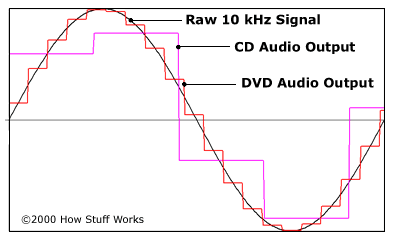
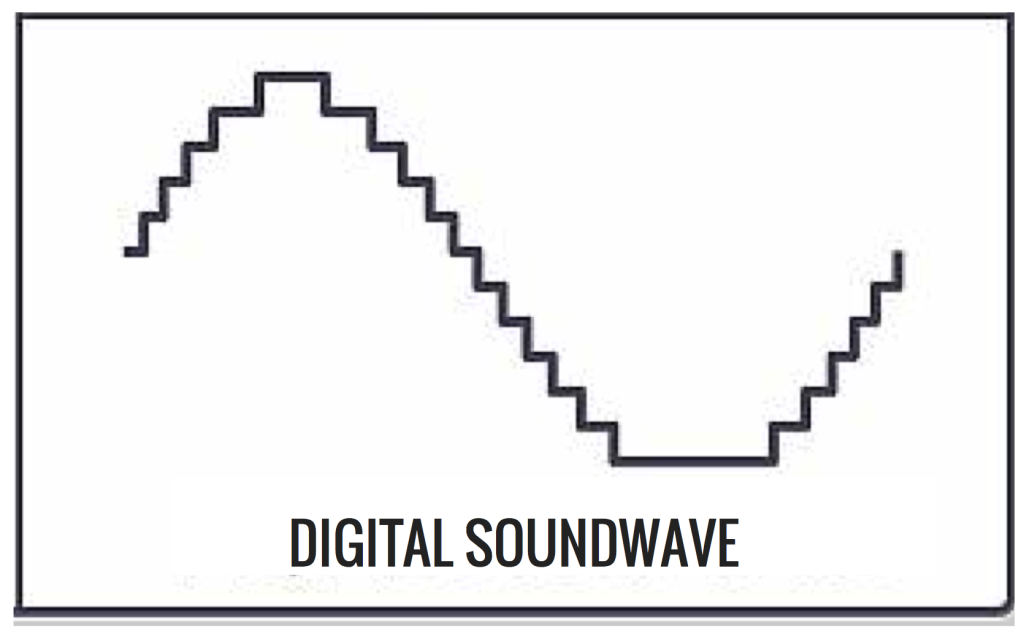
Provisional discretization sound. In order for a computer to process sound, a continuous audio signal must be converted to a discrete digital form using time sampling. A continuous sound wave is divided into separate small time sections, for each section a certain value of sound intensity is set.

Therefore, the continuous dependence of the loudness of the sound at time A (t) is replaced by a discrete sequence of loudness levels. On the graph, this appears to replace a smooth curve with a sequence of “steps” (Fig. 1.2).

Sync Audio Sampling

Sampling frequency. A microphone connected to the sound card is used to record analog sound and convert it to digital format. The quality of the digital sound obtained depends on the number of measurements of the sound volume level per unit of time, that is, the sampling frequency. The more measurements that are made in 1 second (the higher the sampling frequency), the more accurately the “ladder” of the digital audio signal repeats the curve of the dialogue signal.

The audio sample rate is the number of sound volume measurements in one second.

The audio sample rate can vary between 8000 and 48000 sound volume measurements per second.

Audio encoding depth. Each “step” is assigned a specific value for the sound volume level. Loudness levels of sound can be viewed as a set of possible states N, for which a certain amount of information I is required, which is called audio coding depth.

Audio encoding depth is the amount of information required to encode the discrete volume levels of digital audio.

If the encoding depth is known, then the number of digital audio loudness levels can be calculated using the formula N = 2I. Let the audio encoding depth be 16 bit, then the number of sound volume levels is:

N = 2I = 216 = 65536.

During the encoding process, each sound volume level is assigned its own 16-bit binary code, the lowest sound level will correspond to the code 0000000000000000 and the highest – 1111111111111111.

The quality of digitized sound. The higher the sampling frequency and depth of the sound, the better the sound of the digitized sound. The lowest quality of digitized sound, corresponding to the quality of telephone communication, is obtained at a sampling rate of 8000 times per second, a sampling rate of 8 bits, and by recording an audio track (“mono” mode). The highest quality of digitized sound, corresponding to the quality of an audio CD, is achieved with a sampling rate of 48,000 times per second, a sampling rate of 16 bits and the recording of two audio tracks (stereo mode) .

It should be remembered that the higher the quality of the digital sound, the greater the volume of information in the audio file. You can estimate the volume of information in a digital stereo sound file with a duration of 1 second with an average sound quality (16 bits, 24,000 measurements per second). To do this, the encoding depth must be multiplied by the number of measurements in 1 second and multiplied by 2 (stereo sound):

16 bits × 24,000 × 2 = 768,000 bits = 96,000 bytes = 93.75 KB.

Sound editors. Sound editors allow you not only to record and play sound, but also to edit it. Digitized sound is presented in sound editors visually, so copying, moving, and deleting parts of the audio track can be easily performed with the mouse. Also, you can layer tracks