Enhancing Video Quality: Bitrate and Codec


Free Download Mp4Gain
picture

Enhancing Video Quality: Bitrate and Codec

Enhancing Video Quality: Bitrate and Codec


When it comes to video quality, there are two main factors that you need to consider: bitrate and codec.

Bitrate

Bitrate is the amount of data that is used to encode a video file. A higher bitrate will result in a higher quality video, but it will also result in a larger file size.

The ideal bitrate for a video will depend on a number of factors, including the resolution of the video, the frame rate, and the type of content. For example, a high-resolution video with a high frame rate will require a higher bitrate than a low-resolution video with a low frame rate.

If you are concerned about file size, you can try reducing the bitrate of your video. However, keep in mind that this will also reduce the quality of the video.

Codec

A codec is a type of software that is used to encode and decode video files. There are many different codecs available, and each one has its own strengths and weaknesses.

Some of the most popular codecs include:

H.264: This is a widely used codec that offers good quality and compatibility.
MPEG-4: This is another popular codec that is known for its good quality.
VP9: This is a newer codec that offers better quality than H.264 and MPEG-4, but it is not as widely supported.
When choosing a codec, you need to consider the following factors:

The quality of the video that you want to create
The compatibility of the codec with your devices and software
The file size of the video that you want to create

Conclusion

Bitrate and codec are two important factors that you need to consider when enhancing video quality. By understanding these factors, you can create high-quality videos that are also small in file size.

Here are some additional tips for enhancing video quality:

Use a high-quality camera
Shoot in good lighting conditions
Edit your videos carefully
Optimize your videos for the web
By following these tips, you can create videos that are both high-quality and visually appealing.


Free Download Mp4Gain
picture


Mp4Gain Main Window
picture


Mp4Gain Features
picture


Free Download Mp4Gain
picture

Latest Video Codec Trends

Latest Video Codec Trends

Video Codec
Video Codec
Video Codec
Video Codec

Video Codecs: What They Are and Why They Matter

Video codecs are essential in video compression and playback. They are algorithms that encode and decode digital video data, compressing it for efficient storage and transmission. Without video codecs, it would be impossible to store or stream high-quality video content.

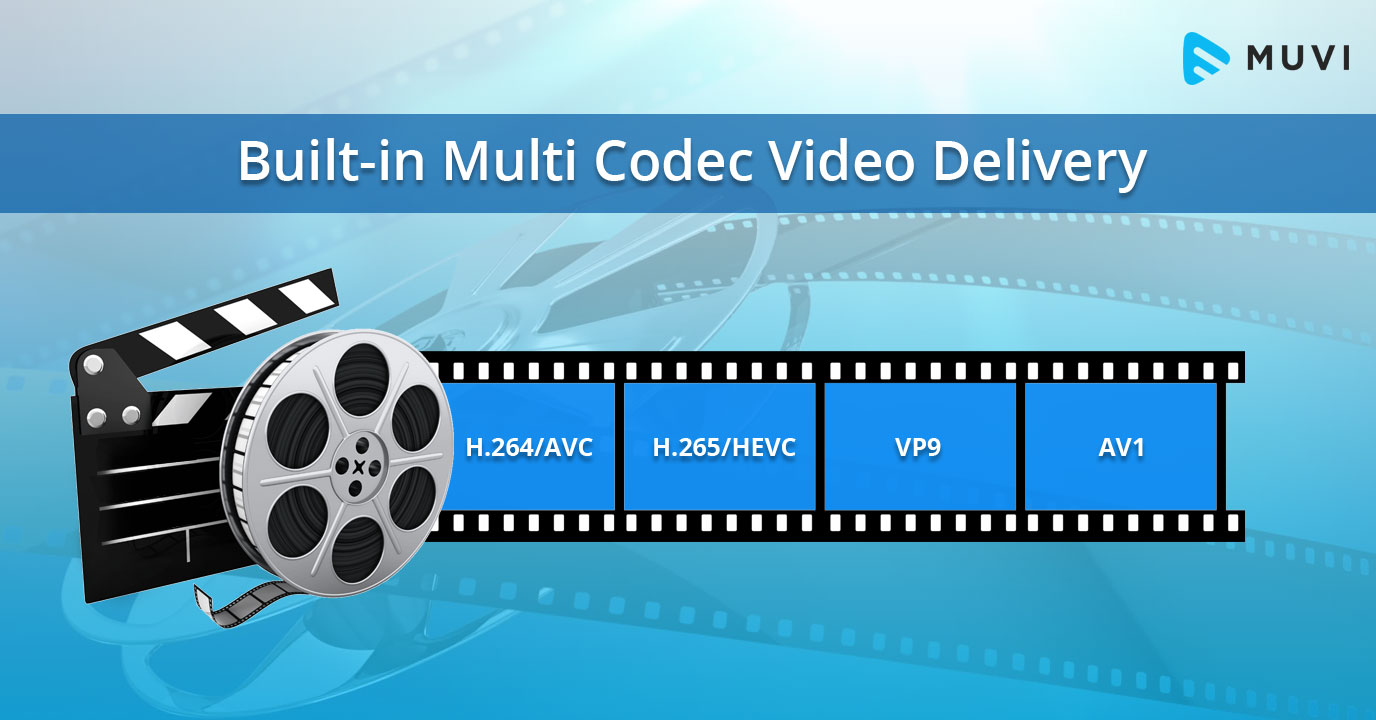
The most popular video codecs today are H.265, VP9, and AV1. H.265, also known as HEVC (High-Efficiency Video Coding), is a codec that offers the same quality as its predecessor (H.264) at half the bitrate. VP9, developed by Google, is an open-source codec that offers better compression efficiency than H.264. Finally, AV1 is a royalty-free codec developed by the Alliance for Open Media, offering even better compression efficiency than VP9.

As video content continues to evolve, so too do video codecs. It’s essential to stay up-to-date with the latest codec trends to ensure your video content is of the highest quality.

Quote: “Video is a powerful tool that can change the world. When you compress video, you’re taking that power and making it more accessible to everyone.” – Kevin Systrom

Latest Video Formats: What You Need to Know

Video formats determine how video data is stored and transmitted. They are also essential in determining playback quality and compatibility. With the advent of 4K and HDR content, new video formats have emerged to meet the demands of high-quality video content.

The most popular video formats today are MP4, AVI, and WMV. MP4 is the most widely used video format, supporting both high-quality video and audio. AVI is an older format but still widely used, while WMV is a proprietary format developed by Microsoft.

Newer video formats like MKV and WEBM offer better compression efficiency and support for 4K and HDR content. MKV, in particular, is an open-source format that offers support for multiple video, audio, and subtitle streams. WEBM, developed by Google, is a royalty-free format that supports high-quality video with a small file size.

Keeping up-to-date with the latest video formats is crucial for ensuring compatibility with modern devices and delivering high-quality video content.

Quote: “Video technology is driving the evolution of the internet.” – Bob Iger

How to Optimize Your Video Content

Optimizing your video content involves choosing the right codec and format for your needs, as well as ensuring your content is of the highest quality. This includes proper encoding settings, resolution, and aspect ratio.

When choosing a codec, consider factors like compression efficiency, compatibility, and licensing costs. For example, H.265 may offer the best compression efficiency, but licensing costs may be prohibitive for some businesses. Similarly, choosing the right format involves considering factors like playback quality, compatibility, and support for modern features like 4K and HDR.

Finally, ensuring your content is of the highest quality involves proper encoding settings, resolution, and aspect ratio. It’s essential to balance quality with file size, ensuring your content is optimized for both playback and streaming.

Quote: “Quality is not an act, it’s a habit.” – Aristotle

Final Words

Video codecs and formats are essential in delivering high-quality video content. Staying up-to-date with the latest trends is crucial for ensuring compatibility with modern devices and delivering the best possible viewing experience.

Codecs and Their Importance in Video Production

Codecs and Their Importance in Video Production

Video Codecs
Video Codecs
Video Codecs
Video Codecs


“A codec is a way of encoding and decoding video or audio data so that it can be transmitted, stored and played back efficiently,” says John Watkinson in his book The Art of Digital Video. In essence, a video codec is a software or hardware that compresses and decompresses video data. This process helps to reduce the size of video files, which makes them easier to store, transmit and stream over the internet.

The Function of Video Codecs

“Codecs are used to compress video data to reduce the amount of data that needs to be stored or transmitted,” explains Brian Nadel in his article on Techradar. He adds that codecs “also help to maintain the quality of the video by minimizing any loss of data during compression.” This is done by removing redundant information and compressing the remaining data without affecting the quality of the video.

The Different Types of Video Codecs

“There are two main types of codecs: lossy and lossless,” notes Larry Jordan in his article on Digital Media Net. Lossy codecs, such as H.264 and MPEG-4, compress video data by permanently discarding some of the information in the video. While lossy codecs result in smaller file sizes, they may also compromise the quality of the video. On the other hand, lossless codecs, such as Apple ProRes and Avid DNxHD, preserve all the information in the video, resulting in higher quality videos but larger file sizes.

Choosing the Right Video Codec

“When choosing a video codec, you must consider the final use of the video,” advises Richard Harrington in his book Video Made on a Mac. For instance, if you are creating a video for the internet, you may want to use a codec that results in a small file size without compromising the quality of the video. On the other hand, if you are producing a video for broadcast, you may want to use a lossless codec that maintains the quality of the video but results in a larger file size.

The Advantages of Video Codecs

“Video codecs are essential in modern video production because they help to compress video data, reducing storage space requirements and making video transmission over the internet much faster and smoother,” states Jeff Strong in his article on Lifewire. By compressing video data, codecs also make it possible to store and transmit high-quality videos without consuming excessive amounts of bandwidth.

The Disadvantages of Video Codecs

“Video codecs may also result in a loss of data, which can affect the quality of the video,” cautions Chris Stevens in his article on Adorama. Furthermore, some codecs may not be compatible with certain software or hardware, which can result in compatibility issues when editing or playing back videos. It is therefore essential to choose the right codec that meets your specific needs and requirements.

Final Words

In conclusion, video codecs play an essential role in modern video production, enabling efficient storage, transmission, and playback of video data. By understanding the different types of codecs and their respective advantages and disadvantages, you can choose the right codec for your specific needs and ensure that your videos are of the highest quality while being optimized for storage and transmission.

Formats and codecs

As a result of the process of sampling an analog audio signal we obtain a sequence of binary numbers (numerical streams) that can be written to particular types of files (audio files or sound files) stored on various types of digital media (CD, DVD, HD or other).

Codecs and formats

These files can have three different encoding formats:

Uncompressed – All data derived from the sampling process is written to the stored file.
Lossy: the information contained in the stored file is less than that contained in the source data (information loss).
Lossless – The information contained in the stored file is identical to that contained in the source data, but the data is still compressed.

Formats & Codecs
In fact, these different possibilities arise from the need that when we want to store all the information related to a signal in a digital medium, we may need to reduce the storage space occupied in order to benefit from the portability or transmissivity of the encoded stream. We must resort to compression of the information itself in such a way that it also allows the reverse operation.

This operation is performed using codecs that are programs (or devices) that deal with both the digitization of signals (typically audio or video) and their digital encoding and / or decoding.

There are several types of codecs, different from each other by the type of signal on which they must operate and by the encoding / compression algorithm implemented in them. Each encoding format can be derived from several different codecs. In fact, these allow you to listen to proprietary formats opened by any file reader, keeping the physical layer separate from the logical format of its representation.

The advantages of compression are:

takes up less space on the target media.
spend less time during data transfer (bit rate).
The cost (disadvantages) is the increase in read / write times linked to decompression / compression times and, in the case of audio files, also in terms of audio quality.

Bitrate

Before delving into the different types of audio formats, let’s focus on concepts related to data transmission speed, since audio files are intrinsically linked to the time that passes: each second is associated with a certain information content and therefore both to a certain subsequence of figures. binary. The number of binary digits that make up these subsequences is called the bit rate.

Bit rate is the number of binary digits used to store one second of information.

CDs, for example, have a sampling frequency equal to 44,100Hz as standard, which therefore generates 44,100 values ​​per second for each channel. In the case of a stereo file, they are multiplied by 2, and since sampling is done at 16 bits (exactly equal to 2 bytes), they must be multiplied by 2:

44,100 * 2 * 2 * 60 (seconds) = 10,584,000 bytes (~ 10MB) every minute

Bitrate is expressed in kilobits per second (kbps) and can range from 32 to 320 kbps. For example, if we wanted to calculate the bit rate of the previous file we would have to calculate:

44,100 * 2 * 2 * 8 (bytes to bit) = 1,411,200 bits / second (1,411 kbs)

The calculations we have just carried out refer to an uncompressed format, whereas in the case of compressed formats, as the total length of the file decreases, the average length of the subsequences also decreases, and consequently the bit rate. mean that will correspond to the compression factor.

In fact, if a file with a 1411 Kbps bit rate like the one in the previous example were compressed at an average bit rate of 320 Kbps, we would have reduced the original file size by a factor of approximately 4.5 (1411/320).

Currently in the most advanced codecs there are three types of bitrate implementation:

CBR (BitRate from Costant). The simplest, most used and now least effective method. The bit rate remains constant in each frame and this means that the encoder will always use the same number of bits to encode each musical passage. In practice, the more complex passages will have a lower quality than those with little dynamics or silence since they will be encoded with an always equal number of bits, while more would be needed for the former and less for the latter. A great advantage of this mode is that the size of the resulting file is always proportional to the length of the part and is easily evaluated.

ABR (Average Bit Rate). Average bit rate is a mode that outperforms CBR and consists of a kind of variable bit rate. The encoder encodes the regions that need it with more bits and the simpler ones with less.

What are codecs?

First, it is useful to know the technical definition of codecs. They are programs that encode and decodify multimedia files, which favor compression for storage and unpacking for viewing.

Multimedia files

When using a media file, a codec is used, even without knowing it. Each file with an MP3 or AVI extension, for example, was created with a codec. Currently, to play music or watch a movie, you need a codec to read these media files. But why?

Codec

Listening to and viewing multimedia files At the beginning of personal computing, the main multimedia files used were WAV and MIDI audio. The WAVs recorded the ambient sound and made short clips. MIDIs were sound synthesizers because they used the computer’s sound card to replicate music. The big problem with these formats was that the MIDI files weren’t music, just any computer playback (currently, MIDI sound technology is used in the polyphonic tones of cell phones) and the WAVs were extremely large.

codec

The problem with WAV

But why are WAV files (and still are) so large? To understand this, it is enough to know that the human ear perceives only one sound track and does not listen as much as possible. However, the WAV can perceive and record these inaudible sounds and transform them into information along with the perceivable ones. In this way, WAV sound files have a lot of information, from unnecessary to what we need.

The way to deal with excess information was to develop a program that would take only the useful parts of the WAV files. In this way the MP3 was created, that is, it is a compressed sound file with only the necessary information.

Starting with the video files

Viewing video files It all started in the late 1980s, with the MPEG project, the Motion Picture Expert Group, or the Animated Picture (or Movie) Expert Group. This group developed a system to compress movie files for storage and playback on computers, without excess size or weight. Imagine that in an 800×600 movie, full screen in high resolution, there are 30 different images per second and each image is made on average with about 500,000 dots. Each point is one byte of information, so each second of film would have approximately 15 MB of information. That way, a CD with a capacity of 700 MB would only fit 50 seconds of film!

This group developed a way to encode these images from the film so they didn’t take up as much space. Despite having lost some of its quality, the film was playable on any computer, in addition to providing detailed observation. These files were either MPEG or MPG. MP3 would actually be the third layer of MPEG, the sound layer (that’s why it’s called MP3). The MP4 format would be a fourth layer of MPEG, with videos in high definition.

Understand how it works

The codec is a small program to encode and decode information from a multimedia file. It encodes the original format in a smaller size for storage and then decodes it, converting it back into an image and / or sound for all to see.

Therefore, you must have the codec installed on your computer to view certain multimedia files. A video in AVI format, for example, can be compressed with different codecs, such as XVID or DIVX. And for your computer to read that information, you need to have that code to decode the movie and watch it.

Existing core codecs

Currently, a primary audio codec, MP3, is used. In addition to some different video codecs, such as XVID, DIVX, RMVB, M4V, among many others. Fortunately, there is the K-Lite Codec Pack, a great package with all of these core codecs and many others, all of which are playable with Media Player Classic. The important thing is that with the K-Lite Codec Pack installed, you will hardly find a file format that requires a codec that is not on your computer.

There are different versions of K-Lite. They are:

K-Lite Mega Codec Package: With this package you offer the vast majority of necessary codecs and also the advantage of having the Media Player Classic ready.

K-Lite Codec Pack Full: Bring all the codecs you will need, without Media Player Classic.

Other possible packages

If you are not satisfied with the K-Lite Codec Pack packages, there are other download options in Baixaki. Some are:

Windows Essentials Codec Pack: allows decoding of other file formats, such as APE audio and FLV video.

Real alternative: a package with codecs for viewing files in Real Media, such as RMA audio and RMVB and RMVB video.


Video formats and compression codecs for video editing

To understand the basics of video editing, one must consider display frame theory. For this reason, we will often use a fitting comparison in the guide: that of motion pictures and the frames that make up the film.

Video Editing

What is a video format?

We all know that you need a screen, a projector, and a movie to get a movie projection. A sequence of images is printed on the film, translucent as the negatives of the photographs, which in the projection modify the light beam of the projector, allowing only certain parts to pass through, which will generate an image on the screen. Film flows, projected images change rapidly, and a motion effect is obtained.

Let’s go back to digital video.

Let’s say we have a series of images that reproduce a movement (we will see later how the capture phase, or video capture, allows this). These images alone are not enough to show a movie on our PC. In fact, we should be able to tell the machine where these images are, what type they are, how fast they should be viewed, and in what order. For this reason, the format of a clip is defined, that is, a kind of “container”, recognizable by the PC, in which the previous information is attached, in addition to the images.
To recognize a video file format of a clip, you can access the file properties panel or observe the file extension itself (for example, AVI, MPG, QTM, etc … all video extensions).

Digital video
Each editor chooses the best video format they consider appropriate, depending on how they work, the technology they have available and the end result they want to achieve.

In fact, try to think how much a color image of about 800×600 pixels takes up. So much … too much to see 25 per second (as the theory of optics says) and save them to our HD.

What is a video codec?

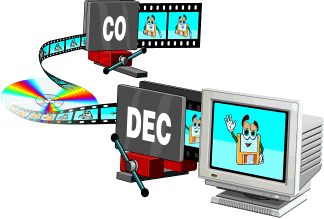
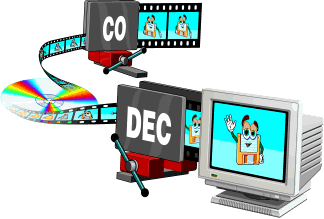
This is where the codec (COmpressor DECompressor or better DECoder CODER) comes in, or the software that contains the mathematical procedure through which the images are compressed (often with loss or loss of information) to allow agile management and reproduction correct clip.
In practice, compressed video formats are obtained.

The codec is used both to capture and compress the video from an external source, and to play and process the video once it is stored on the hard drive. It could be compared to a kind of very fast Winzip that, if necessary, compresses and decompresses the images of a film.

It is useless to dwell on how a codec manages to make a noticeable decrease in the space occupied by images, reducing the loss of quality to a minimum (sometimes surprisingly!) What little indication to say which is the best video codec or the best compression Of video . The answer is always the same: it depends on what you want to achieve (and, similarly, what is the best video format is a question that has multiple answers).
The important thing is that these codecs are available to us, there are many of them and each one has peculiar characteristics that suggest its working environment.

We suggest downloading the K-Lite Codeck Pack (often also abbreviated as Klite) which contains an important collection of useful and cross-cutting codecs, tools, formats and filters.

Structure of a video format

Hardware codec and analog capture

Until recently, analog capture cards (especially M-Jpeg) were almost all equipped with a proprietary chip that allowed smooth, lossless capture as it took the computer’s processor out of compression work (it’s this chip that kept the price of the cards high).
The hardware codec is still software, but it interacts with this chip by letting the system know that it exists and that it can do the job instead of the CPU.
Without the codec installed, the card chip is useless, whereas if only the software codec is installed, the PC processor may be able to do the compression job, but this in particular cases.

Entry-level PCs are still powerful, and often analog acquisition cards only have one analog-to-digital conversion chip, while the processor does the conversion. In some cases, it is even possible to capture with very complex and elaborate software codecs like DivX or Xvid.
It is clear that choosing the hardware codec is always recommended, as in the case of the MPEG2 capture which requires a lot of resources.

Video codecs

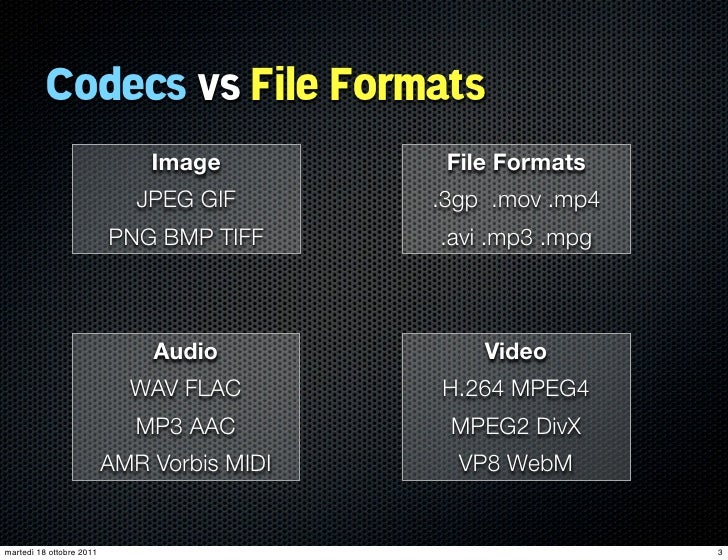
In photography, the choice of the recording codec is quite limited: we usually fluctuate between the JPG format and the Raw format. In video, the choice is slightly wider: MPEG-1, MPEG-2, MPG-4, H264, H265, RAW, ProRes, ProRes Raw, Motion jpeg, etc.

So what are these codecs for, what uses are they designed for, and which ones should you choose?

Códecs

CONTAINERS AND CODECS are NOT the same!

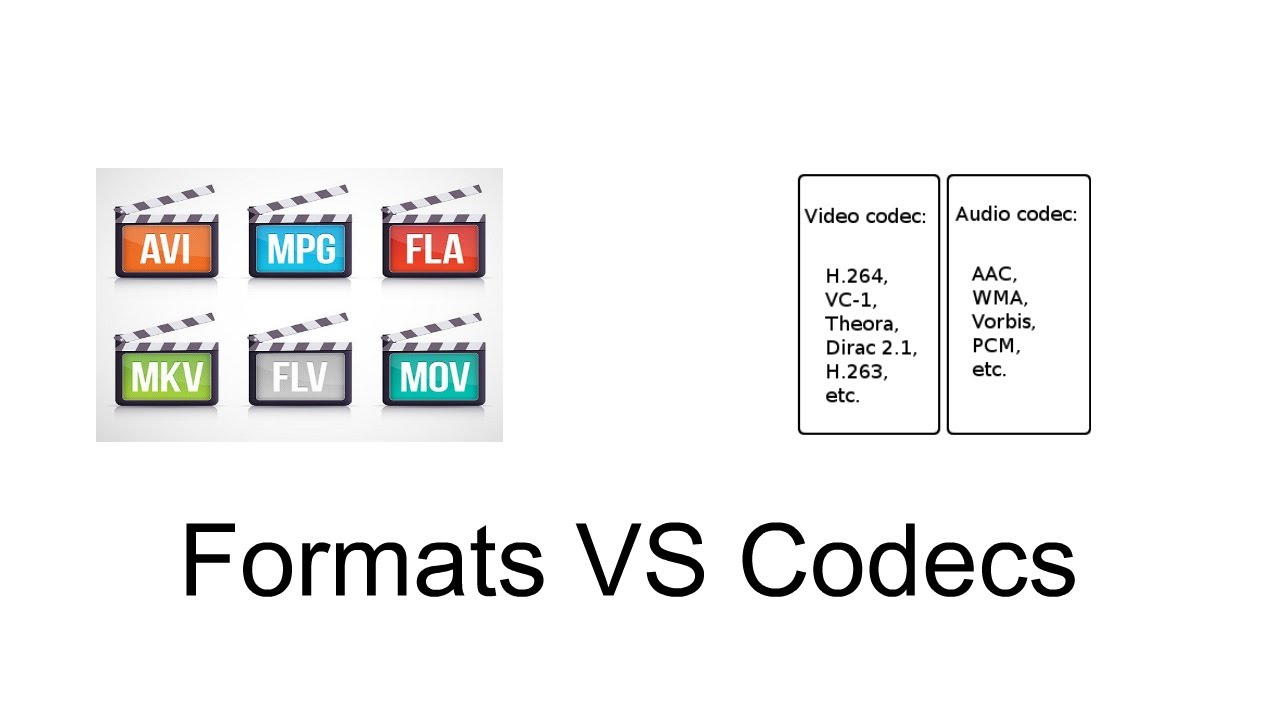
Digital videos are contained in files. These files are called “containers”. The extension of these files often makes it possible to determine their type. The most common containers are MP4, MOV, AVI and MXF. The MXF container is generally used in professional camera series from manufacturers such as Sony or Panasonic.

These containers are “boxes” or “folders” that consist of several elements: video track, sound tracks, time code or subtitles. The purpose of the container is to synchronize all the elements it contains.

Therefore, you cannot know the codec of a video from the file extension: for example, an .avi file and a .mov file could use the same codec to encode the video track.

WHAT IS A CODEC?

A codec is a mathematical procedure consisting of algorithms used to encode and decode the image (codec). It helps define how sensor information is stored and the strategy for compressing and decompressing images.

codec

The size of a one minute 4K video file is about 50 GB. Therefore, it is easy to understand the main advantage of using a codec: compression. For the same minute of 4K recording, for example, using the H264 codec reduces the file size by a factor of about 27, or a final size of about 1.8 GB.

The more “codec” a codec is, the more complex the decoding will be and it will require a powerful machine to accomplish this task. At the same time, the higher the compression, the greater the loss of information that can make post-production difficult.

To achieve this optimization, most codecs use spatial compression: each image is compressed independently of the other images; This is known as an “intra” codec. For more compression, more complex codecs add temporary compression: we’re talking LONG GOP (GOP for “Group of Pictures” or “Long Group of Pictures”); Codecs of this type record only one full image per x images (often 12) and retain only what has changed between these images.

Codecs and bit rates, how much do they influence the quality of MP3s?


The importance of codecs

Everything that has been written about the bit rate is valid
“with the same codec”, ie with the same algorithm
Coding, but the quality of the algorithms is very variable,
since the perception model, fundamental control of the levels of
compression.

codec

Those who are best able to mimic natural perception will get it
the best results since the cutoff frequencies will be
least audible and significant, while a codec with a perceptual model
Unrealistic creates flat and empty passages of important frequencies.

video container

In addition, a bad codec easily introduces “artifacts”; or
Sounds that are not available in the original originate from poor quantization
of some frequencies, especially if the original is not perfect.

Like most things in the computer world, codecs are evolving
In addition to the codec type, it is important that it is current and updated
for increasingly powerful algorithms.

Codecs fall into two categories: “fast”
and slow “. The most important fast codecs include blade,
QDesign and Xing, fast compression, but low to medium quality,
among the slow but high quality Fraunhofer and Lame are these
latest free and especially valid for high bit rates.

You can achieve good results with Fraunhofer coding
Most listeners cannot do this even at 128 Kbit / s and 320 Kbit / s
Distinguish MP3 from the original while compressing with Xing
o Blade with 128 Kbit / s can detect obvious artifacts and only with 256 Kbit / s
Audio reaches the quality of an MP3 compressed with 128 Kbit / s
Fraunhofer.

The just released Xing algorithm had the advantage of lower costs
Rights compared to Fraunhofer and faster coding speed
(It was also the first to implement variable bit rate VBR coding), but
Today’s processor performance is like that. for this
Factor is less important.

The lame algorithm has the advantage that no fees have to be paid
and of remarkable quality, especially at high bit rates – an MP3 from
128 Kbit / s encoded with Lame are less than one compressed with Fraunhofer.
but significantly better than Xing, and 256 Kbit / s Lame has the same quality
Fraunhofer.

At the moment, Lame is the best option for those who
You can afford larger files, while those that need to be careful
about the size, maybe because they have to offer files on an amateur website
or because they have an MP3 player with limited memory, they can pay well
Get a Fraunhofer encoder.

Xing, Blade, and other faster algorithms are not recommended, though
Pay attention to quality.

General quality and bit rate considerations
So that most listeners are of acceptable quality,
using a quality codec like Fraunhofer the bit rate that is normally used
(128 kbps, 1 MB per minute) is usually sufficient, especially if
Songs have a limited frequency range.

For some traces or for more sensitive ears a
highest bit rate, e.g. B. 256 Kbit / s (2 MB per minute, 1/5 of
Corresponding WAV).

64 kbit / s bit rates are always insufficient and with low quality codecs
like Xing or Blade are practically unknown.

Finally, we have to dispel a false myth: it is not possible to point it out
Music genres that need a higher bit rate, classical music too
Sometimes it can be made acceptable at 128 kbps because
Use restricted frequencies, while some rock or pop songs can
suffer because synthesizer tones and human voices are
easily exposed to the “artifact” effect.

Only lyrical music that has always been the most difficult
play and jazz (with cymbals,
Artifacts easy to suffer) certainly not suitable for MP3 and require bit rates
higher.

However, the results vary from song to song and are not
possible to give a general rule. It must be remembered that the audiophile,
The hi-fi musician or hobbyist can almost always
Distinguish an MP3 file with 320 Kbit / s from the original on the audio CD.
So if you have storage space, WAV files or codecs without loss of information
like WMA9 Lossless or FLAC (Free Lossless Audio Codec) always have a quality
Consider MP3, even if they are two to four times larger than
an MP3 with 320 Kbit / s.

What are codecs and why do I have to use them?

It seems incredible, but even today there are many people who still have the so-called codecs, as something virtually unknown. It is not very well known how they work and many people do not even know what they are for. In a basic way, the word codecs can be translated into a compressor – decompressor, and it is used to describe anything that converts data into another form of storage or transmission, and can convert it into something that can be used.

codec

In broadcasted or broadcasting technologies, a codec is a physical device that converts analog video and audio data, into a digital form so that it can be sent over the air. It is also capable of converting the digital information received back to an analog format. In the world of computers, codecs are used as a means of compressing video, images and audio to more manageable size. Most codecs use a lossy compression method, but there are some without losses.

Lossless codecs, such as MSU and Huffyuv, reproduce the original video exactly, without subsequent losses if the video is re-encoded. The most common loss codecs lose several parts of the information, but can save large amounts of space. A codec with losses can act in different ways, such as cutting the original image or sound, and readjusting it in a much more efficient space, then coding it. Another method is to compare a piece of data known to other adjacent data and eliminate excess information to save space. The truth is that there are a lot of codecs available, each of them trying to find the perfect balance between the lost information and the file size. Other factors such as process power also have to be taken into account.

How the video codecs works

The MPEG-1 codec is used in VCDs, and contains the MP3 standard, one of the most used audio codecs. The support for this type of codec is very high, especially among computers, and consumers of devices for watching movies. The quality is very high, although it is not as high as MPEG-2, and the sizes of the files that contain the video are quite large. The MP3 audio standard has good compression through a number of codecs, and is one of the most popular for listening to music online.

The MPEG-2 codec is an incredible high quality standard used primarily for DVDs. While the MPEG-1 codec only allows progressive scanning, MPEG-2 also supports interlacing, allowing greater control over size. Although it is not one of the most advanced codecs, it is widely used for its continued use as a standard for commercial DVDs.

The MPEG-4 goes one step beyond the MPEG-2. It has a number of significant technical advances and better compression methods. It is also widely used, and supports progressive scanning and interlacing. There are a good number of online codecs derived from this format, which includes DivX, 3ivx and Xvid. Each of these codecs has small differences from the original MPEG-4, to give better compression and functionality in certain situations. In fact, there are literally hundreds of codecs on the network, and everyone has their own tastes regarding the application they will use. Many programs, especially players, have their own functionalities to automatically search and download codecs that you may need for a movie or sound file. This eliminates the need for the user to have to search for them on their own. There are so-called codec packages, which bring a good selection of the best and those that are guaranteed to work. Some of the most popular are the ELISOFT Codec Pack 14. 0 and the K-Lite Codec Pack 3.7.0, which usually make almost any multimedia file work.

Codecs: How an audio or video codec works

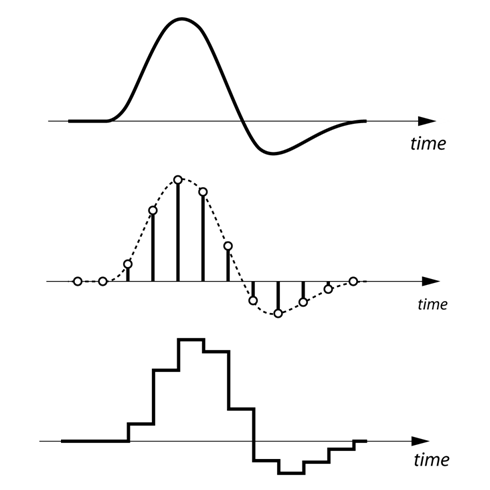
To understand in a simple way what a codec is and how it works, the first thing we have to keep in mind is that the human voice is a continuous (analog) waveform, while the information that circulates through a data network is discrete ( digital). This means that if we want to send packets with data that contain the information needed to reproduce a voice fragment, we will have to digitize the voice beforehand.

codecs

The process of converting an analog signal to a digital signal is done through an element called an encoder. If the encoder is also capable of performing the opposite process, that is, moving from a digital signal to an analog signal even if only approximately, then we will have an encoder-decoder. An encoder-decoder is also called a ‘codec’.

Although it may seem that we would only be interested in selecting one or two codecs taking into account the voice quality (MOS, Mean Opinion Score) and bit-rate parameters that each codec needs, the truth is that we also have to face our network Look closely at the size of the packets that we are going to send since each voice packet is also made up of bits that are used for routing and error correction issues. As they add load, they saturate the network and make the entire system go slower. Do we reduce the number of packages we have to send making them larger? It is not always a good idea because the loss of a large package will have a greater impact on the output, even a cut in communication! What is recommended in these cases is to have a certain compromise between the number of packets that are sent to the network and the protection we want to have. The reference size should be about 20ms of voice per package.

codecs

How codecs work

The codecs reduce the information of the clips to facilitate and enable their publication and viewing through the Internet. There are two methods of compression, the so-called spatial and temporal compression.

In the first one, reduce the information by compressing the existing one inside each frame. Instead of describing the pixel-to-pixel image, pointing out for example the position and color of the pixels, the compression codec generalizes describing similar areas and their light and color characteristics. For example, instead of reproducing a blue sky pixel by pixel, it would be described as an area with similar light and color characteristics. In this sense, the less varied details an image presents, the codec can generalize and compress more easily. Creating videos with simple backgrounds facilitates compression and reduction, just as working with a tripod instead of a camera in hand means stabilizing the backgrounds and therefore facilitating subsequent compression.

The other compression method is temporary, where the information between consecutive frames is compared and only the details that vary are stored. The reference frames from which the differences are analyzed and the subsequent ones are supported are called keyframes and contain the complete image. On the contrary, the frames that reflect the differences are called “delta frames” and only contain the information of the areas that vary with respect to the previous images.

In general, videos that show few changes between frames are compressed better and this necessarily affects the realization. At present, both the television and the cinematographic realization tend to use the camera in motion. However, the compression of dynamic videos is more problematic than the cases of more static images.