Video Formats and Their Features Part 2


Free Download Mp4Gain
picture

Video Formats and Their Features Part 2
video formats

Video file extensions

Video Formats

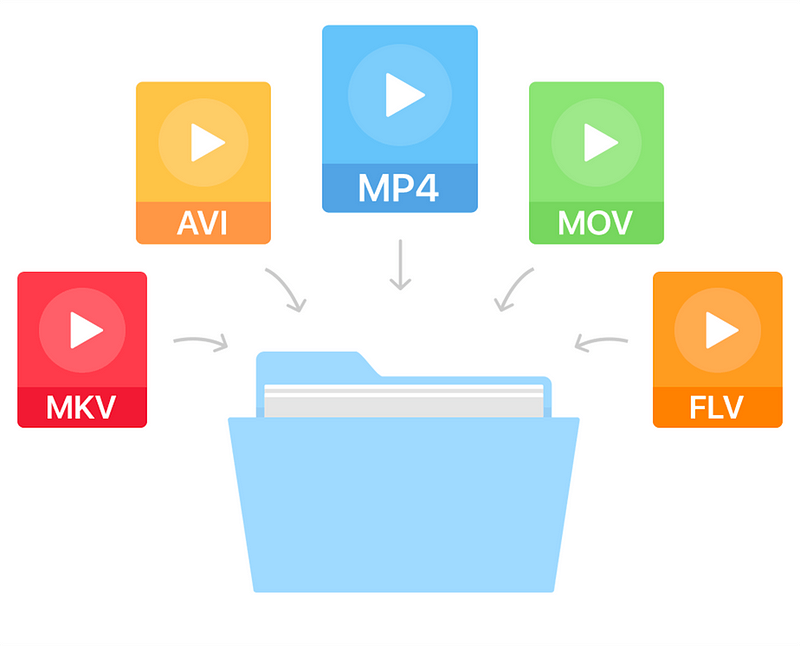
The video extension (like any other file) is a set of characters that help the Windows operating system to determine the type of information contained in the file, as well as to choose the appropriate program to open it. The video file extension classification is as follows:

AVI (Audio-Video Interleaved) is a very popular format, more precisely, a container. It was developed by Microsoft. This container can store four types of data: audio, video, text, and midi. It can include video of any format, from MPEG-1 to MPEG-4, sounds of various formats; the codec mix can be anything. The contents of the AVI container can be found using various programs, from a simple VideoToolBox to a powerful Adobe Premiere.
WMV (Windows Media Video) is another Microsoft format. If you create a movie in Movie Maker that comes with Windows, it will be in this format.
MOV. This format was invented by the Apple Macintosh. In addition to video data, it can contain graphics, animations, and 3D. The files of this format are played in QuickTime Player from Apple itself,
MKV (Matroska or “Matryoshka”) is another container that can hold both video and audio, as well as subtitles and the like. MKV is open source and has been used almost everywhere lately. Files in this format are playable on most players, including Windows Media Player, which is included with Windows.
3gp is a third generation video format for mobile phones. Movies recorded in this format have poor image quality. However, the small size eliminates this disadvantage. Also, 3gp video seems more or less visible on small phone screens.
Video formats used on the Internet
Videos created on the Internet usually have one of the following formats:

FLV (Flash Video) is a video format used by various video hosting sites like YouTube, RuTube, Google Video, and others.
An animation or video in Flash format created in Adobe Flash has the extension SWF (Shockwave Flash). To play these files, you need a browser with Flash Player installed. Videos in this format are also ubiquitous on the Internet, where you can watch them directly from the site.
RealVideo is a format created by RealNetworks and used for television broadcasts on the Web. Movies recorded in this format have an RM, RA or RAM extension and are small in size and of poor quality.
File extensions found on DVD
If you look at the contents of the folder with the DVD movie, you will not immediately understand which file you need to run for the movie to start, because there are a lot of them there. But if you know how files of different extensions differ, this variety will be easier to navigate:

VOB (Versioned Object Base) is an extension of the container, which then contains video (or several at the same time) in MPEG-2 format, audio, movie subtitles and menus. These are the main files on the movie DVD.
IFO files contain information about the movie, the order in which the VOB files are played, and the menus. That is, these are service files that are created in the process of burning a DVD movie.
Also on DVD you can view video files with m2v and m2p extensions (MPEG-2 format). It makes no sense to delve into its features and functions, we can only say that they are necessary for creating VOB files and burning DVD movies.
Optical disc formats
While we’re talking about the files found on DVD, it’s worth talking a bit about the formats of optical digital drives:

Perhaps the most popular of them is the DVD. It is he who is the reason why the VHS format has sunk into oblivion. DVD videos are compressed using the MPEG-2 standard, have a bit rate of 2000 to 9800 Kbps and a size of 720×576 (for PAL) or 720×480 (for NTSC).
HDDVD is a large capacity disc that can record high definition video. Video compression standards are the same as for Blu-Ray.
Blu-ray disc. Next-generation optical media with increased storage capacity for video information, including high definition. It became widespread in 2006 and in 2008 it replaced the HDDVD format. All Hollywood studios have switched to this format.



Free Download Mp4Gain
picture


Mp4Gain Main Window
picture


Mp4Gain Features
picture


Free Download Mp4Gain
picture

Video formats and their characteristics

Video formats and their characteristics

Video formats

Even if you’ve never processed a video, you must have heard out of the corner of your ear that there are some video formats. That by the name (extension) of the file, you can easily identify this format. And you’ve probably heard that if necessary, you can convert one video format to another. Want to know more?

video formats

Before talking about video formats, let’s say a few words about what video standards are.

NTSC. Developed in the United States in 1953. The screen resolution is 720×480 pixels, the frame rate is 30 FPS.
COMRADE. This standard was developed in Germany in 1967. The screen resolution is 720×576 pixels, the frame rate is 25 FPS.
SECAM. A standard developed in France in 1956. It is true that it only concerns television broadcasts, so we will not focus on its characteristics.
Video recording formats
There are several video recording formats, which are divided into analog and digital. To begin with, let’s talk about analog formats, among which the most popular is VHS (more precisely, it was, especially in the 80s-90s). It has a whole family of varieties: VHS-C, S-VHS, Video8, etc. Since 2008 it is no longer used, because it could not withstand the competition, and it is hopelessly out of date.

Video tape (VHS)

But digital video formats are still alive and well:

MiniDV. The recording is done on magnetic tape, 1 hour of video “weighs” 13 GB, the recording speed is ~ 25 Mbit / sec.
HDV. Again, the recording is done on magnetic tape, but the recording quality is much better compared to the previous format – the resolution is 1440 x 1080 with a 16: 9 aspect ratio (interestingly).
AVCHD. High Definition Video Format, whose name stands for Advanced High Definition Video Coding. It is used to record videos in high definition 720p (HD ready), 1080i and 1080p (Full HD) modes on hard drives or memory cards (SD, microSD and Memory Stick PRO). When recording to discs, these are typically 8cm rewritable AVCHD or Blu-Ray discs.
Compression standards and codecs
If you often have to record videos and upload them to the Internet, you should familiarize yourself with the compression standards and codecs that allow you to reduce the file size and as a result, speed up the download of the video to a file hosting or hosting service. videos. So right now there are the following compression standards:

MPEG is one of the main file compression standards. It stands for Moving Pictures Expert Group (the name of the organization that developed it). It has four varieties:
MPEG-1: a file compression format for CDs with mediocre video quality (352×240), currently practically not used;
MPEG-2 is used for digital television and DVD.
MPEG-3 (not to be confused with MP3 audio compression technology): not currently used.
MPEG-4 format can be obtained using codecs like XviD, DivX, etc. Even though it compresses video more strongly than MPEG-2, the image quality is quite decent, especially when using the H.264 codec.
H.264 is a standard that is characterized by a high compression ratio of video data while maintaining decent image quality. Excellent for videos uploaded to the web.
XviD and DivX are highly compressed codecs (based on the MPEG-4 standard).

Video codecs, video formats – what does this all mean?

Video codecs, video formats – what does this all mean?

Video Codec

If you are puzzled by the endless list of export options in your video editing software, this article is for you. Let’s first look at the definition of a codec.

Video Codecs and Containers

Then we will look at the concept of video format, and then we will look at some of the most common codecs and their uses.

If you are recording or editing video, you will almost immediately come across the term “codec”. Since there are so many and it’s hard to tell them apart, I’ve made a quick overview to help you get started. Once you understand certain terms, you can better decide which one suits your needs. Let’s start with a simple definition.

The video codec is.
A codec is actually a combination of two words: an encoder and a decoder (co / dec). What are they doing? Simply put, because video files are so large, you need a way to make them smaller. The codec encodes, compresses data to store or send it, and then decompresses it for playback or editing.

A codec is a computer code that performs its function each time the software calls a file. Codecs can also be used on physical equipment, such as a camera, to digitize incoming video and audio.

This happens in real time, either at the point of capture or at the point of playback. However, if you are not a broadcast engineer, you will have to rely on your computer or device to select the codec. Hardware compresses your video and audio data for viewing, streaming, or storage.

The video format is.
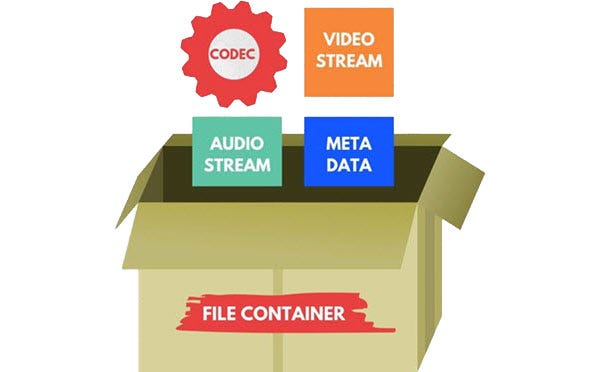
The file format is similar to a container. The container contains data that has been compressed by a specific codec. And sometimes they have the same name.

For example, a file format such as Windows Media Audio contains data compressed with the Windows Media Audio codec. However, a file format such as Audio Video Interleaved (AVI) can contain data compressed with any of several different codecs, including MPEG-2, DivX, or XviD codecs.

AVI files can also contain data that is not compressed by any codec. Therefore, depending on the codecs installed on your system, some AVI files will play fine, while other AVI files, despite having the same file extension, will not play.

It also affects the audio. There is often a situation where when playing a video, the sound plays, but the video does not. This means that the appropriate video codec is installed on your device.

What exactly is a codec?

What exactly is a codec?

Codec

Today there are about three dozen common digital audio formats. Why you need to create so many types of sound files to store one type of content and how to manage all this, you will learn from this material.

Codecs

Surely many users prefer to use their home computer not only as a workhorse, but also as a multimedia center, where they can watch movies or family photos, as well as listen to their favorite music. Although compact digital players or mobile phones are certainly more suitable for listening to musical compositions, but unlike them, a computer can not only play music.

No matter how big the built-in memory of your music player is, it will most likely be difficult to store your entire music library on it. Plus, you can create, edit, organize, and search for music with your PC. Also, don’t forget that there are around three dozen common digital audio formats today, and most players are far from omnivorous and can only play a few of them.

So why do you need to create so many music formats to store one type of content? The fact is that, in the vast majority of cases, the sound is stored in “compressed” form, since one minute of uncompressed composition occupies about 10 MB on the hard disk. On the one hand, this seems not to be much, but on the other, if you are a music lover and your collection consists of several hundred or even thousands of songs, then it is clear that the sound must be compressed to reduce the space it occupies in electronic media.

Various special algorithms are used to compress music files, which subsequently determine the structure and presentation of the audio data, or so-called digital audio file formats. All audio formats can be divided into three groups: uncompressed audio formats, lossless compression, and lossy compression.

No compression
One of the most widespread formats related to this type is the well-known WAV. The sound of files with this extension is stored without compression or changes. It is true that much more space is required to store uncompressed files and therefore WAV is more widely used only in professional audio and video applications, where the sound should not have a loss of quality before processing. Keeping ordinary musical compositions in this form is unwarranted waste.

To play WAV files, you do not need any special software, as all media players understand this format, including the standard Windows Media audio player built into the Windows system.

Another format used to store uncompressed audio that is worth mentioning is Apple’s development called AIFF (Audio Interchange File Format). As you may have guessed, it is most commonly used on Macintosh computers running Mac OS X.

Lossless compression (lossless)
Lossless compression algorithms for audio files work on the principle of conventional file cabinets. They do not provide the highest level of compression (40 to 60%), while they have virtually no effect on sound quality. It is also worth noting that in this case, the encrypted data can be fully restored to its original form. Therefore, the use of lossless compression is most often used in cases where it is important to preserve the identity of the compressed data with respect to the original.

The most popular audio formats in this group are FLAC (Free Lossless Audio Codec), APE (Monkey’s Audio), WMA (Windows Media Lossless), and ALAC (Apple Lossless Audio Codec). Each has its own pros and cons. For example, the APE codec offers slightly better compression gains, while FLAC is more common. In general, all true music lovers store their music collections in lossless formats, since they do not remove any data from the audio stream and files created with these codecs can be listened to even on high-quality stereos.

To play lossless compressed formats, as a rule, third-party players (except WMA) are used, such as MPlayer, foobar, AIMP, Winamp, VLC and others, since all the necessary codecs are already built into them. Another option is to separately install an additional codec pack (for example, K-Lite), after which you can listen to files in lossless format from almost any audio player.

Lossy compression
This is the most popular group of algorithms that provides the maximum audio compression ratio (up to 10 times or more). However, unlike previous formats, the audio file loses quality.

What are video codecs and audio codecs?

What are video codecs and audio codecs?

Video Codecs

Almost any computer user periodically listens to music on it, which is stored electronically. There are many formats for storing music, each of them was developed for specific tasks:

Video Codec

Bit rate is the amount of information used during encoding for 1 second playback. The higher it is, the less the distortion and the sound matches the original as much as possible.
Lossless – Lossless audio encoding. By converting to lossless formats and vice versa, we get exactly the same sound.
Lossy: compression formats designed for the fact that a person simply cannot physically hear certain frequencies that are skipped during conversion. At the same time, it can significantly save the amount of disk space.

Audio CD
The format that ushered in the era of digital sound after the transition from vinyl records. It was adopted as a standard in 1979 by Philips and Sony. In the audio CD format, music can be physically stored only on optical media; when recording to a hard disk, the audio track must be converted.

Due to the highest sound quality and the ability to play on any player, the format is still very popular, even though it is quite old.

Flac
Perhaps the most common format for storing lossless music. Compared to other lossless audio compression codecs, flac developed by xiph.org is completely free and offers the smallest output file size.

MP3
The most popular music format accepted as an unofficial standard for any playback device. Its popularity is based on the fact that because it cuts frequencies inaudible to the ear with practically the same sound quality, an mp3 file is 30% of the original lossless file.

The first audio track in mp3 format appeared in 1994. One of the reasons for its popularity is the ability to store a variety of additional information on audio file tags and the convenience of organizing a music library.

Ogg
A new lossy format that was launched in 2002 as a free alternative to paid formats. Unlike its predecessors, mp3 in particular, it allows the possibility of multi-channel encoding and multi-channel audio storage. It is most used in video games.

The term “audio” today means everything that is somehow connected with sound. This is processing, playing, mixing and simply listening to audio recordings. Few people know that during their existence all popular audio formats have undergone significant changes, sometimes for the better and sometimes even for the worse.

The problem is that when the creators tried to improve the recording quality by using the new format, the size of the result increased significantly. Reducing the size of the final file resulted in a significant loss of quality. But this was not always the case.

The first mention of computer sound is associated with the creation of several primitive video games. Then the sound was played back using the speaker of the system. As the software developers of that time did not try, they failed to achieve the level of quality that would be compatible with tape and reel recorders. This is what got many developers thinking about how to change the audio format to make the sound more natural and natural. It is this problem that has led to the current competition in the audio market. As a result, the formats used strongly affect the quality of the reproduced material and the configuration of the basic playback parameters.

WAV format

The first full quality of audio formats is associated with this particular format. The WAV extension designation was derived from the English word “wave”, which means wave in Russian. It was this format that became the first audio format to be processed with computer programs at a highly professional level. Files with a WAV extension had the following characteristics:

– depth of sound;
– sampling frequency;
– bit rate, etc.

This format was even compatible with the sound that could be obtained after processing an audio CD with an equalizer and other tools. However, the file size in this case was completely unwarranted. For example, the most common 3 minute long track could be up to 50 megabytes long.

Video codecs

In photography, the choice of the recording codec is quite limited: we usually fluctuate between the JPG format and the Raw format. In video, the choice is slightly wider: MPEG-1, MPEG-2, MPG-4, H264, H265, RAW, ProRes, ProRes Raw, Motion jpeg, etc.

So what are these codecs for, what uses are they designed for, and which ones should you choose?

Códecs

CONTAINERS AND CODECS are NOT the same!

Digital videos are contained in files. These files are called “containers”. The extension of these files often makes it possible to determine their type. The most common containers are MP4, MOV, AVI and MXF. The MXF container is generally used in professional camera series from manufacturers such as Sony or Panasonic.

These containers are “boxes” or “folders” that consist of several elements: video track, sound tracks, time code or subtitles. The purpose of the container is to synchronize all the elements it contains.

Therefore, you cannot know the codec of a video from the file extension: for example, an .avi file and a .mov file could use the same codec to encode the video track.

WHAT IS A CODEC?

A codec is a mathematical procedure consisting of algorithms used to encode and decode the image (codec). It helps define how sensor information is stored and the strategy for compressing and decompressing images.

codec

The size of a one minute 4K video file is about 50 GB. Therefore, it is easy to understand the main advantage of using a codec: compression. For the same minute of 4K recording, for example, using the H264 codec reduces the file size by a factor of about 27, or a final size of about 1.8 GB.

The more “codec” a codec is, the more complex the decoding will be and it will require a powerful machine to accomplish this task. At the same time, the higher the compression, the greater the loss of information that can make post-production difficult.

To achieve this optimization, most codecs use spatial compression: each image is compressed independently of the other images; This is known as an “intra” codec. For more compression, more complex codecs add temporary compression: we’re talking LONG GOP (GOP for “Group of Pictures” or “Long Group of Pictures”); Codecs of this type record only one full image per x images (often 12) and retain only what has changed between these images.

What are the most used video formats?

Choosing audio and video codecs and containers affects video quality and file size. Here we show you how to find the format that best suits your needs.

formats

Decades and decades of developments in the audiovisual field have led to a result that, in some way, can be considered curious. While in other sectors, continuous development has led to a very marked standardization (think of the .doc or .pdf format), in multimedia the situation is at least compound.

An example is the world of audio formats, animated by strong “competition” and a multitude of available options. It is no less than that of video formats, in fact. In this case, in fact, we have to deal with a division between codecs and containers (we will see in a moment what they are and what function they perform) that ends up complicating things even more. Therefore, in case you want to convert a movie, you have to be careful to choose the correct codec and the correct video format, to avoid creating files that are too large or simply unreadable. In short, the error is just around the corner.

audio formats

Differences between containers and codecs

Before analyzing the situation and seeing what are the most used video formats, it is necessary to clarify some fundamental concepts: first, what is the difference between the codec and the container. If in the audio world, the codec used to digitize the audio track matches the “final” file format, in the video, on the other hand, the codecs used are different from the file format that the video file will assume at the end of the digitization process. The reason is soon explained and lies in the multimedia nature of a video.

A movie, in fact, contains video and audio data: the conversion or playback software must be able to analyze both multimedia streams, and therefore will need different algorithms that work in one or another type of data stream. Codecs do exactly this: as the name, code, and decoding of data (audio and video) are made from movies, so you can convert them to another video format or play them back with a media player. Even with regard to containers, it is enough to resort to the literal meaning of the word: these are files that contain both the video and audio sequences within them and “make them available” to codecs for reading and playback.

What are the most used codecs?

A codec, as mentioned, is in charge of compressing and decompressing the video files and determines how they are played on the screen of the PC or smart TV. Each operating system provides the user with dozens and dozens of different codecs, each useful for encoding and decoding a specific type of file, even if a new one can be installed by downloading special software or packages from the web. Among the most used codecs we find the FFmpeg, Divx, Xvid, H.264 and its evolution H.265, VP9 and VP 10 (also known as the name of the Google codec).

-Divx and Xvid. As the name also suggests, these are two “mirror” codecs, created in the late 20th and early 21st centuries to meet the initial demand for online multimedia content. Since bandwidth and browsing speed were very limited, these are codecs that can guarantee good video quality even at high levels of image compression. In this way, it was possible to obtain files of contained dimensions even with very long movies (such as full movies)

-264 and H.265. Created by the Motion Picture Expert Group, they can be considered as industry standards. Among the most popular and used in all areas (you can find H.264 encoded movies on Blu-ray discs, for example, but also movies downloaded from the network) thanks to its versatility and ability to guarantee an excellent quality ratio / File size. The H.265 codec, in particular, can guarantee, with the same quality, a compression factor twice as high as that of its predecessor: files “treated” with this codec will therefore weigh half compared to their counterparts processed with H.264 codec

-VP9 and VP10. Also known as “Google Codec”, they are the codecs used by the giant Moutnain View to compress and decompress the movies uploaded to YouTube. These are algorithms optimized for online video playback, capable of offering excellent resolution and high quality even with small files. The VP10 in particular is the all’H.265 answer and is designed for resolutions up to 4K
Mpeg-H.

Video codecs and possible failures

Video codecs and possible failures

Numerous queries that you make to us as readers are caused by one of those incompatibilities in something that should be as simple as being able to put a file in a pendrive and that later (for whatever astral reason) it cannot be reproduced due to a failure or due to other. And this, dear reader, is almost always given by the codecs.

So with the intention of explaining and the desire to give you simple solutions, we elaborate this article where you can know what they are, how to detect them, how to convert them easily and by which way it is better to insert it to our precious Smart TV. But, let us start at the beginning.

But what is that about codecs?

The first thing to distinguish is what a codec and what a container. Sometimes they are confused and it is essential to define them to identify them and get to the point when we are presented with any incompatibility in any file that we want to reproduce.

Surely you sound files with formats as famous as .mpg, .avi, .mov, .divx, .mkv … Well, all these are containers of content both in the form of audio and video tracks so that later when playing them play all at once, in tune and with sufficient quality. That’s where the codec comes in.

A codec is simply a program that creates a particular file with encryption. Hence its name … to encode and decode these files in a language or code that improves image and sound quality or reduces the file size for a better transfer over the network of networks.

So to sum up, one issue is the type of file format or extension that we have in front of us and a very different one, how it has been encoded, in what language, that our TV will then be able to interpret and reproduce correctly.

And it is that before a problem of reproduction of file the first thing that we have to know is with what type of codec it has been codified. To do this in a very simple way we can find out with a simple video player on our PC.

How to know the compatibility of Smart TV

Knowing what codec or container our “smart” television can play is critical to know what type of video file to download and that it doesn’t trouble us later when playing it with the smart TV model we have at home. But this information is not always at hand as we expect. There are brands that do not include this information in detail on their website or in the manual.