Video Codec Explanation


Free Download Mp4Gain
picture

Video Codec Explanation

Video Codec Explanation

Video codecs, or compression-decompression algorithms, are the unsung heroes behind the videos we watch daily. They work like digital magicians, making it possible to store and transmit videos efficiently while preserving image quality. To understand them better, think of video codecs as puzzle masters.

Imagine you have a jigsaw puzzle of a beautiful landscape. However, you need to fit it into a smaller box for storage or mailing. A video codec is like an expert puzzle solver; it disassembles the image into smaller pieces, discards unnecessary ones (compression), and records the steps needed to put it all back together (encoding). When you want to enjoy the landscape again, the video codec reassembles it, like completing the puzzle.

Video codecs come in various types, each with its strengths. Some prioritize smaller file sizes for streaming, while others focus on maintaining pristine quality for high-definition content. Understanding these differences helps you select the right codec for your specific needs.

What Are the Best Video Codecs for Streaming?

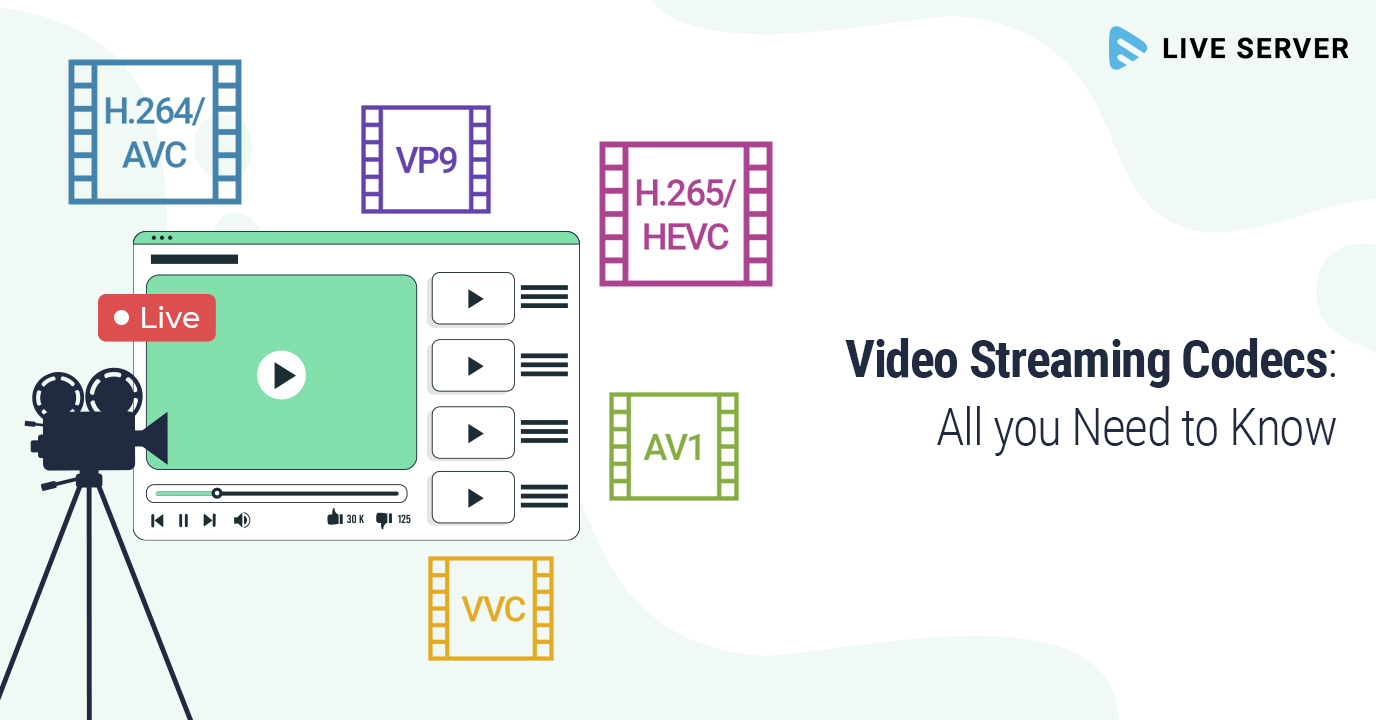
When it comes to streaming video content over the internet, the choice of video codec plays a significant role in ensuring a smooth and enjoyable viewing experience. Two popular video codecs for streaming are H.264 and H.265 (also known as HEVC).

H.264, also known as AVC (Advanced Video Coding), has been a long-standing favorite for online streaming platforms. It offers a good balance between video quality and compression efficiency, making it suitable for a wide range of devices and network conditions. It’s like the reliable family car that gets you where you need to go comfortably and without fuss.

On the other hand, H.265, or HEVC (High-Efficiency Video Coding), is like the fuel-efficient hybrid car of the video codec world. It provides superior compression, resulting in smaller file sizes without compromising quality. This makes it an excellent choice for streaming 4K and even 8K video content, where bandwidth is a concern.

As someone deeply immersed in the world of video codecs, I’ve witnessed firsthand how the right codec choice can transform the streaming experience. It’s not just about technicalities; it’s about delivering content that captivates the audience while optimizing resources.



Free Download Mp4Gain
picture


Mp4Gain Main Window
picture


Mp4Gain Features
picture


Free Download Mp4Gain
picture

Video Codec Profiles and Levels: A Guide for Video Creators

Video Codec Profiles and Levels: A Guide for Video Creators

Video Codec Profiles and Levels: A Guide for Video Creators

When you’re creating a video, one of the most important decisions you’ll make is the video codec you’ll use. The codec will determine the quality and size of your video, as well as the compatibility with different devices.

Video codecs are divided into profiles and levels. Profiles define the features that are supported by a codec, while levels define the maximum quality and size of a video encoded with that profile.

What are Video Codec Profiles?

Video codec profiles define the features that are supported by a codec. This includes things like the type of frames that are supported, the resolution of the video, and the chroma subsampling.

There are a number of different video codec profiles available, each with its own strengths and weaknesses. Some of the most common profiles include:

Main Profile: This is the most common profile and is supported by most devices. It supports a wide range of resolutions and chroma subsamplings.
High Profile: This profile offers higher quality than the Main Profile, but it is not supported by as many devices.
High 10 Profile: This profile supports 10-bit color, which can provide even higher quality than the High Profile.

What are Video Codec Levels?

Video codec levels define the maximum quality and size of a video encoded with a particular profile. This is determined by factors such as the maximum bitrate and the maximum frame rate.

There are a number of different video codec levels available, each with its own quality and size requirements. Some of the most common levels include:

Level 3: This is the lowest level and supports a maximum bitrate of 10,000 kbps.
Level 4: This level supports a maximum bitrate of 20,000 kbps.
Level 5: This level supports a maximum bitrate of 40,000 kbps.
**

Choosing the Right Profile and Level

The best way to choose the right profile and level for your video depends on a number of factors, including:

The desired quality of the video.
The target audience.
The devices that the video will be played on.
If you’re creating a video for a wide audience, then you’ll want to choose a profile and level that is supported by most devices. If you’re creating a video for a specific audience, then you may be able to choose a higher quality profile and level.

**

Final Words about Video Codec Profiles and Levels

Video codec profiles and levels are an important part of video encoding. By understanding the different profiles and levels, you can choose the right settings for your video, ensuring that it is both high quality and compatible with the devices that you want to play it on.

I hope this article has helped you to understand video codec profiles and levels.

Video Codec Comparison: Technical analysis of popular codecs

Video Codec Comparison: Technical analysis of popular codecs

Video Codec
Video Codec
Video Codec
Video Codec

Comparing Video Codecs: In-depth Look

When I first started working with video, I was confused by all the different codecs out there. It’s essential to understand the technical aspects of each codec to make informed decisions. In this section, we’ll dive deep into the world of video codecs and compare their performance, compression efficiency, and compatibility.
One of my favorite quotes from the movie “The Social Network” is, “The internet is not written in pencil, it’s written in ink.” This quote reminds me of the importance of choosing the right codec for your video projects. A poor codec choice can lead to compatibility issues and poor video quality.
I’ve had my fair share of experiences with various codecs, and I’ve learned that it’s crucial to consider factors like bitrate, frame rate, and resolution when comparing codecs. These factors can significantly impact the final video quality and playback performance.

Analyzing Top Video Codecs: A Technical Perspective

In my experience, some of the most popular video codecs include H.264, H.265 (HEVC), VP9, and AV1. Each codec has its strengths and weaknesses, and understanding these differences can help you choose the best codec for your project.
H.264 is widely supported and offers good compression efficiency, making it a solid choice for most applications. However, it may struggle with high-resolution content and require higher bitrates to maintain quality.
On the other hand, H.265 (HEVC) provides better compression efficiency than H.264, especially for high-resolution content. But it’s not as widely supported and may require more processing power for playback.
VP9 is an open-source codec developed by Google, offering similar compression efficiency to H.265. It’s well-suited for web streaming but may not be as widely supported as H.264.
Lastly, AV1 is a newer open-source codec that promises even better compression efficiency than H.265 and VP9. However, it’s still in the early stages of adoption and may not be supported by all devices and platforms.

Video Codec Showdown: A Technical Breakdown

When comparing video codecs, it’s essential to consider factors like compression efficiency, playback performance, and compatibility. In my experience, I’ve found that newer codecs like H.265 and AV1 offer better compression efficiency, which can result in smaller file sizes and lower bandwidth requirements.
However, these newer codecs may require more processing power for playback, which can be a concern for older devices or slower internet connections. Additionally, compatibility can be an issue, as not all devices and platforms support the latest codecs.
In the end, it’s crucial to weigh the pros and cons of each codec and consider your specific needs and target audience. For example, if compatibility is a top priority, H.264 may be the best choice, while H.265 or AV1 might be more suitable for high-resolution content or bandwidth-limited scenarios.

Final Words

Choosing the right video codec can be a daunting task, but understanding the technical aspects of each codec can help you make an informed decision. In my experience, it’s essential to consider factors like compression efficiency, playback performance, and compatibility when comparing codecs.
If you’re looking for a tool to help you with video conversion and normalization, I recommend checking out mp4gain. It’s not free or open-source, but it’s a powerful solution for working with various audio and video formats, including an integrated equalizer. It runs on Windows and can be a valuable tool for managing your video projects.

The Importance of Codecs in Video Compression

The Importance of Codecs in Video Compression

Video Codec
Video Codec

Introduction

Video Codec
Video Codec

Video codecs play a vital role in video compression. The quality and size of video files depend largely on the type of codec used to compress them. In this article, we will explore the significance of video codecs in video compression and the technical aspects that determine the quality and efficiency of video files.

History of Video Codecs

The first video codec was developed in the 1970s, called H.120. This codec allowed for the transmission of video over ISDN telephone lines. Since then, video codecs have evolved significantly, and we now have a wide range of codecs available that offer different levels of compression and quality.

Understanding Video Quality

Video quality can be defined as the degree of excellence that a video possesses. This quality is determined by various factors, including the resolution, bit rate, frame rate, and compression method used.

Resolution

The resolution of a video is the number of pixels that make up the image. Higher resolution videos have more pixels, which means they are sharper and more detailed. The most common resolutions are 720p, 1080p, and 4K.

Bit Rate

The bit rate is the amount of data that is processed per second. A higher bit rate means more data is processed, resulting in a higher-quality video. However, higher bit rates also mean larger file sizes, which can be challenging for storage and transmission.

Frame Rate

The frame rate is the number of frames that are displayed per second. A higher frame rate results in a smoother video, but it also requires more data to be processed, resulting in larger file sizes.

Compression Method

Compression methods are used to reduce the size of video files without compromising on quality. Lossless compression methods preserve the original quality of the video, while lossy compression methods sacrifice some quality to achieve smaller file sizes.

Video Codecs and Formats

Video codecs can be classified into two categories: proprietary codecs and open-source codecs. Proprietary codecs are developed by companies and are generally licensed for use. Open-source codecs, on the other hand, are developed by communities and are free to use.

Proprietary Codecs

Proprietary codecs are developed by companies such as Apple, Microsoft, and Google. They are often used in popular video formats such as MP4, AVI, and MOV. These codecs are optimized for specific devices and software, resulting in high-quality videos that are compatible with a wide range of devices.

Open-Source Codecs

Open-source codecs are developed by communities and are free to use. The most popular open-source codec is the VP9 codec developed by Google. It is used in the WebM format and offers a high level of compression with minimal loss of quality.

Choosing the Right Codec

When choosing a codec, it is important to consider the factors that affect video quality, such as resolution, bit rate, frame rate, and compression method. Proprietary codecs are often optimized for specific devices and software, while open-source codecs offer more flexibility and are free to use.

Format

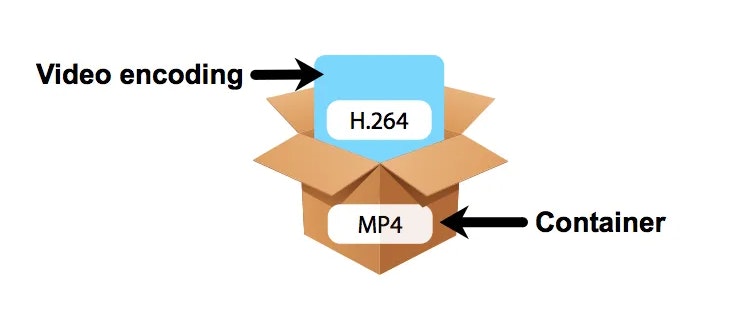
The format of a video file also plays a significant role in determining the quality and efficiency of the file. Popular video formats include MP4, AVI, MOV, and WebM. Each format has its own set of advantages and disadvantages, and it is important to choose the right format based on your needs.

Conclusion

Video codecs are an essential part of video compression, and they play a significant role in determining the quality and size of video files. By understanding the technical aspects of video quality and the different types of codecs and formats available, you can make informed decisions when choosing

What is a video codec?

What is a video codec?

video codec
video codec

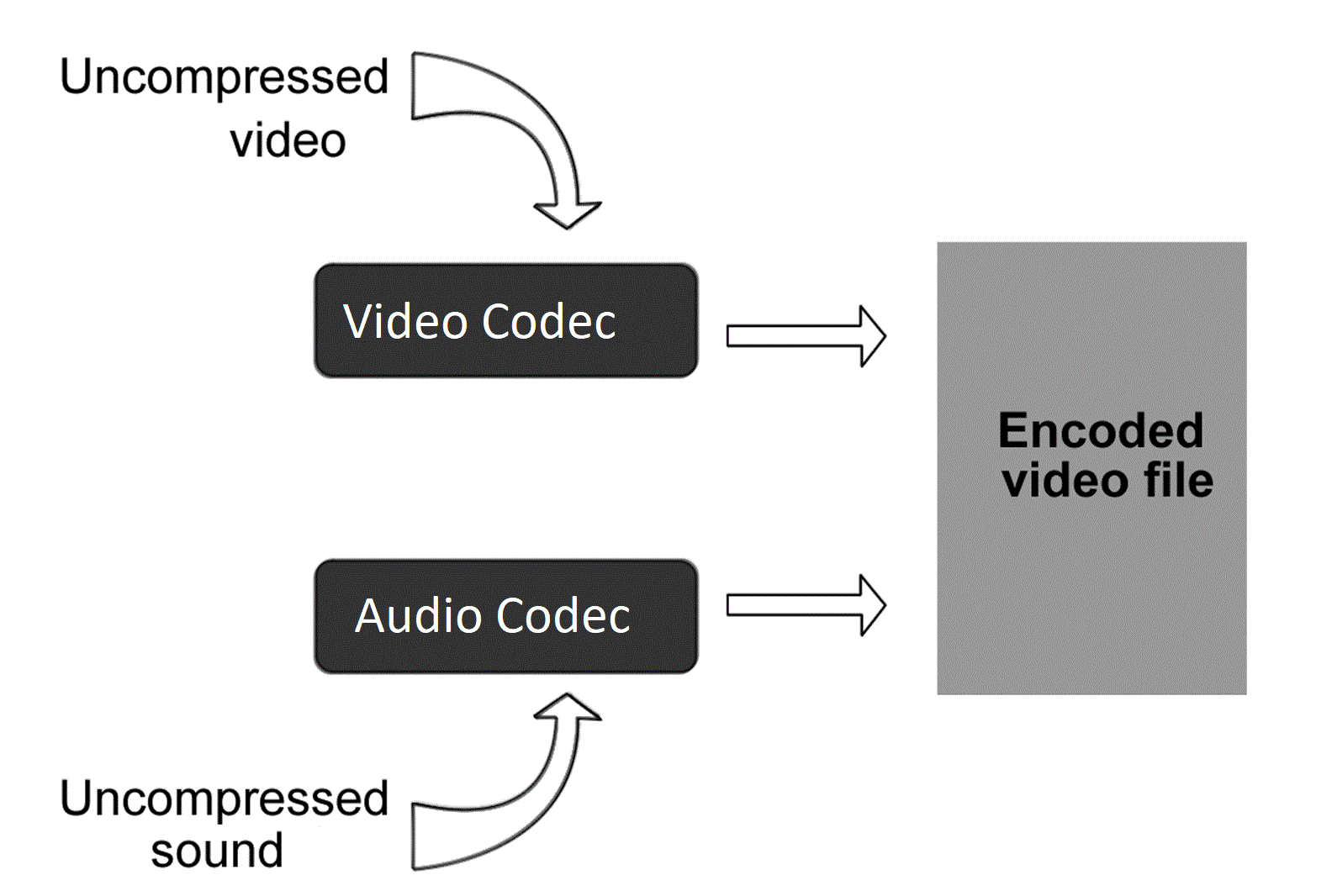
A codec is a program or device that encodes and decodes video. This means that it takes a video and compresses it into a smaller format so it can be streamed or stored more efficiently. Then, when you want to watch the video, the codec decodes it and plays it in its original format.

video codec
video codec

Why is a video codec important?

Video codecs are important because they make videos more accessible and easier to use. Without a codec, the videos would be too large to stream or store, which would mean that we would have to wait a long time to watch them or have a very large storage space to save them.

In addition, the codecs also make the videos look better. Some codecs use advanced techniques to compress the video without affecting its quality. This means that we can see sharp and clear videos, even when they are compressed to a smaller size.

Codecs are also important because they allow videos to be compatible with different devices and platforms. For example, if a video is encoded with a specific codec, it can be viewed on a computer, smartphone, smart TV, or game console without any problem.

What types of video codecs are there?

There are many different types of video codecs, but some of the most common are H.264, H.265, VP9, and AV1. Each codec has its own advantages and disadvantages, and some are better for certain uses than others.

For example, H.264 is a very popular codec used to compress high-definition video. It is a good option for most users as it is compatible with most devices and platforms. However, H.265 is a newer codec that is more efficient in terms of bandwidth and can offer improved video quality.

VP9 is an open source codec developed by Google that is used on some devices and platforms. AV1 is an open source codec developed by a coalition of technology companies and is a promising option for the future, offering more efficient compression and improved video quality.

It is important to note that not all codecs are created equal and some may require more processing power or bandwidth to function properly. Therefore, it is important to choose the correct codec for each situation.

Conclusion

In conclusion, a video codec is an essential program or device that allows you to compress and decode videos to make them more accessible and compatible. There are many different types of video codecs available, and it’s important to choose the one that’s best for each situation. Mp4Gain is an excellent solution for those looking to optimize and enhance their video experience.

WHAT IS THE BIT RATE?

WHAT IS THE BIT RATE?

Video Codec

Bit rate is the amount of video and audio data transferred per second, and the unit bps (bits per second) is used. It is expressed as “video file capacity = bitrate value x time”. The higher the bit rate, the better the picture and sound quality, but the larger the final file size. Adjust the bit rate when you want to reduce the file size when encoding a video file or when you want to improve the image quality.

video codec

The higher the bit rate, the higher the image quality, but if the original video has a low bit rate, no matter how high the bit rate is, no improvement in the quality of the image can be expected. picture. Also, if you are using a CPU with a slow processing speed or a hard disk with a slow rotational speed, if you play a video created at a high bit rate, the processing may not be in time and they will be lost. frames. Also, when posting a video on the home page, it cannot be played properly if the internet line speed is slow.

The DVD-Video standard requires a total video and audio bit rate of 9848 kbps or less, and the Blu-ray standard (BDMV) requires a total video and audio bit rate of 40,000 kbps or less. Therefore, it is necessary to adjust the bit rate according to the purpose and environment. There are two kinds of

encoding methods: constant bit rate (CBR) and variable bit rate (VBR).
Select the encoding method that suits your purpose, such as image quality at encoding time and final size balance.

Constant Bit Rate (CBR)
All constant bit rates assign the same bit rate at all times. Set a high bit rate when you want to improve the image quality of all video files, and set a low bit rate when you want to reduce the file size (a low bit rate can cause noise to be noticeable in a scene with many movement).

It always assigns the same bitrate, so you can easily predict the size of the resulting file. Therefore, it is recommended to use it when there is an upper limit for the file size after encoding or when you want to keep the data transfer rate constant.

Also, WMV (Windows Media Video), etc. You can configure 2-pass CBR. With 2-pass CBR, the amount of data distributed to each video is strictly adjusted and is a mechanism to target higher image quality.

Variable Bit Rate (VBR)
Variable bit rate automatically assigns a high bit rate for fast moving scenes and a low bit rate for slow moving scenes. Since the bit rate is assigned according to the scene, the file size can be reduced while the image quality is relatively high, but the final file size is difficult to predict.

VBR can be divided into two types. 1-step encoding (fixed quality) and 2-step encoding (average bit rate).
1-pass MPEG-2 encoding can shorten processing time for export by analyzing video and encoding while maintaining specified constant quality. However, it is difficult to predict the size of the finished file.

In 2-pass encoding, after analyzing the information from all video data in the 1st pass, the bit rate is assigned and encoded in the 2nd pass based on that information. Although the processing time is long because the processing is performed twice, it is possible to allocate the bit rate efficiently, making it possible to create high-quality video. By specifying the average bitrate, you can roughly predict the size of the file.

Visualization objective | Optimal codec changes depending on the recipient

Visualization objective | Optimal codec changes depending on the recipient

VIDEO CODECS

What should we think about widely used codecs, such as H.265, and internal standards other than international standards?

AVI vs MP4 vs MKV - WMV vs H.264 vs H.265 vs Xvid

When making a selection, you need to think about it depending on your goal and display purpose.

For example, Microsoft codecs include WMV7, WMV8, WMV9, WMA9. These are internal standards, but if you have a Windows machine, Windows Media Player is installed and supports company codecs. The Windows environment is widespread, and if you are targeting offices and users in a Windows environment, you don’t have to think about checking for codecs or installing them, which is a very efficient option.

It is also high resolution, but uses FLAC codec with lossless compression and WAV without compression. Compared to AAC and MP3, which are widely used in portable music players, the amount of FLAC and WAV data is very large and is considered disadvantageous in terms of penetration rate. However, if you are targeting people who want to enjoy higher sound quality, the high resolution is very attractive, and there are many cases where buying compatible equipment or supporting FLAC, WAV, etc. is not a barrier to aiming. .

■ Trends in international standards H.265 / HEVC and H.266 / VVC
H.265 has attracted attention as a next-generation codec, but its spread is limited to some environments. Also, H.266 was announced in 2020 as the latest codec.
H.265 has twice the high compression rate of H.264 / MPEG4 AVC, but on the other hand, it says “the encoding time is longer than H.264 / MPEG-4 AVC” and “the load on the computer during playback is high “. There is one caveat. H.266 has a compression ratio that is twice that of H.265, but it also increases the load.

By the way, some of you may be wondering: “Why is H.265 not so widespread?” This has to do with “standardization”.
The most famous codec is WebM, which is used on YouTube. In this way, “the codec developed by the company and AV1 developed by a non-profit organization are in a competitive state”, and H.265 is “used”. to the fact that a license fee is incurred, it has not been generalized.

One of the reasons H.264 is widely used is the “x264” encoder, which was built around licensing. By avoiding the license relationship, “x264” has been adopted and used in many encoding software, and H.264 has become widespread.

■ Easy to distribute new codecs for specific purposes
For example, Dwango and NTT started the H.265 demo experiment on Nico Nico Live Broadcasting in November 2014. If you are a specific target of niconico users, it is easier to distribute codecs than an indeterminate number of users.

In this way, the codec selection changes according to the display purpose.

In the end
So far, we have explained “compression rate”, “standardization” and “display objective” as “three points of view that must be suppressed to select the optimal video codec”. In actual operation, you may not be able to make decisions due to the rapidly changing display environment and technology. In such a case, I think the best shortcut is to consult a professional. We are not only familiar with the latest codecs and file combination examples, but we also believe that they will offer the best selection according to the purpose and usage scene based on our achievements.

Standardization | It has a great influence on the spread of codecs

Standardization | It has a great influence on the spread of codecs

Video Codec

For video playback, the same codec as the sender-encoded “video data codec” and “audio data codec” must be included in the display environment on the receiver side and decoded.

VIDEO CODECS

Therefore, as a second point of view of codec selection, it is necessary to be aware of the propagation situation.
Codecs are found in many places. In terms of devices, terminals, browsers, personal computer operating systems, etc., “standardization” has a great influence on the support of each codec from each manufacturer.

Standardization can be broadly classified into
1) internal standards (standards independently established by companies)
2) industry standards (independently established by the industry. There are merits in terms of compatibility, etc.)
3) National standards (established by the national government based on the law. JIS, etc.)
4) Regional standards (standards that span multiple countries)
5) International standards (global standards)

There is, and the influence increases in the order of 1) → 5). Since an international standard is recognized as suitable for general use around the world, it will be adopted by many manufacturers and developers and will be widely used. The number of cases where the codec is pre-installed in browsers, players, playback terminals, etc. will increase, and if the codec installation is no longer necessary, the threshold for viewing videos of the recipient will be lowered considerably. Therefore, it is necessary to pay attention to the standardization trend as an important point of view of codec selection.

There are “ISO / IEC JCT1” that started in the storage field and “ITU-T” that started in the communication field as the organizations that established the international standard for compression encoding of video and audio data. ISO / IEC is formulating the MPEG series, ITU-T is formulating the international standard for the H.26X series, and both organizations jointly formulate H.262 / MPEG-2 and H.264 / MPEG-4 AVC (Fig. 1 ).

[Fig. 1] Standardization flow of “MPEG” and “H.26X” series
] Standardization flow chart for each series of “MPEG” and “H.26X”

If you want to widely reach an indeterminate number of people, it is important to select a codec that is popular to some extent, and it is essential to be aware of “standardization” at that time. However, it is not always good to keep up with the latest, and even if it becomes an international standard, it will take some time before it becomes mainstream, so be careful.

Three perspectives to consider to select the best video codec Codec

Three perspectives to consider to select the best video codec
Codec

Video Codec

In this article, as basic knowledge about
codecs: -A codec is a program that encodes (encodes) / decodes (decodes) video data and
Audio.

VIDEO CODEC

-Even if the file format is the same, different codecs are different.-Al
play a video,
I explained that the codec used at the time of encoding is also required for the recipient’s viewing environment, but in this article, “compression rate” and “compression rate” are described as “three viewpoints that need to be suppressed to be able to select the optimal video codec. ” I will explain about “standardization” and “display goal”.

Viewpoint 1: Compression Rate | Make it easy to distribute and distribute high-quality online videos
A film expresses movement through a collection of continuous images and, if it is not compressed, the amount of data will be enormous. Therefore, compression technology has been developed to efficiently record and save video data. Compression technology is one of the hearts of codec development. By using compression technology, it is possible to record a large amount of information, such as moving images with a large amount of data, to achieve higher image quality even with the same capacity, and reduce the amount of data to facilitate distribution and distribution. Therefore, “compression rate” is an important point of view when selecting a codec.

■ Two compression methods, “lossy compression” and “lossless compression”
There are two types of data compression methods: “lossy compression”, which reduces the weight of the data by thinning it within a range that does not affect the eyes, and “lossless compression”, which returns the original amount of data. when unzipped without thinning the data. Since the amount of data is very large in “uncompressed”, which does not compress the data at all, compressed data is often used when handling moving images. Lossy compression codecs are often used for video distribution, especially MPEG-4 AVC and WebM for Youtube.

■ High compression rate codec
For example, since the birth of MPEG-1 in 1993, there have been “MPEG series” such as MPEG-2 (1995) and MPEG-4 AVC (2003). MPEG-4 AVC is said to have approximately twice the compression ratio of MPEG-2. In other words, the standard for DVD video is set at approximately 8 Mbps for MPEG-2, but in terms of calculation, if compressed with MPEG-4 AVC, the same image quality can be obtained at approximately 4 Mbps. Double of compression rate means that the file capacity will be cut in half when video is delivered with the same image quality, and the communication bandwidth at the time of delivery will also be cut in half.

By improving compression efficiency, even with the same image quality, a small amount of data can be used.
The load on the video distribution server can be reduced and the server risk minimal and display lag can be
reduced.-Avoid close communication lines and provide information to viewers.
the
advantages of easier delivery and higher image quality of videos.
The following [Demo 1] is compressed using the MPEG-2 codec on the left and the MPEG-4 AVC codec on the right at the same bit rate, but the difference in image quality is clear.

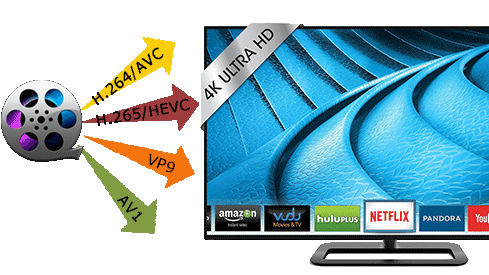
Video codecs for 4K

Video codecs for 4K

4K codecs

If you are experienced in streaming or recording video signals, you probably know what video codecs are.

4K Codecs


Video codec – a device or program that allows you to compress (encode) large video files for viewing or editing; the name is formed at the same time as these words in English: «co the mpressor / dec ompressor» (to mpres-sor / December ohm-pres-sor) and «co de / dec ode» (to di-ro-vat / december hate-ro-vat).

In the context of the characteristics of professional environments or for live-pi-si codecs, reduce the size (or bit rate) of the data stream, allowing the transfer of data to a wide audience. For example, a compressed 1080p30 signal typically takes 4-8 Mbps, while an uncompressed version of the signal would require 1.5 Gbps – that’s 250 times longer! Given current network bandwidth limitations, it would be nearly impossible to stream at such a high bit rate without using video codecs.

Live streaming in 4K?
Streaming or recording in 4K resolution, if possible, definitely has its advantages. This is, first of all, the quality and clarity of the video, as well as ample opportunities for further processing.

In terms of formats and codecs, 4K resolution (3840×2160 pixels) contains four times as many pixels as the most popular modern Full HD resolution (1920 × 1080), meaning in one go, you can stream much more data to your audience.

Fortunately, new codecs have already appeared that allow you to work with 4K and higher resolutions.

H.265 codec: the best choice for 4K
H.265, also known as HEVC, is the successor to the modern generation H.264 codec (known as AVC), which is capable of encoding / decoding 4K video. HEVC is installed on most 4K televisions and computer monitors. When encoded, H.265 consumes up to 8-10 times more processing power than H.264, making HEVC unsuitable for transmitting small to medium-sized data using the latest technologies. Video-on-demand resources like Netflix generally encrypt their video content before making it available to users. In addition, these resources can be allowed as additional computing power,

Note that older formats and codecs (AVC / H.264) are still capable of handling 4K video, but the difference is that newer ones like HEVC do it more efficiently. At the same time, the video quality with the increased compression ratio improved and this did not affect the bit rate. Capable of supporting resolutions up to 8K (8192 × 4320), HEVC is the video format of the future.

At the same time, there are no end-user costs associated with HEVC / H.265, while equipment manufacturers, providers of paid programs and streaming services must pay royalties for using HEVC technology in their products and / or services. A good example would be modern 4K televisions or monitors, in which the H.265 codec is integrated during production and users get it for free with the purchase of the corresponding device.

Free video streaming services (such as YouTube) have traditionally been exempt from royalty payments, but this has not affected HEVC. This exclusion has generated a series of interesting collaborations between renowned high-tech companies in the creation of new open source video formats.

Alliance for Open Media
Dissatisfied with the licensing rules and patent royalties associated with HEVC, tech giants like Microsoft, Google, Mozilla, Cisco, Intel, Netflix, and Amazon have formed a new consortium: the Alliance for Open Media (AOM). It is a non-profit organization dedicated to the development of the next generation of video codecs, video encoding formats, and related technologies. For 2016-2017, AOM plans to introduce new technology that enables more efficient compression of video data, which in turn will significantly reduce the load on the Internet connection and significantly increase the capabilities of modern web networks that transmit video to personal computers, smart phones. , game consoles, streaming consoles, televisions, etc. Also, when using the new format, no royalties will be paid. It follows that any company can create software that can convert,

Many of the group’s members have already contributed to the development of the next generation of 4K codecs; Cisco created Thor, Mozilla worked with Daala and Google with VP9. AMD, ARM, Intel, and Nvidia have recently joined the Alliance.

VP9 is the most popular of the 4K codecs
The VP9 codec is open source and royalty free. It owes its popularity to its use in web applications during the gradual transition from Flash to HTML5 technology.