Video Codec Profiles and Levels: A Guide for Video Creators


Free Download Mp4Gain
picture

Video Codec Profiles and Levels: A Guide for Video Creators

Video Codec Profiles and Levels: A Guide for Video Creators

When you’re creating a video, one of the most important decisions you’ll make is the video codec you’ll use. The codec will determine the quality and size of your video, as well as the compatibility with different devices.

Video codecs are divided into profiles and levels. Profiles define the features that are supported by a codec, while levels define the maximum quality and size of a video encoded with that profile.

What are Video Codec Profiles?

Video codec profiles define the features that are supported by a codec. This includes things like the type of frames that are supported, the resolution of the video, and the chroma subsampling.

There are a number of different video codec profiles available, each with its own strengths and weaknesses. Some of the most common profiles include:

Main Profile: This is the most common profile and is supported by most devices. It supports a wide range of resolutions and chroma subsamplings.
High Profile: This profile offers higher quality than the Main Profile, but it is not supported by as many devices.
High 10 Profile: This profile supports 10-bit color, which can provide even higher quality than the High Profile.

What are Video Codec Levels?

Video codec levels define the maximum quality and size of a video encoded with a particular profile. This is determined by factors such as the maximum bitrate and the maximum frame rate.

There are a number of different video codec levels available, each with its own quality and size requirements. Some of the most common levels include:

Level 3: This is the lowest level and supports a maximum bitrate of 10,000 kbps.
Level 4: This level supports a maximum bitrate of 20,000 kbps.
Level 5: This level supports a maximum bitrate of 40,000 kbps.
**

Choosing the Right Profile and Level

The best way to choose the right profile and level for your video depends on a number of factors, including:

The desired quality of the video.
The target audience.
The devices that the video will be played on.
If you’re creating a video for a wide audience, then you’ll want to choose a profile and level that is supported by most devices. If you’re creating a video for a specific audience, then you may be able to choose a higher quality profile and level.

**

Final Words about Video Codec Profiles and Levels

Video codec profiles and levels are an important part of video encoding. By understanding the different profiles and levels, you can choose the right settings for your video, ensuring that it is both high quality and compatible with the devices that you want to play it on.

I hope this article has helped you to understand video codec profiles and levels.


Free Download Mp4Gain
picture


Mp4Gain Main Window
picture


Mp4Gain Features
picture


Free Download Mp4Gain
picture

Video Codec Comparison: Technical analysis of popular codecs

Video Codec Comparison: Technical analysis of popular codecs

Video Codec
Video Codec
Video Codec
Video Codec

Comparing Video Codecs: In-depth Look

When I first started working with video, I was confused by all the different codecs out there. It’s essential to understand the technical aspects of each codec to make informed decisions. In this section, we’ll dive deep into the world of video codecs and compare their performance, compression efficiency, and compatibility.
One of my favorite quotes from the movie “The Social Network” is, “The internet is not written in pencil, it’s written in ink.” This quote reminds me of the importance of choosing the right codec for your video projects. A poor codec choice can lead to compatibility issues and poor video quality.
I’ve had my fair share of experiences with various codecs, and I’ve learned that it’s crucial to consider factors like bitrate, frame rate, and resolution when comparing codecs. These factors can significantly impact the final video quality and playback performance.

Analyzing Top Video Codecs: A Technical Perspective

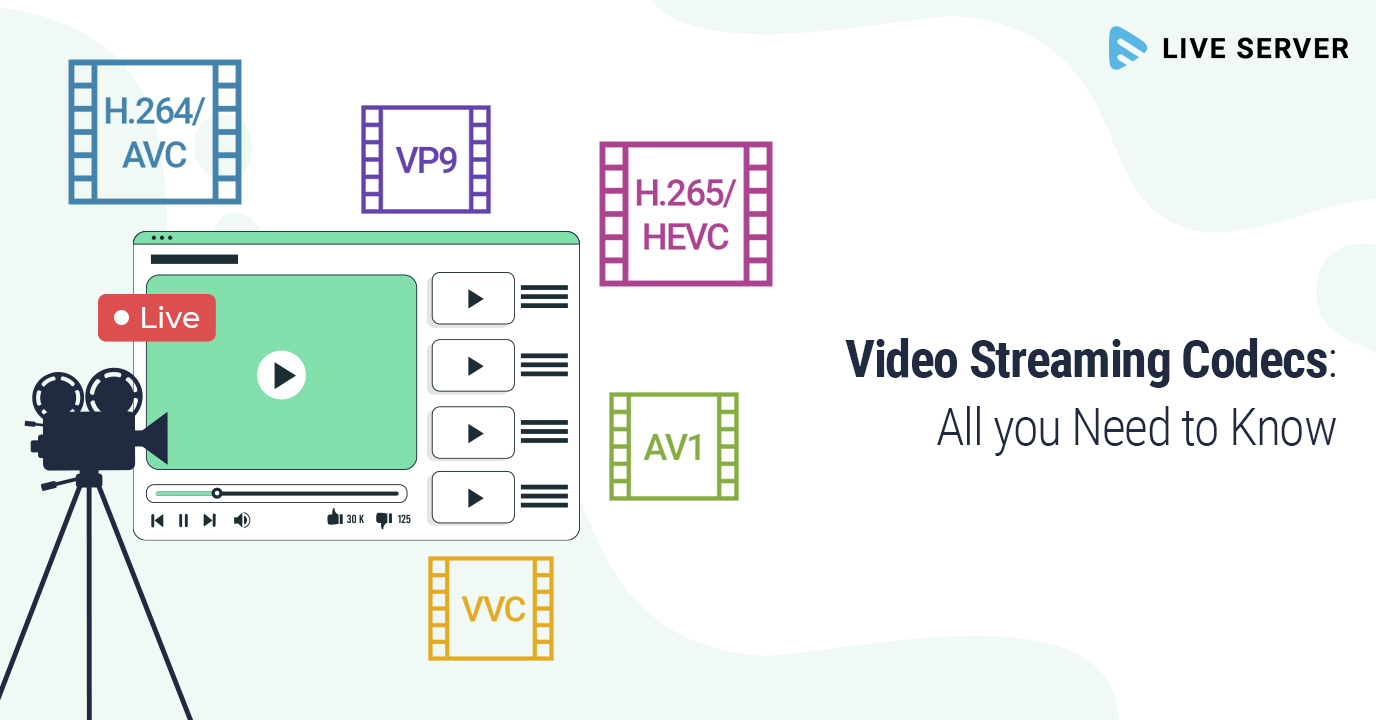
In my experience, some of the most popular video codecs include H.264, H.265 (HEVC), VP9, and AV1. Each codec has its strengths and weaknesses, and understanding these differences can help you choose the best codec for your project.
H.264 is widely supported and offers good compression efficiency, making it a solid choice for most applications. However, it may struggle with high-resolution content and require higher bitrates to maintain quality.
On the other hand, H.265 (HEVC) provides better compression efficiency than H.264, especially for high-resolution content. But it’s not as widely supported and may require more processing power for playback.
VP9 is an open-source codec developed by Google, offering similar compression efficiency to H.265. It’s well-suited for web streaming but may not be as widely supported as H.264.
Lastly, AV1 is a newer open-source codec that promises even better compression efficiency than H.265 and VP9. However, it’s still in the early stages of adoption and may not be supported by all devices and platforms.

Video Codec Showdown: A Technical Breakdown

When comparing video codecs, it’s essential to consider factors like compression efficiency, playback performance, and compatibility. In my experience, I’ve found that newer codecs like H.265 and AV1 offer better compression efficiency, which can result in smaller file sizes and lower bandwidth requirements.
However, these newer codecs may require more processing power for playback, which can be a concern for older devices or slower internet connections. Additionally, compatibility can be an issue, as not all devices and platforms support the latest codecs.
In the end, it’s crucial to weigh the pros and cons of each codec and consider your specific needs and target audience. For example, if compatibility is a top priority, H.264 may be the best choice, while H.265 or AV1 might be more suitable for high-resolution content or bandwidth-limited scenarios.

Final Words

Choosing the right video codec can be a daunting task, but understanding the technical aspects of each codec can help you make an informed decision. In my experience, it’s essential to consider factors like compression efficiency, playback performance, and compatibility when comparing codecs.
If you’re looking for a tool to help you with video conversion and normalization, I recommend checking out mp4gain. It’s not free or open-source, but it’s a powerful solution for working with various audio and video formats, including an integrated equalizer. It runs on Windows and can be a valuable tool for managing your video projects.

The Importance of Codecs in Video Compression

The Importance of Codecs in Video Compression

Video Codec
Video Codec

Introduction

Video Codec
Video Codec

Video codecs play a vital role in video compression. The quality and size of video files depend largely on the type of codec used to compress them. In this article, we will explore the significance of video codecs in video compression and the technical aspects that determine the quality and efficiency of video files.

History of Video Codecs

The first video codec was developed in the 1970s, called H.120. This codec allowed for the transmission of video over ISDN telephone lines. Since then, video codecs have evolved significantly, and we now have a wide range of codecs available that offer different levels of compression and quality.

Understanding Video Quality

Video quality can be defined as the degree of excellence that a video possesses. This quality is determined by various factors, including the resolution, bit rate, frame rate, and compression method used.

Resolution

The resolution of a video is the number of pixels that make up the image. Higher resolution videos have more pixels, which means they are sharper and more detailed. The most common resolutions are 720p, 1080p, and 4K.

Bit Rate

The bit rate is the amount of data that is processed per second. A higher bit rate means more data is processed, resulting in a higher-quality video. However, higher bit rates also mean larger file sizes, which can be challenging for storage and transmission.

Frame Rate

The frame rate is the number of frames that are displayed per second. A higher frame rate results in a smoother video, but it also requires more data to be processed, resulting in larger file sizes.

Compression Method

Compression methods are used to reduce the size of video files without compromising on quality. Lossless compression methods preserve the original quality of the video, while lossy compression methods sacrifice some quality to achieve smaller file sizes.

Video Codecs and Formats

Video codecs can be classified into two categories: proprietary codecs and open-source codecs. Proprietary codecs are developed by companies and are generally licensed for use. Open-source codecs, on the other hand, are developed by communities and are free to use.

Proprietary Codecs

Proprietary codecs are developed by companies such as Apple, Microsoft, and Google. They are often used in popular video formats such as MP4, AVI, and MOV. These codecs are optimized for specific devices and software, resulting in high-quality videos that are compatible with a wide range of devices.

Open-Source Codecs

Open-source codecs are developed by communities and are free to use. The most popular open-source codec is the VP9 codec developed by Google. It is used in the WebM format and offers a high level of compression with minimal loss of quality.

Choosing the Right Codec

When choosing a codec, it is important to consider the factors that affect video quality, such as resolution, bit rate, frame rate, and compression method. Proprietary codecs are often optimized for specific devices and software, while open-source codecs offer more flexibility and are free to use.

Format

The format of a video file also plays a significant role in determining the quality and efficiency of the file. Popular video formats include MP4, AVI, MOV, and WebM. Each format has its own set of advantages and disadvantages, and it is important to choose the right format based on your needs.

Conclusion

Video codecs are an essential part of video compression, and they play a significant role in determining the quality and size of video files. By understanding the technical aspects of video quality and the different types of codecs and formats available, you can make informed decisions when choosing

What is a video codec?

What is a video codec?

video codec
video codec

A codec is a program or device that encodes and decodes video. This means that it takes a video and compresses it into a smaller format so it can be streamed or stored more efficiently. Then, when you want to watch the video, the codec decodes it and plays it in its original format.

video codec
video codec

Why is a video codec important?

Video codecs are important because they make videos more accessible and easier to use. Without a codec, the videos would be too large to stream or store, which would mean that we would have to wait a long time to watch them or have a very large storage space to save them.

In addition, the codecs also make the videos look better. Some codecs use advanced techniques to compress the video without affecting its quality. This means that we can see sharp and clear videos, even when they are compressed to a smaller size.

Codecs are also important because they allow videos to be compatible with different devices and platforms. For example, if a video is encoded with a specific codec, it can be viewed on a computer, smartphone, smart TV, or game console without any problem.

What types of video codecs are there?

There are many different types of video codecs, but some of the most common are H.264, H.265, VP9, and AV1. Each codec has its own advantages and disadvantages, and some are better for certain uses than others.

For example, H.264 is a very popular codec used to compress high-definition video. It is a good option for most users as it is compatible with most devices and platforms. However, H.265 is a newer codec that is more efficient in terms of bandwidth and can offer improved video quality.

VP9 is an open source codec developed by Google that is used on some devices and platforms. AV1 is an open source codec developed by a coalition of technology companies and is a promising option for the future, offering more efficient compression and improved video quality.

It is important to note that not all codecs are created equal and some may require more processing power or bandwidth to function properly. Therefore, it is important to choose the correct codec for each situation.

Conclusion

In conclusion, a video codec is an essential program or device that allows you to compress and decode videos to make them more accessible and compatible. There are many different types of video codecs available, and it’s important to choose the one that’s best for each situation. Mp4Gain is an excellent solution for those looking to optimize and enhance their video experience.

What are the most used video formats?

Choosing audio and video codecs and containers affects video quality and file size. Here we show you how to find the format that best suits your needs.

formats

Decades and decades of developments in the audiovisual field have led to a result that, in some way, can be considered curious. While in other sectors, continuous development has led to a very marked standardization (think of the .doc or .pdf format), in multimedia the situation is at least compound.

An example is the world of audio formats, animated by strong “competition” and a multitude of available options. It is no less than that of video formats, in fact. In this case, in fact, we have to deal with a division between codecs and containers (we will see in a moment what they are and what function they perform) that ends up complicating things even more. Therefore, in case you want to convert a movie, you have to be careful to choose the correct codec and the correct video format, to avoid creating files that are too large or simply unreadable. In short, the error is just around the corner.

audio formats

Differences between containers and codecs

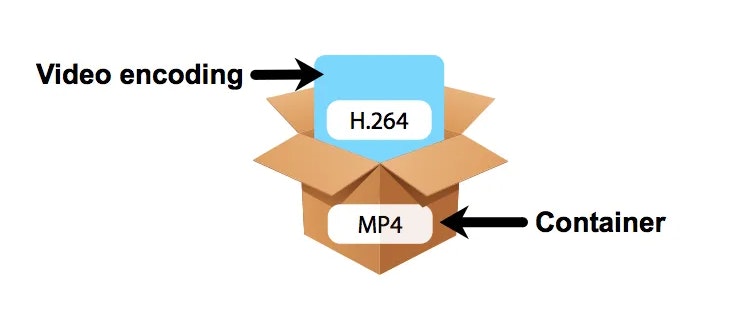
Before analyzing the situation and seeing what are the most used video formats, it is necessary to clarify some fundamental concepts: first, what is the difference between the codec and the container. If in the audio world, the codec used to digitize the audio track matches the “final” file format, in the video, on the other hand, the codecs used are different from the file format that the video file will assume at the end of the digitization process. The reason is soon explained and lies in the multimedia nature of a video.

A movie, in fact, contains video and audio data: the conversion or playback software must be able to analyze both multimedia streams, and therefore will need different algorithms that work in one or another type of data stream. Codecs do exactly this: as the name, code, and decoding of data (audio and video) are made from movies, so you can convert them to another video format or play them back with a media player. Even with regard to containers, it is enough to resort to the literal meaning of the word: these are files that contain both the video and audio sequences within them and “make them available” to codecs for reading and playback.

What are the most used codecs?

A codec, as mentioned, is in charge of compressing and decompressing the video files and determines how they are played on the screen of the PC or smart TV. Each operating system provides the user with dozens and dozens of different codecs, each useful for encoding and decoding a specific type of file, even if a new one can be installed by downloading special software or packages from the web. Among the most used codecs we find the FFmpeg, Divx, Xvid, H.264 and its evolution H.265, VP9 and VP 10 (also known as the name of the Google codec).

-Divx and Xvid. As the name also suggests, these are two “mirror” codecs, created in the late 20th and early 21st centuries to meet the initial demand for online multimedia content. Since bandwidth and browsing speed were very limited, these are codecs that can guarantee good video quality even at high levels of image compression. In this way, it was possible to obtain files of contained dimensions even with very long movies (such as full movies)

-264 and H.265. Created by the Motion Picture Expert Group, they can be considered as industry standards. Among the most popular and used in all areas (you can find H.264 encoded movies on Blu-ray discs, for example, but also movies downloaded from the network) thanks to its versatility and ability to guarantee an excellent quality ratio / File size. The H.265 codec, in particular, can guarantee, with the same quality, a compression factor twice as high as that of its predecessor: files “treated” with this codec will therefore weigh half compared to their counterparts processed with H.264 codec

-VP9 and VP10. Also known as “Google Codec”, they are the codecs used by the giant Moutnain View to compress and decompress the movies uploaded to YouTube. These are algorithms optimized for online video playback, capable of offering excellent resolution and high quality even with small files. The VP10 in particular is the all’H.265 answer and is designed for resolutions up to 4K
Mpeg-H.