WHAT IS THE BIT RATE?


Free Download Mp4Gain
picture

WHAT IS THE BIT RATE?
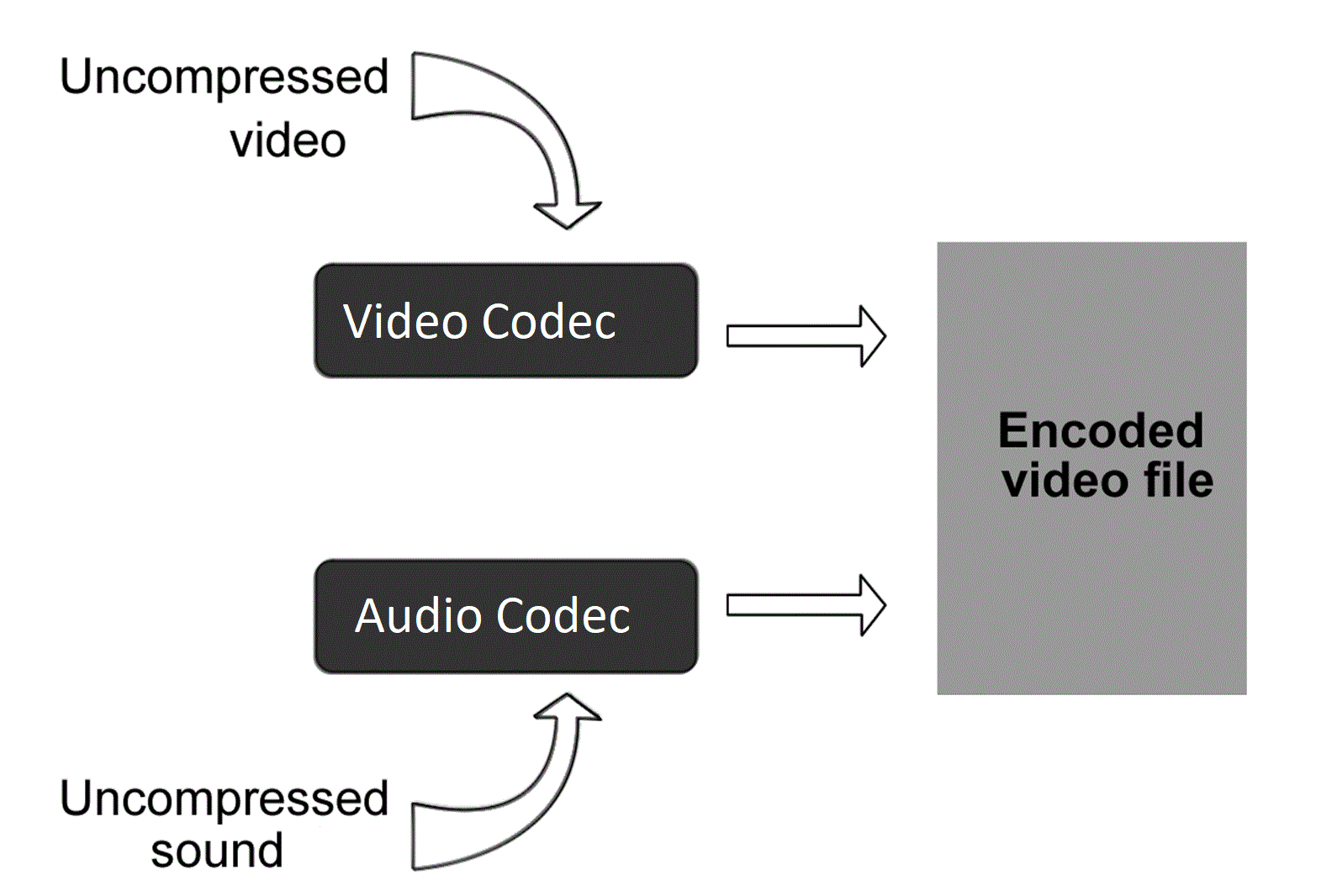
Video Codec

Bit rate is the amount of video and audio data transferred per second, and the unit bps (bits per second) is used. It is expressed as “video file capacity = bitrate value x time”. The higher the bit rate, the better the picture and sound quality, but the larger the final file size. Adjust the bit rate when you want to reduce the file size when encoding a video file or when you want to improve the image quality.

video codec

The higher the bit rate, the higher the image quality, but if the original video has a low bit rate, no matter how high the bit rate is, no improvement in the quality of the image can be expected. picture. Also, if you are using a CPU with a slow processing speed or a hard disk with a slow rotational speed, if you play a video created at a high bit rate, the processing may not be in time and they will be lost. frames. Also, when posting a video on the home page, it cannot be played properly if the internet line speed is slow.

The DVD-Video standard requires a total video and audio bit rate of 9848 kbps or less, and the Blu-ray standard (BDMV) requires a total video and audio bit rate of 40,000 kbps or less. Therefore, it is necessary to adjust the bit rate according to the purpose and environment. There are two kinds of

encoding methods: constant bit rate (CBR) and variable bit rate (VBR).
Select the encoding method that suits your purpose, such as image quality at encoding time and final size balance.

Constant Bit Rate (CBR)
All constant bit rates assign the same bit rate at all times. Set a high bit rate when you want to improve the image quality of all video files, and set a low bit rate when you want to reduce the file size (a low bit rate can cause noise to be noticeable in a scene with many movement).

It always assigns the same bitrate, so you can easily predict the size of the resulting file. Therefore, it is recommended to use it when there is an upper limit for the file size after encoding or when you want to keep the data transfer rate constant.

Also, WMV (Windows Media Video), etc. You can configure 2-pass CBR. With 2-pass CBR, the amount of data distributed to each video is strictly adjusted and is a mechanism to target higher image quality.

Variable Bit Rate (VBR)
Variable bit rate automatically assigns a high bit rate for fast moving scenes and a low bit rate for slow moving scenes. Since the bit rate is assigned according to the scene, the file size can be reduced while the image quality is relatively high, but the final file size is difficult to predict.

VBR can be divided into two types. 1-step encoding (fixed quality) and 2-step encoding (average bit rate).
1-pass MPEG-2 encoding can shorten processing time for export by analyzing video and encoding while maintaining specified constant quality. However, it is difficult to predict the size of the finished file.

In 2-pass encoding, after analyzing the information from all video data in the 1st pass, the bit rate is assigned and encoded in the 2nd pass based on that information. Although the processing time is long because the processing is performed twice, it is possible to allocate the bit rate efficiently, making it possible to create high-quality video. By specifying the average bitrate, you can roughly predict the size of the file.


Free Download Mp4Gain
picture


Mp4Gain Main Window
picture


Mp4Gain Features
picture


Free Download Mp4Gain
picture

Visualization objective | Optimal codec changes depending on the recipient

Visualization objective | Optimal codec changes depending on the recipient

VIDEO CODECS

What should we think about widely used codecs, such as H.265, and internal standards other than international standards?

AVI vs MP4 vs MKV - WMV vs H.264 vs H.265 vs Xvid

When making a selection, you need to think about it depending on your goal and display purpose.

For example, Microsoft codecs include WMV7, WMV8, WMV9, WMA9. These are internal standards, but if you have a Windows machine, Windows Media Player is installed and supports company codecs. The Windows environment is widespread, and if you are targeting offices and users in a Windows environment, you don’t have to think about checking for codecs or installing them, which is a very efficient option.

It is also high resolution, but uses FLAC codec with lossless compression and WAV without compression. Compared to AAC and MP3, which are widely used in portable music players, the amount of FLAC and WAV data is very large and is considered disadvantageous in terms of penetration rate. However, if you are targeting people who want to enjoy higher sound quality, the high resolution is very attractive, and there are many cases where buying compatible equipment or supporting FLAC, WAV, etc. is not a barrier to aiming. .

■ Trends in international standards H.265 / HEVC and H.266 / VVC
H.265 has attracted attention as a next-generation codec, but its spread is limited to some environments. Also, H.266 was announced in 2020 as the latest codec.
H.265 has twice the high compression rate of H.264 / MPEG4 AVC, but on the other hand, it says “the encoding time is longer than H.264 / MPEG-4 AVC” and “the load on the computer during playback is high “. There is one caveat. H.266 has a compression ratio that is twice that of H.265, but it also increases the load.

By the way, some of you may be wondering: “Why is H.265 not so widespread?” This has to do with “standardization”.
The most famous codec is WebM, which is used on YouTube. In this way, “the codec developed by the company and AV1 developed by a non-profit organization are in a competitive state”, and H.265 is “used”. to the fact that a license fee is incurred, it has not been generalized.

One of the reasons H.264 is widely used is the “x264” encoder, which was built around licensing. By avoiding the license relationship, “x264” has been adopted and used in many encoding software, and H.264 has become widespread.

■ Easy to distribute new codecs for specific purposes
For example, Dwango and NTT started the H.265 demo experiment on Nico Nico Live Broadcasting in November 2014. If you are a specific target of niconico users, it is easier to distribute codecs than an indeterminate number of users.

In this way, the codec selection changes according to the display purpose.

In the end
So far, we have explained “compression rate”, “standardization” and “display objective” as “three points of view that must be suppressed to select the optimal video codec”. In actual operation, you may not be able to make decisions due to the rapidly changing display environment and technology. In such a case, I think the best shortcut is to consult a professional. We are not only familiar with the latest codecs and file combination examples, but we also believe that they will offer the best selection according to the purpose and usage scene based on our achievements.

Standardization | It has a great influence on the spread of codecs

Standardization | It has a great influence on the spread of codecs

Video Codec

For video playback, the same codec as the sender-encoded “video data codec” and “audio data codec” must be included in the display environment on the receiver side and decoded.

VIDEO CODECS

Therefore, as a second point of view of codec selection, it is necessary to be aware of the propagation situation.
Codecs are found in many places. In terms of devices, terminals, browsers, personal computer operating systems, etc., “standardization” has a great influence on the support of each codec from each manufacturer.

Standardization can be broadly classified into
1) internal standards (standards independently established by companies)
2) industry standards (independently established by the industry. There are merits in terms of compatibility, etc.)
3) National standards (established by the national government based on the law. JIS, etc.)
4) Regional standards (standards that span multiple countries)
5) International standards (global standards)

There is, and the influence increases in the order of 1) → 5). Since an international standard is recognized as suitable for general use around the world, it will be adopted by many manufacturers and developers and will be widely used. The number of cases where the codec is pre-installed in browsers, players, playback terminals, etc. will increase, and if the codec installation is no longer necessary, the threshold for viewing videos of the recipient will be lowered considerably. Therefore, it is necessary to pay attention to the standardization trend as an important point of view of codec selection.

There are “ISO / IEC JCT1” that started in the storage field and “ITU-T” that started in the communication field as the organizations that established the international standard for compression encoding of video and audio data. ISO / IEC is formulating the MPEG series, ITU-T is formulating the international standard for the H.26X series, and both organizations jointly formulate H.262 / MPEG-2 and H.264 / MPEG-4 AVC (Fig. 1 ).

[Fig. 1] Standardization flow of “MPEG” and “H.26X” series
] Standardization flow chart for each series of “MPEG” and “H.26X”

If you want to widely reach an indeterminate number of people, it is important to select a codec that is popular to some extent, and it is essential to be aware of “standardization” at that time. However, it is not always good to keep up with the latest, and even if it becomes an international standard, it will take some time before it becomes mainstream, so be careful.

Three perspectives to consider to select the best video codec Codec

Three perspectives to consider to select the best video codec
Codec

Video Codec

In this article, as basic knowledge about
codecs: -A codec is a program that encodes (encodes) / decodes (decodes) video data and
Audio.

VIDEO CODEC

-Even if the file format is the same, different codecs are different.-Al
play a video,
I explained that the codec used at the time of encoding is also required for the recipient’s viewing environment, but in this article, “compression rate” and “compression rate” are described as “three viewpoints that need to be suppressed to be able to select the optimal video codec. ” I will explain about “standardization” and “display goal”.

Viewpoint 1: Compression Rate | Make it easy to distribute and distribute high-quality online videos
A film expresses movement through a collection of continuous images and, if it is not compressed, the amount of data will be enormous. Therefore, compression technology has been developed to efficiently record and save video data. Compression technology is one of the hearts of codec development. By using compression technology, it is possible to record a large amount of information, such as moving images with a large amount of data, to achieve higher image quality even with the same capacity, and reduce the amount of data to facilitate distribution and distribution. Therefore, “compression rate” is an important point of view when selecting a codec.

■ Two compression methods, “lossy compression” and “lossless compression”
There are two types of data compression methods: “lossy compression”, which reduces the weight of the data by thinning it within a range that does not affect the eyes, and “lossless compression”, which returns the original amount of data. when unzipped without thinning the data. Since the amount of data is very large in “uncompressed”, which does not compress the data at all, compressed data is often used when handling moving images. Lossy compression codecs are often used for video distribution, especially MPEG-4 AVC and WebM for Youtube.

■ High compression rate codec
For example, since the birth of MPEG-1 in 1993, there have been “MPEG series” such as MPEG-2 (1995) and MPEG-4 AVC (2003). MPEG-4 AVC is said to have approximately twice the compression ratio of MPEG-2. In other words, the standard for DVD video is set at approximately 8 Mbps for MPEG-2, but in terms of calculation, if compressed with MPEG-4 AVC, the same image quality can be obtained at approximately 4 Mbps. Double of compression rate means that the file capacity will be cut in half when video is delivered with the same image quality, and the communication bandwidth at the time of delivery will also be cut in half.

By improving compression efficiency, even with the same image quality, a small amount of data can be used.
The load on the video distribution server can be reduced and the server risk minimal and display lag can be
reduced.-Avoid close communication lines and provide information to viewers.
the
advantages of easier delivery and higher image quality of videos.
The following [Demo 1] is compressed using the MPEG-2 codec on the left and the MPEG-4 AVC codec on the right at the same bit rate, but the difference in image quality is clear.