Formats and codecs


Free Download Mp4Gain
picture

As a result of the process of sampling an analog audio signal we obtain a sequence of binary numbers (numerical streams) that can be written to particular types of files (audio files or sound files) stored on various types of digital media (CD, DVD, HD or other).
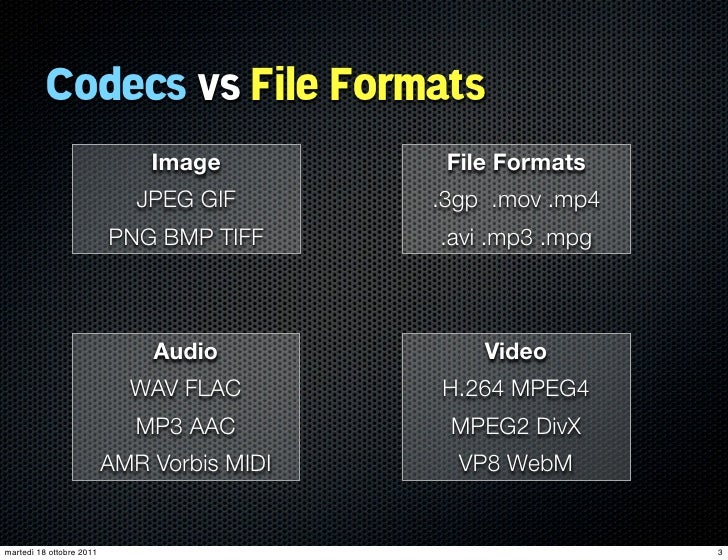
Codecs and formats

These files can have three different encoding formats:

Uncompressed – All data derived from the sampling process is written to the stored file.
Lossy: the information contained in the stored file is less than that contained in the source data (information loss).
Lossless – The information contained in the stored file is identical to that contained in the source data, but the data is still compressed.
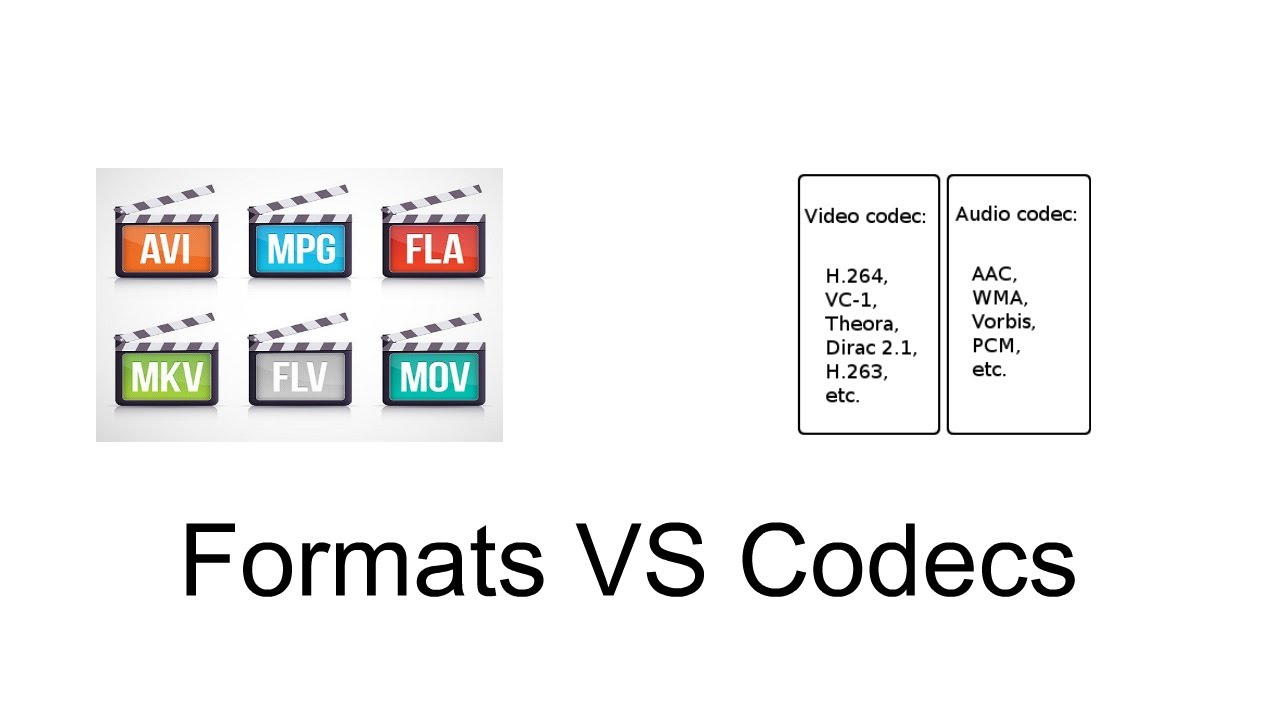
Formats & Codecs
In fact, these different possibilities arise from the need that when we want to store all the information related to a signal in a digital medium, we may need to reduce the storage space occupied in order to benefit from the portability or transmissivity of the encoded stream. We must resort to compression of the information itself in such a way that it also allows the reverse operation.

This operation is performed using codecs that are programs (or devices) that deal with both the digitization of signals (typically audio or video) and their digital encoding and / or decoding.

There are several types of codecs, different from each other by the type of signal on which they must operate and by the encoding / compression algorithm implemented in them. Each encoding format can be derived from several different codecs. In fact, these allow you to listen to proprietary formats opened by any file reader, keeping the physical layer separate from the logical format of its representation.

The advantages of compression are:

takes up less space on the target media.
spend less time during data transfer (bit rate).
The cost (disadvantages) is the increase in read / write times linked to decompression / compression times and, in the case of audio files, also in terms of audio quality.

Bitrate

Before delving into the different types of audio formats, let’s focus on concepts related to data transmission speed, since audio files are intrinsically linked to the time that passes: each second is associated with a certain information content and therefore both to a certain subsequence of figures. binary. The number of binary digits that make up these subsequences is called the bit rate.

Bit rate is the number of binary digits used to store one second of information.

CDs, for example, have a sampling frequency equal to 44,100Hz as standard, which therefore generates 44,100 values ​​per second for each channel. In the case of a stereo file, they are multiplied by 2, and since sampling is done at 16 bits (exactly equal to 2 bytes), they must be multiplied by 2:

44,100 * 2 * 2 * 60 (seconds) = 10,584,000 bytes (~ 10MB) every minute

Bitrate is expressed in kilobits per second (kbps) and can range from 32 to 320 kbps. For example, if we wanted to calculate the bit rate of the previous file we would have to calculate:

44,100 * 2 * 2 * 8 (bytes to bit) = 1,411,200 bits / second (1,411 kbs)

The calculations we have just carried out refer to an uncompressed format, whereas in the case of compressed formats, as the total length of the file decreases, the average length of the subsequences also decreases, and consequently the bit rate. mean that will correspond to the compression factor.

In fact, if a file with a 1411 Kbps bit rate like the one in the previous example were compressed at an average bit rate of 320 Kbps, we would have reduced the original file size by a factor of approximately 4.5 (1411/320).

Currently in the most advanced codecs there are three types of bitrate implementation:

CBR (BitRate from Costant). The simplest, most used and now least effective method. The bit rate remains constant in each frame and this means that the encoder will always use the same number of bits to encode each musical passage. In practice, the more complex passages will have a lower quality than those with little dynamics or silence since they will be encoded with an always equal number of bits, while more would be needed for the former and less for the latter. A great advantage of this mode is that the size of the resulting file is always proportional to the length of the part and is easily evaluated.

ABR (Average Bit Rate). Average bit rate is a mode that outperforms CBR and consists of a kind of variable bit rate. The encoder encodes the regions that need it with more bits and the simpler ones with less.


Free Download Mp4Gain
picture


Mp4Gain Main Window
picture


Mp4Gain Features
picture


Free Download Mp4Gain
picture

What are codecs?

First, it is useful to know the technical definition of codecs. They are programs that encode and decodify multimedia files, which favor compression for storage and unpacking for viewing.

Multimedia files

When using a media file, a codec is used, even without knowing it. Each file with an MP3 or AVI extension, for example, was created with a codec. Currently, to play music or watch a movie, you need a codec to read these media files. But why?

Codec

Listening to and viewing multimedia files At the beginning of personal computing, the main multimedia files used were WAV and MIDI audio. The WAVs recorded the ambient sound and made short clips. MIDIs were sound synthesizers because they used the computer’s sound card to replicate music. The big problem with these formats was that the MIDI files weren’t music, just any computer playback (currently, MIDI sound technology is used in the polyphonic tones of cell phones) and the WAVs were extremely large.

codec

The problem with WAV

But why are WAV files (and still are) so large? To understand this, it is enough to know that the human ear perceives only one sound track and does not listen as much as possible. However, the WAV can perceive and record these inaudible sounds and transform them into information along with the perceivable ones. In this way, WAV sound files have a lot of information, from unnecessary to what we need.

The way to deal with excess information was to develop a program that would take only the useful parts of the WAV files. In this way the MP3 was created, that is, it is a compressed sound file with only the necessary information.

Starting with the video files

Viewing video files It all started in the late 1980s, with the MPEG project, the Motion Picture Expert Group, or the Animated Picture (or Movie) Expert Group. This group developed a system to compress movie files for storage and playback on computers, without excess size or weight. Imagine that in an 800×600 movie, full screen in high resolution, there are 30 different images per second and each image is made on average with about 500,000 dots. Each point is one byte of information, so each second of film would have approximately 15 MB of information. That way, a CD with a capacity of 700 MB would only fit 50 seconds of film!

This group developed a way to encode these images from the film so they didn’t take up as much space. Despite having lost some of its quality, the film was playable on any computer, in addition to providing detailed observation. These files were either MPEG or MPG. MP3 would actually be the third layer of MPEG, the sound layer (that’s why it’s called MP3). The MP4 format would be a fourth layer of MPEG, with videos in high definition.

Understand how it works

The codec is a small program to encode and decode information from a multimedia file. It encodes the original format in a smaller size for storage and then decodes it, converting it back into an image and / or sound for all to see.

Therefore, you must have the codec installed on your computer to view certain multimedia files. A video in AVI format, for example, can be compressed with different codecs, such as XVID or DIVX. And for your computer to read that information, you need to have that code to decode the movie and watch it.

Existing core codecs

Currently, a primary audio codec, MP3, is used. In addition to some different video codecs, such as XVID, DIVX, RMVB, M4V, among many others. Fortunately, there is the K-Lite Codec Pack, a great package with all of these core codecs and many others, all of which are playable with Media Player Classic. The important thing is that with the K-Lite Codec Pack installed, you will hardly find a file format that requires a codec that is not on your computer.

There are different versions of K-Lite. They are:

K-Lite Mega Codec Package: With this package you offer the vast majority of necessary codecs and also the advantage of having the Media Player Classic ready.

K-Lite Codec Pack Full: Bring all the codecs you will need, without Media Player Classic.

Other possible packages

If you are not satisfied with the K-Lite Codec Pack packages, there are other download options in Baixaki. Some are:

Windows Essentials Codec Pack: allows decoding of other file formats, such as APE audio and FLV video.

Real alternative: a package with codecs for viewing files in Real Media, such as RMA audio and RMVB and RMVB video.