Understanding Video Containers: MP4, AVI, MKV, and More
Introduction to Video Containers
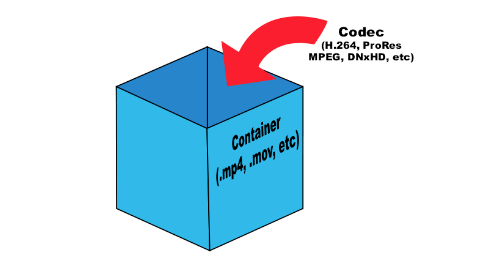
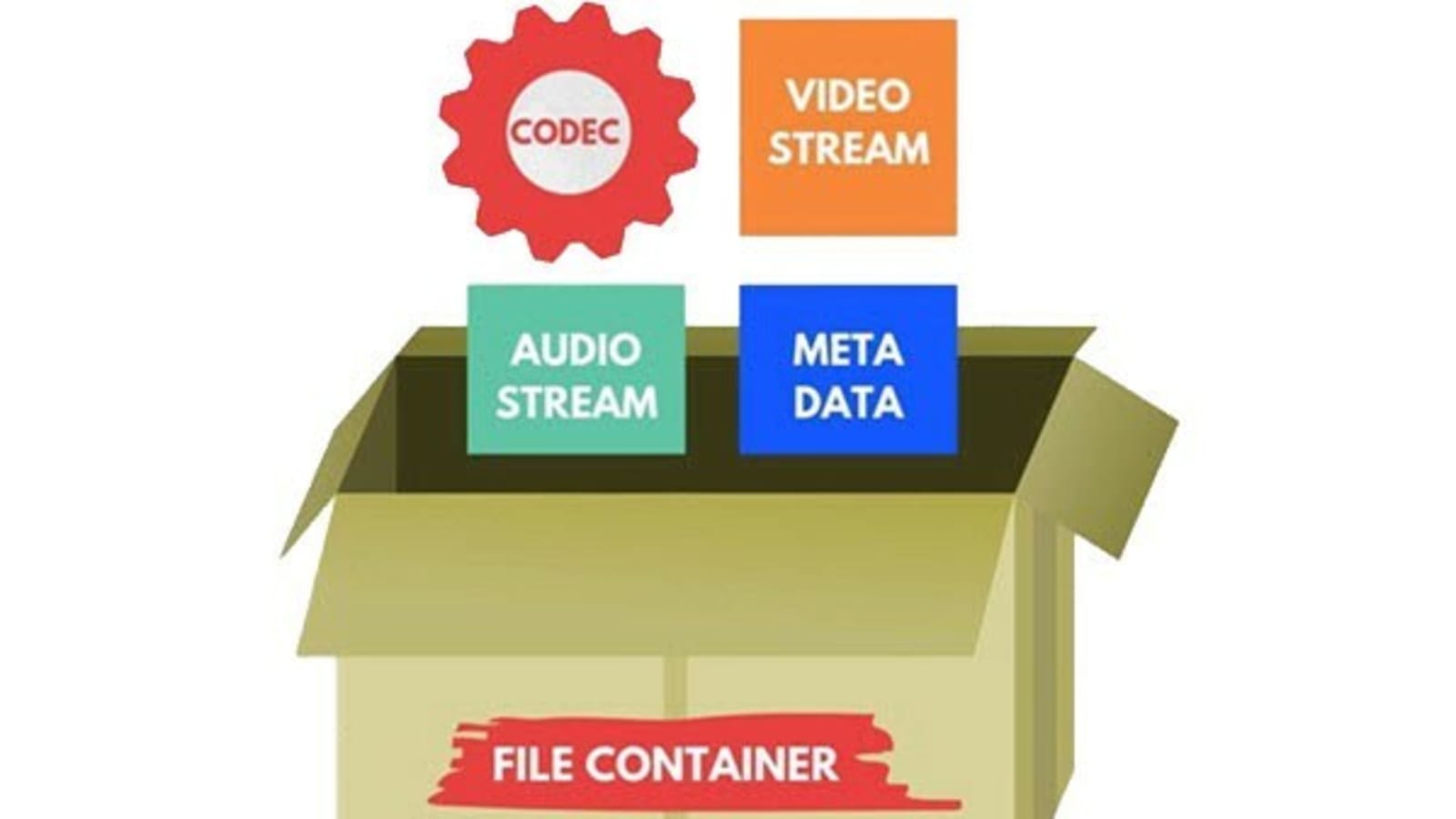
Video containers are an integral part of digital video technology, and they play a crucial role in delivering video content to users. A video container is essentially a file format that combines different types of data, including video, audio, and subtitles, into a single file. Video containers enable users to store and play back video files, and they support a wide range of codecs and other video-related technologies.
In this article, we will explore some of the most popular video containers in use today, including MP4, AVI, and MKV. We will provide an in-depth technical analysis of each container, including their history, features, benefits, and common codecs. We will also cover the purpose and definition of video containers, as well as the importance of choosing the right container for your needs.
The Purpose of Video Containers
The primary purpose of a video container is to store and organize video and audio content in a single file. Video containers are designed to accommodate multiple video and audio codecs, which are used to compress the video and audio data in the file. The container format also includes information about the video and audio streams, such as the frame rate, resolution, and bit rate.
The video container provides a common structure for storing video and audio data, and it enables users to easily share and distribute video files. Video containers are also used to deliver video content over the internet, as they support streaming technologies that enable users to watch video content without having to download the entire file.
History of Video Containers
The history of video containers dates back to the early days of digital video technology, when various video formats were being developed to store and play back digital video content. One of the earliest video container formats was AVI (Audio Video Interleave), which was introduced by Microsoft in 1992. AVI was designed to support multiple video and audio codecs, and it quickly became a popular format for storing and playing back video content.
In the years that followed, a number of other video container formats were developed, each with its own unique features and benefits. One of the most popular video container formats today is MP4 (MPEG-4 Part 14), which was introduced in 2001 as a successor to the older MPEG-2 video format. MP4 is designed to be a highly versatile and efficient container format that can support a wide range of video and audio codecs.
Another popular video container format is MKV (Matroska Video), which was introduced in 2002 as an open-source alternative to other container formats. MKV is designed to support a wide range of video and audio codecs, and it also includes support for advanced features such as subtitles and multiple audio tracks.
Features and Benefits of Video Containers
One of the key features of video containers is their support for multiple video and audio codecs. Video codecs are used to compress video data in order to reduce file size and improve playback performance. Audio codecs are used to compress audio data in a similar manner.
Video containers also include information about the video and audio streams in the file, such as the frame rate, resolution, and bit rate. This information is used by media players to correctly play back the video and audio content, and it ensures that the video is displayed at the correct size and aspect ratio.
Another important feature of video containers is their support for streaming technologies, which enable users to watch video content without having to download the entire file. Streaming technologies work by delivering the video content in small chunks, which are downloaded and played back in real-time.
Common Codecs Used in Video Containers
One of the most important components of video containers is the codec used to compress and decompress the video data. Codecs are responsible for reducing the file size of the video while maintaining its quality. There are many different codecs available, each with its own strengths and weaknesses.
H.264/AVC
H.264/AVC is a widely used codec that provides a high compression ratio with good video quality. It is supported by most modern devices and is often used for streaming video online. However, it can be computationally intensive, requiring a powerful processor to decode.
HEVC/H.265
HEVC/H.265 is a newer codec that provides even better compression than H.264/AVC, resulting in smaller file sizes with higher quality video. It is also more efficient than H.264/AVC, meaning it requires less bandwidth to stream. However, it is not yet widely supported by devices and software, and it can be more computationally intensive to decode than H.264/AVC.
VP9
VP9 is a codec developed by Google that provides high-quality video at lower bitrates. It is commonly used for streaming video on YouTube and other Google services. However, it is not as widely supported as H.264/AVC or HEVC/H.265, and it can be more computationally intensive to decode.
AV1
AV1 is a relatively new codec that provides high-quality video at even lower bitrates than VP9. It is an open-source codec developed by the Alliance for Open Media, which includes major tech companies such as Google, Microsoft, and Amazon. However, it is not yet widely supported by devices and software, and it can be computationally intensive to decode.
Choosing the Right Video Container
When it comes to choosing the right video container, there are several factors to consider, including compatibility with devices and software, quality and file size considerations, and future-proofing.
Compatibility
The first factor to consider is compatibility. Different devices and software support different video containers and codecs, so it is important to choose a container and codec that is widely supported. MP4 is a good choice for maximum compatibility, as it is supported by most devices and software.
Quality and File Size
Another factor to consider is the quality and file size of the video. Different containers and codecs can result in different levels of quality and file size. Generally, newer codecs like HEVC/H.265 and AV1 provide higher quality video at lower file sizes, but they may not be supported by all devices and software.
Future-Proofing
Finally, it is important to consider future-proofing when choosing a video container. Video technology is constantly evolving, so it is important to choose a container and codec that will be supported in the future. MP4 is a good choice for future-proofing, as it is widely supported and likely to remain so in the future.
Conclusion
Video containers play a crucial role in the storage and playback of video content. Understanding the differences between video containers like MP4, AVI, and MKV, as well as the codecs used to compress and decompress the video data, is essential for choosing the right container for your needs. By considering factors like compatibility, quality and file size, and future-proofing, you can ensure that your video content is stored and played back seamlessly on a wide range of devices and software.