Video compression and decoding | Codecs and Decoders


Free Download Mp4Gain
picture

Video compression and decoding | Codecs and Decoders
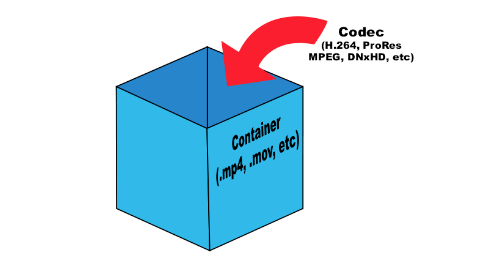
Video Container and Video Codecs

Before doing serious testing, there are a few simple things to clear up. It is important to distinguish between codecs and file containers. For example, Blu-ray files often appear with the extension .m2ts. But the BDAV (blu-ray Disc Audio / Video) container format generally acts as a storage container. In this case, you can use three codecs: MPEG-2, H.264, and VC-1.
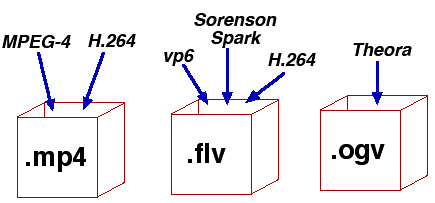
Video Codec and container

What is the difference between a codec and a container? Think about your last vacation. Your suitcase, in this case, is a “container”. Baggage is content (video, audio, subtitles, and other information), and a codec is the way you store everything (data) in your suitcase to fit. You can put things in a suitcase by folding carefully (one codec) or press them into rolls and wrap them with tape to fit more (another codec). This is true for any multimedia content. For example, the Microsoft AVI (Audio Video Interleave) format is a file container, but the video it contains can be encoded with different codecs, from DivX to MPEG-2.

When you play something back on a video player, generally the encoded video is passed through a decoder, converted to YUV (color space) data, and sent to the screen. The decoder recognizes the format and decompresses the compressed data into useful information that can be processed and displayed.

There are two types of decoders: software and hardware. Before UVD, PureVideo, and Intel GMA 4500MHD, video was decoded using software decoders that relied on the power of the processors. Therefore, many companies tried to do something to play videos. But only two of them managed to do this really well: CyberLink and InterVideo (now Corel), so ATI later licensed the PowerDVD decoder for their ATI DVD decoder. Naturally, software decoders consume a large amount of processor time, which, while not affecting the performance of modern processors, significantly reduces the battery life of mobile devices.

Over time, graphics card manufacturers addressed this problem and began developing fixed-function decoders, which were logic circuits in the GPU for video processing. Today they are called hardware accelerators. Its advantage was that when the GPU was working, the time of the main processor was not wasted.

There are some interesting points. Since the decoder processes video, it is quite difficult to set parameters for its performance or efficiency. Regardless of whether the video goes through the hardware or software conversion pipeline, the data changes long before it appears on your monitor. When using software, it is not necessary to compare the systems used in decoding. However, when using the same system, different decoders can produce different images or change the image quality. Most Blu-ray discs played on nVidia or AMD graphics cards will look the same if you disable acceleration in PowerDVD. In both cases, the video is processed using software on the processor, giving the same result.

When hardware decoding is added to the process, things look different. Why? Modern GPUs have a special unit for decoding and processing video data. This is exactly the logic with a fixed function, which was discussed earlier. Hardware accelerated decoding on Sandy Bridge processors is designed and programmed differently than on AMD and nVidia graphics cards.

We must understand clearly: there are no general purpose GPU decoders. There are no decoders that can fully work on DirectCompute, APP, or CUDA. Striving to implement such support is doomed beforehand. GPGPU is designed to handle raw data with a high degree of parallelism. But we are talking about video, not raw data. To process images, you have to do a lot and in a sequential execution. Fixed function decoders decode and process video; they do nothing else. Porting this functionality to more general computing resources would be a step back from moving it to the processor, since in both cases you have to work with software decoding.

Elemental Technologies (known for its Badaboom) is unique in developing a CUDA-based MPEG-2 decoder. And it is not a pure GPGPU decoder. Parts of your pipeline, such as entropy encoding, syntax encoding, syntax decoding, and entropy decoding, must be executed sequentially. Other parts of the process can be designed to run in parallel, such as motion estimation, motion compensation, etc.


Free Download Mp4Gain
picture


Mp4Gain Main Window
picture


Mp4Gain Features
picture


Free Download Mp4Gain
picture

Video codecs, video formats – what does this all mean?

Video codecs, video formats – what does this all mean?

video codec

What is video codec and video format?
If you are puzzled by the endless list of export options in your video editing software, this article is for you. Let’s first look at the definition of a codec. Then we will look at the concept of video format and then we will look at some of the most common codecs and their uses.

Video Codec

If you are recording or editing a video, you will almost immediately come across the term “codec”. Since there are so many and it’s hard to tell them apart, I’ve made a quick overview to help you get started. Once you understand certain terms, you can better decide which one suits your needs. Let’s start with a simple definition.

The video codec.

A codec is actually a combination of two words: an encoder and a decoder (co / dec). What are they doing? Bottom line, because video files are so large, you need a way to make them smaller. The codec encodes, compresses the data to store or send it, and then decompresses it for playback or editing.

A codec is a computer code that performs its function each time the software calls a file. Codecs can also be used on physical equipment, such as a camera, to digitize incoming video and audio.

This happens in real time, either at the point of capture or at the point of playback. However, if you are not a broadcast engineer, you must rely on your computer or device to select the codec. Hardware compresses your video and audio data for viewing, streaming, or storage.

The video format is.
The file format is similar to a container. The container contains data that has been compressed using a specific codec. And sometimes they have the same name.

For example, a file format such as Windows Media Audio contains data that is compressed using the Windows Media Audio codec. However, a file format such as Audio Video Interleaved (AVI) can contain data compressed with any of several different codecs, including MPEG-2, DivX, or XviD codecs.

AVI files can also contain data that is not compressed by any codec. Therefore, depending on the codecs installed on your system, some AVI files will play fine, while other AVI files, despite the same file extension, will not play.

It also affects the audio. Often there is a situation where when playing a video, the sound plays, but the video does not. This means that the appropriate video codec is installed on your device.

Terms display – video format

How do I determine the video format and video codec used?
Unfortunately, the tools built into Windows do not allow you to find detailed information about a video file.

What is the smallest video format?
Currently, the HEVC or H.265 codec is one of the most efficient available on the market and is commonly used to compress 8K UHD video. However, the use of the codec requires the payment of a license fee, so it is not widely supported or widely supported by different devices or browsers. For the Internet, the .WEBM format and the corresponding VP8 / VP9 codec are used. This package is widely supported and popular for reducing the size of video files.

However, it is important to consider factors other than size: where the files will be played and the required video quality.

Lossless video compression

Lossless video compression

Lossless video

In mid-November of last year, I was struck by the news from AlparySoft R&D Company about the launch of a codec developed by it to work with video. And although there are many codecs now, Lossless Video Codec still has one distinctive feature – these are the algorithms used that allow you to compress a video signal without mathematical loss. That is, after the encode-decode process, the source and the final video will be absolutely identical, and the original video is compressed 2 to 5 times.

Lossless

And so, last Saturday (May 15), Lossless Video Codec 2.0 was released. An important innovation was the addition of a lossless compression algorithm, that is, compression in which the human eye cannot differentiate between the original and processed video. The compression ratio here, for obvious reasons, is higher and amounts to 5-15 times.

I managed to learn the details about the new product with the help of Elena, the company’s public relations manager.

– What difficulties did you face when developing lossless compression algorithms?

– As with all other algorithms for processing and analyzing large amounts of data (either by filtering or eliminating data redundancy), there is the problem of choosing between compression quality and performance.

Obviously, the more time you can spend analyzing the data (in our case, it’s a frame from a movie), the better it can be compressed. On the other hand, we are faced with the task of compressing the stream of frames in real time (that is, 25-30 frames per second). Low-level optimization of its individual parts plays an important role in the development process of a program, which, although it is a laborious process, can significantly increase the speed of algorithms.

– Okay, but what does Lossless Video Codec look like in the context of similar products and in particular DivX?

– Compared to similar products, our codec looks pretty decent. For example, the tests and the results of the comparison with the well-known HuffYUV codec can be viewed on our website (www.alparysoft.ru/prod/compression/compress-compare.php).

Comparison with DivX would be wrong as there are several fundamental differences. First, DivX is a lossy codec; In any case, during compression, some information is lost, while in our codec, as noted above, lossless compression algorithms are presented. Second, our codec does not use video information from previous frames to compress a frame, because of this, videos compressed by our codec can be much easier to use for editing in various video editing programs.

– Elena, how long has your team been working on Alparysoft Lossless Video Codec?

– Work on the codec takes just over a year. Three developers participate in it.

– How popular is the codec developed today?

– According to statistics, there were several thousand downloads from the Russian Alparysoft website alone. But our codec is hosted on many sites, mostly foreign. Among them, there are such popular resources dedicated directly to video processing as Dvdrhelp.com and Doom9.com; here we constantly post updates to our programs.

Of course, there are comments and wishes, and advice and criticism from the users of our programs, as the site has a forum: any user can express his opinion about Alparysoft products. I do not pretend to say that absolutely all reviews are positive, but on the other hand, competent criticism and professional advice is always the force that helps to advance, improve, taking into account the requirements of consumers of rapidly developing technologies.

– From what I understand, the codec is free at this stage of development …

– Yes indeed, Alparysoft Lossless Video Codec is a free product and you just need to register online to get started. We took that step to popularize the products and technologies developed.